EXPLORE COMMUNITIES
CONNECT WITH EXPERTISE ACROSS NAE AND LEVERAGE THE POWER OF THE NETWORK WHY JOIN COMMUNITIES?
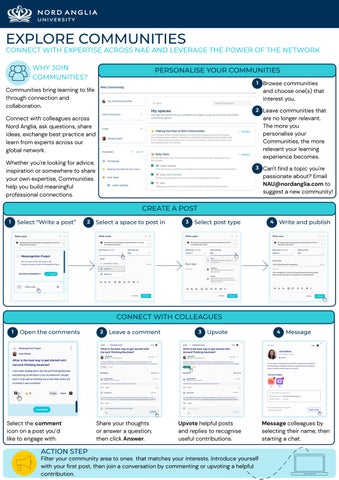
PERSONALISE YOUR COMMUNITIES 1 Browse communities
Communities bring learning to life through connection and collaboration.
and choose one(s) that interest you. 2 Leave communities that
are no longer relevant. The more you personalise your Communities, the more relevant your learning experience becomes.
Connect with colleagues across Nord Anglia, ask questions, share ideas, exchange best practice and learn from experts across our global network. Whether you're looking for advice, inspiration or somewhere to share your own expertise, Communities help you build meaningful professional connections.
3 Can't find a topic you're
passionate about? Email NAU@nordanglia.com to suggest a new community!
CREATE A POST 1
Select “Write a post”
2
Select a space to post in
3
Select post type
4
Write and publish
CONNECT WITH COLLEAGUES 1
Open the comments
Select the comment icon on a post you’d like to engage with.
ACTION STEP
2
Leave a comment
Share your thoughts or answer a question, then click Answer.
3
Upvote
Upvote helpful posts and replies to recognise useful contributions.
Filter your community area to ones that matches your interests. Introduce yourself with your first post, then join a conversation by commenting or upvoting a helpful contribution.
4
Message
Message colleagues by selecting their name, then starting a chat.