International Research Journal of Engineering and Technology (IRJET)
e-ISSN: 2395 -0056
Volume: 03 Issue: 01 | Jan-2016
p-ISSN: 2395-0072
www.irjet.net
POWER WINDIOWS USING TOUCH SCREEN S. Parameshwara1, Manu. s2, Manjunath2, Suren Sharan Navalgi2, Vinay Mahadev Hunachyal2 1 Assistant Professor, Department of Electronics and Communication Engineering, The National Institute of
Engineering, Mysuru, India-570008
2 Students, Department of Electronics and Communication Engineering, The National Institute of Engineering,
Mysuru, India-570008 ---------------------------------------------------------------------***---------------------------------------------------------------------
Abstract - This paper introduces a new control
system is not “live” once the ignition has been turned off. The Hydro-Electric system; however, could lower the windows at rest. Power windows have become so common that by 2008, some automakers eliminated hand cranks from all models.
mechanism for power windows. At present electronic buttons and crank handles are used as control units for power windows. This paper aims at introducing a touch screen interface for the same. This is basically a paper based on control systems. A resistive touch screen in placed at appropriate position so as to be controlled by the driver with ease. The touch screen shows the present position of the power windows. The user can adjust the windows just by sliding his finger by applying a slight pressure on the screen. The touch screen controller measures the coordinates of the destination point. The micro-controller used is Arduino Atmega8 and is given the input from the touch screen controller. The controller calculates the appropriate amount of time for which the motor is to be run in a particular direction. This time is equivalent to the length of movement to be caused on the window. The output power of the micro-controller is not sufficient enough to drive the power windows motor. Hence an intermediate component H-Bridge is used which is suitable. The H-Bridge receives the direction and amount of time for the motor run as inputs and controls the power windows motor accordingly.
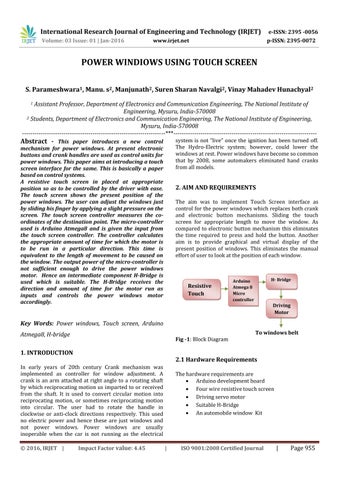
2. AIM AND REQUIREMENTS The aim was to implement Touch Screen interface as control for the power windows which replaces both crank and electronic button mechanisms. Sliding the touch screen for appropriate length to move the window. As compared to electronic button mechanism this eliminates the time required to press and hold the button. Another aim is to provide graphical and virtual display of the present position of windows. This eliminates the manual effort of user to look at the position of each window.
Resistive Touch Screen
H- Bridge
Arduino Atmega 8 Micro controller
Driving Motor
Key Words: Power windows, Touch screen, Arduino Atmega8, H-bridge
Fig -1: Block Diagram
1. INTRODUCTION
2.1 Hardware Requirements
In early years of 20th century Crank mechanism was implemented as controller for window adjustment. A crank is an arm attached at right angle to a rotating shaft by which reciprocating motion us imparted to or received from the shaft. It is used to convert circular motion into reciprocating motion, or sometimes reciprocating motion into circular. The user had to rotate the handle in clockwise or anti-clock directions respectively. This used no electric power and hence these are just windows and not power windows. Power windows are usually inoperable when the car is not running as the electrical © 2016, IRJET |
To windows belt
Impact Factor value: 4.45
The hardware requirements are Arduino development board Four wire resistive touch screen Driving servo motor Suitable H-Bridge An automobile window Kit
|
ISO 9001:2008 Certified Journal
|
Page 955
International Research Journal of Engineering and Technology (IRJET)
e-ISSN: 2395 -0056
Volume: 03 Issue: 01 | Jan-2016
p-ISSN: 2395-0072
www.irjet.net
2.2 Software Requirements
done as shown in the flowchart given in Fig. 2. The amount by which the window is to be moved is given by ‘w’.
Windows operating System Arduino Development Tools JDK
Start 2.3 Touch screen A Touch Screen is a 2-dimensional sensing device that is constructed of two sheets of material separated slightly by spacers. Resistive 4- and 5-wire touch systems belong to the most popular and most common touch screen technologies. Their market share is about 75%, mainly due to their low costs and simple interface electronics. Resistive system can be found in various mobile applications including PDAs and Smart phones.
Sense x1, x2
If
X = x1-x2
Yes
Features:
No
x2>x1
Reading touch screen coordinates for 4- and 5wire screens Measurement of screen resistance(4-wire) Translation of touch coordinates into screen coordinates.
X = x2-x1
C
B
A
Special Features:
RoHS Compliant Power- Saving Sleep mode Industrial Temperature Range Built in drift compensation algorithm 128Bytes of user EEPROM 4X4mm QFN package
2.4 ARDUINO ATMEGA8
Move Up
Move down
Main power off
Yes
Stop
Fig -2: Flow chart The Touch Screen used is two dimensional 4-wires Resistive of size 3” x2. The user slides his finger on the Touch Screen in appropriate direction in order to move the window shield accordingly. The touch screen notifies the X and Y co-ordinates of touch portion of the screen and sends the corresponding analog voltage values its output wires. The X and Y analog output values of the 4 wire Touch Screen appear as inputs to the Arduino board analog input pins. The ADC controller converts these analog values into digital representations.
Arduino hardware is programmed using a Wiring-based language (syntax and libraries), similar to C++ with some slight simplification and modifications, and a processingbased integrated development environment.
3. IMPLEMENTATION Two values are measured X1 and X2 indicating the swipe start and end co-ordinates. Then the calculation can be Impact Factor value: 4.45
Calculate w
No
Arduino is a popular open- source single –board microcontroller, descendant of the open source wiring platform, designed to make the process of using electronics in multidisciplinary projects more accessible. The hardware consists of a simple open hardware design for the Arduino board with an Atmel AVR processor and on-board input/output support. The software consists of a standard programming language complier and the boot loader that runs on the board.
© 2016, IRJET |
Calculate w
|
ISO 9001:2008 Certified Journal
|
Page 956
International Research Journal of Engineering and Technology (IRJET)
e-ISSN: 2395 -0056
Volume: 03 Issue: 01 | Jan-2016
p-ISSN: 2395-0072
www.irjet.net
Fig -3: Output of Touch Screen
4. CONCLUSIONS The aim of the paper was to interface a microcontroller and a touch-screen in order to control the functioning of an automobile power window. All the connections were made and machine was run on various codes. All the errors were debugged and finally the code which works for finger swipe movement was finalized. Due to the constraint of insufficient continuous power supply, the final code was tested on a smaller motor. And due to the same constraint the assembly is programmed successfully to work with just touch as the control. Once it has been taken up by any manufacturer to put it into use, the following improvements can be done on the system. The touch screen can be developed to be used as means of entertainment during the ride. It can be interfaced with a display unit for movies or even small touch games. The touch screen can be programmed to control, windscreen wipers, side mirrors, room mirrors and also the overhead window. The complete control unit can be compressed into a single embedded board with desired functionalities. A potentiometer relay can be added to the window assembly to give a feedback to the control system on the exact position of the window at that instant. A continuous power supply can be provided that can supply a continuous peak output of 12V,7A.
REFERENCES [1] [2] [3] [4] [5]
Arduino user manual Arduino documentation with libraries. Serial – USB bridge by silicon labs. Essential device drivers by silicon labs Components required for low power usage by Li2 Innovations [6] Hercules manual by NexRobotics
© 2016, IRJET |
Impact Factor value: 4.45
|
ISO 9001:2008 Certified Journal
|
Page 957