

Predicted Grades and Reference:
• To finalise your university choices, you will need to discuss your predicted grades with your subject teachers
• Your predicted grades are based on your internal formal assessments
• Print your predicted grade form.
• Take your PGF to all your subject teachers to add your predicted grades and sign the form
• Make an appointment with your personal tutor to discuss and finalise your reference.
• Bring your completed PGF to the careers department and post in the PGF box.
The Careers Department will not be able to process your UCAS application until predicted grades and reference has been completed and signed.
Register for UCAS account.
If you have already created an account for UCAS go onto your hub and click + Add application
Then go to the section Starting your UCAS application.
IF YOU HAVE NOT CREATED AN ACCOUNT
Go to UCAS webpage – www.ucas.com and choose ‘Sign in’ (top right hand of page).
Registering for an account.
We recommend that you use a professional/personal email address. To complete your registration, you will need to verify it with the code sent to your email. PLEASE DO NOT USE YOUR COLLEGE EMAIL ADDRESS.
You cannot complete registration until you have done this.
Remember the password as you will need this to access your UCAS Hub and application.
Once you have registered, UCAS will ask you a few questions like where you live so they can tailor the information you see.
UCAS will ask you a few questions about yourself; your level of study is Undergraduate.
Choose if you want to get tailored information about uni, college, and apprenticeship options. Select the subjects, locations, or industries that you are interested in – you can change these at any time in your preferences.
Remember anything marked with a * is compulsory.
Choose the year you want to start your studies, level of study (It is Undergraduate) and type of application you wish to make.
Make sure you choose 2025 if want to start next year, including if you want to defer entry.
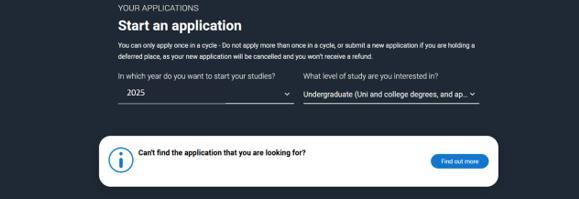
Select Undergraduate (unless you are applying to a Conservatoire)
To start your UCAS application click on the red cross to get started.


If you are applying with the help of your school, college, or centre? - select ‘Yes’
Click Link to a school, college, or centre using a Buzzword – click ‘continue’.
Enter Buzzword – Hsfc35516625 then click ‘save buzzword’.
Check the buzzword gives you ‘Hereford Sixth Form College’ then click ‘Yes’. If the buzzword does not give you the correct college, then click ‘No’ and enter the correct buzzword.
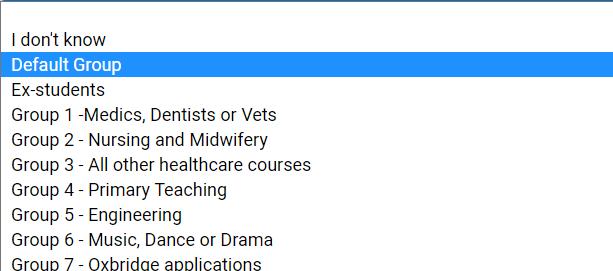
Once your application has been linked you can then select a group for your application. If you are applying for any other course that is not listed, please click the Default Group.
Your Choices - Remember – anything marked with a * is compulsory.
To add your choice start typing the name of the university into the University/college name. Do the same for the course selected. You don’t have to select a point of entry, but it will usually be Year 1 or foundaion year.
There is a maximum of five choices. A maximum of four from medicine, dentistry, veterinary medicine or veterinary science. Choices do not need to be added in any prefernece order.
The next screen will show you your application status. (You will find your UCAS ID at the top right-hand side of the screen – make a note of this as you will need it if you want to contact UCAS and/or universities).
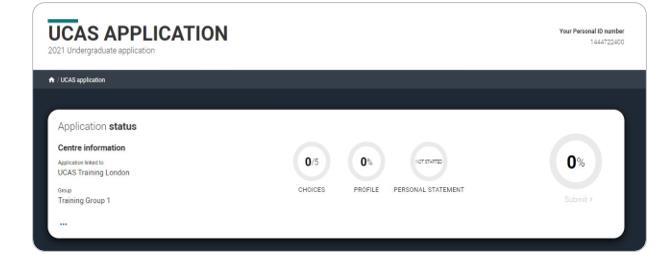
You do not need to complete the application straight away; you can log in and out at any time until you’re finished. Remember to click ‘mark section as complete’ and ‘save this section’ as you progress. When you have completed a section, the heading in the column will be ticked and turn green. You must complete all mandatory questions marked with a *
Profile: Complete each section.
Personal details: Your name should already be visible, but you will need to add your title and complete the other mandatory fields (marked with a *).
Nationality details: In the Nationality section, depending on the information you provide, you may see more questions Your nationality is associated with the country that would issue you a passport for internal travel. If you do not have a passport, it is usually the country in which you were born. If you have dual nationality, please list both nationalities. The information you provide will help universities in determining your fee status and allow them to assist you with the visa application process, if required.
If you select pre settled status you will be asked for an expiry date. If you select that you need a visa, you will also be asked for your passport details.
Where you live: You must add three years of residency history between 1st September 2022 and 1st September 2025 Your current address should be added first, followed by your previous addresses until September 2022.
For each address tell us why you are living there; any reason can be selected, for example you may have two permanent homes When you have added enough addresses you will then need to confirm your home address.
Contact and residency details: Your email will be used by both UCAS and your choices to update you. PLEASE DO NOT USE YOUR COLLEGE EMAIL ADDRESS. You will only see the fields to add the nominated contact details if you answer YES to the question. This means someone else can speak to UCAS about your application (usually your parent/carer).
Supporting information: Please select the correct options in this section, but you do have the options of *I do not know *Prefer not to say.
Finance and Funding: Select ‘UK, Chl, Iom, or EU student finance’ (Please note ‘Private Finance’ means you will be paying your tuition fees yourself)
Student support arrangements – select the county in which you live.
Diversity and inclusion: This information is only shared with universities once you have secured a place, it does not influence any decision making.
Care support information: Growing up in care means you are entitled to a range of practical support. When you give this information, you are letting the university know you may need additional support during your studies.
Parental education: fill out all this section.
More about you: Please carefully read the statement at the top of the page. Complete this section by answering ALL the questions.
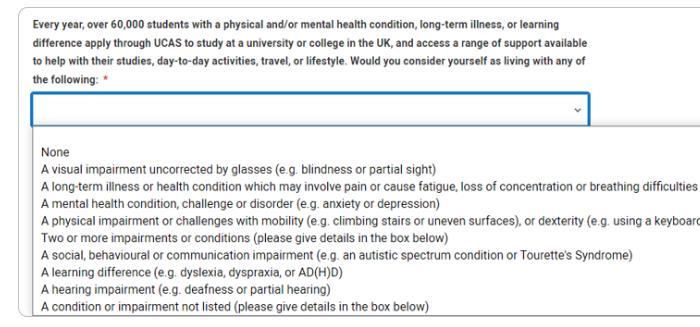
Education:
Please note you must select an option to proceed.
If you are linked to a centre, when you click on ‘+ place of education’, you will be asked if you would like to add it. Check Hereford Sixth Form College has been added. The exam centre number will automatically populate. If the exam centre number does not appear that is ok.
Start date: September 09/**** end date 08/**** Type of Study: full time. Study Mode: Did you attend a centre in person or if you studied a course completely remotely, select online.
Once you have added where you studied you need to click add qualification. You need to add any qualifications you have achieved or will be sitting. For qualifications you will be sitting in the summer, please mark as PENDING.
Read the information carefully to know what qualifications you should enter. (Please see the separate handout for qualifications.) Use your Student Portal as all qualifications are listed on it making sure you put in the correct exam boards and speak to your teacher if not sure of the correct title.
Once you have entered your qualifications for Hereford Sixth Form, go back to Education, and click + place of education. Add the name of the school you attended and sat your exams. The exam centre number will automatically populate If the exam centre number does not appear that’s ok.
Start date: September 09/**** end date 08/**** Type of Study: full time Study Mode: Did you attend a centre in person or if you studied a course completely remotely, select online.
Add qualification: please check your GCSE qualifications for the exact titles of your subject. Please note on the predicted grade forms the examination boards are not on there, these are on your certificate/result slips. Be consistent with the dates for the qualification If you are not sure of your GCSE subjects, you can check your portal under exams & results and click qualification on entry. Select the qualification type you are trying to find. Refer to the Qualifications leaflet (handed out in Impact, copy on teams, or ask careers for it).
You must enter all your qualifications from secondary school onwards - whether you have the result (including any that were ungraded).
BTEC Registration Number: this number needs to be obtained from your teacher, but it is not compulsory.
Unique Leaner Number: this can be found on your predicted grade form or on your portal
Employment: Only enter paid work here, not everyone will have something to enter - please use capital letters for names and addresses. If no employment, please mark this section as complete. Any work experience or volunteering should be covered in your personal statement.
Extra activities: Add any activity you have taken part in to prepare for higher education. These include national or regional schemes, university-run programmes, summer schools, taster courses and booster courses. Open days are not relevant to this question. If you have not attended any such activity, please leave this section blank.
Before adding your Personal Statement to your UCAS application, please attend a support session offered by the Careers Dept – these will be advertised on IMPACT. You should check your spelling and grammar carefully. You may have to make more than one attempt to get it right! Once you are sure it is ready, copy it onto your UCAS application.
Your profile must be complete and showing ‘Ready to send’ before being able to review and submit. Press the Review and Submit blue button. Go to the bottom of the application click ‘Accept and proceed (or return to application to make more changes)
Check your preferences. You must tick the box at the bottom of the page to confirm you have read and understood the terms and conditions. Then click Accept and proceed.

Click ‘pay now’ and you will be asked to enter your card details. The application fee is £28.50 regardless of number of choices. Once you have paid and submitted your application, it will go to the college. Careers Department will submit your application to UCAS once they have checked it (at busy times this process will take longer), added your predicated grades and college reference.
If you are concerned about the application fee, or do not have a card to make the payment, please contact the Careers Department – careers@hereford.ac.uk
*If you have received free school meals at some point during the last six years, you are eligible to have the application fee waived. Please follow the instructions emailed to you.
If Careers finds a mistake on your form after you have ‘submitted’ it, the form will be returned to you for editing. You will be contacted by email or text – it is important that you check your college email daily in case Careers is trying to contact you. When you have corrected your form, you will then click ‘review and submit’ to return the form to Careers to finish the process - you will not have to pay again
The College deadlines for completing UCAS forms are as follows:
Oxbridge and Medical/dental/veterinary medicine applicants: 12th September 2024 (5:00 pm)
Vocational courses (healthcare, drama, primary teaching etc): 26th November 2024 (10:00 am)
All other applications: 9th December 2024 (10:00 am)
Conservatoire applications open on 10th July 2024 (closing date is 2nd October 2024) - for music courses 29th January 2025 (6.00pm)
We cannot guarantee that forms received after the College deadline will be sent to UCAS by their deadline which is:
Oxbridge and Medical/dental/veterinary medicine applicants: 15th October 2024 (6.00pm)
All other applications: 29th January 2025 18:00 (UK Time)
Once College has finalised and sent your UCAS application, it is a ‘waiting game’ for responses from universities - the response time varies.
You will receive notification from UCAS via email confirming your choices and you will then be able to use ‘TRACK’ on ucas.com to follow the progress of your application.
It is not a problem if you decide against going on to higher education, you can simply decline your offers or withdraw The important thing to realise is that even if you are only considering going on to university, it is worth submitting an UCAS form to keep that option open.
However, if you want to change your choice of course or universities after you have submitted your form, speak to the careers department before you make any changes. The aim is to get UCAS choices right first time wherever possible.
Please ask any member of the Careers Department if you have any other questions concerning your UCAS form email careers@hereford.ac.uk
Anything marked with a * must be filled out
Print of Predicted Grade Form (PGF)
Taken to all subject teachers and signed
Completed college reference with tutor
Take PGF to careers and post in box
Registered with UCAS and set up an account Linked with the College by using the buzzword ‘HSFC35516625’
Personal Details – Filled out all with a *
Nationality details – Filled out all with a *
Where you live – enter your current address first, followed by any other addressed you may have lived at in the last 3 years.
Contact details – Enter your phone number leaving out the 0 if putting a mobile number in. Add postal address
Nominated access – we strongly suggest you nominate somebody, usually a parent or guardian who can speak to UCAS on your behalf if needed.
Supporting information - Filled out all with a *
Finance and Funding – If you are applying for student finance please select ‘UK, Chl, loM or EU Student finance services.
If you are self-funding your studies, please select ‘Private Finance’. Support arrangements – select the county where you currently live Diversity and inclusion – Some questions are optional
More about you – Please make sure ALL sections are filled out
Employment – If you are, or have been, in paid employment, please add details to this section
Extra activities – Have you attend an activity to prepare you for HE – if not leave it blank
Personal statement – Place your personal statement in this section to support your application – you are limited to 4000 characters.
Submitted your application by the deadlines – paid £28.50
Tick when completed
UCAS – Choose your Future – www.ucas.com
A Level Explorer – www.theuniguide.co.uk/a-level-explorer
Subjects Informed choices – www.informedchoices.ac.uk/subjects
Which subject and which university? – www.theuniguide.co.uk/choosing-a-course
On demand webinars – Subject Guide – www.unitasterdays.com/university-subjectguide-videos/
Subject guides – www.thecompleteuniversityguide.co.uk/subject-guide
What can I do with my degree? – www.prospects.ac.uk/careers-advice/what-can-ido-with-my-degree
How to choose a university? – www.thecompleteuniversityguide.co.uk/studentadvice/where-to-study/choosing-a-university
Search and compare undergraduate courses in the UK – www.discoveruni.gov.uk
Unifrog – www.unifrog.org
Contextual offers - www.unifrog.org/blog/contextual-offers-getting-the-biggerpicture
Personal Statement - www.ucas.com/undergraduate/applying-university/writingpersonal-statement/how-write-personal-statement
Personal Statement - www.theuniguide.co.uk/advice/personal-statements/writingyour-personal-statement
Personal Statement worksheet - www.ucas.com/sites/default/files/ucas-personalstatement-worksheet.pdf