This guidebook is your streamlined guide to starting college strong, unpacking everything from campus life to tech tools, so you can focus on thriving from day one.
This guidebook is your streamlined guide to starting college strong, unpacking everything from campus life to tech tools, so you can focus on thriving from day one.
Created by the First Year Experience Guidebook Committee, with support from the Office of Academic Affairs. Design by Ana Marjanovic.

Campus Compass Bot is here to help you navigate!
Log in with your CUNYfirst credentials (FirstName.LastName##@login.cuny.edu)
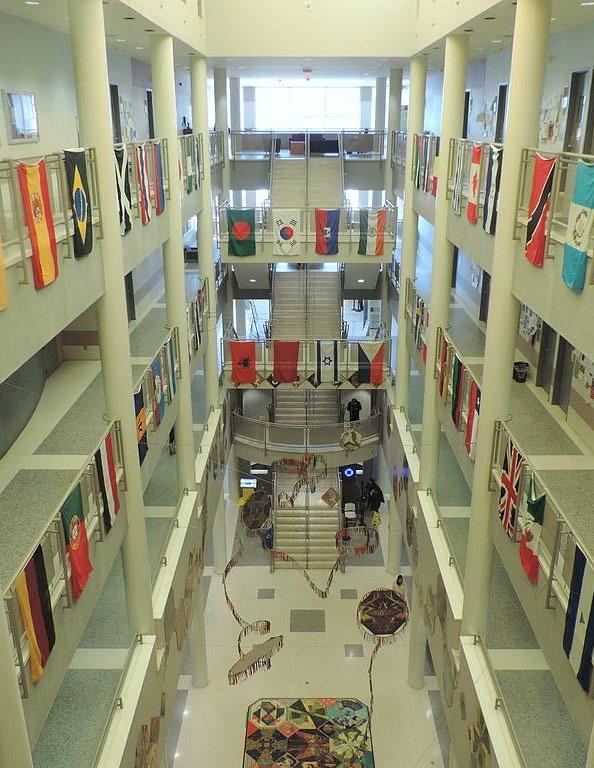

This comprehensive First-Year Guidebook is designed to support you as you begin your journey at Hostos. In these pages you'll find practical guidance, helpful tips, and encouraging words to assist you in navigating your first year with confidence. Whether you're looking for advice on time management, improving your writing skills, or getting involved in student life, this guidebook will be of real use to you.
The College is named after Don Eugenio María de Hostos (1839-1903), the Puerto Rican philosopher, educator, man of letters and fighter for the Puerto Rican Independence. Progress, education, and social justice were priorities for de Hostos the man, and they are priorities as well for Hostos the College.
Hostos owes its founding to the vision and activism of many Puerto Rican, Latino, and other supporters who believed the South Bronx deserved its own institution of higher learning. They realized their goal when, in 1968, the College was founded. Hostos offers both career and academic programs, including allied health sciences, digital design and animation, education, engineering, liberal arts and sciences, theater arts, and many other disciplines. Students may choose from 28 associate degree programs and two certificate programs.
The College calls the South Bronx its home and, in conjunction with local agencies, advances educational, labor, economic and community development initiatives. The South Bronx is composed of many voices, many languages, many nationalities, many dreams – and they have all found a home at Hostos. All students are welcome here, regardless of race, creed, color, country of origin, gender, sexuality, or political opinion. They will always be. Your future begins here!
For almost six decades, Hostos Community College has provided thousands of students with the knowledge and experience they required to change their lives and the lives of their loved ones. I am delighted that you have decided to join their ranks!
You have made a marvelous choice. Hostos offers a wide variety of top-notch, accessible, and affordable academic programs taught by our award-winning faculty. Your academic success and personal growth mean a great deal to me and to all who work at the College, and we strive to create the kind of nurturing, supportive community that will help you derive the most from your time here.
The first year of college can be a daunting, even intimidating experience. I understand the feeling – I once felt that way myself. Luckily, I found the people and resources I needed to understand those feelings and transform them into positive thoughts and actions. Hostos gladly extends such resources to you. As the semester rolls along, please remember that you are not alone. The College’s Student Offices and Services runs the gamut from financial aid to tutoring, from health and wellness to computer labs, from athletics to student government and beyond.
We are continually looking for new and better ways to serve our students. Thanks to a $15 million gift to Hostos from the philanthropist MacKenzie Scott, I have had the pleasure of implementing a series of initiatives designed to promote student success. Families United in Education, the Hostos Research Center, Mentor/Mentee Jobs on Campus, Bridge Tuition Support Assistance, and the Hostos Student Symposium are only a few of the new resources the College offers – and more are on the way!
I anticipate great things for you, and I couldn’t be happier to welcome you to Hostos Community College.
Sincerely,
Daisy Cocco De Filippis, Ph.D. President
Greetings from the Hostos Guidebook Committee
At Hostos, you’ll quickly discover that we’re more than just a college we’re a vibrant, inclusive community where your growth matters. From your first day, you’ll find support at every turn. Our dedicated faculty, advisors, and staff are here to guide you with academic advising, tutoring, mental health services, career planning, and financial aid. Beyond the classroom, you’ll find countless ways to connect and thrive through clubs, leadership programs, student government, and cultural events. There’s always something happening at Hostos!
We’re so glad you’re here! We believe in your potential. We understand that every student’s journey is unique, and we’re here to support yours wherever it leads. Whether you’re returning to school, balancing work and family, or pursuing your education for the first time, we’re committed to helping you succeed, build confidence, and shape the future you envision.
Welcome to your journey. Welcome to Hostos!
With warmest regards,
• Natasha Lorca Yannacañedo, MFA, Professor, Director of First Year Seminar and Capstone, Faculty Director of First Year Experience, Chair, Guidebook Committee
• Jason Pelosi, M.Ed., Director of the Student Success Coaching Unit
• Shaneka Crossman, Title V Director
• Alison Lowenstein, M.A., Lecturer
• Linda Hirsch, Ph.D., Professor, Director of the Liberal Arts & Science Degree Program, WAC Co-Coordinator
• Silvia Reyes, Ed.D., Director of Special Projects & Student Engagement, USIP & Math SI, Director of CUNY Language Immersion Program (CLIP), Director of the First Year Experience Mentoring Program
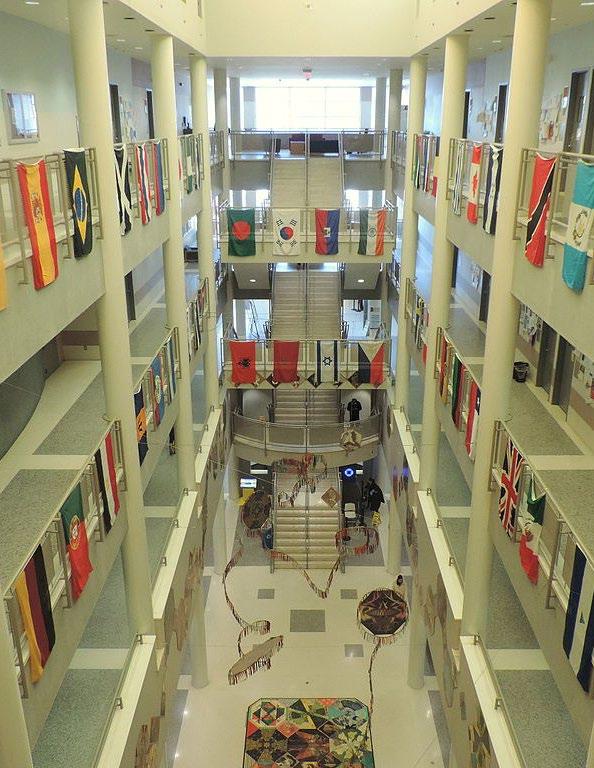
Think of the academic calendar as your personal roadmap for the semester! It highlights all the key dates you’ll need to know like when classes start and end, registration deadlines, holidays, exam periods, and important cut-off dates for adding, dropping, or withdrawing from classes.
Checking the calendar regularly can help you stay on top of your schedule, avoid last-minute stress, and make sure you don’t miss anything that could affect your classes or financial aid. It’s updated whenever changes happen—so keeping an eye on it can save you time and help you stay on track to reach your goals.
Make it a habit to check the calendar early and often it’s one of the easiest ways to stay organized and set yourself up for success!
Ca mpus Buildings
A Building / Allied Health Building – 475 Grand Concourse
B Building – 500 Grand Concourse
C Building / East Academic Complex – 450 Grand Concourse
D Building / Savoy Manor Building – 120 East 149th Street
G Building / Administration Building – 135 East 146th Street
Trailer Site 5 (T5) – 427 Walton Avenue
Trailer Site 6 (T6) – 121 East 146th Street
Prow Building – 560 Exterior Street
CLIP Building – 590 Exterior Street
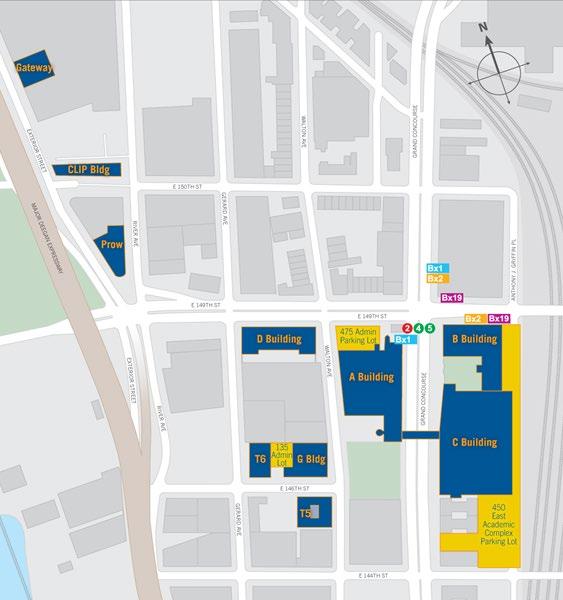
Gateway Building – 610 Exterior Street
A Building / Allied Health Building - 475 Grand Concourse
⇒ Library
⇒ Academic Departments: Allied Health; Natural Sciences
⇒ Classrooms
⇒ Hostos Children’s Center
⇒ President’s Office
⇒ Office of Continuing Education and Workforce Development
⇒ Office of Institutional Research and Student Assessment
B Building - 500 Grand Concourse
⇒ Admissions Office
⇒ Testing Center
⇒ Office of Academic Affairs
⇒ Academic Departments: English; Language & Cognition; Mathematics; Behavioral & Social Sciences
⇒ Classrooms
⇒ Dental Hygiene Patient Care Center
⇒ Information Technology
⇒ Human Resources
⇒ Mailroom
C Building / East Academic Complex – 450 Grand Concourse
⇒ Main Theater and Repertory Theater
⇒ Art Gallery
⇒ Hostos Research Center
⇒ Physical Education Complex
⇒ Cafeteria
⇒ Hostos Academic Learning Center (HALC)
⇒ Academic Departments: Humanities; Business & Accounting
⇒ Classrooms
⇒ Student Activities Offices
⇒ Student Counseling Center
D Building / Savoy Manor Building – 120 East 149th Street
⇒ Student Services: Registrar, Financial Aid, Single Stop USA Resource Center, Accessibility Resource Center (ARC)
⇒ Career Services
⇒ Bursar and Business Offices
⇒ Office of Student Development and Enrollment Management
⇒ Office of Institutional Advancement
⇒ Multi-Purpose Conference Room
G Building / Administration Building – 135 East 146th Street
⇒ Office of Administration & Finance
⇒ Budget Office
⇒ Campus Operations
⇒ Campus Planning and Development
⇒ Procurement
⇒ Accounts Payable
M Building – 429 Gand Concourse, 2nd Floor
⇒ Student Success Coaches Unit (SSCU)
⇒ Accelerated Study in Associate Programs (ASAP)
⇒ Trailer Site 5 (T5) – 427 Walton Avenue
⇒ Allied Health Pipeline Program
⇒ Immigration Center
Trailer Site 6 (T6) – 121 East 146th Street
⇒ Maintenance Shops
⇒ Prow Building – 560 Exterior Street
⇒ Continuing Education
⇒ Center for Workforce Development
⇒ CLIP Building – 590 Exterior Street
⇒ CUNY Language Immersion Program
Gateway Building – 610 Exterior Street
⇒ currently unoccupied.
Class registration comes up sooner than you might expect, so be ready! Make sure to check your enrollment date and time, and don’t forget to talk with your advisor or Success coach about which courses are the best fit for you. Make sure to enroll online when your date and time comes so you can ensure your best schedule.
Log into your CUNYfirst account and locate your enrollment appointment date and time under "Course Planning and Enrollment".
Degree Audit (if applicable):
Review your Degree Audit in CUNYfirst to see which courses are required for your major and which ones you've already completed.
Class Schedule:
Explore the schedule of classes to find courses that align with your interests, academic goals, and available time.
Prerequisites:
Ensure you have met any prerequisite requirements for the courses you wish to take.
Transfer Explorer:
Verify that the courses will transfer to the CUNY schools you plan to transfer to. If they don’t –ask your advisor why.
Schedule an appointment with your academic advisor using Navigate and discuss your academic plan, your chosen courses, and ask any questions or concerns you may have about your program. (Your advisor’s name is listed on Navigate.)
Log into CUNYfirst:

Access your CUNYfirst account and navigate to the "Student Center".
Launch Schedule Builder:
Click on "Launch Schedule Builder" to start planning your schedule.
Search for Courses:
Use the search function to locate your desired courses by course number, subject, title, or instructor's name. Alternatively, click on “Plan” under “Select Courses” to see courses your advisor has picked out for you (if you met with your advisor and they have made a plan for you).
Add Courses to Your Schedule
Check off the boxes next to the courses you wish to enroll in.
Generate Schedules:
Use the "Generate Schedules" feature to view possible combinations of your chosen courses.
Enroll:
Once you've selected your preferred schedule, click "Get This Schedule," then "Enroll," and finally "Do Action" to complete the registration process.
Pa y Tuition and Fees
Pay your tuition and fees to secure your enrollment and avoid being dropped from your courses.
Hostos Login
Hostos login follows this format: networklogin@stu.hostos.cuny.edu (e.g.,jdoe@stu.hostos.cuny.edu)
Hostos login follows this format:
Computer access
Hostos Wireless
Printing/copy services
Single Sign-On Portal
Access to other Hostos web applications
Hostos login follows this format: FirstName.LastName##@login.cuny.edu (e.g., John.Doe99@login.cuny.edu)
Email Services
CUNYfirst Portal
Brightspace
Microsoft Office 365
Eduroam
Each login method is protected using a designated authentication system to ensure secure access:
Hostos Login utilizes Single Sign-On (SSO) for seamless and secure authentication across Hostos platforms.
CUNYfirst Login employs Multi-Factor Authentication (MFA) to enhance security and protect sensitive user information.
Hostos ( Email ) Login
Email Access Requirements:
Multi-Factor Authentication (MFA) is required to log into your email
You will need a working phone or smart device to complete the authentication process
Two authentication methods (primary and backup) are necessary to ensure uninterrupted access to your email
Hostos Login Steps
1) Go to https://outlook.office.com/
2) Enter your CUNYfirst username (ex. joe.doe26@login.cuny.edu)
3) Click Next
4) Will get redirected to the CUNYfirst Login page to sign in with your CUNYfirst login and password.
5) Click login and you will be signed in to your Hostos email
Visit the Student Computing Center (SCC) to log on and set up a password. You can reset your password at any time before it expires by logging on to a lab computer and by pressing CTRL+ALT+DEL. Enter your current password and follow the prompt to create a new one. Your Hosts login password must be:
Between 8 – 13 characters
At least one uppercase letter
At least one lowercase letter
At least one number
At least one symbol
Must not contain your name, birthdate, or social security number
Must be a new password (cannot reuse previous passwords)
The Hostos Student Email Lookup page helps students retrieve their college email account details by entering the last six digits of their SSN (or 999999 if unavailable), year of birth, and first name. Below the lookup form, students can also explore the “Connected Life of a Hostos Student,” which includes quick links to Hostos Email, Wireless Network access, Educational Technology, CUNYfirst login credentials, and CUNY Alert for campus-wide notifications. For instructions, visit https://apps.hostos.cuny.edu/AccountLookup/Students.aspx or scan the QR code.

CUNYfirst (Fully Integrated Resources and Services Tool) is the City University of New York's online system where students can manage their college information. Through CUNYfirst, you can register for classes, view your schedule, check grades, track your financial aid, and manage personal details all in one place. Once you have claimed your account in CUNYfirst, the CUNYfirst system will send messages only to your Hostos College email address. Make sure that you have activated your Hostos email account. After claiming your account, it is imperative that you keep your CUNYfirst ID (EMPLID) handy, because you Social Security number will no longer be used to access student information. For instructions, visit www.hostos.cuny.edu/CUNYfirst or scan the QR code.
CU NY Login Account Self - Service
To access many online services at CUNY including Brightspace, DegreeWorks, and email—you will need to activate your CUNY Login account. The CUNY Login Account Self-Service page allows you to activate a new account, recover your username or password, and manage your login credentials. Be sure to complete this step early, as it is required for accessing essential systems used throughout your academic journey. For instructions, visit https://managelogin.cuny.edu/ or scan the QR code.
MFA (Multi - Factor Authentication)
All users must have already set up MFA (Multi-Factor Authentication) in order to log in
For instructions, visit www.hostos.cuny.edu/MFA or scan the QR code.
Student Computing Center (SCC)
���� Open Computer Lab
• Access computers, printers, and copiers
���������� Tech Help On-Site
• Friendly staff available to assist with tech issues
���� Account Support
• Get help with Hostos email and CUNYfirst passwords
���� Location
• C 595
WiFi Access
Eduroam
CUNY offers free, secure Wi-Fi access via eduroam at campus and Central Office hotspots.CUNY students, faculty and staff can configure an eduroam wireless network connection on their devices to access the internet through an eduroam Wi-Fi hotspot at CUNY or anywhere else in the world. Visitors from other institutions participating in eduroam can access the internet through CUNY eduroam Wi-Fi hotspots as well. By following this onetime procedure for your device, you ensure that your CUNY Login credentials are secure when connecting to the internet through ANY eduroam Wi-Fi hotspot
Use an existing wireless connection to open cat.eduroam.org in a web browser on your device.
• Click or tap Click here to download your eduroam® installer.
• Search for and select City University of New York.
• Click or tap the eduroam button.
• Follow the download and installation instructions, including any prompts to download and install a separate file or app for your device (for example, geteduroam app for Android) or access a URL (for Chromebook).
• For Chromebooks, select Default for the Server CA Certificate field.
• Enter your CUNY Login username and password when prompted (FirstName.LastName##@login.cuny.edu).
• Join or connect to eduroam.
Enjoy wireless internet access all around the Hostos campus! Just connect your wireless device to the Hostos_Wireless network using your Hostos login and password.
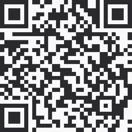
Service@Hostos is the college’s online help request system. Use it to report issues like tech problems, password resets, printing errors, or questions about campus services. Submit a ticket, and support staff will respond directly. To access Service@Hostos, visit https://www.hostos.cuny.edu/Service@Hostos or scan the QR code. Log in with your Hostos login credentials.
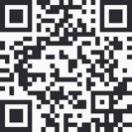
The Caiman Card is your official Hostos ID and offers convenient features designed with students in mind. In addition to serving as your campus identification, it functions as a prepaid card that can be used at various locations on campus once funds are added. With your Caiman Card, you can access campus buildings and print and make copies in the computer lab (C-595) and library (A-308). The Caiman Card makes it easy to manage everyday tasks on campus with one secure and convenient tool. Access at https://www.hostos.cuny.edu/caimancard or scan the QR code.
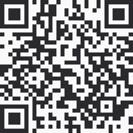
Single Sign-On (SSO) offers a streamlined and secure way to access Hostos applications and CUNYFIRST logins. Login from the Hostos home page. For more information, visit https://www.hostos.cuny.edu/SSO/How-To-s or scan the QR code.
Provides access to multiple Hostos web portals with a single set of credentials.
Enables password management, including saving and updating for each portal.
Adds an extra layer of security through options like authenticator apps or security questions.
Allows off-campus access to Hostos web portals.
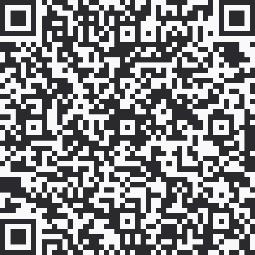
Hostos Navigate is here to help you stay connected with your advisors, staff, faculty, and classmates. It’s a great tool to keep you organized, support you in reaching your academic goals, and get ready for whatever comes after Hostos — all while helping you graduate on time. You can login to the Navigate site from the Hostos homepage by selecting the ‘Login To’ dropdown menu and selecting Hostos Navigate under the Student login side of the menu. You can also download the Navigate360 Student app to your mobile device to keep your Hostos information accessible 24/7 and while you are on the go. For more information, go to https://www.cuny.edu/about/administration/offices/academictechnology/navigate/student/ or scan the QR code. Navigate provides you with immediate and easy access to making appointments with your advisors, checking your course schedule, reviewing your holds, exploring majors and careers, checking your Journeys, To Do lists, and more. See more details below.
Appointments: make, review, cancel and reschedule appointments with your success team, including your academic advisors, tutors, and financial aid advisors.
Courses, Calendars and Events: review all registered course details, class schedule, and scheduled campus events
Campus Resources: find location and contact information for campus offices, services, programs, and resources
Account Holds and Service Indicators: review and address holds and service indicators that may need your attention
To-Do Checklist: add and review relevant and timely to-do items
Majors Explorer: complete the majors explorer survey and discover career information associated with majors offered at Hostos
Journeys: review Journeys that have been connected to your account that guide your choices as you identify opportunities that you want to pursue that help you prepare to graduate and for your next steps after graduating from Hostos
Forage: Explore careers, skills, and experiences that help you connect with careers and industry partners that can help you prepare to pursue your preferred career
Go to the Apple App store or Google Play store to download the free Navigate360 Student App. After you get the app, select your preferences for alerts and push notifications to receive
reminders about appointments, holds, and the important things you need to remember to do while you study at Hostos.

Although the lab staff mainly focus on technical issues, they can also provide basic assistance with the use of the applications installed on the computers and with online resources available to students such as Hostos e-mail, Brightspace, and online libraries. Help Desk Staff can offer support for students with claiming or resetting passwords for Hostos e-mail and CUNYfirst. The Help Desk also provides support over the phone for various issues EXCEPT password related inquires/problems to preserve the privacy of students.
⏰ Hours
Monday – Friday
8:30 AM – 7:00 PM
Contact
(718)518-6502
Educational Technology (EdTech)
EdTech is here to help you stay up to date with the latest tech tools that make learning more exciting and accessible. With new trends in online learning, videos, social media, and mobile apps, there are plenty of ways to stay engaged and connected. EdTech offers lots of helpful tutorials and guides to get comfortable with learning platforms and programs, including:
Brightspace | AI Essentials | Are You Ready for Online Learning | Microsoft Office 365 | Basic computer skills | Workshops | Online Learning Student Hub
⏰ Hours
Monday – Friday 9:00 AM – 5:00 PM
Contact
(718)319-7915 Service@Hostos
Printing & Copying
You can print up to 700 pages during the Spring and Fall semesters (500 pages in Summer) with your student account. If you need more, you can add funds at the Bursar’s Office (DB105) or at the cash machine in the Library’s Reserves Room (3rd floor). To help the environment, all printing is double-sided by default. Print or copy at these convenient spots:
Printing Rates
$ Black & White, one-sided: $0.10 per page
$ Black & White, double-sided: $0.05 per page
$ Color, one-sided: $0.30 per page
$ Color, double-sided: $0.30 per page
Kiosks
Need quick access to your Hostos email, CUNY portal, or eSIMS? There are plenty of computer kiosks around campus for you to use.
(3rd floor) Student lounge (by Room C-392) 5th floor opposite
D Building Savoy Lobby
Stay in the know with display screens around campus showing class schedules, weather, time, student news, department locations, and more.
A Building Lobby and 3rd Floor (by bridge)
B Building Lobby (by elevator)
C Building 3rd Floor and Lobby (2 screens)
The resources listed below are here to help you thrive academically, and we encourage you to explore each one. Getting to know them now will help you grow into a confident, wellrounded student!
At Hostos, academic advising plays a key role in helping you succeed. Our advising services are holistic and supportive, offering guidance from dedicated full-time Advisors and Student Success Coaches. Whether you're planning your schedule or thinking about your future goals, we’re here to support your journey.
Advising is designed to help you stay on track, persist through challenges, and graduate on time. Through this support, you'll develop key skills outlined in the Hostos Institutional Advisement Outcomes.
To help you reach your academic and personal goals, our full-time advisors and Student Success Coaches are here to guide you every step of the way. They’ll help you choose a major, understand your degree requirements, and explore your interests, strengths, and goals. Whether you need support with course withdrawals, questions about your academic standing, or planning your next steps after Hostos, your advisor or coach is here for you.
They can also connect you with important campus resources like tutoring, counseling services, health and wellness support, and even the food pantry. The support is holistic meaning we care about you as a whole person, and we're here to help at every stage of your academic journey.
In addition to one-on-one guidance, Hostos offers helpful workshops and events on topics like time management, financial literacy, self-care, and how to balance school, work, and life.
Every Hostos student whether you're starting fresh, transferring in, or returning is assigned an advisor or coach when you're admitted. While meeting with an advisor isn’t required, we strongly encourage you to take advantage of these easy-to-access services. They’re here to help you stay on track and graduate on time!
Advising services at Hostos are offered through three key units: the Student Success Coaching Unit (SSCU), College Discovery (CD), and Accelerated Study in Associate Programs (ASAP). Each unit has its own structure, but they work together to share best practices and ensure that no matter where you start, you’ll receive consistent and caring support.
The Hostos Academic Learning Center (HALC), located in room C-596, is a welcoming space where you can get the academic support you need to succeed. It’s more than just a tutoring center it’s a full learning environment filled with helpful resources, caring staff, and tools to help you grow as a student.
Throughout the year, HALC offers a variety of activities and programs designed to strengthen your academic skills. You’ll find both one-on-one tutoring and self-guided tutorials to support your learning.
Tutoring is available for most introductory courses at Hostos. Our friendly, knowledgeable tutors are here to help you review course material, prepare for exams, and build confidence in your studies.
���� In-Person Hours
Mondays – Thursdays: 11:00 AM – 6:00 PM
Fridays: 11:00 AM – 3:00 PM
���� Virtual Hours
Mondays – Thursdays: 12:00 PM – 9:00 PM
Fridays: 11:00 AM – 3:00 PM
Schedule an Appointment
���� Location C-596
���� Contact (718) 518-6624 halctutoring@hostos.cuny.edu
Welcome to our tutoring appointment request page! Booking your next session with us is quick and easy. Please follow the instructions below to get started:
Click Here to Schedule an Appointment
Sign into your Microsoft 365 Account using your CUNYFirst/Brightspace username and password (E.g., Jay.Doe72@login.cuny.edu).
If you requested a virtual tutoring session, download the Microsoft Teams App and sign in to your Microsoft Account using your CUNYfirst/Brightspace username and password to meet with the tutor.
Library Services
The library is a central hub for learning, research, and connection here at Hostos. Whether you're studying solo or working with a group, it's a great place to focus and find the resources you need. Take a look below to explore all the helpful tools and services the library has to offer!
Here is how to utilize the library for research, quiet study, and accessing online resources.
Research - Home - Research 101 - LibGuides at Hostos Community College Library
Hostos Library Orientation on Brightspace
Quiet study - Space Availability - Hostos Library - LibCal - Hostos Community College Library
Accessing online resources - CUNY OneSearch
It’s important for students to get comfortable with the virtual systems and portals you'll be using throughout your time at Hostos. Don’t worry we’ve got you covered! Below, you’ll find some of the most commonly used platforms.
We’ve also included a quick overview of CUNYFirst, Schedule Builder, and Navigate to help you use them with confidence and ease.
Navigate tutorial
CUNYfirst
CUNYfirst Student Center Navigation Overview
New student To Do list - How To's...
Schedule builder and DegreeWorks
Other great “How To” videos
Online Learning Student Hub
Department Chairs Contact information
Allied Health
���� Chair: Elvir Dincer
���� edincer@hostos.cuny.edu
���� Nursing Unit: 718-518-4267
���� Dental Hygiene Unit: 718-319-7949
���� Radiologic Technology Unit: 718-518-4123
���� Location: A-307
Behavioral & Social Sciences
���� Chair: Ernest Ialongo
���� eialongo@hostos.cuny.edu
���� 718-518-6566
���� Location: A-221
Business
���� Chair: William Baker
���� wbaker@hostos.cuny.edu
���� 718-518-6520
���� Location: C-590
Education
���� Chair: Jacqueline DiSanto
���� jdisanto@hostos.cuny.edu
���� Aging & Health Science / Teacher Education: 718-518-4156
���� Health Education / Physical Education: 718-518-4159
���� Location: A-107
English
���� Chair: Jason Buchanan
���� jbuchanan@hostos.cuny.edu
���� 718-518-6600 / 6601
���� Location: B-504
Humanities
���� Chair: Humberto Ballesteros
���� hballesteros@hostos.cuny.edu
���� 718-518-6685 / 2545
���� Location: C-412
Language & Cognition
���� Chair: Gail August
���� gaugust@hostos.cuny.edu
���� 718-518-6602
���� Location: B-519
Mathematics
���� Chair: Nieves Angulo
���� nangulo@hostos.cuny.edu
���� 718-518-6615 / 6691
���� Location: B-437
Natural Sciences
���� Chair: Yoel Rodriguez Fernandez
���� yrodriguez@hostos.cuny.edu
���� Biology: 718-518-4128
���� Physical Science: 718-518-4129
���� Location: A-507
Discover how you can explore career paths, find internship opportunities, and get support with job preparation all designed to help you take the next step toward your future! Career Services offers a comprehensive range of services designed to help you achieve your career aspirations, including:
Career Counseling and Advising: Personalized guidance to help you explore career paths, set goals, and create actionable plans for success.
Resume and Cover Letter Assistance: Workshops and one-on-one sessions to craft professional resumes and cover letters that stand out.
Interview Preparation: Mock interviews, workshops, and tips to help you present your best self to potential employers.
Job and Internship Opportunities: Access to Handshake, our online platform where you can find job postings, internships, and connect with employers.
Career Fairs and Networking Events: Opportunities to meet with employers, explore career options, and build your professional network.
Experiential Learning: Internships, service learning, and other hands-on experiences that allow you to apply your classroom knowledge in real-world settings.
���� Hours:
���� Monday–Friday: 9:00 AM – 5:00 PM
���� Evening hours by appointment
���� Summer Hours: 8:30 AM – 6:00 PM (Closed Fridays)
���� Phone: 718-518-4468
���� Email: careerservices@hostos.cuny.edu
���� Location: D-Building, 2nd Floor, Room 210
How to search for jobs or internships?
• Log in to http://app.joinhandshake.com/
• Use your school email. Emails ending in ".edu" will get you quicker access. @stu.hostos.cuny.edu
• For easier access download the Handshake app in your App Store or Google Play.
• Look for “sign up” button, usually located in the top right corner of the page.
• Use the search bar to find your school. Hostos partners with Handshake, so we might already have an account for you. The app will let you know! Fill in the required information: Name, major, school graduation month & year and EMPL ID.
• Handshake will send you an email confirmation to the email address provided. Open the email and click on the confirmation link. Set up your password. 8 character minimum.
• Once your account is set up, start exploring job and internship opportunities, company profiles and career events!
At Hostos, you're not alone on your college journey! Our academic advisors and coaches are here to help you every step of the way. Whether you're figuring out your goals, staying motivated, or facing a challenge, they’ve got your back. They’ll work with you to create a plan that fits your needs, keep you on track, and connect you with helpful resources. Think of them as your personal support team cheering you on, helping you navigate college life, and making sure you have what you need to succeed.
Choosing Your Path: AAS vs. AA/AS at Hostos
At Hostos, you can choose a path that fits your goals whether you're ready to jump into the workforce soon or planning to continue your education at a four-year college.
Associate in Applied Science (AAS):
These are career-focused programs designed to help you build the skills and knowledge you need to enter the workforce right after graduation. If you're aiming for a specific job or career like nursing, dental hygiene, digital design, or early childhood education an AAS degree gives you the hands-on training to get there faster. Some students with an AAS also go on to pursue bachelor’s degrees later, but the main focus is preparing you for employment.
Associate in Arts (AA) and Associate in Science (AS)
These are academic transfer degrees perfect if you’re planning to continue your studies at a four-year college or university. You’ll take a mix of general education and major-related courses that will prepare you for the next step in areas like psychology, education, biology, business, and more. AA degrees tend to focus more on humanities and social sciences, while AS degrees lean more toward math and science.
Not sure which is best for you? No problem your advisor can help you explore your options and figure out the path that fits your interests, strengths, and long-term goals. Whatever you choose, Hostos is here to support you every step of the way!
Accelerated Study in Associate Programs ( ASAP )
ASAP (Accelerated Study in Associate Programs) is here to help motivated students like you stay on track and earn your degree as quickly as possible ideally within three years. It’s a proven program supported by the City and State of New York, the Robin Hood Foundation, and the Stella and Charles Guttman Foundation.
We know that many students juggle school, work, and family responsibilities, which can make it tough to finish a degree on time. That’s where ASAP comes in! The program offers
personalized academic, social, and financial support to help ease those challenges and guide you toward graduation with an Associate in Arts or Associate in Applied Science degree.
���� Hours:
���� Monday–Friday: 9:00 AM – 5:00 PM
���� Phone: (718) 518-6606
���� Email: asap@hostos.cuny.edu
���� Location: M Building, 429 Grand Concourse, 2nd Floor
Interested in joining? Take a look at the eligibility requirements below to see if ASAP is a good fit for you!
Be a current or newly accepted student at Hostos Community College
Be skills proficient in English (Reading/Writing) and Math OR require no more than two semesters of developmental support based on the CUNY Proficiency Score Index
Be a NYC or NYS resident
Complete the Free Application for Federal Student Aid (FAFSA) and the New York State Tuition Assistance Program (TAP) application
Students who do not receive financial aid may join ASAP, however, they will not be eligible to receive the tuition gap scholarship
Agree to enter into a full-time associate degree program in an approved major and graduate within six semesters from the time of entry.
ASAP at Hostos does not accept students majoring in Radiology Technology or Dental Hygiene
Be a continuing/transfer student with less than 21 credits
Be a continuing student with a minimum of 2.0 GPA
If you are interested in participating in the ASAP program, submit an ASAP Interest Form. Once the form is submitted, a member of the Recruitment team will reach out to you. For more information email the ASAP Recruitment team at asap@hostos.cuny.edu.

At Hostos College Discovery, we understand that many community college students face challenges whether personal or academic that can make finishing an Associate’s degree difficult. As a College Discovery (CD) student, you won’t have to face those challenges alone. You’ll receive personalized academic, personal, and financial support to help you succeed and graduate with your degree.
CD is open to students from all majors, and the special benefits you receive through the program can be transferred to other CUNY colleges as well as many state and private universities. Having all College Discovery advisors trained as social workers means you get support that goes beyond academics. They understand the challenges you might face whether personal, financial, or emotional and can help you navigate those obstacles while
guiding you through your college journey. This kind of care makes it easier for you to focus on your studies and succeed. Plus, some state universities even offer Master’s programs with tuition waivers for CD students!
���� Hours (Fall & Spring):
���� Monday, Tuesday, Thursday: 9:00 AM – 5:00 PM
���� Wednesday: 9:30 AM – 6:45 PM
���� Friday: 9:30 AM – 4:00 PM
���� Phone: 718-518-4266
���� Email: collegediscovery@hostos.cuny.edu
���� Location: D-Building, 1st Floor, Room 101
Your advisors and coaches are here to connect you with helpful campus resources like tutoring, counseling, health and wellness services, and the food pantry whenever you need them. Their support is holistic and tailored to your unique needs at every stage of your academic journey.
Beyond one-on-one support, Hostos also offers workshops and events on topics like time management, financial literacy, self-care, and balancing school with work and life so you have all the tools to thrive both in and out of the classroom.
College Discovery Eligibility
1st time freshmen with a HS academic average below 80.
Household income must fall within the guidelines established by the state of New York.
CD Requirements
Attend and complete the Summer Discover Program unless attending high school to obtain a diploma.
Be a resident of NYC for one year prior to enrollment.
College Discovery - How to Apply
All prospective students must file a CUNY admissions application and also fill out the SEEK/CD portion of the on-line application. Failure to do so will result in not being selected. For more information on the admissions process please visit the Office of Admissions, 500 Grand Concourse, (corner of 149th street) 1st floor, Bronx, NY.
Following your application to CUNY you will be contacted by e-mail from the CD Office to come in for an interview to determine if you your family income falls under the guidelines to be eligible. We also will want to know if you are willing and motivated to succeed in your studies.
Your Student Success Coach will guide and support you with your educational, personal, and professional goals beginning the first day you register for classes at Hostos through graduation. You can meet one-on-one with your Student Success Coach to discuss any question or concern you may have.
���� Hours:
���� Monday–Friday: 9:00 AM – 5:00 PM
���� Phone: (718) 664-2560
���� Email: sscu@hostos.cuny.edu
For more information and to schedule an appointment with your Student Success Coach (in person, virtual, and phone), please contact us via email or phone or drop by our office.
Meet one-on-one with your Student Success Coach to discuss any question or concern you may have about the following:
Academic Success
o Selection or change of major
o Course advisement, selection, and completion
o Guidance for college-going and Hostos policies, procedures, and processes
o Study skills and time management
o Connect with professors
Personal development
Educational and professional goals
Graduation requirements and planning for your Hostos Associate Degree
Academic and non-academic resources and services on campus
Engagement with campus club activities and the Student Government Association

The Academic Resource Center provides students with disabilities with academic support and accommodations. In addition to classroom and campus accommodations, students can use our private accessible computer lab, participate in workshops, and be trained in the use of Assistive Technologies. Registered ARC students also have opportunities for personal and professional growth through participation in CUNYwide activities where they can network and are introduced to new opportunities.
To enroll with the Accessibility Resource Center, please review our Requesting Services page and schedule an intake appointment with one of our staff members.
In-person office visits are by appointment only. The Assistive Technology Lab is accessible during office hours. ARC is also providing services through Microsoft Teams. Please contact
us to schedule any appointments to meet virtually. Details on services for students with disabilities or other special needs, including how to apply for accommodations.
���� Hours:
Fall & Spring
���� Monday, Tuesday, Thursday: 9:00 AM – 5:00 PM
���� Wednesday: 9:30 AM – 6:45 PM
���� Friday: 9:30 AM – 4:00 PM
Summer
���� Monday–Thursday: 8:30 AM – 6:00 PM
���� Phone: 718-518-4454
���� Email: ARC@hotos.cuny.edu
���� Location: M-Building, 429 Grand Concourse, Room M200
T ransfer Services
Visit Transfer Services. You might be thinking that you just got here - and wondering why we are already talking about transferring? That’s because it is never too early to start your transfer plan. Below is an example of a timeline for transferring successfully:
4 Semesters Before You Wish to Transfer:
Investigate majors. If you are unsure of your academic program, start exploring. It is never too early to think about your intended major. Identify your path. Find your classes on the CUNY Transfer Explorers site or the SUNY Transfer Path for your desired curriculum or discipline. Establish a plan. Use your chosen path(s) to create a Transfer Course Planner to map your coursework for the next four semesters. Review your plan. Consult your academic advisor for guidance, as well as a transfer counselor
3 Semesters Before You Wish to Transfer:
Begin your research. Identify CUNY or SUNY or private campuses that offer your curriculum. Visit campuses. Most offer transfer open houses and information sessions. Some might even offer virtual tours. Investigate majors. If you are unsure of your academic program, start exploring. It is never too early to think about your intended major. Identify your path. Find your classes
on the CUNY Transfer Explorers site or the SUNY Transfer Path for your desired curriculum or discipline.
2 Semesters Before You Wish to Transfer:
Apply for admission. If you plan to transfer for the spring semester, consider applying by September. For a fall semester transfer, plan to apply by midNovember. Some majors or campuses may have deadlines earlier than these suggested dates. Submit a transcript request. Ask your current college to send an official transcript to the college(s) to which you are applying. Be sure to request one official transcript from each collegiate institution you have ever attended.
1 Semester Before You Wish to Transfer:
Renew your FAFSA. Request that a Student Aid Report be sent to the campuses to which you've applied. Request preliminary credit evaluations. Some campuses will provide this prior to admission, while others will do so upon admission. Review your financial aid packages. Compare the net costs between colleges. Choose your transfer college. Notify your chosen campus of your intent to enroll. Pay your tuition deposit. Attend an orientation session. It's a great way to connect with your new campus!
���� Instagram: @hostostransferservices
���� Phone: 718-518-4457
���� Email:
• rrayo@hostos.cuny.edu
• smaldonadogarcia@hostos.cuny.edu
���� Location: D-Building, Savoy Building, Room D101
We bring 4 year college every Tuesday to the A Atrium to answer all of your questions. We have other events throughout the semester – follow us @hostostransferservices and keep your CUNYFIRST update with your current contact information to stay up to date with all of our events.

The Office of the Registrar is an important part of the Academic Affairs Division and takes care of all your academic records like grades and transcripts making sure they’re accurate and up to date. They also handle graduation certifications, enrollment reports, and manage class schedules and room assignments.
���� Hours:
���� Monday–Friday: 9:00 AM – 5:00 PM
���� Phone: 718-518-6771
���� Email: RegistrarsOffice@hostos.cuny.edu
���� Location: D-Building, Room D-207
To make managing your academic life easier, Hostos students use CUNYfirst, an online system where you can register for classes, check your schedule, pay bills, view your grades, and update some of your personal info. All you need to get started is your CUNYfirst ID and password!
Grades Explained
INC - Incomplete
This grade indicates that the objectives of a course have not been completed for good and sufficient reasons, and that there is a reasonable expectation that the student can, in fact, successfully complete the requirements of the course. The instructor, in consultation with the student, may grant an INC if the student has met the instructor’s requirements for the course, completed most of the coursework and have a passing semester average. Whether or not the student is registered at Hostos, the INC becomes a FIN grade if the missing coursework is not completed by the last day of classes of the semester immediately following the semester in which the INC grade was assigned; refer to the Academic Calendar for dates and times.
W - Withdrawal without penalty
This grade indicates that a student has good and sufficient reasons for withdrawing from the course, and is doing so at a time when he or she is doing passing work, prior to the last day of classes.
WU - Unofficial Withdrawal
Given lack of continued enrollment. Replaces NC grades assigned prior to 1980. This grade is included in the computation of the GPA and counts as a failure (F) prior to Fall 2021. Effective Fall 2021, WU grade will not have punitive impact on student’s GPA
WA
All students born on or after January 1, 1957, whether degree or non-degree, who register for six or more credits/billable equivalent credits are required to demonstrate proof of
immunization for measles, mumps, and rubella. A non-punitive administrative grade (WA) will be given to students who are excluded from classes for reasons of non-compliance with the New York State Immunization Law (PHL 2165).
R
Given in courses designed as developmental (remedial courses with credit and excess hours) and remedial courses (with no credit). An "R" grade is given when a student has not reached a minimal level of proficiency for the course, but has fulfilled all three of the following conditions:
Satisfactory enrollment record;
Satisfactory completion of in-class and homework assignments;
Satisfactory progress toward the performance objectives of the course.
The "R" grade is considered a non-punitive grade, and is not included in the computation of the GPA. It is given one time only per course, except in the case of ESL 091 or ENG 091, which may be given twice. Students who take ENG 1399/ENG 092 Spring 2003 and thereafter may receive an "R" grade twice.
WN – Withdrawn, Never Attended (punitive):
This grade is included in the computation of the GPA and counts as a failure (F).
*WN – Withdrawn, Never Attended (non-punitive):
Effective Fall 2009 through Spring 2012, this grade is not included in the computation of the GPA.
WN – Withdrawn, Never Attended (non-punitive):
Effective Summer 2012; this grade is not included in the computation of the GPA.
P - Passing
A grade assigned to SSD 1000 (Freshman Orientation), and COOP 101, 102, 103 (Cooperative Education).
F - Grade Policy
The grades of "#F," "#WU," and "#FIN" denote grades excluded from GPA calculation. Grades not computed in grade point averages are based on CUNY policy effective September 1, 1990:
"When an undergraduate student receives the earned academic grade of "F," "FIN," "WU," or an administrative failing grade, and that student subsequently retakes that course and receives a grade of "C" or better, the initial grade of "F" will no longer be computed into the cumulative grade point average. The
"F" will remain on the transcript. The number of failing credits that can be deleted from the grade point average calculation shall be limited to 16 for the duration of the student's undergraduate enrollment in the institutions of The City University of New York."
If a course for which a student wants the failing grade to be replaced by a grade of "C" or better was taken prior to September 1, 1984, the student must receive the approval of the appropriate Committee on Academic Standing;
For a grade of "C" or better to replace a grade of "F" in the calculation of the cumulative GPA, the failing grade cannot be received at another institution;
A failing grade may not be partially replaced. If a student has replaced 14 credits of failing grades and subsequently receives a grade of "C" or better in another 3-credit course that was previously failed, the failing grade cannot be replaced;
If a student has received more than one failing grade for the same course and subsequently earns a grade of "C" or better in the course, the failing grades will be deleted from the calculation of the cumulative GPA, subject to the 16-credit limit;
If a student fails a course that was taken on a pass/fail basis and subsequently retakes the course, a grade of "C" or better must be earned in order for the failing grade to be replaced; If the course number or title of a course was changed in the period between the receipt of the failing grade and the repetition of the course but the content remained the same, the failing grade will be replaced if a grade of "C" or better was received in the repeated course;
If the content of the course was changed in the period between the receipt of the failing grade and the repetition of the course, or when a student has been allowed to substitute one course for another, the declaration of course equivalency for the purpose of deleting the failing grade from the calculation of the cumulative GPA will be at the discretion of the appropriate Committee on Academic Standing;
The cumulative GPA calculated on the basis of this policy is to be used for purposes of retention and graduation from the college and the admission to and continuance in a major or specialization. It will not be used to calculate graduation honors, the Dean's List, or departmental honors at graduation.
Any student who does not want a repeated course to replace a previously recorded failing grade should notify the Registrar so that the replacement does not take place. This request may be made at any time after the second enrollment, provided the student is enrolled in the College.
Note: The policy is not applicable to an e-Permit course; students receiving a failing grade ("WU", "F", "FIN") under no circumstances will benefit from the "F" grade policy.
FIN - Failure due to Incomplete
A grade given when an "Incomplete" reverts to an "F" grade. Failure to complete requirements of a course by the end of the next academic semester results in an "FIN" grade.
No grade submitted by instructor
"Z" is an administrative grade, which cannot be assigned by the instructor.
Find helpful information about mental health services, how to book counseling appointments, and workshops designed to support you both personally and academically. We’re here to help you feel your best! Throughout the semester, the Counseling Center offers workshops focused on managing stress, building healthy habits, and boosting emotional resilience. Past workshops have covered topics like mindfulness, test anxiety, and even making vision boards. These sessions are open to everyone and often include interactive activities and wellness giveaways. Be sure to check your Hostos email regularly that’s where you’ll find announcements about upcoming workshops and events you won’t want to miss! The services provide resources for students in crisis and food pantry information.
You have access to free and confidential mental health counseling through the Counseling Center. Whether you need short-term individual counseling, crisis support, or referrals to community providers, they’re here to help. Counseling is available for free to registered Hostos Community College students. Sessions are 1-1 by appointment only. Counselors assist with a range of student concerns:
Personal Concerns — academic difficulties, cultural and identity issues, gender, sexual orientation, self-esteem, family problems, stress management, concerned about friends
Interpersonal Issues — communication skills, dating & relationships, conflict management & resolution
Psychological Concerns — depression, anxiety, eating disorders, addiction & substance abuse
Crisis Intervention — suicidality, acute stress, sexual assault, death of a family member or friend
���� Hours:
When Classes Are in Session:
���� Monday, Tuesday, Friday: 9:00 AM –5:00 PM
���� Wednesday & Friday: 9:00 AM – 7:00 PM
When Classes Are Not in Session:
���� Monday–Friday: 9:00 AM – 5:00 PM
���� Phone: 718-518-4461
���� Email: infocounseling@hostos.cuny.edu
���� Book: Make an Appointment
���� Location: C-Building, 3rd Floor, Room 330
The Health Services Office is here to support your well-being with programs that take a whole-person approach, encouraging healthy lifestyle choices to help prevent illness. Balancing school and work can sometimes feel overwhelming, but at Hostos, you’re not alone. There are plenty of resources available to help you take care of yourself, from free counseling sessions to fun wellness events all designed to support your well-being on campus.
They provide education, training, and work closely with community health providers to keep you healthy. This office also handles immunization requirements and, along with the Office of Public Safety, is ready to respond quickly to any medical emergencies on campus.
The Wellness Office is all about empowering you to take charge of your health in a balanced way. They see wellness as the harmony between your physical, emotional, spiritual, social, sexual, intellectual, and environmental well-being. Their goal is to help you make positive lifestyle choices that promote long-lasting health and prevent disease.
���� Hours:
���� Monday, Tuesday, Thursday: 9:00 AM –5:00 PM
���� Wednesday: 9:30 AM – 6:45 PM
���� Friday: 9:30 AM – 4:00 PM
���� Phone: 718-518-4483
���� Email: usanders@hostos.cuny.edu
Nurse’s Office
���� Phone: 718-518-4141
���� Email: mcruz@hostos.cuny.edu
���� Phone: 718-518-4474
���� Email: chfrancis@hostos.cuny.edu
���� Workshops: Workshops & Events
���� Location: D-Building, 1st Floor, Room 101
If you’re feeling unwell or need any medical help while on campus, don’t hesitate to visit Nurse Vasquez’s office. She is here to support you with care and kindness. Your health and comfort are important to us, so stop by whenever you need assistance.
���� Hours:
���� Monday–Friday: 9:00 AM – 5:00 PM
���� Phone: 718-518-6542
���� Email: immunization@hostos.cuny.edu
���� Email: mavasquez@hostos.cuny.edu
���� Location: A-Building, 3rd Floor, Room 334C
The mission of the Financial Aid Office is to empower the community by eliminating financial barriers to higher education. Through service, we aim to ensure that all eligible students have access to the opportunities needed to achieve their educational and career goals. We are committed to providing clear and transparent information about financial aid programs, options, and solutions always in accordance with city, state, and federal student aid regulations.
���� Hours:
���� Monday–Friday: 9:00 AM – 5:00 PM
���� Phone: 718-518-6555
���� Location: D-Building, Room D-B112
The Office of Financial Aid is determined to deliver high-quality services with professionalism and compassion, especially for students facing financial hardship during their time at Hostos. We are dedicated to treating all applicants equitably and safeguarding the privacy of your personal information.
Financial aid counseling is available on a walk-in basis during business hours, or by appointment upon request. We also offer computer access and assistance with completing financial aid applications online to support the timely processing and disbursement of educational funds.
We are Hostos, and we will use every available resource to ensure that financial challenges do not stand in the way of our students’ success. The Financial Aid section of the Hostos website provides a wide range of helpful links and tools to guide you through the process. These cover topics such as how to apply for financial aid, student forms and Verify My FAFSA, Federal and New York State aid programs, the New York State Dream Act, scholarships, summer PELL, veteran benefits, and special programs. You can also review your aid online, check Satisfactory Academic Progress (SAP) requirements, and download printable forms.
Additional resources include the CUNY Net Price Calculator to estimate your college costs, information on Tuition and Fees, and a Monthly Tuition Payment Plan to help you manage payments. You’ll also find a Student Aid Glossary for unfamiliar terms, a list of common FAFSA errors to avoid, and guides such as the CUNYfirst Self-Service Student Guide. For federal and state aid applications, you can directly access FAFSA.gov, studentaid.ed.gov, hesc.ny.gov, and information on the Excelsior Scholarship.
If you need assistance or have questions, you’ll find contact information for the Financial Aid Office on the site, along with links to the Student Development and Enrollment Management (SDEM) Division.
At Hostos, Fabian Wander, Marina Esquilin, and Jason Libfeld are here to help as your Immigration Success Liaisons. If you have any questions or need support with immigrationrelated concerns, don’t hesitate to reach out to them—they’re ready to guide and assist you. Whether you’re undocumented, DACA, or just have questions, they’re here for you!
�������� Fabián Wander
Title: LCSW, Director of Counseling Center and Health and Wellness Services
���� Location: C-330, 450 Grand Concourse
���� Phone: 718-518-6567
���� Email: fwander@hostos.cuny.edu
���� Marina Esquilin (Ella habla español con fluidez)
Title: Scholarship Coordinator; TheDream.US Liaison
���� Phone: 718-518-4166
���� Email: mesquilin@hostos.cuny.edu
Being part of the Hostos community is a wonderful way to make friends and feel right at home here. While it’s exciting to get involved, remember to find a balance that works for you and fits your schedule. Hostos offers a variety of clubs to explore, and if you don’t find one that sparks your interest, you can even start your own! Plus, our student government is lively and always looking for new voices.
Take a peek at what life outside the classroom looks like at Hostos you might find your next favorite activity or group!

The Office of Student Activities (OSA) is here to help you grow as a confident, caring leader who respects and values others. They work with students to create and run fun and meaningful educational, cultural, social, and recreational programs that celebrate the rich diversity of the Hostos community. OSA partners with more than 30 student organizations, offering training in things like budgeting, proposal writing, and club management, while also making sure clubs follow college guidelines. They also team up with the Student Government Association to support elections, help new leaders get settled into their roles, and register student clubs.
���� Hours:
���� Monday–Friday: 9:00
AM – 5:00 PM
���� Phone: (718) 5186561
���� Email: osaho@hostos.cuny.edu
���� Location: C-Building, Room C-371
These connections between students and college staff help build a friendly, supportive campus community where everyone feels like part of the Hostos family.
Hostos offers a wide range of extracurricular activities for you to enjoy in your free time. From events organized by OSA, the Student Leadership Academy, Student Government, academic departments, and student groups, there’s always something happening on campus. Student organizations cover all kinds of interests and are grouped into four categories: Academic, Cultural, Religious, and Special Interest so there’s something for everyone to get involved in!
These are the clubs/organizations:
Accounting Club
Aging and Health Club
Alpha Beta Gamma
Animation Club (club office C-470)
Biology Club
Black Student Union (BSU)
Break the Silence
Caiman Podcast
Capoeira Club (club office C-473)
Career Club
CCSD at Hostos
College Discovery Club
Common Ground
Community Health Club
Computer Science Club
Crafts for Community
CUNY Unlimited
Dental Hygiene Club
Engineering Club
English Club
E-Sports/Game Club
Family Empowerment Club
Film Analysis Club (formerly Film Society)
Forensic Science Club
French and Italian Club
Game Design Club (club office C-572)
Geoscience Club
HEAT Club
Hip-Hop Club (club office C-473)
Honors Club
Hostos Dream Team
Hostos Outdoors Club (HOC)
LLACS Club
Manga/Comic Club
Math Club (club office C-471)
Mathematics and Computer Science
Scholars Club (MACSS)
Music Club
Muslim Club
Nursing Club (LPN)
Nursing Club (RN)
Origami Club (club office C-570)
Phi Theta Kappa (PTK)
Physics Club
Politics Club
Print Club (club office C-470)
Public Administration Club
Puerto Rican Student Organization (PRSO)
Rainbow Club
Reimagining Justice
Robotics Club
Scholarship Club
Science Club
Spanish Club
STEM Club
Tabletop Gaming Club (club office C-572)
Theater Club
Urban Unity (club office C-577)
Veterans Club
X-Ray Club (Radiology Club)
If you are interested in being part of a club, visit join Hostos clubs and fill out the form so that we can help you to get in contact with the club representatives.

One of the main organizations that serves and represents the needs and interests of students at the Hostos Community College is the Student Government Association (SGA). SGA is comprised of sixteen (16) members, seven (7) of which serve as Executive Officers and nine (9) as Senators. SGA members are part of many important college-wide committees including the Hostos Association, College-Wide Senate, Auxiliary Enterprise Committee, Technology Fee Committee, Space Requests Committee and others. SGA organizes cultural, educational and social activities for the student body
throughout the school year. It also assists student organizations in the planning and development of their activities.
���� Email: studentgovernment@stu.hostos.cuny.edu
���� Location: C-Building
General Information
The SGA Conference Room is located in room C-534
SGA mailboxes are located at the SGA Conference Room (C-534)
All SGA Senate Meetings are open to Hostos Students and the college population
SGA Elections are held annually in the Spring semester
SGA members are elected to office for a one (1) year term
SGA Executive Board
The members of the Student Government Executive Board shall be the SGA President, the Vice President for Academic Affairs, the Vice President for Student Affairs and Community Relations, the Budget and Finance Commissioner, the Executive Secretary and appointed by the SGA President with the Consent of the Hostos Student Senate an Evening and Part-Time Student Affairs Commissioner and a Campus Affairs Commissioner.
Time Management | Reading Tips | Support System
By Natasha Lorca Yannacañedo
Time management is a critical skill for you to master in college, as it can significantly impact your academic success, personal well-being, and future opportunities. College is a transformative time in your life, and managing your time effectively allows you to fully engage in your classes, participate in extracurricular activities, build meaningful relationships, and grow into a well-rounded, confident version of yourself. Most importantly, learning how to manage your time now sets you up for long-term success—both in your career and in life beyond college—by giving you the tools to balance responsibilities, make thoughtful decisions, and reach your goals with intention and clarity.
When building your weekly schedule, it’s essential to think beyond just your class times. A thoughtful, balanced schedule can help you stay on track, reduce stress, and actually enjoy your college experience. Planning by the week is the most effective approach—crisismanaging your time on a daily basis will eventually lead to burnout.
Use a weekly planner or digital calendar (like Google Calendar) to visualize your week. Personally, I love using a small physical planner—it helps me see the week at a glance and stay grounded. Here are key elements to include in your weekly schedule:
Add all your class times to your calendar first. These are your non-negotiables—the foundation of your weekly plan.
Schedule dedicated time for studying and completing assignments. A good rule of thumb is to plan for two hours of study time for every hour of class (more challenging classes may require three). Break these into manageable blocks, and don’t forget time to review notes or prepare for exams. Don’t just rely on professor-assigned deadlines—set mini-deadlines for rough drafts, tutoring at the Writing Center, and study sessions.
It’s important and healthy to make time for connection. Whether it’s a club meeting, lunch with a classmate, or a weekend hangout, social time helps build a support system and a sense of belonging in college. Make sure to incorporate social time into your weekly schedule. Make sure your social time supports you. Spend time with people who uplift and energize you. A good conversation or shared laugh can shift your entire day.
If you have a job, caregiving responsibilities, or other obligations, block those in early so you know how much time you truly have.
Slee p
Aim for 7–8 hours of sleep per night. Staying up late to cram may seem productive in the short term, but it hurts your memory, focus, and well-being over time.
There’s no shame in needing support. Visit your professors during office hours, connect with academic advisors, or talk to a counselor if you're feeling overwhelmed. Hostos offers free mental health and tutoring services use them. These resources are here to support your success—use them!
Schedule time to eat! Skipping meals can lead to low energy and poor concentration. Schedule time to make your meals at home or to get food on or near campus.
Don’t overlook the importance of rest. Build in time to relax, take a walk, listen to music, or just breathe. You need time to recharge in order to stay focused and avoid burnout. Being on your phone or scrolling through social media might feel like downtime, but it actually keeps your brain active and overstimulated. True rest involves stepping away from screens and allowing your mind to reset.
At the beginning of the semester examine each course syllabus and write down key dates like exams, quizzes, and paper deadlines. Write in all major deadlines in your weekly calendar. Use Sunday evenings or Monday mornings to map out your week. Always add homework assignments to your calendar right when you receive them.
When studying, it’s best to take a short break at least every hour. Here are some quick fiveminute break ideas that can help your brain reset:
Deep breathing: Try diaphragmatic breathing breathe deeply into your belly and make your exhale longer than your inhale.
Quick meditation: Use free apps or check out UCLA’s Mindful Awareness Research Center meditations (available in English and Spanish).
Change your environment: Take a brief walk or move to a different space.
Let in some joy: Put on your favorite song and sing or dance!
Try the Pomodoro Technique for study breaks with 25 minutes of focused work and a 5 minute break. Or work an hour and take a 10 minute break. Figure out what works best for you.
While it might feel relaxing to scroll through Instagram, TikTok, or other platforms during a break, social media doesn’t actually allow your brain to rest and reset in the way true downtime does. Most content on social media is fast-paced, emotionally charged, or designed to keep you engaged for as long as possible. This constant stimulation keeps your brain active sometimes even anxious rather than giving it a break. Instead of refreshing your focus, social media can leave you feeling mentally cluttered, distracted, or even drained. You want to come back to your work more clear-headed and energized so avoid social media.
Prioritize Tasks: Start by identifying your most important and time-sensitive responsibilities, like assignments and exams. Focus your energy on those first.
Create a Weekly Schedule: Include academic commitments, study sessions, and designated time for rest and fun. Make a weekly to-do list on Sunday or early Monday and review it daily.
Break Tasks into Smaller Steps: Big projects are easier to handle when broken down into manageable chunks.
Set Realistic Goals: Avoid overloading your schedule. Choose goals that are achievable so you can complete tasks without unnecessary stress.
Eliminate Distractions: Identify what distracts you most TikTok, texting, noise? and create a study environment that minimizes those. Some students work well with some background music on and some students need it to be very quiet. Figure out what allows you to focus best.
Learn to Say No: It’s okay to say no to social events or activities when your plate is full. Balance is key.
Reflect and Adjust: Set aside time weekly or monthly to evaluate what’s working and what isn’t. Your system should evolve as your semester and goals shift.
Improved Academic Performance: Students who manage their time well tend to earn better grades and understand course material more deeply.
Reduced Stress: Planning ahead helps prevent last-minute panic and supports better mental health.
Work-Life Balance: A realistic schedule allows time for academics, hobbies, friendships, and self-care.
Greater Productivity: When you manage your time efficiently, you get more done in less time.
Life Skills: Time management is a valuable skill that will serve you well in college, your career, and beyond.
Remember: Remember that effective time management is a skill that takes practice and patience to develop. It is a skill you build over time. Start small, experiment, and be kind to yourself along the way. Tailor these best practices to your unique needs and preferences, and don't be too hard on yourself if you encounter occasional setbacks. You have the power to shape your college experience and it starts with how you manage your time. Every hour is a chance to invest in your goals, your growth, and your well-being. Time management isn’t about being rigid or perfect; it’s about creating space for what matters most your learning, your passions, your relationships, and your rest. Like any skill, time management takes practice and the more you work at it, the better you’ll get. Believe in yourself, stay focused on your purpose, and remember that you are capable of great things when you plan with intention and lead with self-care. You’ve got this.
Do the assigned reading.
Re-read when you don’t understand something.
Don’t just randomly highlight. Readers highlight the important sentences.
In addition, if you’re just using a highlighter without notes in the margins, you might even forget why you highlighted it: “Uhh…why again did I think this was important?” Make sure to write notes in the margins and any questions you have.
Remember reading takes TIME. You’ve got to allocate significant time to get through it. Don’t assume you can skim it and understand.
Building a strong support network is essential to succeed in college. Connecting with others can help you stay motivated, manage stress, and tackle academic challenges more effectively. Forming study groups allows you to share ideas, clarify concepts, and prepare for exams together. Attending professors’ office hours gives you the chance to ask questions, deepen your understanding, and build relationships with faculty who can offer guidance and mentorship. Don’t hesitate to reach out to classmates, tutors, and academic advisors they're there to support your journey. Remember, you’re not alone, and building connections can make a big difference in your college experience.
At Hostos, you have lots of great chances to connect with alumni and professionals in your field of interest. The Alumni Office hosts workshops and presentations throughout the year where you can meet and learn from Hostos graduates who have made a real impact in areas like health services, business, communication, education, the arts, and more.
If you want to get involved or have questions, feel free to reach out to Felix Sanchez, our Alumni Relations Manager, at fsanchez@hostos.cuny.edu. You can also visit the Alumni Relations Office in Room D-205 at 120 E. 149th Street.
Are you ready to make a difference and grow your leadership skills? At Hostos, there are lots of ways to build your talents through on-campus experiences, programs, and internships designed just for you.
The Student Leadership Academy offers amazing opportunities to help you develop the skills you need to create positive change in your community through scholarship, work, and volunteer service. As you grow as a leader, you’ll sharpen your abilities, broaden your perspective, and learn how to use your head, hands, and heart to make a real impact locally and beyond.
Getting involved is easy! You can join one of the Academy’s five programs, like the Student Ambassador Program, the Student Orientation Services (SOS) Team, the Emerging Leaders Program, the Hostos Athletic Leaders Organization (HALO), or the Volunteer Corps. Or, if you prefer, you can take part in workshops and activities open to all Hostos students.
The Leadership Academy also works closely with other great groups like the Global Scholars Program, the Honors Program, Student Government, Phi Theta Kappa Honors Society, and many more. Together, they offer workshops, trainings, and leadership initiatives to help you grow and connect. Plus, the Academy partners with the CUNY Leadership Academy to bring even more exciting programs and opportunities across the whole CUNY system.
Click the links below for descriptions of the five Student Leadership Academy Programs:
Hostos Student Ambassador Program
Student Orientation Services Team
Emerging Leaders Program
Hostos Community College Volunteer Corps
Hostos Athletic Leaders Organization (HALO)
There are also many scholarships and grants you can apply for as well as committees and campus groups that can use your talents. Check out the ones below to see what’s available now:
Boren Awards: Scholarships and Fellowships for Study Abroad
Campus Leadership Development and Programming
Clubs & Activities
Goldwater Scholarship
Kaplan Leadership Program
Leadership Advisory Council
Leadership Awards and Recognition
Model NYS Senate Project - Edward T. Rogowsky Intership Program in Government and Public Affairs
National Character & Leadership Symposium
National Conference on Ethics in America at West Point
National Model United Nations
Phi Theta Kappa (PTK)
Student Government Association (SGA)
Student Leadership Alumni Board
Get involved! College is your time to explore and grow. You never know what you can do!
With your validated Hostos ID, the whole city becomes your campus! You can enjoy free access to tons of museums, libraries, and cultural spots all around NYC. Just show your Hostos ID and explore all the amazing places waiting for you.
The Frick Collection
Intrepid Sea, Air & Space Museum
Jacques Marchais Museum of Tibetan Art
The Jewish Museum
The Leslie-Lohman Museum of Gay & Lesbian Art
El Museo Del Barrio
Museum Of the City of New York
The Museum of Jewish Heritage
Museum of Modern Art (MOMA)/MOMA PS1
The National September 11 Memorial & Museum
The Shed
Whitney Museum of American Art
The Poster House
American Folk Art Museum
BRIC Rotunda Gallery
Bronx Museum of the Arts
Bronx Zoo: Free for college students
Green-Wood Cemetery
International Print Center
Jamaica Center for Arts & Learning: Gallery admission only
Kentler International Drawing Space
Museum at the Fashion Institute of Technology
National Museum of the American Indian Smithsonian Institution
The Center for Book Arts
The Public Theatre’s New York Shakespeare Festival
Queens County Farm Museum
Queens Museum of Art
Snug Harbor Cultural Center and Botanical Gardens
Socrates Sculpture Park
Storefront for Art & Architecture
Museums with suggested admission for CUNY students (pay what you wish)
American Museum of Natural History
Brooklyn Museum
Flushing Town Hall: Gallery admission only
King Manor Museum
Metropolitan Museum of Art
The Met Breuer
The Met Cloisters
Queens Museum of Art
Sculpture Center
Staten Island Museum
Studio Museum in Harlem
CUNY CARES
CUNY CARES connects students across CUNY with resources for food, housing security, healthcare, and other basic needs.
���� CUNY CARES
���� (212) 997-2869 (CUNY Central)
���� 205 East 42nd Street, New York, NY 10017
���� Contact form (no direct email provided)
CUNY EDGE (at Hostos)
CUNY EDGE supports students on public assistance with academic guidance, workshops, and career preparation.
���� CUNY EDGE at Hostos
���� (718) 319-6639
���� 475 Grand Concourse, Room D-210, Bronx, NY 10451
���� cunyedge@hostos.cuny.edu
One Stop Resource Center
A central hub for practical student needs services include the Hostos food pantry, emergency aid, and links to local social support.
���� One Stop Resource Center
���� (718) 319-7981
���� 475 Grand Concourse, C-Building, Room C-318, Bronx, NY 10451
���� onestop@hostos.cuny.edu

Scholarships and Grants Office
This office connects students with scholarships, grants, and awards offering counseling and application support.
���� Scholarships & Awards
���� (718) 518-4189
���� 475 Grand Concourse, C-Building, Room C-329, Bronx, NY 10451
���� scholarships@hostos.cuny.edu

Veterans Affairs
Support for military veterans and their families, from benefit certification to academic advising and campus integration.
���� Veterans Affairs
���� (718) 518-7982
���� 475 Grand Concourse, C-Building, Room C-371, Bronx, NY 10451
���� veterans@hostos.cuny.edu

First Year Experience
Helps first-year students transition to college with tailored support, advising, and engagement opportunities.
���� First Year Experience
���� 475 Grand Concourse, C-Building, Bronx, NY 10451
���� nfabara@hostos.cuny.edu

Children’s Center
Provides early childhood education and care to the children of Hostos students, supporting student-parents’ academic success.
���� Children’s Center
���� (718) 518-4141
���� 450 Grand Concourse, A-Building, Room A-109A, Bronx, NY 10451
���� childrenscenter@hostos.cuny.edu
Microsoft 365 Access Help (Student Help Desk)
Assists Hostos students with technical support for Microsoft 365, email, and general IT issues.
���� Student Help Desk
���� (718) 518-6646
���� 475 Grand Concourse, C-Building, Room C-595, Bronx, NY 10451
���� itjobrequest@hostos.cuny.edu

Office of Public Safety
Ensures campus safety with patrols, emergency response, reporting, and public safety education.
���� Public Safety Department
���� (718) 518-6888
���� 475 Grand Concourse, C-Building, Room C-030, Bronx, NY 10451
���� psafety@hostos.cuny.edu

Natasha Lorca Yannacañedo, MFA, Professor, Director of First Year Seminar and Capstone
Faculty Director of First Year Experience, Chair, Guidebook Committee
Jason Pelosi, M.Ed., Director of the Student Success Coaching Unit
Shaneka Crossman, Title V Director
Alison Lowenstein, M.A., Lecturer
Linda Hirsch, Ph.D., Professor, Director of the Liberal Arts & Science Degree Program, WAC CoCoordinator
Silvia Reyes, Ed.D., Director of Special Projects & Student Engagement, USIP & Math SI, Director of CUNY Language Immersion Program (CLIP), Director of the First Year Experience Mentoring Program
We gratefully acknowledge the design work of Ana Marjanovic, whose vision shaped the look of this guide.
Edition Version 1.0. Published on September 19, 2025.