
Rationale
A Blended Approach
121 Rental
Terms of Agreement
Device Warranty
Insurance and Terms of Loan
Replacement Accessories/Consumables
Holme Grange Terms for Loaned Devices/Accessories
Timelines
Device Care
Screen Time
Safeguarding
Printing
Training

Holme Grange has a duty to prepare pupils for life beyond school: Technology both enhances and supports the learning process and prepares pupils to possess the skills, aptitudes and knowledge to be responsible and positive contributors to our future global community.
To best prepare our pupils for this future Holme Grange School will deliver its taught curriculum, where appropriate, through a blended approach –taking the best of what technology can offer to complement traditional and proven pedagogy. pupils learn collaboration, communication, creativity and critical thinking in a variety of ways throughout the school day and the school’s directed use of technology aims to strengthen these opportunities and prepare pupils for their future educational journey and, subsequently, the world of work
The school operates a ‘blended’ approach to teaching and learning, combining the traditional use of paper and pen with helping children become familiar with technology to maximise their learning and prepare them for the modern world.
The school's academic leadership committee have been reviewing our approach to blended learning carefully this year, to ensure that pupils are getting the right balance between more traditional bookbased learning and using their devices. This has involved returning to exercise books for some subjects as the main bank of evidence for pupils' work, but also using the devices as powerful tools for independent work and storing helpful learning and research resources This also sits side-by-side with our commitment to training pupils to use generative AI responsibly so that pupils do learn to make use of this technology purposefully and responsibly and in a way that does not harm their critical thinking skills
Please be assured that pupils do not spend all day looking at a screen plenty of curriculum time still involves what might be described as “traditional” classroom activities away from screens. Teachers will also continue to utilise the interactive whiteboard and collaborative methods of teaching and learning in class where devices are used
For the termly fee, Holme Grange will provide your child(ren) with a Microsoft Surface device during their time in the Senior School via two rental agreements: Year 7 to Year 9 inclusive and Year 10 and Year 11 inclusive. At the end of Year 11, parents will take ownership of the device (which would be just two years old) although there is the opportunity of taking ownership of the first rental device at the end of the Year 9 should you wish. The Holme Grange Rental scheme: Years 7 to 9 (inclusive) is a compulsory scheme which all Parents are required to sign up to.
Holme Grange School takes away the hassle of device management.
Your package includes:
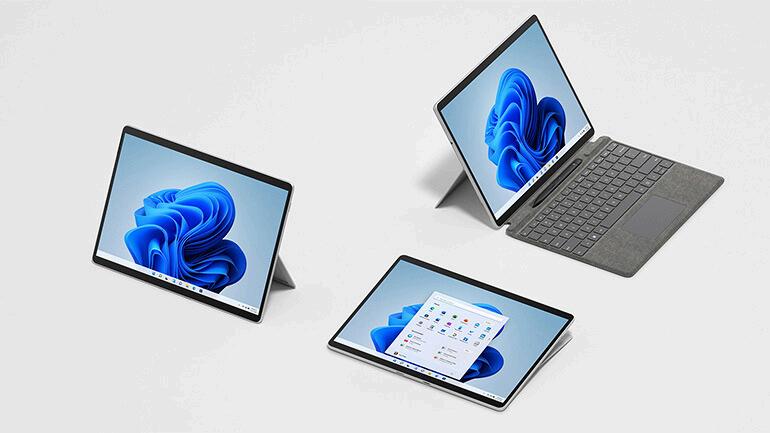
The Microsoft Surface Pro 11 bundle (see details below for breakdown of the package)
Enrolment in the Holme Grange 121 device management scheme
Windows 11 Pro: Offers advanced productivity, security and management features
Full access to the Microsoft 365 suite of apps
Industry standard filtering and monitoring software (see our Safeguarding section below for further detail)
IT Support during routine school working hours (both term time and holiday periods via our IT Support hub – see IT Support, below)
Instant access during term time to loan devices and accessories should you experience any problems (see Loan Terms and Conditions, below)
The Microsoft Surface Pro 11 bundle
For the termly rental fee, you will receive:
Microsoft Surface Pro 11th Gen SDx Elite U5 with 16GB RAM and 512GB SSD ensures smooth multitasking, fast performance, and long-term usability
Surface ProX Keyboard COMM SC EngBrit UK/Ireland Only Commercial Black
Microsoft Surface Classroom Pen2 (digital inking stylus)
UAG Metropolis SE case protection.
Labelling service
3 year repair, service and warranty for the type covers (keyboards)
3 years repair, service and warranty for the Surface device
Years 7-9
9 termly payments of £216.21
Years 10-11
6 termly payments of £273.00
All rental devices remain the property of Holme Grange School for the duration of the payment period and are managed by the school – parents are advised to read the School’s Code for Acceptable Use, Pupils, for more detail regarding the scope of device management both onsite and offsite.
At the end of the first rental period (after the 9th termly payment), parents can make a final payment to take ownership of the device However, you will be offered the choice of taking out a new agreement to cover a new device to see your child through the important GCSE years (Year 10 and Year 11).
*Please note that the repair and replacement service applies to the Surface device and keyboard only for the duration of the payment period Other accessories (pen, charger, protective case) are not covered If these items break or fail beyond their period of warranty, it is the parent’s responsibility to replace the accessory item – Holme Grange School will provide loan accessories for a limited period to allow parents time to source a replacement – see terms for loan devices, below)
The School reserves the right to change the make/model and specification of 121 devices provided to pupils, to suit the evolving nature of technology within an educational setting, at the conclusion of any rental period.
Your monthly rental fee includes the Replace and Repair Warranty.
During the rental agreement, the device and keyboard are covered by a repair and replacement warranty – this means that should the device itself or the keyboard/type cover fail, or sustain accidental damage, the device or keyboard will be repaired or replaced without charge Holme Grange will administer to any devices requiring repair or replacement, taking the hassle away of any returns and tracking from parents A loan device and/or keyboard will be provided to your child whilst any repairs take place to ensure continuity in learning.
Further accessories to the device (charger, pen, protective case) will only be covered by the manufacturer’s standard warranty. If the stylus or charger fail after the period of warranty, it is the parents’ responsibility to provide a replacement (See replacement accessories, below) Device care is therefore hugely important to the longevity of both the device and accessories – see section on Device Care.
The charger and protective case are provided at point of rental, but these are very much regarded as consumables and if they break/are lost/suffer damage, it is the parents’ responsibility to provide a replacement See replacement accessories, overleaf
All devices and keyboards included in the 2026/2027 (academic year) leasing programme will be covered under the Loan Devices & Accessories Policy to support continuity of learning:
Loan Devices – A limited number of loan devices are available free of charge during repair periods
Loan Keyboards – Available free of charge during repair periods.
This policy will ensure that learning is not interrupted, providing pupils with continued access to essential technology.
Years 7 to 9 Years 10 and 11 9 termly payments 6 termly payments
You may wish to take ownership of the device at the end of the agreement by making a further one-off payment (cost to be advised at the time) or return the device to school
The school will distribute devices in advance of Year 7 and collect in again at the end of term in Year 9 unless parents take up the purchase option.
For pupils joining mid-year, for Years 7 to 9, we will provide a device at the point of entry.
Parents take ownership of the device once their final payment is made
Every effort will be made to ensure that your child is aware of the requirements to ensure that their device remains a functional and reliable support to their learning. There are, however, a number of key non-negotiables which parents and children must follow to ensure that our pupils develop optimal habits in caring for their device:
It is expected that all pupils take their devices home with them every evening and over weekends/holidaysnot only will much homework be designated via the device, but the device also allows effective communication with pupils via Form/Year Group Teams and/or email
Every pupil is expected to arrive at school with a device that is full of charge, ready for the day’s learning Getting into a good routine for charging their device at home every evening is hugely important. The School provides device lockers for all pupils Each device locker has an integrated power supply point Devices that are fully charged at the start of the day may still require further charge during lunchtime – again it is the pupil’s responsibility to ensure that devices are stored securely in their device locker and charged at lunchtime ready for the afternoon’s lessons
Pupils may be tempted to leave their device in an unsecured location in an effort to get to breaktime or lunch more speedily It has not been uncommon for pupils to use their book/bag lockers to store their 121 devices: this is problematic for a number of reasons, not least the possibility for water ingress as the lockers are outside and whilst covered, moisture in the air can/will get into the lockers and affect the contact points of the device between type cover and tablet. For this reason, pupils must not store their device in their bag/book locker but use the device lockers provided
All device lockers must be secured – pupils must secure their device locker with a suitable padlock (code or key operated) Whilst the School operates in a way that supports pupils in securing their device, with supervision duties, CCTV etc, this provision does not override the requirement for each individual to be fully responsible for keeping their device safe and secure
The School reserves the right to cut through a padlock securing a device in a locker should the School have reasonable ground to suspect misuse (see the Code for Acceptable Use) and/or in the event that the pupils have lost a padlock key or forgotten a code.
Whilst we will support as much as possible, pupils will receive sanctions for inappropriate/negligent device care
Please note that insurance does not cover negligence, lost devices or malicious damage. If a device or accessory is lost or damaged in this way, a pupil may not be provided with a loan device and costs of repair/replacement may need to be borne by parents A loan device may be available, but as these are limited, preference will be given to pupils for whom insurance coverage applies
Microsoft will issue software updates with some regularity Whilst these updates may be pushed out automatically, they will only take effect should the user permit or when the device is restarted It is, therefore, best practice to shut down and then restart your device daily. At home, whilst daily shutting down is preferable, parents must ensure that their child restarts their device every Sunday, prior to the week’s schooling.
IT Support
The 121 device is an integral part of a pupils’ learning equipment. This means that any defects or faulty equipment must be addressed as soon as possible: pupils can seek the support of our IT team:
Our IT Support Team is based in “The Shed”, adjacent to Langton pupil surgery times are 8:00 to 9:00am (before school and during Form Time) and at lunchtime (13:25 to 14:25pm).
IT support can also be contacted via raising a ticket via the QR code below, or alternatively via the address: it@holmerange.org – parents and pupils can raise a ticket to seek support in the use/deployment of the 121 devices Tickets will be responded to within 24 hours
Our suite of online video guides is available to both parents and pupils on the IT Support portal
The School holds a limited stock of replacement accessory/consumable items for purchase: type covers, stylus, chargers & protective covers Whilst pupils may request a replacement, parents must authorise any purchase. This can be done via the 121 portal in advance, or in response to our IT Support Team’s emailed request Once we have parental authorisation for the payment, the item(s) can be provided to your child in school All such charges will be added to your next term’s school invoice.
With the use of technology to support curriculum delivery in the Senior School, there may be concerns over screen time By virtue of the broad nature of the curriculum where subjects are naturally delivered unplugged (a term to describe activities which do not primarily require device use, Drama, Sport, Music, Art, DT, Food are just some examples) occasions where device use will be more prevalent will be punctuated by the “unplugged” moments In addition, the School’s expectations for Teachers in delivering lessons which may suit more focused device interaction are such that a variety of learning activities will again punctuate the periods of time that pupils are focusing their attention solely on the screen of their device
During school hours*, the School will manage safeguarding, behavioural and disciplinary matters arising from pupils’ interactions with technology and, of course, react according to procedure regarding behaviour and discipline or in instances where pupil welfare may be at risk (see our Safeguarding and Child Protection Policy).
If an out of hours online incident is reported which suggests a pupil or pupils are at risk of harm, the School will operate on a “best endeavours” basis, responding as soon as is reasonably practicable given the out of hours circumstance.
For example, the School’s monitoring system picks up the search term, “self-harm” at 3:00am on a Saturday during a published school holiday Whilst this may be a matter of some urgency it is not a reasonable expectation for there to be immediate action – a response would therefore be forthcoming on a “best endeavours” basis. It is paramount, therefore, that parents and carers are able to have confidence in the management of their home networks and their childs’ online activity when away from school
Parents should ensure that the security features of any internet connection used to connect the device to the internet away from the School site is managed by appropriate controls. A range of websites offer detailed advice for parents to manage their children’s life online:
https://www.thinkuknow.co.uk/
https://www internetmatters org/parental-controls/ https://www.nspcc.org.uk/keeping-children-safe/online-safety/parental-controls/ https://www.childnet.com/help-and-advice/supporting-young-people-with-sendonline/parental-controls/
*School hours are defined by the period between 8 15am and 6pm, Monday to Friday, term time.
Pupils will have access to a printing portal at school, and with staff permission, can print although in Years 7 to 10 there will be limited need for this Year 11 pupils with coursework requirements for their GCSEs are more likely to use this facility. Pupils have an agreed printing capacity of 50 pages, which they cannot exceed
At home, whilst the School manages the device (thus pupils and parents can not access many of the settings as School Admin retains this permission) the devices will allow for home printers to be added.
As part of induction to the Senior School, all pupils new to our senior school will receive comprehensive induction training in the best use of the Microsoft 365 suite, including Teams and OneNote, and expectations regarding device care and routines over their first few days with us in the Senior School
Parents are invited to attend an online induction to Teams and Device use at the start of every academic year
When will my child receive their device?
Devices will be distributed on their first day in school.