iPad On/off switch Hue App
Spo1fy App
Hill House website
On-‐line HH tech instruc1ons
Switch on and close apps
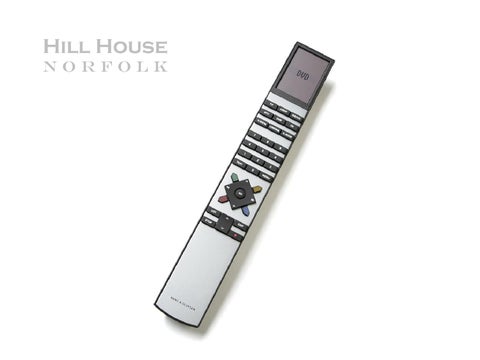
B&O Universal Remote
Source Channels or tracks Change top screen of the remote
Volume
Go buFon, up/down, forward/rewind
Off
Play CD number 3
1) Hit CD 2) Hit 3
Playing a DVD
1) Hit DVD 2) DVD player in the white cupboard under DVDs. Press eject and put a DVD in 3) Use the GO and arrow keys to navigate
Playing the PlaySta1on2
1) Turn everything off (red buFon) Inputs for PlaySta1on
2) Plumb the PlaySta1on2 into the TV (it’s in the cupboard under the DVDs) and switch it on 3) Press TV and the screen will locate it
Play from iPod/ iPad/ iPhone
1) Hit A.MEM or ATAPE 2) Insert iPhone or iPod by the CD stack or the iPod in the dock 3) Play from device
Play from iPhone 5, Android or lap-‐top
1) Hit A.MEM or ATAPE 2) Pop the green AUX cable out ‘Line out port’ on docking sta1on and put into device 3) Play device
Changing the CDs 1) Press the top buFon on the side of the unit and the glass opens 2) Move a CD to the side out of the clamps 3) Put a new CD into the clamp (moving le[ or right) 3) Press the buFon to re-‐close the glass door
Playing Spo1fy 1) Open Spo1fy on iPad 2) Log-‐on details: HillHouseNorfolkSpo1fy (password required) 3) Hit A.MEM or ATAPE on the B&O 4) Select a play list or search for a track 5) Download if you want to avoid buffering
SKY TV
1) Hit DTV or SAT 2) Hit Menu and then GO 3) Control with arrows and GO 4) Or open white cupboard door and use SKY remote normally poin1ng at Sky box
Playing out of 4 speakers in TV room
1) Hit LIST un1l SPEAKER shows in the top screen 2) Hit 4
Linking any TV in the house to the DVD playing in the sicng room 1) Hit LIST un1l ‘LINK’ shows in the top screen 2) Hit DVD at the TV in the room you want to be in
Playing a DVD in the kitchen or Bedroom 2 1) Touch the metal bar to open the DVD player 2) Insert the DVD 3) Touch the metal bar to close it 3) Use DVD on the remote
Wall sensors
Bedroom 1 en-‐suite, drawing room (behind chair), dining room and outside (by drawing room French doors)
1) Point your remote at the sensor and hit any source and it will play 2) Or control manually using the buFons
Turn off every B&O product in the house
1) Hold down the red buFon for 3 seconds