S5731-S24N4X2Q-A (02354VBY) Datasheet Overview
The CloudEngine S5731-S series switches were developed based on next-generation high-performing hardware and the Huawei Versatile Routing Platform (VRP). The CloudEngine S5731-S supports simplified operations and maintenance (O&M), intelligent stack (iStack), flexible Ethernet networking. It also provides enhanced Layer 3 features and mature IPv6 features. The CloudEngine S5731-S can be used in various scenarios. For example, it can be used as an access or aggregation switch on a campus network or as an access switch for Metropolitan Area Network.
Quick Specification
Table 1 shows the Quick Specification.
Model
S5731-S24N4X2Q-A
Part Number
02354VBY S5731-S24N4X2Q-A (24*100M/1G/2.5G Ethernet ports, 4*10GE SFP+ ports, 2*40GE QSFP ports, AC power,
Description front access) Basic dimensions (excluding the parts protruding from the body): 43.6 mm x 442.0 mm x 220.0 mm (1.72 in. x Dimensions without packaging (H x W x D)
17.4 in. x 8.66 in.)
[mm(in.)]
Maximum dimensions (the depth is the distance from ports on the front panel to the parts protruding from the rear panel): 43.6 mm x 442.0 mm x 236.0 mm (1.72 in. x 17.4 in. x 9.29 in.)
Weight with packaging [kg(lb)]
5.4 kg(lb)
Typical power consumption [W]
106 W
Maximum power consumption [W]
134 W
Memory
2 GB
Flash memory
1 GB in total. To view the available flash memory size, run the display version command.
PoE
Not supported
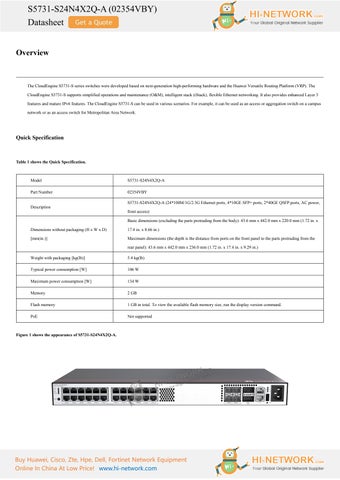
Figure 1 shows the appearance of S5731-S24N4X2Q-A.
Buy Huawei, Cisco, Zte, Hpe, Dell, Fortinet Network Equipment Online In China At Low Price! www.hi-network.com
S5731-S24N4X2Q-A (02354VBY) Datasheet Product Details Figure 2 shows the structure of S5731-S24N4X2Q-A.
Note: (1)
Twenty-four 100M/1000M/2.5GE BASE-T ports (multi-GE ports)
(6)
One USB port
(2)
Four 10GE SFP+ ports
(7)
One PNP button
(3)
Two 40GE QSFP+ ports
(8)
AC socket
(4)
One ETH management port
(9)
Ground screw
(5)
One console port
Figure 3 shows the indicators on the S5731-S24N4X2Q-A.
Table 2 shows the description of indicators on the S5731-S24N4X2Q-A.
No.
Indicator
Name
Color
Status
Description
1
PWR
Power module
-
Off
The switch is powered off.
Buy Huawei, Cisco, Zte, Hpe, Dell, Fortinet Network Equipment Online In China At Low Price! www.hi-network.com
S5731-S24N4X2Q-A (02354VBY) Datasheet indicator
Green
Steady on
The system power supply is normal.
-
Off
The system is not running.
Green
Fast blinking
The system is starting. During the system startup preparation phase, the SYS
System status 2
Green
Steady on
SYS
indicator is steady green, which lasts for a maximum of 30 seconds.
indicator Green
Slow blinking
Red
Steady on
The system is running normally. The system does not work normally after registration, or a fan alarm or a temperature alarm has been generated. ● If you are not changing the indicator mode (default): The switch is a standby or slave switch in a stack or the stacking function is not enabled on the
-
Off switch. If you are changing the indicator mode: The stack mode is not selected. The stack mode is selected. The switch is a standby
Green
Steady on
or slave switch in a stack, and the service port indicators show the stack ID of the switch.
3
MST
● If you are not changing the indicator mode
Stack indicator
(default): The switch is the master switch in a stack or a standalone switch with the stacking function enabled. ● If you are changing the indicator mode: The stack Green
Blinking mode is selected. The switch is the master switch in a stack or a standalone switch, and the service port indicators show the stack ID of the master switch. After 45 seconds, the service port indicators automatically restore to the status mode.
4
SPEED
-
Off
Green
Steady on
Speed indicator
The speed mode is not selected. The speed mode is selected, and service port indicators show the speed of each port. ● When you press this button once, the service port indicators change to the stack mode and show the stack ID of the local switch. ● When you press this button a second time, the service port indicators change to the speed mode and show the speed of each service port.
Mode switch 5
-
MODE
-
button
● When you press this button a third time, the service port indicators restore to the default mode and show the connection status and link activity of each service port. If you do not press the MODE button within 45 seconds, the service port indicators restore to the
Buy Huawei, Cisco, Zte, Hpe, Dell, Fortinet Network Equipment Online In China At Low Price! www.hi-network.com
S5731-S24N4X2Q-A (02354VBY) Datasheet default mode. In this case, the SPEED indicator is off. NOTE: Hold down the mode switch button for 6s and release it to start the web initial login mode. Either of the following situations will occur: ● If the switch has no configuration file, the system attempts to enter the web initial login mode. In this mode, the status of mode indicators is as follows: ● If the system enters the web initial login mode successfully, all mode indicators turn green and stay on for a maximum of 10 minutes. ● If the system fails to enter the initial login mode, all mode indicators fast blink for 10 seconds and then restore the default status. ● If the switch has a configuration file, the system cannot enter the web initial login mode. In this case, all mode indicators fast blink for 10s, and then return to the default states. The indicator in the upper left corner of Multi-GE a port indicates the indicator of a port at port indicator the top, and the indicator in the upper (one indicator right corner indicates the indicator of a for each port) port at the bottom. 40GE optical
Arrowheads show the positions of ports.
port indicator
A down arrowhead indicates a port at the
(one indicator
bottom, and an up arrowhead indicates a
for each port)
port at the top.
Meanings of service port indicators vary in different 6
-
modes. Each optical port has two single-color indicators. The one on the left is the 10GE optical ACT indicator (yellow), and the one on service port the right is the LINK indicator (green). indicator (two Arrowheads show the positions of ports. indicators for A down arrowhead indicates a port at the each port) bottom, and an up arrowhead indicates a port at the top. 7
ID
Off
The ID indicator is not used (default state). The indicator identifies the switch to maintain. The
ID indicator Blue
Steady on
ID indicator can be turned on or off remotely to help field engineers find the switch to maintain.
-
Off
The ETH port is not connected.
Green
Steady on
The ETH port is connected.
Green
Blinking
The ETH port is sending or receiving data.
-
Off
● No USB flash drive is connected to the switch.
ETH port 8
L/A indicator
9
USB
USB-based
Buy Huawei, Cisco, Zte, Hpe, Dell, Fortinet Network Equipment Online In China At Low Price! www.hi-network.com
S5731-S24N4X2Q-A (02354VBY) Datasheet deployment
● The USB port is damaged.
indicator
● The indicator is damaged. ● The USB flash drive does not have any configuration file and cannot be used for deployment. ● The switch has been upgraded using the USB flash drive and is restarting. Green
Steady on
A USB-based deployment has been completed.
Green
Blinking
The system is reading data from a USB flash drive. The switch has copied all the required files and
Yellow
Steady on
completed the file check. The USB flash drive can be removed from the switch. An error has occurred when the system is executing
Red
Blinking
the configuration file or reading data from the USB flash drive.
Get More Information
Do you have any question about the S5731-S24N4X2Q-A (02354VBY)? Contact us now via info@hi-network.com.
Specification
S5731-S24N4X2Q-A Specification Model
S5731-S24N4X2Q-A
Part Number
02354VBY S5731-S24N4X2Q-A (24*100M/1G/2.5G Ethernet ports, 4*10GE SFP+ ports, 2*40GE QSFP ports,
Description AC power, front access) Basic dimensions (excluding the parts protruding from the body): 43.6 mm x 442.0 mm x 220.0 mm (1.72 in. x 17.4 in. x 8.66 in. Dimensions without packaging (H x W x D) [mm(in.)] Maximum dimensions (the depth is the distance from ports on the front panel to the parts protruding from the rear panel): 43.6 mm x 442.0 mm x 236.0 mm (1.72 in. x 17.4 in. x 9.29 in.) Dimensions with packaging (H x W x D) [mm(in.)]
90 mm x 547 mm x 357 mm (3.54 in. x 21.54 in. x 14.06 in.)
Chassis height [U]
1U
Weight without packaging [kg(lb)]
4.76 kg (10.49 lb)
Weight with packaging [kg(lb)]
5.4 kg(lb)
Typical power consumption [W]
106 W
Typical heat dissipation [BTU/hour]
361.69 BTU/hour
Maximum power consumption [W]
134 W
Buy Huawei, Cisco, Zte, Hpe, Dell, Fortinet Network Equipment Online In China At Low Price! www.hi-network.com
S5731-S24N4X2Q-A (02354VBY) Datasheet Maximum heat dissipation [BTU/hour]
457.23 BTU/hour
Static power consumption [W]
70 W
MTBF [years]
40.40 years
MTTR [hours]
2.97 hours
Availability
> 0.99999
Noise at normal temperature (acoustic power) [dB(A)]
43.70 dB(A)
Noise at normal temperature (acoustic pressure) [dB(A)]
31.70 dB(A)
Number of card slots
0
Number of power slots
0
Number of fans modules
2
Redundant power supply
Not supported
Long-term operating temperature [°C(°F)]
–5°C to +45°C (23°F to 113°F) at an altitude of 0 to 1800 m (0 to 5905.44 ft.)
Short-term operating temperature [°C(°F)]
-5°C to +50°C (23°F to 122°F) at an altitude of 0-1800 m (0-5905.44 ft.) When the altitude is 1800–5000 m (5906–16404 ft.), the highest operating temperature reduces by 1°C (1.8°F) every time the altitude increases by 220 m (722 ft.). The device can work for a short period of time when the operating temperature is beyond the normal range, but the following conditions must be met: The operating temperature can exceed 45°C (113°F) for a maximum of 96 consecutive hours in a year.
Restriction on the operating temperature variation rate
The total time when the operating temperature exceeds 45°C (113°F) in a year is less than or equal
[°C(°F)]
to 360 hours. The number of times the operating temperature exceeds 45°C (113°F) is less than or equal to 15 in one year. If any of the preceding conditions is not met, the device may be damaged or an unknown error may occur. Devices cannot start when the temperature is lower than 0°C (32°F). The maximum transmission distance of an optical module used for short-term operation cannot exceed 10 km.
Storage temperature [°C(°F)]
–40°C to +70°C (–40°F to +158°F)
Long-term operating relative humidity [RH]
5% RH to 95% RH (non-condensing)
Long-term operating altitude [m(ft.)]
0–5000 m (0–16404 ft.)
Storage altitude [m(ft.)]
0-5000 m (0-16404 ft.)
Power supply mode
AC built-in
Rated input voltage [V]
AC input: 100–240 V AC; 50/60 Hz
Input voltage range [V]
AC input: 90 V AC to 264 V AC, 47 Hz to 63 Hz
Maximum input current [A]
3A
Memory
2 GB
Flash memory
1 GB in total. To view the available flash memory size, run the display version command.
Console port
RJ45
Buy Huawei, Cisco, Zte, Hpe, Dell, Fortinet Network Equipment Online In China At Low Price! www.hi-network.com
S5731-S24N4X2Q-A (02354VBY) Datasheet Eth Management port
RJ45
USB
Supported
RTC
Supported
RPS input
Not supported
Service port surge protection [kV]
Common mode: ±7 kV
Power supply surge protection [kV]
Differential mode: ±6 kV; common mode: ±6 kV
Ingress protection level (dustproof/waterproof)
IP20
Types of fans
Built-in
Heat dissipation mode
Air cooling for heat dissipation, intelligent fan speed adjustment
Airflow direction
Air intake from left and front, air exhaustion from right
PoE
Not supported EMC certification
Certification
Safety certification Manufacturing certification
Want to Buy
Learn More about Hi-Network
Search our Resource Library
Follow us on LinkedIn
Contact HI-NETWORK.COM For Global Fast Shipping
HongKong Office Tel: +00852-66181601 HangZhou Office Tel: +0086-571-86729517 Email: info@hi-network.com Skype: echo.hinetwork WhatsApp Business: +8618057156223
Buy Huawei, Cisco, Zte, Hpe, Dell, Fortinet Network Equipment Online In China At Low Price! www.hi-network.com
Contact for Sales or Support