2027/2028
Family Application Guide This guide will walk you step-by-step through the Clarity application for the 2027-2028 enrollment year.
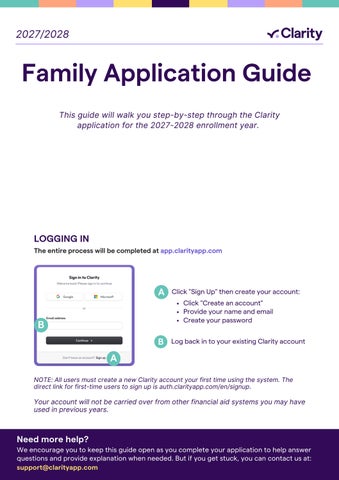
LOGGING IN The entire process will be completed at app.clarityapp.com
A
Click "Sign Up" then create your account: Click "Create an account" Provide your name and email Create your password
B B
Log back in to your existing Clarity account
A NOTE: All users must create a new Clarity account your first time using the system. The direct link for first-time users to sign up is auth.clarityapp.com/en/signup.
Your account will not be carried over from other financial aid systems you may have used in previous years.
Need more help? We encourage you to keep this guide open as you complete your application to help answer questions and provide explanation when needed. But if you get stuck, you can contact us at: support@clarityapp.com
Table of Contents
Before you begin
Step 4: Review & Submit
03 Important Tips Before You Begin 03 The Process 04 Your Portal
Other Considerations School Questions Payment Verification Submit Application
Step 1: People 05 07 08 09 10
Parents or Guardians Second Parent or Guardian Address(es) Student Applicants Editing Student Applicants and Other Dependents 11 Household Summary
Step 2: Background
Step 5: Documentation Requests 29
Upload Additional Documents
Step 6: Financial Aid Notification 30 31
Hearing Back from School(s) Frequently Asked Questions
12 Background Questions
Step 3: Financials 13 14 15 16 17 18 19 20 21 22
2027/2028
Taxable Income Non-taxable Income Monthly Expenses Assets - Primary Residence Assets - Other Real Estate Assets - Vehicles Other Assets Assets - 529 Plans Liabilities Businesses
02
Before you begin IMPORTANT TIPS BEFORE YOU BEGIN Make a list of the schools you're applying to. Be sure to note their deadlines (both admission and financial aid) and requirements.
Throughout the application you will see this symbol: . Hover your mouse or tap your finger on this symbol to see helpful tips and explanations.
You only need to complete one Clarity application per household. Your application will cover any number of schools using Clarity and any number of children in your household.
Be sure to monitor your Clarity portal throughout the application process. Schools may require additional documents—those requirements will be displayed in the "Document Requests" section of your portal.
Gathering documents and information like your most recent tax documents can help you complete the application.
While the Clarity application is designed to be easy enough to fill out in one sitting, you can save your work at any time and come back to it later. Be sure to always click the "Save and continue" button at the bottom of the page to save your work.
THE PROCESS Complete the application Click "Continue Application" from your portal Home page to begin or continue your application. Complete your biographical information. add applying students and indicate which schools you're applying to. Sign and submit a tax verification form to give Clarity permission to pull your prior year tax returns. This means you won't need to upload any of them yourself! Complete your financial information. NOTE: The responsive application will shift the questions you see based on your answers, kind of like TurboTax.
Pay and Submit The Clarity application fee is $65 and covers all the Clarity schools you're applying to and any number of children in your household. Once you submit your application, you will not be able to make changes to your tax filing status, indication of if you do or do not receive a United States W2, and information entered on the IRS tax verification form. Make sure you have indicated accurate social security number(s) and exact address used for filing of your 2025 taxes to avoid errors and delays.
Upload any extra documents # 310b56
2027/2028
Schools may require additional documents in addition to last year's taxes. Check the "Document Requests" panel on your portal to see what you need to upload.
03
Before you begin YOUR PORTAL HOME
From your portal homepage, you can: Access your application Review any additional document requirements Manage and upload documents View your student(s) and application status(es)
A
B
A
C
B
B
C
2027/2028
D
D
A
Click to continue your application in progress
B
View document requirements and upload
C
View your applying students
D
Monitor your application status at each school you are applying to
04
Step 1: People PARENTS OR GUARDIANS
Every living biological parent and legal guardian will need to submit their information for an application to be considered complete. Start by telling us about yourself. Then list any additional parents or guardians living in your household. Later, you will have the opportunity to invite parents and guardians from outside of your household to create their own account and fill out a separate application.
B
A
A
2027/2028
If you received only a 1099 in your most recent tax year, answer "No" to this question.
B
Only answer "Yes" to this question if there is another parent or guardian living at your same address. If you are divorced or separated, answer "No". You will be able to add additional guardians living outside your home later in the application.
05
Step 1: People PARENTS OR GUARDIANS CONT. Complete Occupation Details for each parent or guardian.
A
B
C
A
What is your current occupation? Enter "N/A" if not applicable.
C
How many years have you been working for your current employer? Enter 0 if not applicable.
2027/2028
B
What is the name of your current employer? Enter "N/A" if not applicable.
06
Step 1: People SECOND PARENT OR GUARDIAN If you answered "No" to an additional parent or guardian living in your home on the previous page, you will not see this step. Move to the next page of the guide.
2027/2028
07
Step 1: People ADDRESS(ES)
Later in the application—during Step 4, "Verification"—you will complete a tax verification form that will allow us to verify your most recent Form 1040 filed with the IRS. The address information in this section must match the address listed on your most recent Form 1040. If your current address does not match the one listed on your most recent Form 1040, please indicate that your address has changed in the last two years in this section.
A
B
A
2027/2028
Indicate here if your address has changed in the last two years.
B
Enter the previous address that matches the address listed on your most recent Form 1040.
08
Step 1: People STUDENT APPLICANTS Only list students here who are applying to or re-enrolling at schools who accept Clarity applications. You will be able to add additional dependents later in the next section.
A
A B
C
Add all schools that Student 1 is applying to. Your Clarity application will be sent to each school that you add.
B
In the "Add a School" window, start typing the name of the school you wish to add. Or, click the symbol to scroll through a full list of schools that accept Clarity applications.
Estimate the amount you can pay for Student 1 next school year.
C
2027/2028
09
Step 1: People EDITING STUDENT APPLICANTS AND OTHER DEPENDENTS Be sure all details for your student applicants and other dependents are correct before submitting your application.
A
A
Once you've added one or more students, use the pencil icon next to their name or date of birth to make any edits.
B
B 2027/2028
Be sure to add all dependents claimed on your most recent tax returns who are not already listed as a parent, guardian or student applicant. Scroll to the bottom of the page to find the "Add Another Dependent" button, if needed.
10
Step 1: People HOUSEHOLD SUMMARY Use this summary step to review the information you've submitted so far. Be sure there are no errors or omissions here before proceeding.
A
B
A
2027/2028
Click on the name of any section in the left navigation to jump directly to that section and make changes.
B
Be sure to always click "Save and continue" at the bottom of any page after making changes. If you click to jump to a different section without clicking "Save and continue" first, your changes will not be saved.
11
Step 2: Background BACKGROUND QUESTIONS The questions on this page will help streamline the application for you. To ensure we're asking questions that are relevant to you and your circumstances, the answers you provide here will impact the questions you see later in the application.
A
B C D E
A
Your "primary" residence is where your family lives for more than 50% of the year.
C
Answer "yes" if you own 1% or more of any corporation, partnership, LLC or sole proprietorship.
E
This includes all income reported as non-taxable on your most recent tax return. Examples include child support and social security.
2027/2028
B
Include all real estate, including land, vacation homes, investment properties, etc.
D
A 529 plan is a tax-advantaged account that can be used to pay for qualified education costs, including college, K-12, and apprenticeship programs. Answer "yes" if there are any plan(s) your name, your spouse's name, or in any of your dependents' names.
12
Step 3: Financials TAXABLE INCOME If your current year taxable income is not finalized, list your best estimate(s). You may be required to submit additional documentation for verification.
A
B
C
D
E
F
List the combined total of any dividends or interest payments received by the end of the current year. Dividend totals are line 2b and Interest totals are line 3b of your 1040.
A
List each parent or guardian's combined total salaries and wages. Found in box 1 of your W2.
B
C
Exclude any amount indicated in the "Total Salaries and Wages" section above. This is line 3 from Schedule 1 of your 1040.
D
This includes any realized capital gains received by the end of the current year. This is line 7 of your 1040.
E
Add any taxable social security, pension and annuities, IRA distributions and anything else listed on schedule 1 of your 1040 here.
F
If you answer "Yes" here, you will be asked to forecast the coming year.
2027/2028
13
Step 3: Financials NON-TAXABLE INCOME If your current year income is not finalized, list your best estimate(s) You may be required to submit additional documentation for verification
A
B
A
Only include the non-taxable component of Social Security income.
C
If you like, you can add a note to your application anywhere you see this option.
2027/2028
B
Include any other non-taxable income sources. Examples include gifts, inheritances, and certain other types of non-taxable benefits.
14
Step 3: Financials MONTHLY EXPENSES Use the sliders on this page to select an appropriate range for your household. If items like retirement contributions or union dues are paid on an annual basis, please divide your gross total by 12.
A A B
B
Includes electricity, water, gas, internet, heating oil and phone bills. You may also include sewage, trash, and recycling monthly costs.
C
This includes all monthly grocery, restaurant, and clothing expenses.
D
This includes all monthly transportation expenses including car payments, gas, public transportation, rideshares, etc.
E
Includes monthly actual paid premiums for health, dental and vision insurance policies. Do not include actual out-of-pocket healthcare expenses.
C
D
E
F F
G G
H
H I
J K
This includes property taxes, and HOA fees.
Please divide your annual out-of-pocket medical expenses by 12 to provide a monthly amount. Include out-of-pocket paid for deductibles, co-pays, coinsurance, and prescriptions.
Includes student loan payments made on behalf of yourself and any dependents. This should include only contributions made to a post-tax account like a Roth IRA. If contributions are made on an annual basis, please divide your gross total contributions by 12.
I
Includes monthly contributions to any daycare services.
J
Includes monthly contributions to any eldercare services.
K
Includes monthly contributions to any 501(c)3.
L
If paid on an annual basis, divide total gross dues by 12.
L M N
2027/2028
M Only include paid child support payments. N
This includes monthly alimony expenses.
15
Step 3: Financials OTHER EXPENSES Use this section to list any 2026 expenses that don't fit into the categories on the previous pages. Include a brief note explaining each expense. Documentation may be requested for any expense listed here.
2027/2028
16
Step 3: Financials ASSETS - PRIMARY RESIDENCE Your "primary" residence is where your family lives for more than 50% of the year.
A
A
2027/2028
Begin typing your address. Then select your complete address from the dropdown list that appears. If your address does not appear in the dropdown, type your complete address in the box and then click on the next box on the page to continue filling out the application.
17
Step 3: Financials ASSETS - OTHER REAL ESTATE In this section, please include the information pertaining to any additional real estate which you own in full or in part. Examples include: rental properties, vacation homes, etc.
A
A
2027/2028
If you add two or more properties in this section, use the dropdown list at the top of the page to toggle between entries.
18
Step 3: Financials ASSETS - VEHICLES In this section, please indicate the information regarding monthly expenses for all vehicles you own or lease and include the value/payment information for those vehicles.
A
A
2027/2028
If you add two or more vehicles in this section, use the dropdown list at the top of the page to toggle between entries.
19
Step 3: Financials OTHER ASSETS In this section, please include information for the total monetary value of all additional assets not previously accounted for in the application.
A
B
C D
A
Enter the total average monthly balance for all accounts over the past 12 months.
B
Includes all money invested, excluding retirement accounts.
C
Enter the total value of all retirement accounts.
D
Itemize all remaining assets not listed elsewhere on this application. Examples include trusts and annuities.
2027/2028
20
Step 3: Financials ASSETS - 529 PLANS A 529 plan is a tax-advantaged account that can be used to pay for qualified education costs, including college, K-12, and apprenticeship programs. If your 529 is not in the name of specific dependents, please divide the total amount evenly across all dependents.
2027/2028
21
Step 3: Financials LIABILITIES In this section, please include the monthly payment amounts for all current outstanding debts for your household.
A
B
C
D
A
Enter your total outstanding credit card debt.
B
List the total amount of outstanding loans in your or your spouse's name(s). Additionally, please list the total amount of outstanding loans in your dependents' names if you made or intend to make payments on their behalf in the current year.
C
List the total outstanding amount owed for any healthcare related expenses.
D
List all other outstanding debts using the "Add Another Debt" button.
2027/2028
22
Step 3: Financials BUSINESSES List all businesses where you own 1% or more of any corporation, partnership, LLC or sole proprietorship.
A
B
C
D
E
A
If you add two or more businesses in this section, use the dropdown list at the top of the page to toggle between entries.
C
Net Income/net profit is the profit left after deducting total business expenses from your gross income. Make sure this is consistent with your corresponding tax returns.
E
Liabilities are debts or any other obligations in which your business owes money currently or in the future.
2027/2028
B
Gross profit/gross income is the revenue earned before taxes and other deductions. Make sure this is consistent with your corresponding tax returns.
D
If you have completed a financing or 409a within the last two years, please use that valuation. Otherwise, please estimate.
23
Step 4: Review & Submit OTHER CONSIDERATIONS Please list outside sources such as friends, family, or grants that will be contributing to your tuition payments. Please include any additional information that may be important to share with the schools to which you are applying
2027/2028
24
Step 4: Review & Submit SCHOOL QUESTIONS Sometimes, individual schools have additional questions for their applying families. If you see questions on this page, that means a school you're applying to would like you to answer their additional question(s). The school name labels indicate which school is asking the additional question.
A
A
A
2027/2028
Header indicates which questions come from which schools.
25
Step 4: Verification (cont) ENHANCED TAX VERIFICATION Clarity uses best-in-class security to safeguard the information you share with us while making the application process intuitive and efficient for families. You will be prompted to select how you authorize Clarity to access your taxes from the IRS. If you select the Clarity method, you will sign some tax authorization forms and do a quick identity verification. If you select the IRS method, you will need to make sure all guardians on the application have an account with irs.gov. If you don’t already, you will need to create one first. * NOTE: For families that went through the Clarity method last year, you A will likely not need to repeat the process at all, as you authorized us to pull your taxes in future instance of applying.
If you have any questions around the tax verification process, please refer to the Tax Verification Family Guide found in our help center.
2027/2028
26
Step 4: Review and Submit PAYMENT The fee to submit your Clarity application is $65. The fee is a flat fee, meaning that it does not change whether you apply for one or multiple children, and to one or multiple schools.
A
A
2027/2028
Contact the school(s) you are applying to if you need a code to waive the application fee.
27
Step 4: Review & Submit SUBMIT APPLICATION Use this page to review your entire application. Use the left navigation to jump to any part of the application that you would like to review or make changes to before submitting. Once you submit your application, copies will be sent to the schools to which you are applying. You will not be able to make changes to your tax filing status, indication of if you do or do not receive a United States W2 and information entered on the IRS tax verification form. Make sure you have accurate social security number(s) and exact address used for filing of your 2025 taxes to avoid errors and delays.
A
B
B
C
A
Click on the name of any section in the left navigation to jump directly to that section and make changes.
C
Be sure to always click "Save and continue" at the bottom of any page after making changes. If you click to jump to a different section without clicking "Save and continue" first, your changes will not be saved.
2027/2028
B
A filled-in purple bubble containing a checkmark means that the corresponding section is complete. An empty bubble indicates that a section is incomplete. You will need to navigate to any incomplete sections and fill in missing information before you can submit your application.
28
Step 5: Documentation Requests UPLOAD ADDITIONAL DOCUMENTS Once your application has been submitted, you may receive requests to upload additional documents for schools. From your main homepage, you will be able to upload these files under the Documents section of your portal. If any document requests are not applicable, please reach out to the school directly and let them know.
B C A
D
2027/2028
A
Click on Documents in your left menu.
B
The Documents page will show documentation requests for all schools.
C
Click on the "upload document" button to choose a file to upload.
D
Click on the arrow to view all uploaded files and/or to delete any uploads.
29
Step 6: Financial Aid Notification HEARING BACK FROM SCHOOL(S) Once your application is complete and you've uploaded all requested documents, schools will begin the process of reviewing your application. You will hear back directly from schools regarding your financial aid decision.
FREQUENTLY ASKED QUESTIONS What is a W2?
What is a Form 1040?
A W2 is a wage and tax statement that you should receive from your employer that defines the income you earned, taxes that were withheld and benefits you paid into and/or were provided from your employer.
A Form 1040 is what individual taxpayers use to file their taxes with the IRS. Where do I get a fee waiver? Please check with the school's financial aid office directly. Clarity does not provide these directly.
Where do I get an access code?
I don't have a specific document to upload that is being requested. What should I do?
Please check the school's website or check with their financial aid office directly if an access code is needed to add them to your application.
Please reach out to the school's financial aid office directly.
Can I add another school to my application later?
Can I get a refund?
Yes, you can add another school to your application after initial submission under Step 1 Student Applicants.
Clarity’s application policy is non refundable and the only exceptions that can be made is if the school is requesting this directly.
What is the status of my application?
What if the IRS rejects my tax verification form?
You can find the current status of your application on your main homepage. If it says "submitted" and you've fulfilled all documents being requested, you should be set. If you have any questions about your status, please check with the school's financial aid office directly for any updates.
2027/2028
Please refer to the email you will receive from Clarity that will outline which tax documents we will need your household to manually upload.
uestions
30