



The Gilbertine Academy Administration
Head of School
Kenneth Noster
Principal, Home Education
Simon Noster
Headmaster, Gilbertine Academy
Yvan Beaudoin
Secretary Treasurer
Vic Wiens
Chief Operating Officer
TobyLauren Burgess
Executive Assistant to Head of School
Caitlin Noster
Administrative Assistant to the COO
Rebecca Bekolay
IT Systems Administrator
Levi Breederland
Graphic Designer
Naomi Doyle
Development Director
Saul Noster
Development Assistant
Joshua Bruce

Office Manager
Rae LaRocque
Manager’s Assistant
Julia Yaceyko
Home School Consultants
Janice Laurence
Denise Martens-Dieser
Peter Weidman
Terry Yaceyko
Administrative Assistant
Jennifer Laszlo
Office Assistant
Helen Burgess
Finance Manager
Melissa McEachern
Family Funding Manager
Taylor Laurence
Family Funding Associates
Thomas Laurence
Ezra Noster
Accounts Payable
Dylan Kwasnycia
Accounts Receivable
Jim Burgess
Family Funding Assistants
William Burgess Briah Tinant



Phone: (780) 741-2113
Toll Free: (877) 425-8546 with questions: office@wisdomhomeschooling.com
Publisher: WISDOM Home Schooling
Content/Editor /Desktop:
TobyLauren Burgess, Rebecca Bekolay
Desktop / Design:
Naomi Doyle
www.wisdomhomeschooling.com
Data Manager
Janelle Mailhot
SIS Data Assistant
Hope Bekolay
SIS Data Clerk
Vincent Laszlo
Events Director
Marlane Noster
Events Coordinator
Kyra Tinant
Socratic Dialogue
Online Program Manager
Nicole Noster
Mediated Learning Director
Thérèse McDonald
Mediated Learning Advisor
Kristina Hankyle
High School Advisor
Christian Bekolay
High School Credit Advisor
Peter Weidman
High School Subject Specialists
Pierre-Andre Beaudoin (Chemistry)
Rhonda Caluttung (English & Social Studies)
Lydie Delli Santi (French, Spanish)
James Rauch (Latin)
Peter Weidman (Math, Sciences)
North
Georg & Gayle Beinert
Menno & Margaret Knelsen
Darrel & Kristine Buchholtz
Theresa & Vince Holden
Michael & Victoria Hutchinson
Sheldon & Sharon Kok
Don & Bo Reid
Cory & Sierra Rotchford
Peter & Kathleen Wing
Neil & Julie Aragon
Joe & Diane Pollock
Kris & Amanda Watson
Content:

WISDOM publishes articles by many Individual authors. The opinions of the writers are not necessarily those of WISDOM. We reserve the right to decline any submission, and to edit those submissions we accept for accuracy, clarity & length.
Tiffany Arnold
Michele Barter
Pierre-Andre Beaudoin
Joan Bishop
Madysan Buchholtz
Rhonda Caluttung
Lydie Delli Santi
Carrie Friesen
Simon Friesen
Rachelle Godin
Liz Gurnett
Nola Hutchinson
Anella Jantz
Desmond Kilgannon
Randy Kopp
Gordon Loewen
Meghan Lupien
Kyla Mould
Simon Noster
Sue Peachment
Kim Schultz
Dominique Skuban
Glenn Spiess
Christine Stankiewicz
Brian Taje
Paul van den Bosch
Catherine van Kampen
Peter Weidman (403) 866-7822 (780) 363-3740 (780) 239-0381 (780) 878-5380 (587) 335-2081 (403) 846-0404 (403) 392-9209 (780) 217-4006 (587) 222-1790 (780) 349-1827 (780) 349-1577 (780) 781-2527 (587) 297-1992 (780) 225-6688 (780) 723-5382 (587) 298-7565 (438) 349-2592 (306) 716-6328 (780) 581-8885 (403) 994-1963 (780) 623-2886 (780) 350-8192 (639) 894-0470 (587) 414-7354 (780) 312-4525 (403) 358-4497 (403) 845-2923 (780) 223-2414
Valley
Albert
(780) 926-6556
(780) 417-3025 (780) 515-0318 (780) 934-6287 (780) 460-4468 (780) 668-5389 (780) 934-3156 (587) 596-7023
(403) 652-7506 (403) 931-3884 (403) 200-2158
Photography:
Unless otherwise credited, photography is courtesy of the Noster, Burgess, Tinant, and Doyle families. The people appearing in photos throughout this publication do not endorse any specific product, service, cause, association or endeavour. Images and photos are for illustrative purposes only.
• This handbook is intended to answer the most common questions families have about our funding guidelines and reimbursement procedures.
• If you can’t find answers to your questions here, please call our finance team at 780-741-2113
• Policies and procedures are subject to change. (We inform families about any significant changes in our monthly e-newsletters and the WISDOM Family Magazine.)
• Information in this handbook is accurate at the time of printing.


Home education funding is a grant that homeschooling families in Alberta may access to purchase resources for the education of their children. Funding is allocated to The Gilbertine Institute and is then made available to families via Receipt Submission, Purchase Order, or through accessing WISDOM events and courses
WISDOM Home Schooling is the registered brand name for The Gilbertine Institute’s “Gilbertine Academy Home Schooling.” Government funding is provided to The Gilbertine Institute for any students who give notification of their intent to home educate with WISDOM, prior to the enrolment deadline (last business day of September). Please note, families are able to enroll past this deadline, but Alberta Education will not allocate funding for them in that case (See 1 4 below).
Submit an eft application along with a void cheque or bank verification letter to eft@gilbertineinstitute.com in order to receive your refund via direct deposit. You may also mail these items to us if you prefer, though we recommend emailing them as it’s generally more reliable. You do not have to re-submit the eft application unless your bank information has changed, or you “take a break” from home schooling with WISDOM (i.e., you don’t enroll with us for a school year). When you re-enroll, you will need to resubmit your
eft application. Families that prefer refund by cheque may choose to not submit an eft application. If the application is not submitted, you will receive a single refund cheque which will be mailed on or around July 15th at the end of that school year for receipts submitted throughout the year.
After the last business day of September, the government allocates educational funding for the year. You must have your student fully enrolled before the last business day of September, otherwise the government simply won’t allocate funding for you. To be considered fully enrolled, you must have:
• completed the notification,
• sent us a copy of the student’s Canadian birth certificate or passport,
• and have submitted your student’s education program plan (epp) for approval.
If you switch school boards after funding has been allocated, the funding cannot transfer to a new school board. It is tied to whichever board you initially enrolled with. However, if you leave WISDOM and still have remaining funding, you can apply for it by submitting eligible receipts for educational expenses that were purchased before your exit date from WISDOM (Purchase Orders are not possible in this scenario). Please read “Receipt Submission” on page 7 to confirm eligibility. Please note that funding carries over one school year, then expires the next. It will not sit indefinitely until you claim it.
Alberta Education requires that claimed expenses are clearly reflected in your student’s home education program plan (epp). This is why it is necessary to have your epp approved by your facilitator before you can claim your funding. Please note however that there are many generic educational expenses that can be claimed without being explicitly referenced like pencils, books, paper, printers, computers etc. Conversely, there are certain items we cannot refund even if they are mentioned in an epp. Please see our Funding Policy (located at the end of this manual) or visit our website for more information on what can and cannot be refunded.
Receipts for physical goods can be refunded if the refund date is within two years of their purchase date. Because expenses are tied to your epp, some other expenses can only be refunded with funding allotted the year they occurred. We call these “school year specific” receipts, and they include lessons, fieldtrip admission fees, internet, and subscriptions. Basically anything that is an “experience” or “service” rather than a physical item. When submitting receipts that pertain to year-specific expenses, the summer months of June through August are considered “flexible” months and can be related to the school year occurring either before or after these months. For example, swimming lessons taken in July of 2025 could either be reimbursed as part of the 24/25 or 25/26 school year, whichever is optimal. An important note: If you have carryover funding from a specific school year, that funding can be used to reimburse “year specific expenses” from that year. Say you forgot to submit your swimming lessons from the 24/25 school year. Normally they would be considered expired as we enter the 25/26 school year, and you could not have them refunded. However, if you had carryover funding from the 24/25 school year, you could use that funding to claim the swimming lessons.
The Resources you Reimburse Legally Belong to the School Board. However…
Any non-consumable resources legally belong to the school authority, and some school authorities require the return of all resources which have been reimbursed with home education funding. However, WISDOM does not reclaim the resources you purchase with funding. They are yours to keep, and we encourage you to share them with other families when you no longer need them!
The total funding allotment for the 2025/2026 school year is $901 per student grade 1 and up, and $450.50 per kindergarten student. This funding is available to you in halves: You can access the first half of your funding at the start of the school year, and the second half at the end of February. The reason we release the funding in halves is because the government releases the funding to us in 10% increments from September to June. While 100% of your funding is allocated, only 10% is released to us per month. For your convenience, we’ve created a system where we front the funding for you in halves. This way you can make larger educational purchases at the start of the year without the need to wait for your funding to “trickle in.”
There are three ways to claim funding: (1) by submitting receipts for expenses incurred for educational resources (See 3. Receipt Submission), (2) by using purchase orders for educational expenses (See 6. Purchase Orders), and (3) by taking part in WISDOM programs, courses, and events and requesting that the cost is taken directly out of available funding. By regulation, we are not able to supply funding directly to parents unless it is claimed in the above mentioned methods.
If at any time you claim more funding than you have available, we will hold on to the excess receipts and reimburse them when your funding becomes available again (or they expire). This is documented at the bottom of the first page on your refund summary sheet, where it says “Receipts on hand waiting to be refunded when funding becomes available” (see page 11).
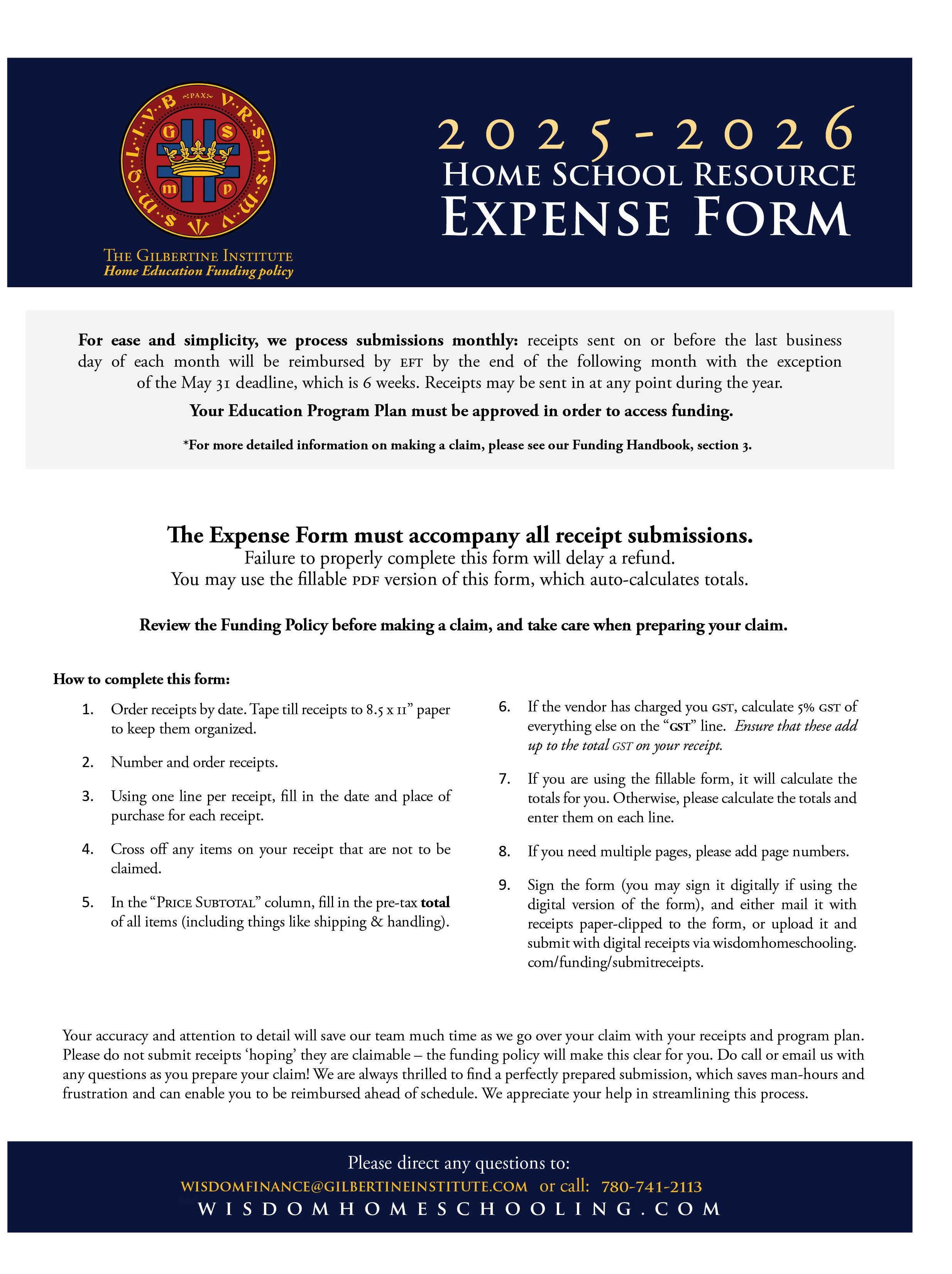
In 2020/2021 Alberta Education implemented a Red Tape Reduction measure which allows us to automatically provide you 100% of your funding for the year when you claim 75% of it.


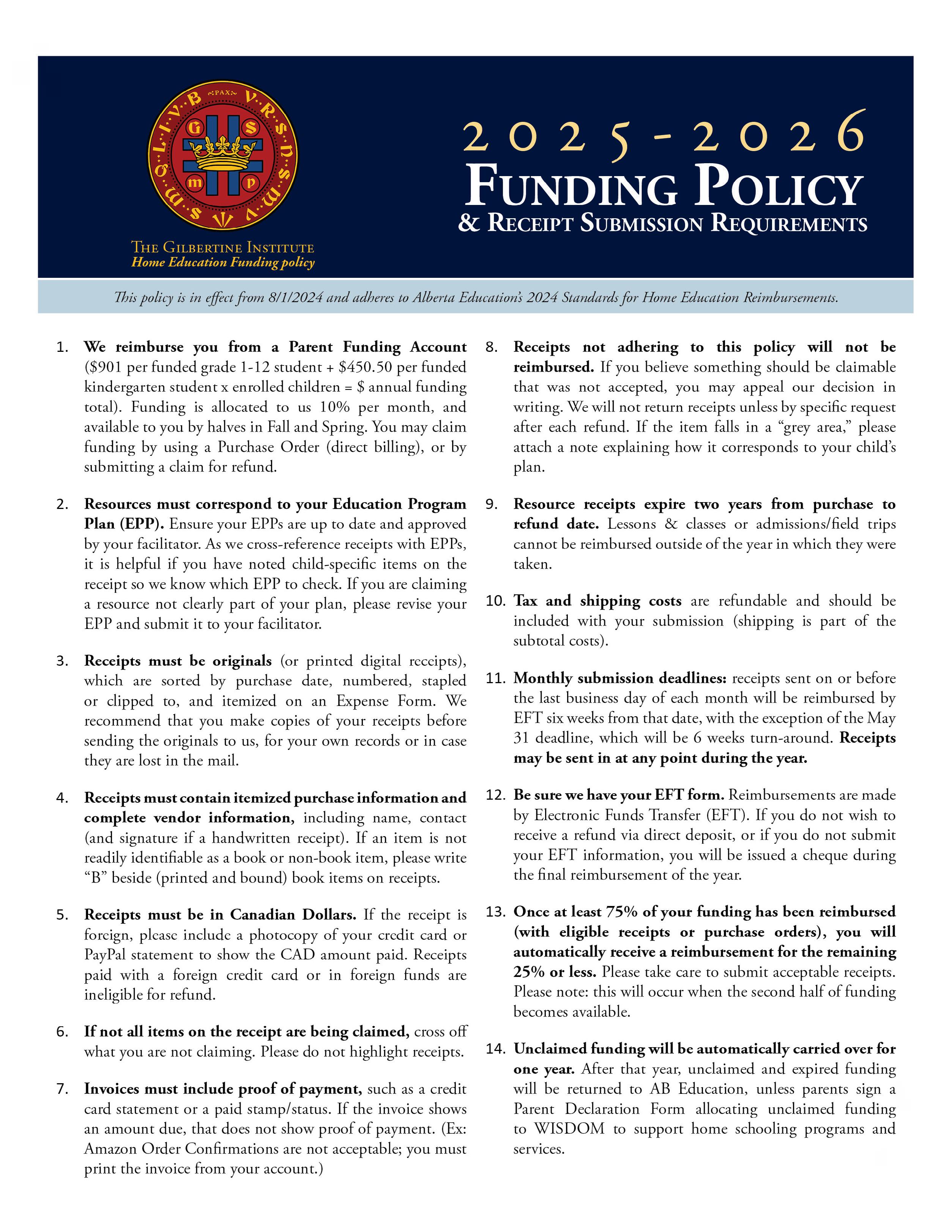
The Family Funding Policy is a 2 page document created by WISDOM that contains an overview on how funding works, a list of items which are eligible for funding, a list of items which are not eligible for funding, and guidelines for funding caps and allowances for certain items.
The Family Funding Policy is designed to protect continued access to funding by preventing misuse. It was created in adherence to both Alberta Education’s Standards for Home Education Reimbursement, and internal communication from Alberta Education Strategic Financial Services.
Alberta Education only allows reimbursement for educational expenses related to the student’s education program, including related teacher resources. This means that any expense pertaining to the “school,” aka home (such as furniture or home decor), is not refundable.
While there is no funding cap on curriculum and common ‘school supplies,’ Alberta education has placed a funding cap on admission fees. Up to 50% of a student’s funding can be claimed on Admission Fees. This is for student passes for recreation centres, museums, zoos, science centers, skiing admission, et cetera. We have also applied funding caps for a few other types of expenses in order to prevent misuse of home education funding (see 7.1 Funding Policy).
You can find the family funding policy at the back of this manual!


You can either submit receipts for reimbursement online, or by mail. This segment contains instructions for both.
The online submitter can be found on our website. Go to wisdomhomeschooling.com > Funding > Submit Receipts.
1. Your EPPs have been submitted and approved (we cannot issue funding until all your students’ EPPs have been approved)
2. Your EFT application has been submitted (unless you’d prefer a single cheque at the end of the school year)
3. You have read the 2 page Family Funding Policy (located at the end of this manual) and understand what kind of receipts you can and cannot claim.
Before preparing your receipts for refund, ask the following to make sure they are refundable:
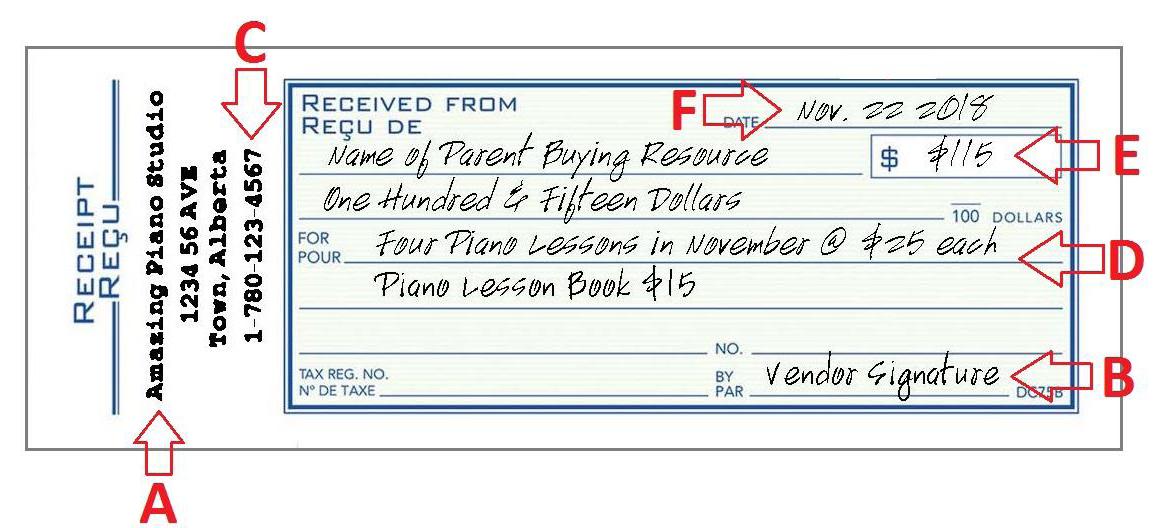
1. Does the receipt contain the following information? (Especially relevant for hand written receipts)
A. Name of vendor.
B. A signature or business mark (for authentication).
C. Vendor’s contact information (for verification purposes).
D. Resources, items, or activities paid for clearly listed with item cost.
E. Total amount paid.
F. Date of receipt issue.
G. Proof of Payment (see below).
2. Does the receipt contain proof of payment? Note: ORDER CONFIRMATIONS almost never contain proof of payment! “Thank you for your purchase” and “Payment method: credit card” do not constitute proof of payment. Look for words like “Receipt,” “Paid,” “Items shipped/delivered” or “This is your official receipt.”
3. Was the receipt purchased two years ago from the refund date? If the receipt will be two years old by the date it would be funded (end of the month following submission), it is expired and cannot be refunded.
4. Is it a school year specific receipt? Lessons, subscriptions, admission fees, rec centre passes, internet and all receipts that are paying for a “service” or “experience” rather than a tangible good are considered “school year specific” receipts and must be refunded with funding allotted the year in which they occurred. Note: If you have carryover funding, you can refund year specific receipts from the school year that funding was carried over from.
5. Is the receipt made out to you? If the receipt does not contain a name at all, that is not a problem. If the receipt says “sold to” and lists a name that is different from yours, we cannot refund it. (If you had a family or friend purchase items in their name for you, have them write a hand written receipt for the items you paid them to order. See section 1 above.)
Hand written reciept example:

6. Is the shipping address on the receipt the same as what you indicated on your notification form? If the address is different, include a note with the reason. Example: if shipping was made to a usa address, write something like, “I have family in the usa and saved a lot of money on shipping to their home in the States. We plan on visiting them in December and will pick up the resources then.”
7. Is this receipt clearly reflected in my student’s Education Program Plans? If we cannot connect a receipt to a plan, it cannot be reimbursed. If necessary, you can revise your plan or add a resource prior to May 31st by contacting your facilitator. Please note that some items can be reimbursed without being explicitly mentioned in your plan, as they are considered necessary educational expenses (eg pencils, paper, binders, etc). Please read our Funding Policy (found at the end of this manual) for a full list of items that do not need to be explicitly mentioned in your epp.
8. Is the receipt in usd or another foreign currency? We cannot refund any receipt in a foreign currency (usd included) without an accompanying credit card statement that shows the conversion to cad. It is not sufficient to provide evidence of the exchange rate on the day of purchase, we must have the credit card statement. Note: Only put the cad amount on your expense form, not the foreign currency.
9. Is the receipt complete and legible? If the receipt is too faded, pixelated, illegible, or missing pages or sections, we are unable to refund them (this is why scanning receipts is preferable to taking pictures of them for online submissions).If a non-typical resource is being claimed and you have multiple students, please indicate which student it is for so we may reference the correct epp.
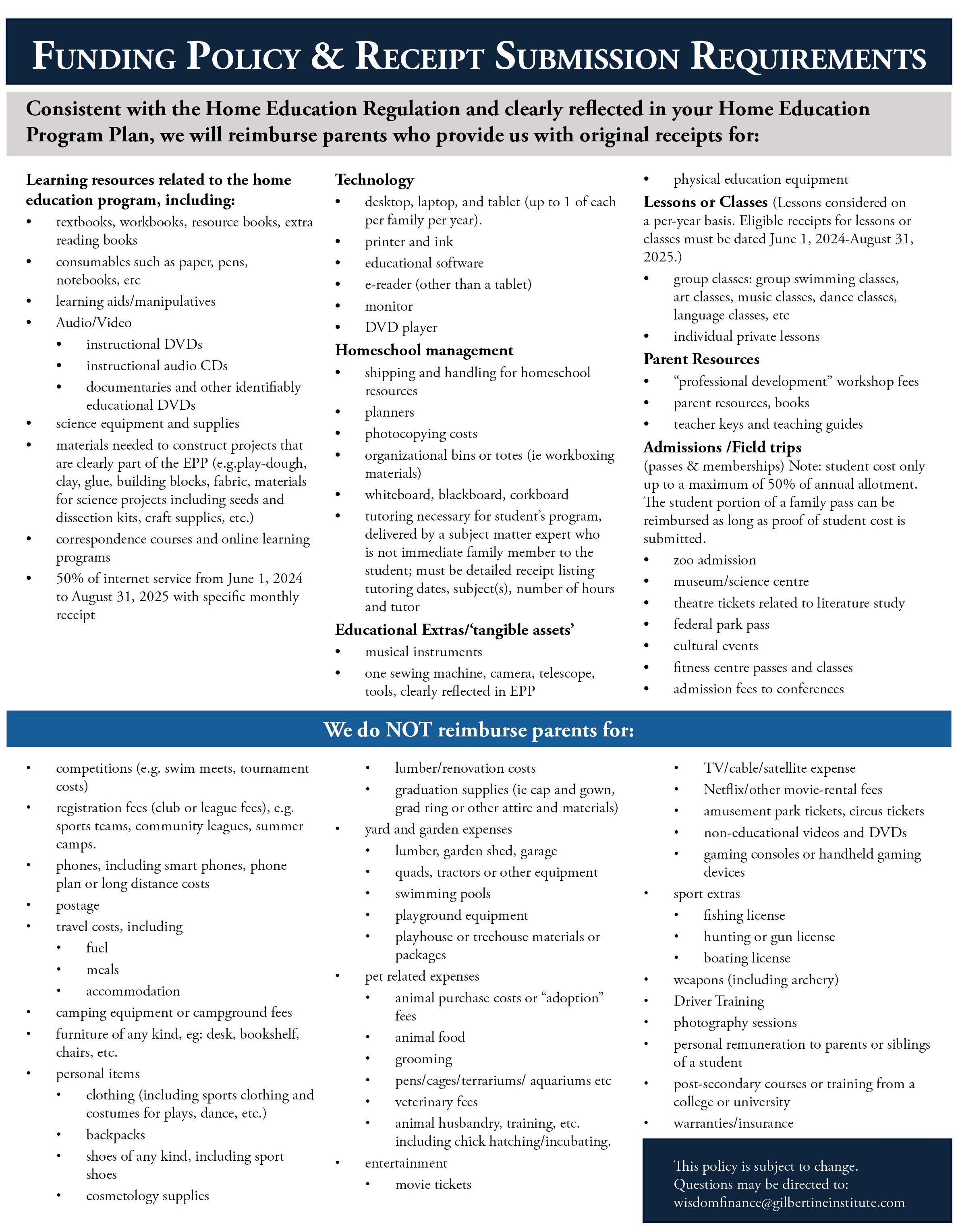
Now that you know your receipts are eligible, you can prepare your receipt submission!
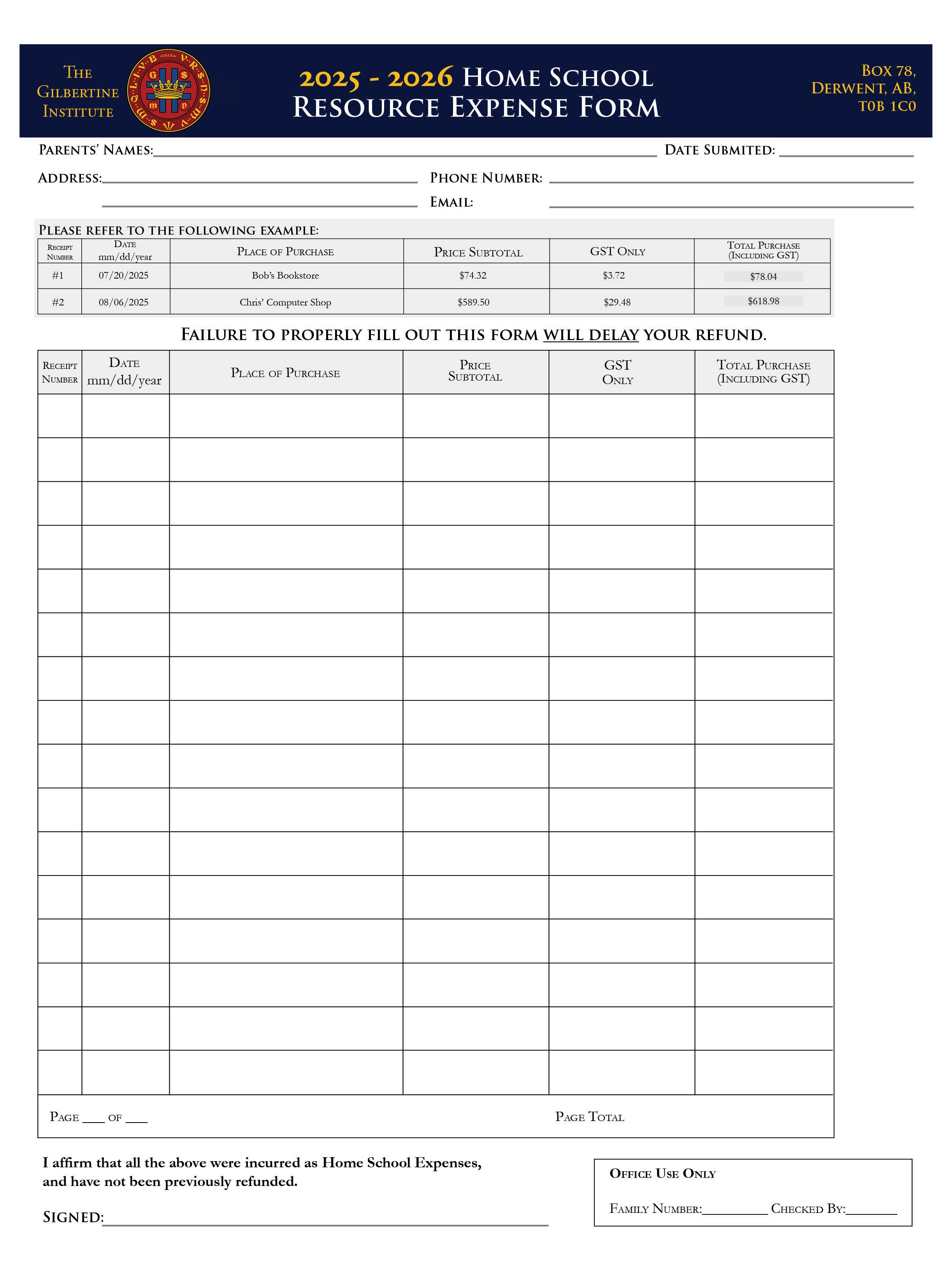
• Step 1: Open our Resource Expense Form (or Download and Print it) You can use the fillable pdf version of the form on our website which calculates the totals for you (and can be signed electronically), or you can download and print a blank version to fill in by hand. Both can be found on our website. Use black or blue pens when filling out your form by hand and ensure that all information stays within the designated areas on the sheet.
Fill out the information at the top of the form (Your name, address, date of submission, etc.) Leave the other boxes blank for now, you will fill them in on step 3
Please note, we cannot refund receipts submitted without a completed expense form.
• Step 2: Prepare your Receipts Follow these steps to prepare your receipts for submission. These steps apply to both online and mail submission unless otherwise specified. Remember, it’s now preferable for you to send copies of your receipts and hold on to the originals for your records. For online submission, scanned images are preferred (pdf ) but any image file format will do (Please note heic files are not supported by the online submitter).
If your receipts contain items you are not claiming, cross out the items you are not claiming or circle the ones you are (We may reject receipts if the entire receipt is being claimed but it contains items that are not eligible). Do not use highlighter as the chemicals in the highlighter will cause the ink to fade.
Please leave a note for items that are not clearly itemized. This is common with till receipts. For example, if the receipt says “KITTY-RAINBO,” we cannot know that it’s for a “Kitty Rainbow Notebook” unless it is clarified by you.
Number the receipts in chronological order: I.e. write “1” on the oldest receipt you are claiming, “2” on the second oldest receipt, etc. If you are submitting online and are having difficulty numbering them digitally, just make sure each receipt is uploaded in chronological order and corresponds to the order on the expense form.
Tape any till receipts to a larger sheet of paper (for mailing only). Please only tape them to one side of the larger paper, and take care not to tape over any of the ink as this will cause it to fade. If the receipt is the size of a full page, you do not need to tape it to another page.
Submit the receipts in their numbered order (For mail, place them in the envelope in order).
1. If the receipt you are claiming is specific to an epp/epps, write the names of the student/students on the receipt. For example, you have 9 students with us. Only John is in basketball. You would write “for John” on the receipt for the basketball hoop you are submitting so we know which epp to check.
2. Receipts in a foreign language must have an English translation attached to them.
3. Internet receipts: We can only reimburse 50% of internet bills, and for the internet portion only. On your Resource Expense Form, enter 50% of the subtotal and 50% of the gst Add the two together in the “Total” section for what you can claim. We cannot refund other services you may be paying for to your internet provider (common culprits are “fire-box” or built in streaming subscriptions). If your bill is itemized as

a “bundle” which contains non-internet items, we will have to reject the bill. Regarding proof of payment for internet, it is often contained in the following month’s bill (where it says “balance forward: 0 00”). Always submit a credit card statement for the last month you are claiming if the bill does not say “paid” or “balance owing: 0 00” on it. You must also submit a bill for each month you are claiming: it is not sufficient to provide a single month’s payment and request the full year.
• Step 3: Fill out the Receipt Information in the Expense Form You can claim 16 receipts per Resource Expense Form. If you have more than that amount to claim, simply fill out another expense form. You can make as many receipt submissions as you’d like in a given month.
1. Under the “Receipt Number” section, write the receipt number that you assigned to it (Not the receipt’s actual receipt number or invoice number).
2. In the “Date” column, write the date of purchase for the receipt.
3. In the “Place of Purchase,” write the name of the store (if it’s an online purchase, simply write the website name. For Amazon purchases, writing “Amazon” will suffice, rather than the Amazon seller’s name.)
4. In the “Subtotal” section, fill in the pre-tax subtotal. Include the cost of shipping here as well.
5. In the gst section, write the gst and only the gst (For bc receipts, do not add the pst to this amount. Include that in the “subtotal”.) For usd purchases, leave this section blank and fill in the “subtotal” and “total” section.
6. Finally, write the entire total in the “Total” section (If you are using the fillable form, this will calculate automatically).
7. In the “Page Total” section at the bottom, please write the total for that page only. (This will fill automatically in the fillable pdf ). If you are submitting multiple forms, do not add the form totals together in that box.
8. Sign the bottom of the form.
• Step 4: Mail or upload your submission! If uploading: After each file is uploaded and you click submit, you should receive a confirmation email from us within the next ten minutes or so. This will contain a link where you can review your submission.
Sometimes this confirmation email can end up in your spam folder. If you don’t receive this email, try submitting again. If the issue persists, contact us as soon as possible to confirm whether or not your submission went through. We have no way of knowing if a submission failed, so it’s very important to let us know if you think it did!
If mailing: Mail to the following address:
WISDOM Home Schooling
Attn. Finance
Box 78
Derwent AB T0B 1C0
Make sure the post office post marks the date on the receipt.
You will receive a confirmation email when your mail has been received.
Remember, if you have any questions do not hesitate to reach out to us! We are happy to help you prepare a flawless submission so you can receive your full expected refund.
For information on when you will receive your refund and what happens if you make a mistake with your submission, please read “The Receipt Refund Process”on page 10.


Receipts are processed in the order they are received. When we receive receipts in a given month, they are set aside to be processed the following month. For example, receipts submitted in September are processed for refund in October. To process, we manually go through each individual receipt, ensuring that it is eligible for reimbursement (i.e. lines up with EPP, contains proof of payment, etc.)
If we have time, we always reach out via email if there are problems with your submission which can be fixed. This is not guaranteed, however, as our workload can vary greatly and ultimately it is your responsibility to ensure you have submitted properly. The best practice is to read through the policy carefully and call us ahead of time if you have any questions (please find the policy at the back of this manual). We are more than happy to help you prepare your submission ahead of time so there are no surprises!
If we cannot refund an item because it’s not reflected in your epp properly, there may be a delay in that item’s reimbursement, even if you submit a corrected epp to your facilitator right away. This is because getting it approved and uploaded depends on the facilitator’s availability, which cannot always be guaranteed.
Again, if you are unsure about your receipt submission, please contact us! We are happy to answer any questions you may have so that you can make a flawless submission and receive your full expected refund.
If you have submitted your eft information to us (see below), you will receive a refund for receipts submitted at the end of the month following when you submit (with the exception of the end of the school year, see below). So if you submit in September, you will be refunded at the end of October, and so forth. This makes the ongoing deadline for receipt submissions the last day of a given month.
If you have not submitted your eft information, you will receive a single refund cheque at the end of the school year (mid-July).
May 31st is the final deadline for receipt submissions! Any submissions received after May 31st will be set aside to be processed at the beginning of the next school year (end of October). Receipts submitted in May will be refunded mid July rather than at the end of June. Because of the huge volume of receipts we always receive at the end of the school year, we require a couple extra weeks to process them all. If you are submitting via mail, make sure the post office post marks the envelope for you.
For those who have submitted an eft application along with a void cheque or bank verification letter to eft@gilbertineinstitute.com, you will receive your refund via direct deposit on the last business day of the month. Please note it can take 1-2 business days to reach your account, depending on bank processing times. You may also mail these items to us if you prefer, though we recommend email as it’s more reliable.
1. Claims of less than $20 will not be processed, but held until a larger claim is submitted.
2. You do not have to re-submit the eft application unless your bank information has changed, or you “take a break” from schooling with WISDOM (ie, you don’t enroll with us for a school year). When you re-enroll, you will need to resubmit your eft application.
3. Families that prefer refund by cheque may choose to not submit an eft application. If the application is not submitted, you will receive one refund cheque which will be mailed on or around July 15th of that school year for receipts submitted throughout the year.
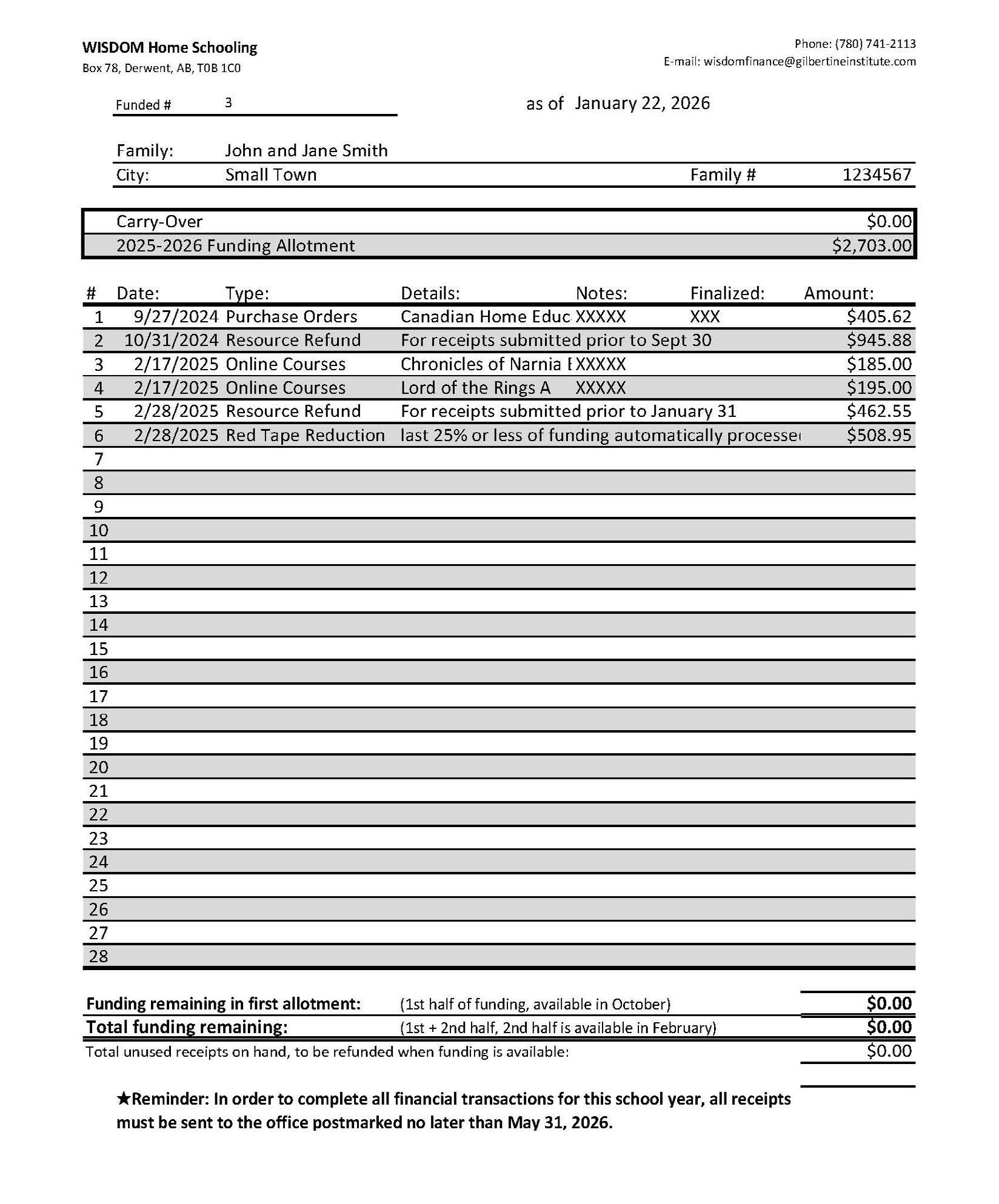
On the day of the refund, you will be emailed a link to your refund summary sheet. It is always good to check your refund summary, even if you received your full expected amount. Here is a quick overview of the refund summary sheet:
A B C
• This is where you’ll see how much funding you were allotted at the start of the school year, as well as how much funding may have carried forward from last year.
• This is where you’ll see how much funding has been used, and what it was used for. “Red Tape Reduction” is the amount we refund you when you claim over 75% of your funding for the school year.
• This is where you’ll find your total funding remaining in your first allotment and for the entire year. You’ll also see your “total unused receipts on hand” amount. This is where we document receipts we haven’t been able to refund just yet, but will once your funding is available again.
B C

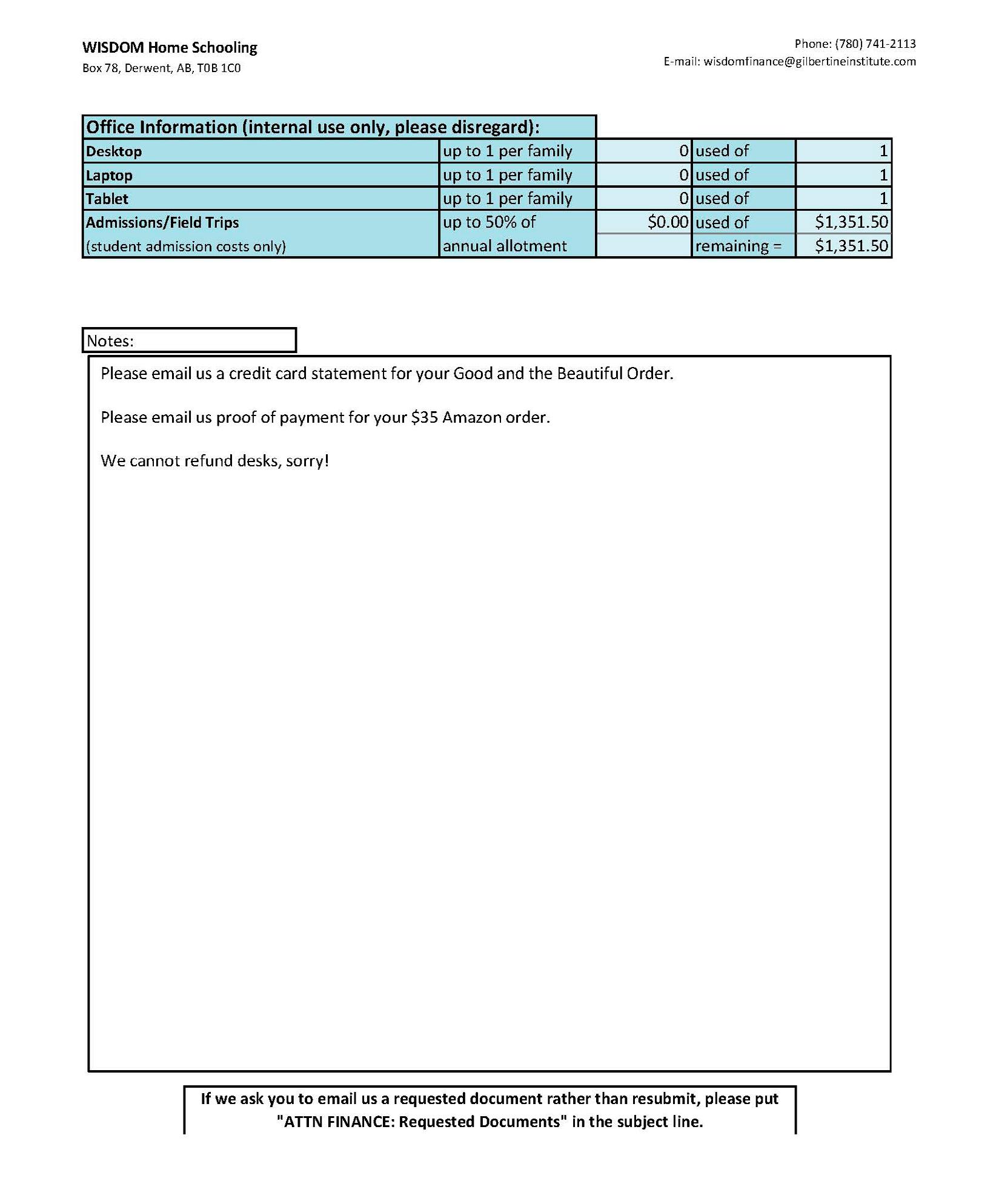
• This is where we track allowances. This section is commonly mistaken as an “extra funding pool,” but in reality it’s where we keep track of how much funding was spent on items that have limits (field trips and computers.)
• This is where you will find any important notes about receipts we were not able to refund. It is always good to check the notes of your refund summary even if you received your full expected amount, as there may be receipts you can fix to be refunded when your funding becomes available again.

Purchase orders (POs) allow you to pay for educational resources directly from your funding (as opposed to paying out of pocket and then applying for reimbursement). Purchase orders can only be made through businesses listed in our approved purchase order vendor list,* which can be found on our website.
1. Each vendor has their own preferred method of contact, whether it’s email, phone or in-store. Check the vendor list to see their preferred method of contact.
2. After contacting them through their preferred method, tell them you would like to make a purchase order through WISDOM.
3. Give them the list of items that you will be purchasing and your family ID number. This number can be found in your parent portal, or by contacting the WISDOM office.
4. The Vendor will email WISDOM an invoice for the items you are trying to purchase.
5. As long as you have available funding and the items are eligible as per our policy (please find it at the end of this manual), WISDOM will approve the invoice and issue the vendor a PO number within 1-2 business days.
6. The vendor will let you know your order is ready for pickup or out for delivery.
7. The vendor will bill The Gilbertine Institute (WISDOM) directly out of your available funding.
Some vendors are set up to make purchase orders through their websites. If you are checking out and you see a box that says “purchase order number,” enter WISDOM PO and your family ID number there. The vendor will then initiate the purchase order process with us and ship the items to you once the order is approved.
If you submit a PO for something that costs more than the funding you have available, you will simply have to pay the difference out of pocket. We will cover as much as we can with your available funding and the vendor will charge you for the rest. You can always submit the receipt for the extra cost and we can refund it once your funding becomes available again.
Just because a business is registered with us for purchase orders does not mean we can refund any and all items that they sell. Items you purchase from them must still be eligible for reimbursement as per our policy (please find it at the end of this manual).
*If you know of a company that would like to become a registered PO vendor with WISDOM, please have them email us at purchaseorders@ gilbertineinstitute.com. If they are eligible, we will email them an onboarding package to set them up as a PO vendor with us.

• Funding Policy
• EFT Application
• Expense Form
• Declaration Form

TheGilbertine Institute is pleased to offer Direct Deposit for payments. Instead of mailing a cheque, we will electronically transfer payment to your bank account and notify you via e-mail (or postal mail, if you don’t have email) that the bank deposit is being made. This will benefit your cash flow by getting funds into your bank account faster and avoid problems with lost and stolen cheques and postal disruptions. Direct Deposit is secure, and providing this information only allows us to deposit into your account. Please complete and sign this form.
namE:
strEEt addrEss:
city: provincE:
phonE (with arEa codE):
Email: postal codE:
d ir E ct d E posit i n F ormation
Your payment will be deposited directly into your BANK ACCOUNT.
In addition to this form, you MUST provide either a copy of a VOID CHEQUE or BANK ACCOUNT VERIFICATION from your bank clearly stating your Bank ID, Transit ID Code, and Account Information
I hereby authorize The Gilbertine Institute to initiate deposits to the financial institution as indicated above. This authorization will remain in effect until I revoke it in writing.
If my bank information changes, it is my responsibility to provide updated information to The Gilbertine Institute. Failure to update information will result in unsuccessful transmission of payment; charges incurred for failed payments will be my responsibility.
authorization (Sign and Print Name):
Upon completion, please email this form and required attachments to eft@gilbertineinstitute.com, fax to 780-581-1612, or mail to: thE GilbErtinE institutE Box 153, Derwent, ab, t0b 1c0
The Home Education Grant supports educational choice for students and parents. The Home Education Student Grant is provided to the school authority to support home education students. Up to 50 per cent of that funding is to reimburse the parent/or guardian for instructional materials and resources that support the educational program at home. Furthermore, parents who submit receipts for at least 75 per cent of eligible expenses will receive the entire $901 (Grades 1-12) or $450.50 (ECS). Parents have up to two years to access the parental portion of the home education funding If the parent portion is being claimed in the second year, please ensure the form being used is for the school year in which the expenses occurred, as indicated in the header.
Parents will be allowed to transfer some or all of the parental portion of the home education funding to the associate school authority for eligible education supports in accordance with Section 7 of the Home Education Regulation, should they choose to. If parents decide to transfer their funding, they are required to sign the Parent Declaration below to facilitate this transfer. Transferred funding cannot be used to support tuition or any other expense prohibited under the Standards for Home Education Reimbursement.
The deadline for this declaration form is August 31 of the current academic school year for the school's year-end accounting purposes
Declaration by Parent/Guardian
I/We, ________________________ parent(s)/ guardian(s) of _ , (Alberta Student Number), transfer $__ of the maximum amount of $901 (Grades 1-12) or $450.50 (ECS) that will remain as the unclaimed parental portion of the home education funding allocation for the 2025-26 school year to school authority for education supports provided by the school authority.
The Gilbertine Academy S2338
Signature of Parent(s)/Guardian(s)
Name(s)
Date (yyyy-mm-dd)