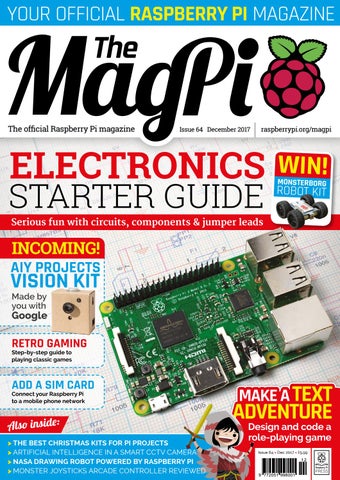
YOUR OFFICIAL RASPBERRY PI MAGAZINE
The official Raspberry Pi magazine
Issue 64 December 2017
raspberrypi.org/magpi
WIN!
MONSTERBORG
ROBOT KIT
Also inside: > THE BEST CHRISTMAS KITS FOR PI PROJECTS > ARTIFICIAL INTELLIGENCE IN A SMART CCTV CAMERA > NASA DRAWING ROBOT POWERED BY RASPBERRY PI > MONSTER JOYSTICKS ARCADE CONTROLLER REVIEWED
Issue 64 • Dec 2017 • £5.99
12 9 772051 998001
Welcome
WELCOME TO THE OFFICIAL MAGAZINE verybody knows the Raspberry Pi is a coding tool. It’s inspiring a whole new generation of students and developers. But the Raspberry Pi is much more than that. Coding on a Raspberry Pi has purpose, and that purpose is to control hardware and make things that whizz, whirr, and do stuff. If you’re new to this. We’ve got an amazing Electronics Starter Guide (Page 18). If you’re already a master hacker, don’t worry: we have something massive for you this month… AIY Projects is back with a bang, and Google has revealed to us its new Vision Kit (Page 6). Think ‘Google Clips made from cardboard’. Inside is a new Vision Bonnet that adds an artificial intelligence chip to the Raspberry Pi, making the Raspberry Pi 60 times faster at vision processing. It also enables you to control electronic components with AI. (Remember: ‘Don’t do evil with your Raspberry Pi’.) Seriously though: it’s an amazing piece of kit and we can’t wait to see what you all make with it. I wish you all a Merry Christmas and a Hacky New Year. Don’t forget to share the things you build with us and the rest of the maker community.
PAGE 3 0
E
THIS MONTH: 06 AIY PROJECTS VISION KIT
The new smart camera project made by you with Google
18 ELECTRONICS STARTER GUIDE Get started with components, kits, and circuits
56 RETRO GAMING
Your quick-start 101 introduction to retro game emulation
62 MAKE A TEXT ADVENTURE
Lucy Hattersley Editor – The MagPi
Code your own text adventure with this classic tutorial
FIND US ONLINE raspberrypi.org/magpi
GET IN TOUCH magpi@raspberrypi.org
EDITORIAL
DESIGN
PUBLISHING
DISTRIBUTION
SUBSCRIPTIONS
CONTRIBUTORS
Editor: Lucy Hattersley lucy@raspberrypi.org Features Editor: Rob Zwetsloot rob@raspberrypi.org Sub Editors: Phil King and Jem Roberts
Seymour Distribution Ltd 2 East Poultry Ave London EC1A 9PT | +44 (0)207 429 4000 This magazine is printed on paper sourced from sustainable forests and the printer operates an environmental management system which has been assessed as conforming to ISO 14001.
raspberrypi.org/magpi
SEE PAGE 30 FOR DETAILS
Critical Media: criticalmedia.co.uk Head of Design: Dougal Matthews Designers: Lee Allen and Mike Kay Illustrator: Sam Alder
Select Publisher Services Ltd PO Box 6337 Bournemouth BH1 9EH | +44 (0)1202 586 848
For advertising & licensing: Publishing Director: Russell Barnes russell@raspberrypi.org | +44 (0)7904 766523 Director of Communications: Liz Upton CEO: Eben Upton
Alex Bate, Mike Cook, David Crookes, Kent Elchuk, Kyle Goff, Phil King, Sean McManus, Binsen Qian, Matt Richardson, Richard Smedley, Dean Swift, Clive Webster, Sai Yamanoor, Srihari Yamanoor
The MagPi magazine is published by Raspberry Pi (Trading) Ltd., 30 Station Road, Cambridge, CB1 2JH. The publisher, editor, and contributors accept no responsibility in respect of any omissions or errors relating to goods, products or services referred to or advertised in the magazine. Except where otherwise noted, content in this magazine is licensed under a Creative Commons Attribution-NonCommercial-ShareAlike 3.0 Unported (CC BY-NC-SA 3.0). ISSN: 2051-9982.
December April 2016 2017
3
Contents
raspberrypi.org/magpi
Issue 64 December 2017
TUTORIALS
COVER FEATURE 42
> BUILD A KALEIDO CAM Make a very artistic camera in the Pi Bakery
> GPIO CONTROL INTERFACE
46
How to use C-STEMbian for GPIO programming
48
> MAKE A XMAS TREE STAR 3D-print a star and light it up with a Raspberry Pi
> DIY AIR-QUALITY MONITOR
50
Use a Pi Zero to create a light-up air-quality sensor
18
54
> MOBILE INTERNET ON PI Using Hologram to get WiFi wherever you are
56
> PI 101 - RETRO GAMING Enjoy some classic games on your Pi using Lakka
STARTER GUIDE
IN THE NEWS
VISION KIT
A new AIY Projects kit is coming from Google
4
December 2017
ELECTRONICS
06
HACKING WITH PIP
The hackable handheld console
08
HACKSPACE
Read our new sister magazine for makers
12
raspberrypi.org/magpi
Contents THE BIG FEATURE
In association with
MONSTERBORG & THUNDERBORGS
MAKE A TEXT ADVENTURE Head North and get eaten by a Grue
97
62 REGULARS
YOUR PROJECTS
> NEWS
06 60 80 98
> TECHNICAL FAQ > BOOK REVIEWS > FINAL WORD
COMMUNITY
32
RAPANUI Making clothes with a Raspberry Pi
> PI ROOM INTERVIEW Bringing computing to Togo in Africa
> THIS MONTH IN RASPBERRY PI 84 Everything else that happened in the community
> EVENT REPORT - PYCON Here’s what went on at this year’s PyCon
> COMMUNITY PROFILE This month we highlight Lorraine Underwood
SMART SECURITY
34
A powerful homemade security camera
NASA ARM
> EVENTS SCHEDULE Here are some events you can go to this month
> YOUR LETTERS
36
82
We answer your pressing questions
88 90 92 94
A space-age robot that draws whatever you ask
OUT RUN ARCADE 38 Hacking a toy into the best arcade racer ever
REVIEWS > MONSTER JOYSTICK KIT > CHRISTMAS KITS
raspberrypi.org/magpi
December 2017
76 78 5
News
FEATURE
VISION KIT Google AIY Projects team reveals do-it-yourself Pi Zero W intelligent camera oogle AIY Projects has announced its Vision Kit, a smart camera kit you can build using a Pi Zero W, Pi Camera, Module, and a powerful AI board called the ‘Vision Bonnet’. Keen Google fans will recognise the similarity between the Vision
G
THE VISION BONNET Pi camera port
Kit and Google Clips, a recently announced smart camera. The Vision Kit enables makers to build a similar device, but that’s just the start.AIY Projects is all about developing hackable AI kits for makers that they can integrate into their own projects.
“We look at how do we get these technologies in people’s hands in ways that are easy,” says Jess Holbrook, AIY Projects UX Research Lead. “AI and machine learning are up on this pedestal,” he explains. Google wants to show makers that
Movidius MA2450 The beating heart of the Vision Bonnet, this powerful VPU chip makes the Pi Zero W 60 times faster at vision processing
The Pi Camera Module is connected directly to the Vision Kit bonnet
GPIO breakout pins The Vision Bonnet has six GPIO breakout pins, enabling you to integrate the kit with your own hardware projects
6
December 2017
raspberrypi.org/magpi
AIY VISION KIT
News ORDER DEC The AIY Projects Vision Kit will be available for pre-order from Micro Center in December 2017. The initial run is going to be very limited. If you’re interested, we advise you to order a kit as soon as it’s available. microcenter.com
they can build pretty impressive stuff themselves. As with earlier AIY Projects, Google is interested to see what ideas makers come up with to use AI to “solve problems for themselves, their families, and their communities.”
“We have developed a deep learning inference acceleration engine that we’re running on the chip,” explains Kai Yick from the AIY Projects team. “It’s 60 times faster than trying to do it on a Raspberry Pi 3.”
The Vision Kit adds an advanced AI hardware board to the Raspberry Pi All aboard AI
The Vision Kit adds an advanced AI hardware board to the Raspberry Pi. Developed by Google, it’s called the Vision Bonnet and sports a powerful Movidius MA2450 (movidius.com/myriadx) vision processing chip. The chip acts as a “neural network accelerator” says Billy Rutledge, Director of AIY Projects at Google. “In the case of Vision Kit, we are moving forward in a pretty big leap and running the AI neural network on the accessory board itself.” This is in contrast to the earlier AIY Projects Voice Kit, which relied on Google Cloud infrastructure for voice recognition and natural language processing. raspberrypi.org/magpi
The projects you build will operate independently of a network connection, making for a more versatile piece of equipment. The Vision Bonnet also ensures the security of captured images, as they are all processed locally on the device.
The third neural network can identify 1,001 common objects, like a cup, an orange, or a chair. A label displays the name, and the level of confidence in the neural network’s inference. In the future, the hope is that users will be able to modify these neural networks. You could take the cat, dog, and person model and modify it to look for rabbits. Then build a project that works with a rabbit hutch, for instance. Both The MagPi and Google can’t wait to see what makers have in store for the AIY Projects Vision Kit. Pre-orders for the Vision Kit will begin in December at Micro Center (microcenter.com).
Below The Vision Kit is a smart camera project used to detect faces, moods, and objects; you can build it at home and integrate it with your own projects
Kit form
Once you’ve assembled the Vision Kit, there are a number of neural networks software programs you can run. The first neural network is a “person, cat, and dog detector,” reveals Peter Malkin, Software Lead at AIY Projects. It detects if a person, cat, or dog is in the frame. The second neural network is focused on facial emotions. It will detect happiness, sadness, and other sentiments. December 2017
7
News
PIP
PIP – THE HACKABLE HANDHELD
cottish firm Curious Chip has unveiled Pip, “the playful handheld device you program yourself.” Pip has been launched on Kickstarter, with a modest £50,000 target – see kck.st/2yAEc4h. A £150 pledge bags you a Pip, while £200 nets you a Pip, camera, and maker pack.
S
THE
HACKABLE HANDHELD Make apps, play games, hack anything
With final-version prototypes to play with, Raspberry Pi co-founder Eben Upton has given his backing: “I’m super-excited about this! I’m really, really looking forward to seeing what people do [with a Pip].” Pip’s D-pad and buttons are mounted on two detachable USB controllers – however, Jason Frame, co-founder and technical lead for Pip, tells us, “We came up with the removable controller idea… a full two weeks before [a certain handheld game console
was announced]”. Two shoulder buttons are housed in the main body. Pip also includes a row of eight RGB LEDs and a 40-pin GPIO ribbon cable connector either side of its 4-inch, 800 × 480 pixel touchscreen. There’s a speaker, microphone, accelerometer, and compass, as well as two USB ports, HDMI out, wireless, and an optional 5MP camera. Pip is powered by a Raspberry Pi Compute Module 3 Lite.
Above Pip is more than a games console – it’s a mobile makers’ lab
8
December 2017
raspberrypi.org/magpi
PIP – THE HACKABLE HANDHELD
News
DOES COMPUTE Unusually, Pip uses a Compute Module 3 (CM3) rather than a Raspberry Pi 3. But Curious Chip didn’t know what would power Pip in the early days of development. “The CM3 Lite edition (with SD card support) was announced shortly before Pip v1 debuted at Bett 2017 [a trade show for education technology] and immediately we gave it a serious look,” Jason tells us. You can see the resultant motherboard to the left, with the CM3 slot (which the Raspberry Pi Foundation borrowed from laptop SODIMM memory) in the centre. Asked whether the use of CM3 gave Pip a possible upgrade option, Jason responds, “Size was the main concern… The smaller a device is, the more likely you are to take it with you and the more to can do with it.” He adds,“Pip should have enough juice for our expected use-cases for a good while to come. Isn’t a quad-core, credit-card-sized SoC with 1GB RAM enough for anybody?”
Made for making
Pip might look like a portable games console, and indeed it comes preloaded with “a number of open-source remakes of popular games like Pac-Man and Super Bomberman,” according to Jason. However, he adds, “What we really want is for kids – and adults! – to go beyond that: make stuff and share it with the world. Games, apps, physical stuff, everywhere and anywhere.” Pip was made with making in mind. “All we wanted to do,” Jason continues, “was make a portable device that you could have your
A portable device that you can have your own code running on in less than five minutes own code running on in less than five minutes.” To this end, Pip has its own IDE, called Curiosity. “It’s hosted on Pip itself,” Jason reveals, “so there’s nothing to install.” You can create software for Pip on any machine with a web browser. “Curiosity offers one ‘mode’ for each language supported by Pip: JavaScript, Python, Lua, and PHP+HTML5,” Jason explains. raspberrypi.org/magpi
Above Make apps, games, and other software with Pip’s built-in development tool
“There are built in libraries for games coding that simplify stuff like drawing, collision, particle systems, and even shader effects.” You can emulate your code in the browser, and “it’s just one click” to send your code to Pip wirelessly. For young coders, there’s a visual coding app called Livewire. Jason confirms , “We’ve been iterating [Livewire] for five years now.” December 2017
9
News
BITBARISTA
BITBARISTA THE FIRST AUTONOMOUS COMPANY? Coffee for the masses University of Edinburgh project might just be the first fully autonomous business. The Pi-powered BitBarista accepts BitCoin payments to dispense coffee, pays users to restock supplies, and will call a technician should a fault occur. BitBarista is not some glorified kettle with WiFi, though. Using the BitCoin from coffee sales, BitBarista “pays people for small services such as filling its water tank and replenishing it with
A
BitBarista pays people for small services such as filling its water tank and replenishing it with coffee beans coffee beans,” according to Dr Larissa Pschetz, Programme Director of Product Design and Researcher at the Centre
Above BitBarista asks users where to restock its coffee from – would you choose the cheapest, or the most ethical?
10
December 2017
for Design Informatics, University of Edinburgh and co‑creator of BitBarista. When coffee stocks run low, BitBarista asks the user to select a restock vendor. These options could be ranked in price order, or by ethical preference. Larissa explains, “I was also intrigued by this idea of an autonomous coffee machine that would reduce intermediaries in the coffee trade, potentially supporting smallholder famers in developing countries.” BitBarista is currently on a long-term trial throughout the UK, “which is revealing reactions to the machine’s autonomous features,” according to a University of Edinburgh spokesperson. So far, Larissa has seen that “some rituals such as making coffee for colleagues were lost
Above The technology is advanced, but BitBarista is built using a standard De’Longhi coffee maker
while others, such as watching who chose the ‘best price’ option, were created.”
Raspberry Pi and coffee
The Pi controlling BitBarista uses Raspbian “and different plug‑ins to simplify tasks and connect things together,” Larissa reveals. “We also use Electrum for the BitCoin payments.” The code is on GitHub, at magpi.cc/2iVHXKI. BitBarista might be useful for other vending machines, but Larissa warns, “The machine still needs to follow the social rules of the context where it is placed. If people think it is inappropriate they will probably turn it off.” Asked whether there were machines where BitBarista technology might not ever be appropriate, Larissa replies, “Of course there is always space for malicious practices, but people are careful and good at figuring these things out so it wouldn’t last in the long term.” raspberrypi.org/magpi