Safety information
• Please read and observe the guidance presented in the “Operating instructions and safety information” for doors. The document is available from our website at finstral.com/manuals
Operating and safety instructions. Entry doors.

• This guideline contains important information on the commissioning and operation of the door locking mechanisms. Please read it carefully prior to installation and commissioning and keep it at hand. Clients and users must be advised of the need to comply with this guideline. Failure to comply with it will invalidate the warranty for proper, trouble-free performance. We assume that installation and commissioning will be performed only by duly qualified specialist contractors and competent personnel.
• The door locking mechanisms were designed and
manufactured in accordance with safety regulations and harmonised standards. The safety and security features of these products are a key prerequisite for their compliance with European standard EN 14846. Do not make any changes that are not described in this guideline.
• The locking mechanisms shall be protected from moisture. They are not suitable for locations exposed to high humidity or chemical substances. Seal all potential points of water ingress.
• The locking mechanisms are primarily intended for installation in the front and side entrance doors of houses and apartments. Products manufactured to EN 14846 vouch for a high level of personal safety and adequate protection against burglary when fitted to doors and frames that are in good condition.
• All locally applicable regulations, guidelines and provisions governing installation shall be observed.
• A primary-side isolating device for the supply circuit and a suitable safety device (fuse/circuit breaker) shall be provided by others.
• When running cables, avoid sharp edges and prevent the cables from being pinched, squashed or stretched (subjected to tension).
• To ensure safety and compliance with approvals (CE), any unauthorised alterations and/or modifications to the door are prohibited. Any such action will render the warranty and declaration of performance null and void.
• Only use the locking/latching system when it is in technically flawless working order. Immediately rectify any faults that may compromise safety/security. The drive shall be disconnected from the mains and operated manually until the fault has been rectified.
• For doors with electrical connection:
◦ Do not operate the handle during the motorised locking or unlocking action.
◦ Product safety largely depends on good-practice installation and regular maintenance. The installation of electronic components demands particular care as chafing points, defective cables, damaged contacts etc. are safety-critical and can lead to system failure. Prior to installation, ensure that all components are in flawless condition.
◦ Before any installation, repair, maintenance or adjustment operations are performed, all associated circuits must be disconnected from the voltage supply and secured against inadvertent reconnection.
◦ During installation, take care to prevent cables from being damaged, kinked or pinched.
Note: Good-practice tightening of screws When dismantling and refitting components, take care not to damage the cables when fixing screws. Screws must always be tightened by hand (max. torque 1 Nm). As some components are made of plastics, overtightening – e.g.
through the use of a cordless screwdriver – may result in damage.
Commissioning
Power consumption for motorised lock (motorised unlocking, motorised locking)
Presented below are the technical data for power consumption with motorised locks.
In standby mode, incl. 12 V DC switched-mode power supply
During locking cycle
During unlocking cycle
When retracting latch for 5 seconds
Motor inrush current
Short-term current spike in case of blockage
Temperature range
Door weight
On-site commissioning
Approx. 65 mA
Approx. 450 mA
Approx. 400 mA
Approx. 250 mA
Approx. 1 A
Approx. 3 A
-10 °C to +50 °C
Up to max. 200 kg
Install the door unit in the wall opening as normal and run the power cable (230 V AC or 12 V DC) to the interior face of the wall. Make sure that no fixings (e.g. wall ties) are installed near the electronic components or cables. Have the power cable connected to the mains supply by an electrical contractor. Where appropriate, check that the door frame is properly earthed. An emergency power supply should be provided to ensure that all electronic components are served, even in the event of mains failure. Unlocking via the profile cylinder is possible at all times. A check to ensure that the magnet is correctly positioned and seated is part of the commissioning inspection.
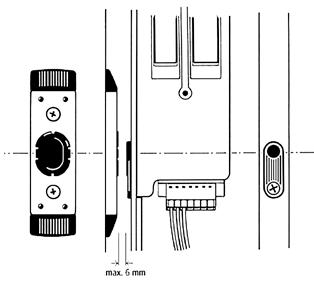
The magnet and the motor’s magnetic sensor must be at the same height (acceptable deviation ± 1 mm).
Connection diagram: Version 1 – Standard – with tappet contacts / with radio receiver module / external power supply unit
Top-hat rail power supply unit (article number 02-11699)
Integrated power supply unit
230 V AC – 12 V DC
Max. 4.5 A/54W
The intercom system (by others) can be connected to the radio receiver module of the motor via an external radio transmitter (article number 02-11203). (For connection details, see page 8.) The radio transmitter can be connected directly to the intercom system. It will open the door via radio signal.
Alternatively: With integrated power supply unit
Commissioning
Built-in transmitter
Intercom: Built-in transmitter 02-11203 (self-locking lock with opening motor and motorised lock)
The built-in transmitter is a stationary radio transmitter with rolling code encryption. Provided voltage is applied, the radio telegram will be transmitted for a maximum of 10 seconds. This allows the activation of a device by radio signal.
The built-in transmitter is comparable to a remote control – with the application of a voltage at the transmitter corresponding to the pressing of a remote control button.
Installation instructions
Avoid installing the transmitter at the following locations so as not to compromise its range:
• On a distribution board or in a metal housing
• In the immediate vicinity of large metal objects
• On (or near) the floor
Connecting transmitter
Connect a switched voltage source to the transmitter via the blue cables (voltage: 6 V – 24 V AC, 50 Hz / 6 V – 32 V DC; Imax = 11 mA).
Pairing with radio receiver module
1. Using a thin object, briefly (max. 1 second) press the programming button of the control module or radio receiver module. The green LED (control module) or red LED (radio receiver module) will flash slowly.
2. Then press the front, middle button on the master remote control within 20 seconds. If the control module or radio receiver module has accepted the master remote control, the green LED (control module) or red LED (radio receiver module) will light up for 2 seconds, then continue to flash slowly.
3. Proceed by applying a voltage twice in succession within 20 seconds. Should the 20-second time limit be exceeded, then the pairing process will be aborted. If the new remote control has been accepted by the control module or radio receiver module, then the green LED (control module) or red LED (radio reception module) will light up for 1 or 4 seconds respectively. If the built-in transmitter is not recognised during the pairing process, then the relevant function will be aborted.
Connection diagram: Version 2 – all-inclusive (plug & play)
The door is fully operational after mains connection (230 V AC). The power supply unit, control unit and all cables are already integrated in the door. External components can also be connected to the control unit. Examples: Intercom system, alarm system, smart home systems, turn-only door drives, external controls (e.g. combination lock), time switch etc. For the connection of external components to the control module, see pages 14-15 and 18-20.
Control unit connections For connection options, see page 15 (self-locking lock with opening motor) or pages 19-20 (motorised lock)
White output 5 Yellow output 6 Green input 7 Brown input 8
Motor drives
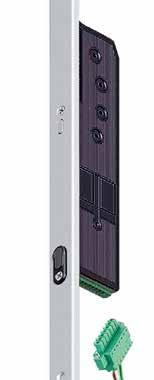
→ Self-locking lock with opening motor
Motor drive for self-locking lock with opening motor (motorised unlocking, automatic locking)
Size
50 mm x 206 mm x 15.5 mm
Weight Approx. 500 g (electrical locking unit only)
Voltage supply 12V DC
Signalling 1 piezo buzzer
Temperature range -10 °C to +50 °C
Contact rating of relays Max. 350 mA (resettable fuse/PTC)
→ Motorised lock
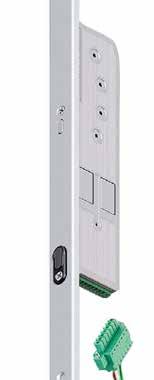
Motor drive for motorised lock (motorised unlocking, motorised locking)
Size 50 mm x 206 mm x 15.5 mm
Weight
Approx. 500 g (electrical locking unit only)
Voltage supply 12 V DC
Signalling 1 piezo buzzer
Temperature range -10 °C to +50 °C
Contact rating, terminal 6 Max. 350 mA (resettable fuse/PTC)
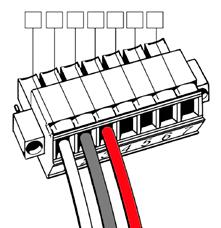
Opening pulse 6–12 V AC / 6–24 V DC
Output (12 V DC, 350 mA) GND
Opening pulse (voltage-free)
Data: 12 V GND
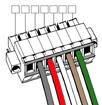
(data) Black or brown (GND) Red or green (12 V)
White
Motor drives → Multifunctional plug
Application examples
The stated applications merely serve to illustrate some of the connections frequently required in practice. It is essential to apply the relevant switching signal (e.g. 12 V DC pulse or voltage-free contact) to the appropriately configured terminal.
Note
The use of shielded cables is recommended to prevent external interference from affecting proper operation.
Terminal Assignment
1 + 2 + 3 These terminals are already used for the 12 V DC supply and data lines of the motor drive.
4 + 5 Input (pulse < 1 second)
E.g. for external access control systems (code lock, fingerprint scanner, eye scanner) fitted directly to the door leaf. A voltage-free pulse from the intercom or access control system triggers motorised unlocking.
5 + 6 Output
E.g. as power supply for illuminated push handles or illuminated glazing units.
Terminal 5 = GND (ground)
Terminal 6 = 12 V DC (max. 350 mA)
5 + 7 Input (pulse < 1 second)
E.g. for external access control systems (code lock, fingerprint scanner, eye scanner) fitted directly to the door leaf or for direct connection of intercom systems.
Terminal 5 = GND (ground)
Terminal 7 = 6–12 V AC or 6–24 V DC
Radio receiver module
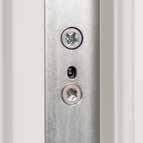
Presented below is an overview of the LED signals and what they indicate for doors with a radio receiver module.
Programming button LED signals Meaning
The LED lights up for 2 seconds. A signal from a previously paired transmitter has been received. The lock is unlocked by the motor.
The LED lights up for 0.5 seconds. A signal from a not previously paired transmitter has been received. The lock is not unlocked.
The LED does not light up at all. The LED does not light up in the non-actuated default state as no transmission signal is received. If, however, the LED does not light up despite transmission of an opening signal, then the radio receiver module or motorised lock has not yet been connected to the 12V DC operating voltage or the cables on the motor plug have been wrongly connected.
button / LED
receiver module
Control module → Self-locking lock with opening motor
Control module and self-locking lock with opening motor (motorised unlocking, automatic locking): three outputs
The control module has three outputs: one cable connection for the power supply, one for the motor and one for intercom systems and other devices.
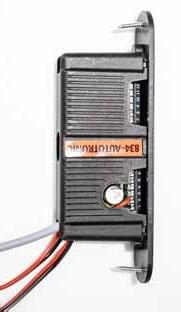
Access to control module connections
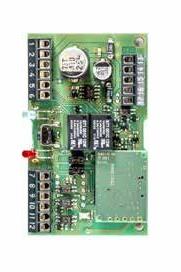
To access the control module connections, you can remove the circuit board. Start by taking off the stainless-steel front cover. This is held in place by two magnets and is easily removable. To do this, carefully insert a small flat-head screwdriver or your fingernail into the cover recess to prise off the cover. For this, you may need to unscrew the housing and pull the cables along. This will enable you, if required, to reconnect the existing wiring (yellow/white, green/brown) to different terminals. Once all cables are connected to the correct terminals, you can reinsert the control circuit board into the housing and refit the cover.
Description of connection pins
Terminal Pin assignment
Switched-mode power supply
1 GND 2 +12 V
Outputs:
3 + 4
Turn-only door drive
Outputs:
5 + 6
Door status output
Inputs:
7 + 8
Door opening
Control unit power supply, 12 V DC ± 4 % (from power supply unit code 23012 or external power supply unit article no. 02-11699)
Switch relay (normally open): e.g. for electric turn-only door drives
• Function 1
Directly after the motorised lock is opened, a relay closes the contact for 1 second. The turn-only door drive or a similar device can be connected to this switch.
In this case, the turn-only door drive is activated and opens the door when the contact is closed.
• Function 2
The DRT jumper (see circuit diagram) can be removed if required. This ensures that the output remains switched on for as long as a continuous signal is applied to the permanent-open function (see function 2 for terminals 9 + 10).
The terminal 5 + 6 wiring (white and yellow cables) can also be used.
The switch relay (normally closed contact) indicates, e.g. with alarm systems, whether the door is open or closed. Opening the door leaf and/or unlocking the lock will deactivate the normally closed contact within 1 second. The contact will remain open on the output side until the door leaf is re-closed and locked by the motor.
This enables an alarm system control to read the signal digitally and indicate whether the door is open or closed.
Ready-wired (white and yellow cables), output frame side
Control input for door opening (6–12 V AC or 6–24 V DC)
Function: door opening
If voltage (6–12 V AC or 6–24 V DC) is applied for 1 second, then the motorised lock will open. The door will fully relock after 3 seconds.
Application example: The door is opened from the inside via an existing intercom system or, for example, via a building management system with a 12 V AC control line.
Ready-wired (brown and green cables), output frame side
Inputs:
9 + 10
Door opening
Inputs:
11 + 12
Door opening
Input (voltage-free) for door opening
This input can be optionally configured with two functions:
• Function 1: Short-time unlocking (door open)
Standard door opening with full relocking after 3 seconds.
If a voltage-free pulse is applied to this input for ≤ 1 second (e.g. controlled by an access control system or a manual push-button), then the motorised lock will open.
• Function 2: Permanent unlocking (permanent-open function)
If, for example, with a normally closed switch, a continuous voltage-free signal is applied to this input – controlled e.g. by a time or manual switch – then the motor will open the lock.
As long as the continuous signal is applied, the latch and all deadbolts will remain retracted.
The terminal 7 + 8 wiring (brown and green cables) can be used.
Input for voltage-free signals
This input can be optionally configured with two functions:
• Function 1: Short-time unlocking (door open)
Standard door opening with full relocking after 3 seconds.
If a voltage-free pulse is applied to this input for ≤ 1 second (e.g. controlled by an access control system or switch), then the motor will open the lock.
Application example: The door is intended to be opened from the outside via an access control system, e.g. using combination code lock or fingerprint scanner.
The terminal 7 + 8 wiring (brown and green cables) can be used.
13 – 15: These inputs are reserved for power and data transmission from the control unit to the motor.
Inputs:
16 + 17
Deactivation
Disabling of lock functions for voltage-free signals
As long as this input is activated, i.e. the switch is closed, then all motorised opening functions are disabled. The opening pulses directly at the motor (terminals 4 and 7) are also deactivated.
This function allows deactivation of the motor control for certain periods. Operation of the motorised lock, for example, should be deactivated after an alarm system has been armed.
Control module → Self-locking lock with opening motor
Application example with combined connections and functions
Activation of the door’s permanent-open function is, for example, required during the daytime, with full automatic locking at night. The door is opened from the outside via an access control system (e.g. using a combination code lock or fingerprint scanner). Moreover, the door leaf should be automatically swung open by an electric turn-only door drive and the leaf position monitored for the alarm system.
Terminal assignment
Connect the time switch with continuous voltage-free signal to terminals 9 and 10 for function 2. Connect the access control system with voltage-free pulse to terminals 11 + 12 for function 1. Connect the turn-only door drive to terminals 3 + 4. Connect the alarm system to terminals 5 + 6.
Troubleshooting
Presented below is an overview of possible faults, causes and remedies for doors with control module and self-locking lock with opening motor (motorised unlocking, automatic locking). Fault
Motorised unlocking does not work.
The green and red LEDs flash alternately.
The deadbolt is stiff. Check the door installation and, if necessary, realign the door frame. If required, readjust the door leaf position on the hinge.
The door is warped. Check the door installation and, if necessary, realign the door frame. If required, readjust the door leaf position on the hinge.
The striking plates are fitted too tightly.
The central deadbolt has been extended (or the lock has been locked using the profile cylinder).
Adjust the contact pressure on the striking plate.
Unlock the lock using the profile cylinder. A locked lockcase will disable all opening motor functions.
The lock fails to unlock. The green and red LEDs light up. The data connection between the electronic drive unit and the control unit has been interrupted.
One or more cables are damaged.
The tappet contact is not in contact with the mating surfaces.
Check that the spring-loaded contact pins make contact.
Check whether the contact pins are in contact with the mating surfaces when the door is closed.
Check all cables and plug connections.
Lubricate the mating surfaces and check the rebate clearance (distance between sash and frame).
The lock fails to lock.
The green LED flashes slowly.
Motorised unlocking does not work.
The door cannot be opened by remote control.
The door cannot be opened via an external opening pulse.
With motorised opening, the latches are retracted for too short a period.
The door has been opened.
The latch remains retracted.
The magnets at the locking points in the striking plates are out of range.
The permanent-open function is activated.
No LED lights up. The power or data connection between the electronic drive unit and the control unit has shortcircuited.
The red LED lights up. The remote control is not paired.
The distance from the receiver is too great.
The remote control battery is running low.
The red LED lights up. The external connections have not been correctly carried out.
The green LED lights up when the door leaf is in the closed position.
The green and red LEDs light up.
The contact magnet for the motor is missing.
This is not a fault. The signal indicates that the door has been open for over 20 seconds.
The forend fixing screws are jamming the drive rods. An external control signal has been applied for too long to terminals 9 + 10.
Check the rebate clearance and fit the door correctly.
Deactivate the permanent-open function (see Finstral door operating instructions).
Check that all wiring in the sash is correctly connected (from motor to the tappet contacts). To do this, remove the gear mechanism.
Pair the remote control.
Move the remote control closer to the door.
Replace the battery.
Check that the connection to the control unit is correct and properly connect up the control unit.
Fit the contact magnet on the frame side or insert it into the striking plate.
Close the door. The door will automatically relock.
Screw in the screws perpendicular to the forend. Reduce the pulse duration to ≤ 1 second.
Control module
→ Motorised lock
Control module and motorised lock (motorised unlocking, motorised locking): three outputs
The control module has three outputs: one cable connection for the power supply, one for the motor and one for intercom systems and other devices.
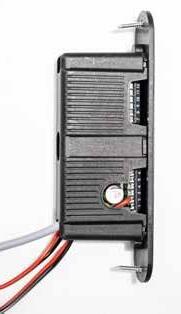
Access to control module connections
To access the control module connections, you can remove the circuit board. Start by taking off the stainless-steel front cover. This is held in place by two magnets and is easily removable. To do this, carefully insert a small flat-head screwdriver or your fingernail into the cover recess to prise off the cover. For this, you may need to unscrew the housing and pull the cables along. This will enable you, if required, to reconnect the existing wiring (yellow/white, green/brown) to different terminals. Once all cables are connected to the correct terminals, you can reinsert the control circuit board into the housing and refit the cover.
Description of connection pins
Presented below is an overview of the terminals and the associated pin assignment.
Terminal Pin assignment
Switched-mode power supply
1 GND
2 +12 V
Outputs:
3 + 4
Turn-only door drive
Control unit power supply, 12 V DC ± 4 % (from power supply unit code 23012 or external power supply unit article no. 02-11699)
Switch relay (normally open): e.g. for electric turn-only door drives
• Function 1
Directly after the motorised lock is opened, a relay closes the contact for 1 second. The turn-only door drive or a similar device can be connected to this switch.
When the contact is closed, the turn-only door drive is activated and opens the door.
• Function 2
The DRT jumper (see circuit diagram) can be removed if required. This ensures that the output remains switched on for as long as a continuous signal is applied to the permanent-open function (see function 2 for terminals 9 + 10).
The terminal 5 + 6 wiring (white and yellow cables) can also be used.
Outputs:
5 + 6
Door status output
Inputs:
7 + 8
Door opening
The switch relay (normally closed contact) indicates, e.g. with alarm systems, whether the door is open or closed. Opening the door leaf and/or unlocking the lock will deactivate the normally closed contact within 1 second. The contact will remain open on the output side until the door leaf is re-closed and locked by the motor.
This enables an alarm system control to read the signal digitally and indicate whether the door is open or closed.
Ready-wired (white and yellow cables), output frame side
Control input for door opening (6–12 V AC or 6–24 V DC)
This input can be optionally configured with two functions:
• Function 1: door opening
If voltage (6–12 V AC or 6–24 V DC) is applied for 1 second, then the motorised lock will open. The door will fully relock after 3 seconds.
Application example: The door is opened from the inside via an existing intercom system or, for example, via a building management system with a 12 V AC control line.
• Function 2: Opening with day-latch function
If voltage (6–12 V AC or 6–24 V DC) is continuously applied to this input (controlled e.g. by a time switch), then the motorised lock will open.
The latch will remain retracted until the door leaf is opened or for a maximum of 5 seconds if the leaf is not opened. The door will fully relock if the continuous signal is interrupted.
Ready-wired (brown and green cables), output frame side
Control module → Motorised lock
Inputs:
9 + 10
Door opening
Inputs:
11 + 12
Door opening
Input (voltage-free) for door opening
This input can be optionally configured with two functions:
• Function 1: Short-time unlocking (door open)
Standard door opening with full relocking after 3 seconds.
If a voltage-free pulse is applied to this input for ≤ 1 second (e.g. controlled by an access control system or a manual push-button), then the motorised lock will open.
• Function 2: Permanent unlocking (permanent-open function)
If (e.g. with a normally closed switch) a continuous voltage-free signal is applied to this input – controlled e.g. by a time or manual switch – then the motor will open the lock.
As long as the continuous signal is applied, the latch and all deadbolts will remain retracted.
The terminal 7 + 8 wiring (brown and green cables) can be used.
Input for voltage-free signals
This input can be optionally configured with two functions:
• Function 1: Short-time unlocking (door open)
Standard door opening with full relocking after 3 seconds.
If a voltage-free pulse is applied to this input for ≤ 1 second (e.g. controlled by an access control system or a switch), then the motor will open the lock.
Application example: The door is intended to be opened from the outside via an access control system, e.g. using combination code lock or fingerprint scanner.
• Function 2: Opening with day-latch function
If a continuous voltage-free signal is applied to this input, e.g. controlled by a time switch, then the motorised lock will open.
Here, the latch will remain retracted until the door leaf is opened or for a maximum of 5 seconds if the leaf is not opened.
As long as the continuous signal is applied, all bolts apart from the latch will remain retracted. If required, the TGF jumper (see circuit diagram) can be removed so as to stop the latch from being retracted by the motor with the first day-latch activation.
The terminal 7 + 8 wiring (brown and green cables) can be used.
13 – 15: These inputs are reserved for power and data transmission from the control unit to the motor.
Inputs:
16 + 17
Deactivation
Disabling of lock functions for voltage-free signals.
As long as this input is activated, i.e. the switch is closed, then all motorised opening functions are disabled. The opening pulses directly at the motor (terminals 4 + 7) are also deactivated. This function allows deactivation of the motor control for certain periods.
Application example with combined connections and functions
The door is intended to be secured only by the latch, e.g. during the daytime, and always fully automatically locked at night. The door is opened from the outside via an access control system (e.g. using a fingerprint scanner or remote control). Moreover, the door leaf should be automatically swung open by an electric turn-only door drive.
Terminal assignment
Connect the time switch with continuous voltage-free signal to terminals 11 and 12 for function 2. Connect the access control system with voltage-free pulse (≤ 1 second) to terminals 9 + 10 for function 1. Connect the turn-only door drive to terminals 3 + 4.
Control module
→ Motorised lock
Troubleshooting
Presented below is an overview of possible faults, causes and remedies for doors with control module and motorised lock (motorised unlocking, motorised locking).
Fault Control unit LED signals Possible cause of fault
The lock fails to lock completely.
The green and red LEDs flash alternately or the lock beeps 5 times after an unlocking attempt.
The locking mechanism is stiff.
The door is warped.
The striking plates are fitted too tightly.
The deadbolts hit an obstruction.
A profile cylinder without “FZG” marking (free-wheel function) has been used.
Remedy
Unlock the mechanism with the profile cylinder key and, without using force, the lever handle. The door installation may need adjustment.
Check the door installation and, if necessary, realign the door frame. If required, readjust the door leaf position on the hinge.
Adjust the contact pressure on the striking plate.
Check whether all striking plates are freely accessible and correctly positioned.
Fit an “FZG” free-wheel profile cylinder.
The lock fails to lock or unlock.
The green and red LEDs light up.
The data connection between the electronic drive unit and the control unit has been interrupted.
One or more cables are damaged.
The tappet contact is not in contact with the mating surfaces.
Check that the spring-loaded contact pins make contact.
Check whether the contact pins are in contact with the mating surfaces when the door is closed.
Check all cables and plug connections.
Lubricate the mating surfaces and check the rebate clearance (distance between sash and frame).
The lock fails to lock. The green LED lights up. The magnet is out of range. Check the rebate clearance and fit the door correctly.
The green and red LEDs flash slowly.
The green LED flashes slowly.
The day-latch function is activated.
The permanent-open function is activated.
No LED lights up. The power connection between the electronic drive unit and the control unit has short-circuited.
There is no or only inadequate voltage supply from the power supply unit.
Deactivate the day-latch function (see Finstral door operating instructions).
Deactivate the permanent-open function (see Finstral door operating instructions).
Check that all wiring in the sash is correctly connected (from motor to the tappet contacts). To do this, remove the gear mechanism.
Check the output voltage of the power supply unit (12 V DC).
The door cannot be opened by remote control or via an external opening pulse.
The red LED lights up. The remote control is not paired.
Pair the remote control.
The latch remains retracted.
The green and red LEDs light up when the door is open.
The distance from the receiver is too great.
The remote control battery is running low.
The connection to the control unit or motor drive has not been correctly carried out.
This is not a fault. The signal indicates that the door has been open for over 20 seconds.
The forend fixing screws are jamming the drive rods or the rods have been overtightened.
The external control signal to terminals 9 + 10 has been applied for too long.
Move the remote control closer to the door.
Replace the battery.
Rectify the connection.
Close the door. The door will automatically relock.
Screw in the screws perpendicular to the forend and check the U-rail to ensure that the drive rods are not jammed.
Reduce the pulse duration to ≤ 1 second.
Integrated power supply unit
Technical data
Connect the integrated power supply unit to the sheathed three-pole cable outside on the frame at 230 V AC.
Tested to
Electromagnetic compatibility
Ingress protection
Protection class (EN 61140)
Ambient temperature
Relative humidity
Input voltage range
Frequency
Input current
Mains failure bridging time
Surge protection
Connections
Output voltage
Output current
EN 60950
EN 50081-2 (emission)
EN 61000-6-2 (immunity)
IP 20 with plug (IP 53 without plug)
Prepared for Class I equipment and installations
-20 °C to +60 °C (0 °C to 40 °C without derating)
5 % to 80 %
230 V AC input (180 V to 264 V input voltage range)
50 to 60 Hz
Type 0.7 A at 230 V AC
> 20 ms at nominal voltage 230 V AC
Yes
3 m cable with 3 x 0.75 mm²
12 V DC stabilised 2% (SELV)
2.0 A for 100% duty cycle
3.5 A for 5% duty cycle
Ripple Max. 2%
Efficiency
Thermal overload protection, short-circuitproof, no-load-proof
Type 79%
Profile-dependent switched-mode power supply unit
• For installation in door frame, 230 V AC input / 12 V DC output
• 230 V cable connections
• Length 3,000 mm – surface-mounted cable
• Earthing cable (length 400 mm) and 12 V (length 200 mm), pre-assembled
Power supply unit connection
Supply voltage via switched-mode
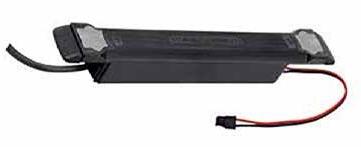
Install the door unit in the wall opening as normal and run the 230 V cable to the interior face of the wall. Make sure that no fixings (e.g. wall ties) are installed near the electronic components. Have the 230 V cable connected to the mains supply by an electrical contractor. For aluminium doors, check that the door frame is properly earthed. For flush installation, run the 230 V cable through a conduit.
Green/yellow
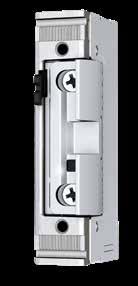
Electric strike → Code 105 00
The electric strike remains released for as long as the push-button is pressed.
Operating voltage 10-24 V AC/DC
Continuous current-resistant 11-13 V DC
Nominal resistance 42 Ω
AC consumption
DC consumption (stabilised)
Technical data
255 mA (12 V)
510 mA (24 V)
286 mA (12 V)
571 mA (24 V)
Resistance to forced entry 3750 N
Adjustment range of latch ± 1.5 mm
Operating temperature range -15 °C to +40 °C
Fire safety suitability No
Performance features
Strong latch spring
Adjustable latch
Mechanical release (E) type 105 00 only
Fail-locked
Hold-open function for one-time entry
EN 1125/EN 179 Type 103 00
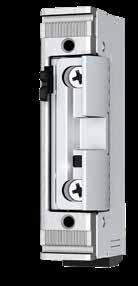
→ Code 107 00
Once activated, the electric strike remains released until the door has been opened once.
Operating voltage 10-24 V AC/DC
Continuous current-resistant 11-13 V DC
Nominal resistance 42 Ω
AC consumption
DC consumption (stabilised)
Technical data
255 mA (12 V) 510 mA (24 V)
286 mA (12 V)
mA (24 V)
Resistance to forced entry 3750 N
Adjustment range of latch ± 1.5 mm
Operating temperature range -15 °C to +40 °C
Fire safety suitability
Performance features
Strong latch spring
Adjustable latch
Mechanical release (E)
Fail-locked
Hold-open function for one-time entry
Bolt switch contact → Code 108 00
Lock monitoring
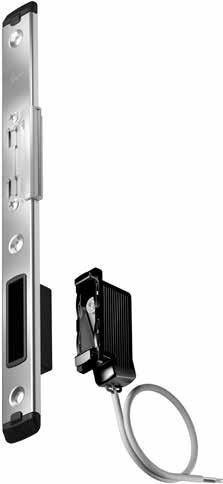
The bolt switch contact (striking plate contact) is used for lock monitoring, e.g. for integration in an alarm or building management system. It is fitted with a microswitch and is thus dust- and splash-proof. It is also fitted with a spacer plate for use with U-shaped striking plates.
The bolt switch contact can be used with virtually all locking mechanisms.
Technical data
Bolt switch contact (striking plate contact) with microswitch IP67
VdS (German Association of Property Insurers)
Operating temperature
3-core connection cable
RFZ126VDS
RFZ126VDS10
Switch current
Colour coding
Class C
From -40 °C to +85 °C
Cable length 6 metres
Cable length 10 metres
1A at 30 V DC
COM = black NO = white NC = red
“Instinct” motor drive
→ Installation
Remove the jumper at the “Instinct” gateway. Connect the “Instinct” UPS, “Instinct” system cable and cable transition plus all external components at the “Instinct” gateway as shown in the connection assignment, then fit this in the designated box.
→ Commissioning
Connect the “Instinct” UPS to the “Instinct” power supply unit. The illustration shows the connection of the “Instinct” top-hat rail power supply unit. Connection of the “Instinct” flush-mounted power supply unit is similar. Connect the “Instinct” power supply unit to the mains by means of a properly prepared connection cable (not included in the delivery package).
Note
Proper connection of the power supply unit must be carried out only by a qualified electrician.
“Instinct” motor drive → Commissioning
Once the power supply is established, the hook bolts are automatically extended.
Manually operate the hook bolts to check that they are working properly. The hook bolts must then be immediately disengaged by the motor.
Test whether the locks respond properly to opening signals using the access control system, app (“Instinct by Maco”) or push-button. If everything is working correctly, a motorised sound can be heard at each locking mechanism and the hook bolts also move slightly. If necessary, repeat this step several times to check each individual locking mechanism.
“Instinct” motor drive
Commissioning
Close the door from the inside. The locking mechanisms must engage with the striking plates without any abnormal noises. Adjust the striking plate setting if necessary.
If any abnormal noises occur, then the cam height can be manually adjusted.
7-10 mm
SW 7
“Instinct” motor drive → Commissioning
Check the contact pressure – to do this, the door can be unlocked from the outside only via the access control system or the “Instinct” app. From the inside, the door can be opened by the wall switch.
Information on contact pressure adjustment
1. Adjust the cam position as shown in the system folder.
2. Check the height setting.
- Manually press in the hook bolts.
- Carefully close the door and check for proper closing action.
- A marking is provided on the hook bolt to facilitate adjustment in line with the on-site situation.
3. Check and, if necessary, adjust the contact pressure.
Fit the covers over the locking mechanisms and striking plates.
Optionally check for proper functioning with all external components, e.g. alarm system, smart home systems or intercom. Commissioning has now been successfully completed.
“Instinct” motor drive → Gateway connection plan
Port 1 for Maco openDoor access control systems/Finstral fingerprint scanner
Port 2 for Maco openDoor access control systems/Finstral fingerprint scanner
No function
Power supply
With UPS function: Connection of “Instinct” UPS module
Without UPS function: Connection of “Instinct” power supply unit
“Instinct” bus
For leaf-side installation: Connection of “Instinct” cable transition
For frame-side installation: Connection of system cable
Output: Door open
Function: Indicates whether all locks are properly unlocked.
Optionally as NO or NC signal: 10: NO
11: COM
12: NC
Examples: Alarm system, turn-only door drive
Output: Lock monitoring
Function: Indicates whether all locks are properly unlocked.
Optionally as NO or NC signal:
7: NO
8: COM
9 NC
Examples: Alarm system, smart home systems
Input: Daytime unlocking
Function 1: Connection for external components to activate/deactivate daytime unlocking (by continuous 2-second activation)
Function 2: Connection for external components for one-time opening with activated lock hold-open function (by short activation pulse). If the door is not opened within 5 seconds, the locking mechanisms will re-engage.
Examples: Daytime unlocking push-button, alternatively intercom
Input: Door opening from outside
Function: Connection for external components to unlock “Instinct” system
Special features: Does not respond to child safety mode
Examples: Intercom systems, external access control systems, smart home systems etc.
Input: Door opening from inside
Function: Connection for external components to unlock “Instinct” system
Special features: Responds to child safety mode (door opening requires continuous 5-second activation); child safety function is only available with “Instinct” Bluetooth module.
Example: Opening push-button
“Instinct” motor drive → Flush-mounted
“Instinct” termination cable
“Instinct” system cable
“Instinct” system cable1 for frame-side installation
Installation conduit
1 Lengthening possible with CAT5e/CAT6
Frame-side installation “Instinct”
Fingerprint scanner
Lever handle
Push-button
→ Connection assignment
Adjustment of connection cable length
Standard
Shortening
1. Remove plug.
2. Shorten cable.
3. Strip insulation from individual wires.
4. Reconnect wires in accordance with plug assignment (see table below).
Lengthening
1. Remove plug and draw connection cable into a junction box.
2. Draw extension cable into junction box.
3. Strip insulation from individual wires and connect each wire to appropriate connection terminal.
4. Fit plug to extension cable in accordance with plug assignment (see table below).
Plug assignment
“Instinct” connection cable
cable
CAT5e,
Blue-white not used
Copyright © Finstral AG, Unterinn/Ritten, 2023
All rights reserved.
The Finstral logo is a registered figurative mark of Finstral AG.
The name “Finstral” is a registered word mark of Finstral AG.
March 2023 edition
Article number 60-0308-00-07
Subject to technical changes. Colour may differ from original products owing to printing processes. The presentation and description of the products in the catalogues are for indicative purposes only. Should the delivered product deviate in any way from the product appearing in the advertising material, then this shall not constitute a defect or deviation as only the order is authoritative.
Always at your side.
Finstral Studio Unterinn Headquarters, 600 m2 exhibition area Unterinn/Ritten, Italy T +39 0471 296611 finstral.com/unterinn
Finstral Studio Borehamwood Showroom, 210 m2 exhibition area Studio 3, Premiere House, Elstree Way, Borehamwood, Hertfordshire, WD6 1JH finstral.com/borehamwood
Talk directly to a specialist consultant: Via chat at finstral.com, by live video chat from the Finstral Studio or by phone on +44 20 8050 0584 (free of charge).
Your nearest Finstral partner: