EUDORA SCHOOLS A Family Guide to AI in the Classroom | USD 491 | 2026–2027 School Year
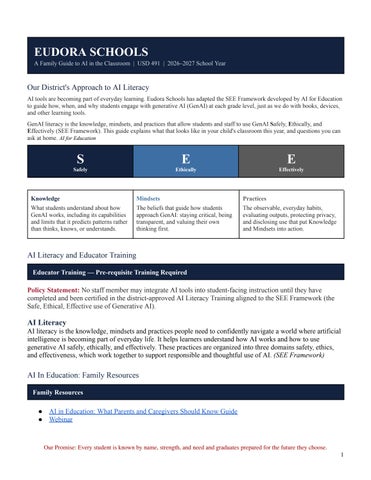
Our District's Approach to AI Literacy AI tools are becoming part of everyday learning. Eudora Schools has adapted the SEE Framework developed by AI for Education to guide how, when, and why students engage with generative AI (GenAI) at each grade level, just as we do with books, devices, and other learning tools. GenAI literacy is the knowledge, mindsets, and practices that allow students and staff to use GenAI Safely, Ethically, and Effectively (SEE Framework). This guide explains what that looks like in your child's classroom this year, and questions you can ask at home. AI for Education
S
E
E
Safely
Ethically
Effectively
Knowledge
Mindsets
Practices
What students understand about how GenAI works, including its capabilities and limits that it predicts patterns rather than thinks, knows, or understands.
The beliefs that guide how students approach GenAI: staying critical, being transparent, and valuing their own thinking first.
The observable, everyday habits, evaluating outputs, protecting privacy, and disclosing use that put Knowledge and Mindsets into action.
AI Literacy and Educator Training Educator Training — Pre-requisite Training Required
Policy Statement: No staff member may integrate AI tools into student-facing instruction until they have completed and been certified in the district-approved AI Literacy Training aligned to the SEE Framework (the Safe, Ethical, Effective use of Generative AI).
AI Literacy AI literacy is the knowledge, mindsets and practices people need to confidently navigate a world where artificial intelligence is becoming part of everyday life. It helps learners understand how AI works and how to use generative AI safely, ethically, and effectively. These practices are organized into three domains safety, ethics, and effectiveness, which work together to support responsible and thoughtful use of AI. (SEE Framework)
AI In Education: Family Resources Family Resources
● AI in Education: What Parents and Caregivers Should Know Guide ● Webinar
Our Promise: Every student is known by name, strength, and need and graduates prepared for the future they choose. 1
What This Looks Like by Grade Band PK–2 — AI is shown by the teacher. Students watch, listen, and discuss. Eudora School does not recommend independent GenAI use for early elementary learners. At this age, AI literacy is built entirely through adult-guided demonstrations, unplugged activities, and discussion, not hands-on tool use. Students build early knowledge (AI is made by people and follows instructions; AI is not human) and begin practicing the mindset of healthy skepticism (words and pictures from a computer can be wrong). SAFE
ETHICAL
EFFECTIVE
Families will see:
Families will see:
Families will see:
• The teacher demonstrates AI to the
• Talking about who is and isn't shown in
• Comparing their own thinking to a
whole class using district-approved tools • Discussion of what information is private and shouldn't be shared • Practice recognizing when to ask an adult if something feels confusing
AI-made pictures • Learning that AI tools are built and directed by people
machine's output: "What did I think? What did AI think? Who was right?" • Building curiosity about how digital tools work
Families Will Not See:
• Students using AI on their own • AI writing or creating anything for a
Families Will Not See:
• Independent decisions about AI use • Discussions of complex real-world AI harms
Families Will Not See:
• Using AI to complete any part of an assignment
• Evaluating AI output without a teacher present
student • Any unsupervised AI exploration
3–5 — Students begin using AI with teacher guidance, clear rules, and oversight. Upper elementary students begin engaging with developmentally appropriate, secure, and instructionally sound GenAI tools, but only in structured, supervised settings. Every activity is scaffolded with a clear explanation of how the tool works, its possible positive and negative impacts, and why checking its answers matters. SAFE
ETHICAL
EFFECTIVE
Families will see:
Families will see:
Families will see:
• Guided use of teacher-approved tools
• Discussing when AI makes mistakes or
• Comparing AI answers to their own
only • Learning that some information should never be shared with a tool • Recognizing when a tool is using AI
shows bias • Beginning conversations about fairness and representation in AI output
thinking before accepting them • Reflecting after each activity on whether AI helped or didn't
Families Will Not See:
Families Will Not See:
Families Will Not See:
• Disclosure expectations beyond simple
• Open or unsupervised AI exploration • AI making any decision for a student • Independent account creation or tool
honesty conversations • Independent judgment calls about appropriate use
• AI completing student assignments • Using AI as the first or only step in a task
selection
Our Promise: Every student is known by name, strength, and need and graduates prepared for the future they choose. 2
6–8 — Students analyze AI outputs and think critically about what they find. As cognitive and digital maturity grows, middle schoolers take on more direct, supervised engagement with GenAI. Students learn that tools are often designed to be agreeable rather than accurate, and are expected to critically evaluate outputs, analyze tools for efficacy, and explain their reasoning, not just accept what AI produces. SAFE
ETHICAL
EFFECTIVE
Families will see:
Families will see:
Families will see:
• Recognizing when a tool is being
• Explaining what AI did and why they
• Comparing multiple AI responses side
agreeable rather than accurate • Reviewing what personal data a tool collects before using it Families Will Not See:
agree or disagree with it • Identifying errors or bias in AI output • Understanding school guidelines for disclosure
• Using AI for tests or graded
Families Will Not See:
skill-building practice
• AI use without a teacher's knowledge
by side
• Using AI for brainstorming, not for final answers
• Iterating on a prompt to improve the result
• Turning in AI-generated work as their
Families Will Not See:
own • Using AI to bypass academic integrity expectations
• Treating AI output as a finished product
• Letting AI replace their own reasoning or first draft
9–12 — Students use AI as a thinking partner and are accountable for the results. High schoolers move toward more independent GenAI use, supported by continued scaffolding and increasingly sophisticated exploration of risks, benefits, ethics, and societal implications. The goal is a collaborator, not a crutch: students document how they used AI, evaluate its accuracy, and own the final product. Academic integrity always applies. SAFE
ETHICAL
EFFECTIVE
Families will see:
Families will see:
Families will see:
• Reviewing a tool's privacy and data
• Clearly documenting where and how AI
• Using AI as a brainstorm-starter or
policies before use • Deciding what personal information is and isn't appropriate to share • Maintaining their own judgment rather than deferring to AI
was used • Disclosing AI use honestly in schoolwork • Considering whose perspectives may be missing from AI output
Families Will Not See:
Families Will Not See:
Families Will Not See:
• Using AI in ways that violate school
• Submitting AI-written work as their
device or data policies • Treating AI as an authority rather than a resource
own • Using AI without the teacher's knowledge
• Letting AI replace their own reasoning • Using AI for tasks meant to build
draft-feedback tool
• Evaluating AI responses for accuracy and bias before using them
• Owning and refining the final product in their own voice
independent skill
Our Promise: Every student is known by name, strength, and need and graduates prepared for the future they choose. 3
District-Approved AI Tools Every approved tool below is selected and supported through the same SEE lens: staff reviews its data and privacy practices (Safe), confirms it fits classroom guidelines and age restrictions (Ethical), and uses it to genuinely support - not replace - student thinking (Effective).
MagicSchool AI (Approved for Staff, PK–12) magicschool.ai
Built exclusively for educators, accelerates lesson planning, differentiation, rubric creation, IEP/504 drafting support, and parent communication in a school-safe, privacy-first environment.
Canva AI (Approved for Students 3–12, Staff PK–12) canva.com/education
AI-assisted design for student projects and presentations, classroom posters, digital storytelling, and staff communications, with built-in educator privacy protections.
NotebookLM (Approved for Students 13+, Staff PK–12) notebooklm.google.com
Google's AI research notebook. Students and staff upload their own source documents and generate summaries, FAQs, study guides, and Q and A - always grounded in the materials provided.
Gemini (Google AI) (Approved for Students, Staff PK–12) gemini.google.com
Google's flagship AI assistant supports secondary students and staff with writing, research, brainstorming, coding, and multimodal tasks within Google Workspace for Education's enhanced privacy controls.
Questions to Ask at Home These questions mirror the same three SEE lenses your child is learning to apply at school.
Safe
Ethical
Effective
• “Did you share anything private with
• “Did you tell your teacher how AI
• “What part did YOU figure out on your
the AI tool today?” • “Did your teacher know which tool you were using?”
helped with this?” • “Was anything AI made unfair or left someone out?”
• “How do you know what AI said is
own?” actually true?”
Your child's teacher can share more about how AI is used in their specific classroom - don't hesitate to ask.
Our Promise: Every student is known by name, strength, and need and graduates prepared for the future they choose. 4