EPUBtoPDF.net · Free ebook guides · epubtopdf.net/guides
FORMATS EXPLAINED
EPUB vs PDF vs MOBI: which should you use? What each ebook format is good at, how they differ, and which one to pick for reading, printing or Kindle. By Sam, Digital Marketer Updated November 11, 2026
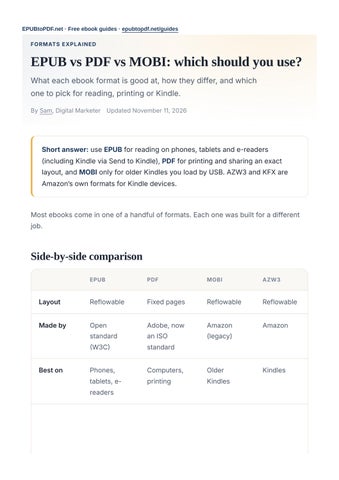
Short answer: use EPUB for reading on phones, tablets and e-readers (including Kindle via Send to Kindle), PDF for printing and sharing an exact layout, and MOBI only for older Kindles you load by USB. AZW3 and KFX are Amazon’s own formats for Kindle devices. Most ebooks come in one of a handful of formats. Each one was built for a different job.
Side-by-side comparison EPUB
MOBI
AZW3
Layout
Reflowable
Fixed pages
Reflowable
Reflowable
Made by
Open standard (W3C)
Adobe, now an ISO standard
Amazon (legacy)
Amazon
Best on
Phones, tablets, ereaders
Computers, printing
Older Kindles
Kindles
EPUB
MOBI
AZW3
Reader can change font size
Yes
No
Yes
Yes
Prints well
No
Yes
No
No
Kindle
Via Send to Kindle
Yes, fixed pages
USB only, older models
USB
Apple Books, Kobo, Google Play
Yes
Yes
No
No
Typical file size (novel)
0.3 to 2 MB
1 to 5 MB
0.5 to 3 MB
0.5 to 3 MB
Status
Current standard
Current standard
Being phased out
Current on Kindle
EPUB: the standard for reading EPUB is the open format used by almost every ebook store and reading app except Amazon’s own store. It was created by the International Digital Publishing Forum (IDPF), which merged into the W3C in 2017. Inside, an EPUB is a small website zipped into one file: HTML for the text, CSS for the styling and the images. That is why the text reflows to fit any screen, and why readers can choose the font, size and colors. The current version, EPUB 3, also supports fixed layouts (used for comics and picture books), audio and video, right-to-left and vertical scripts, and accessibility features
for screen readers. It is the best choice for novels and any long reading on a phone or e-reader.
PDF: the standard for fixed layouts A PDF looks exactly the same on every device, which makes it ideal for printing, forms, design-heavy books, and sending a document to someone who has no ebook app. Every browser opens PDFs. On a small screen, though, you will be zooming and scrolling, because the page cannot reflow. Convert EPUB to PDF when you need to print or share; convert PDF to EPUB when you want to read comfortably on a phone.
MOBI: Amazon’s legacy format MOBI (Mobipocket) was the format of early Kindles. Amazon now uses newer formats, and Send to Kindle stopped accepting MOBI files in 2022. If you have old MOBI books, convert them to EPUB so they keep working everywhere, or to PDF to print them. Only use MOBI if you load books onto an older Kindle by USB.
AZW3 and KFX: Kindle’s own formats AZW3 (also called KF8) replaced MOBI and supports richer formatting. Calibre and many indie sellers produce DRM-free AZW3 files, which you can convert to EPUB. KFX is the newest Kindle format, used for books downloaded by recent Kindle apps; these files are normally DRM-protected and cannot be converted. Comic books often come as CBZ or CBR files instead: simple archives of page images, read in comic apps. You may also meet FB2 (FictionBook, popular in Eastern Europe) and DjVu (used for scanned books); both are niche today.
Accessibility EPUB 3 is the stronger format for readers who use screen readers, large text or textto-speech. The text reflows at any size, headings and reading order are part of the file, and the format has standard accessibility metadata that stores and libraries
display. A PDF can be accessible only if it was tagged when it was made, and many are not; zooming a PDF also means scrolling sideways on every line.
Which format should authors and publishers use? Most authors publish an EPUB for ebook stores and a print-ready PDF for the paperback. Apple Books, Kobo, Google Play Books and Barnes & Noble accept EPUB; Amazon KDP accepts EPUB or DOCX and converts it for Kindle. Sell or send a PDF only when the layout must stay fixed, as in workbooks, cookbooks and design-heavy guides. If a library or store offers both formats for the same book, choose EPUB for reading on a phone or e-reader and PDF when you need page numbers that match the print edition.
Which format for which device? DEVICE OR TASK
BEST FORMAT
HOW
Kindle Paperwhite, Oasis, Basic
EPUB
Send with Send to Kindle
Kindle Scribe
EPUB or PDF
PDF works well on the large screen
Kobo e-readers
EPUB
Copy over USB
iPhone, iPad, Mac
EPUB
Apple Books
Android phones and tablets
EPUB
Google Play Books or another reader
Windows PC
EPUB or PDF
A free reader, or PDF in the browser (guide)
Printing
EPUB to PDF
DEVICE OR TASK
BEST FORMAT
HOW
Sharing with someone who has no ebook app
Every device opens it
Self-publishing (KDP, Apple, Kobo)
EPUB
Word to EPUB
Converting between formats All of these conversions are free and run in your browser, as long as the file is DRMfree: EPUB to PDF and PDF to EPUB MOBI to EPUB and MOBI to PDF AZW3 to EPUB EPUB to Word, Word to EPUB and EPUB to TXT Converters cannot open books protected with DRM (copy protection). Books bought from Amazon, Apple or Kobo, and most library loans, are locked to their own apps.
Which ebook format is best?
+
Frequently asked questions
Is MOBI still used?
+
For reading on phones and e-readers, EPUB. For printing and sharing an exact layout, PDF. MOBI is only worth using for older Kindles loaded by USB.
Is EPUB or PDF better for Kindle?
+
Rarely. Amazon has moved to newer formats and Send to Kindle stopped accepting MOBI in 2022. EPUB is a better choice for nearly everyone.
What is the difference between EPUB 2 and EPUB 3?
+
EPUB, sent with Send to Kindle. Amazon turns it into a proper Kindle book with adjustable text. A PDF also works but keeps fixed pages.
Can I convert between these formats?
+
EPUB 3 is the current version. It adds better support for audio, video, fixed layouts, more languages and accessibility. Nearly every modern reading app opens both.
Is EPUB or PDF better for accessibility?
+
Yes, as long as the files are DRM-free. See our ebook converters.
Which format should I choose when a library offers EPUB and PDF?
+
EPUB 3, in most cases. Its text reflows at any size, keeps a clear reading order for screen readers and carries accessibility metadata. PDFs are accessible only when they were properly tagged.
EPUB for reading on a phone, tablet or e-reader. PDF if you need the exact print layout or page numbers that match the paper edition.
Read the latest version of this guide and convert DRM-free ebooks for free in your browser at epubtopdf.net. No upload, no signup, no watermark.