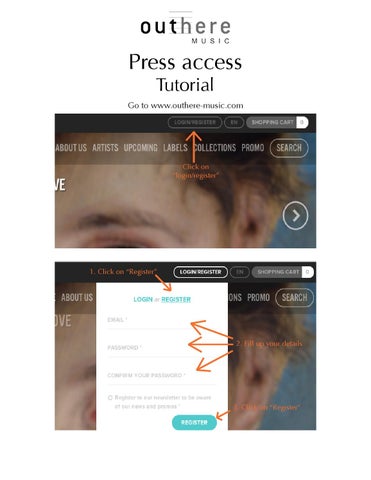
Press access Tutorial
Go to www.outhere-music.com
Click on “login/register”
1. Click on “Register”
2. Fill up your details
3. Click on “Register”
You are now logged in 1. Click on the profile icon to access your profile
2. Click on”Ask for Press access”
Click on”Ask for Press access”
Your request has now been sent to the website administrator. You’ll receive an email of confirmation when your press access will be validated. Once the press access has been confirmed Log in Click to access your profile
Click on “Press Access”
In the Press Access
1.Click on the reference you need the covers from
2. Click on “Download HD Covers”
Click on “PDF” to download the catalogue of the selected label
Stream the album
Download the album in mp3
Download the cover, graphical material, presentation sheets
If you experience any problem, send an email to the website administrator: elise@outhere-music.com