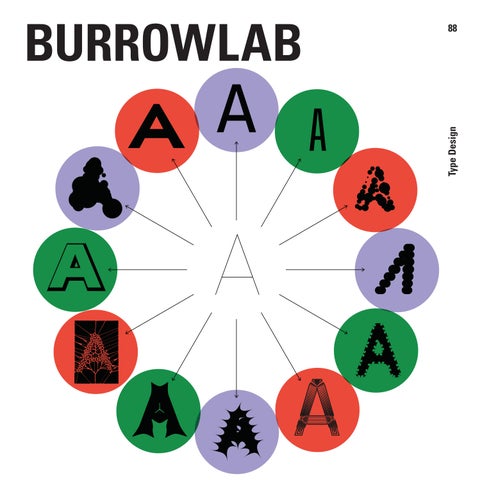
FLEXIBILITY • Visualising flexibility of the algorithm
How did you get into typography and design?
I co-founded the design studio, Burrow, with two friends, Giulia Schelm and Lukas Küng. Most of the studio’s work is rooted in the cultural sector. We work with artists and architects, create lots of websites, books, exhibitions and visual identities.
Early on, we decided it was best to produce as much as we could in-house, so we would have better control over the final product – both analog and digital.
In that spirit, we screen-printed book covers for most publications in our workshop and we developed the websites we designed ourselves too, so we could get our design concepts working exactly as we imagined them.
When did you get started with the coding?
My first steps into web development were maybe around 2018. The more complex technical stuff, I would say I got started about five years ago.
I AM DEVELOPING A PROGRAM TO DESIGN FONTS.
SCHEMA • A simple Infographic illustrating the concept of the algorithm flow
Do you enjoy the technical side of things?
Yeah, I do. There was a moment where it started to feel more creative than the “creative“ work, in a way. You constantly have to find solutions for your ideas, and nobody is blocking you from putting your solution into effect.
Is that what you’re doing day to day, programming?
I do a lot of programming but research & design as well. It has become part of my process, that those go hand in hand. For design projects where I am doing the design and the programming, I make a sketch and get into prototyping early on.
For me, it is part of the design phase, a way to explore things, trying out new technologies, new interactions, and so on. It’s real ping-pong.
I do some sketches in Figma, Illustrator, or whatever program seems more suitable for the task and then start to implement it quickly.
The same goes for my type design tool (with the Working title Burrowlab): I take my sketchbook and try to figure out how to solve a certain problem, how to construct a solution, and then figure out the math for it.
I enjoy the mix. Mostly I work in the code editor, but I need to visualize
TYPE • Typographic challenges
things too. Because I didn’t study informatics or mathematics, I lack some of the terminology for the problems I face, which requires me to do lots of research, finding good references for what I am trying to solve.
How do you feel about the relationship between the science and the art of your work?
It’s funny to separate it into those two categories. I would say, in reality, it’s much more messy.
I have not thought about it as an artistic practice. It can be artistic, because a lot of the decision making is intuitive and not technical. I’m looking at lots of references in typefaces and I dive into the discipline of type design. Things like optical compensation and other fine-tuning which makes a typeface unique and readable and just work. That, for me, is really interesting to look at from something like a scientific perspective, figuring out how to implement it.
But then, I am developing a program to design fonts, which are themselves a tool. So it’s a tool to design another tool, and I want to be as unbiased as possible.
This is part of why the project is so endless. Every time I add a feature, I feel “oh, wait, this assumes way too much about how the user will want to design.” So I need to go a step back and just evaluate other options.
For this reason, quite early on, I realised I couldn’t do this all myself, instead I’d like to develop a plugin system, so that other people can extend the tool. In this way, the glyphs can be designed by anyone, different writing systems can be added, and so on. But, I digress!
2 — lorem ipsum
Ut expella cesedi doluptates nus.
I T'S A TOOL TO DESIGN ANOTHER TOOL.
What exactly is parametric typography?
A typeface design, in general, is based on outlines. In the past, letters were created using a pen and the artist’s hand gesture. This manifests in a letter form which is strongly characterized by the choice of drawing tool.
Later on, things became more constructed. Then with mass production, and the advent of the letterpress, each letter became a stamp – an outline – and was designed as such. With parametric type, we return to the previous path-drawing approach, but in the digital realm.
You use a specific tool to draw a letter form. That drawing, that path, is the skeleton of the letter. So let’s say you draw a rough ‘A’. Once you’ve done that, you can decide whether to use an Edding or a sharp pencil to create the outline.
The final form – which is what we call a font – is the outline for each glyph, dynamically generated with the parameters you have set to be applied to your skeleton.
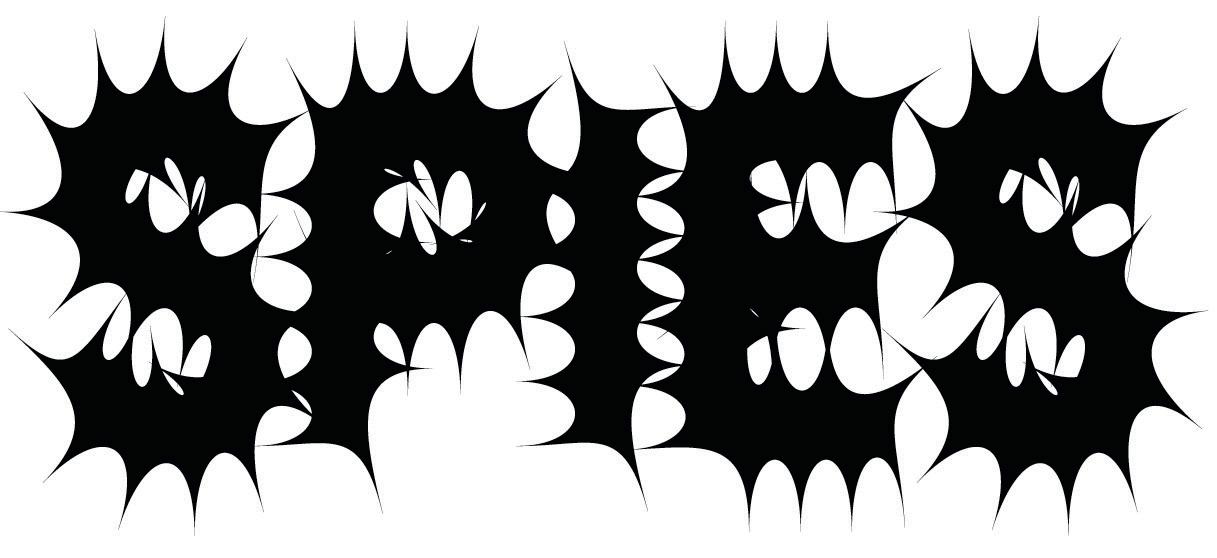
GLYPH • Ink traps
This concept is almost as old as the computer. From what I gathered, Donald Knuth started this whole thing in the ‘70s, with Metafont. Since then there have been dozens of projects that experimented with this approach. And of course, right now there’s a bunch of AI-based tools too.
I was not aware of this parametric history when I started building a type design tool. My practice is typography focused in terms of graphic design. So, for fun I started to design some fonts. And once I started coding, it didn’t take long to combine code and typography.
What were your first experiments like?
I started with creating a bitmap generator, where I would just draw each letter based on a grid of pixels. This is a good starting point for anyone who’s interested in programmatically designing fonts. And a pixel is not just a square. It can be any shape, and it can be layered too. You can do quite a lot just with that and some simple mechanics.
Then I thought, this is fun and all, but what if I could actually draw the letters myself with more freedom? After a while I started to figure out how to interpolate the lines. And then put some effects on it. I never really finished one thing, before I wanted to try and add the next feature – it was fun having no deadlines!
Because I publicly shared all of the progress, almost like a sketchbook, suddenly I had a boost in 2023 where lots of people were interested in what I was doing. Even people working on similar projects reached out to me.
going. That was necessary, because I didn’t initially plan to be doing this for five plus years!
So you create a skeleton, which is the line that the pen will follow. Then you describe the type of pen that will follow that line?
In a way, it’s like a game of connect the dots. Take the letter ‘N’ for example. You have four coordinates in a grid, which are then connected. At the moment, I’m working on a user interface, so you would draw your letterform visually, without caring about what the exact coordinates are.
In my tool this drawing is called the glyph blueprint. In more calligraphy focused tools, you draw the skeleton, and then you apply a stroke to that skeleton, using an ellipse shape, or whatever shape your pen is. As the ellipse is following along the skeleton, the final glyphs outline is defined.
In my case, because fonts can be stretched and skewed before applying the stroke, I have this abstract blueprint stage, which is where you just draw the letter. Then, depending on how high your capital heights are, or the width of your letters, it generates a skeleton as the second step.
The skeleton is altered by the parameters, to make sure everything fits together nicely. So, for example, if you use a thick pen, it gets offset, it shrinks as the weight increases.
I suddenly found myself part of this community of type designers. I received lots of feedback and suggestions, which really motivated me to keep
IT'S
LIKE
A
GAME OF CONNECT THE DOTS.
Application of Outline Effect Modules - to apply typographic styles of other effects
Handdrawing
WORD
Showing word in different parameter settings
The ellipse is the pen’s tip, which runs along the skeleton?
If you imagine an ellipse, you need the height of the ellipse and the width. So it’s not a circle. You can describe height, width and rotation.
This is the direct calligraphic approach, but we have many other parameters too. Like the height of the letters in relation to each other, capital letters, descenders. This is
another step where the algorithm messes with your pen.
This means you can work in a more typographic way. For example, with the letter ‘O’. The outer curves of the ‘O’ could be as round as possible, and the inner ones more squarish. The tool uses an interpolation algorithm as a first step to get from your line drawing to a smooth outline.
There’s a lot to think about!
This is the big challenge. How easy can you make it for the person who designs with this tool? I was even thinking of building in an assistant. Not even in terms of AI, but just a way to say, ‘please just correct everything so it looks optically compensated.’
When you design a system like this, you make so many assumptions. You have to.
Sounds like the kind of thing that could take up all your time
Yes, absolutely! I did spend a lot of time on it. Also, if I remember correctly, Donald Knuth thought he would be finished with Metafont in a year, but eventually it took 10 years. And he was never completely happy with the letter ‘S’.
I just thought parametric type would be fun to try out, and here we are five years later, I’m still completely in the middle of it! But for me, it’s already fun at this point. It’s a really capable system. It can do a lot of things and I’m able to export fonts, font-families and variable fonts.
Also, because I work with the skeleton first, you can just use the skeleton alone. That means, without caring about stroke interpolation, the user can decide to add elements to the skeleton and play with effects from there.
Could you make your own version of a classic font?
A lot of people ask questions like, ‘Can you replicate Helvetica?’ This is not the goal, but I am interested in being able to produce a proper sans serif.
THE DREA M IS TO DEVELOP IT FOR MY OWN TYPEFACES, AND TO PRODUCE ANIMATIONS TOO.
Parametrically, we’ll never be able to control every node. You can export the font and edit it manually, but I’m interested in having mechanisms in place to fine-tune and correct everything.
Generally it’s about recurring form, shape and situations. That for me is an interesting challenge to solve. The layer on top of that is working with effects, applying serifs, rounded corners and things like that.
How does Burrowlab help a working designer?
The main purpose is to quickly prototype fonts. Whether for a full type face, a logo or a headline,
I hope that would work for everyone from beginners and students, all the way to professionals that would usually prefer to draw fonts by hand.
Is your tool a good way to learn typography?
I think you can learn a lot from it because you can immediately see the effect when you change values. That’s something I realized while interacting with it myself, and it’s something you don’t have anywhere else.
When you draw a font, it’s hard to get a feeling for what will happen if you change the height, for example? Does the whole font look larger?
STEPS • Explaining the different phases of the algorithm
It allows a more intuitive form of learning, where you just change something and you see directly how it plays out. You get immediate feedback on an emotional level. How the font feels – now it gets heavier, now it feels more cramped, and so on.
Is there a strong link between parameters and emotions?
Possibly, but I think it is very subjective. For part of my Master’s degree, I had one semester where I plugged all the type face parameters to different frequencies. I recorded my final presentation and linked this to the parameters. So in the end, I had a long string of words, each with their own parameter settings based on my pitch, volume, etc. at that moment.
Even so, it was difficult to pin down direct connections. You can’t really say high frequencies do this, low frequencies do that. It’s a very personal thing, assigning emotion to visual forms.
Having said that, this is something I’m very interested in. I do this often in workshops with students, trying to work with words that have a strong meaning, in poetry for example.
In a recent workshop I asked the students to pull out a few words from poems they liked, and figure out what form would be fitting for the words, or perhaps would run contrary to the emotional content of the poem. It’s really interesting to use the tool that way, and you can get really quick output.
Sounds like it cuts out a lot of the
toil from type design
Well, I like the toil too! I really enjoy drawing a font. But I also remember those times where I had drawn three styles of a font, and sat back and just thought, “Is this right?” Then once the whole thing was done,
EXTREMES • Visual concept Connect the dot + Pens
I realized it should be two pixels thinner. At that point you kind of have no choice, you just have to draw all the letters, again!
This is the annoying or meditative part, right? You just move the dots a bit. That happens quite a lot, because you need a bunch of letters to figure out the feeling of the font, before you can really determine its character. In that sense, the tool helps prototyping.
It could be a valuable process to quickly make a sketch and then go into a conversation about direction, rather than having three people working in parallel on three different styles for a custom type face.
It could be a great teaching tool as well
I have used it in a number of design schools. In Leipzig, in the type design class, they made the announcement poster for the workshop with it. It looks like they had fun screen printing the output.
And at the university in Potsdam, we did a workshop with students, exploring the borders of readability. Specifically for that I built a feature that allows you to draw some shapes in Illustrator, copy them into the tool, and place them on the outline of the font. So these elements suddenly appear on all the glyphs. There were a lot of experiments with that.
Obviously, these are all more experimental approaches. But right now I’m focused on producing a really detailed sans serif font. I feel I’m quite close!
Can you look at classic or existing fonts, and tell which would work well parametrically?
I think so. It’s the more rigid, rule-based ones, and the more technical looking. That doesn’t mean you cannot do really quirky looking fonts. You can definitely do that too.
I can also turn out more organic, or almost hand drawn looking fonts, but that’s hard to do well on purpose. When you see something that looks hand drawn, or has very specific changing weights, it’s really hard to reproduce this.
But in terms of the classics, I think something like Clarendon or Didot, for example. That kind of font is easier to create with my tool. Something similar to Helvetica would be a bit easier to reproduce than Gill sans, for example.
SPACING & KERNING - with Kerning Bubbles
I SEE THE TOOL EXPANDING IN LOTS OF DIFFERENT DIRECTIONS.
A LOT OF THE DECISION MAKING IS INTUITIVE AND NOT TECHNICAL.
Do you have a long development schedule in front of you, or is the tool nearly ready for public consumption?
I’m really pulling out all the stops right now to get to a first release. I’ve had people try it out already, but that just showed me it wasn’t ready for the public.
One of the big challenges is to refine the data format. It’s almost like defining your own font file. That is a big challenge, because if you do it badly, you will have to build converters later to move from first release to next release. I want to avoid that type of work!
Also, because I’m just doing this for fun, there’s only me, so it’s hard to do everything at once. But I’m really eager to put it out there.
Once the tool is finished, what’s the next step? Use it to develop for clients? Build a font foundry?
The dream is to develop it for my own typefaces, and to produce animations too. I see the tool expanding in lots of different directions.
I also tested an API that would take in a word plus some parameters and then send you back the SVG of your new type face. That works almost in real time, so it would be great on the web for various experiments.
Animation is another obvious addition, because the tool already produces dynamic output, just by its very nature. But for that to function well, you need good interfaces and that means more work for me!
WHEN YOU DESIGN A SYSTEM LIKE THIS, YOU
MAKE SO MANY
ASSUMPTIONS.
YOU HAVE TO.
BLUEPRINT • Explanation on how a simple line drawing (Blueprint) is turned into any shape and typographic style
49 FRANK RAUSCH Interface Design 2019 50 DENNIS LÜCK Designing Creativity 2019 51 IAN ANDERSON Graphic Design 2019
52 FOLCH STUDIO
Narrative Design 2019 53 MARC TAMSCHICK Spatial Media Design 2020
54 TYPEJOCKEYS Type Design 2020
55 MOTH Animation Design 2021
56 JONAS LINDSTRÖM Photography 2021
57 VERONICA FUERTE Graphic Design 2021
58 CHRISTOPHE DE LA FONTAINE Product Design 2021
59 DAVID KAMP Sound Design 2021
60 THOMAS KURPPA Brand Design 2021
62 MARTHA VON MAYDELL
Design 2022 63 STUDIO KLARENBEEK & DROS
Research 2022 64 JOUPIN GHAMSARI Photography Design 2022 65 LOTTERMANN AND FUENTES Photography Design 2022
66 SUPER TERRAIN Graphic Design 2022
67 EIKE KÖNIG Art Design 2023
68 CHRISTOPHER NOELLE Light Design 2023
69 DENNIS HINZE Sport Fashion Design 2023
70 KLASIEN VAN DE ZANDSCHULP Interactive Design 2023
71 VALENTIN VODEV Industrial Design 2023
72 GERMANS ERMICS Sculptural Design 2023
73 MADE BY JAMES Type & Logo Design 2024
74 SNASK Branding & Video 2024
75 CRAFTING PLASTICS! STUDIO Design Research 2024
76 STUDIO BRUCH Graphic Design 2024
77 GEMMA O'BRIEN Graphics & Lettering 2024
78 MARLOTA Fashion Design 2024
79 RONAN BOUROULLEC Product Design 2025
80 FRANCESCO FRANCHI Editorial & Information Design 2025 81 FIELD.IO Experiential Design 2025 82 SUPERFLEX Art Design 2025
83 MIKE MEIRÉ Design as Cultural Editing 2025
84 EVA CREMERS Digital Design 2026
85 EIKO OJALA Illustration Design 2026
86 PEARSON LLOYD Product Design 2026
87 CHRISTOPH HEFTI Textile Design/Art 2026
Support Design Friends, become a member. More information on www.designfriends.lu Design Friends would like
COLOPHON
PUBLISHER Design Friends
COORDINATION Heike Fries/Hyunggyu Kim
LAYOUT Stephanie Post
INTERVIEW Mark Penfold
PRINT Imprimerie Schlimé
PRINT RUN 250 (Limited edition)
ISBN 978-2-919829-17-0
PRICE 5 €
DESIGN FRIENDS Association sans but lucratif (Luxembourg)
BOARDMEMBERS
Anabel Witry (President)
Guido Kröger (Treasurer)
Heike Fries (Secretary) Hyunggyu Kim (Member)
COUNSELORS
Vera Heliodoro, Hyder Razvi, Olga Silva, Silvano Vidale
This catalogue is published for the lecture of Burrowlab "Developing a parametric type system." at Rotondes on June 17th, 2026 organised by Design Friends.