Chapter 1: Python 3
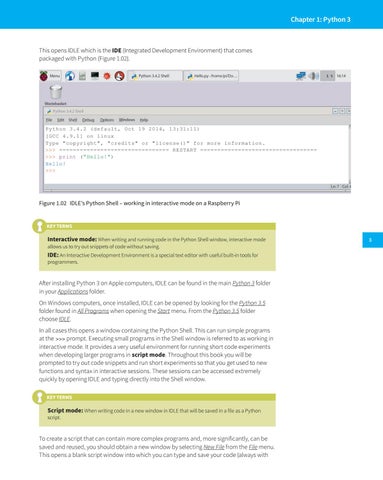
This opens IDLE which is the IDE (Integrated Development Environment) that comes packaged with Python (Figure 1.02).
Figure 1.02 IDLE’s Python Shell – working in interactive mode on a Raspberry Pi
KEY TERMS
Interactive mode: When writing and running code in the Python Shell window, interactive mode allows us to try out snippets of code without saving.
IDE: An Interactive Development Environment is a special text editor with useful built-in tools for programmers.
After installing Python 3 on Apple computers, IDLE can be found in the main Python 3 folder in your Applications folder. On Windows computers, once installed, IDLE can be opened by looking for the Python 3.5 folder found in All Programs when opening the Start menu. From the Python 3.5 folder choose IDLE. In all cases this opens a window containing the Python Shell. This can run simple programs at the >>> prompt. Executing small programs in the Shell window is referred to as working in interactive mode. It provides a very useful environment for running short code experiments when developing larger programs in script mode. Throughout this book you will be prompted to try out code snippets and run short experiments so that you get used to new functions and syntax in interactive sessions. These sessions can be accessed extremely quickly by opening IDLE and typing directly into the Shell window. KEY TERMS
Script mode: When writing code in a new window in IDLE that will be saved in a file as a Python
script.
To create a script that can contain more complex programs and, more significantly, can be saved and reused, you should obtain a new window by selecting New File from the File menu. This opens a blank script window into which you can type and save your code (always with
3