A/AS Level Computer Science for WJEC
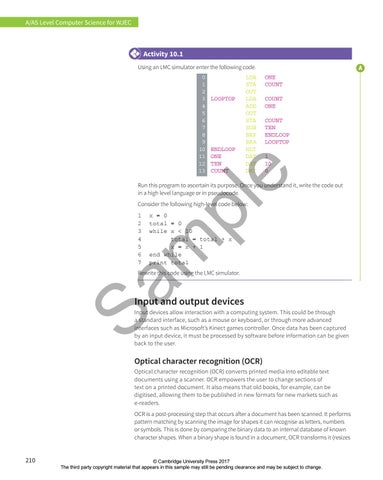
Activity 10.1 Using an LMC simulator enter the following code.
LOOPTOP
ENDLOOP ONE TEN COUNT
LDA STA OUT LDA ADD OUT STA SUB BRP BRA HLT DAT DAT DAT
ONE COUNT COUNT ONE COUNT TEN ENDLOOP LOOPTOP 1 10 0
e
0 1 2 3 4 5 6 7 8 9 10 11 12 13
pl
Run this program to ascertain its purpose. Once you understand it, write the code out in a high level language or in pseudocode. Consider the following high-level code below:
Sa m
1 x = 0 2 total = 0 3 while x < 10 4 total = total + x 5 x = x + 1 6 end while 7 print total
Rewrite this code using the LMC simulator.
Input and output devices Input devices allow interaction with a computing system. This could be through a standard interface, such as a mouse or keyboard, or through more advanced interfaces such as Microsoft’s Kinect games controller. Once data has been captured by an input device, it must be processed by software before information can be given back to the user.
Optical character recognition (OCR) Optical character recognition (OCR) converts printed media into editable text documents using a scanner. OCR empowers the user to change sections of text on a printed document. It also means that old books, for example, can be digitised, allowing them to be published in new formats for new markets such as e-readers. OCR is a post-processing step that occurs after a document has been scanned. It performs pattern matching by scanning the image for shapes it can recognise as letters, numbers or symbols. This is done by comparing the binary data to an internal database of known character shapes. When a binary shape is found in a document, OCR transforms it (resizes
210
© Cambridge University Press 2017 The third party copyright material that appears in this sample may still be pending clearance and may be subject to change.