BYOD 2027
Minimum Specification Requirements Apple iPad
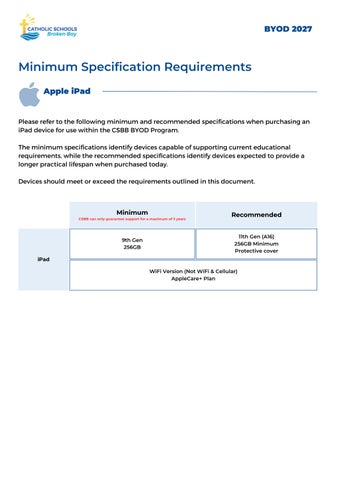
Please refer to the following minimum and recommended specifications when purchasing an iPad device for use within the CSBB BYOD Program. The minimum specifications identify devices capable of supporting current educational requirements, while the recommended specifications identify devices expected to provide a longer practical lifespan when purchased today. Devices should meet or exceed the requirements outlined in this document.
Minimum CSBB can only guarantee support for a maximum of 3 years
9th Gen 256GB
Recommended 11th Gen (A16) 256GB Minimum Protective cover
iPad WiFi Version (Not WiFi & Cellular) AppleCare+ Plan
Apple iPads - Additional Information iPads Minimum: 9th Gen 256 GB WiFi version
Recommended: iPad 11th Gen (A16)
The benefit of WiFi only iPads is there are no additional complexities associated with managing cellular data connections. This simplicity makes it easier for CSBB to implement security measures effectively.
The iPad 11th generation (A16) offers several advantages over older models, including a faster processor for smoother performance, a larger and more vibrant display for better visibility. Improved camera and advanced features enhance interactive learning and productivity, making it a more effective tool for current and future needs
AppleCare+ plan
An AppleCare+ plan provides additional protection against accidental damage that may occur during a student's daily use. AppleCare+ can help reduce repair costs and minimise disruption if the device is accidentally damaged.
Protective Cover / External Keyboard
Protective covers help safeguard devices against drops, spills and scratches, helping to extend their lifespan. External keyboards may improve the typing experience and can be beneficial for students who regularly complete written work on their iPad.
Other Considerations
Headset
Apple Pencil
Headsets provide clear audio quality, which is essential for multimedia resources and online learning. Headsets which include headphones and microphone, enhance the educational experience, providing a focused and immersive learning environment for students using their personal devices in the classroom or at home. Using an Apple Pencil enhances the student's ability to interact with digital content in a more natural and precise manner. A digital pencil allows students to take handwritten notes, draw diagrams, and annotate documents just like they would on paper, promoting a more immersive and tactile learning experience.