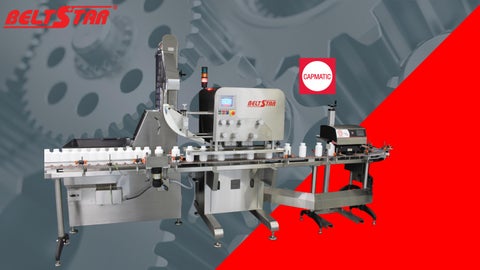
Inline Belt Driven Screw Capping System Servo Controlled
Belt Tightening System
RE-TORQER
CAPPER
Fully automated capping Includes automatic cap sorting & distribution
CAPPER
Semi automated capping Manual cap placement
RE-TORQER
Capsort elevator • Limited or no change parts required
Cap application belts • To engage cap threads to bottle • Upon Manual Cap Placement • After Induction Sealer
Spindles Vs Belts
Cap placement & torque
Cap torquing belts • • • • • •
To apply desired application torque Used for retorquing After manual cap placement After induction sealing process Numerical HMI setting Recipe driven
Cap torque application & monitoring
Cap placement & Application torque
Cap application torque and/or re-torquing
Cap application torque & monitoring
Cap placement – Application torque – Torque monitoring
Load Cell Torque Sensor
EM-Limiter
Torque feedback sensors ensures that the desired applied torque value entered on the HMI is the same on the cap.
❖ Using a separate calibrated scale, weigh the object to obtain the object’s weight. ❖ Position the loadcell in the calibration position and remove the pins holding the bracket.
❖ Press the TARE button. ❖ Put the calibrated object on the loadcell. ❖ Tap the WEIGHT data field and enter the weight of the calibrated weight. ❖ Press the CALIBRATION button. ❖ Press the TARE button. ❖ Reposition the load cell to its original position. Reinsert the pins holding the bracket to secure the adjustment.
Calibrated Weight
EM-Limiter
Loadcell Torque Sensor
Torquing belts applies application torque set via the HMI Monitoring belts confirms & records how much torque was applied
Torque validation/calibration kit
Cap presence & skew inspection Foil presence detection
Video link https://vimeo.com/813320787/7c8ea81acc?share=copy https://vimeo.com/318300272/8de9af3701?share=copy https://vimeo.com/766950732/51ebc12238?share=copy https://vimeo.com/868505061/3e1ac3ca8b?share=copy
Thank you
CAPMATIC.COM