Accommodate Us
Resource Toolkit
Tip Sheet
Creating a Welcome Story A Welcome Story (sometimes referred to as a Visual Story or What-To-Expect Story) is a resource designed to provide people with accurate and useful information about what to expect when planning a stay at your accommodation.
Why should accommodation providers create Welcome Stories? They provide predictability for guests, which can help them feel more relaxed and confident about booking and staying with you. They can also be used by guests as a reminder or ‘go-to’ resource to check key information and feel reassured throughout their travel experience.
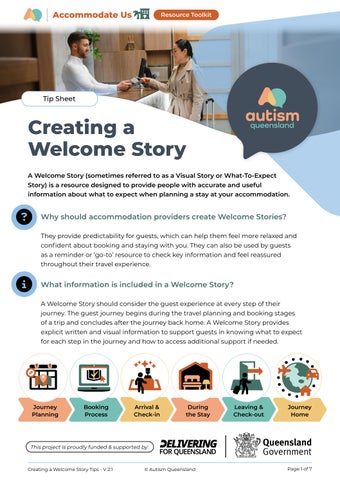
What information is included in a Welcome Story? A Welcome Story should consider the guest experience at every step of their journey. The guest journey begins during the travel planning and booking stages of a trip and concludes after the journey back home. A Welcome Story provides explicit written and visual information to support guests in knowing what to expect for each step in the journey and how to access additional support if needed.
Journey Planning
Booking Process
Arrival & Check-in
During the Stay
Leaving & Check-out
Journey Home
This project is proudly funded & supported by:
Creating a Welcome Story Tips - V 2.1
© Autism Queensland
Page 1 of 7
Creating a Welcome Story Tip Sheet Creating your Welcome Story •
Use clear and concise language.
•
Consider readability and font sizes.
•
Use current photographs of the actual setting (wherever possible).
•
Link to other resources or provide QR codes to learn more (e.g. maps, accessibility guides, menus, etc.). This will help to keep your Welcome Story concise and up to date.
•
Make the Welcome Story easily accessible on your website.
•
Consider having printed copies available at reception and/or in guest rooms.
Updating your Welcome Story •
Remember to update your Welcome Story if there are changes to any steps across the guest journey, or to the venue environment (e.g. facilities closed for maintenance or renovations, changes to operational procedures, new services, etc.).
•
Consider having a handout of any updates or changes for guests on arrival. Ideally this information would be communicated ahead of time on your website and via guest emails. Unexpected changes can cause significant distress for neurodivergent travellers.
•
Seek regular feedback on your Welcome Story from guests or other community members to assess effectiveness and to inform any changes.
The following sections provide key considerations for each stage of the guest journey and examples of what to include when creating a Welcome Story.
This project is proudly funded & supported by:
Creating a Welcome Story Tips - V 2.1
© Autism Queensland
Page 2 of 7
Creating a Welcome Story
Tip Sheet
Helpful tip! Journey Planning
Use pictures, icons, and other visuals to communicate information where possible.
Consider the steps involved
Consider the environment
Finding the venue: Provide clear instructions to help guests find their way to your venue.
Parking options: Provide explicit information about parking options and clear instructions for finding the venue's reception from the carpark.
This might include: • Street address • Public transport options • Maps • Driving directions including maps • Nearby landmarks.
Finding your way: Carpark map 1
Entry gates to venue are acc essible from Re Road. sort
2
Guest parking is on right hand side upon entry Left hand side ( parking is for staff only ( ).
3
Entry doors to reception are located on gro level of the yel und low building. Pre ss the yellow button to open the doors ( ).
).
When onsite parking is provided, consider information on the following: • Is there 24-hour access to carparks? • Is a code or key required for access? • Are parking bays allocated to guests or can guests choose where to park? • How can guests make specific requests relating to parking bay allocations if required (e.g. parking close to lift access)?
1
2
3
Include visual information such as: • Photos of the parking options and a carpark map. • Link to a video tour of the carpark including access to lift/stairs and reception.
This project is proudly funded & supported by:
Creating a Welcome Story Tips - V 2.1
© Autism Queensland
Page 3 of 7
Creating a Welcome Story
Consider the environment
Arrival & Check-in
Reception or welcome area: It can be helpful to describe the space guests will first enter when arriving at your venue (e.g. office, reception, or lobby area). Descriptions should include the sensory elements of the space as well as pictures or a video tour where possible.
Consider the steps involved Check-in process: •
•
•
Tip Sheet
If you offer flexible check-in options, clearly outline these choices. Provide clear check-in instructions outlining each step of the procedure. The check-in procedure can be added directly into the Welcome Story.
The combination of multiple sensations at once can make an environment particularly challenging to navigate. Adding predictability about what to expect in these spaces supports and empowers guests to be prepared. Below are a few examples of common sensory experiences upon arrival:
Sounds
Touch
Sights
Smells
Movement
Music
Incidental touch from others queuing
Bright lights
'Signature scent' diffusers/candles
Crowds/queues at peak times
Food smells from cafes or restaurants
Room access only via elevator
Others talking Traffic noise
Hotel Check-in Procedure
Tip Sheet!
Luggage trolleys
Check-in time: _____
______________
Your booking num ber: _______________ ____ (You should have received this whe n you made your booking).
Access the Creating a Check-in Procedure Tips resource for more information.
Elevator bells/ music
Reflective surfaces (e.g. mirrors/tiles) Artworks or lighting displays Glass walls
Perfumes and cologne
Bathroom hand driers
1
On arrival, follow signs to Reception and let a staff member know that you would like to chec k-in.
2
Staff will ask for your name and may require you to show identifica tion (e.g. drivers license or passport.)
3
Ask for confirmat ion that your room meets any special requ irements you mad e at time of booking (e.g. quie t location, dimm able lights, air-conditioning etc.)
4
Receive your room key or access card.
This project is proudly funded & supported by: Page 1 of 2
Creating a Welcome Story Tips - V 2.1
© Autism Queensland
Page 4 of 7
Creating a Welcome Story
Tip Sheet
Helpful tip!
During the Stay
To keep the Welcome Story concise, it is recommended to indicate, link, or provide a QR code to where guests can find this information rather than including it all in the Welcome Story.
Consider the steps involved Using accommodation facilities: •
Include venue maps or links to access online.
•
Identify opening and closing times for facilities (e.g. restaurants, pool area, reception, games room, carpark, etc.). Be specific, people may interpret ‘open til late’ differently (avoid ambiguity).
•
•
Provide any information specific to the type of room/ booking (e.g. breakfast included, requires use of shared bathroom on level 2, etc.).
•
Describe any options for customising the room (e.g. Is there a choice of pillows or bedding? Adjustable lighting or aircon? How do guests action any special requests?).
Outline or link to any venue rules or expectations (e.g. no glass in pool area or phones silenced in the day spa). •
•
•
Provide information on how to access hard copy or online menus. Describe how to use lifts (e.g. do you need to swipe an access card before selecting floor level?). This could also be linked to as a separate ‘How to’ document.
Provide information on how to access step-by-step instructions for the use of any in-room facilities (e.g. coffee machine, TV, aircon, washing machine, oven etc.).
Using your TV remote
Turn on/off
Change input source (e.g. connect to DVD player).
Volume up/down View TV guide Go back (return to previous menu
)
This project is proudly funded & supported by:
Creating a Welcome Story Tips - V 2.1
© Autism Queensland
Page 5 of 7
Creating a Welcome Story
Tip Sheet
(Continued)
Consider the environment Activities and events: Include information about specific services or activities on offer. This might include links more details or timetables for: • Kids club/child minding services • Day spa session times • Tours and activities • Special events.
Kids Club Sch edule (Monday 19th May) 9:00am: Meet in Games Room (opposite pool entrance).
Information to highlight for activities might include: • Date and time. • Who the activity is suitable for (e.g. age requirements). • How to book the service. • If the activity is included or if there are additional costs (and how to pay). • Links to additional information and visual supports about the activity or event (e.g. a visual schedule of what will happen and when).
Meet Lilly the
Kids Club Mana
Find and deco
ger.
rate your nam
e badge.
Participate in a Lego building challenge in groups or ind ividually. 10:30am: Morn ing tea time! Ap ples and fruit juice prov ided or bring your own. Outside activity : Mini golf (plea se pack a hat and sunscre en!) 12:30pm: Lunc h time! Sandwi ches and fruit proviced or bring your own. Your choice of activity until pic k up time at 3:00pm in th e Games Room .
This project is proudly funded & supported by:
Creating a Welcome Story Tips - V 2.1
© Autism Queensland
Page 6 of 7
Creating a Welcome Story
Tip Sheet
Helpful tip! Leaving & Check-out
Use pictures, icons, and other visuals to communicate information where possible.
Consider the steps involved
Consider the environment
Check-out process:
Reception or lobby area: Provide information about what to expect at checkout and departure.
• •
•
Clearly outline options for check-out (e.g. early check out the night before, contactless, key drop etc.). Step guests through Hotel Check-out the check-out process Procedure using the same concepts Check-out time: 10:00am outlined in the Creating a Upon exiting your room, go to the reception 1 Check-in Procedure Tips front desk. Make sure you have all your belongings. resource. Provide information or link 2 Let staff know your name and that you would like to check-out. to local transport options to the support the journey Return your room key or 3 access card. home.
•
•
•
Describe the sensory environment (e.g. sounds, sights, smells, touch, and movement). Highlight any options for avoiding peak busy times at check-out for guests to avoid sensory overwhelm. Provide or link to a map to support exiting the venue.
Autism Queensland is here to help—get in touch to learn more: Scan QR code for more AccommodateUs Toolkit resources designed to reduce barriers and create inclusive venues.
Creating a Welcome Story Tips - V 2.1
Email: css@autismqld.com.au Phone: (07) 3273 0000 Website: autismqld.com.au This project is proudly funded & supported by:
© Autism Queensland
Page 7 of 7