

AUGIWORLD

AUGI Members Reach Higher with Expanded Benefits
AUGI is introducing three new Membership levels that will bring you more benefits than ever before. Each level will bring you more content and expertise to share with fellow members, plus provide an expanded, more interactive website, publication access, and much more!
Basic members have access to:
• Forums
• HotNews (previous 12 months)
• AUGIWorld (previous 12 months)
DUES: Free
Student members have access to:
• Forums
• HotNews (previous 24 months)
• AUGIWorld (previous 24 months)
• AUGI Educational Offerings DUES: $2/month or $20/year
Professional members have access to:
• Forums
• HotNews (full access)
• AUGIWorld (full access and in print)
• AUGI Library
• ADN Standard Membership Offer
DUES: $5/month or $50/year



Letter From the Editor
We are now past half of the year, and in July. This month’s theme is 3rd Party Apps. Third-party apps have become an integral part of the modern digital ecosystem. Whether you’re using a smartphone, managing cloud-based software, or working within enterprise platforms like Autodesk, Microsoft 365, or Google Workspace, thirdparty applications extend functionality beyond what the original platform provides. This article explores what third-party apps are, their benefits, associated risks, and how to use them responsibly.
Some of the benefits are listed below:
Benefits of Third-Party Apps
1. Enhanced Functionality

www.augi.com
Editors
Editor-in-Chief
Todd Rogers - todd.rogers@augi.com
Copy Editor
Miranda Anderson - miranda.anderson@augi.com
Layout Editor
Debby Gwaltney - debby.gwaltney@augi.com
Content Managers
3ds Max - Brian Chapman
AutoCADAutoCAD Architecture - Melinda Heavrin
BIM/CIM - Stephen Walz
BricsCAD - Craig Swearingen
Civil 3D - Shawn Herring
Electrical - Mark Behrens
Manufacturing - Kristina Youngblut
Revit Architecture - Jonathan Massaro
Revit MEP - Jason Peckovitch
Tech Manager - Mark Kiker
Inside Track - Shaun Bryant
Advertising/Reprint Sales
Nancy Tanner - sales@augi.com
AUGI Executive Team
President
Third-party apps expand the capabilities of core platforms. For example:
• BIM add-ins can improve workflows in Revit or Civil 3D
• Excel plugins add advanced analytics or automation
• Project management tools integrate with communication platforms
This allows businesses and individuals to customize tools to their exact needs.
2. Increased Productivity
Many third-party apps automate repetitive tasks:
• Data syncing between systems
• Automated reporting and dashboards
• Workflow triggers (e.g., sending notifications or updates)
This reduces manual effort and frees users to focus on higher-value tasks.
3. Integration Across Platforms
Third-party apps often act as bridges between otherwise disconnected systems:
• CRM ↔ Email ↔ Project Management
• GIS ↔ BIM ↔ Visualization tools
• Cloud storage ↔ collaboration platforms
This interoperability is critical in industries like AEC, where multiple tools must work together seamlessly.
4. Rapid Innovation
Third-party developers can innovate faster than large platform providers:
• Niche features tailored to specific industries
• Experimental tools that push platform capabilities
• Frequent updates and improvements
This results in a more dynamic and evolving ecosystem.
I hope you enjoy this issue. I want to thank all the authors and volunteers that keep this organization running. Please reach out to me if you would like to contribute to the magazine. You can reach me at todd.rogers@augi.com
Vice-President
Treasurer
Secretary
Shelby Smith
AUGI Board of Directors
Eric DeLeon
Chris Lindner
Frank Mayfield
Shelby Smith
Scott Wilcox Kristina Youngblut
AUGI Advisory Board of Directors
Gil Cordle
Jason Peckovitch
Jeff Thomas III
Publication Information
AUGIWORLD magazine is a benefit of specific AUGI membership plans. Direct magazine subscriptions are not available. Please visit www.augi.com/account/register to join. To manage your AUGI membership and address, please visit www.augi.com/account. For all other magazine inquires please contact augiworld@augi.com
Published by:
AUGIWORLD is published by AUGI, Inc. AUGI makes no warranty for the use of its products and assumes no responsibility for any errors which may appear in this publication nor does it make a commitment to update the information contained herein.
AUGIWORLD is Copyright ©2026 AUGI. No information in this magazine may be reproduced without expressed written permission from AUGI.
All registered trademarks and trademarks included in this magazine are held by their respective companies. Every attempt was made to include all trademarks and registered trademarks where indicated by their companies.
AUGIWORLD (San Francisco, Calif.) ISSN 2163-7547
Bright Ideas for a Bright Future

AUGIWORLD brings you the latest tips & tricks, tutorials, and other technical information to keep you on the leading edge of a bright future.




Tby: Jason

3rd Party Tools Are Not the Strategy

he BIM industry has always had a complicated relationship with 3rd party tools. On one hand, they solve very real problems that native software platforms


often struggle to address efficiently. On the other hand, many firms have quietly allowed these tools to evolve from productivity enhancements into operational dependencies. Somewhere along the

way, the conversation shifted from “What problem does this solve?” to “How do we build our workflow around this platform?”
That distinction matters more than many organizations realize.
Most experienced BIM/VDC professionals understand why 3rd party tools became so prevalent in the first place. Revit alone cannot solve every coordination challenge, fabrication workflow, data management issue, reporting requirement, or QA/QC process that modern project delivery demands. As projects became larger and more complex, firms naturally began searching for tools that could close workflow gaps, automate repetitive tasks, and improve consistency across teams.
In many cases, those tools deliver exactly what they promise. Some dramatically improve efficiency. Others reduce modeling errors, accelerate production, simplify content management, or streamline fabrication workflows in ways that save measurable time and money. Particularly on the construction side, where production pressure and schedule compression are constant realities, specialized tools can quickly become embedded into day-to-day operations.
That part of the conversation is important because this is not an argument against 3rd party applications. The BIM industry would likely struggle to function at its current scale without them.
The concern is not the existence of the tools themselves. The concern is what happens when organizations stop treating tools as support systems and start treating them as the strategy.
PRODUCTIVITY CAN HIDE FRAGILITY
One of the biggest risks with modern BIM ecosystems is that firms often adopt tools faster than they evaluate the long-term operational impact behind them. A workflow problem appears, a vendor demonstrates a compelling solution, implementation begins, and the productivity gains are immediate enough that few teams stop to evaluate the dependency being created.
Over time, organizations can become so accustomed to the ecosystem that the platform itself starts shaping production assumptions, staffing expectations, and even implementation decisions. What originally began as a productivity
enhancement gradually becomes embedded into day-to-day operations.
In many cases, firms unintentionally lose ownership of the underlying process itself. Instead of understanding why a workflow exists, teams become increasingly focused on how the platform expects the process to operate. Those are not always the same thing.
The danger is not necessarily the software. The danger is allowing operational decision-making to become overly dependent on systems that are no longer being critically evaluated. Once that happens, organizations can slowly drift into adapting their standards and processes around the software rather than ensuring the software continues supporting the broader business goals.
Some organizations no longer fully own their BIM process. They rent it from their software stack.
THE DATA PROBLEM NOBODY TALKS ABOUT
One of the more frustrating realities in contractordriven BIM workflows is that the closer teams move toward fabrication-level detail, the harder it becomes to maintain clean and consistent model standards. Manufacturer content, fabrication services, and specialized workflows often introduce data structures that were never designed around a company’s internal standards strategy.
In theory, highly detailed manufacturer content sounds beneficial. In practice, it often introduces bloated geometry, inconsistent parameter structures, duplicate metadata, and project-specific information that does not align with established company workflows.
A common example is manufacturer families that technically contain the required information but do so using parameter structures that do not integrate cleanly with a company’s scheduling, tagging, filtering, or QA/QC standards. Rather than relying on inconsistent manufacturer parameters, many firms end up introducing their own company-standard parameters simply to maintain operational consistency across projects.
At that point, the manufacturer data frequently becomes secondary or ignored altogether because the internal company parameters are the ones actually driving schedules, tags, deliverables, and
downstream workflows. Technically, the content “works,” but the organization has now created parallel data environments inside the same model just to preserve standardization.
That tension becomes especially visible in fabrication-oriented workflows where CADmep services, Revit fabrication content, and manufacturer-specific models all intersect. What appears standardized inside one ecosystem often translates poorly into broader BIM environments where interoperability, maintainability, and model performance still matter.
The issue is not necessarily that these workflows are wrong. In many cases, they are necessary to meet production demands. The challenge is that every additional layer of customization, parameter mapping, and workflow adaptation introduces long-term complexity that organizations must eventually maintain.
Unfortunately, many firms only evaluate whether the workflow functions today. Few stop to consider what the accumulated technical debt may look like years later after templates, standards, schedules, tags, and deliverables have all evolved around temporary production solutions.
WHEN ECOSYSTEMS BEGIN SHAPING STANDARDS
One of the more interesting shifts I have noticed moving from the consulting side into the contractor environment is how different 3rd party ecosystems influence workflow decisions. In many contractordriven environments, the software stack extends far beyond model authoring. Fabrication integration, procurement workflows, field coordination, spooling, reporting, and production tracking often become deeply tied to specific platforms and proprietary systems.
Over time, those ecosystems begin influencing more than just production workflows. They begin by shaping standards, training expectations, staffing requirements, and even the way organizations think about BIM implementation itself.
At first, the ecosystem improves consistency and production efficiency. Eventually, however, implementation standards begin referencing the platform directly. Training becomes platform specific. Hiring expectations evolve
around ecosystem familiarity. Internal processes increasingly adapt themselves around proprietary workflows that newer team members simply inherit as “the way things are done.”
In some environments, questioning the workflow itself can almost feel discouraged because “that is how the system works.” The platform stops being viewed as a support system and starts becoming the framework through which operational decisions are made.
The danger is not necessarily the software. The danger is losing the ability to separate operational strategy from the ecosystem supporting it. When organizations stop evaluating whether workflows still align with actual business goals, software platforms can quietly begin influencing decisions that should belong to leadership, standards governance, and long-term operational planning instead.
THE HIDDEN COST OF “STANDARDIZED” ECOSYSTEMS
Deeply integrated ecosystems also introduce operational risks that many organizations do not fully recognize until maintenance, support, or migration challenges begin surfacing years later. Workflows that appear highly efficient during stable production periods can become increasingly fragile as interconnected platforms, databases, and integrations evolve independently over time.
In fabrication-oriented environments, version dependency can become particularly disruptive because workflows are often interconnected across multiple platforms simultaneously. A fabrication profile may function correctly in CADmep while behaving inconsistently inside Revit after an upgrade cycle. Add-ins that production teams rely on daily may lag behind platform releases for weeks or months, forcing organizations into difficult decisions between delaying upgrades or accepting temporary workflow instability during active projects.
That challenge becomes even more complicated in enterprise environments where different offices, projects, or teams may not all upgrade at the same pace. In theory, standardization should simplify operations. In practice, version fragmentation across interconnected ecosystems can create situations where workflows functioning reliably for
one team become unstable for another depending on software versions, fabrication databases, or plugin compatibility.
The larger the ecosystem becomes, the more maintenance responsibility organizations quietly inherit alongside the productivity gains.
This becomes especially important during mergers, leadership transitions, or large-scale implementation efforts. Ecosystems that once appeared highly efficient can suddenly become difficult to adapt, difficult to migrate away from, or difficult to support consistently across multiple teams and offices.
In some cases, firms eventually discover that years of customization have created environments that only a handful of internal power users fully understand. Once those individuals leave, maintaining the workflow becomes significantly more difficult.
That is not operational maturity. That is operational dependency.
HEALTHY BIM ORGANIZATIONS STILL OWN THE PROCESS
Healthy BIM organizations absolutely leverage 3rd party tools. In many environments, they should. The goal is not to reject specialized software or pretend native platforms solve every problem effectively.
The goal is to ensure the organization still owns the process beneath the software.
That means understanding why workflows exist rather than simply inheriting them. It means evaluating long-term maintainability alongside short-term efficiency gains. It means creating standards that can survive platform changes instead of becoming completely dependent on a single ecosystem.
Most importantly, it means recognizing that software alone does not create operational maturity. A fragmented workflow does not become a good workflow simply because automation was added to it. Poor standards do not become healthy standards because a platform enforces them more aggressively. Inconsistent data structures do not become scalable simply because they are hidden behind polished interfaces and automated buttons.
3rd party tools are accelerators. Some are incredibly valuable accelerators. But acceleration only helps if the underlying direction is already sound. The BIM industry does not have a shortage of software. What it still struggles with, in many cases, is governance, ownership, consistency, and long-term operational thinking.
That is why 3rd party tools should support the strategy, not become the strategy itself.

Jason Peckovitch is an AUGI Advisory Board Member, Autodesk Certified Professional in BIM Management for Building Design, and Revit Certified Professional for Mechanical and Electrical Design based in SE Iowa. He currently serves as BIM/VDC Manager at ACI Mechanical Inc., bringing over 25 years of CAD/BIM experience and nearly two decades focused on MEP coordination, Revit standards, and scalable content strategies.
Jason writes regularly for AUGIWORLD and shares Weekly BIM Mastery insights on LinkedIn, focused on practical, field-tested BIM without the fluff. He is the author of Becoming a BIM Manager: Industry Insights, Field-Tested Playbook, and BIM Without the Bullshit, a practical guide grounded in real-world implementation, leadership challenges, and what actually works in production environments.
Outside of work, he is a father of three, a published photographer, and a car and tech enthusiast. Connect with him on LinkedIn, find him on X as ThatBIMGuy, or reach out at thatbimguy@gmail.com

The Unexplained
Ihave been working in technology with hardware and software for a long time. I have seen to the good, the bad and the unexplained. Things work great for a long time and then seem to stop working for no reason at all. Some things keep failing and then stabilize and start working fine. Most things can be traced down, diagnosed and corrected. But some things can be baffling and stump you. If you have been doing tech support for a while you have seen it all. But sometimes things seem to fix themselves. It was nothing you actually did, but things started working again. They are unexplained.
There is a series about the unexplained. From Wikipedia: The UnXplained is a television series on History that claims to “explore subjects that have mystified mankind for centuries”. The show is hosted and executive produced by William Shatner and has aired for eight seasons. There is some weird stuff out there, but this article is about the tech unexplainable.
Here are some of the unexplained things that I have seen from the perspective of the person with the problem and what they say when I arrive at their desk to assist. Let’s take a closer look at these things and provide some attempts at explaining it.
I DIDN’T DO ANYTHING
When I walk up to the persons desk, they tell me what the problem is and that they did everything right and nothing wrong. Things were working fine and then BOOM, they stopped working. Something must have happened, but it was not them that caused it. What really happened?
POSSIBLE EXPLANATIONS
There can be collateral damage caused by other processes starting or ending, updates put in place, new systems blending into the mix and more. I always ask, “what has changed?” when I see something breaking on its own. This is question is directed to me as much as others. Usually there will be some change that cascaded down from an upgrade or shut down of some system that I thought had no connection.
Without pointing a finger at the person driving the software, they probably did do something different or unique that they do not recall doing. No malicious intent. Things do just fail now and then, but good troubleshooting can usually uncover a root cause. When I analyze the issues and they lead to operator origination, I try not to place blame. Blaming or shaming is not the point. Getting them back to work is the goal. They often don’t realize they forgot a step or picked the wrong command. I usually have them show me what they were doing, and they uncover a step they missed. Then I say, “you fixed it!”. If I notice something they missed, I gently mention what they might have overlooked. No big deal. Things are working now. Move on.
I TRIED THAT
Why do tech fixes just work when I do the same thing that others said they have already done? I try the same steps they said they used and it works. They are baffled and so am I. They call me a wizard and thank me for figuring it out, even when I did
not do much at all. Sometimes things just work when you do the same things that others have tried (or at least they said they tried it). You go through the same steps in the same way and bingo – it works. Why did it not work for them?
POSSIBLE EXPLANATIONS
Things might work for you that don’t work for others based on your permissions. When troubleshooting, try not to use your login. You have elevated privileges that might get around bottlenecks that others encounter. If you do use your login, log out and have them try it with their username and password.
Doing the same thing they did might work for you because during the time it took to call you and you arrive at their desk, the server or network that might have been glitching has stabilized. Network latency can cause many issues. Servers that consolidate data on the fly can clog up resources and bog things down. So, many times, just waiting a while can allow things to recover.
At other times, it might be that the person just didn’t wait long enough to have a fix take effect. They may know what to do, but they move too fast. When restarting their system or getting out and getting back in is done too fast, the system does not have time to clear old data in memory. Give it a little time. I sometimes say I am going to “check on the server” while they shut their machine off. Then I come back and have them start their PC again. That works more often than not by just giving it a refresh and a little more time.
IT’S WORKING NOW
Sometimes things just fix themselves. I see hardware and software problems resolved in many ways but sometimes things just seem to fix themselves. Have you seen this? I claim no magic, no horse whisperer kind of connection, no electromagnetic fields. Some have suggested that “the force is strong with this one”. Sometimes I don’t even touch anything. I just get close and things work. Why do things work when I just walk over to someone’s desk?
POSSIBLE EXPLANATIONS
This is part of the “give it time” concept. Like I mentioned, just the delay in getting to their desk can “fix” things. Usually, they keep trying to fix it and when they reproduce the problem, they include some forgotten step and voila – it works. Congratulate them on getting it fixed and have a quick laugh. Those who use the software and hardware are knowledgeable and resourceful. They know how to fix quite a few things themselves. Give them time and they will get back on track.
STILL UNEXPLAINED
For all the guessing I do as to why some things work for me and not others, I am still stumped. I do admit that for those in tech support, things do just work for you that others have issues with. Is it a talent? A gift? Who knows? Just accept that you are good at what you do and that your skill in getting technology to work is valued. And to stay humble, remember, it does not extend to all areas.
Why don’t I have the same affect when I need to fix my leaking faucet or a sprinkler pipe? When I touch anything mechanical, it becomes worse. If I try to fix a leaking faucet, the handle snaps off the shutoff valve and it gushes water all over the floor before I even touch the faucet to start fixing that. Now I have two problems to fix. And the mechanic that works on my car… what a wizard!

Mark Kiker has more than 30 years of hands-on experience with technology. He is fully versed in every area of management from deployment planning, installation, and configuration to training and strategic planning. As an internationally known speaker and writer, he was a returning speaker at Autodesk University for twenty years. Mark has served as Draftsman, Principal Designer, CAD/BIM Manager, Systems Analyst, IT Director, CTO, CIO and AUGI Board President. He can be reached at mark.kiker@augi. com and would love to hear your questions, comments, perspectives and ideas for future topics.
A Handshake in Ghent: The story behind EGBoundary and BricsCAD
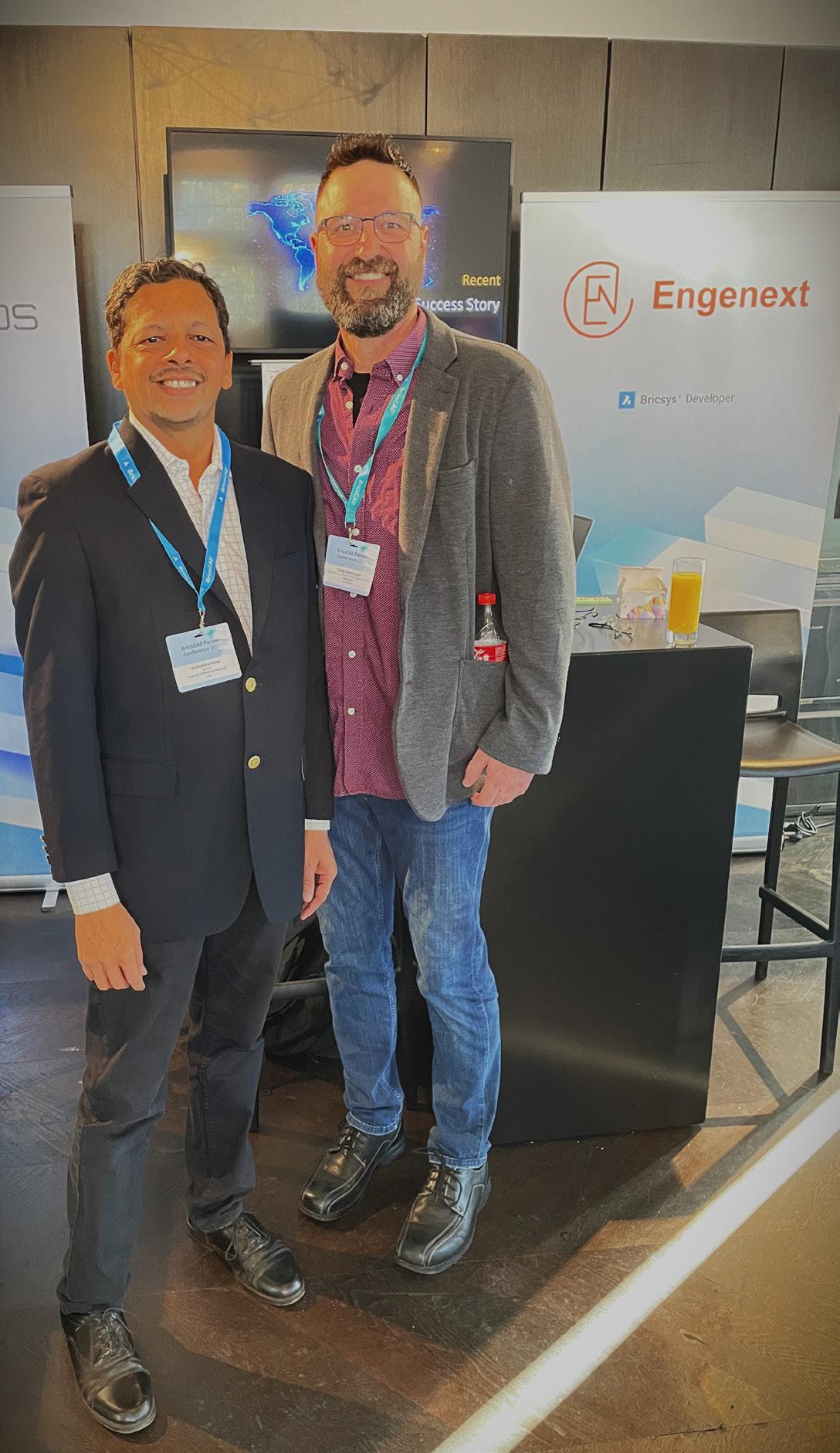
Some of the best products start with a handshake. Mine did. At the BricsCAD Partners’ annual conference in Belgium, a short hallway conversation with Craig Swearingen turned into a development opportunity, a sales win for a CAD platform, and a critical solution for a customer who had run out of options. This is the story of how three parties: a shipbuilder, a CAD vendor, and a small development firm found each other at the right moment, and what we built together.
HOW DID THIS START
It all started when Craig and I met at BricsCAD Partners’ annual conference in Ghent, Belgium.
I was representing my company, Engenext Software Solutions LLP, the developer of CAD customizations and Solutions, with an interest in finding new software development opportunities. Craig, Implementation Specialist at BricsCAD, was searching for a consistent developer who could address the highly technical needs of his customers. During a networking session, I expressed my interest in developing customizations. Craig expressed the need for a technical solution for one of its customers. Our interests matched. This was an ‘aha!’ moment for both. And we readily agreed we could develop a solution for the customer.
THE CHALLENGE
The customer is a leading naval architecture/ shipbuilding firm in Canada. Their design requirements are stringent and demanding. The field they operate in requires a high precision of results and a quick turnaround. They extensively used boundary
Craig and Aniruddha in Ghent Belgium at the Partner Summit
extraction for 2D drawings in their design workflows. This requirement was addressed by a capable tool until this tool suddenly became unavailable to them because of global restrictions. They had a tough time finding a replacement. Other existing solutions could not satisfy their requirements. They needed a reliable, modern replacement integrated with BricsCAD.
WHY BRICSCAD
BricsCAD provides rich and comparable API, both Lisp as well as C++ and .NET. Easy onboarding for developers, flexibility in building workflows, and prompt support are the differentiating factors.
With BricsCAD, it was easy for Engenext to quickly assemble a team and start the development. With the challenges of platform and competency sorted out, it was easy to focus on the actual algorithm and software development.
THE DEVELOPMENT JOURNEY
The development started with an understanding of the exact requirements. Input was obtained from the customer as well as from the results of the nowdefunct technology. While requirements gathering was on, Engenext was also busy building some proofs of concepts, algorithm development, comparisons of data structures, tolerances, and so on. Special attention was given to the accuracy of results, comparable or better – performance, and identical user interaction.
Careful, timely, prompt, and precise communication helped fast-track this project. The customer was open to sharing input drawings, reviewing the results of prototypes, providing feedback, and suggesting improvements.
“The ability to have our customer work directly with the Aniruddha allowed the entire development process to accelerate quickly. And the next thing I know, Aniruddha says ‘We have a solution”, states Craig Swearingen.
With all parties exchanging necessary information in a timely manner, the functionality was taking shape and was ready to be delivered.
THE MILESTONES
Technology milestones are a little different from regular Software Development Life Cycle milestones. I feel technology evolution is more like ‘Crystallization’ than ‘Building serially’! They are more about the logical evolution of technology than percent progress. Hence, they may not show linear progress. Initially, it may feel like it is going nowhere, but at some point, in time, it gets into a desired form and starts showing results. With more challenges revealed as we go, it may move back and forth, but ultimately, it comes together as a solution.
In our case, initially, it was about choosing data structures. After careful analysis and comparative studies, we finalized a data structure.
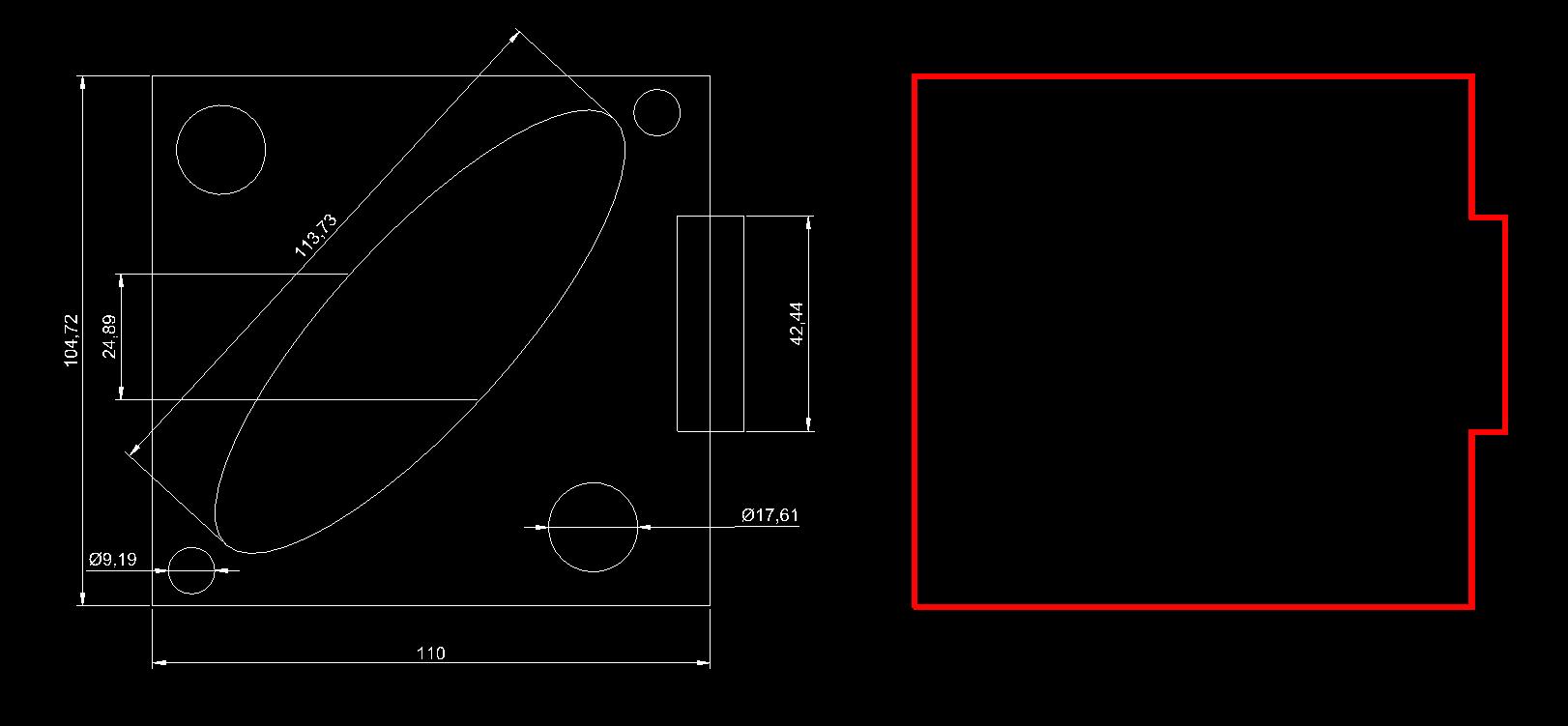
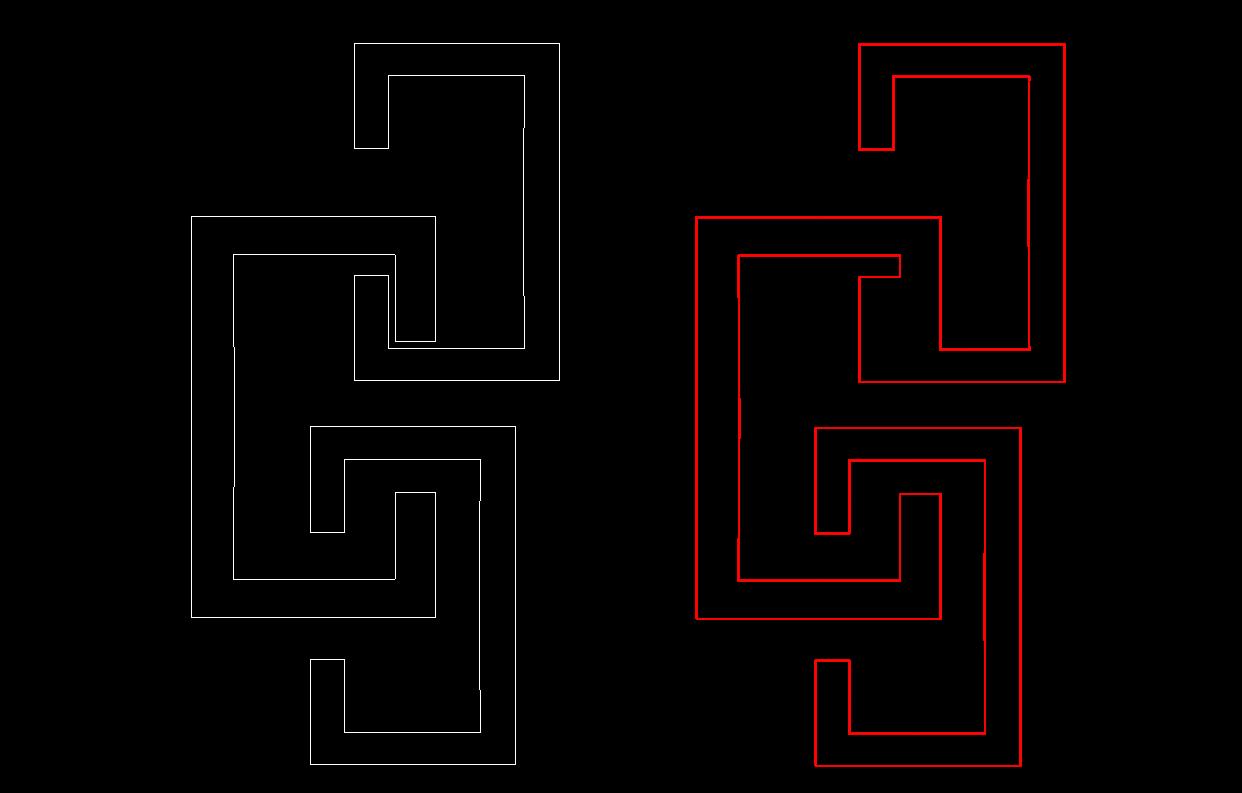
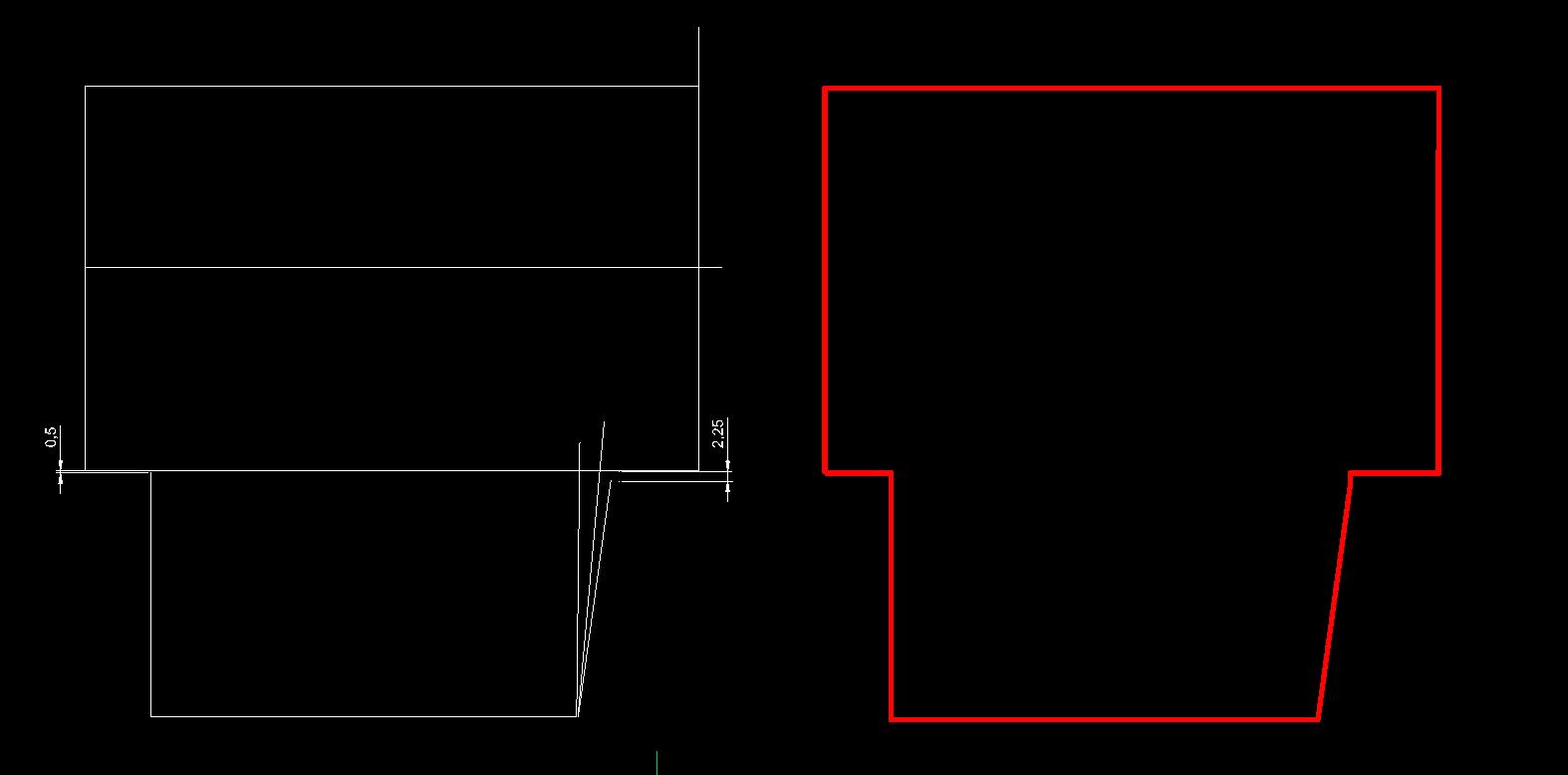
3: Handling inaccuracies: gaps, extensions, overlaps
Then came the algorithm to find boundaries. Identifying multiple outer boundaries was a tricky requirement. So was the requirement to remove dangling edges. And navigating through a huge amount of intersections was a performance challenge.
A typical challenge was to work with inaccuracies, such as edges with gaps or intersecting ends.
Multiple combinations of these cases posed problems. We had to tweak our algorithms to address many of these. All this was achieved without modifying the original input.
Another facet was to keep the technology CAD platform independent. The boundary extraction problem is a geometry problem with inputs coming
Figure 2: Handling concavities with tolerances. Merging of boundaries based on tolerance
Figure
from and outputs going to CAD. With a geometrical solution kept independent of CAD API, our solution became multi-CAD integrable, meaning the geometrical core could be integrated with any CAD system that has 2D entities.
THE SOLUTION
Finally, the product came into a desired form and was named ‘Engenext Boundary Capture, or just EGBoundary.
It’s a simple tool that extracts the outer boundary of a 2D drawing. It creates a closed, water-tight, nonself-intersecting polyline. It also identifies multiple outer boundaries in extremely complex cases. They may be concave, pushing into each other’s convex hulls. EG boundary addresses them with ease.
It handles the corner and intersection conditions smartly. Sometimes, input drawings may have inaccuracies such as edges not connected at ends, or overshooting a little to create intersections instead of a corner. There could be a variety of T-junction cases, and many other peculiar cases. EGBoundary handles them to obtain an acceptable end condition.
Auto-Tolerance is an important feature included. It decides the gap tolerance on its own by analyzing various gaps and overlaps. Of course, the user can override them with manual entry. This tool does not change the original input drawing entities.
Other convenience features, such as color, thickness, and layer of the outer boundary, are also provided.
EGBOUNDARY PERFORMANCE AND
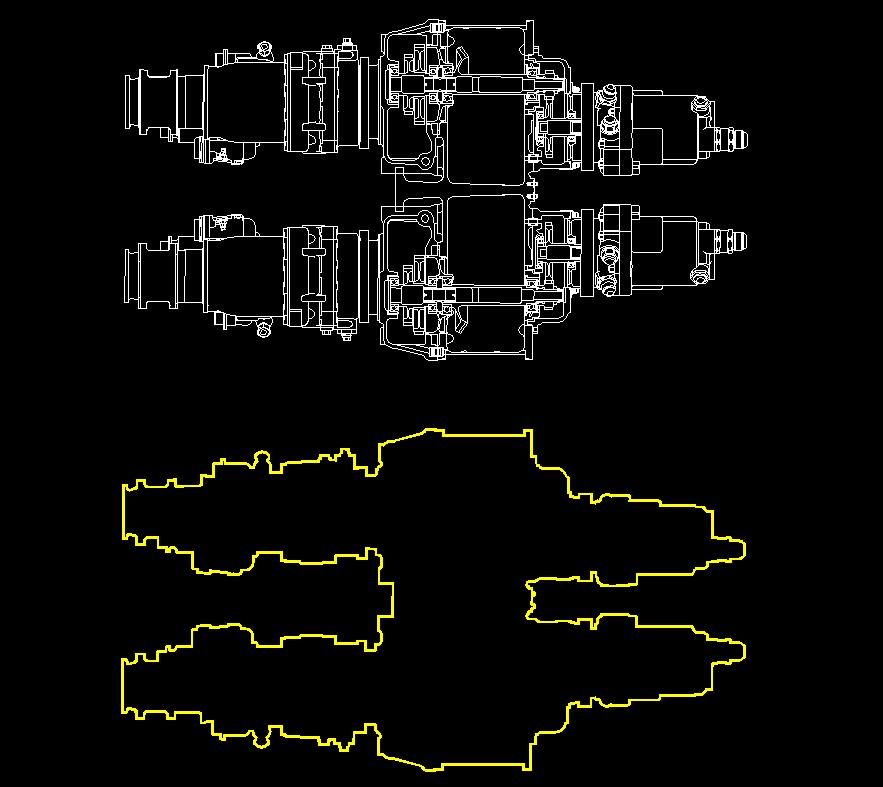
Figure 4: Handling complex drawings.
ACCURACY
EGBoundary is definitely built for handling a large number of entities. Something like 100,000 entities is not uncommon.
Thorough thought was given for the accuracy of results and the performance of operations. Many use cases were considered, examined, and handled while addressing corner cases for edge intersections all while deliberate effort was made to obtain the true form of the outer boundary.
Already built on .NET 8.0, it will work with future CAD versions of BricsCAD. The core engine being CAD independent makes upgrade/integration effort is minimal. We also support previous versions of BricsCAD, which makes it usable across multiple versions, thus the customer does not have to buy a separate installer for every version.
Did I mention this tool is CAD platform independent? (i.e., it can be integrated with other CAD platforms too.) It can even be integrated with your custom CAD! Overall, it’s a simple piece of technology, packing a lot of power into it.
THE BEST PART: THE CUSTOMER OUTCOME
Let’s wrap this up with the best part: The customer benefits! EGBoundary has definitely shown better
performance as compared to other equivalent tools. Gains of 40% are common.
• Better handling of corner conditions has resulted in improved output.
• Handles a much higher number of entities than existing tools. A case with 300000 entities that was unsolvable with existing tools was handled by EGBoundary successfully.
• EGBoundary can be incorporated in Lisp routines. Making it an automatable tool. With minimal user interaction during its functioning, it can be made to work in the background.
Simple, non-restrictive licensing options make EGBoundary, a sought-after option.
MORE ABOUT ENGENEXT BOUNDARY CAPTURE:
Engenext Boundary Capture (EGBoundary) is an advanced boundary extraction technology designed for 2D drawings. It provides a fast, accurate, and reliable method for extracting closed, watertight, non-self-intersecting polyline boundaries — including multiple outer boundaries — from selected 2D entities.
As a domain-independent technology, EGBoundary can be applied across a wide range of industries, including shipbuilding, automotive, civil engineering,

AEC, plant engineering, electronics, and more. It can also be seamlessly integrated into custom CAD applications and engineering workflows.
EGBoundary enables users to achieve substantial productivity improvements, especially when working with large and complex drawings, while maintaining exceptional affordability, licensing flexibility, and ease of use.
ABOUT ENGENEXT:
Engenext Software Solutions LLP is dedicated to building advanced software solutions for the engineering domain. With extensive experience in developing solutions across multiple disciplines, geographies, and industry roles, Engenext delivers innovative, comprehensive, and effective software systems tailored to evolving engineering needs.
Engenext specializes in developing next-generation software platforms by modernizing existing systems using the latest technologies while preserving core intellectual property, performance, reliability, and user experience. The company combines deep engineering-domain understanding with modern software architecture to help organizations transform and future-proof their engineering applications.
ABOUT OCTAVE BRICSCAD
Octave BricsCAD is the true CAD alternative. We are the 2D and 3D CAD alternative that helps you switch smoothly, excel in the detail, and realize better value from day one. Download the free, 30day trial of BricsCAD. Would you like free lessons? We have that available at BricsCAD Learning Ready to migrate to BricsCAD? Download the free Migration Guide. Follow us today on LinkedIn and YouTube
ABOUT OCTAVE
Octave provides enterprise software that helps organizations design, build, operate and protect critical industrial and infrastructure assets. Octave supports decisions across the full asset lifecycle where performance, safety and reliability matter and failure is not an option. Octave connects engineering, operational and safety workflows, enabling customers to convert complex operational data into decisions that improve performance, resilience, and incident response across real-
world environments. Octave has more than 7,000 employees in 45 countries. Learn more at octave. com and follow us on LinkedIn

Mr. Aniruddha Raste is the Founder and Director of Engenext Software Solutions LLP. With a postgraduate qualification in Mechanical Engineering and over 29 years of hands-on experience in CAD software development, he actively leads the company’s engineering solution initiatives.
His extensive exposure to multiple engineering domains, combined with onsite consulting experience across diverse geographies and cultures, enables him to deliver practical and globally relevant software solutions. In addition to technical leadership, his experience in business development and ownership of next-generation engineering software projects brings strategic vision and refinement to Engenext’s offerings.

Mr. Craig Swearingen is a Global Implementation Specialist and Customer Success Consultant at BricsCAD. Currently, Craig provides migration and implementation guidance, management strategies, and technical assistance to companies which need an alternative, compatible CAD solution. Craig spent 19 years in the civil engineering world as a technician, Civil 3D & CAD power user, becoming a support-intensive CAD/ IT manager in high-volume production environments.
Craig is a longtime AUGI member (2009), a Certified Autodesk® AutoCAD® Professional, and he enjoys networking with other CAD users on social media.

The Future of Mentorship in AEC has Two Mentors, Not One
Ifound myself in a leadership conversation a few weeks ago talking about mentorship, and I gave the same answer I think a lot of us give.
“It’s part of our culture.”
After I said it, I realized how weak that answer actually was though.
How many junior staff in most firms actually have an active mentor? How are they paired? What happens when that mentor leaves? How do we know if any of it is even working?
Truthfully, most AEC firms don’t really know. We kind of eyeball it, hope good relationships form naturally, and when someone resigns, the mentorship usually walks out the door with them.
That’s not a mentorship strategy. That’s just hoping things work themselves out.
THE SILENT CRISIS IN AEC PEOPLE OPS
A few months before that conversation, I watched a senior designer put in their notice. Obviously, there are project impacts when that happens. Schedules shift, teams scramble, and risk goes up. But what stuck with me afterward wasn’t just the delivery side of it. It was realizing that this person had also been mentoring several younger staff members every day in ways nobody was formally tracking. Helping them grow, answering questions, guiding decisions, teaching them how to navigate the work and the industry. And the day they left, all of that disappeared too.
Nobody really talks about that side of turnover.
Mentorship doesn’t get treated with the same level of operational attention as project delivery. Even firms that genuinely care about staff development usually don’t have much structure around it. When
senior staff leave, there’s rarely a transition plan for the mentorship relationships they carried out. No visibility, reassignment, or continuity.
In project delivery, we’d never tolerate that. If a PM left in the middle of a major project, leadership would immediately step in and reassign responsibilities. But when does mentorship disappear? Usually…silence.
And honestly, this problem is only getting bigger. Mid-career tenure is shrinking. Senior bench strength is getting thinner. We’re bringing in plenty of new graduates, but we’re not growing the mentor capacity needed to support them at the same pace. We’re heading toward a point where the demand for guidance is going to exceed the number of humans available to provide it.
THE HYBRID MENTOR
Alright, full warning here… yes, this is where AI enters the conversation. But stick with me.
For years, we’ve treated mentorship as something that could only exist as a one-to-one human relationship. And obviously that human component still matters tremendously. But technology has finally matured enough that I think there’s a second layer we should be thinking about. Not AI replacing mentors, but AI supporting them.
Imagine a junior engineer paired with a senior leader for the relationship side of mentorship providing judgment calls, career advice, navigating difficult situations, leadership growth, and all the human stuff that actually matters. Then underneath that, they also have an AI mentor layer handling the day-to-day support like workflow walkthroughs, standards questions, “how did we solve this on the last project,” tool guidance, process navigation, and
internal best practices. The kind of things junior staff need constantly but often hesitate to ask because everyone around them already seems overloaded. That changes the equation completely.
The senior mentor stays focused on the high-value conversations only humans can really provide. The junior staff member gets faster answers, more confidence, and more support exactly when they need it. And maybe most importantly, knowledge itself stops living exclusively inside one person’s head. It becomes part of an accessible system that doesn’t retire, resign, or get reassigned to another project.
WHERE KNOWLEDGE ACTUALLY COMES FROM
guidance, best practices, and forums. That’s an incredibly deep knowledge base that most firms still aren’t connecting into their AI ecosystems. When you combine vendor knowledge with your own internal standards, you suddenly create a system that understands both how the tools are intended to work and how your firm specifically uses them.
But honestly, the biggest source of knowledge is probably the one almost nobody is talking about.
Your employees are already generating mentorlevel knowledge every single day through AI conversations.
Think about it. A designer using Claude to troubleshoot a Civil 3D corridor issue at 11 PM. A PM using ChatGPT to structure a difficult proposal
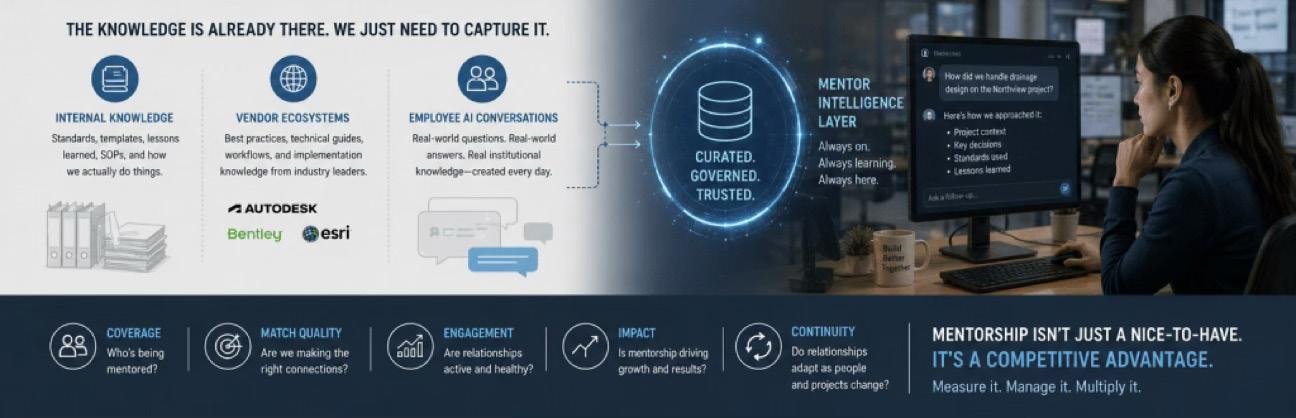
This is usually the first thing people ask me when I bring this up: “What would the AI even learn from?”
Honestly, most firms are already sitting on massive amounts of usable knowledge. They just aren’t leveraging it well.
Every AEC firm already has years of standards, templates, lessons learned, workflow guides, and “how we actually do things at this company” types of documentation. The problem is most of it is buried somewhere in SharePoint or a server nobody opens unless they absolutely have to. An AI layer suddenly makes all of that searchable and conversational. That standards document nobody reads now becomes the standards conversation people can actually interact with.
Then there’s the vendor ecosystem side of it. Companies like Autodesk, Bentley Systems, and Esri already publish enormous libraries of technical documentation, workflows, implementation
response. A junior engineer walking through a workflow problem during lunch with Gemini. Someone refining a drainage calculation with AI support. Every one of those conversations produces useful, contextual, real-world AEC knowledge.
And right now, most of it disappears forever inside private chats.
That’s one of the biggest silent knowledge leaks happening in our industry right now. Firms are paying for AI tools. Employees are getting real value from them individually. But the organization itself isn’t capturing any of the institutional learning being created in the process.
Of course, none of this works unless employees trust the system.
HOW TO DO THIS WITHOUT BURNING TRUST
The firms that figure out how to ethically aggregate and curate internal AI usage are going to build mentor agents that are genuinely useful instead of generically helpful. Your own people are the best curators of what good looks like inside your firm. You just have to give them a way to contribute, and a reason to.
First, move your AI tooling from personal accounts to enterprise seats. The enterprise versions of ChatGPT, Claude, and Gemini now include data agreements where your conversations stay inside your firm, don’t train the vendor’s external models, and can be governed centrally. That’s the foundation. Without it, you have no legitimate path to aggregation in the first place.
Second, build opt-in contribution into the workflow. Give employees a simple way to flag a specific exchange and say, “this one is worth saving for the firm.” Could be a button, a tag, a shared channel… whatever fits your stack. The employee retains control, can review what they’re contributing, can redact what they want redacted, and gets visibility on what gets used. Nothing leaves their account without their decision. That last part matters because the fastest way to kill participation is to make people feel surveilled.
Third, set up a curation layer. Treat AI knowledge contributions the way you’d treat any other technical content. A small group of senior engineers or digital delivery staff reviews submissions, strips identifying details, validates accuracy, and decides what gets promoted into the mentor agent’s training set. The same discipline as you apply to standards updates coupled with the same governance you apply to BIM content.
NONE OF THIS WORKS WITHOUT MEASUREMENT
Even with great mentors and great AI systems, if you can’t actually measure mentorship coverage, you’re still operating on hope.
Mentorship needs the same level of rigor we already apply to utilization, BIM governance, QA/QC, and project delivery. Firms should understand who has mentorship support, where the gaps are, whether relationships are continuing over time, and whether the system is actually helping people develop.
Because what leadership measures is usually what leadership prioritizes.
This is a big part of what I’ve been thinking about while building an intelligent project resource optimizer myself, so that it creates visibility into mentorship coverage, pairing support, and giving leadership a real operational view of workforce development instead of relying on assumptions and good intentions.
At the end of the day, mentorship without infrastructure is just hope. Mentorship with infrastructure becomes leverage.
The firms that figure out how to combine human mentorship, AI support layers, institutional knowledge capture, and measurable workforce development into a single ecosystem will certainly have an advantage. The firms that develop people the fastest are typically the firms that outperform everyone else.
How is your firm handling mentorship today? And honestly…where is all of your AI-generated knowledge living right now?

Stephen Walz is the Digital Design Lead for Civil Infrastructure at HDR, a global leader in Engineering, Architecture, Environmental and Construction services. Stephen has been in the AEC Industry since 2003, and with HDR since 2004 working in its northeast and southeast regions.
In Stephen’s current role, his primary focus is to work with HDR’s Business, Technical and IT Leadership, as well as our technology vendors, to identify, evaluate and implement new platforms/tools/ technologies as it relates to Civil Infrastructure, drive consistency with how HDR is leveraging the various tools and platforms, and identifying ways to build skillsets and overall awareness across HDR to better serve their clients. Stephen can be reached for comments or questions at Stephen.Walz@hdrinc.com


The CAD Budget Conversation Nobody Wants to Have

WHAT AN OLD PICKUP TRUCK TAUGHT ME ABOUT REVIT, AUTOCAD, DRAFTSIGHT, AND SMARTER TECHNOLOGY DECISIONS
Afew weeks ago, I borrowed my cousin’s old pickup truck to haul supplies up to my retreat property on a rough dirt road. It was not fancy.
No giant touchscreen. No heated seats. No luxury package. The paint had long since surrendered to the desert sun, and the driver’s side door only opened if
you lifted slightly while pulling the handle. It rattled at every stop sign like a coffee can, full of bolts.
But that truck did exactly what I needed it to do.
When my father heard I had borrowed a truck, he asked why I didn’t take his instead. His truck was beautiful. High-end. Every feature imaginable. More horsepower. Better suspension. Far more technology. An objectively better vehicle in nearly every measurable way.
And honestly? Both trucks could have made the trip.
Figure 1 - Work Truck (image courtesy of Daniel Maynes, Fractional CTO)
But there was something strangely uncomfortable about taking a luxury truck up narrow dirt roads, scraping against branches, hauling muddy equipment, and risking damage when a reliable workhorse could handle the job perfectly well.
That realization stayed with me because it mirrors a conversation happening quietly inside design firms everywhere right now.
Not every CAD workflow requires the most advanced software environment available.
And pretending it does may be one of the most expensive technology habits firms continue to carry.
THE PROBLEM IS NOT REVIT
Let’s be clear from the beginning. This is not an article against Revit, AutoCAD, or the Autodesk ecosystem.
Autodesk tools earned their reputation through decades of innovation, interoperability, industry adoption, and highly specialized workflows. For firms deeply invested in BIM coordination, civil infrastructure, advanced automation, or integrated project delivery, Autodesk products remain incredibly valuable.
The issue is not whether those tools are powerful. The issue is whether every downstream workflow inside a company still requires premium licensing costs to produce high-quality deliverables. That is a very different conversation.
THE WORKFLOW MOST FIRMS ALREADY HAVE
Consider a fairly common workflow. A firm uses Revit to create highly detailed building models. Designers coordinate systems in 3D. Clash detection happens in BIM. Teams collaborate in sophisticated model environments.
But then something interesting happens downstream. Large portions of the production process still revolve around:
• DWG files
• 2D documentation
• annotation
• dimensions
• plotting
• redlines
• sheet revisions
• vendor coordination
• PDF deliverables
In many firms, entire groups of employees primarily touch drawings for basic drafting and documentation tasks rather than advanced BIM authoring.
And yet those users are often assigned the same premium CAD licensing environments as highend production teams. That is where the budget conversation begins.
THE “EVERYONE GETS AUTOCAD” HABIT
For years, firms standardized around a simple philosophy:
Everyone gets AutoCAD.
At the time, that made perfect sense. The Autodesk ecosystem became the industry standard. Compatibility mattered. Training pipelines mattered. Hiring mattered. Standardization reduced support complexity.
But modern design environments have evolved. Today, many organizations quietly have employees using full 3D modeling seats primarily for:
• text edits
• plotting
• markups
• reviewing consultant drawings
• legacy file access field coordination
• minor sheet updates
• basic annotation
That approach may no longer be operationally necessary. It may simply be expensive inertia.
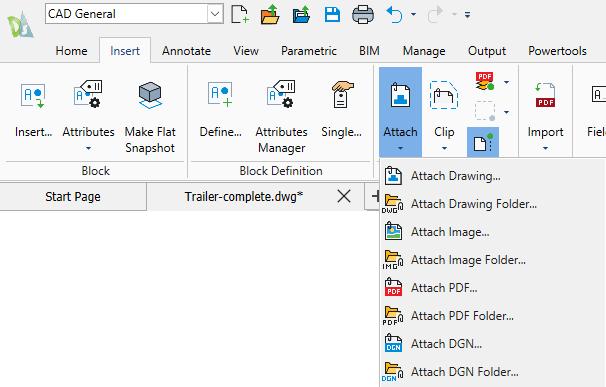
Figure 2 - DraftSight attach options
WHERE DRAFTSIGHT ENTERS THE CONVERSATION
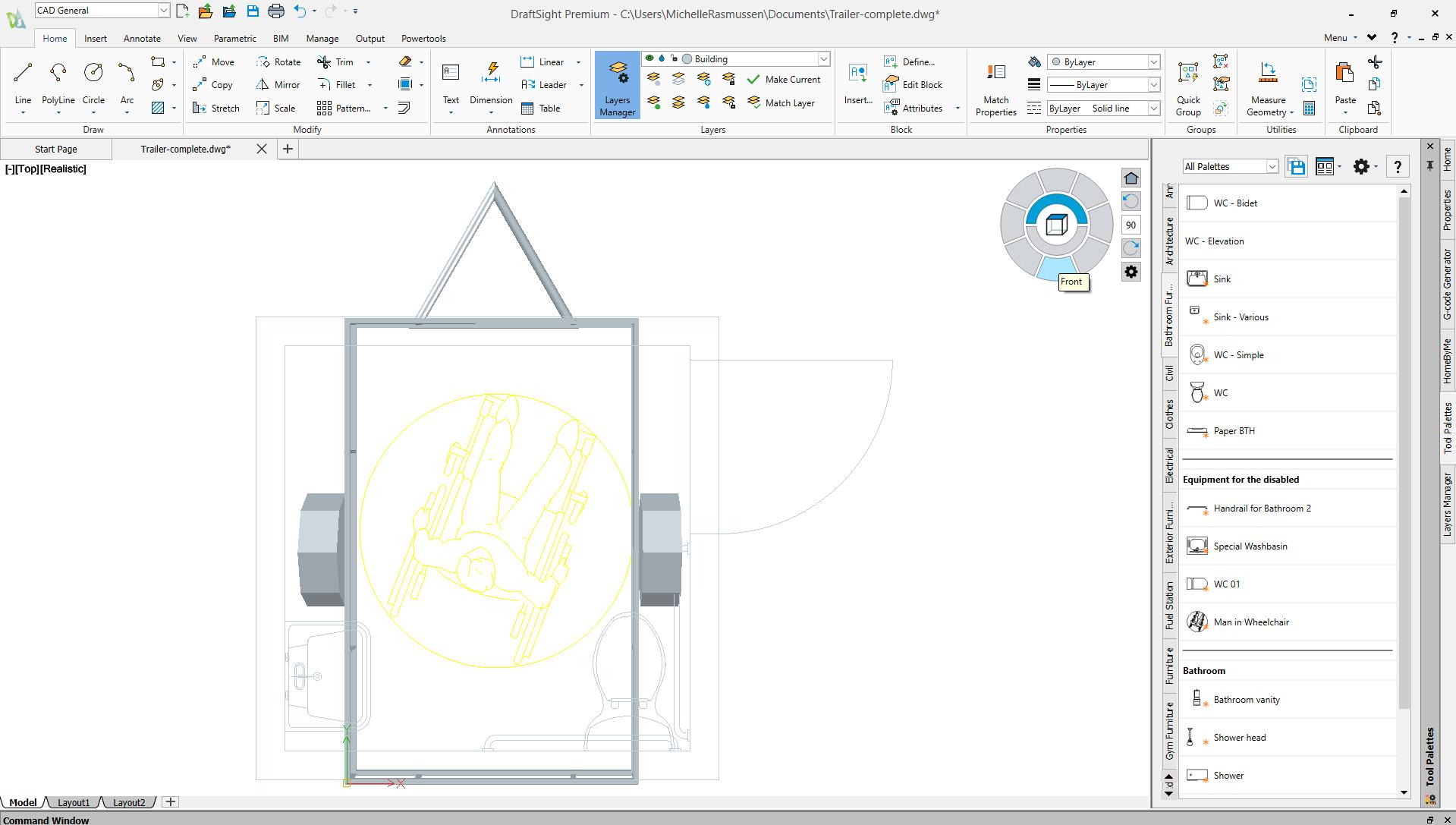
This is where DraftSight becomes interesting. Not as a “replacement war” against AutoCAD. And not as a knock against Autodesk. But as a workflow segmentation strategy.
DraftSight uses the same DWG file format relied upon throughout the industry and provides a drafting environment familiar to many experienced CAD users. For standard 2D workflows, the transition can often be remarkably smooth because the language of drafting itself has not changed.
That familiarity matters. Because the biggest roadblock to DraftSight adoption is usually not technical. It is emotional.
“We’ve always been an AutoCAD firm.”
That sentence carries more weight than most organizations realize. AutoCAD is deeply tied to company identity, standards, onboarding processes, consultant coordination, and institutional confidence. For many CAD managers, changing platforms can feel less like evaluating software and more like questioning years of operational decisions.
But the better question may not be:
“Should we replace AutoCAD?”
The better question may be:
“Which users truly require premium Autodesk workflows, and which users primarily need reliable DWG production tools?”
THE HYBRID CAD STRATEGY
The most successful implementations are rarely “rip-and-replace” scenarios. Instead, firms are beginning to build hybrid ecosystems.
Something like this:
Workflow Role Best Fit
BIM model creation Revit
Advanced production drafting AutoCAD
Civil engineering workflows Civil 3D + AutoCAD
Specialized Autodesk toolsets AutoCAD
Sheet annotation teams DraftSight Review and markup staff DraftSight Legacy DWG access DraftSight Field coordination users DraftSight
That changes the conversation entirely. Now DraftSight is not competing against AutoCAD or Revit. It is supporting the broader ecosystem while helping firms’ lower unnecessary software overhead.
THE NETWORK LICENSE CONVERSATION NOBODY IS HAVING
One of the most overlooked aspects of CAD budgeting today is not software capability.
Figure 3 - DraftSight interface
It is license utilization.
Many organizations now operate primarily on named-user licensing models. That works well for employees who live inside CAD all day long.
But many companies also have:
• intermittent CAD users rotating shift workers
• occasional reviewers
• project managers
• estimators
• administrative staff
• field personnel needing periodic DWG access
In those environments, assigning a full premium named-user CAD seat to every occasional user can become extremely expensive very quickly. This is where DraftSight’s shared network licensing model becomes strategically important.
Instead of purchasing dedicated full-time seats for every occasional user, firms can often share licensing resources across groups whose usage fluctuates throughout the day.
That distinction can create substantial savings.
And those savings are not just theoretical. They can potentially free budget for:
• hiring additional staff
• investing in add-ons
• improving hardware
• funding training
• expanding BIM initiatives
• upgrading collaboration systems
In other words:
Reducing software overhead can sometimes strengthen innovation rather than restrict it.
THE INDUSTRY STILL SPEAKS DWG AND PDF
There is another reality the industry quietly understands. Even in highly advanced BIM environments, much of construction communication still happens through DWG files and PDFs.
That remains the operational language of:
• general contractors
• sub-contractors (such as plumbers, electricians, and HVAC technicians)
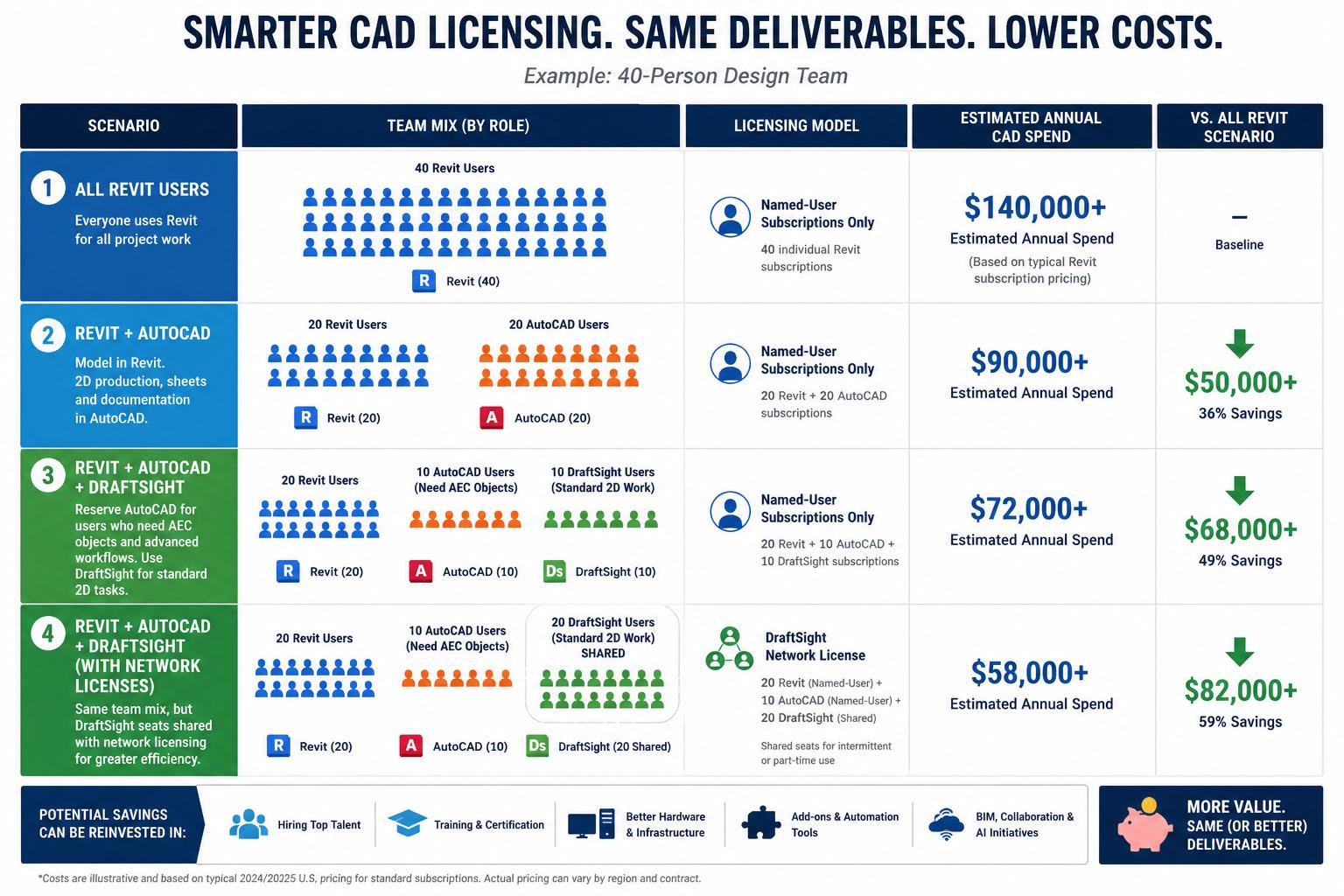
Figure 4 Potential Savings (image created by AI)
Civil 3D
• field teams
• fabricators
• consultants
• permitting departments
• archived records
And while 3D workflows continue to expand, many deliverables still resolve into 2D communication. That does not mean BIM lacks value. It simply means not every workflow benefits equally from premium 3D complexity. Sometimes 2D remains the fastest, clearest, and most practical communication method available.
AUTOCAD STILL EARNS ITS PLACE
None of this diminishes the value of AutoCAD.
Organizations that are deeply dependent on:
• specialized Autodesk verticals proprietary plugins
• advanced automation
• custom enterprise integrations
• highly specialized production workflows
may absolutely require the full Autodesk ecosystem. And that is perfectly reasonable. The goal is not to force every workflow into the same software environment. The goal is to align technology investment with actual workflow needs. That distinction matters.
THE BETTER CONVERSATION
The CAD industry often frames software decisions as battles:
• this platform versus that platform
• BIM versus CAD 3D versus 2D
• Autodesk versus alternatives
But most mature firms eventually discover the real conversation is operational, not emotional.
It is about:
• workflow efficiency
• license utilization staffing strategy
• interoperability
• deliverable quality
• long-term sustainability
Smart firms are beginning to realize that technology standardization does not always mean
software uniformity. Sometimes it means building an ecosystem where premium tools are reserved for premium workflows, while lighter-weight drafting environments reduce cost without reducing deliverable quality.
FINAL THOUGHTS
That old pickup truck was never trying to compete with my father’s luxury truck. Both were capable. Both had value. But one carried a level of cost and complexity that simply was not necessary for the task in front of me.
That may be the most important lesson in today’s CAD conversations. The goal is not to abandon powerful platforms like Revit or AutoCAD. Those tools remain foundational to modern design workflows.
The goal is to stop paying premium software costs for workflows that no longer require premium software complexity. And for many firms, that may mean discovering
there is room for both AutoCAD and DraftSight in the same garage!

Michelle is a Fractional Chief Learning Officer who designs enterprise learning strategies that accelerate digital transformation and workforce capability. A former Autodesk Manager of Learning Content and ACI Platinum Instructor, she has led global learning initiatives, guided technology implementations, and aligned executive stakeholders around scalable, outcome-driven training ecosystems. Michelle bridges strategy, culture, and systems— embedding learning into business operations to improve performance, reduce risk, and futureproof talent in rapidly evolving industries. She can be reached at michelle@ collaborativeclam.com


Autodesk University (AU) – Part 1 of 2
Autodesk University (AU) holds a big place in my heart. Without it, my career would not be where it is right now. My first AU was 2006, and I went on my own dime, as my employers did not want to contribute. That said, at the time, I was one of two experts in the UK on an Autodesk product called FMDesktop, and the employer at the time was one of the only two resellers of FMDesktop in the UK. I did argue that it would be to their indirect benefit to support me going, especially as Autodesk had asked me to present two FMDesktop classes that year! They did not see eyeto-eye with me, so looking back it was their loss. My career changed dramatically after that AU, and I don’t regret leaving the company in question.
This month’s INSIDE TRACK concentrates solely on Autodesk University and is part one of two, and next month’s Inside Track will also be AU-centric.
To check out AU, you can find the Autodesk University homepage here: https://www.autodesk. com/autodesk-university
YOU WANT TO GO TO AN AUTODESK EVENT IN VEGAS?!!
This leads me to helping you get employer buyin to allow you to attend AU. Traditionally, AU was always held in Las Vegas, Nevada, the adult party capital of the world. This was often the first stumbling block when getting the hall pass to attend AU from your boss.
Autodesk provided a guide for attending AU2024. It still stands true now for AU2026. Here’s a condensed version: -
1. Familiarize yourself with classes and conference details
Make your case compelling with good research. If you’re gearing up for a conversation with your boss about AU, get familiar with what AU as a conference has to offer. There are hundreds of classes offered at
AU. Bookmark the ones most relevant and bring up the keynote sessions featuring executives, Autodesk customers, and thought leaders sharing new ideas and inspiring stories.
Beyond the sessions, AU is full of networking opportunities, including meetups that enable you to connect with industry peers and foster relationships that can contribute to your professional growth and your firm’s success.
There’s a lot to see and do! Get to know what AU has to offer, then map out the opportunities you’d like to attend to present to your management.
2. Create a sample agenda or list of classes you want to attend
When making a case to attend a conference that involves your time and resources, details matter. Show your manager that you’ve done your homework and pinpoint the sessions that will benefit your role and the organization, with strategic intent, adding how the benefits add to your role.
Keep an eye on the general agenda page using the list of specific classes so you can build your AU agenda. With hundreds of classes, you’ll find sessions that align with your (and your firm’s) needs.
Check out the previous year’s classes on demand. Maybe even show your manager a couple, so they see how informative, and impactful, they are!
3. Price out the investment
Learning and development take a certain amount of investment, and your manager will likely ask how much the trip will cost. To make this part of your conversation easier, build these factors in: -
• The price of the conference pass
• Average hotel cost (multiplied by the number of nights)
• Airfare
• Average transportation cost
• Miscellaneous costs
AU is NOT an inexpensive event. There IS a cost implication. It is up to YOU to make the business case, so make sure you consider the return on investment (ROI) that your manager will be looking for. A research and priced business case is a GOOD business case!
4. Outline your top reasons for attending
Make sure you stress your larger motivation to attend AU. Don’t just talk about the classes you want to attend. Relate them to your specific role in the company, projects you are involved in, your career path, and anything else you’re working on. Communicate how your presence at the conference benefits the company so you and your manager can sit down together and identify the business case for attending AU.
5. Send a formal email
Make things official is always a good thing. Get your business case down in writing in a formal email. This can often convince your manager, and in the email arrange a face-to-face meeting to discuss your case further. Make the effort with the email to make your case more compelling because it then shows your commitment to professional development.
And the good news is you don’t have to write the email from scratch. There’s a great AU2026 page here that contains a great calculator to calculate your AU costs and add them to your business case email, using the template provided. Use it to create a compelling, professional email where you can also add your personal touch. Customize your email with a sample agenda and your top reasons for attending.
In conclusion….
AU is an incredible event. Not only will you learn more about your craft and the tools you use there, but you will also meet, network, and make incredible friends for life like I have. In this part one of two, I have taken you through the HOW of getting manager/organization approval to attend AU.
I sincerely hope that this month’s INSIDE TRACK gives you an insight into an approach for a business case to attend AU this year. In next month’s INSIDE TRACK, I’ll be covering more of the practical things to think about when attending AU, after you have received the approval to go. This includes comfortable shoes. To find out more about footwear for AU, I’ll see you here next month!

Shaun ‘CADjedi’ Bryant is a seasoned CAD and BIM veteran with over 38 years of experience in the industry. As a CAD subject-matter expert and instructor with practical experience in AutoCAD, BricsCAD, DraftSight, and Revit, Shaun creates clear, structured learning content that helps engineers and designers understand complex CAD and BIM workflows and apply them effectively in real project environments. He is known for breaking down detailed engineering processes into content that has helped over half a million learners strengthen core CAD skills, improve workflow efficiency, and communicate technical information more effectively. Alongside his instructional work, Shaun advises organisations on improving CAD communication standards and building stronger capability frameworks within technical teams through his company, CADFMconsultants. He also a huge advocate for user communities such as AUGI, building resilient connections between application vendors and their users.
Shaun is also the owner of the Not Just CAD brand that includes The Not Just CAD blog and podcast. He is a true techie geek and runs CADFMconsultants // Not Just CAD from ‘The Workshop’ in East Yorkshire in the UK.
If you have some news to share with us for future issues, please let us know. Likewise, if you are a user of a featured product or news item and would like to write a review, we want to know. shaun.bryant@cadfmconsult.co.uk