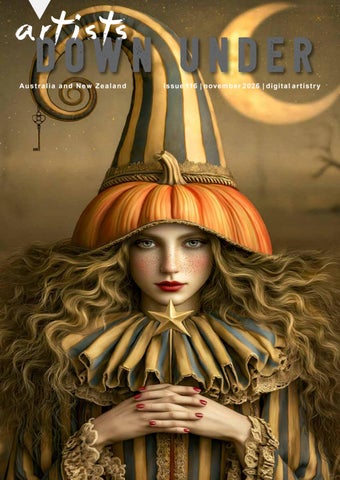
DOWN UNDER Australia and New Zealand
I ssu e 116 | novemb er 2026 | digi t al ar t ist r y
04
EDITOR’S REPORT By Pam Henderson
05
P H O T O S H O P A R T I S T RY
31
PA M H E N D E R S O N
32-33
KIM RICCI
By Sebastian Michaels
06-07
S A N D R A DA N N
34-35
JULIE POWELL
08-09
PRUE WRIGHT
36-37
B E V T E R AW S K YJ
10-11
C O L I N CA M P B E L L
38-42
PHOTOSHOP I N S P I R AT I O N
12
SHARON R ANKMORE
13-17
A R T I S T S M O N T H LY AC H I E V E M E N T S
18-19
COLIN KILLICK
20-21
MICK ROONEY
22-23
JA N E T OV E Y
24
K YE THOMPSON
25-30
A R T BY I LO N A A B O U - Z O LO F
By Andrew Haysom
F R O N T C OV E R by R O S A P E R RY - T H E FO R G OT T E N H A L LO W E E N S TO RY 43
DENNIS RICK ARD
44-45
R O S A P E R RY
46-47
H E M A N T KO G E K A R
48-49
AL BAMASS
50
Christina Brunton - Tunnel Vision
2
C H I N E S E W H I S P E R S # 10 7
By Maureen Maxwell
51-59
A R T BY M A R I E H E LYA R
60-61
M AU R E E N M A X W E L L
62-63
PENNY DE JONG
64-65
K A R E N WA A LW Y K
66
D E N I S E CAU C H I
92
CHRISTINA BRUNTON
67-76
COFFEE AND PIXELS
93
MARINA HOBBS
77-85
86-87 88-89
By Maureen Maxwell
A GLITCH IN RE ALIT Y
94-97
By Marina Hobbs & Robyn McLauchlan
TRISH HOSKIN
98-108
G E O R G E KO N C Z A N D R E W H AYS O M
M O N T H LY A R T I S T I C PHOTOSHOP CHALLENGE THEME - FR AME IT
109-115 90-91
QUOTE’S CHALLENGE
By Christina Brunton
ARTISTS BUSINESS A DV E R T I S E M E N T S
Andrew Haysom - Rings Of Fire
3
a r t i s t s DOWN UNDER Australia and New Zealand
How nice is the weather at the moment, beautiful warm days but not too hot and still cool enough at night to sleep. I always find the warmer weather very motivating, makes you want to do things, gives those creative juices a little nudge, what to create. Now that starts a whole new thought pattern. Have you ever thought about what motivates other artists, what thought patterns run through their minds when they sit to create their next image, have they already got ideas or do they stare at a blank screen waiting for it to happen. Do they have a routine to get ideas flowing, do they carry a notepad to jot ideas down when they happen, interesting isn’t it when you start to think about it. But whatever works for you is all you need to worry about. No matter what motivation works, our artists have definitely found it this month, I have received so many amazing images from our artists who have been very busy creating. We have two series of images for you this month, one from Ilona Abou-Zolof & one from Marie Helyar, along with our latest image creation from the girls in the Redlands Group in their Chinese Whispers series. Our Coffee & Pixels meet up group is going so well each month, catching up for a chat, having lots of interesting discussions and setting their newest theme to go away & create with. Our two artists Marina Hobbs & Robyn McLauchlan who do a special series for us each month have delighted us once again with their latest series “A Glitch In Reality” and of course we cannot forget our ever loving Photoshop Guru, Andrew Haysom who has put together another awesome tutorial for us all to follow & learn. And of course we have another set of images from the Art Buddies, this months theme was “Water”, and for our Artists Challenge, the theme was “Frame It”. I hope you enjoy this months edition. Look out & support one another.
Pam Henderson
Julie Powell - The Letter Backgrounds: Foxy Squirrel Laitha’s Designs - Jai Johnson - White Lane Studio Copyright 2017 ©
Ilona Abou-Zolof - Halloween
4
Artists in this publication are responsible for any rights appertaining to their work.
HTTPS://PROPHOTOSHOPARTISTRY.COM
Image by: Denise McDermott, Photoshop Artistry Student
55
SANDRA DANN
( AUSTRALIA )
https://www.sandradimagery.com/
TIME IS TICKING
6
T H E LO N G AWA I T E D J O U R N E Y
7
PRUE WRIGHT
T H E WA R R I O R
8
( AUSTRALIA )
AFRO GIRL
9
colin campbell
( AUSTRALIA )
https://colincampbell.myportfolio.com https://artistsdownunder.com.au/artists-1/colin-campbell/
E U K A LY P T
10
CAG E 19 7 9
11
SHARON RANKMORE
( AUSTRALIA )
https://artistsdownunder.com.au/artists-4/sharon-rankmore/
DIVERGENCE
12
artists down under monthly Achievements 13
artists down under facebook page The Artists Down Under Public Facebook page has been set up to allow the artists in the group to showcase their work and to enable them to share promotional information about themselves, e.g. exhibitions, awards etc... You can find the Artists Down Under Public Facebook page at this address; https://www.facebook.com/groups/ArtistsDownUnder/
So, if you are an artist in the group, don’t forget to regularly share your work and information here, and to let your friends and family know about the page if they are interested in viewing the latest art and news from the group. If you are a reader of the magazine who does not have access to the page, please click the link above and request to join. When you request to join you will be asked to answer three simple questions that will allow us to determine if you are an eligible artist who may wish to join the group and therefore be able to post on the page, or a member of the public who can view, comment and like the work on the page. It’s a great place to see some great art from this vibrant group every day!
Two ADU members receive a special gift Our very good Awake friend Diane Stafford from WhiteLaneStudio continues to give gifts as a reward for members of the Artists Down Under group who contribute to the ADU Facebook page by regularly posting their artworks and supporting other members with their comments. Diane Stafford from Chester, UK, designs Photoshop textures and overlays for photo artists and photographers to use in their digital artworks. Diane has created another special kit just for Artists Down Under for the month of NOVEMBER. Two artists will receive a Diane kit each. Diane Stafford can be found at
https://whitelanestudio.co.uk/biolinks
The NOVEMBER lucky winners are Diane Stafford (WhiteLaneStudio) Texture & Overlay Kit - Trish Hoskin - Sue Masterson
14
LIVING THE PHOTO ARTISTIC LIFE https://issuu.com/thephotoartisticlife/docs/living_the_photo_artistic_life_-_issue_no._140?fr=sYjM2Nzg0NDE1MDQ
Congratulations to the following artists for having their images chosen to appear in the International magazine “Living The Photo Artistic Life”. Sandra Dann - Regal Giraffes Penny de Jong - She Became The Wind - The Night I Left Home Rosa Perry - The Forgotten Halloween Story Ilona Abou-Zolof - Venetian Masquerade - Dream Trail Jane Tovey - The Spirit Of Autumn Maureen Maxwell - I’m Not Ready Christina Brunton - Bright Lights
Christina Brunton - Bright Lights
Jane Tovey - The Spirit Of Autumn
Ilona Aou-Zolof - Dream Trail Maureen Maxwell - I’m Not Ready
15
LIVING THE PHOTO ARTISTIC LIFE
Ilona Abou-Zolof - Venetian Masquerade
Rosa Perry - The Forgotten Halloween Story Penny de Jong - She Became The Wind
Sandra Dann - Regal Giraffes
16
Penny de Jong - The Night I Left Home
shift art OCTOBER 2026 Theme
“The Impossible Library” https://shiftart.com/shift-art-photoshop-challenge-results-october/
Congratulations goes to
PENNY DE JONG & PRUE WRIGHT FOR BEING NOTICED
Penny de Jong - She Dreamt Of A Magical Library
Prue Wright - Tree Of Knowledge
17
COLIN KILLICK
18
( AUSTRALIA )
18
T H E S . S . (S T E A M P U N K S TA R S H I P) E X P LO R AT I O N
19
19
MICK ROONEY
( AUSTRALIA )
https://www.artistsdownunder.com.au/artist-3/mick-rooney/
QUEEN OF THE ELEMENTS
S TA R
20
WA R R I O R A N G E L
21
JANE TOVEY
( AUSTRALIA )
S E C R E T B U T T E R FLY B U S I N E S S
22
ASCENT
23
KYE THOMPSON
POT
24
( AUSTRALIA )
art by
ILONA ABOU-ZOLOF “ENCHANTED AFTERDARK” 25
E E R I E M E LO DY
26
ETHERE AL PRESENCE
27
FREE SPIRIT
28
QUIET ODDITY
29
T WISTED DELIGHT
30
PAM HENDERSON
( AUSTRALIA )
http://www.artistsdownunder.com.au/artist-4/pam-henderson/
WA L K T O T O W N
31
KIM RICCI
( AUSTRALIA )
https://artistsdownunder.com.au/artist-3/kim-ricci/
CHURCH OF THE GOOD SHEPHERD
32
B E YO N D T H E H O R I Z O N
UNDER GOD’S SK Y
33
JULIE POWELL
( AUSTRALIA )
https://www.juliepowellphoto.com/ https://artistsdownunder.com.au/artist-2/julie-powell/
DAY O F T H E D E A D I
34
T H E FO U R T H H O R S E M A N I I I
DAY O F T H E D E A D I I
35
BEV TERAWSKYJ
( AUSTRALIA )
https://artistsdownunder.com.au/artists-1/bev-terawskyj/
RISING
36
MEMORIES
37
a Dr t Oi sWt sN U N D E R Australia and New Zealand
SOME PHOTOSHOP INSPIRATION
USING THE DISPLACE FILTER TO DISTRESS TEXT By Andrew Haysom
As a follow up to last month’s article about distressing text and vectors, this month I want to talk about another way to do so, using the Displace filter. The majority of the articles you see about using the Displace filter are to do with using it to make an overlaying image conform to a surface, like making a logo image “fit” onto the surface of a shirt or something, but it can also be used very well for creating distress. In researching this article, I realised that I really didn’t know how the Displace filter works, I had a couple of big misconceptions about how it works, and now that I understand it better, I think I will be able to use it more effectively, I hope that my explaining how it operates may help some of you too. The Displace filter operates on a layer (or preferably a Smartobject) in your document and replaces every pixel in that layer with another pixel from the layer, based on the information in another Photoshop document called a Displacement Map. The Displacement Map must be either a Grayscale document or an 8-bit RGB document and must have been saved as a PSD file prior to running the Displace filter. For every pixel in the layer being operated on the Displace filter examines the corresponding pixel in the Displacement Map and uses the Red and Green channel data of that pixel in the Displacement Map to calculate a horizontal and vertical offset. The pixel in the new calculated location (based on those offsets) in the layer is copied over the original pixel. Effectively every pixel in the source layer is updated by the Displace filter but some may remain unchanged when the horizontal and vertical offsets are calculated as zero and they are replaced by themselves.
38
The Red channel in the Displacement Map controls the horizontal offset (0 moves maximum amount left, 255 moves maximum amount right). The Green channel in the Displacement Map controls the vertical offset (0 moves maximum up, 255 moves maximum down). A channel value of 128 indicates no offset with the offset increasing in either direction as the channel value gets lower or higher, 0 and 255 indicating the maximum offset. The Blue channel in the Displacement Map is ignored.
So, for every pixel, the horizontal and vertical offsets are calculated based on the Displacement Map and Photoshop goes and gets the pixel based on those offsets and copies it over the top of the pixel. One of the misconceptions I had was that Displacement Maps had to be black and white (gray scale), because this is usually the process advised when using Displace to make something conform to a surface. To do this, we’re usually advised to save a black and white version of the image, maybe adjust the contrast, and then save this to be used as the Displacement Map. However, as you can see from the above explanation colour does play a part in how Displace works because the displacement is determined by the Red and Green channel information. A corollary of this is also that if you are using a black and white image as a Displacement Map the horizontal and vertical offset is always the same (because the Red, Green and Blue channels are identical in a true black and white / greyscale image). The example in Figure 2 illustrates the use of colour. The Displacement Map file has an Olive background, the colour code for which is (RGB 128, 128, 0). As both the Red and Green channels are 128, this means that the Displacement offsets calculated are both zero, so the pixels in these Olive positions will not be affected (they’re effectively copied over themselves).
39
There are four colour squares in the example Displacement Map; Black (RGB 0, 0, 0) – red channel 0 gives maximum offset left, green channel 0 gives maximum offset up. So, the image in the location of the black square appears to have shifted down and to the right and appears reduced in size with the pixels along the top and left edges have been replaced with Olive background pixels. Red (RGB 255, 0, 0) – red channel 255 gives maximum offset right, green channel 0 gives maximum offset up Green (RGB 0, 255, 0) - red channel 0 gives maximum offset left, green channel 255 gives maximum offset down. Yellow (RGB 255, 255, 0) - red channel 255 gives maximum offset right, green channel 255 gives maximum offset down. So, the other three squares like the first one appear to have been displaced similarly but in other directions. You will find the Displace filter under the Filter / Distort menu. Selecting this displays the Displace dialog (see Figure 3).
40
The Horizontal and Vertical Scale are percentages that determine the size of the offsets calculated. When these are set to 100, the maximum offset is 128 pixels, at 200 it’s 256 pixels, at 50 it’s 64 pixels, at 20 it’s just under 26 pixels etc. The scale values can range from -999 to +999 with the negative values reversing the direction of the offset. The “Stretch To Fit” or “Tile” option determines what action to take if your Displacement Map is smaller than your target document, will it be stretched to fit, or tiled to fill your document. The “Wrap Around” or “Repeat Edge Pixels” option determines what action to take if an offset causes the pixel selection to go “off the page”. Will the request wrap-around to the opposite edge and reach into the document from the other edge, or will the pixel on the edge of the document be used. When you press OK you will be prompted to find your Displacement Map document and then the filter will do it’s work. I’d highly recommend making your layer a Smartobject before using Displace, this makes it very easy to re-do the filter with different parameters. To compare using Displace to the method presented last month for distressing text, refer to Figure 4 for four examples of using Displace to distress the same example text used in the last article.
41
You can also use the Displace filter to add distress or texture to your images, the two images of mine that are in this month’s magazine, “Incomprehensible II” and “Incomprehensible III” were both heavily influenced by the Displace filter to create the distortion and distress. You can also try using it to create your own textures. Adding contrast to your Displacement Map will drive more obvious displacement. I find that Displace can create a lot of hard-edged pixels, so sometimes adding a small amount of blur afterwards can help. Hope you have some fun with Displace!
Andrew Haysom
42
DENNIS RICKARD
( AUSTRALIA )
https://artistsdownunder.com.au/artist-2/dennis-rickard/
R AK ALI
43
ROSA PERRY
( AUSTRALIA )
https://www.flickr.com/photos/rosa_perry https://rosa-perry.myportfolio.com/artwork
YO U N G P O E
44
IN HER STILLNESS
45
HEMANT KOGEKAR
CORNERS
46
( AUSTRALIA )
P O R TA L
47
AL BAMASS
MOON VEIL
48
( AUSTRALIA )
M YS T E RY P E T E
49
artists DOWN UNDER Australia and New Zealand
DIGITAL ARTISTS GROUP A COLLABORATIVE GROUP OF PHOTO ARTISTS
CHINESE WHISPERS #107
“STORIES THAT COME TO LIFE“ STAGE 1
STAGE 2
Maureen Maxwell
Pam Henderson
Pam and I have been doing these collabs every month for over 7 years. You would think that we could never really surprise each other, however, every month we do. And that is both a wonderful artistic journey and a learning opportunity. I started the collab this month and Pam has turned it into this wonderful image of stories coming to life. She is to be congratulated! It is excellent!! Maureen Maxwell
50
art by
MARIE HELYAR “BREAKING THE FRAME” 51
BRE AKING THE FR AME 1
52
BRE AKING THE FR AME 2
53
BRE AKING THE FR AME 3
54
BRE AKING THE FR AME 3A
55
BRE AKING THE FR AME 4
56
BRE AKING THE FR AME 5
57
BRE AKING THE FR AME 6
58
T H E PA I N T
59
MAUREEN MAXWELL
( AUSTRALIA )
http://www.artistsdownunder.com.au/artist-3/maureen-maxwell/
LO O K I N G T O T H E F U T U R E
60
DA R E T O B E D I F F E R E N T
M Y Q U E E N , I H AV E R E T U R N E D
61
PENNY DE JONG
( AUSTRALIA )
http://www.artistsdownunder.com.au/artist-4/penny-de-jong/
DA N C E L I K E N O O N E I S WATC H I N G
62
TIME RECL AIMS THE E ARTH
63
KAREN WAALWYK
( AUSTRALIA )
https://www.flickr.com/photos/88165766@N05/ https://www.artistsdownunder.com.au/artist-3/karen-waalwyk/
T R AV E L L I N G T H E S E A F LO O R
64
U N D E R WAT E R T H R O N E
65
DENISE CAUCHI
POST OFFICE
66
( AUSTRALIA )
Marie Helyar - The Creative Table
‘COFFEE and PIXELS’ by Maureen Maxwell
THIS MONTH’S CHALLENGE THEME IS
Embrace Colour 67
Christina Brunton - Water Colour At The Seaside
68
Maureen Maxwell - My Favourite Colours
Jenny Davidson - Horse Of Many Colours
69
Rosa Perry - The Colours She Carried
70
Bev Terawskyj - Embrace Colour
71
Ilona Abou-Zolof - Chroma Flight
72
Prue Wright - Hibiscus
73
Penny de Jong - Life Is A Canvas
74
Karen Waalwyk - Exploding Paint Pot
75
Marie Helyas - The Paintbrush That Bloomed
76
A GLITCH IN REALITY By MARINA HOBBS AND ROBYN MCLAUCHLAN
77
A GLITCH IN REALITY
Marina Hobbs - Chess Rules
marina hobbs 78
A GLITCH IN REALITY
Marina Hobbs - Flower Harvest
marina hobbs 79
A GLITCH IN REALITY
Marina Hobbs - Going Up
marina hobbs 80
A GLITCH IN REALITY
Marina Hobbs - Reality Bites
marina hobbs 81
A GLITCH IN REALITY
Robyn McLauchlan - Apartment By The Sea
robyn mclauchlan 82
A GLITCH IN REALITY
Robyn McLauchlan - High Tea Velodrome
robyn mclauchlan 83
A GLITCH IN REALITY
Robyn McLauchlan - Spring Colours
robyn mclauchlan 84
A GLITCH IN REALITY
Robyn McLauchlan - The Orange Moon
robyn mclauchlan 85
TRISH HOSKIN
( AUSTRALIA )
https://trish-hoskin.myportfolio.com/ http://www.artistsdownunder.com.au/artist-4/trish-hoskin/
PIXIE KING
86
ROSA BELL A
87
GEORGE KONCZ
( AUSTRALIA )
http://www.artistsdownunder.com.au/artist-2/george-koncz/ http://georgekonczphotography.com/
W H AT A P E A R L
88
LO T S O F P E A R L S A R O U N D
89
ANDREW HAYSOM
( AUSTRALIA )
https://andrewhaysom.myportfolio.com/ https://artistsdownunder.com.au/artists-1/andrew-haysom/
INCOMPREHENSIBLE II
90
INCOMPREHENSIBLE III
91
christina brunton
( AUSTRALIA )
U N I C O R N A N D T H E CA S T L E
UNICORN
92
MARINA HOBBS
( AUSTRALIA )
B R E AT H I N G S PAC E
93
artists DOWN UNDER Australia and New Zealand
A COLLABORATIVE GROUP OF PHOTO ARTISTS
QUOTE CHALLENGE by the Art Buddies
A bit of background first: In our Art Buddies group, we’re a vibrant mix of ADU members from across Australia, each contributing individual talents and viewpoints. Our ‘Art Buddies’ team includes Christina Brunton, Denise Cauchi, Ilona Abou-Zolof, Marie Helyar, and Ngaire Danvers. We gather regularly on Zoom, taking turns to set our creative challenges.
Challenge: “Water” Let’s get creative with water, I hope your imagination take you some amazing wet places. This challenge was set by Ngaire Danvers
Our Art Creations: We hope our creations motivate you to share your own interpretation on the Artists Down Under Facebook page. Your artistic expression matters to us, and we are excited to see what you create!
94
Ilona Abou-Zolof - Desert Memory
Marie Helyar - Hope Walks Here
95
Christina Brunton - Sailboat In The Harbour
96
Ngaire Danvers - Water
Denise Cauchi - The Power Of A Majestic Waterfall
97
98
artists down under monthly artistic photographic challenge theme:
FRAME IT 99
Pam Henderson - Book Club
100
Penny de Jong - Whisperings By Candlelight
101
Prue Wright - The Ballerinas
102
Colin Campbell - Cage 2
103
Karen Waalwyk - A Face Worth Framing
104
Bev Terawskyj - Framed Halloween
105
Rosa Perry - A Memory That Wasn’t Mine
106
Ilona Abou-Zolof - Framed
Christina Brunton - I’ve Been Framed Again
107
Marie Helyar - Framed
108
artists DOWN UNDER Australia and New Zealand
adu artists s s e n i s u b s t n e m e s i t r e v d a 109
110
111
Still-Life & Flowers
SELF-PACED & ONLINE
Learn to use the Mixer Brush In this class, you will learn how to effectively use the Mixer Brush tool in Adobe Photoshop to create beautiful and unique still-life & florals.
Learn techniques The class is suitable for both beginners and advanced artists, and I will cover everything from the basics of Mixer Brush to advanced techniques like creating custom brushes and textures.
Master & Create Whether you are looking to explore a new medium, expand your digital art skills, or simply enjoy the process of creating art, my Still-life & Flowers Mixer Brush Art Class is the perfect place to start.
Six band new projects Six brand new projects including three stilllife scenes and three flowers. All base images, bonus practice images, textures, E-Book and custom brushes provided
julie.powell@outlook.com www.juliepowellphotography.com
112
JULIE POWELL PHOTOGRAPHY
113
114
115
WEBSITE:
http://artistsdownunder.com.au/
http://tinyurl.com/artisitsdownunderpublic