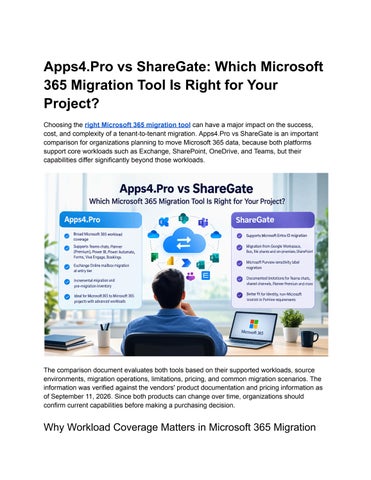
Apps4.Pro vs ShareGate: Which Microsoft 365 Migration Tool Is Right for Your Project? Choosing the right Microsoft 365 migration tool can have a major impact on the success, cost, and complexity of a tenant-to-tenant migration. Apps4.Pro vs ShareGate is an important comparison for organizations planning to move Microsoft 365 data, because both platforms support core workloads such as Exchange, SharePoint, OneDrive, and Teams, but their capabilities differ significantly beyond those workloads.
The comparison document evaluates both tools based on their supported workloads, source environments, migration operations, limitations, pricing, and common migration scenarios. The information was verified against the vendors' product documentation and pricing information as of September 11, 2026. Since both products can change over time, organizations should confirm current capabilities before making a purchasing decision.
Why Workload Coverage Matters in Microsoft 365 Migration
Many migration projects begin with four familiar workloads: Exchange, SharePoint, OneDrive, and Teams. These are usually the first services identified during a tenant assessment. However, migration complexity often becomes visible only after the project team starts examining how employees actually use Microsoft 365. Organizations may also depend on Power Automate flows, Power BI reports and datasets, Microsoft Forms and their response data, Planner projects, Microsoft Bookings, Teams chat history, and Viva Engage communities. If these workloads are overlooked during planning, teams may have to export information manually, rebuild applications and configurations, use multiple migration tools, or leave some business data behind in the source tenant. This is one of the most important differences between Apps4.Pro and ShareGate. Apps4.Pro focuses on providing broader Microsoft 365 workload coverage, while ShareGate provides broader source-platform and identity migration capabilities.
Core Microsoft 365 Workloads Both Apps4.Pro and ShareGate support Microsoft 365 tenant-to-tenant migration for major workloads. Exchange Online mailboxes are supported by both platforms, although the pricing tiers in which Exchange migration is available differ. SharePoint Online and OneDrive for Business are also supported by both tools. Teams teams and channels are supported by both products as well. The differences become more noticeable when organizations move beyond these core workloads. Apps4.Pro supports Teams 1:1, group, and meeting chat migration. According to the comparison, ShareGate does not currently provide Teams private chat migration. Both platforms support Teams channel conversations, but ShareGate places the 50 most recent conversations in the live Posts tab and stores older conversations in an HTML Message history tab. Apps4.Pro's broader Teams chat coverage can therefore be important for projects where user-to-user and meeting chat history is part of the migration scope.
Apps4.Pro Supports More Additional Microsoft 365 Workloads One of the strongest points in favor of Apps4.Pro is its coverage of Microsoft 365 workloads that are outside the traditional migration scope. Apps4.Pro supports both Planner Basic and Planner Premium. Its documented Planner Premium migration coverage includes information such as sprints, dependencies, goals, effort,
percentage complete, and sub-tasks, along with buckets, tasks, assignments, attachments, and comments. The comparison states that ShareGate does not support Planner Premium migration. Apps4.Pro also supports Viva Engage communities, conversations, and memberships. This can help organizations preserve collaboration history that might otherwise require manual reconstruction. Microsoft Forms is another area where the products differ. Apps4.Pro supports Forms together with supported response data. This is particularly relevant when Forms have been used for surveys, attestations, or other processes where historical responses are important. Power Automate is also supported by Apps4.Pro. The comparison highlights that flows can be involved in approvals, alerts, and business integrations, making them potentially disruptive to lose during a tenant cutover. Power BI is another supported Apps4.Pro workload. The document states that Apps4.Pro migrates Power BI reports, dashboards, workspaces, and semantic models, helping organizations retain their reporting environment instead of rebuilding it after migration. Apps4.Pro also supports Microsoft Bookings, while ShareGate does not offer migration coverage for Bookings according to the comparison.
Where ShareGate Has the Advantage Broader Microsoft 365 workload coverage is not the only factor to consider. ShareGate has important capabilities that Apps4.Pro does not currently offer. ShareGate supports Microsoft Entra ID identity migration through its Pro and Enterprise offerings. Apps4.Pro does not offer Entra ID identity migration. ShareGate also supports additional source environments, including Google Workspace, Box, file shares, and on-premises SharePoint. These capabilities can become decisive when the migration is not simply a Microsoft 365 tenant-to-tenant project. For example, an organization moving from an on-premises SharePoint environment or Box into Microsoft 365 may require ShareGate because of its source-platform coverage. ShareGate also supports Microsoft Purview sensitivity label migration through its Pro and Enterprise offerings, while Apps4.Pro does not currently offer this capability. This means the decision is not simply about which tool supports more workloads. It also depends on where the source data comes from and whether identity migration is part of the project.
ShareGate Migration Limitations to Consider The comparison also documents several ShareGate limitations based on ShareGate's published documentation. One important limitation is Teams private chat. ShareGate migrates channel posts and replies, but not 1:1 or group chats. The document also notes that a PowerShell Copy-Chat beta was withdrawn following a May 2026 notice related to message-history issues. There are also limitations involving Teams channel conversations. Only the 50 most recent conversations appear in the live Posts tab, while older conversations are placed in a Message history tab. The PowerShell module available with Migrate Pro and Enterprise can increase the Posts-tab limit to 500. Other documented limitations include the migration of reactions, link previews, and mentions. These elements do not survive channel migration in the same form. Shared channels are also outside the supported scope of ShareGate Migrate. The comparison additionally notes that Exchange-attached services in Teams, such as the Teams Calendar and shared mailboxes, do not migrate as part of a team. Several Teams tabs also require attention. Yammer, Power BI, Stream, Forms, and Whiteboard tabs have same-tenant limitations and may require manual reconfiguration in a tenant-to-tenant migration. Flow and Wiki tabs are not supported. Planner also has documented limitations. ShareGate rewrites Planner authorship and timestamps, while original values are added as task comments. Backgrounds, notifications, and favourites are not preserved, and Premium plans are unsupported.
Migration Operations and Project Experience Workload coverage determines whether a tool can perform the migration, but the migration experience determines how much effort the project team must invest. Both Apps4.Pro and ShareGate support incremental or delta migration. ShareGate's incremental passes copy new and changed content without deleting items at the destination. Both platforms also provide pre-migration planning capabilities. Apps4.Pro provides an inventory and risk report, while ShareGate provides reports such as source analysis, permissions matrix, site and site collection reports, and checked-out document reports. Parallel execution is supported by both products, although their machine and activation models differ by licensing tier.
Reporting is another important part of the migration process. Apps4.Pro provides item-level reports, validation summaries, and audit logs. ShareGate provides migration reports covering completed items, warnings, and errors. The tools also differ in their approach to scripting and support. Apps4.Pro is positioned as requiring no scripting, while ShareGate offers a PowerShell module on Pro and Enterprise and requires it for certain capabilities.
Apps4.Pro vs ShareGate Pricing The document provides list pricing for both platforms based on information retrieved on September 11, 2026. Apps4.Pro is listed at $5,995 for Essentials, $8,995 for Growth, and $17,995 for Enterprise. ShareGate Migrate is listed at $5,995 for Essentials, $9,995 for Pro, and from $17,995 for Enterprise. Both platforms offer a 15-day trial according to the comparison. The entry-level offerings are particularly important. ShareGate Migrate Essentials covers SharePoint, Teams, Planner, OneDrive, and file shares, but Exchange Online mailbox migration is not included at that level. Exchange migration requires Pro or Enterprise. Apps4.Pro Essentials includes Exchange mailboxes, SharePoint, OneDrive, Teams channels, Teams chats, and Planner. These workloads are described as unlimited across Apps4.Pro tiers, while Viva Engage, Forms, Power Automate, and Power BI have tier-specific volume limits. Apps4.Pro's additional workload allowances increase with higher tiers, and additional capacity is available through add-on licensing.
Which Tool Should You Choose? There is no single answer for every migration project. Apps4.Pro is generally the stronger fit when the project is a Microsoft 365 to Microsoft 365 migration and the scope extends beyond the four core workloads. It is particularly relevant when Teams private chats, Power BI, Power Automate, Microsoft Forms, Planner Premium, Viva Engage, or Bookings are critical to the migration. It can also be attractive when Exchange Online mailbox migration is required at the entry pricing tier. ShareGate is generally the better fit when the project requires Entra ID identity migration or migration from sources such as Google Workspace, Box, file shares, or on-premises
SharePoint. Its support for Microsoft Purview sensitivity label migration is another important consideration. For mergers and acquisitions, the decision may depend on identity ownership. ShareGate can be preferable when users must be created and mapped as part of the migration, while Apps4.Pro can be suitable when identity is handled separately and the content scope is broader. For divestitures or carve-outs, ShareGate may be the better fit because identity and permissions restructuring can dominate the project. For Google Workspace to Microsoft 365 migration, the document identifies ShareGate as the current choice, while noting Apps4.Pro's Google Workspace migration as an open beta rather than generally available functionality. For Microsoft 365 to Microsoft 365 projects involving Power Platform workloads, Apps4.Pro can be the better fit because ShareGate does not provide migration coverage for Power BI, Power Automate, or Forms.
Final Thoughts The comparison between Apps4.Pro and ShareGate ultimately comes down to migration scope. Apps4.Pro is designed to cover a wider range of Microsoft 365 workloads within one migration platform, particularly workloads such as Teams chats, Planner Premium, Viva Engage, Forms, Power Automate, Power BI, and Bookings. ShareGate, meanwhile, provides important capabilities around identity migration and broader source environments, including Entra ID, Google Workspace, Box, file shares, and on-premises SharePoint. For some large consolidation projects, using both tools may even make sense. ShareGate can handle identity and non-Microsoft sources while Apps4.Pro handles Microsoft 365 workloads that ShareGate does not migrate. The most important step is therefore to inventory the entire Microsoft 365 environment before selecting a migration tool. Do not limit the assessment to Exchange, SharePoint, OneDrive, and Teams. Identify business applications, collaboration history, automation, reporting, forms, planning data, communities, bookings, and identity requirements. Once the complete scope is known, the decision between Apps4.Pro and ShareGate becomes much clearer. Rather than asking which product is universally better, organizations should ask which platform covers the workloads, source environments, identity requirements, and migration scenarios that actually matter to their project.