

From the CEO’s Desk
Amanda Rae
Communication is one of those parts of business that seems simple until we realize how much it shapes everything.
It shapes the way a lead feels when they first inquire. It shapes the confidence a client has after booking. It shapes expectations, boundaries, timelines, trust, and even whether someone feels ready to say yes. In many ways, communication is not just something we do in business. It is how our business is experienced.
That is what this issue of The Journey is all about.
Inside these pages, you will find practical ways to make communication clearer, calmer, and more intentional. We talk about onboarding as the place where client confidence begins. We look at contracts not just as protection, but as one of the clearest ways to set expectations.
We explore boundaries, follow-up, silence, texting, phone calls, lead forms, client portals, and the systems that help communication happen consistently without relying on memory alone.
The thread running through all of it is this: better communication is not about saying more. It is about saying what matters, at the right time, in a way your clients can understand and trust.
As small business owners, it is easy to carry too much in our heads. We remember the next step, the reminder, the follow-up, the detail we meant to send. But a better business is built when those moments are designed with care. When your process communicates clearly, your clients feel guided. When your clients feel guided, they trust you more. And when trust grows, business gets better.
My hope is that you take your time with this issue. Read it, reflect on it, and look for one area where your communication can become more intentional this month.
Onwards and upwards,
Amanda Rae CEO, 17hats
Sips & Snippets News from 17hats HQ
Feature Updates
Feature Update:
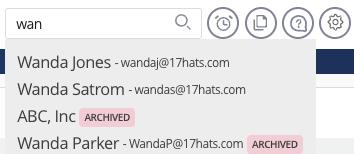
Archived Contacts in Search
Finding active contacts just got easier! Archived Contacts will now appear at the bottom of your Contact Search results and are clearly labeled as Archived, helping keep your searches cleaner and more organized.
New Feature:
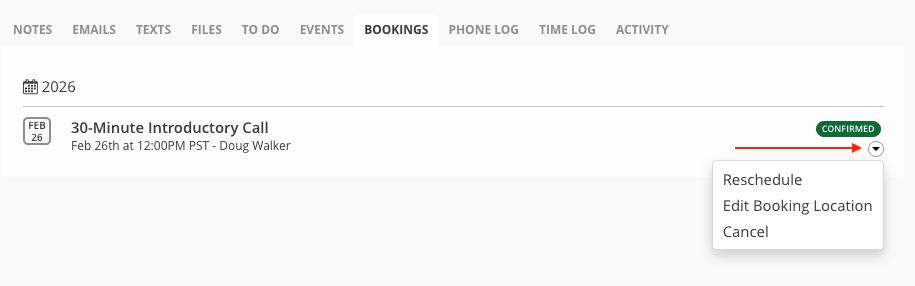
Edit Locations for Online Scheduling Bookings
Need to change a meeting spot? You can now edit the location of an Online Scheduling booking directly from the Project → Bookings tab. Any updates will update the calendar event, future Online Scheduling location tokens, and Project details. — keeping everything accurate and up to date.
New Feature:
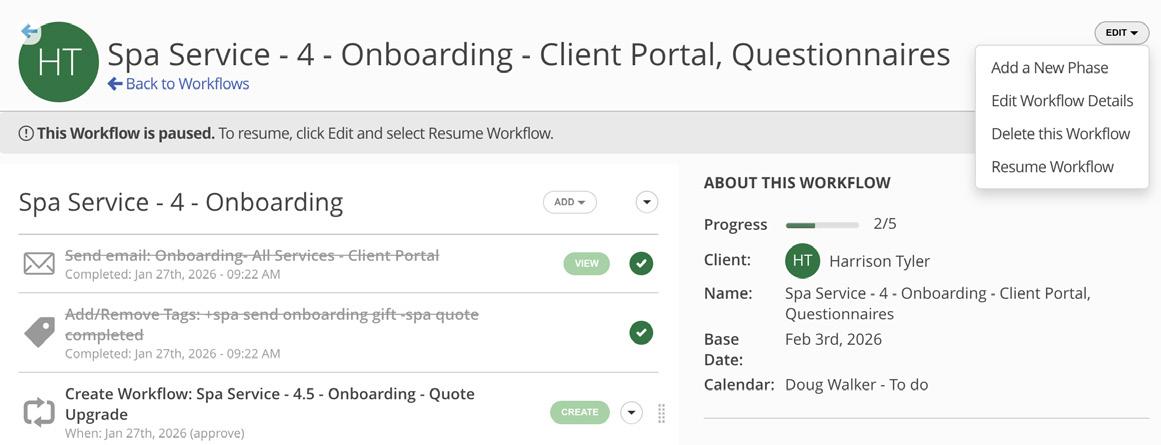
Start/Stop Workflow Automation
This just-released feature allows you to start and stop Workflows by applying a Project Tag. This feature will redefine how you follow up with your leads and clients.
Feature Update:
Project Details Question Type
Capture key project info right from your Questionnaires! The new “Project Details” question type lets you map responses directly to project dates, times, and locations — automatically updating your project and creating events in one step.
Feature Update: Send Documents via SMS Texting
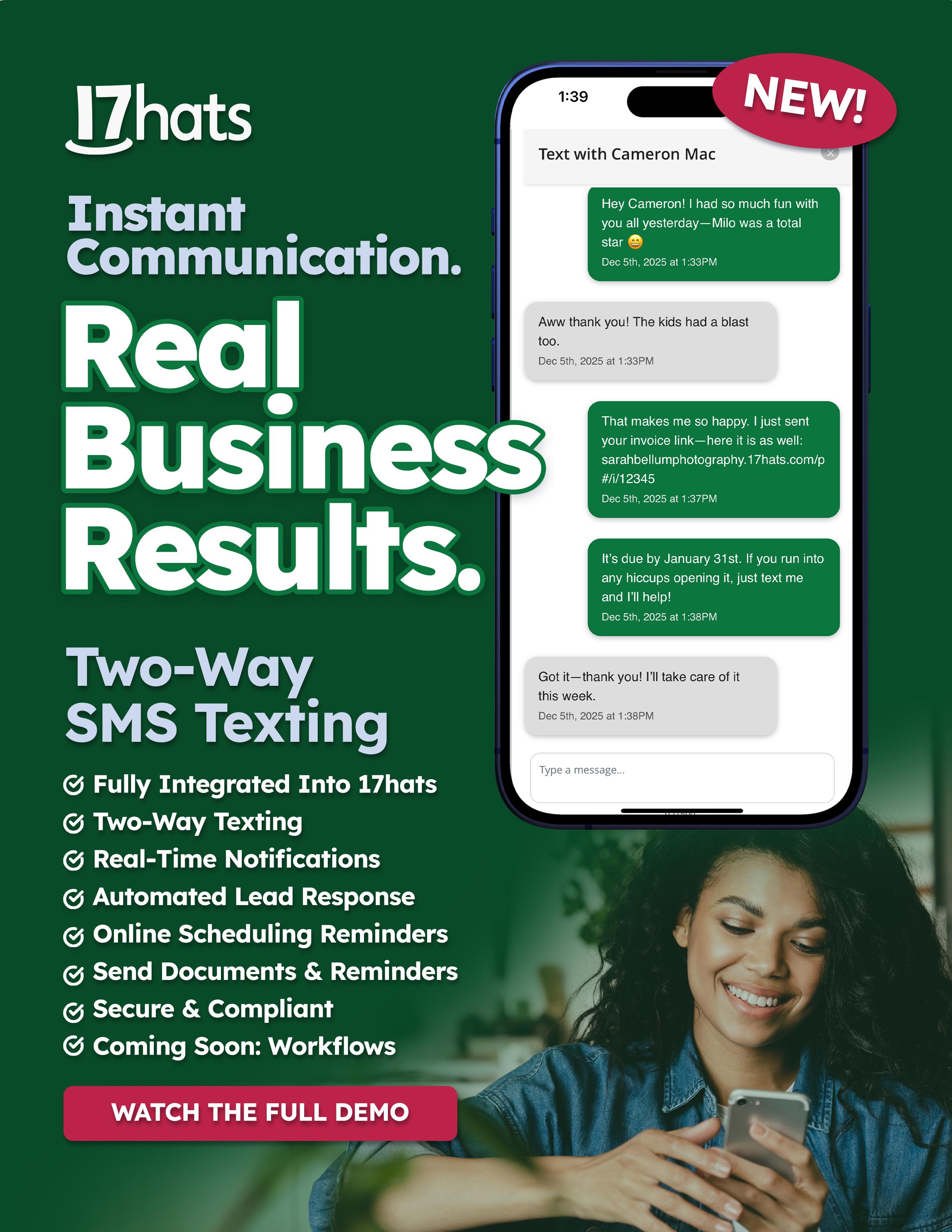
You can now send documents by text message in 17hats! When SMS is enabled and clients have opted in, you can send Quotes, Contracts, Invoices, and Questionnaires via SMS — making it easier to share important documents in the way your clients prefer.
Feature Update: Edit Invoice Issue Dates
You now have more flexibility when creating invoices! Invoice Issue Dates can now be edited to a past or future date without affecting due dates or payment schedules, making it easier to match your billing timeline and workflow.
Feature Update:
Enhanced Text Editing
We’ve upgraded the text editor in Questionnaires! You’ll now have more formatting options when customizing “Text” Option in Questionnaires — giving you greater flexibility in how you communicate with clients.
Feature Update: Pause and Resume Workflows
You can now pause and resume active Workflows with ease! This gives you more control over timing without deleting or rebuilding steps, and temporarily removes related notifications until you’re ready to pick things back up.

Onboarding
Is Where Client Confidence Begins
A lot of small business owners think the hard part is getting the booking.
Then the client says yes, signs the Contract, pays the Invoice, and suddenly there is a quiet space between booking and the actual service. That space is onboarding, and it's more important than most business owners realize.
Onboarding is the time between booking and service. It is the part of the client experience where you help someone move from “I hired you” to “I know exactly what is happening next.”
When onboarding is handled well, clients feel clear, prepared, and confident. When it is skipped, rushed, or overloaded with too much information, clients start to feel unsure. They may not always say it, but they feel it.
Confusion creeps in. Trust gets shakier. The process starts to feel heavier than it should.
That is why onboarding is really a communication phase.
Don’t Skip It — and Don’t Overdo It
One of the biggest onboarding mistakes is acting like it does not need its own process.
A client books, and the business owner assumes everything will work itself out naturally. Maybe a few emails go back and forth. Maybe information gets sent when the owner remembers. Maybe the client is asked for ten things at once because the business owner is trying to get everything handled quickly.
None of that feels good on the receiving end.
Too little communication makes clients feel lost. Too much communication all at once makes them feel overwhelmed. Both create friction.
The goal of onboarding is not to dump every detail into one email. It is not to collect every possible answer in one sitting. It is to guide the client through the next steps in a way that feels clear and manageable.
Small business owners often know exactly what needs to happen. The problem is that they do not always communicate it in the right order.
That is where a real onboarding process helps.
Think of Onboarding in Four Phases
A good onboarding experience does not have to be complicated. In fact, it works best when it is simple and structured.
Here is one practical way to break it down.
Phase One: The Thank You Phase
This is the first message or touchpoint after someone books.
Your first job here is not to explain everything. It is to acknowledge the booking, thank the client, and tell them what happens next.
That sounds basic, but it is one of the most important communication moments in the
whole process. Clients want to know their booking went through. They want to know you saw it. They want to know what to expect now.
A strong thank you message should do three things:
• thank them for booking
• give a short timeline of next steps
• include one clear call to action
If the next step is filling out a Questionnaire, say that. If the next step is scheduling a call, say that. If they simply need to wait for your next email, say that too.
Clarity builds confidence.
Phase Two: The Information Phase
Once the client knows what is happening next, the next phase is giving them the information they need in order to move forward well.
This is where many business owners go too big.
They send a long email with every policy, every detail, every possible reminder, and every question the client might ever have. It is usually done with good intentions. They are trying to be thorough. But in practice, it often creates more confusion.
Good onboarding communication is timely, relevant, and short.
Give clients the information they need for the next step, not the next ten steps. That could
mean sharing how your process works, what to expect during the service, what materials they need to prepare, or what timeline they should keep in mind.
The test is simple: does the client need this information right now?
If not, save it for later.
Phase Three: The Information-Gathering Phase
This is the point where you begin collecting what you need from the client.
That might mean sending a Questionnaire, inviting them to schedule a consultation through Online Scheduling, or gathering project details in a more structured way.
The best onboarding is not just you talking at the client. It is also you creating a clear path for them to give you what you need.
The key here is making it easy.
Do not ask for everything at once if the service does not require it. Group information logically. Ask clear questions. Use tools that help the client move through the process without feeling like they are doing homework.
This is where Questionnaires can be especially helpful. Instead of relying on scattered emails or trying to remember what details still need to be collected, you can gather information in one place and make the process feel more organized for both sides.
Phase Four: The Reminder Phase
By this point, the client has booked, received the first information they need, and given you the details required to move forward.
Now they need reminders.
This is the phase where you keep the process alive and make sure nothing important gets missed. Depending on your service, that could include reminders about an upcoming session, event, due date, call, deliverable, or outstanding task.
When reminders are useful they're reassuring, not repetitive.
This idea connects closely to what we talked about in What Silence Says on page XX. Clients do not always need more information, but they do need signals that the process is still moving. A good reminder tells them that nothing has been forgotten and that your business is still paying attention.
Build Your Onboarding Process Inside 17hats
One of the best things about onboarding is that it does not have to live in your head.
You can build it directly inside 17hats.
That is a big deal, because onboarding is one of those areas where business owners often know what should happen but struggle to do it consistently. When the process depends on memory, timing gets sloppy, messages get delayed, and important steps get missed.
Inside 17hats, you can use Workflows to create a repeatable onboarding process that runs the same way every time. You can send thank-you emails, deliver next steps, assign Questionnaires, send Scheduling Links, and set reminder emails or text messages at the right points in the process. You can also track where clients are in Pipelines, which makes it easier to know what has happened and what still needs attention.
That kind of structure does more than save time. It strengthens communication.
It helps your business feel more polished. It helps your clients feel more prepared. It helps you stop carrying every step in your head.
Better Onboarding Creates a Better Experience
When onboarding is done well, the rest of the client experience gets easier.
Clients know what to expect. They know what you need from them. They know what comes next. That kind of clarity reduces stress on both sides.
A good onboarding process is not about sending more messages. It is about sending the right message at the right time, in the right order.
That is what makes onboarding such an important part of communication. It turns a booking into a process the client can trust.
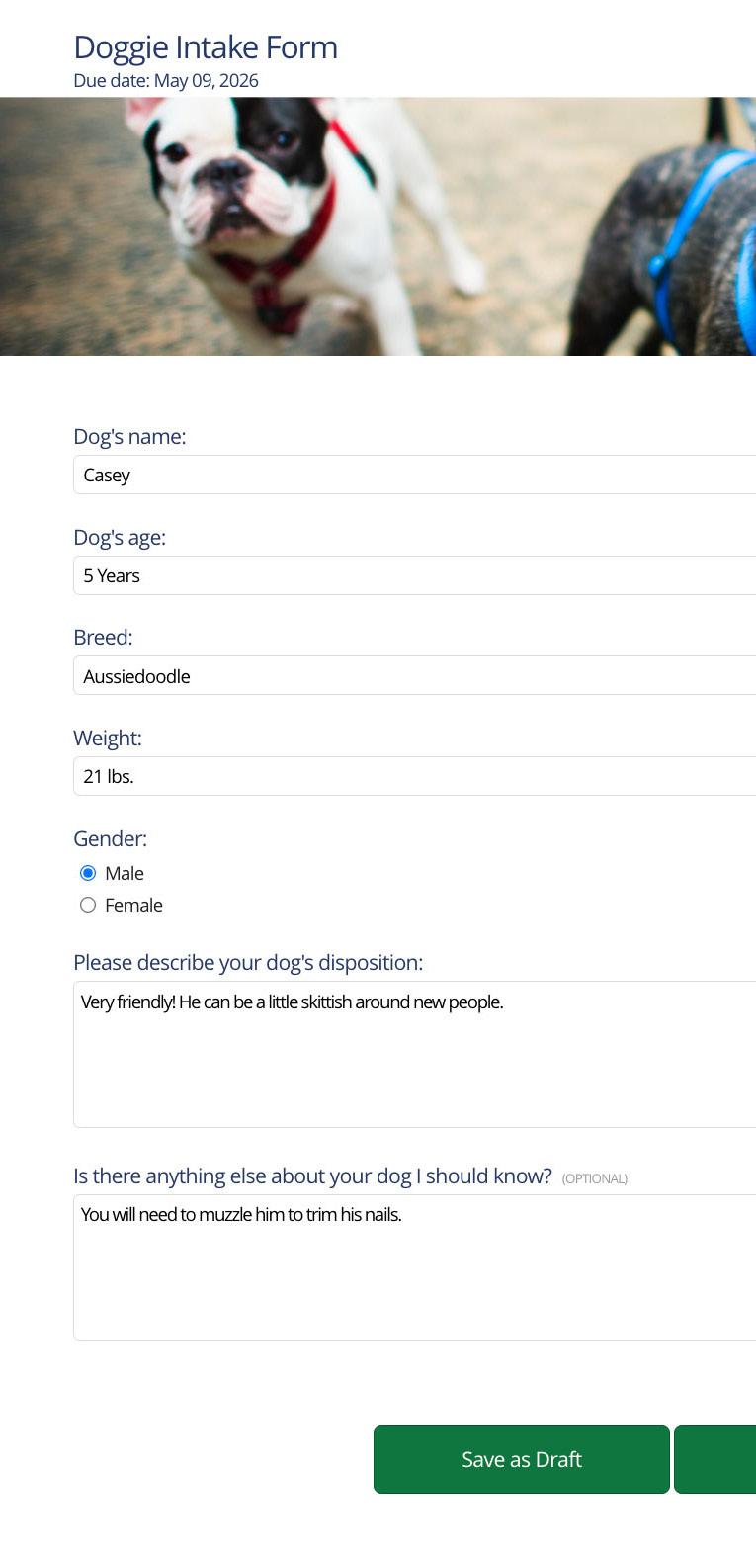
Know Your Audience:
COMMUNICATE SO PEOPLE ACTUALLY GET IT
Clear to You Is Not Always Clear to Your Client
One of the biggest communication mistakes solo business owners make is assuming that clear to you means clear to your client. It usually does not.
If you work in a creative field, you spend a lot of time inside your own process. You know your terms. You know your tools. You know what strong work looks like. But your clients are not living in your world all day. They are living in theirs. That means the way you explain your work has to meet them where they are.
This is especially true for solo business owners in the creative industries. A photographer, designer, copywriter, florist, planner, illustrator, or brand strategist may be excellent at their craft and still lose people with unclear language. Not because
Communication Is Part of Your Brand
In April’s issue, we talked about the five pillars of your brand. That article reminded us that your brand is not just your logo, colors, or visuals. It is also the way people experience you. Communication plays a huge role in that experience.
Your words help people understand your value, your process, and what it feels like to work with you. If your communication feels confusing, overly technical, or disconnected from your client’s world, it can create distance. If it feels clear and thoughtful, it builds trust.
Good communication is not about sounding smarter. It is about making your message easier to receive.
Know Who You Work With
A first-time client may need simple, direct language. They may not
They may need more context, more explanation, and more reassurance.
A marketing director may already understand those terms, but care more about deadlines, deliverables, approvals, and results.
A local business owner may want to know the cost, the steps, and how long it will take.
A luxury client may expect a higher level of polish, detail, and care in the way you present your ideas. The point is to explain your work in a way that makes sense to the person in front of you.
Speak to Their Industry, Not Just Your Own
This is where many solo business owners get stuck.
They explain their work using the language of their own field, but not the language of the client’s industry. That can create confusion even when

Every industry has its own rhythm, priorities, and vocabulary. If you are a designer working with a restaurant owner, you may want to speak in terms of guest experience, menu clarity, and first impressions. If you work with wellness brands, your language may need to feel calm, thoughtful, and trust-building. If you work with a corporate client, they may respond better to terms like timeline, rollout, approvals, and stakeholder feedback.
This does not mean loading your communication with jargon. In fact, too much insider language can make people feel left out. The goal is not to sound impressive. The goal is to sound relevant.
A simple question can help: are you using language your client uses, or only language people in your industry use?
Translation Builds Trust
Here is a good example. A brand designer might say, “Your visuals lack cohesion.” That may be accurate, but a client may understand this much faster: “Right now, your brand looks inconsistent, and that can make your business feel less established.”
It is the same idea, but it lands differently.
That is what strong communication does. It translates expertise into language that feels useful, clear, and real. When clients do not have to work hard to understand you, they trust you faster. They ask better questions. They feel more confident moving forward.
Look at the Places This Shows Up
This matters more than most business owners realize.
It shows up on your website when you describe what you do. It shows up in your inquiry form when someone decides whether to reach out. It shows up in your proposal when a client is deciding whether to book. It shows up in onboarding emails, calls, project updates, and final delivery.
If the words do not connect, people hesitate. They may not ask the next question. They may not book. They may not fully understand the value of what you offer.
Make It Actionable
attention to the words your clients use when they talk about their goals, frustrations, and questions. That language is valuable.
Next, look for patterns. Where do clients get confused most often? What words do you find yourself explaining again and again?
That is usually a sign that your communication needs to be simpler.
Finally, remember this: clear beats clever almost every time. You do not need perfect wording. You need language that helps people understand you quickly and trust you more easily.
Good Communicators Translate Well
For solo business owners in creative industries, this skill can change everything. It can strengthen your marketing, improve your client experience, and make your brand feel more trustworthy from the very first interaction.
Good communicators do not just express themselves well. They translate well. When people feel like you understand their world, they are

For many service-based business owners, contracts can feel like one of two things: a formality or a legal shield. Something you send because you know you are supposed to, or something you hope you never have to pull out.
But the truth is, a good contract does much more than protect you if something goes wrong. A good contract communicates.
It tells your client what to expect, what you expect from them, how the project will work, and what happens if something changes along the way. It takes important details out of your head and puts them into a shared agreement. That alone can prevent a surprising amount of stress, confusion, and conflict.
For solo business owners, that matters even more. When you are the one doing the work, answering the emails, managing the timeline, and keeping the client experience moving, you do not have room for vague expectations. A contract helps create structure before the project starts, which makes everything that follows smoother.
*this article is not legal advice.
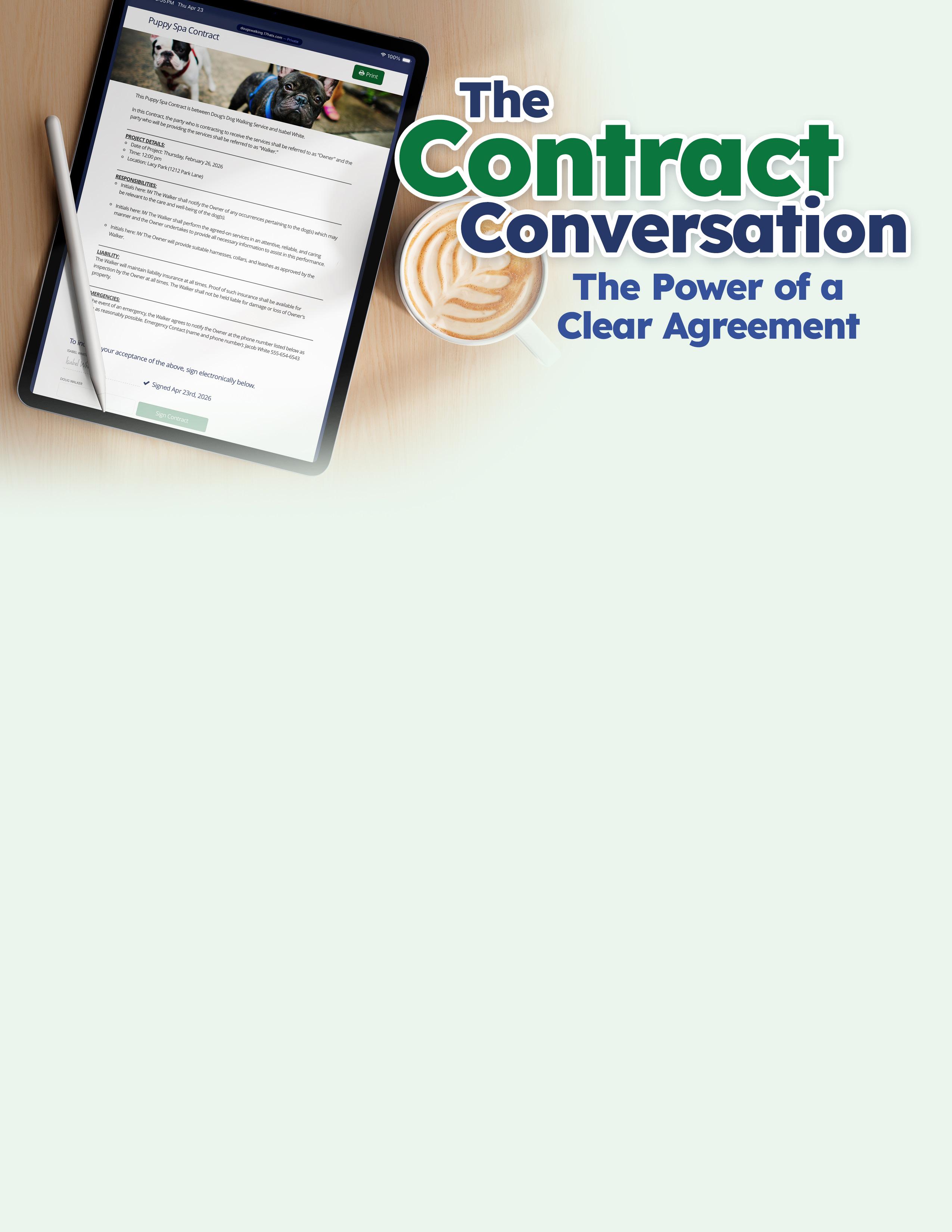
Most Client Problems Start Before the Problem
Many client issues do not begin with a difficult person, but with an unstated assumption.
The client assumes that one round of revisions means “until I’m happy.” You assume it means one structured set of changes.
The client assumes the timeline is flexible. You assume the deadline matters.
The client assumes you will provide one thing. You assume they understand what is not included.
This is where friction starts. Not always because someone is unreasonable, but because no one made the invisible visible.
That is the real power of a contract. It brings assumptions into the open.
Instead of hoping both sides understand the project the same way, the contract gives you a chance to define it clearly. It answers the questions that people often do not know to ask until they are already frustrated.
What Contracts Should Communicate Clearly

Scope
Define exactly what the service includes and what it does not. If additional work is requested later, explain how that will be handled. Clear scope keeps the project grounded and helps prevent misunderstandings.
Timelines
State when the project begins, what deadlines matter, and what can affect the schedule. Include what happens if the client delays feedback, files, approvals, or other needed materials along the way.
Revisions
Explain how many rounds of revisions are included and what counts as a revision. If changes go beyond that limit, outline how extra requests will be handled so expectations stay realistic on both sides.
Payment Terms
Make payment details easy to understand from the start. Include due dates, payment schedules, late fees, and any non-refundable amounts. Clear terms help remove stress and make money conversations easier.
A Contract Sets the Shape of the Project
A strong contract tells the story of how the project will work.
It explains the scope so the client knows what they are getting. It lays out timelines so both sides understand pacing and deadlines. It addresses payment terms so there is no awkward surprise later. It makes room for things like revisions, cancellations, ownership, late fees, communication expectations, and responsibilities.
In other words, a contract is not just paperwork. It is one of the clearest ways to describe the working relationship.
Responsibilities
Spell out what each side is responsible for during the project. This can include content, decisions, approvals, communication, or access to needed materials. A strong contract makes the process feel shared, not one-sided.
Ownership and Usage
Clarify who owns the final work and what rights the client is receiving. If there are limits around editing, resale, transfer, or commercial use, those details should be clearly written into the agreement.
Cancellations
Explain what happens if the project is canceled before it is complete. Include notice requirements, what payments are still due, whether any fees or retainers are refundable, and how force majeure events will be handled. Clear terms help reduce stress if plans change.
AI Clauses
If AI tools are part of your process, say so clearly in the contract. Explain how they may be used, whether AI-generated content is involved, and any limits around privacy, originality, or ownership. Clear language helps set expectations early.
This is especially important for creative and servicedriven businesses, where the work can feel less tangible at the start. A photographer may be selling coverage, editing, delivery, and usage. A designer may be offering strategy, concepts, revisions, and files. A planner may be coordinating details, vendors, deadlines, and support. A coach may be offering calls, feedback, resources, and structure.
In all of these cases, the contract helps turn a service into something concrete.
It says, here is what this includes. Here is how it works. Here is what happens next. That kind of clarity is good for everyone.
Clarity Reduces Anxiety
Contracts are often talked about in terms of risk, but they also have emotional value. They reduce anxiety.
Clients want to know what they are saying yes to. They want to know what happens after they sign, when payments are due, what they can expect from you, and what you need from them. Even the most excited client can feel uneasy if the process is unclear.
You feel that too.
Without a clear agreement, you may find yourself second-guessing what was promised, worrying about whether you explained things well enough, or trying to navigate uncomfortable situations without anything to point back to.
A strong contract creates calm because it replaces guessing with clarity.
That calm matters more than many business owners realize. When expectations are clear, clients feel more secure. And when clients feel more secure, they tend to communicate better, trust the process more, and create fewer problems out of uncertainty.
Weak Contracts Create Friction Later
A weak contract is not always one with bad legal language. Sometimes it is simply one that leaves too much unsaid.
Here are a few common weak spots:
• language that is too vague to be useful
• missing details around revisions or timeline delays
• unclear cancellation or refund terms
• no explanation of client responsibilities
• no clear boundary around additional work
• unclear ownership or usage rights
When these gaps exist, business owners often end up trying to solve preventable problems in the middle of a project. That is when stress rises. The client feels surprised. You feel frustrated. The relationship starts to strain.
Most of the time, the issue is not that anyone intended harm, but that the agreement did not do enough communicating up front.
A Good Contract Supports the Relationship
Some business owners worry that a detailed contract will feel cold or overly formal. In reality, the opposite is often true.
A clear contract supports the relationship because it removes confusion before confusion has a chance to grow.
It shows that you are thoughtful. It shows that you have a process. It shows that you respect both the client’s experience and your own work enough to define the relationship clearly.
That does not create distance. It builds trust.
Clients do not usually feel put off by professionalism. They feel reassured by it.
In fact, a well-written contract can improve the entire client experience because it helps people understand what working with you actually looks like. It creates structure. It reduces unnecessary back-and-forth. It gives you both something solid to refer to when questions come up.
That is not a barrier to connection. That is one of the things that makes good service possible.
Think of Your Contract as Part of Your Client Experience
If you want a better way to think about contracts, stop seeing them only as protection for worst-case scenarios.
See them as part of your client experience.
Your contract is one of the first places where a client learns how you work. It reflects your professionalism, your clarity, your boundaries, and your process. It helps set the tone for the entire project.
A rushed or unclear contract can create doubt. A thoughtful contract can create confidence.
You are not just delivering a service. You are building trust, setting expectations, and guiding people through a process. A good contract helps you do all three.
Before problems begin, it makes the invisible visible, gives structure to the relationship, and it makes expectations easier to follow.
And in service-driven businesses, that is one of the clearest forms of communication you can offer.
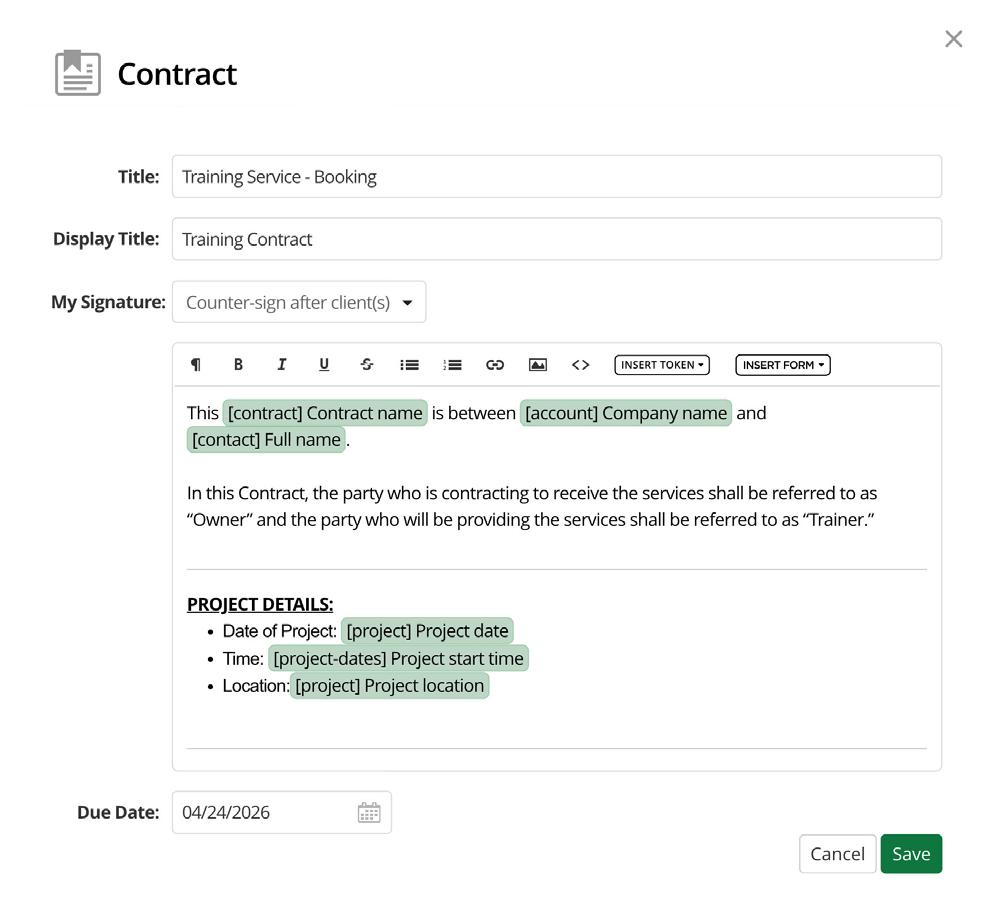
What 17hats Contracts Can Do
If contracts are communication, 17hats gives you a powerful way to make that communication clear, professional, and easy to manage.
With the Contracts feature in 17hats, you can build detailed agreements that do more than collect a signature. Contracts can be created as part of your workflow and paired with invoices and questionnaires, helping you guide clients through the booking process in one smooth experience.
17hats contracts can help you:
• create professional agreements for different services or project types
• include important terms around scope, payment, timelines, revisions, cancellation, and responsibilities
• send contracts digitally for fast review and signing
• store signed agreements inside the project so everything stays organized
• combine contracts with invoices to help clients book in fewer steps
• reuse templates so you do not have to start from scratch each time
• keep your process consistent across every project
The easier it is to send a clear agreement, the easier it is to create a client experience that feels confident from the start.
A strong contract helps prevent confusion. A strong system helps you use that contract well. That is where 17hats can make a real difference.
WRITTEN BY JEBB GRAFF
Turn Down
Has your client ever seemingly ignored your instructions even though they read your email?
Have you ever felt frustrated that a client keeps referring to one of your packages as “the middle one” instead of the name you spent so much time crafting?
Have you ever felt confused about how and what to order from a restaurant whose server begins with “we do things a little differently here”?
If you answered yes to any of these, then you have experienced noise in communication.
While we can’t rid our communication of noise completely, we can turn it down and make an effort to create what scientists and engineers refer to as a high signal to noise ratio. When the signal is high, the noise becomes harder to perceive.
When we break communication down to its essentials there are five key components;
1. Signal: The message we intend to communicate.
Where and when to meet, cost of the service, what the product is, specials we’re running, what happens next, etc.
2. Transmitter: Who or what is sending the message.
You
3. Medium: The method by which the message is sent.
Email, phone, video, handwritten letter, inperson meeting, website, etc.
4. Noise: Anything that interferes with the signal between transmission and reception. Poor internet/phone connection, spelling & grammar mistakes, too many words, visual distractions, pop-up windows, etc.
5. Receiver: Who or what is receiving the message.
Your lead, client, staff, etc.
We can rank the amount of control we have of these components in order of the list.
We have the most control over the first two since we determine the intended message and we are the transmitter. We have a decent amount of control over the medium we choose to send the message through. We have some control over the noise our message competes with and little to no control of the receiver. We can do our best to create messaging that influences the receiver, but we ultimately cannot control whether they answer the phone, read the email, or interpret our words the way we intended.

Down The Noise
So how do we increase signal and decrease noise?
In our communications, external and internal, we can start by making note of all the areas we see people get a little hung up on.

If you commonly hear people refer to your packages differently than you originally named them, maybe it’s time to admit that it’s a friction point (albeit a small one) and consider changing the name to something more relatable to your clients.
If you’re sending combined “invoice & deliverables” emails and your clients are paying the invoice then still ask how to get the deliverables, it’s time to split that email into two separate emails (with searchable subject lines).
If you notice your clients’ eyes glaze over while you’re explaining your service, reel it in and realize that vocabulary that would be normal in a conversation with one of your industry peers may be meaningless jargon to your client. Yes, you should educate your clients but not at the expense of their experience, your brand, or your bank account.
You can survey your clients to find out about their experiences, if everything made sense, or if

inbox.
Ask a trusted friend who doesn’t know your industry to be a test client. Ask them for candid feedback to help you discern noise from the signal.
We live and breathe our businesses so it’s easy to think if everything makes sense to us then it will to our clients. In reality sometimes our cute or clever names for services are confusing for clients (and SEO), our emails read like encyclopedias, and our websites are full of jargon better suited for industry peers than the people we actually intend to serve.
Practice stripping your communication down to only the essentials. You may find that lowering the volume causes people to lean in to pay attention.

Scripts and Shifts for Your Hardest Client Emails
Reframes and key phrases for reschedules, cancellations, late payments, and follow-ups so you stop avoiding and overthinking, and respond with confidence.
Certain client emails hijack your mental energy before you ever hit send.
A client cancels. An invoice is late. A lead has gone silent. A project goes off the rails. You know you need to respond and address the issue, but instead of just sending the email, you write it in your head… seventeen different times… and spiral on it all day long.
Before you let your brain spiral, use my simple framework to help you send these emails easier:
• Be human: I can approach this with warmth and understanding.
• Be clear: I can be direct, point to my policies, and not over-explain or apologize.
Here are four of the most challenging client emails and the key reframe to help you use this framework to change how you feel sending them.
1. Reschedules and Cancellations
The Spiral: “Why is this always last-minute? Ugh, now I have to charge them a rescheduling fee. What if they leave a bad review? But if I let it slide, I know it’ll happen again."
Reframe: Clear policies actually help clients show up for themselves and get results. When you hold firm to your policies, this consistency builds trust and respect (not to mention, helps you weed-out the wrong clients).
How to Respond: Be human and acknowledge their situation with warmth. Then, state your policy clearly to help empower them to decide how to move forward.
2. Late Payments
The Spiral: "Why haven’t they paid yet? Why does this have to be an issue? I don't want to seem desperate. What if they ghost me completely?"
Reframe: Following up on a late payment can stir anyone’s money worries. But consider who you need to be for your business and your client. Your business needs policies to be communicated, late fees added, and contracts to be honored so that the business can operate successfully. For your client, it might actually help them to see how you set expectations, stay firm, and communicate to them. It's not confrontational, it's professional. You’re holding up your end of a two-way agreement by reminding them to hold up theirs.
How to Respond: Be human and check in on them –you never know what may be happening on their end. Then, clearly address that the invoice is past due, give them the link to pay, and state your policy or late fees.

3. Following Up with a Silent Lead
The Spiral: "I really thought they were a perfect fit. Why haven’t they responded by now? I don't want to seem desperate. What if they think I’m pushy or annoying?"
Reframe: Following up is not pushing someone into a sale. You know life happens, you get busy, or you leave an email unread for months. Even worse, you don’t follow up and later see that they hired someone else –gut-punch! A well-timed follow-up isn't chasing. It gives them the opportunity to decide instead of sitting on the fence.
How to Respond: Be human and check in – did they receive your proposal, do they have any questions? Then, clearly state how they can move forward. Sometimes, after a few follow-ups, it can be helpful to give them another option or an out so you know where they sit.
4. Resetting Expectations/Scope Mid-Project
The Spiral: "This is way more work than planned. This project was supposed to be wrapped up a month ago! I don't want to seem difficult. I’ll just try to get this done and over with."
Reframe: When a project goes off the rails, you start feeling tension and resentment. The discomfort you're avoiding now will be ten times worse if you don’t address it. The thing is, clear
boundaries, expectations, and next steps actually build a relationship, not hurt it. It establishes clear direction and needs so both parties can do their part. Silence and pushing through won’t make the problem disappear, it will eventually cause you to lose (or fire) the client.
How to Respond: Be human and address the issue – At this point, we’ve done xyz, and [our time is up] or [this is out of the project scope]. Then, clearly state what options they have – I’d be happy to help you and can send you a quote so we can continue working on this?
Steal My Emails
Writing a clear email from a blank screen while you're already spiraling is exactly why you’re procrastinating.
I've written the full versions of every email and bundled them as ready-to-import templates so you can use them right away.
About The Author

Grab My Email Templates

Danielle Uhl is a Certified Coach & Business Consultant, 17hats Implementation Expert, and multibusiness entrepreneur with 13+ years scaling three profitable businesses from scratch. As a 17hats Ambassador, Marketplace Partner, and contributor to The Journey, she offers custom 17hats system build-outs, consulting, and ready-to-use templates so you can stop running on fumes and duct-taped chaos and build a sustainable business.

Boundaries That Build Trust
Boundaries are a key part of creating a clear, consistent client experience.
For many solo business owners, boundaries can feel uncomfortable.
You want to be helpful. You want to be easy to work with. You want clients to feel taken care of. So you answer texts late at night, squeeze in one more small extra, reply on weekends, and let timelines slide because you do not want to seem difficult.
At first, that can feel like good service.
But over time, unclear boundaries usually lead to three things: scope creep, resentment, and burnout.
That is why boundaries matter so much. They are not separate from communication. They are communication. They tell clients how your business works, what they can expect from you, and what you need in order to do your best work.
Boundaries create clarity, not distance.
What Happens When Boundaries Are Unclear
Most client frustration does not begin with one major moment. It builds slowly.
A client sends messages at all hours because no one ever explained when
you are available. A project drags on because revision limits were never clearly set. A rush request turns into stress because you said yes before thinking through the impact on your schedule. A few unpaid extras start to pile up because it feels awkward to address them now.
When boundaries are unclear, clients often fill in the blanks based on what feels normal to them. That does not make them difficult. It just means they are working with the information they have.
If your process is vague, your clients will create their own version of it.
The Boundaries That Matter Most
Boundaries look different in every business, but there are a few common areas that matter for almost everyone.
Office hours help clients know when you are available and when you are off the clock.
Response times set the tone for communication. You do not need to reply instantly to be professional, but people do appreciate knowing when they can expect to hear back.
Revisions protect your time and keep projects from stretching far beyond the original agreement. Rush work needs clear rules, especially if taking on last-minute work affects other clients or your personal time.
Communication channels matter too. If you want project details to stay in email and not get scattered across texts, voice notes, and social DMs, that needs to be said.
And then there are the unpaid extras. The extra call. The additional edits. The quick favor that turns into another hour of work. This is often where resentment begins.
None of these boundaries are harsh. They are simply part of running a healthy business.
Set Boundaries Early, Not After You Are Frustrated
Boundary conversations are hardest when they happen after something has already gone wrong.
It is much easier to say, “My office hours are Monday through Friday, and I reply within one business day,” at the start of a project than it is to explain later why you are no longer answering weekend texts.
It is easier to say, “Two rounds of revisions are included,” before the work begins than to push back after the fifth round of changes.
This is also where clear agreements come into play. As we talked about in The Contract Conversation, expectations are easier to honor when they are made visible from the start.
Early boundaries feel like process. Late boundaries can feel personal, even when they are necessary.
Clear Does Not Mean Cold
A lot of solo business owners avoid boundaries because they worry they will sound rude, inflexible, or unkind.
But clarity is not coldness. You can be warm and direct at the same time.
You can say, “I respond to emails during business hours and do my best to reply within one business day.”
You can say, “Two rounds of revisions are included so we can keep the project moving smoothly.”
You can say, “I’m happy to take that on. Since it falls outside the original scope, I’ll send over an updated quote.”
That is not bad service. That is clear service.
Boundaries Build Trust
This is the part many business owners miss: boundaries and trust work together.
When your boundaries are clear, your business feels more consistent. Clients know how communication works. They know what is included. They know what happens next. That consistency creates confidence.
And confidence builds trust.
Strong boundaries also make it easier for you to show up well. When you are not overextended, resentful, or constantly reacting, you communicate better. You do better work. You create a better client experience.
Boundaries are not walls. They are structure. They protect your energy, support your professionalism, and help your clients feel more secure in the process.
People do not need unlimited access to trust you. They need clear expectations, thoughtful communication, and a business that feels steady from start to finish.
What Silence Says: Five Ways To Stay Connected To Clients
Most solo business owners do not mean to communicate poorly. They are busy. They are juggling client work, admin tasks, family life, and the constant pressure of keeping the business moving. So an email sits for two days. A lead inquiry goes unanswered a little too long. A client asks a question, and the answer feels obvious, so it gets skipped for now.
None of that feels dramatic in the moment. But silence has a way of saying more than we think.
In business, people are always reading signals. If you do not give them clarity, they will create their own story. And that story is not always generous.
A delayed reply can read like disorganization. A vague process can feel like inexperience. An unanswered question can sound like avoidance.
That does not mean every client is right. It means silence is never neutral.
When There Is a Gap, People Fill It
This is one of the hardest truths in client communication: when people do not know what is happening, they guess. Usually, they guess based on their own fears, frustrations, or past bad experiences.
If a lead does not hear back, they may assume you are too busy, not interested, or not on top of your business. If a client is waiting for files and gets no update, they may assume the project is off track. If a question sits unanswered, they may think you are dodging it.
That is why silence can create tension even when nothing is technically wrong. The problem is not always that you are unavailable.
Being Busy Is Not the Same as Being Unclear
You do not need to be constantly available to be a strong communicator. That is not the goal.
People do not expect instant replies from healthy, professional business owners. What they do need is context. They need to know when they will hear from you, what happens next, and whether something is still moving forward.
That is the difference between being unavailable and being unclear.
Unavailable sounds like: “I’m in meetings today, but I’ll reply by tomorrow afternoon.”
Unclear sounds like: Nothing.
One builds trust. The other builds doubt.
The Hidden Messages Your Business Might Be Sending

You may not realize it, but your business is always communicating through patterns.
If your inquiry process feels slow, you may be signaling that new leads are not a priority.
If your follow-up is inconsistent, you may be signaling that your process is not solid.
If your project updates only happen when a client asks first, you may be signaling that communication is reactive instead of intentional.
If your boundaries are vague, clients may assume access to you is unlimited until told otherwise.
Again, this is not about perfection. It is about awareness. A few small gaps can create a bigger feeling than you intended.
Five Ways to Stay Communicative Without Being Constantly Available
The good news is that you do not need to be glued to your inbox to communicate well. You just need a few systems that keep people informed.
1. Send a quick acknowledgment
You may not have a full answer yet, but you can still confirm that you received the message. A simple “Got this — I’ll look it over and get back to you by tomorrow” goes a long way. It tells the other person they are not being ignored.
This is also where automated acknowledgments can be helpful. For example, 17hats can automatically respond when a lead or client submits a document or pays an invoice. Those small touchpoints reassure people that their action went through and the process is moving.
2. Use auto-replies only when they are truly needed
Auto-replies are most helpful when you are actually out of office, away for several days, or unavailable for a clear reason.
The best rule is simple: use them when they provide real context, not just more email.
3. Give timelines before people ask
If you know a deliverable, gallery, draft, or proposal will take a few days, say that up front.
People are much more patient when they know what to expect. Silence feels longer when no timeline was ever given.
4. Build in checkpoints
Do not let long stretches go by with no communication, especially in service-based or creative work.
A quick update like “Everything is on track and I’ll send the next draft Friday” can prevent a lot of unnecessary worry.
5. Follow up even when the answer is no
If a lead reaches out and you are not available, or a project is not moving forward, close the loop.
Ghosting may feel easier in the moment, but it leaves a lasting impression. A respectful no is still professional communication.
Silence Can Undercut Good Work
This is what makes the issue tricky: you can be talented, thoughtful, and great at your work, but if your communication has too many gaps, people may never fully experience that.
Silence can make a good business feel shaky.
In those moments, they can reduce uncertainty and let people know when to expect a response. But if you are simply in and out of your inbox during a normal workweek, an auto-reply can create more noise than clarity.

On the other hand, small moments of clarity can make your business feel steady, thoughtful, and trustworthy. An update. A quick note. A clear timeline. A simple acknowledgment. These things are not flashy, but they don't have to be to be meaningful.
Your clients and leads do not need constant access to you. They do need signs that they are seen, that the process is moving, and that your business is paying attention. Because when you do not provide context, people create their own. And in business, silence almost always says something.
5 Ways to Succeed as an Introverted Small Business Owner
WRITTEN BY LIZ WILCOX
If you're an introvert and you own a business, there's a good chance you've felt a little out of place at times.
As a solo business owner, you're probably comfortable being alone. And as an introvert, you may even prefer it. You're great at your work, but drained by networking. You care deeply about your clients, but might need a break after back-to-back calls. And when so much business advice is built around visibility, constant connection, and “put yourself out there” energy, especially on social media, it can start to feel like success belongs to bolder, louder people.
That’s simply not true.
Introverted business owners bring a lot to the table. They tend to be thoughtful, observant, prepared, and really good at listening. Those are not side qualities. In a service-based business, they are often the exact things that build trust.
If you find yourself avoiding follow-up, putting off hard conversations, overthinking meetings, or feeling a little flighty during in-person events, keep reading. The goal is not to become more extroverted. The goal is to build your business in a way that works with your strengths instead of against them.
1. Stop avoiding the parts of business that drain you
A lot of introverts are not bad at communication. They are tired by it.
If client calls, networking, or being visible online drains you, the answer is not to ignore those parts of your business. It is to handle them more intentionally. Put calls on certain days. Limit how many meetings you
take in one afternoon. Plan ahead for events instead of forcing yourself into them last minute.
��
When you know what drains you, you can stop pretending it doesn’t and start building around it. You do not have to be “on” all the time to be effective.
Try this: Look at the last two weeks of your calendar and ask: What gave me energy? What drained it? Then adjust your schedule around those patterns.
2. Write down what you say all the time
One of the easiest ways to make business less socially exhausting is to stop reinventing the wheel.
If you find yourself answering the same questions over and over about your process, pricing, timing, revisions, or next steps, write those answers down. Put them in your inquiry replies, your welcome guide, your proposal, or your email templates.
This helps in two ways. It saves energy, and it makes you more consistent.
For introverts, the decrease in constant on-the-spot communication equates to a decrease in how quickly you feel drained. Clear written communication gives you structure. It also creates a better client experience because people feel informed before they ever get on a call with you.
Try this: Make a list of the five questions clients ask most often. Write a clear answer to each one and save them somewhere you can reuse. Bonus tip: add those answers to your templates so they work for you again and again.
3.
Build relationships in ways that actually fit you
A lot of introverted business owners hear the word networking and immediately think, “No thanks.”
Fair enough.
But relationship-building does not have to mean loud rooms, awkward small talk, or collecting as many contacts as possible. Often, it works better when it is smaller and more consistent. A coffee chat. A thoughtful follow-up email. Staying in touch with past clients. Reaching out to one referral partner instead of trying to meet twenty people at once.
Introverts are often better at depth than breadth. That is a real advantage in business if you use it on purpose.
Try this: Instead of signing up for a big event, reach out to one past client, one local business owner, or one referral partner this week and start there.
4. Use listening as one of your best business skills
This gets overlooked all the time. A lot of introverted business owners are strong listeners, and that matters more than people think. Clients want to feel heard. They want to feel like you understand what they need, not like you are just waiting for your turn to talk.
When you listen well, you ask better questions. You catch concerns earlier. You communicate more clearly because you actually understand what the other person is trying to say. And in a service-based business, that can be one of your biggest advantages.
Good communication is not always about saying more. Sometimes it is about listening well enough to say the right thing.
Try this: In your next client conversation, focus on asking one more follow-up question before jumping in with your answer.
5. Protect your focus like it is part of the job
Introverts often do their best work when they have uninterrupted time to think, create, and problem-solve. But that focus gets chipped away fast when your days are packed with pings, calls, meetings, and constant back-and-forth.
If you want to do better work and feel less fried, protect your focus before your calendar fills itself.
That may mean batching calls into specific windows, having office hours, turning off notifications while you work, or keeping one day a week meeting-free. It may also mean not giving every client access to you in every possible channel.
This is not about being unavailable. It is about staying functional and doing your best work consistently.
Try this: Block one recurring stretch of focus time on your calendar each week and treat it like a client appointment.
Success does not have to look loud
A strong business is not built only through charisma or constant visibility. It is built through trust, clarity, consistency, and good work.
Introverted business owners can be especially strong in those areas when they stop measuring themselves against louder people and start building in ways that are more sustainable.
In a lot of ways, that is what good communication is really about. Not performing. Not overexplaining. Not trying to be the biggest presence in the room. Just learning how to communicate clearly, listen well, and build trust in a way that feels natural and steady.
That is where the real traction starts.

One of the easiest habits to lose as a solo business owner is follow-up after the work is done.
The project wraps. The invoice is paid. The files are delivered. Everyone is happy. Then you move on to the next thing.
That makes sense. You are busy. There is always another deadline, another inquiry, another task waiting for your attention.
But if the only time clients hear from you is when you are actively working together or when you want to sell something, you miss one of the best ways to build a stronger business.
Staying in touch is not pushy. Staying in touch in a thoughtful, steady way reminds people you're
still here, still helpful, and still someone they trust.
Why Follow-Up So Often Gets Dropped
Many solo business owners only communicate when they need something.
They reach out when it is time to book, pay, approve, or renew. Once the project is over, the communication stops until there is another reason to make contact.
Usually, this is not because they don't care. It's because follow-up feels easy to postpone. It may also feel awkward. A lot of people worry they will sound salesy, needy, or intrusive.
So they stay quiet. But that quiet can create distance. Clients move on. Life gets busy. Even a great experience can fade from memory if there is no reason to stay connected.
Staying Visible Builds Trust
People are more likely to hire you again when you still feel familiar.
That is what staying in touch really does. It keeps the relationship warm.
It reminds past clients that your business is active, reliable, and still relevant to their needs. It also shows that your client experience doesn't end the second the project is complete.
A thoughtful follow-up says, “I care about the relationship, not just the transaction.” It tells people that your
business is steady, organized, and invested in serving well over time.
Good Follow-Up Feels Helpful, Not Pushy
The key is to stop thinking of follow-up as a sales tactic and start thinking of it as relationship maintenance.
You aren't trying to hover. You are trying to stay connected in a way that feels natural and useful.
That might mean sending a newsletter with practical tips, seasonal reminders, or helpful updates.
Good follow-up is usually tied to something relevant. The point is not to say, “Do you need anything?” over and over again. The point is to provide a reason to reconnect.
Practical Ways to Stay in Touch
There are a lot of simple ways to keep the relationship going without making it feel forced.
Newsletters can be one of the easiest. They help you stay visible at scale and give you space to share useful advice, recent work, updates, or reminders.
Seasonal updates work well when your service has a natural rhythm throughout the year. If there is a time when clients are more likely to need you, that is a great reason to reach out.
moments give you a built-in reason to reconnect.
Helpful resources are another strong option. Share a guide, checklist, reminder, or quick tip that connects to the work you did together.
Personal check-ins can also go a long way, especially for high-touch service businesses. A short message that feels specific and genuine is often more powerful than a generic sales email.
How to Stay Top of Mind Without Becoming Annoying
This is where most people overthink it. You don't need constant contact to stay memorable. You need consistent contact.
That means showing up often enough to stay familiar, but not so often that people feel crowded.
You should make your communication worth reading or listening. Build goodwill by keeping your communication useful, timely, or thoughtful. If every message is self-promotional, people tune out.
A good filter is this: would this message feel helpful if I were the one receiving it?
If the answer is yes, you are probably in a good place.
What It Says About Your Brand
Repeat clients are often easier to book, easier to serve, and more likely to refer to others. But those repeat opportunities do not always happen automatically. Sometimes they come from simply staying in touch.
Consistent, thoughtful follow-up turns one-time work into an ongoing relationship.
And in a service-based business, that kind of relationship is often where the next opportunity begins.
Beyond the
4 Simple Ways To Stay Top Of Mind In Real Life
Milestone follow-ups can feel especially thoughtful. Anniversaries, birthdays, or other project-related
For solo business owners, the way you communicate after a project or service matters.
Send a coffee gift card
Show up at local events
WRITTEN BY DEB MITZEL

Before a potential client ever speaks to you, your business has already introduced itself. The question is whether that introduction is saying what you think it is.
Most small business owners think about communication as the words they choose, the email they write, the contract they send, the phone call they have. Those things absolutely matter. But there is a layer of communication happening underneath all of that, one that runs constantly and almost entirely without your awareness. And it is impacting how people feel about your business before you ever have a conversation.
That communication layer is made up of signals. Some are visual. Some are process-driven. Some are simply about timing. But together they answer a question every potential client is asking, even if they can't put it into words - is this business as good as it looks?
Your business is communicating right now. The only question is whether you're the one directing the message.
The First Impression Starts Before You Think It Does
Wherever someone first encounters your business - your website, a social media post, a referral that leads them to search your name, a print piece, an advertisement - that moment is already a communication event. The visual impression they get, the clarity of your message, and whether your presence feels organized and intentional all combine to form an immediate verdict, often before they've read a single word.
Professional brand photography is one of the most underestimated tools in that first impression. When your imagery is cohesive, current, and aligned with the quality of work you actually deliver, it creates credibility before anyone reads your bio or scrolls to your testimonials. When it feels scattered or outdated, even the best copy has to work against that initial hesitation.
The same principle applies to every visual element of your brand. Consistency across your website, your social presence, your email header, your documents... it communicates that your business is run with intention. And intention builds trust.
Response Time Is a Communication Choice
Response time tells a client a lot about how they'll feel working with you. You don't need to be glued to your phone or available around the clock, but you do need a system that makes sure no one who reaches out gets left hanging. A warm, genuine message that thanks them for reaching out, tells them a little about what to expect next, and maybe shares a helpful resource turns that first touchpoint into a real experience. It says someone is paying attention. It says they matter. And it removes that anxious wondering that happens when people reach out and hear nothing back.
Here is something most business owners don't think of as communication - how long it takes to hear back from you. A potential client fills out your contact form on a Tuesday afternoon and hears back Thursday morning. In that time, something happened. They either moved on, found someone else, or are now a little less enthusiastic than when they first reached out.
The In-Between Moments Matter Most
The in-between moments tell your clients more about how you run your business than the work itself ever will.
Think about the last time you had a genuinely great experience as a customer, not just with the end result, but with the whole process. Chances are what made it feel great had less to do with the final product and more to do with how you felt getting there. You knew what was happening. You weren't left wondering. Someone thought ahead and made sure you had what you needed before you even had to ask. That feeling is what people remember. Not the deliverable, not the price, but whether someone made them feel like they mattered all the way through. As business owners, we get so focused on delivering the work that we sometimes lose sight of what it feels like to receive it.
Here are the moments that shape how clients feel about you:
• The warm acknowledgment that lets someone know their inquiry landed and that you're on it
• The booking confirmation that tells them exactly what comes next so they can exhale and trust the
process
• The midpoint check-in on a longer project that says you're still thinking about them, not just the deadline
• The follow-up after delivery that wraps things up well and leaves the door genuinely open
• The heads-up when something changes, offered before they ever have to wonder or ask
None of these take a lot of time, and most of them can be built into your system so they happen on their own. Consistently. Without you having to remember. But when they're missing, clients feel it. They may not be able to put their finger on exactly what's off, but something is, and they know it.
Tone Carries More Weight Than You Think
Beyond timing, every message you send is carrying a feeling along with it, whether you intended it to or not. A message that feels warm and conversational lands in a completely different place than one that feels rushed or impersonal. When your communication is specific and clear, clients feel confident. When it's vague or uncertain, it leaves them with questions they shouldn't have to ask and a nagging feeling they can't quite shake. Tone shapes how a client feels about you as the person helping them, and that feeling follows them through the entire relationship.
One of the most practical things you can do is build your tone into your templates and automated messages on purpose, not as an afterthought. Don't just plug in the details and move on. Step into the shoes of the person receiving it. Does it sound like you? Does it feel like someone who genuinely cares is on the other end? Does it give them what they need and leave them feeling good about what comes next?
Your inquiry response, your onboarding sequence, your delivery message, your follow-up... every single one of these is a chance to remind your clients that they made the right call in choosing you. Don't let those moments go to waste.
Consistency Is the Real Goal
Here's the honest truth about most small business communication - it tends to rise and fall with the
owner's bandwidth. When there's margin in the week, clients get a great experience. When it's a busy season, responses slow down, follow-ups slip, and the in-between moments disappear. The client who books in January gets a different experience than the one who books in October. That inconsistency isn't intentional. But the client on the receiving end doesn't know that.
Building a good communication system isn't about automating everything or losing the personal connection you've worked hard to create. It's about making sure the foundation is always there so every client gets a professional, warm, organized experience regardless of what else is happening in your business that week. The personal connection doesn't go away. Your systems just make sure it doesn't get lost in the shuffle.
When your systems take care of the in-between moments, something really good happens. You stop spending energy trying to remember what you said to whom and when. You stop worrying about whether someone fell through the cracks. And you free yourself up to bring your full attention to the parts of your work that actually need you there, the conversations, the consultations, and the moments where a real human connection makes all the difference.
A client's experience of your communication doesn't begin when you decide to reach out. It begins the moment they encounter your business, and it never really stops.

A Quick Audit Worth Doing
If you want to see what your business is really communicating, try stepping outside of it for a moment. Put yourself in the shoes of someone encountering your business for the very first time today. Walk through it honestly and see what you find.
• Do the visuals match the quality of your work?
• Is it clear who you serve and what the experience of working with you actually looks like?
• If someone reached out today, how quickly would they hear back... and how would that response feel?
• At each stage of your process, does a client always know what comes next, or are there moments where they're left to figure it out on their own?
• Are there gaps where a client might go quiet, not because they lost interest, but because they simply didn't know what to do next?
Most small business owners can honestly find at least one place where their business isn't quite saying what they think it is. That's not something to feel bad about. Because now you can do something about it. And it's almost always easier to fix than it looks.
The businesses that clients rave about aren't always the ones who do the flashiest work. They're the ones who made every step of the experience feel intentional, personal, and worth talking about. That doesn't happen by accident. It happens by design.
Your business is always communicating. Make sure it's saying what you mean.
About The Author
Deb Mitzel is a Small Business Systems Strategist and one of 17hats' original Marketplace Partners. With 30 years of operational and leadership experience, she helps solopreneurs and small business owners build simple, strategic systems so their clients get the best experience possible and they still have time for the things that matter most. Learn more at debmitzelcreative.com.
Communication Isn't a Personality Trait It's a System
WRITTEN BY KRISTEN LETTINI
How to create client communication that feels professional, consistent, and personal — without relying on memory
There’s a moment most business owners have at some point.
You meant to follow up. You meant to send something. You meant to check in.
And then the day moved on.
Nothing is technically broken. Your clients are happy. Your work is strong. But it doesn’t feel as polished as it could.
If that sounds familiar, it’s not because you’re bad at communication.
It’s because your communication is relying on you to make it happen.
Before I ran my own business, I worked in corporate communications at a large global
company — where every message, every touchpoint, every follow-up was intentional.
Not because people were more disciplined. Because it was built into the process.
In large, well-run organizations, communication doesn’t happen because someone remembered to hit “send.” It happens because it’s built into how things run — thought through once, not recreated every time.
Now, working with small business owners, I see how often communication depends on memory instead of structure — and how quickly that creates unnecessary pressure.
It’s not a lack of care. It’s a lack of structure to support that care consistently.
When communication lives in your head, it creates a quiet kind of pressure.
You’re remembering who needs what. Tracking what hasn’t been sent. Circling back when you have a minute.
And when life is life-ing — or business gets busy — things slip.
A delayed response.
A missed follow-up.
A moment where the experience doesn’t quite match the quality of your work.
Nothing dramatic, but just enough to feel a little off. Over time, it adds up.
The shift is simple, but it changes everything.
Communication is not a personality trait. It’s a system.
It’s something you design once so it doesn’t rely on you every time.
You should be intentional about when and how communication happens. That doesn’t mean automating everything or losing the personal touch your clients value.
It’s about deciding what should happen — and making sure it happens the same way every time. Don't overcomplicate it.
A few examples:
• When someone completes your contact form, they don’t wait for you to reply when you get a chance. They’re acknowledged right away.
• When someone pays an invoice, they’re not left wondering if it went through. They receive a clear confirmation.
• When a contract is sitting unsigned, it doesn’t rely on you to remember to follow up. A reminder goes out at the right time.
These aren’t big changes. But they remove dozens of small decisions from your day.
Not all at once.
Not forgotten later. Just… handled.
This is where a lot of people hesitate. They don’t want their business to feel robotic or over-automated.
The goal is clear, timely, thoughtful communication — without you managing every step.
You’re still present where it matters. You’re just not carrying everything.
If you want a place to start, pick one moment in your process.
Something simple, like what happens after a client pays.
Right now, that might look like: You see the payment, make a mental note to respond, and follow up later.
Instead, design it once.
What should they receive immediately? What do they need to know next? What would make this feel complete?
Then build that in. One step. One touchpoint. Done well.
This is what creates a business that feels polished without feeling heavy.
• Where your communication reflects the quality of your work.
• Where your clients feel taken care of.
• Where you’re not relying on memory to hold it all together.
Because the goal isn’t to get better at remembering.
It’s to build a business that runs in a way you can trust.
And communication is one of the clearest places to start.
Download Kristen's Worksheet
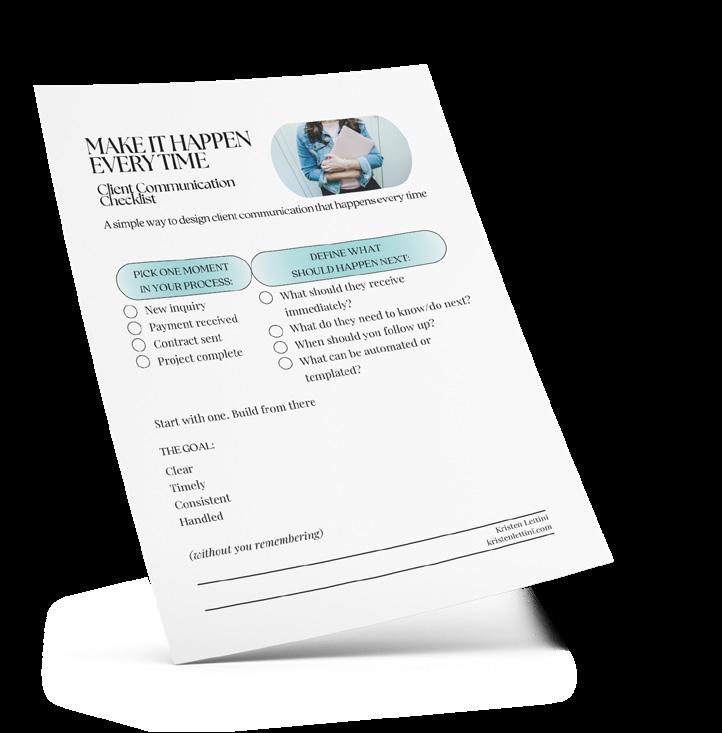
P.S. If you want a simple way to put this into practice, I created a onepage checklist you can use to map your own communication touchpoints. You can download it here.

About The Author
But professional doesn’t mean stiff. And personal doesn’t mean manual.
Kristen Lettini is a Systems Strategist who helps service-based business owners create calm, professional client experiences—without increasing their workload. With a background in corporate communications at a global organization and an MBA, she brings a thoughtful, structured approach to small business systems. She specializes in turning everyday processes into streamlined, repeatable workflows that reduce mental load and support consistency. Kristen is the host of the Build Your Own Fairytale podcast and a 17hats Ambassador.
Pick Up The Phone When to
The Fastest Way to Clear Up Confusion
Not Every Problem Belongs in an Inbox Email is useful. It gives you a paper trail and lets people reply on their own time.
But not every conversation belongs in email.
If you work in a creative business, you know how quickly a simple message can turn into a long thread. A client misunderstands a timeline. A revision request grows bigger than expected. A payment conversation gets awkward. You spend twenty minutes writing the perfect reply, only to get another email that makes things less clear.
Sometimes the fastest way to clear up confusion is to stop typing and start talking.
Know When a Call Will Work Better
A phone call is often the better choice when the issue involves tone, urgency, emotion, or too many moving parts.
If there has been a miscommunication, a call helps people get on the same page faster. If a client sounds

upset, a call gives you a chance to respond like a real person, not a paragraph. If a project scope is shifting, a live conversation can help you define what is changing before resentment builds.
Pricing is another good example. Many solo business owners in creative fields freeze when it is time to talk about money. But money conversations often go better when someone can hear your confidence.
Calls also help when there is a delay, a conflict, or a decision that needs to happen quickly. If an email chain is getting longer and less clear, that is usually your cue.
The Trap of the “Perfect Email”
One reason people avoid calls is that email feels more controlled.
The problem is that the search for the perfect email can waste time and make things worse.
When you overexplain, your point gets buried. When you over-edit, your tone can sound stiff. When you
wait too long because you are trying to get it just right, the silence starts to send its own message.
In many cases, you do not need a better sentence. You need a quicker exchange.
That does not mean every issue should be handled on the phone. Final decisions, payment terms, and scope changes should still be confirmed in writing. But the conversation that gets you there may be much easier by phone.
Tone Can Solve What Text Cannot
A short email can sound cold even when you do not mean it that way. A simple question can read like criticism. When tension is already present, text leaves too much room for guesswork.
A phone call removes a lot of that guesswork. Your client can hear your calm and your care. They can hear that you are trying to solve the problem, not win the argument.
That matters in creative work, where feedback can feel personal and emotional.
How to Ask for a Call
People often avoid asking for a call because they think it will sound intense. It does not have to. The key is to make the call sound simple and helpful. You are not escalating the issue. You are choosing a better tool.
You can say:
“I think this would be easier to sort out with a quick call. Are you free this afternoon or tomorrow morning?”
“There are a few moving pieces here, and I want to make sure I explain them clearly. Would a 10-minute call be easier?”
“I’d love to talk this through in real time so we can get aligned quickly.”
Simple Scripts for Common Situations
If a client is upset:
“I can hear that this has been frustrating, and I want to make sure I understand the issue clearly. Can we hop on a quick call today?”
If the scope is changing:
“It sounds like the project has grown from the original plan. I think a quick call would help us define what has changed and what the next step should be.”
If there is a delay:
“I want to give you a clear update and talk through the timeline with you. Do you have ten minutes for a quick call?”
Talk First, Then Follow Up in Writing
One of the best habits you can build is this: call first when needed, then send a short follow-up email.
Thank them for the conversation, recap the decision, confirm next steps, and note any timeline or cost changes. That gives you the speed and clarity of a call, with the record-keeping of email.
Choosing the right format is part of good communication. Not every problem needs a phone call. But some problems need a human voice.
Sometimes, the most professional thing you can do is stop trying to write the perfect email and just pick up the phone.
Phone Scripts That Move Things Forward
Not every phone call needs a perfect script. What matters most is sounding calm, clear, and confident. These examples are meant to help you start the conversation, especially when emotions are high, details are messy, or a lead needs a little guidance to move forward.
When a Client Is Upset
“Thanks for telling me. I can hear that this has been frustrating, and I want to make sure I understand what feels off from your side. Can you walk me through your main concern first? Then I’ll talk through what I can do next.”
When the Project Starts Expanding
“I’m glad you brought that up. What you’re describing sounds like it goes beyond what we originally planned for this project. I’d be happy to talk through adding that in, and then I can follow up with any timeline or pricing changes.”
When a Client Wants a Rush Turnaround
“I understand the urgency, and I want to be honest about what’s realistic. Rush work affects my schedule and other commitments, so if we move forward quickly, it would need to be handled as an expedited project with an adjusted fee.”
When a Client Keeps Contacting You Outside Boundaries
“I wanted to quickly mention something so we stay on the same page. The best way to reach me is during business hours by email, since that helps me keep projects organized and respond well. I appreciate your understanding.”
When a Lead Has Gone Quiet
“Hi [Name], I wanted to follow up and see if you had any questions about moving forward. I know people are often comparing options or working through timing, so I just wanted to check in and see where things stand on your end.”
When You Want to Help a Lead Book
“It sounds like we could be a really good fit. The next step would be to reserve your spot with a signed agreement and deposit. If you’re ready, I can send that over today so you can officially get on my calendar.”
When a Lead Sounds Interested but Hesitant
“I completely understand wanting to think it over. Before we wrap up, is there anything specific you’re unsure about that I can clarify? Sometimes one quick question about timing, cost, or process is the only thing standing in the way.”
When You Need to Say No
“I appreciate you thinking of me. Based on what you’re needing, I don’t think I’m the best fit for this project. I’d rather be honest than overpromise, and if it helps, I can point you toward a better next step.”
Keep Every Conversation in One Place
When you start picking up the phone more in your business, something else becomes just as important: keeping track of what was said.
It’s easy to forget the details of a quick call. A client mentions a timeline change. A lead shares their budget. You agree on next steps. Then a few days later, you’re trying to remember exactly what was discussed.
This is where 17hats does a lot of heavy lifting.
Don’t Let Important Details Slip Through the Cracks
Inside each Project, you’ll find a simple but powerful tool: Phone Logs.
Every time you jump on a call with a client or lead, you can open a new Phone Log and quickly jot down notes. Capture what was discussed, any decisions made, and the date and time of the call.
These don’t have to be long summaries. Even a few bullet points can save you from confusion later.
Over time, this becomes a clear record of your conversations. No more guessing and digging through memory.
See the Full Conversation at a Glance
Communication rarely happens in just one place. That’s why the Tabs section in the Project page is so valuable.
• The Email tab keeps all correspondence in one view, so you can quickly reference past messages without searching your inbox.
• The Texting tab opens a right-side panel where you can see your full SMS conversation thread with a client. You can read and send messages directly
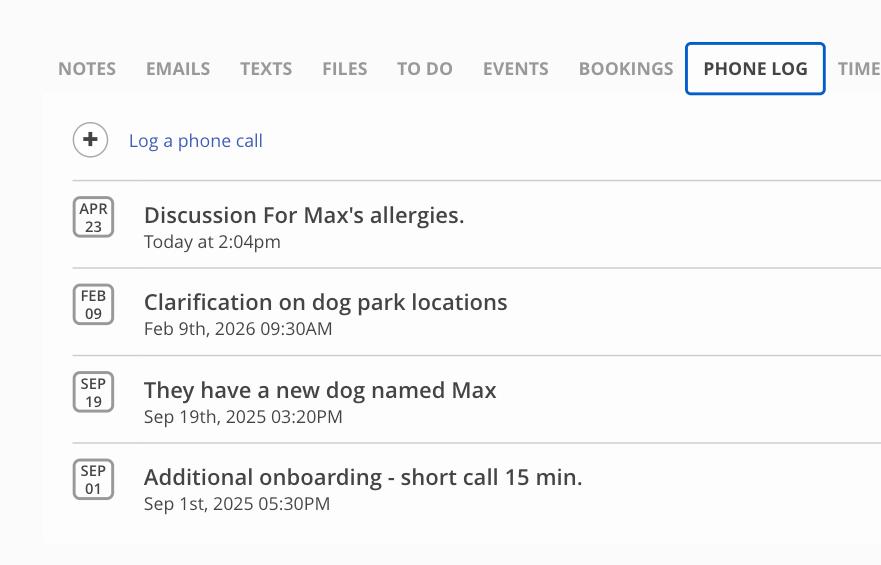
from your Project page, keeping those quick backand-forth conversations tied to the project instead of scattered across your phone. (SMS Texting is available as an add-on for U.S. and Canadian members.)
• The Notes tab lets you add internal thoughts, reminders, or context about the client. Everything is organized by date, making it easy to revisit earlier details.
Instead of piecing together information from different tools, everything lives together in one timeline.
Track Your Time, Protect Your Work
There’s one more piece that often gets overlooked: your time. With the Time Log feature, you can track exactly how long you spend on each project. This is especially helpful for service-based businesses where time equals value.
When calls, texts, emails, and extra requests start adding up, your Time Log helps you see the full picture. It ensures no billable hours are missed and gives you better insight into how you’re running your business.
Better Communication Starts with Better Tracking
Clear communication is not just about what you say in the moment. It’s about what you remember, what you record, and how you follow through.
When every call, message, and note is stored in one place, you show up more prepared, more professional, and more confident. And that kind of consistency is what creates a great client experience.

Client Communication That Converts: Leading The Experience From First Inquiry to Final Decision
WRITTEN BY ELLE SANDERS
Most service-based business owners believe that better communication means being more available, sending more emails, or responding faster. But the real shift happens when you realize this: Great communication isn’t about more-it’s about leadership. When clients reach out, they’re not just looking for information. They’re looking for clarity, certainty, and someone they trust to guide them through a decision. And without that guidance, hesitation fills the gap.
Where Most Communication Breaks Down
In many businesses, communication is reactive. A client inquires. You respond. You send pricing. You wait. From the business owner’s perspective, it feels efficient. From the client’s perspective, it often feels overwhelming or unclear. They’re left trying to piece together, What happens next? What will this experience feel like? Am I making the “right” decision? When those questions go unanswered, even if unintentionally, clients stall or walk away. Not because they weren’t interested, but because they weren’t led.
The Shift: From Responding to Guiding
The most impactful change I made in my business wasn’t increasing communication; it was structuring
it. Instead of treating each touchpoint as a oneoff response, I built a guided journey where every interaction has a purpose. From the first inquiry to the final follow-up, communication is designed to anticipate questions before they’re asked, reduce uncertainty at every stage, and build trust through consistency and clarity. This means clients aren’t left guessing what to do next. They’re led there.
What a Guided Communication Experience Looks Like In Four Simple Steps
A strong communication system doesn’t feel robotic; it feels intentional. It balances automation with personalization, giving clients both efficiency and connection. Here’s what that looks like in practice:
1. Immediate Clarity
When a client first reaches out, the goal isn’t just to respond; it’s to orient them.
What’s the next step? What can they expect? How does this process work?
When clients understand the path forward, hesitation dissolves.
Strategic Touchpoints Leading The Decision Process

2. Layered Communication (Not Information Overload)
Instead of sending everything at once, information is delivered in stages as needed throughout the process. Each message builds on the last, answering the next most important question before the client even has to ask it. This keeps clients engaged without overwhelming them and builds confidence along the way.
3. Strategic Personal Touchpoints
Automation creates consistency, but connection builds trust. Simple, intentional moments, like a personalized message or a quick planning call, shift the experience from transactional to relational. Clients don’t just feel informed, they feel seen.
4. Leading the Decision Process
One of the biggest mistakes business owners make is stepping back when clients need guidance the most. Instead, communication should continue to lead, reinforcing what matters most to the client, clarifying options without pressure, and creating a space where clients can confidently say yes. When clients feel supported (not sold to) they make stronger, more aligned decisions.
Why This Matters More Than You Think
When communication is structured this way, everything changes. Clients move forward faster, objections decrease, and confidence increases. And most importantly, clients don’t just choose your service, they feel good about choosing it. That emotional certainty is what drives not only better experiences, but stronger business outcomes.
The “Aha” Most Business Owners Miss Communication isn’t just a customer service function. It’s a core part of your sales system. When you lead clients with the right message at the right time, you remove friction, build trust, and create a natural path to yes without pressure or persuasion tactics.
Final Thought
If your clients are hesitating, it’s not always about price or timing. Often, the real issue is clarity and communication creates it. Not more communication, just better structure behind it. When you stop simply responding and start leading, your clients don’t just understand the process; they move through it with confidence.
About The Author
Elle is the owner of Elle Studios LLC and ElleMarie & Co Photography, a luxury photography studio and education brand focused on client experience, sales psychology, and sustainable business growth. With over a decade in the industry and a multi-sixfigure business, she specializes in helping service-based business owners refine their client journey through intentional communication and ethical sales strategies. Elle is passionate about teaching others how to build businesses that not only generate revenue, but also create meaningful, confidence-driven client experiences.

Lead Capture Form
Checklist for Better Communication
Your Lead Capture Form is more than a form. It is often your first real interaction with a potential client. Before they book, before they reply to an email, before they experience your process, this is one of the first chances your business has to communicate clearly.
If your form feels too long, too confusing, or too demanding, people may stop before they ever hit submit. But if it feels simple, thoughtful, and easy to complete, you create momentum right away.
Use this checklist to make sure your lead capture form is helping, not hurting, your communication.
Ask only what you need right now
This is not the time to gather every possible detail. Start with the basics you need to qualify the lead and begin the conversation. Save the deeper questions for later.
Keep it to five questions or fewer
The more questions you ask, the more likely someone is to give up halfway through. A shorter form feels easier to answer and lowers the barrier to reaching out.
Make every question easy to understand
If someone has to stop and think, “What do they mean by this?” your form is creating friction. Use clear, simple language and avoid overexplaining.
Make sure the tone sounds like you
Your form is part of your brand voice. It should feel welcoming, professional, and human — not cold, robotic, or overly formal.
Tell them what happens next
One of the easiest ways to communicate clearly is to remove the guesswork. Let people know what to expect after they hit submit and when they will hear from you.
Set up an autoresponder
A quick automatic reply helps reassure people that their message went through. It also gives you a chance to thank them, set expectations, and keep the experience moving.
Use workflows to keep momentum going
If you know your process well, your Lead Capture Form can do more than collect information. It can trigger the next steps automatically and create a smoother client experience from the very beginning.
Keep the experience easy
Every extra field, confusing question, or unclear step adds friction. The more straightforward your form is, the easier it is for the right leads to take action.
Make Your Lead Capture Form Work Harder in 17hats
Use One Smart Question To Speed Up The Sale
One of the simplest ways to make your Lead Capture Form work harder for your business is to ask one very strategic question:
What are you interested in?
At first glance, it seems basic. But when you turn that question into a dropdown list of your actual revenue streams or services, it becomes much more than a form field. It becomes a way to guide leads into the right next step automatically.
Instead of sending every new lead into the same general process, you can let their answer shape what happens next.
For example, if someone selects Dog Walking Service, that answer can trigger a Workflow built specifically for that service. If someone selects Spa Service, they can be sent down a completely different path. That means your follow-up communication can feel more personal, more relevant, and much more helpful right away.
This is where 17hats really shines.
Using the 'Start Workflow' tied to a dropdown answer, you can automatically send an email that speaks directly to the service the lead is asking about. Instead of sending a generic “thanks for reaching out” message, you can send next steps that actually match their interest. That might include what to expect, how your process works, what happens next, or even what they need to do to move forward.
That kind of communication feels organized. It tells the lead that your business has a process and that they are already in it.
That Workflow can move the lead toward booking faster by sending the right communication at the right time. Depending on your process, that could mean sending a Quote, Contract, Invoice, Scheduling Link, Questionnaire, or follow-up email designed for that exact service.
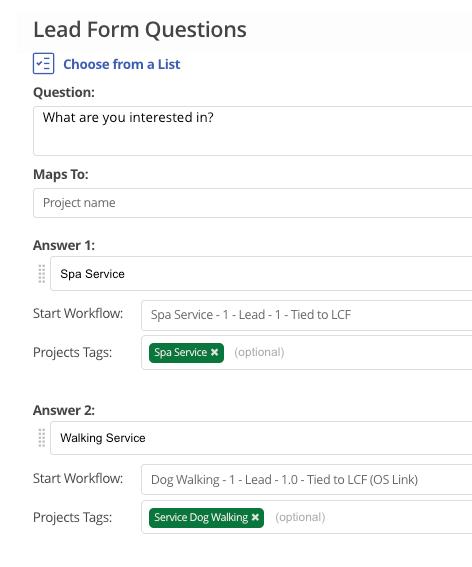
In other words, one dropdown question can help you sort, tag, and route leads automatically — all while giving them a better experience.
This is a smart business move because it cuts down on manual work, speeds up response time, and helps close deals faster. It also creates a more polished first impression. Leads are not left waiting for you to decide what to send. They get communication that fits what they actually asked for.
When your Lead Capture Form helps direct people into the right Workflow from the beginning, your communication gets clearer, your process gets faster, and your sales pipeline gets a lot easier to manage.
Texting Your Clients: 7 Do's and Don'ts
Texting has quickly become one of the easiest ways for small business owners to stay connected with clients. Sometimes it is the fastest way to confirm a time, send a reminder, answer a quick question, or keep a project moving without adding another email to someone’s inbox.
That is exactly why 17hats built SMS Texting to be more than a simple reminder tool. It is a two-way texting feature that lets you send and receive client messages inside 17hats, and it connects with other parts of the platform like, Online Scheduling, and Lead Capture Forms.
17hats also supports texting opt-ins and automated text templates for reminders and confirmations, all while keeping the communication tied to the right client and project.
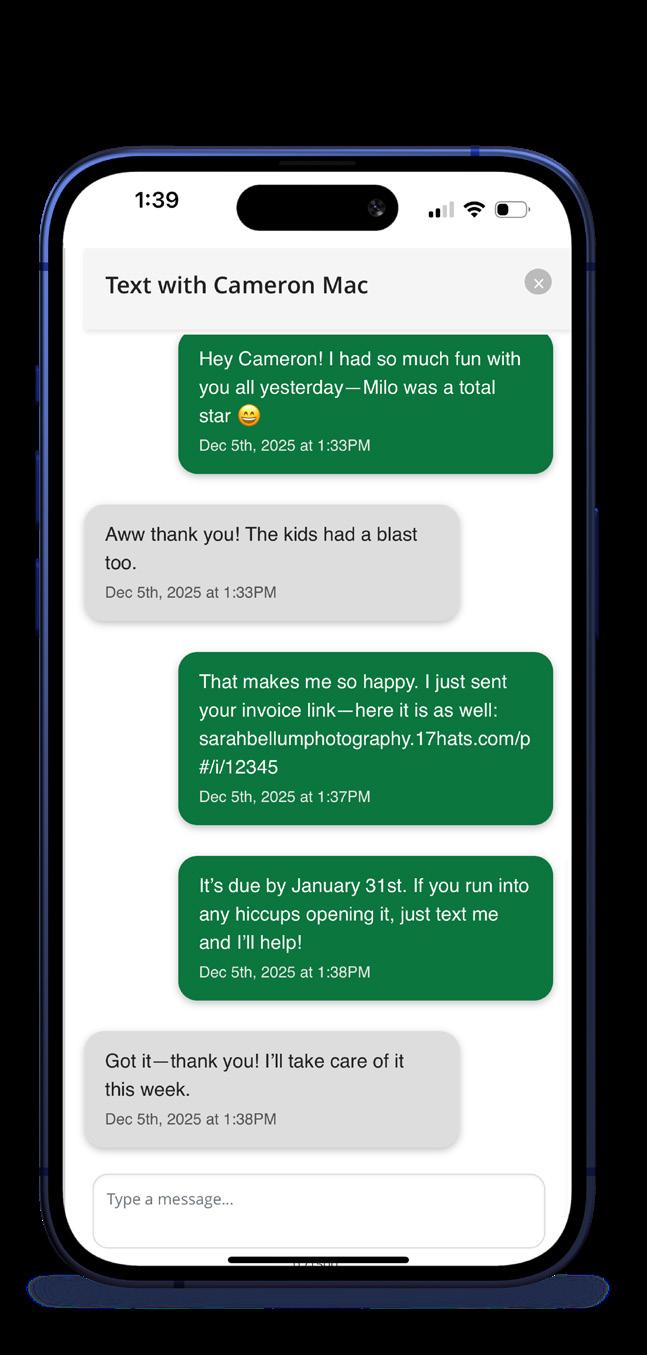
That said, just because texting is easy does not mean every text is a good one. The best client texting is clear, timely, and professional.
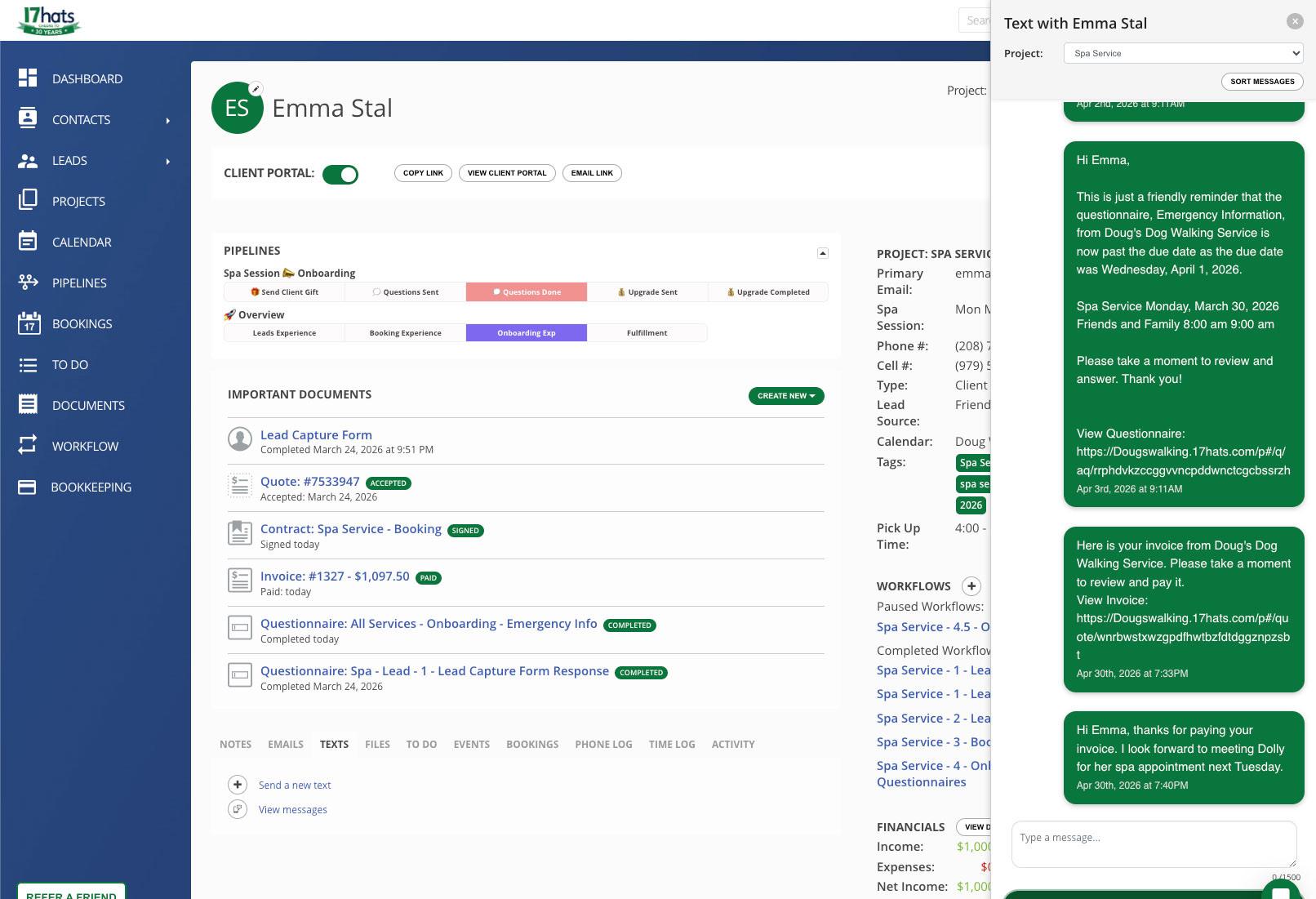
Here are seven simple do’s and don’ts to help you use it well.
1. Do use texting for quick, helpful communication
Texting works best when speed matters. Reminders, confirmations, short updates, and simple questions are all a natural fit. It is a great tool for keeping things moving without overcomplicating the conversation. SMS Texting in 17hats is designed for this kind of fast, integrated communication.
2. Don’t use texting for long or complicated conversations
If a message needs a lot of explanation, multiple decisions, or formal documentation, texting is probably not the best place for it. In those moments, email, a call, or a Contract update may be the better next step. Texting should make communication easier, not messier.
3. Do keep the tone warm and clear
Texting is more casual than email, but it still represents your business. A good client text feels friendly, direct, and easy to understand. Think helpful, not sloppy.
4. Don’t text without permission
This one is important. Clients must opt in before they can receive text messages from your business through 17hats. That is not just best practice — it is part of staying compliant. 17hats tracks opt-ins and allows contacts to opt out as well.
5. Do use texting to support your process
One of the smartest ways to use SMS Texting is to make it part of the larger client experience. 17hats supports automated texting around Quote, Contract, Invoice, and Questionnaire reminders, as well as Online Scheduling confirmations. Those messages can help clients stay informed without adding more manual follow-up to your plate.
6. Don’t let important details live only in text
Texting is great for speed, but some information still belongs somewhere more formal. If a client confirms something important by text, make sure it is reflected in the right place afterward, whether that is a Contract, Invoice, project note, or follow-up email. This keeps your process clean and your records accurate.
7. Do treat texting like part of your client experience
Texting is not just a convenience feature. It is part of how clients experience your business. When it is used well, it makes your communication feel modern, responsive, and organized. When it is used poorly, it can feel scattered or intrusive. The difference is intention.
The best client texting is not about sending more messages. It is about sending the right message, at the right time, in a way that feels easy for your client and manageable for you.
5 Ways The 17hats Client Portal Helps You Communicate Better
Client communication is not just about sending emails, replying quickly, or remembering to follow up. Sometimes the best communication happens when your clients already know where to go, what to expect, and how to find what they need.
That is what makes the Client Portal in 17hats so useful. It is not just a place to store documents. It is a communication tool that helps your business feel clearer, more organized, and easier to work with.
Here are five ways it helps you communicate better with your clients.
1. It gives clients one place to find everything
One of the biggest communication problems in any business is scattered information.
A Quote gets sent in one email. A Contract is in another. The Invoice is somewhere else. A Questionnaire link gets buried in the inbox. Before long, your client is asking you to resend something they know you already sent.
The Client Portal helps solve that by putting important project documents in one secure place. When clients can log in and find what
they need without digging through old messages, communication feels smoother right away.
2. It keeps key project details easy to access
Clients do not always need another long email. Sometimes they just need to double-check the basics.
The Client Portal gives clients a quick way to confirm important project or event details like the date, time, or location. That may seem simple, but it cuts down on unnecessary back-and-forth and helps clients feel more confident about what is happening.
Clear communication often comes down to one thing: making important information easy to find.
3. It lets you communicate in a more branded, personal way
The Client Portal is not just functional. It can also feel like part of your brand.
With custom messaging and branded elements, you can make the portal feel more welcoming and aligned with the rest of your client experience. That means it is not
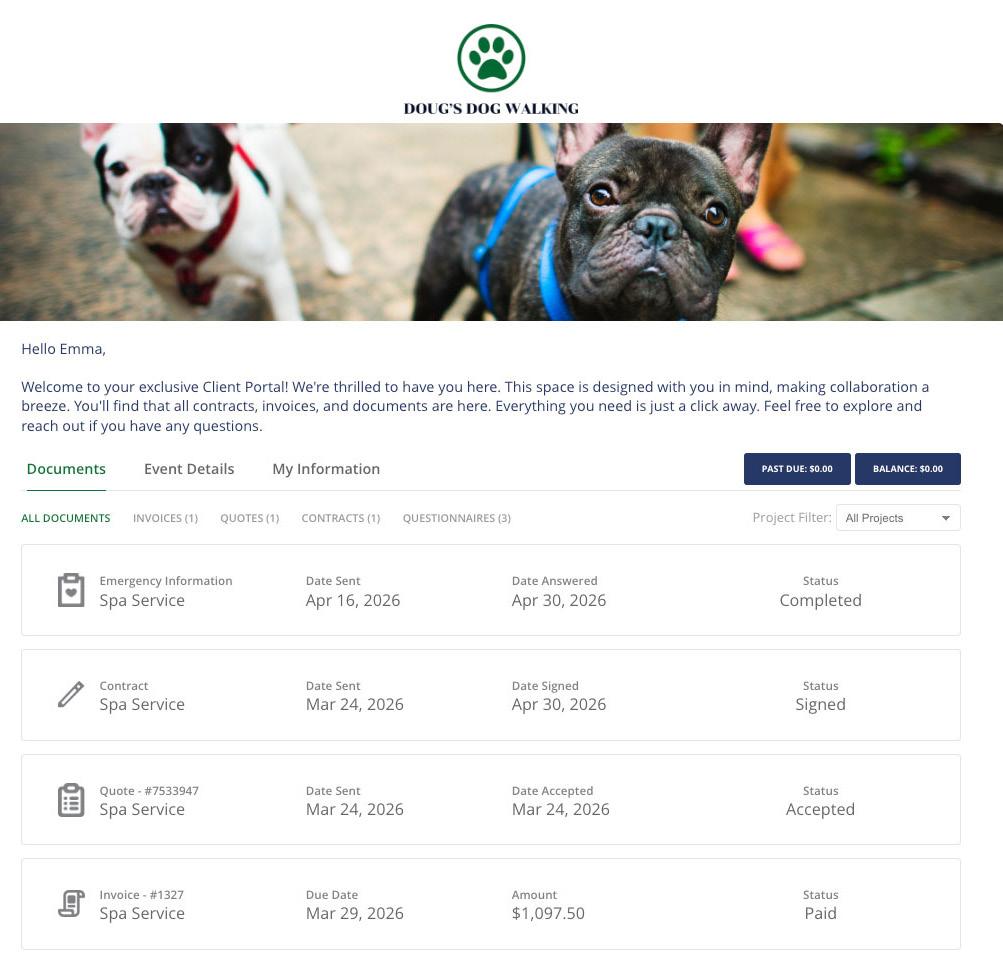
just a document hub — it becomes another place to guide your client, reinforce your professionalism, and communicate in your own voice.
Clients notice when your business feels cohesive and they notice when each step feels intentional instead of pieced together.
4. It makes it easier for clients to keep information updated
Good communication is not only about what you send. It is also about how information comes back to you.
When clients can update their own contact details in the Client Portal, it saves time and reduces the need for extra emails just to confirm basic information. A new phone number, an updated email address, or a corrected mailing address can all be handled more easily.
That makes your process more efficient, but it also makes the client experience feel easier and more self-sufficient.
5. It adds privacy and professionalism
Trust is part of communication too.
Privacy is important when sharing sensitive information. The option to password protect the Client Portal adds another layer of security, which helps clients feel more comfortable accessing important documents and details through your system.
That extra protection sends a message. It tells clients that your business is thoughtful, professional, and serious about protecting their information.
The bigger takeaway
The Client Portal supports better communication because it removes some of the most common points of friction in the client experience. Instead of asking clients to keep track of scattered emails, missing links, or unclear next steps, it gives them one reliable place to stay connected to the project.
That changes how your business feels to work with.
When clients can quickly find documents, review details, update information, and access what they need in one place, the process feels more organized and more trustworthy. It also takes pressure off you to resend, repeat, and re-explain the same things over and over.
In the end, better communication is often less about sending more messages and more about making the right information easier to access. The Client Portal helps you do exactly that.

Marketplace Favorites for Better Client Communication
Dr. Jeanine Bennet
AI Ready Communication Toolkit
Communication is at the heart of every strong business. From that very first inquiry to the ongoing relationship you build with your clients, how you communicate shapes the entire experience.
It’s not just about what you say, but how and when you say it. Clear, thoughtful communication builds trust, sets expectations, and makes everything feel smoother, for you and for your clients. When it’s working well, it removes a lot of the back-and-forth and helps you show up with more confidence.
This month, we’re highlighting a few Marketplace resources created by members of our community that are designed to support exactly that. These are tools built from real experience to help you communicate more clearly, stay consistent, set boundaries, and simplify the day-to-day without overcomplicating things.
Description: A ready-to-use communication toolkit designed for small businesses implementing AI. Includes templates, scripts, policies, and frameworks that help you communicate clearly, reduce confusion, and lead your team with confidence during AI adoption.
Partner Bio: Jeannine is a certified and award-winning résumé writer, career and business strategist, and leadership coach.
Anthony LaMothe - Photographer Wedding Discovery Questionnaire
Description: Once those newly engaged couples inquire with you about their wedding, this questionnaire can get you all the important information you need so you can meet them prepared! You can use this preliminary questionnaire for the important wedding day information from your potential clients prior to meeting them. This is a great start that will have you readily prepared for your first inperson, video, or phone call meeting with the couple.


Partner Bio: Anthony LaMothe is an award-winning and published photographer based in New Orleans, specializing in weddings, lifestyle, branding, and headshots. With over 17 years of experience, he is the founder of Anthony LaMothe Photography and travels nationwide for his work.
Deb Mitzel - Small Business Systems & 17hats Strategist
Online Scheduling Email Reminder Pack
Description: Plug and Play Email templates you can use to send information to clients for their appointments scheduled with you through online scheduling for services you have already set up. Please note that this is an email template pack only, and does not include the set up of the service. You will need to have your services set up through Online Scheduling before you can use these templates.
Partner Bio: Deb Mitzel brings nearly 30 years of business experience to helping small business owners strengthen the systems behind their success. A longtime 17hats user, Deb specializes in CRM setup, consulting, and practical business strategy that helps owners confidently run the “business side” of their work.
Matt Stagliano - Photographer, Podcaster, Author
Online Scheduling Email Reminder Pack
Description: Elevate your portrait photography business with "The Connection Collection" bundle! Build trust, streamline your workflow, and capture more bookings with expertly crafted messages for every client touchpoint. These templates work especially well for the In-Person sales model.
Partner Bio: Matt Stagliano is a photographer, videographer, and podcaster based in Bethel, Maine. As the owner of Stonetree Creative and host of Generator, he creates portrait and commercial work while exploring creativity through conversations with artists and entrepreneurs.

Kristen
Lettini
- Systems Strategist & Workflows Expert Coffee Chat / Networking Follow Up Workflow & Pipeline
Description: Elevate your networking and build stronger relationships with this virtual coffee chat workflow & pipeline bundle. Say goodbye to manual scheduling and hello to simple & automated processes. This comprehensive bundle automates your virtual coffee chat process, saving you time and energy.
Partner Bio: Kristen helps service-based business owners build 17hats systems that truly stick. With a background in marketing, operations, and communications, she focuses on workflows that reduce mental load and improve client experience. Her audits, VIP builds, and templates are designed to make your CRM feel clear, usable, and supportive.
Jaimie Dee - Photographer
Re-Engage
Cold Leads: Quick Engagement Template
Description: Revitalize your outreach with the 'Re-Engage Cold Leads: Quick Engagement Template.' Tailored for simplicity, this adaptable template gently nudges cold leads, encouraging them to reveal if they're still interested in your services. Perfect for reigniting dialogue with silent prospects, it offers a straightforward way to clear your follow-up list or re-engage clients. This template ensures efficient communication at any follow-up stage.

Jaimie Dee - Photographer
Rejection
to Reconnection: The Follow-Up Conversion Kit
Description: The Follow-Up Conversion Kit" is your strategic response when prospects feel your services aren't the right fit. This concise template, paired with a bonus text message script, facilitates sharing quotes within 17hats or as a PDF, serving as a considerate final effort to engage. It prompts clients to revisit their initial "no" by highlighting your unique brand and offering clear next steps. Ideal for leaving a memorable impression, ensuring your studio stays top of mind should their circumstances change.

Partner Bio: Jaimie Dee is a wedding and portrait photographer and co-founder of Jaimie Dee Photography. She has specialized in capturing weddings, engagements, elopements, and life’s meaningful moments with a style that blends candid emotion and refined portraiture.
Danielle Uhl - Systems Strategist
Comprehensive Coaching Feedback & Testimonial Questionnaire
Description: This in-depth Coaching Feedback & Testimonial Questionnaire was designed to capture detailed client experiences for your coaching programs. Gather valuable insights, detailed experiences, and specific tangible outcomes to use to create compelling case studies and continuously improve your coaching services.
Partner Bio: Danielle Uhl blends strategy, systems, and coaching to help small businesses grow without overwhelm. With experience scaling multiple businesses and a deep knowledge of 17hats, she offers templates, custom builds, and operations consulting designed to support long-term, personalized success.
Share Your Secret to Business Success
Turn your business savvy into cash rewards by simply sharing 17hats.
Referring 17hats is a win-win. You’ll earn $50 for every new member who joins using your link — and there’s no limit to how many rewards you can collect.
Even better? Your friends get a huge head start with 50% off their first year or first two years of 17hats. That’s up to $400 in savings for them, just for being connected to you. It’s an easy way to support fellow business owners while putting extra cash in your pocket.

Easy Ways To Refer 17hats:
Share on Social Media
Post about how 17hats helps you — and include your link. Include before/after stories or screenshots! Business owners love seeing behind-the-scenes.
Send a Personal Message
Reach out to a business friend with a quick text or DM: “Hey! If you’re still juggling client stuff manually, you should check out 17hats. Here’s my referral link for 50% savings — it’s a no brainer!”
Add it Where People Already Look
Place your referral link somewhere simple, like your email signature, website resources page, or link-in-bio. That way, business owners can discover it naturally without feeling like you’re directly pitching them.
Example:
Find Your Referral Code & Link!
Head to your 17hats account settings and click the “Referrals” tab to copy your unique referral link. Your referred friend can use your code when signing up for a trial or upon checkout. You can also send them your link that allows your referral to directly buy now.
“Tools I use to keep my business organized: 17hats — here’s my referral link for 50% off.”
Your Shortcut To Working
Want to get more out of 17hats without the guesswork? Our top tutorials are the fastest way to learn, implement, and level up your business systems — no tech degree required. Each video walks you through key tools and features step-by-step, so you can spend less time figuring things out and more time doing what you love.

Learn how to use the new Question type in Questionnaires to capture Project Details.

Learn how to use Project Notes in 17hats for better communication.

Create custom welcome messages in your 17hats Client Portal.

Learn how to merge Tags in 17hats to keep your account organized.

Head over to 17hatsUniversity.com and blog.17hats.com to dive deeper into both business and 17hats education. Bookmark both sites and check back weekly for fresh insights and tutorials.

You Bring The Talent We Bring The Tools
17hats is the all-in-one business management platform you didn’t realize you need — but soon can't imagine yourself living without. Together, we'll take your business to the next level. START A 7-DAY
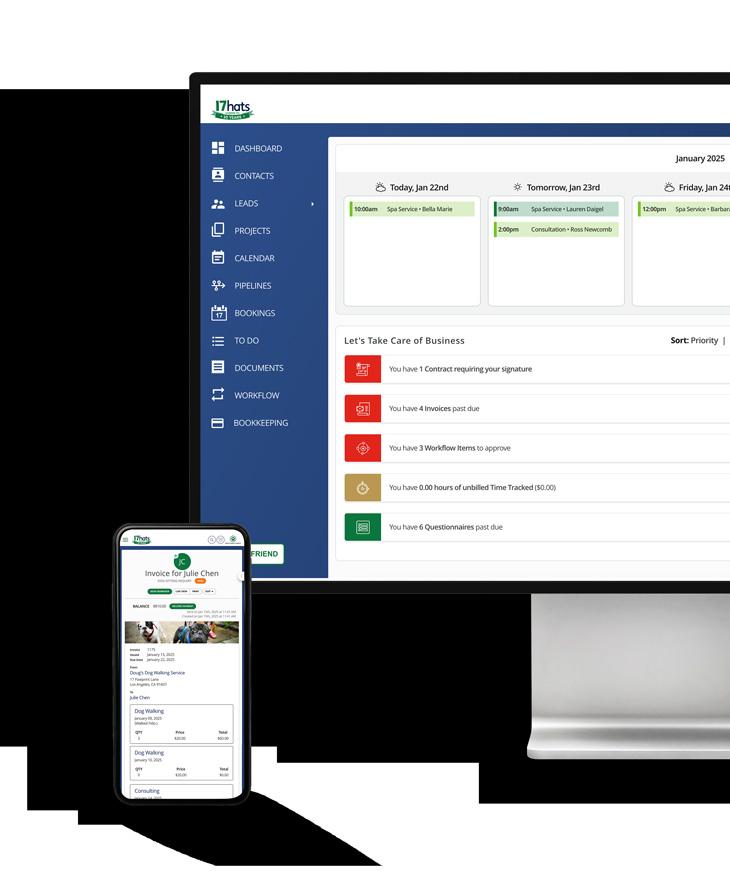
17hats Resources

Deep dive into our blog and learn how 17hats can help you manage your business better.

Listen to our HatsOff Podcast for business tips and tricks with our CEO, Amanda Rae.

Check out our University for 17hats tutorials, workshop replays, live events, and more.
Upcoming Conferences
The Photo Creators Conference, Tucson, AZ
June 1 - 4, 2026
Discover the art of photography through our expert-led sessions. A truly hands-on boutique conference experience where passionate photographers come to level up their skills, connect with industry leaders, and reconnect with their creativity.
Featuring education from 17hats CEO, Amanda Rae
Maternity and Newborn Photographers Summit, Grapevine, TX
July 23 - 26, 2026
The Maternity & Newborn Photographers Summit is where photographers like you master the art, business, and confidence to grow. Learn from world-class instructors, refine your craft hands-on, and surround yourself with a community that believes in your potential.
Find something new from 17hats at the trade show!
Balloon Boss Summit 2026, Orlando, FL
November 8 - 12, 2026
Elevate your Balloon Business and Increase Your Professional Network in an Intimate Setting. Focus on increasing business skills taught by business professionals. Learn proven business systems to increase efficiency from balloon business owners.
Find Ambassador, Nicole Larson leading 4 new classes.
Ambassador Events


17hats Power Hour: Basic Workflows
Tuesday, May 19, 2026
11:00 AM PT / 2:00 PM ET
Location: Virtual
Join 17hats Ambassador Deb Mitzel, for her 17hats Small Business Success Series: Power Hour. This series is dedicated to learning more about a 17hats feature, including use and set it up and Q&A after the feature presentation.
debmitzelcreative.com/workshops
Word Search
Word Search: Communication
CLIENT FOLLOWUP
TEXTING


Communication is the real work of leadership.
– Nitin Nohria