VOLUME 15 ISSUE 5 SEPTEMBER/OCTOBER 2022 WELL CONNECTED Architecture meets neuroscience at the Daylight Awards RIGHT TO LIGHT Solar power to the people The Society of Light and Lighting LINESLIGHT

SLL Lighting Guide 19: Lighting for Extreme Conditions (2019)
@YAHOO.COMJILLENTWISTLEENTWISTLEJILL
'The attention brought to the importance of daylight in human health flagged up the whole relationship between neuroscience and architecture in general,' says 2020 laureate Prof Russell Foster.
SLL Lighting Guide 1: The Industrial Environment (2018)
SLL Lighting Guide 7: Office Lighting (2015)
CURRENT SLL LIGHTING GUIDES
September/ Octobersll.org.uk20222 SECRETARY Brendan Keely bkeely@cibse.orgFSLL EDITOR Jill jillentwistle@yahoo.comEntwistle COMMITTEE:COMMUNICATIONS Eliot Horsman MSLL (chair) James Buck Iain Carlile FSLL Jill ChrisEntwistleFordham MSLL Rebecca Hodge Stewart Langdown FSLL Luke Locke-Wheaton Rory Marples MSLL Linda Salamoun MSLL All contributions are the responsibility of the author, and do not necessarily reflect the views of the society. All contributions are personal, except where attributed to an organisation represented by the author. COPY DATE FOR LL6 2022 IS 9 PUBLISHEDSEPTEMBERBY The Society of Light and Lighting 222 Balham High Road London SW12 9BS ISSNwww.sll.org.uk2632-2838 © 2022 THE SOCIETY OF LIGHT AND LIGHTING The Society of Light and Lighting is part of the Chartered Institution of Building Services Engineers, 222 Balham High Road, London SW12 9BS. Charity registration no 278104 Editorial Unit C, Northfield Point, Cunliffe Drive, Kettering, Northants NN16 9QJ Tel: 01536 527297 E: gary@matrixprint.com Printed in UK FROM THE EDITOR
SLL Lighting Guide 10: Daylighting – a guide for designers (2014)
SLL Lighting Guide 11: Surface Reflectance and Colour (2001)
SLL Lighting Guide 6: The Exterior Environment (2016)
John Keane, CEO of SolarAid, looks at how this has helped spread the use of solarpowered LED luminaires in electricity-deprived parts of sub-Saharan Afria (Out of darkness, p9), replacing toxic, polluting and dangerous kerosene lamps. He also points out how much work there is still to be done, leading to new initiatives from the charity. As well as the schools and hospitals that remain in the dark, he says, 'there are still
SLL Lighting Guide 16: Lighting for Stairs (2017)
SLL Lighting Guide 17: Lighting for Retail Premises (2018)
SLL Lighting Guide 21: Protecting the Night-time Environment (2021)
SLL Lighting Guide 22: Lighting for Control Rooms (2022) Guide to Limiting Obtrusive Light (2012) Code for Lighting (2012) Commissioning Code L (2018) SLL Lighting Handbook (2018) CIBSE TM66: Creating a Circular Economy in the Lighting Industry (2021) many households that struggle to afford the upfront cost of even a $5 solar light'. Attitudes to natural light have also evolved (or rather we are rediscovering ancient wisdom) not just as an energy-saving resource, but as vital to human health. The Daylight Awards (Building relationships, p6) are exemplary in acknowledging the connection of two key disciplines in this respect.
It is paradoxical that on the one hand we exploit the planet's finite resources to the point of environmental destruction and species extinction, but have so far failed to take full advantage of the infinite (in current human terms) resources: the sun, the sea and the wind. That is changing, too slowly, but certainly in the lighting field, the development of solar power technology – the efficiencies and cost of LEDs, batteries and photovoltaic panels – has greatly increased its viability.
SLL Lighting Guide 18: Lighting for Licensed Premises (2018)
SLL Lighting Guide 8: Lighting for Museums and Galleries (2021) SLL Lighting Guide 9: Lighting for Communal Residential Buildings (2013)
SLL Lighting Guide 20: Lighting and Facilities Management (2020)
SLL Lighting Guide 0: Introduction to Light and Lighting (2017)
SLL Lighting Guide 2: Lighting for Healthcare Premises (2019)
SLL Lighting Guide 12: Emergency Lighting (2022)
SLL Lighting Guide 4: Sports (2006) SLL Lighting Guide 5: Lighting for Education (2011)
SLL Lighting Guide 13: Places of Worship (2018) SLL Lighting Guide 14: Control of Electric Lighting (2016) SLL Lighting Guide 15: Transport Buildings (2017)


1516131165439 SECRETARY'SEDITORIAL COLUMN CROWNINGNEWS
Lighting in its many forms took centre stage at the Platinum Jubilee celebrations earlier this year BUILDING RELATIONSHIPS
@CIBSE.ORGBKEELYKEELYBRENDAN Joe and Peter for the interviews. They can be watched by heading to the events tab on the SLL website (see box). The entry deadline for the SLL Young Lighter 2022 competition has passed and we look forward to announcing the shortlist soon. The competition final is scheduled to take place online in mid-December and we will be sending out additional information in due course.
WangTing
IN PLAIN VIEW Following a delayed publication date, LG22 on the lighting of control rooms is now available. Paul Ruffles provides a brief reminder of what it involves and looks at new considerations REST ASSURED Iain Carlile examines three of the latest Lighting Research and Technology papers which focus on circadian-effective light, wellbeing and sleep quality EVENTS
ACHIEVEMENT
FRONTIERS OF LIGHTING From sustainability to the smart city, Stuart Mucklejohn reports on the wide-ranging topics and future thinking discussed at this year's Science and Technology in Lighting Symposium
• Manufacturers who wish to donate equipment, email: sll@cibse.org
• For more details and to download entry forms for Ready Steady Light: ready-steady-lightlighting-sll/sll-events/sll-societies/society-of-light-and-www.cibse.org/get-involved/
As always, there are three awards up for grabs. A panel of expert judges will decide the winners of the SLL Technical Award and the Artistic Award, supported by the IALD, with the coveted Peer Prize decided by the contestants taking part. The RSL 2022 team entry form can be downloaded from the website (see box above). Each year, the society puts out a call to lighting manufacturers who may wish to donate kit to Rose Bruford College, supporting their lighting education programme and students, along with future RSL events. Last year support and equipment were provided by Lee Filters, Light Collective, Signify, White Light, Whitecroft and Zumtobel Group. If you are interested in finding out more or in donating lighting equipment, please contact us (see box). We are very pleased that the new Lighting Guide 22: Lighting for Control Rooms has been launched (see p13) and can be downloaded free by members or purchased as a PDF from the SLL website under the SLL Publications and Guidance. Please note that there are no print copies available. I thank the publication author Paul Ruffles (Lighting Design and Technology), and also David Watts (CCD Design and Ergonomics) and Richard Caple (Thorlux Lighting) for theirBackwork.inearly 2020, Peter Phillipson travelled to Hastings in Sussex to interview Joe Lynes about his work in lighting research and teaching, as well as his life outside of his career. The videoed interview is split into three main parts. Part 1 focuses on Joe becoming involved in lighting research and teaching students. Part 2 details Joe’s further lighting research and teaching, while Part 3 looks at Joe’s life outside of academia – activism, pacifism and adoption. There are also four soundbites available to watch. I would like to express my appreciation to
September/ October 2022 Twitter: @sll100 3
SLL Ready Steady Light (RSL) in association with Rose Bruford College returns on Tuesday 18 October 2022. One of the SLL’s flagship events, RSL sees teams competing against each other to design and set up temporary exterior installations with a limited range of equipment and in only three hours. Last year’s event had a record number of teams taking part and we hope to see a good number of entrants this year.
FROM THE SECRETARY
• To download LG22: Lighting for Control Rooms: rooms-2022-pdflg22-lighting-for-control-research/knowledge-portal/www.cibse.org/knowledge-
Jill Entwistle profiles the two laureates of the 2022 Daylight Awards – and looks at how they reflect the growing relationship between neuroscience and architecture OUT OF DARKNESS
COVER: Fusheng Art Gallery by Beijing Bamboo Lighting Design in Wuhan, Hubei, China, winner of a 2022 IALD Award of Excellence
• To watch the interview with Joe Lynes: lynes-interviewlighting-sll/sll-events/joe-societies/society-of-light-and-www.cibse.org/get-involved/
John Keane, CEO of SolarAid, outlines the charity's latest initiatives to bring solarpowered lighting to sub-Saharan Africa
Secretary’s column/Contents Contents 2


'We always wondered if loss of PEDF was driven by ageing, or was driving ageing,' said Becerra. 'This study, especially with the clear link to altered lipid metabolism and gene expression, indicates the loss of PEDF is a driver of ageing-related changes in the retina.'
The retina is composed of layers of cells that function together to detect and process light signals, which the brain uses to generate vision. Its light-sensing photoreceptors sit above the retinal pigment epithelium (RPE), a layer of support cells, which produce and secrete the PEDF protein, in simple terms promoting a cellular recycling process that maintains our vision. The RPE nourishes photoreceptors and recycles pieces of the photoreceptor cells called outer segments. These get used up and their tips shed each time photoreceptors detect light. If the RPE cannot provide recycled components of older outer segment tips back to photoreceptors, these cells lose their ability to make new segments, and eventually become unable to sense light. Without nutrients supplied by the RPE, photoreceptors die. In people with AMD or certain types of retinal dystrophies, senescence or death of RPE cells in the retina leads to vision loss.
The scholarship will support Yang in his final year of studies, helping to pay for more extensive model making and testing of his ideas.
NewsNEW STUDY
Prevention of age-related macular degeneration (AMD) and other ageing conditions of the retina could eventually result from a new study in mice at the National Eye Institute (NEI) in Maryland. It suggests that loss of the protein pigment epithelium-derived factor (PEDF), the so-called 'youth' protein that protects retinal support cells, may drive age-related changes in the retina, the light-sensitive tissue at the back of the eye.
Afterexperience.graduating, Yang plans to work for the Housing Development Board in his birthplace Singapore. By introducing a specific focus on lighting design to the architecture, he hopes to improve people's living experience and transform the way Singaporeans interact with their home and city.
LITTLEFAIR RETIRES Paul Littlefair has retired from his role of principal lighting consultant at the Building Research Establishment after nearly 43 years at the BRE. He was a consultant and researcher in all aspects of lighting and solar shading. He was involved in formulating daylight standards and guidance and worked with Prof Peter Raynham of the Bartlett on updating the UK standard on daylight (BS8206-1) in the 2000s and more recently the UK publication of the European standard on Daylight (BS EN 17037).
'People have called PEDF the "youth" protein, because it is abundant in young retinas, but it declines during ageing,' said Dr Patricia Becerra, chief of NEI’s Section of Protein Structure and Function, and senior author of the study, which was published in the International Journal of Molecular Sciences. 'This study showed for the first time that just removing PEDF leads to a host of gene changes that mimic ageing in the retina.'
He explores how the conditions of transparency, translucency and opaqueness can shift across time, seasons, and frameworks, changing the quality of light and affecting the user
'In my memory Paul has been at the BRE forever,' said Raynham. 'He has been a relentless advocate of better daylighting.' 'Paul is leaving a great legacy through his dedication and massive contribution to the field of lighting and the built environment overall,' said Cosmin Ticleanu, principal lighting consultant at the BRE. was LOOKS TO THE SOLUTION OF AGEING-EYE CONDITIONS MAN SCHOLARSHIPJONATHANWINSSPEIRS
Ernest Chin Yang, currently studying architecture at the Bartlett School of Architecture, UCL, is the winner of the 2021/2022 Jonathan Speirs Scholarship Fund (JSSF) award. John Roake, chair of the JSSF, said the decision was unanimous and described him as 'a worthy and exciting scholar'. Yang's portfolio of conceptual designs and exploratory pieces include a final year project that centres on ice, investigating its dialectic relationship with light. His design for a festival of ice set on Lågskär Island, in Åland's archipelago of Finland, aims to show how it could become a legitimate building material in an urban context.
Yang's projects can be viewed at: www.ernchy.com/work, www.jssf.org.uk
THE LATEST NEWS AND STORIES ICE
Previous work from Becerra’s lab and others has shown that PEDF protects retinal cells, preventing both damage to the cells and abnormal growth of blood vessels in the retina. However, while researchers have known that PEDF levels drop in the retina during the ageing process, it was not clear whether this loss of the protein was causing, or merely correlated with, age-related changes in the retina.
While conducting research on an ancient artwork that had been in the museum’s collection since 1961, Dr Hou-mei Sung, curator of East Asian Art at Cincinnati Art Museum, stumbled across a bit of a discovery. Under special lighting conditions, a plainlooking bronze mirror from the 16th century reflects to reveal an image of a Buddha surrounded by rays of light. Known as 'magic', 'transparent' or 'light-penetrating' mirrors, they were first created in China during the Han dynasty (202 BCE–220 CE). When light is projected on to them, the mirrors appear transparent and reveal characters or a decorative design. Difficult to make and very rare, only a few similar Buddhist pieces from China and Japan are thought to exist, at the Shanghai Museum, Tokyo National Museum and Metropolitan Museum of Art. Sung’s discovery looks to be Chinese and the oldest uncovered. www.cincinnatiartmuseum.org
September/ Octobersll.org.uk20224
www.nei.nih.gov


Duringcelebration.theshow, which included performances from Diana Ross, Celeste and The Royal Ballet, as well as words from the royal family and Sir David Attenborough, a succession of stunning images created a mesmerising backdrop that not only told a story but brought the building to life for both the audience there and the 12m viewers watching at home.
One of its most dramatic applications was for the projections on to Buckingham Palace which, together with the main stage LED screens, formed a dynamic backcloth for the BBC Studios’ Platinum Party at the Palace
Photon media server was used to handle playback, which ensured bright, clear projection on to the palace facade for the BBC’s live broadcast.
Designed for exterior use, the screens allowed Matthew Lee, who led the media server programming, to control light levels as the event moved from daylight through dusk into darkness.
'The ROE Black Quartz LED enabled me to take control of the LED brightness via sACN from my control desk, allowing me to have fine control over brightness as the concert went from bright daylight, through to fully dark. It also meant we were able to push to its brightest output for the daytime events such as Trooping of the Colour.'
Government,ZealandNew Governor-GeneraltheofOffice TechnologyCreative TechnologyCreative
NorthHouse Creative p The facade of Buckingham Palace was transformed with precisely mapped content ranging from galloping horses and tropical foliage to images of the queen through the years p Sk y Magic drones appearing above the palace were coordinated with projections
The event marked the third Jubilee celebration Creative Technology has been involved in. It has also delivered various other high-profile BBC events including Election Night Results at BBC Broadcasting House, the 100th Anniversary of the Battle of Passchendaele, and the 75th anniversary of VJ Day in 2020.
September/ October 2022 Twitter: @sll100 5 Event lighting rom the beacons burning the length of the UK to Thomas Heatherwick's Tree of Trees sculpture and Sky Magic illuminated drones, lighting in both its most primitive and sophisticated forms was at the centre of this year's Platinum Jubilee celebrations.
Event technology specialist Creative Technology brought together some of the industry’s most skilled engineers to display the content by NorthHouse Creative, whose team of designers, directors and visual artists fuse film, motion and digital design. To translate NorthHouse’s vision into reality, CT used 32 Panasonic highbrightness PT-RQ35K projectors. VYV’s
The screens received 4k (ultra high definition) canvases from lighting director Nigel Catmur’s Hippotizer media servers. These were all pixel mapped to the screens that were also displaying content by NorthHouse with live camera feeds from production company NEP.
'It truly was a show where we could let our imaginations go wild. We poured liquid platinum over the palace with Alicia Keys, we collaborated with Sky Magic on a projection-showdrone-and-forSigala and Ella Eyre, we swung disco balls around the Palace for Diana Ross, we dug into an incredible amount of archive footage for the Prince of Wales’ speech and for Duran Duran we peeled back 70 layers of wallpaper from the palace inspired by Her Majesty’s amazing styling over the years.'
ACHIEVEMENTCROWNING
F Lighting in many different forms took centre stage at the Platinum Jubilee celebrations earlier this year
Working to Stufish’s stage design, CT also supplied 209sqm of ROE Black Quartz 4.6 LED screen to all three of the main stages.


RELATIONSHIPSBUILDINGW p Gr afton's UTEC campus, Lima: 'rich and intricate spatial experiences' p Un iversita Luigi Bocconi, Milan (a nd above right), by Grafton Architects: the practice shows 'remarkable' skill in directing daylight both vertically and horizontally into what are often 'thick and layered building volumes'
September/ Octobersll.org.uk20226 Daylighting
The two categories – the Daylight Award for Architecture and the Daylight Award for Research – acknowledge the perhaps more obvious architectural role that natural lighting plays, but also recognises its vital importance to human biology. The two awards reflect the relationship between both these spheres, and acknowledge the increasing recognition of daylighting in human health and wellbeing. As one of the 2020 laureates, Prof Russell Foster put it: 'The attention brought to the importance of daylight in human health flagged up the whole relationship between neuroscience and architecture in general.' This year the Daylight Award for Architecture went to Yvonne Farrell, (pictured left, opposite page) and Shelley McNamara of Dublin-based Grafton Architects. The Daylight Award for Research was given to Anna Wirz-Justice, emeritus professor of psychiatric neurobiology at Basel University, and former head of the Centre for Chronobiology at the Psychiatric University Clinic in Basel.
'The laureates exemplify common themes,' said the jury, whose seven members included Danish architect Dorte Mandrup, Koen Steemers, professor of sustainable design at Cambridge University, and Prof Russell Foster, head of the Sleep and Circadian Neuroscience Institute at Oxford University.
'Not only do they represent international excellence in daylight research and practice, but they also embody a generous and humanistic spirit regarding the celebration of daylight. The contribution of daylight to enhance quality of life – even to celebrate life – is an intrinsic quality of their work.'
hat is significant and heartening about the biennial Daylight Awards is their broad remit.
DAYLIGHT AWARD FOR ARCHITECTURE: Grafton Architects Grafton Architects was founded in 1978 by Yvonne Farrell and Shelley McNamara, BaanIwan BaanIwan Jill Entwistle profiles the two laureates of the 2022 Daylight Awards – and looks at how they reflect the growing relationship between neuroscience and architecture


AwardsDaylightIwanBaan
This sense of human scale was a quality emphasised by the judging panel, who talked about the 'comfortable and warm atmosphere in service of the users' and how natural light 'heightens the working conditions and sensory qualities of the spaces'. The aim is to use natural light to create pleasant and pleasing spaces for people rather than impress or awe them. 'The daylight does not create monumentality, and it is not a religious or scenographic light. It is a beautiful, soft and humanistic light, perfectly merged with the architecture. This is a light that integrates and creates a unique spatial experience without being demonstrative or imposing.'
GilbertDennis
The practice also displays 'remarkable' skill in directing daylight both vertically and horizontally into what are often 'thick and layered building volumes', said the jury. They 'bring the light where it is wanted, necessary and comfortable. It allows them to create a complex and rich interior architecture, spatially dense, which nevertheless achieves a human scale and intimate environments within tall and large buildings.'
The practice also made skilful use of surfaces and materials to reflect and modulate daylight, the jury said. They combined glazed ceramic flooring with rough brick walls, silky dark wood with judiciously placed apertures, to create 'rich and intricate spatialFarrellexperiences'.describestheir approach as the 'physics of space, physics of culture'.
September/ October 2022 Twitter: @sll100 7 Daylighting who both graduated from the School of Architecture at University College Dublin in 1974, and taught there from 1976-2002. The practice has won numerous architectural awards including the RIBA’s International Prize, Stirling Prize and Gold Medal. In 2020, Farrell and McNamara were selected as the Pritzker Prize Laureates. Grafton Architects has 'mastered the use of daylight throughout their wide and exceptionally varied design production,' said the jury. 'It is clear that daylight is particularly important in their architecture. It is not an accessory. It is a major constituent element of theThearchitecture.'judgescommented on the way that Farrell and McNamara exploit daylight to shape and define space, using it to signify purpose or priority. 'They differentiate and articulate spaces of different importance, functional purpose and experiential atmosphere,' observed the judges. 'Daylight is employed in their design process as an integrated and irreplaceable quality, along with the spatial arrangement, structural frame and technical systems.'
'As we move to the future times of sustainability,' she says, 'we should be aware that light is an extraordinary energy, it is not just a visual delight.
'It is a beautiful, soft and humanistic light, perfectly merged with the architecture'
p Kingston University, London, by Grafton Architects: 'daylight to enhance quality of life is an intrinsic quality of their work' E
'What we really try to do is capture the environmental conditions of location, for people to enjoy it. It is a cultural relationship. Our relationship with light starts with looking at the angle of the sun, one of the aspects that we look at very deeply.'


September/ Octobersll.org.uk20228
Widespread research in recent years has revealed that light is essential for health, regulating many aspects of human physiology, as well as circadian rhythms and sleep/wake cycles. Research has also shown that the consequences of circadian dysregulation include fluctuations in mood, irritability, impulsivity, and reduced concentration, alertness, performance, and creativity. Long-term, there is an increased risk of cardiovascular disease, obesity, Type 2 diabetes, cancer and mental illness.
There is also a healing aspect to daylight exposure, as Florence Nightingale contended in the mid-19th century. 'Recovery from illness can be accelerated by enhanced exposure to daylight,' says Wirz-Justice.
Wirz-Justicearchitectureinstallations,exhibitions,lectures,andprojects.'isapioneer of research into how light regulates human circadian rhythms and sleep. Her main aim has been to define the key parameters of how light acts as a biological stimulus – the importance of when we see light, how long we see it, and of what intensity and colour spectrum. Having worked in a psychiatric clinic, she observed the connections and correlations between abnormal light exposure and circadian rhythm disruption, and how they affected mental health. She not only introduced the use of light therapy to Europe, but studied its use in Seasonal Affective Disorder (SAD), non-seasonal depression, Borderline Personality Disorder andThedementia.resultwas that she was able to establish both the scientific and therapeutic application of light as a treatment for different areas of mental illness. Together with her colleagues, she has written a manual for healthcare professionals, the aim of which is to provide guidance on evidencebased light treatment to improve mood and sleep'Researchdisorders.on light’s widespread effects on humans, independent of vision, has changed architecture in the past decade,' says WirzJustice. 'It has initiated new lighting standards to incorporate non-visual effects of light as necessary for health. It has reawakened interest in the huge potential of daylight to complement artificial light.'
'We and many others have collaborated with architects in new hospitals or retirement homes. Schools and workplaces also need enough access to daylight. If young children spend time outside every day, this seems to be a simple strategy to prevent myopia. So,' she concludes, 'I think we have reached a level of knowledge whereby chronobiologists and architects can talk to each other to improve the quality of the built environment with respect to the health-enhancing effects of daylight.'
The Daylight Award was established by the philanthropic foundations Villum Fonden, Velux Fonden and Velux Stiftung www.thedaylightaward.com
FlierlChristianBasel,ofUniversity
'Research on light’s widespread effects on Wirz-JusticeAnnapastarchitecturevision,independenthumans,ofhaschangedinthedecade' E
The work of Anna Wirz-Justice (pictured below) is rooted in the therapeutic use of light to treat mental disorders, but its implications have been much wider. Crucially it has linked to other disciplines, including architecture, according to the judges.
p The sleep lab at University of Basel where Wirz-Justice is emeritus professor of psychiatric neurobiology. She 'has embedded her science broadly across the public sector,' said the jury
DaylightingDAYLIGHT
AWARD FOR RESEARCH: Anna Wirz-Justice
'Anna Wirz-Justice has embedded her science broadly across the public sector,' said the jury. 'She has, and continues to reach out to numerous other fields in both the natural and humanistic sciences, to convey the importance of the natural daynight cycle on our psyche and physiology, including through architecture and the world of art. She has been the driving force behind multiple public


E
Over the past 20 years, solar lights have developed from being expensive anomalies to increasingly affordable and robust products which offer a genuine alternative to candles, battery-powered torches and kerosene lamps for rural communities. It is vitally important that solar lights are affordable, particularly in low-income countries, where many people live on less than two dollars a day. In 2006, the most affordable solar lights were typically more than $50, used CFL lamps, and housed NiCad or lead acid rechargeable batteries that T p There are still many households that struggle to afford the upfront cost of even a $5 solar light
September/ October 2022 Twitter: @sll100 9 Solar power OUT OF DARKNESS
John Keane, CEO of SolarAid, outlines the charity's latest initiatives to bring solar-powered lighting to sub-Saharan Africa
THE PROBLEM Homes without access to electricity face many long-term disadvantages. From the risks posed by open flames to the loss of opportunity and time, energy poverty affects every aspect of society and hinders the development of rural communities as a whole. Of these, the most conspicuous is the danger that darkness poses. Families are experiencing health issues due to indoor air pollution, snake bites and tragic house fires.
THE SOLUTION Since its establishment in 2006, SolarAid has been working to replace open flames with a safe and climate-friendly solution – the solar light. Solar lights and multi-light solar home systems use the latest LEDs, batteries and solar photovoltaic panels to provide access to clean, safe power and lighting.
The testimonies of young lives lost because of the will to study in the evening are numerous. The limited opportunities to study and work after the sun has set have detrimental consequences on families' finances and makes it nearly impossible to escape poverty. It also hinders the ability of rural authorities to provide access to quality education and modern healthcare – both of which are vital to communities committed to working their way out of poverty. An estimated three out of four health facilities across sub-Saharan Africa currently lack access to reliable electricity. It’s a similar story for rural schools where only 35 per cent of primary schools have access to electricity.
he Illuminating Engineering Society was established in 1909, 30 years after Thomas Edison carried out his first public demonstration of the electric light bulb. Yet today, over 140 years later, there are still more than 578 million people who are living without access to electricity across sub-Saharan Africa. This forces millions of people across the continent to burn candles or kerosene to light their homes, schools and health facilities. These lighting alternatives are not only providing substandard levels of lighting, they are dangerous and toxic. They emit CO2 and black carbon into the atmosphere, polluting both the environment and homes, as well as drastically increasing the risk of house fires. With clean, affordable and safe lighting alternatives readily available, these forms of lighting should be consigned to history. This situation hinders the development of rural communities and traps families in cycles of poverty. SolarAid is a charity dedicated to changing this reality across Africa, helping people and communities across the continent to make the switch from the dangers of fire to the safety of the latest solar lights and home systems.

In order to light up every home, school and clinic, SolarAid will be launching a series of new projects and partnerships aimed at developing inclusive models designed to overcome the affordability barrier. One example is the solar light library. Many children attending participating schools are now able to borrow a solar light to help them study for their all-important exams.
'While the rise of the solar light in Africa is a success story, it would be wrong to conclude that the job has been done'
done. While an increasingly vibrant solar market is helping ensure access for many, there are still many households that struggle to afford the upfront cost of even a $5 solar light. Further, the solar market has not been set up to electrify schools and health facilities, many of which remain in the dark. SolarAid has therefore broadened its mission to a focus on the families furthest down the poverty scale, as well as institutions such as schools and rural clinics. No one should be left in the dark; no child should be reading by candlelight; no family should be breathing in toxic kerosene fumes each night; no expectant mother should be forced to give birth in the dark.
Another new, innovative model is SolarAid’s new Light a Village programme, which has been designed together with rural communities as a sustainable business model, using solar home systems to light up every home, school and health facility in the village. With the right level of focus, determination and technology, it is possible to effect positive change. In line with its new organisational strategy, the next steps for SolarAid are to form more innovative partnerships to help expand its impact across Africa and create sustainable solutions for the world’s most disadvantaged communities, spearheading sustainable development goal seven: to ensure access to affordable, reliable, sustainable and modern energy for all. which was designed to retail for $5, breaking the affordability barrier for many. Today, many solar lights now retail for around this price point, making solar lights and home systems better and more affordable than everAlongsidebefore. making access to solar light and power more affordable, solar lights and ‘plug and play’ solar home systems with lithium batteries are designed to be maintenance free. They do not require registered technicians to install them and, crucially, they do not use an inverter which, together with lead acid batteries used in older solar systems, are a leading reason why many solar systems have failed in the past. This essentially means that solutions are safe, can be rapidly deployed and, when paired up with an increasing range of energyefficient appliances, such as mobile phones, radios and even healthcare products such as foetal dopplers and pulse oximeters, can make a huge difference to quality of life.
September/ Octobersll.org.uk2022Solar power 10 E
Meanwhile, SolarAid set up a social enterprise, SunnyMoney, which, together with its partners, has worked hard to build trust, demand and access to solar lights in rural, hard-to-reach places, across Malawi, Zambia, Uganda, Senegal, Kenya and Tanzania. Many thousands of solar entrepreneurs have been trained and now sell solar lights and systems to serve their localToday,communities.millionsof solar lights and home systems are being used to safely light up and power homes, schools and health facilities across the continent.
WHAT’S NEXT? While the rise of the solar light in Africa is undoubtedly a huge success story, it would be wrong to conclude that the job has been would generally only cycle up to 500 times. Prices have since tumbled, while the quality and lifespan of solar lights have increased. This has been achieved due to the three main components within a solar light: first, the LED, second, the rechargeable battery and, third, the solar panel.
The energy efficiency of the LED has increased substantially, while the cost per lumen has significantly decreased over the past 10-15 years. The price of warm white LED packages, for example, has declined from around $18 per thousand lumens in 2010 to less than $2 today. In terms of the rechargeable battery, lithium ion batteries, which are in every smartphone laptop and e-vehicle, are now also the battery of choice for the majority of solar lights. As with LEDs, the performance of these batteries is improving, lifespans are increasing and the price points are falling. The batteries in the latest solar lights can cycle more than 2000 times, with certain lithium ion chemistries designed to operate efficiently in hot conditions and last for well over five years. Finally, the solar panel. When SolarAid was set up 16 years ago, the price per watt of solar panels was around $5. Today, the price per watt is less than $1. All combined, this led to SolarAid, together with Chinese company Yingli Solar, in 2016, launching a solar light, p Plug and play SHS (solar home system) at Zambia Helpers Association, Chilanga: SolarAid has broadened its mission to include institutions such as schools and rural clinics

The UV appliances panel included P A presentation by Georges Zissis of Université Toulouse III looked at the next lighting era after LEDification, linked to the evolution of smart cities E
From sustainability to the smart city, Stuart Mucklejohn reports on the wide-ranging topics and future thinking discussed at this year's Science and Technology in Lighting Symposium in Toulouse
roceedings opened with a joint session and a visitor from space –a guest appearance by former test pilot and French astronaut, Philippe Perrin, who has subsequently become a highly influential politician in the city of Toulouse. His experience in space, especially when he was on the outside of the International Space Station completing the assembly of various units, highlighted his appreciation of the importance of natural light. His mood and dexterity were far higher in the periods of sunlight compared to those times when he had to work under artificial light, he said. He stressed that the well-known satellite images of artificial light from the Earth show the distribution of wealth, not population.
OFFRONTIERSLIGHTING
September/ October 2022 Twitter: @sll100 11 LS17 Symposium
Kevin Lane from the International Energy Agency drew the audience’s attention to 2021 having the largest ever annual increase in CO2 emissions as the global economy recovered from the pandemic. The drop in emissions in 2020 is now seen to be solely due to the impact of Covid 19 on economic activity. To reach net zero by 2050, the next decade is very important. Progress in reducing energy demand from buildings, transport, industry and electricity generation by 2030 is vital to satisfy the 2050 target, said Lane. Regulations and enforcement will clearly play a major part in reaching net zero but the biggest changes are likely to be derived from alterations both in human attitudes and behaviour.
In the first paper dedicated to lighting, Progress towards the Development of Autonomous Lighting Control Systems, Robert Karilcek (Rensselaer Polytechnic Institute) emphasised that, to be effective, lighting control systems in buildings must be autonomous. Relying on humans to use on/ off switches as lighting controls is known to be ineffective. Likewise, most current lighting control systems have interfaces too complex to be operated by those without extensive training. To meet the requirements for an autonomous lighting control system extensive data are needed: where are the occupants, what are they doing, what are they likely to do next? Although specialist motion sensors are suitable for research purposes, a real system would have to be based on low-cost sensors. Presence detectors alone, he said, will not provide enough information for an autonomous control system.
This theme of human activity recognition was also addressed in a subsequent paper by Ziad Salem (Institute for Surface Technologies and Photonics, Austria), Sit-to-stand and Stand-to-sit Activities Recognition by Visible LightErikSensing.Runkle (Michigan State University) reviewed the science and practice of horticultural lighting. Photon flux density has a big influence on plant biomass while the spectral power distribution (SPD) of the light source determines plant morphology and the photoperiod governs the progress to flowering. Blue light, UV-A and UV-B apparently have major influences on colouration and the formation of flavonoids.
Niels Ladefoged from Directorate General for Energy (DG-ENER) addressed ecodesign and energy-labelling requirements. He highlighted the benefits of providing incentives for consumers to purchase the best-performing products. However, improved market surveillance is essential to ensure products really do satisfy their declared performance.
thought-provoking


In a thought-provoking presentation Georges Zissis (Université Toulouse III) gave his vision of the way towards lighting era 4.0, the previous era being that of ‘LEDification’. The future will be closely linked with the evolution of smart cities and lighting will become a subsystem of an extensive information and communications technologies (ICT) network. There will, however, still be a need for lighting designers. The worlds of ICT and lighting again came into focus with Bruno Foucras, a volunteer with The Shift Project (see box), in his talk Smart Lighting and Digital Sobriety. A French think tank advocating the shift to a post-carbon economy, one of The Shift Project's main concerns is the amount of WEEE generated by ICT equipment due to the very low collection and recycling rates. The handling of lighting-related waste was also the subject of Annika Jägerbrand’s (Halmsted University) survey of this topic in Sweden and France. A circular economy approach to luminaire design – making them easy to dismantle and hence easier to recycle –would be highly beneficial in the move towards sustainable lighting.
The 17th International Symposium on the Science and Technology of Lighting (LS17) was held in conjunction with the 11th Energy Efficiency in Domestic Appliances and Lighting (EEDAL) conference at Université Toulouse III from 1-3 June. There were 75 contributed papers presented and the programme/abstracts booklet can be downloaded free of charge from the symposium website (see box) Dr Stuart Mucklejohn is project manager at Ceravision and secretary of the LS17 International Scientific Committee Useful websites: ECOSLIGHT: www.ecoslight.eu/ Massive Open Online Course (MOOC): Booklet_LS_2.pdfeedal-ls21.sciencesconf.org/data/pages/LS17org/en/home/Thewww.ecoslight.eu/mooc/ShiftProject:https://theshiftproject.programme/abstracts:https://
September/ Octobersll.org.uk202212 LS17 Symposium presentations by David Sliney (Johns Hopkins University), Peter Gordon (CudoForm) and Jonas Tiren (LightLab Sweden). David Sliney reminded the audience that UV germicidal irradiation is not new having been used extensively from the 1920s to 1950s before many vaccines were available. At the start of the coronavirus pandemic it became evident that the transmission of such viruses was not understood by many health experts. The virus was spread predominantly by airborne transmission, rather than by contact with contaminated surfaces. Sliney showed an elegant demonstration of the derivation of the recommended social distancing of 2m from Schlieren imaging. A detailed description of upper room UV disinfection followed. He emphasised the need to understand the characteristics of the three ranges of UV radiation: UV-C 100-280nm; UV-B 280-315nm; UV-A 315-400nm. UV-C is the only effective means of disinfecting air. In a subsequent paper Nagisa Ide (Toshiba) compared the inactivation efficiencies against SARS-CoV-2 of three sources: 222nm radiation from an excimer lamp; 254nm from a lowpressure mercury lamp; 280nm from an LED. He said that 99.999 per cent of the virus was inactivated with less than 20mJ/sqcm for all sources. Sliney commented that 222nm radiation was very effective for disinfecting air and surfaces but is known to be less effective for destroying bacteria in substrates.
Maria Nilsson (Halmstad University), in her initial survey of the methods and outcomes of studies on light pollution and human physiology, found that while most studies of artificial light at night (ALAN) reported a negative impact on human health, lighting conditions were not adequately recorded nor reported.
In his keynote address on temporal light modulation (TLM), Christophe Martinsons (Centre Scientifique et Technique du Bâtiment) highlighted its good and bad aspects. While many TLMs found in nature, such as reflections from water, the twinkling of stars, are pleasing and some are used to good effect – warning signs, lighthouses, visible light communication –these phenomena are bad for general lighting. TLM is known to adversely impact human health giving rise to eyestrain, headaches and seizures. The human perception of TLM is detected in peripheral vision and gives rise to downgrading of visual performance.
E
James Hooker (Sylvania Lighting) gave an elegant description of the design and manufacturing challenges involved in the development of linear LED filament lamps for professional lighting applications. This was complemented by Rudi Geens’s (Sylvania Lighting) detailed presentation on the measurement of LED filament characteristics as a function of junction temperature and current. Alessio Corazza (SAES Getters) presented a new approach to preventing damage caused by volatile organic compounds (VOC) in sealed LED systems and packaged laser diodes. Pyrolysis of gaseous carbon-containing species causes darks spots within these devices. Spiros Borotis (Hellenic Open University) brought the participants’ attention to the European Commission-funded ECOSLIGHT project (Environmentally Conscious Smart Lighting) and the need to continually update the skills of lighting professionals. The next initiative is the Massive Open Online Course (MOOC): Essential Skills for Environmentally Conscious Smart Lighting Professionals, an eight-week course which begins on 5 September 2022 (registration is free, see box for websites).
Two recent publications in this area were highlighted: Guidance on the measurement of temporal light modulation of light sources and lighting systems (CIE TN 012:2021) and Visual aspects of time-modulated lighting systems (CIEKévin249:2022).Bertin(Université Toulouse III) defined the parameters needed to characterise horticultural lighting designs as a precursor to carrying out in-depth environmental impact studies and life-cycle assessments. Stray light from large commercial greenhouses is a widely recognised problem, not only for nearby residents but also for wildlife. Bertin illustrated that by careful placing of shades, stray light can easily be much reduced.
Recommendations were presented for improving the reliability and repeatability of such studies.

Following a delayed publication date, LG22, which provides guidance on the lighting for control rooms, is now available. Paul Ruffles provides a brief reminder of what issues this involves and looks at new considerations E iverse in their context and varying considerably in scale, what mainly characterises the function of the control room is the number and variety of display screens it has, and their various locations and angles to the users. They can be process control rooms in industrial or chemical plants, signalling control of railways or underground systems, control suites in nuclear power stations, right through to CCTV and security rooms. While the guide concentrates on the complex visual and lighting issues inherent in large conventional control rooms, it also relates to any space where there are many display screens and users, such as the typical financial dealing rooms in big office spaces.
September/ October 2022 Twitter: @sll100 13 Guidance IN PLAIN VIEW
For these reasons the lighting designer needs to understand the geometry between operators, their screens and larger remote room displays before they can design the lighting, as well as the control of daylight through any windows in the room. Some rooms have windows simply to give the occupants some contact with the outside world, but in other control rooms they are essential so that the controller can see out over external process plant or over an airfield. If the power to the normal lighting fails in control rooms
The purpose of a control room is to clearly present information on the state of a system to the operators. Whatever the environment, good lighting is most important in ensuring that the task being carried out is done so safely and in comfort. Control rooms can be complex, having many operators with an extensive arrangement of screens around them and perhaps large overview screens on the wall in front of them. Many rooms operate 24 hours a day, some monitoring and controlling safetycritical operations.
D
'The designerlightingneeds to understand the geometry between operators, their screens and larger remote room displays'

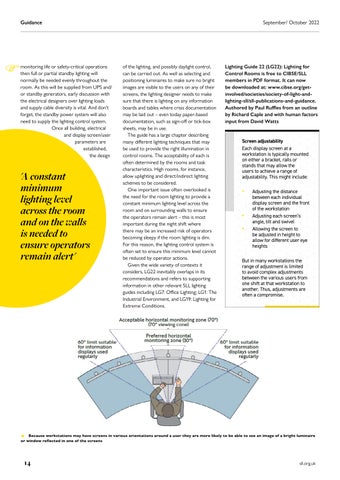
p Because workstations may have screens in various orientations around a user they are more likely to be able to see an image of a bright luminaire or window reflected in one of the screens
inputbyAuthoredlighting-sll/sll-publications-and-guidance.involved/societies/society-of-light-and-www.cibse.org/get-byPaulRufflesfromanoutlineRichardCapleandwithhumanfactorsfromDavidWatts
September/ Octobersll.org.uk202214
Guidance
Lighting Guide 22 (LG22): Lighting for Control Rooms is free to CIBSE/SLL members in PDF format. It can now be downloaded at:
• Allowing the screen to be adjusted in height to allow for different user eye heights But in many workstations the range of adjustment is limited to avoid complex adjustments between the various users from one shift at that workstation to another. Thus, adjustments are often a compromise.
Screen adjustability
E of the lighting, and possibly daylight control, can be carried out. As well as selecting and positioning luminaires to make sure no bright images are visible to the users on any of their screens, the lighting designer needs to make sure that there is lighting on any information boards and tables where crisis documentation may be laid out – even today paper-based documentation, such as sign-off or tick-box sheets, may be in use. The guide has a large chapter describing many different lighting techniques that may be used to provide the right illumination in control rooms. The acceptability of each is often determined by the rooms and task characteristics. High rooms, for instance, allow uplighting and direct/indirect lighting schemes to be considered.
One important issue often overlooked is the need for the room lighting to provide a constant minimum lighting level across the room and on surrounding walls to ensure the operators remain alert – this is most important during the night shift where there may be an increased risk of operators becoming sleepy if the room lighting is dim. For this reason, the lighting control system is often set to ensure this minimum level cannot be reduced by operator actions. Given the wide variety of contexts it considers, LG22 inevitably overlaps in its recommendations and refers to supporting information in other relevant SLL lighting guides including LG7: Office Lighting; LG1: The Industrial Environment, and LG19: Lighting for Extreme Conditions. monitoring life or safety-critical operations then full or partial standby lighting will normally be needed evenly throughout the room. As this will be supplied from UPS and/ or standby generators, early discussion with the electrical designers over lighting loads and supply cable diversity is vital. And don’t forget, the standby power system will also need to supply the lighting control system. Once all building, electrical and displayparametersscreen/userareestablished,thedesign 'A remainensureisandacrosslightingminimumconstantleveltheroomonthewallsneededtooperatorsalert'
• Adjusting each screen’s angle, tilt and swivel
Each display screen at a workstation is typically mounted on either a bracket, rails or stands that may allow the users to achieve a range of adjustability. This might include:
• Adjusting the distance between each individual display screen and the front of the workstation

From the results the authors recommend that future studies into the effect of screen use before sleep need to discriminate between type of screen use, and could be used to help develop behavioural strategies that are more supportive of sleep, performance and health. Iain Carlile, FSLL, is a past president of the SLL and a senior associate at dpa lighting consultants
It was found that in the two hours before bedtime the participants spent an average of 19 minutes on screens using social media and an average of 29 minutes watching TV. Analysis of the results showed that a 10-minute increase in pre-bedtime social media use resulted in a reduction in sleep duration of seven minutes, and 10 minutes of watching TV resulted in an increase of sleep duration by three minutes. Selfreported physical activity and food intake before bedtime did not significantly correlate with sleep duration.
None of the investigated pre-sleep activities significantly related to subjective sleep quality.
Lighting Research and Technology: OnlineFirst In advance of being published in the print version of Lighting Research and Technology (LR&T), all papers accepted for publishing are available online. SLL members can gain access to these papers via the SLL website (www.sll.org.uk)
T p Workers’ test schedule over 24 hours on a typical workday during the test period aligned with assembly-line routine work (He and Yan)
Iain Carlile examines three of the recently published Lighting Research and Technology papers which focus on circadianeffective lighting, wellbeing and sleep quality here is a growing awareness of delivering effective lighting in buildings to support the circadian entrainment of occupants, observes Rea in his paper on circadian-effective lighting. He notes that one of the many questions in this area relates to the matter of whether a modest amount of light for a longer period has the same effect on the circadian system as a high level of light for a shorter duration. He presents an overview of current research, which broadly confirms that the answer to this question is 'Yes, more or less'. In broad terms, and within limits, Rea says that it should be possible to double the duration of light exposure while halving the light level, and vice-versa, to achieve the same circadian-effective dose of light. In conclusion he notes that the design guideline UL 2480 CSd metric, though not perfect, appears effective to maintain day-active and night-inactive behaviour and physiology, while providing flexibility.
REST ASSURED
The authors conclude that daily light exposure before work could have a delayed effect on workers’ alertness and sleep quality.
A further examination of how exposure to light can impact on health and wellbeing involved a study of factory workers in Chongqing who work in windowless interiors.
The law of reciprocity holds (more or less) for circadianeffective lighting MS Rea Impact of advance light exposure on assembly-line workers’ subjective work alertness and sleep quality S He and Y Yan Pre-bedtime activities and lightemitting screen use in university students and their relationships with self-reported sleep duration and quality LM Huiberts, AL Opperhuizen and LJM Schlangen
He and Yan conducted an in-situ investigation into the effect of pre-work artificial light exposure on workers’ alertness and nighttime sleep quality.
Huiberts et al have investigated the effect on sleep of using light-emitting screen devices before bedtime. A field study was conducted in which 61 university students (27 male/34 female, mean age of 21.6 years, age range 20-27, SD = 0.21) recorded information relating to social media use and watching TV in the two hours prior to bedtime. They also recorded their sleep timing (time of going to bed, time of going to sleep, minutes need to fall asleep, number and duration of awakenings, wake-up time, alarm use, time of getting up) and their sleep quality (subjectively assessing on a scale of 1-7 their sleep quality, ease of falling asleep, and feeling of being refreshed on waking).
Each experimental lighting intervention was applied from 08:30 to 09:00 and during lunch breaks (12:00 to 12:30) for five consecutive working days. The interventions included combinations of different vertical illuminances (1440 lux and 70 lux), measured at eye level, and different Correlated Colour Temperatures (CCT) of 5300K and 3300K. A benchmark illuminance level of 4 lux was also used at 5300K only. Daily measurements were taken of workers’ alertness and nighttime sleep, with chronotype being monitored once a week. It was shown that the higher illuminance correlated with a subjective increase in work alertness and sleep efficiency, while a lower CCT slightly improved alertness. For both of the advance light conditions, subjective alertness and sleep efficiency were higher than for the dark exposure. Also, subjective alertness was more pronounced in the afternoon than the morning. No evident change in chronotype due to differing lighting conditions was found.
September/ October 2022 Twitter: @sll100 15 LR&T essentials

Events 2022 For details of all upcoming webinars, go to: presentationsgoForlight-and-lighting-sll/sll-events/upcoming-webinars-and-online-contentwww.cibse.org/society-of-previouslyrecordedCPDwebinars(includingregionalwebinars),to:www.cibse.org/society-of-light-and-lighting-sll/sll-events/pastEVENTS IALD ENLIGHTEN AMERICAS Date: 29 September-1 October Venue: Westin Mission Hills Resort, Rancho Mirage, California www.iald.org LIGHT + BUILDING 2022 Date: 2-6 October Venue: Messe Frankfurt www.light-building.com READY STEADY LIGHT (SLL) Date: 18 October Venue: Rose Bruford College, Sidcup www.sll.org.uk LIGHT MIDDLE EAST 2022 (Messe Frankfurt Middle East) Date: 21-23 November Venue: Dubai World Trade Centre www.lightme.net LIGHT22 Date: 22-23 November Venue: Business Design Centre, Islington, London www.lightexpo.london CIBSE (INCLUDINGBUILD2PERFORMLIGHT2PERFORM) Date: 29-30 November Venue: London ExCeL www.build2perform.co.uk AVAILABLE WEBINARS INCLUDE SLL IN CONVERSATION (in assocation with Signify) With Mike Simpson, global application lead for Signify, and Richard Morris, associate and lighting designer at Arup LIGHTING FOR 2050: NET ZERO CARBON (SLL & CIBSE Ireland webinar) Speaker: Sophie Parry FSLL Sophie Parry looks at approaches to lighting application with low carbon outcomes, as well as exploring considerations for luminaire specification and modelling the proposed lighting design 16
