




It is my pleasure as Vice-Chancellor to welcome you to Leeds Trinity University. You are joining a university renowned for its friendly and supportive community, which prepares graduates to make a rich and varied contribution to society.
Providing our students with an exceptional university experience is at the heart of everything we do at Leeds Trinity, and I sincerely hope you have a successful and enjoyable time with us during your studies.
Your Get Going Guide highlights key dates, important details and helpful information you need before your course start date. Please make sure you read through the guide and complete any tasks to ensure that everything is in place for the start of your PGCE.
Leeds Trinity has an established reputation for learning, teaching and graduate employability, and I encourage you to make the most of every opportunity presented to you. I am excited to watch you develop during your time at Leeds Trinity, and I am confident you will finish your programme as a confident and highly employable individual bound for a successful career.
I am glad that you have chosen to join us at Leeds Trinity University, and I look forward to welcoming you to our community in September.
Professor Charles Egbu Vice-Chancellor Leeds Trinity University

Welcome Week is the official start of your course, where you will spend time with your academic department, meet other students and attend sessions that will prepare you for the upcoming semester.
All Welcome Week activity will take place in person. You can check your timetable via myLTU to see when your sessions take place. Welcome Week is compulsory and you are expected to attend. You will be provided with more information about your first week on campus from your programme team.
We also encourage you to get involved in other social activities to make the most of university life at Leeds Trinity. There will be a range of events taking place, with a joint offering from the University, Leeds Trinity Students’ Union, Trinity Fitness and the Chaplaincy.
For up-to-date information on Welcome Week, visit leedstrinity.ac.uk/new-students

For students undertaking PGCE (Primary), Welcome Week will take place from Tuesday 1 September to Sunday 6 September.
For students undertaking PGCE (Secondary), Welcome Week will take place from Monday 7 September to Sunday 13 September.
If you are an international student, there are some additional steps you need to take before beginning your studies at Leeds Trinity, including arrival dates, document checks and programme registration.
Please check the email address you applied with for a link to your International Students’ Pre-Arrival Guide. This includes detailed information about arriving and settling in to the UK, including organising your visa, travel to the UK, setting up your bank account, paying your university fees, and transition to life in Leeds.


We know that starting university can be overwhelming. This section includes key information and steps that you need to take before starting at Leeds Trinity.
We cover:
• Your IT credentials – Access essential systems, such as your student emails and e:Vision, the home of your student record.
• Downloading the student app –Access the most up-to-date information at your fingertips.
• Registering for your degree – Find out how to enrol in your programme of study before you arrive.
Please read through this section carefully and follow the steps provided. This will help make the transition to university as smooth as possible, setting you up for success when you arrive.
Follow the information on this page to help you log in and use our IT systems. You will need your Leeds Trinity University username and password to get started. You should have received this via email.
We recommend completing these steps on a laptop or desktop computer. You will also need a mobile device.
Once you have been sent your username and password, use them to log in to myltu.leedstrinity.ac.uk
This will register your credentials and give you access to all of Leeds Trinity University’s online systems, including our online registration facility.
If you have changed your email or postal address, let us know as soon as possible so we can ensure that your registration details are sent to the correct address. You may do this by contacting admissions@leedstrinity.ac.uk
Once you are registered, we will primarily communicate with you via your student email address. Make sure you check your university email regularly.

When you log into our IT systems for the first time, you need to make sure you have set up a second factor of authentication. We use Microsoft Authenticator app as our second factor.
Please download the Microsoft Authenticator app from the App Store and Google Play Store to your mobile device. With MFA, you’ll be able to reset your password and protect your account from hackers.
Don’t worry if you’re not sure about setting up MFA, the IT Support team will cover this during Welcome Week.
myLTU is our student app – a personalised student portal that gives you access to everything you need for life at Leeds Trinity.
Once you are fully enrolled and have started your course you can access the following:
• Your personal timetable
• Moodle – our virtual learning environment
• Your university emails
• e:Vision – the home of your student record
• Information and contact details for student services
• The Library website
• Information about your Leeds Trinity Students’ Union
• The latest university events
To download the app to your mobile device, search myLTU on the App Store or the Google Play Store. If you do not have access to a smartphone, you can access myLTU via a computer at myltu.leedstrinity.ac.uk. Please ensure you have downloaded the app or saved the website before you arrive.
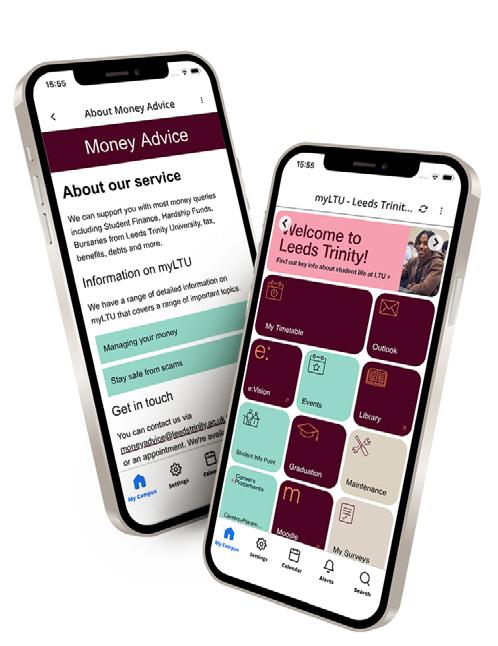
You can log in to myLTU using your student email and password. When you log in, please accept push notifications to ensure you receive important updates.
If you do not complete Multi-Factor Authentication, you will be locked out of the app. If you experience any issues accessing myLTU, our IT staff can help once you arrive on campus.
You can access timetable information on myLTU under the PGCE Timetable tile. Your Programme Leader will explain your timetable in more detail on your first day.
Before you start your studies, you need to formally register on your programme at Leeds Trinity University via our e:Vision.
e:Vision is an online platform that allows you to keep track of your personal student details. You can view and amend the personal details we hold about you alongside information about your programme, module registration, timetable and results.
The options available through e:Vision will vary depending on the time of year. Once you’ve logged in, you can use your e:Vision account to:
• View and edit your personal and contact information, including the ability to amend your preferred name and pronouns.
• Update your Student Finance Student Support Number
• Download a confirmation of attendance letter
• Register on your programme
• View financial information and make payments (accommodation/fees etc.)
• View your registration details
• Make and view module selections
• View component, module and end-of-year results
• View your teacher reference number (Primary Education students only)
• View your timetable
• Access your Student Inclusion Plan (if applicable)
• Opt-in to join the Students’ Union
• Apply for extensions or mitigating circumstances on assessments
You can access e:Vision via evision.leedstrinity.ac.uk or via the e:Vision tile on myLTU. Log in with your Leeds Trinity University username and password.
Once you have accessed your e:Vision account, you can register on your programme of study.
Registration opens on Wednesday 12 August and you must complete registration before the start of term.

When registration opens on Wednesday 12 August, log into your e:Vision account, click ‘Programme Registration’ and follow the prompts. You’ll be asked to confirm or upload:
• Privacy Statement
• Clearance checks (documents you are required to produce in order to get full registration)
• Home contact details
• Term-time contact details (this should be your Leeds
• Trinity University generated email address)
• Student ID photo upload
• Emergency contact information
• Trusted ‘Other’ contact information
• Personal information
• Academic Regulations and Students’ Union information
• Study readiness
• Career readiness
• Confirmation
The registration process should take no longer than 10 minutes to complete. Most questions are mandatory and you will not be able to progress to the next section until you answer all questions and your photograph is uploaded. Once you have answered all questions and agreed to the declarations, you will return to your e:Vision homepage.
If you require further support with your registration, you can access a ‘Step-by-Step’ guide from the Registration page. Some students will also be required to attend an in-person session in addition to online registration. Make sure to check your student and personal email address regularly to see if this applies to you.
All students must be fully registered by the end of the fourth week of teaching. Those who remain unregistered or provisionally registered after this may have their registration with the University cancelled. If you are not engaging with your studies, our Student Engagement Advisors will contact you to discuss the next steps.
If you have met all the required admission clearance criteria to join the programme (e.g. proof of your entry qualifications, satisfactory DBS enhanced disclosure certificate if required etc.), you will be given full registration status.
This means that you have full access to all Leeds Trinity University facilities and will be eligible to receive your student loan/bursary.
If you cannot meet all the required admission clearance criteria when registering on your programme and are in the process of gathering the required documentation, you will be given provisional registration status.
This is a temporary status that allows you to undertake study and use the computing and library facilities, but it will not allow you to access any funding that may be due to you (e.g. student loan or bursary) until all conditions are met.


When you arrive at university, we know there’s a lot of information to take in. This section includes essential tasks and actions you need to complete within your first few weeks at Leeds Trinity.
We cover:
• Collecting your student ID card – Your key to accessing campus facilities and spaces.
• Getting connected – Ensure you can access all essential IT services whilst at university.
• Your fees and funding – Understand when and how to pay your fees and accommodation, if applicable.
Please read through this section carefully and follow the steps provided. This will ensure you can focus on settling in to student life.
Your student ID card is an integral part of your student experience. It’s your key to accessing campus, learning resources, printing and, if you’re a resident on the Horsforth Campus, it will serve as one of the keys to your accommodation.
When registering onto your programme of study, you will be required to upload an image of yourself. You will not be able to complete registration without uploading your photograph, so please ensure you have one available before you start your online registration. The photograph will be used for your student ID card. The photograph should follow the standard passport photograph guidelines.
Please view the Government website for further information: gov.uk/photos-for-passports
If you are not living on our Horsforth Campus, you must collect your student ID card from the Atrium during your first week on campus.
If you are moving onto campus, you will be directed to collect your student ID card and the keys to your accommodation on arrivals day.
Please make sure you don’t lose your student ID card, as it is your key to access facilities, including teaching rooms, buildings and learning resources.
All UK education institutions are required to take reasonable steps to ensure that every student at the institution has permission to study in the UK.
When it is time to collect your student ID card, you will need to show proof of your right to study.
To show proof of your right to study in the UK you will need to bring one of the following documents:
• Valid passport
• EU ID Card (if you have settled or pre-settled status under the EU Settlement Scheme)
• Birth certificate along with a form of photographic ID, e.g. photocard driving licence
• Proof that you have been accepted to receive student finance along with a form of photographic ID, e.g. photocard driving licence
Please note that when collecting your student ID card, the name on the document will need to match your official name you used when you registered at Leeds Trinity University. A driving licence will not be accepted without a second form of ID from the list above. We cannot accept photographs or photocopies, so you must bring your original documents.

It’s important to understand how to pay for your university fees, get support with your student finance and prepare a budget as you begin your studies.
If you have taken out a tuition fee loan to cover the cost of your tuition fees, or plan to take out a tuition fee loan, your student finance funding organisation will notify Leeds Trinity University. If you have not taken out a tuition fee loan, you will need to arrange to make payment of your tuition fee directly to Leeds Trinity University.
Invoices for tuition fees will be issued in November 2026 for UK students.
Tuition fees will be due in full on 1 November 2026 and payment may be made as follows:
• Payment by tuition fee loan (if eligible) - This will be paid directly to the University by the Student Loan Company (SLC). Please check your SLC information to ensure you have applied for the correct tuition fee.
• Online via your e:Vision account or at epayments.leedstrinity.ac.uk/open - If you are paying your fees directly to the University, you will need to know your student ID number and have a debit/credit card.
• International students fees - 50% deposit upfront, then 25% within 8 weeks from the start of the course, and the remaining 25% within the subsequent 8 weeks. If you require the university to sponsor you for a student visa, 50% of your fees should already have been paid in advance as a deposit for your CAS (Confirmation of Acceptance of Studies).
More information on how to pay your tuition fees as an international student is available on leedstrinity.ac.uk/international/internationalfees-and-funding/ paying-your-tuition-fees/.
Students living on our Horsforth Campus will be provided with their accommodation invoice on or before their arrival. The fees should be paid in line with the accommodation agreement.
Payment may be made as follows:
• Online via your e:Vision account. Click on ‘My Finance’
• Online at: epayments.leedstrinity.ac.uk/ open
You will need to know your student ID number and have a debit/credit card. There is an option to set up a recurring card payment that will automatically take the correct instalment payment on the due date to avoid you having to remember future payments. To set up a recurring payment, please contact the Finance Office.
Students living at Clarence Dock will be sent an invite to download the ‘Kliq’ app. This will show your accommodation fee details, and you can make payment through the app.

We hope that by now you have applied for your student finance for the 2026/27 academic year if you are eligible. If you haven’t applied yet, you should do so straight away to limit any delay in the payment of your student finance.
You may also be eligible for additional scholarships and bursaries from the Department for Education. Visit gov.uk for more information
If you are unsure if you are eligible for student finance, please contact the Money Advice team at moneyadvice@leedstrinity.ac.uk
We recommend getting in touch if you:
• Are not a UK national
• Have been a resident outside of the UK
• Have some previous PGCE study
For any queries about teaching bursaries, please email ITTadmissions@leedstrinity.ac.uk
To get off to a good financial start, you should plan your budget before you begin your studies. As a Leeds Trinity University applicant and student, you can sign up to Blackbullion for free and access resources to help you plan your budget and improve your financial skills, knowledge, and wellbeing. To sign up visit blackbullion.com or scan the QR code.
When you start your studies, the Money Advice team can support you with budgeting. You can also find additional money management advice on myLTU, or by visiting leedstrinity.ac.uk/study/ fees-and-finance.

As a student you can access all University IT systems from anywhere with a reliable internet connection, on almost all devices. You can log in to our range of online facilities by using your student username (email) and password.
As a Leeds Trinity University student, you get a free subscription to Office 365 for the duration of your studies. We recommend using Office 365 to access your University emails, documents and calendar (including your timetable). You can access Office 365 at office365.leedstrinity.ac.uk
You will need to download the Microsoft Authenticator app from the App Store or Google Play as you’ll need this when you log in for the first time.
Alongside your face-to-face teaching on campus, there will be additional engagement activities and opportunities online through Microsoft Teams.
Every module you’re enrolled on will have its own area, known as a team, within Microsoft Teams. It’s a place where you can chat with your classmates and collaborate when you’re working in a group.
Visit office365.leedstrinity.ac.uk and log in with your student email address and password to download the software for free.
myLTU is your personalised Leeds Trinity University portal that provides access to your timetable, student emails and more.
Download myLTU from the App Store or Google Play.
e:Vision is the home of your student record, and is where you register onto your programme, view your student timetable and your results.
Moodle is our Virtual Learning Environment, which includes your learning and teaching information. Here you’ll be able to access everything you need for your course.
Our dedicated Careers+Placements portal. Here you can access one-to-one careers appointments, exclusive placement opportunities, your Career Passport, skills assessments, summer internships and graduate jobs, as well as skills workshops on things like CVs and interviews, assessments, summer internships and graduate jobs, as well as skills workshops on things like CVs and interviews.
LinkedIn Learning is a platform where you can find business, creative, and technology courses to help you achieve your personal and professional goals. You can access LinkedIn Learning via myLTU.
Horsforth Campus and City Campus are covered by our University Wi-Fi network, eduroam. You can access the network using your university email address and password. Guest Wi-Fi access is available; details can be found at Reception at both campuses.
If you are in Leeds Trinity University accommodation, your internet connection is provided by Wifinity. You’ll be given more information about about how to connect to your accommodation wi-fi when you move in.
You can find out more information about getting connected on our website, including helpful videos and guidance.
Check out the IT Support tile on myLTU for further support and information.



We’re here to support you throughout your time at Leeds Trinity - academically, personally and financially.
Whatever challenges you face, there’s a team, service or space available to help you feel confident and supported as you study.
We cover:
• Student Support – Our support services are here to help you navigate everything from academic worries to personal wellbeing.
• Help and advice - We have services that will help you engage with your studies, and a welcoming space to talk, connect and reflect.
• Study support - Discover more about the academic support we provide, including our personal tutors and the Learning Hub.
It’s important to make a note of these resources. You might need to access them when you start, or later into your studies. You can reach out whenever you need advice, reassurance or practical help.
Our Student Support services enable you to access a wide range of help and advice when it’s needed –whether it’s personal or regarding academic concerns and issues.
Student Support are available from 9:00am until 5.00am Monday to Friday, and 12:00am until 5:00am Saturday to Sunday.
The team provide support and advice on all areas of student life. You can reach the Duty Managers by phone or text on +44 (0)7458 109288 or by emailing studentsupport@leedstrinity.ac.uk
One-to-one chats can then be arranged on campus or via phone, text or video call.
Disability Services are here to support students. The team can help manage any disability-based barriers that might be impacting your ability to study.
They can help with:
• Dyslexia Screening
• Disabled Student Allowance (DSA)
• Student Inclusion Plans
• Any other areas relating to disability
If you have a disability, long-term health condition, mental health difficulty or specific learning difference, we encourage you to let them know so they can support you from day one.
You may have already received an email inviting you to complete a form allowing you to declare any disabilities you may need support with.
You can get in touch with the team by emailing disability@leedstrinity.ac.uk
The Mental Health and Wellbeing service provides the opportunity to talk in confidence about any issues causing concern.
The team can help direct you towards the most appropriate support whether that be via our qualified and experienced practitioners on campus or via local NHS and non-NHS services.
You can get in touch with the service with any questions or to refer yourselves either through myLTU or by emailing studentwellbeing@leedstrinity.ac.uk
Money Advice can support you with most money queries including Student Finance, Hardship Funds, Bursaries from Leeds Trinity, tax, benefits, debts and more.
You can get in touch with the team by emailing moneyadvice@leedstrinity.ac.uk

We are committed to creating a safe, respectful and inclusive environment for everyone. If you experience or witness any form of bullying, harassment or sexual misconduct, support is available.
You’ll attend a mandatory training session during induction to help you understand LTU’s approach to tackling these issues, how you can report any concerns, and the support available to you. You can find all our policies, procedures and support information on our website.
Visit leedstrinity.ac.uk/bullyingharassment-and-sexual-misconduct for more information.
Leeds Trinity University is fully committed to the principle, promotion, and protection of freedom of speech within the law and upholding the principle of academic freedom for its academic staff. In line with our values, we encourage debate that allows different views and ideas to be discussed and challenged and champion the right of everyone to contribute and by cultivating a culture of mutual respect.
The university must uphold the law and balance its various legal duties, including securing freedom of speech and keeping people safe, whilst also ensuring the proper functioning of the university. We also have a duty to ensure that freedom of expression does not break the law or breach the legal rights of others.
Visit leedstrinity.ac.uk/freedom-of-speech for more information.

To create a positive environment for all students at Leeds Trinity University, and in line with the Office for Students’ (OfS) E6 condition, we provide mandatory consent, active bystander, and harassment training.
This is an in-person training session delivered during Welcome Week, led by specially-trained staff.
In addition to our student support servcies we have dedicated teams who can help you make the most out of your time at Leeds Trinity.
The Student Engagement Advisors are here to help you stay on track and succeed throughout your time at university. They work closely with students who may be struggling with attendance, engagement, or academic progress. The team can support you with the following:
• Discussing engagement with lectures
• Meeting academic deadlines
• Signposting you to support services, such as Student Support, academic support and financial support
• Completing forms, such as extensions and mitigating circumstances
• Liaising with academic staff regarding any student matters you may wish to discuss
Find out more information on the Student Info Point tile on myLTU.

Whether you need a hot drink and a friendly face, a chat about something, space to pray and reflect, a question answered, or you just want a relaxed space to hang out, your Chaplaincy team is here for you.
Committed to your social and spiritual needs, the Chaplaincy:
• Run regular social, spiritual and volunteering events
• Provide a space to relax
• Provide a space for prayer, worship and reflection on both Horsforth and City Campus (Chapel and Multi-faith Prayer Room)
The Chaplaincy team is here to provide support and advice to any student who needs. You can find out more at leedstrinitychaplaincy.co.uk.

To achieve success in your studies, make sure you access the academic support available.
Every student is assigned a personal tutor who will meet with you to discuss your academic progress, university experience and personal and professional aspirations.
Personal tutors are a great resource - they know how the University works, they will understand your subject area, and they will encourage you to reflect on your academic performance. We encourage you to attend your meetings when you are invited.
You will be invited to meet with your personal tutor three times a semester; once in a group meeting and then two individual meetings, personalised to your level and programme of study.
Personal tutor meetings are ideally placed to help you bring together the different elements of your programme. You will be encouraged to come along with questions about your studies and to bring any feedback you have received on assessments so that you can discuss your progress with your personal tutor. They can also direct you to any other guidance you might need.
The Learning Hub provides one-to-one support to develop the skills you need to succeed in your studies. They work with all students at all levels across both campuses.
The skills that they can help you develop and the support they can offer includes:
• Understanding your assignment briefs
• Learning how to get your point across
• Gaining the confidence to manage your projects/deadlines
• Structuring your assignments
• Introducing you to tools and resources
• Reviewing and providing feedback
• Supporting you with your group projects
They can signpost you to other services such as academic tutors and the Disability team so you are fully supported.
Find out more information on the Student Info Point tile on myLTU.


Both of our campuses provide everything you need to make the most of university life, join a community and feel comfortable in your new environment.
We cover:
• Your campuses - Discover what’s available in Horsforth and Leeds!
• Travelling - Find out the best ways to get to and from our campuses.
• Library and IT services - Explore the facilties and support you can access.
• Careers + Placements - Meet the service that can help kickstart your career.
• LTSU - A democratic, charitable organisation that represents and advocates for you.
Whether your course is based at the Horsforth Campus or City Campus, you’ll have access to the facilities, events and opportunities at both locations.
We have two campuses, one located in the suburb of Horsforth, and one in the urban city centre in Leeds! Both campuses have a range of study spaces, resources, lecture theatres, support services and food and drink options.
Our Horsforth Campus is set on a beautiful green space in Horsforth, a town located under six miles north west of Leeds city centre. During your University-based training at Horfsforth Campus, you’ll learn in classrooms equipped with all of the resources of a classroom in a primary and secondary school. This will give you the chance to practise before your school-based training.
In addition to this, at our Horsforth Campus you can access:
• The Andrew Kean Learning Centre and Library
• Trinity Fitness Sports Centre, 3G pitches and running track
• Media Centre
• LTSU Trini-Tea Central or one of our on-site cafés including our Dining Room which offers a range of budget-friendly hot and cold food options
• Chapel and Chaplaincy Lounge
Although you will be based at the Horsforth Campus for your programme of study, you still have access to all the facilities available at City Campus as a Leeds Trintiy student.
Located at Trevelyan Square in the heart of the city and just minutes away from Leeds Train station, our City Campus has:
• Bespoke Library
• Chapel and multifaith prayer room
• Fairground Café
• LTSU Lounge
If you would like to access City Campus, make sure to bring your student ID card as without it, you won’t be able to go beyond Reception.

We run a wide range of events across both campuses, including social activities, free sports sessions, Chaplaincy events, workshops and more. Stay up to date by visiting the Events tile on myLTU.
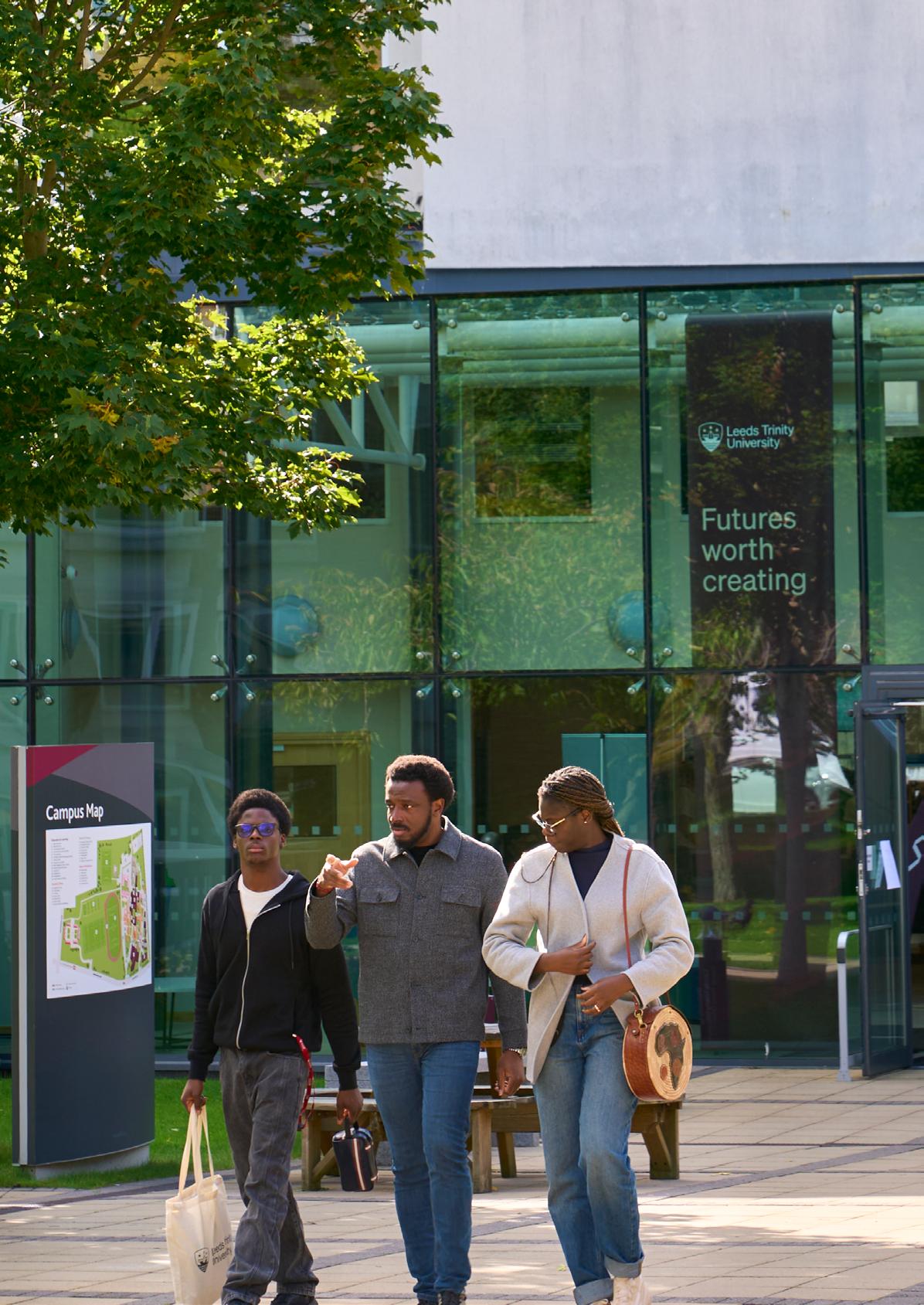
Since opening as a teacher training college in 1966, we’ve helped generations of teachers develop the skills and confidence to make a real difference in the classroom.We have an excellent reputation for training teachers to work in primary and secondary education settings.

You can grab a hot drink from Costa, the Atrium Café or refuel with a hot meal in the Dining Room at the Horsforth Campus, and make use our microwaves and vending machine facilities.
You can view the full list of food and drink spots at both our campuses on the Campus Life tile on myLTU.

Bring the energy!
Whether you want to move your body or build your strength, you can join Trinity Fitness, our on-site gym at the Horsforth Campus with a student membership. Visit trinityfitness.co.uk
At the Horsforth Campus, there is:
• Trini-Tea Central – The Student Union café that serves hot and cold drinks and has a range of games, books and pool tables.
• The Chaplaincy Lounge – You can use this space to relax and reflect.
There are also a range of comfortable chairs, sofas and seating in the Atrium in the main building and in the Andrew Kean Learning Centre.



Just a short train journey from Horsforth Campus, you can find a range of places to visit. Here are some of our favourite spots:
• Leeds Dock - Home to the Royal Armouries Museum, restaurants, a bookshop on a canal boat, and more, this is a cultural hub of Leeds. You can walk there from City Campus in 15 minutes, or take the water taxi.
• Leeds Art Gallery - Located just next to Leeds Town Hall, the gallery houses a range of art, from paintings and exhibitions to installations. Plus, they have the library and the Tiled Cafe, both perfect study spots.
• Kirkgate Market - This is one of the largest indoor markets in Europe. Our top spot is the food and drink hall - there are so many local vendors selling a range of food from all over the world!
Leeds has transport links across the region which can help you travel to and from City Campus, including local trains and buses.
To plan your route to and from campus, we recommend you visit:
• Train: nationalrail.co.uk
• Bus: wymetro.com
Leeds train station is just a 4-minute walk away from the City Campus. If you would rather get the bus, Leeds bus station is an 11-minute walk from the City Campus.
Horsforth train station is a 15-minute walk from Horsforth Campus. If you would rather get the bus, there are bus stops located on Brownberrie Lane just outside of Horsforth Campus.
Students who regularly use public transport to travel to campus can make savings bus and rail tickets by purchasing a student Mcard.
Find more information on m-card.co.uk/the-cards/19-25
Secure cycle storage at Horsforth Campus is provided outside the Sports Centre and near the West Car Park.
We offer cycling facilities and secure cycle storage at City Campus. Bicycle storage is situated in the basement, alongside shower and locker facilities.
Leeds City Council has partnered with WalkSafe to release a local version of the WalkSafe app. The free app is available to help you have safer and more enjoyable experiences when you are out around Leeds.
Find out more via leeds.gov.uk/campaign/walksafe-leeds
Where demand is sufficient we run a free, accessible shuttle bus. This will service various drop-off and pick-up points, including Horsforth train station, the local supermarket, doctors, dentists, and other local amenities.
Further information about the shuttle bus can be found under the Campus Life tile on myLTU.
Due to high demand and limited availability on our Horsforth Campus, we recommend that students do not drive. If you require the use of a car, we operate a first-come first-served pay and display system. Designated accessible car parking spaces are available for car drivers that hold a Blue Badge. It is free to park in an accessible bay providing you have a valid Blue Badge on display.
There is no parking available at the City Campus. The nearest car parks are Trinity Leeds Car Park (LS1 4AG), Leeds Station Car Park (LS1 4HT) and Q-Park The Light (LS1 8TL).

Leeds Trinity University has two libraries, located in the Andrew Kean Learning Centre at the Horsforth Campus, and on the third floor of the City Campus. When you visit the Library, you’ll find:
• Friendly, helpful staff
• Resources to support your studies, including books, eBooks, journals, databases, and selections from module reading lists
• Group, quiet and silent study spaces
• Open access computers
At the Horsforth Campus, you will also find wellbeing spaces, a café where you can relax, and a 24-hour IT room. At City Campus, wellbeing spaces, popular fiction and non-fiction books and lockers where you can collect book reservations are also available. At both of our libraries you can access our IT Services in-person.
Students have access to both Horsforth and City Campus libraries regardless of where your programme of study is based.
You can access the Library website via the Library tile on myLTU, or by visiting library.leedstrinity.ac.uk.
From here you can:
• Find and access print books, ebooks, databases and journal articles
• Research a topic for your assignment
• Access subject-specific resources
• Get help with referencing
• Check the latest opening hours
• Access help and support
• Book a study room
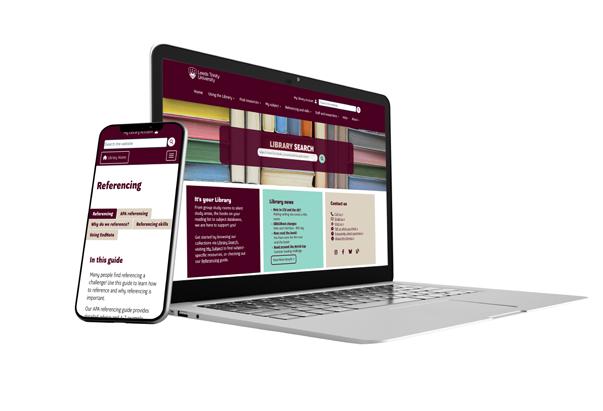
Librarians will help you get the most out of the Library during your time at Leeds Trinity University. They deliver teaching sessions and offer one-to-one appointments to help you develop your research and referencing skills, as well as find the information you need for your assignments.
You can find out more about our Librarians, including how to make a one-to-one appointment, by visiting library.leedstrinity.ac.uk.
The Student Information Point is the first point of contact for students with any questions relating to studying at the Leeds Trinity University. The team will listen to your situation and provide information, help, advice and tips on what to do next.
You can visit the Student Information Point in the Andrew Kean Learning Centre on our Horsforth Campus or on the third floor of our City Campus. You can also access the Student Information Point on myLTU via the Student Info Point tile.
If you need any assistance with IT Services, log a ticket via the Self Service Portal that can be found in the IT Support tile in myLTU.
You can also visit the Service Desks at Horsforth and City Campus. The IT Service Desk can support you with accessing and using IT facilities. If you’ve tried to figure things out on your own but need some help, or if there’s an IT problem that can only be solved in person, you can come to the Service Desk.
There are PCs and Apple Macs located throughout the Andrew Kean Learning Centre at the Horsforth Campus, including accessible PCs. You can borrow laptops from the IT Service Desk, while the 24-Hour IT room has 43 PCs.
Desktop computers are available on the third floor of City Campus. Computer labs are located on the first, second and fourth floor and are available if they are not being used for teaching. If you need support accessing computers, visit the IT Service Desk on the third floor. There is also a self-service LapSafe Locker in Reception with 32 high-spec laptops available to loan for use in the building.

Visit the Library website for more information on using Library search, resources, referencing skills as well as Library opening times and updates.

Leeds Trinity isa career-led university, providing you with opportunities throughout your studies to engage with employers and take part in a range of employability enhancing activities and events – all while having access to qualified careers professionals to coach and guide you.
The team of qualified Careers Advisors and Consultants are on hand to help you find your way, supporting you to achieve your career ambitions from your first year, right through to graduation and beyond – with services available for up to three years after you graduate.
During your studies, the friendly and approachable team can offer you support that is flexible around your timetable and extra-curricular commitments. You will have access to:
• Job and further study fairs
• Employer networking
• Professional work placements
• Exclusive part-time and graduate vacancies
• Campus and summer internships
• Tailored career support
• CV and application checks
• Interview preparation sessions
To get started, simply visit mycareer.leedstrinity.ac.uk and log in using your student email and password. You can also find out more on the Careers and Placements SharePoint page: leedstrinity.sharepoint.com/sites/CareersPlacements.
Keep up to date by following @LeedsTrinityCP on Instagram and LinkedIn.
Leeds Trinity Students’ Union is all about helping you make the most of your time at uni — whether that’s smashing your course, meeting new mates, joining a society, or just figuring life out one step at a time.
The Students’ Union is an independent charity, which means every bit of money made gets put straight back into improving your uni experience. From events and support services to clubs and campaigns, it’s all for you.
Need advice? Got a question? Want to get involved? The friendly staff team is always around to help you out. Every Spring, you can vote (or run!) in our student elections — there are over 200 roles up for grabs. It’s your uni experience, get involved, your voice matters.
The SU have loads of clubs that bring together your favourite interests - there’s something for everyone. Sports teams compete in BUCS (British Universities & Colleges Sport), and we’re always hyping up the next big match.
Check out the full list at ltsu.co.uk
From the massive Freshers Fair to Varsity, wellbeing events, and the LTSU Awards Evening, there’s loads going on all year round.
Remember to opt in to activate your membership via e:Vision!
Need a chill spot on campus? Trini-Tea is the cosy café space where you can recharge, connect and feel at home. Serving up tasty, budget-friendly food and drinks it’s perfect for lunch, study breaks, or just vibing with friends.
Make sure to follow us across our social channels!
@leedstrinitysu
@leedstrinity_su
@leedstrinitysu
LTSU offers a variety of services to support students’ academic, social, and personal growth. We’re a small organisation with big ideas!
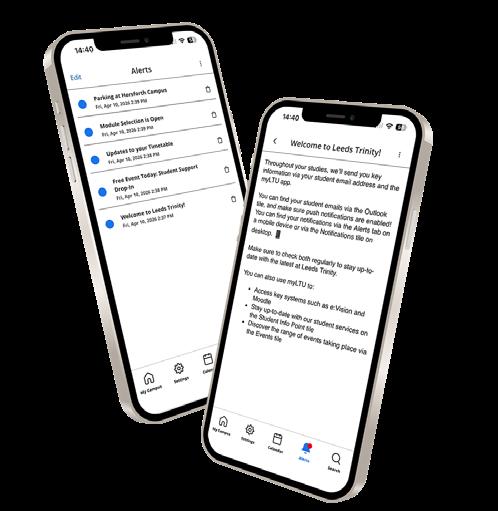
The Student Communications & Events team will keep you up to date during your studies. Please make sure you check your student email and myLTU notifications regularly to make sure you don’t miss out on important information.
When you download myLTU make sure you enable push notifications. We’ll send you regular updates about key university information, events and opportunities.
You can view your notifications on myLTU via the Alerts tab or on the Notifications tile on the desktop version.
Once you begin your studies, we will primarly contact you via your student email address. We recommend you check this daily for updates, including emails from your academic staff.
Take a look at the Get Connected section on page XX for more info about setting up your student emails.
Our dedicated student social channels are the ultimate destination for all current Leeds Trinity students.
Find out more about what’s happening on campus, key dates for your diary, how you can get involved with events, campaigns, student voice, and much more.
We regularly provide students the opportunity to create content for these channels. Keep an eye on your student emails for further information about content creation opportunities!
@leedstrinitystudents
@leedstrinitystudents
To ensure you’re prepared for the start of the academic year, complete everything on your student checklist before the start of your programme.
Register your username and password
Download myLTU and turn on notifications
Register for your programme
Apply for your student finance (if applicable)
Collect your student ID card (further information will be sent to you)
Log into Moodle and check your programme information
Join your Students’ Union via ltsu.co.uk
Check your timetable
Set up Office 365 and check your student emails
Register with MyCareer via mycareer.leedstrinity.ac.uk
Follow @leedstrinitystudents on Instagram and TikTok

Information about our PGCE courses is available on our website, including details on your course modules and assessment methods.