Troubleshooting
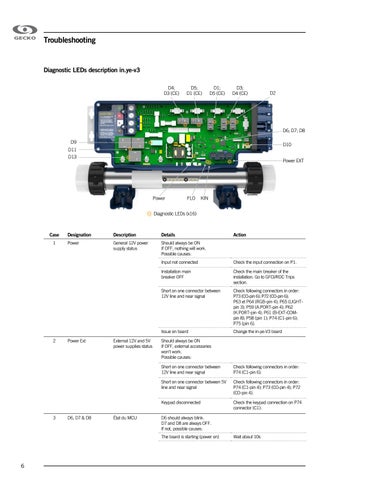
Diagnostic LEDs description in.ye-v3 D4; D3 (CE)
D5; D1 (CE)
D1; D5 (CE)
D3; D4 (CE)
D2
D6; D7; D8 D9
D10
D11 D13
Power EXT
Power
FLO
KIN
Diagnostic LEDs (x16)
Case 1
2
3
Designation
Description
Details
Power
General 12V power supply status
Should always be ON If OFF, nothing will work. Possible causes:
Power Ext
D6, D7 & D8
External 12V and 5V power supplies status
État du MCU
Input not connected
Check the input connection on P1.
Installation main breaker OFF
Check the main breaker of the installation. Go to GFCI/RDC Trips section.
Short on one connector between 12V line and near signal
Check following connectors in order: P73 (CO-pin 6); P72 (CO-pin 6); P63 et P64 (RGB-pin 4); P65 (LIGHTpin 3); P59 (A.PORT-pin 4); P62 (K.PORT-pin 4); P61 (B-EXT-COMpin 8); P58 (pin 1); P74 (C1-pin 6); P75 (pin 6).
Issue on board
Change the in-ye-V3 board
Should always be ON If OFF, external accessories won't work. Possible causes: Short on one connector between 12V line and near signal
Check following connectors in order: P74 (C1-pin 6).
Short on one connector between 5V line and near signal
Check following connectors in order: P74 (C1-pin 4); P73 (CO-pin 4); P72 (CO-pin 4).
Keypad disconnected
Check the keypad connection on P74 connector (C1).
D6 should always blink. D7 and D8 are always OFF. If not, possible causes: The board is starting (power on)
6
Action
Wait about 10s