VOLUME 39 / NUMBER 9
TECHLEARNING.COM
IDEAS AND TOOLS FOR ED TECH LEADERS
I
MAY 2019
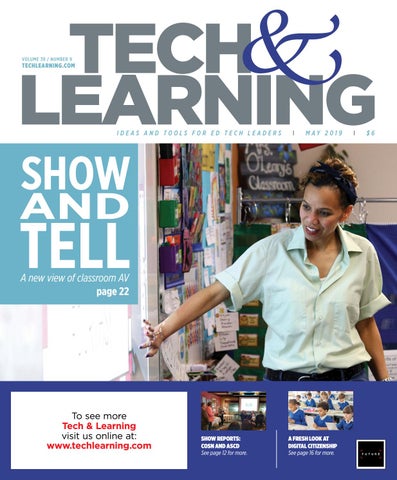
SHOW
AND
TELL A new view of classroom AV page 22
To see more Tech & Learning visit us online at: www.techlearning.com
SHOW REPORTS: COSN AND ASCD See page 12 for more.
A FRESH LOOK AT DIGITAL CITIZENSHIP See page 16 for more.
I
$6
M
A
Y
2
0
1
9
|
V
O
L
.
3
9
N
O
.
9
CONTENTS FEATURES
18
16
DIGITAL CITIZENSHIP FRAMEWORK UPDATED
18
LAUNCHING DIGITAL PORTFOLIOS DISTRICT WIDE
22
A NEW VIEW OF AV
By Mike Ribble and Marty Park The nine elements that support the updated S3 framework for digital citizenship: Safe, Savvy and Social. By Annie Galvin Teich A district leader shares how they developed and implemented a more robust and balanced assessment system using digital portfolios. By Sascha Zuger AR and VR have renewed interest in AV technology and students are using AV in innovative ways to demonstrate computational thinking, coding, and other career-building skills.
PRODUCTS
38
32
REVIEWS BY TOM’S GUIDE
Dell Chromebook 3189; XYZ da Vinci Nano 3D Printer; Zift
38 WHAT’S NEW: NEW TOOLS FOR SCHOOLS DEPARTMENTS & COLUMNS 4 EDITOR’S NOTE: SHOWSTOPPERS 6
TRENDING Storytelling with texting; curation tools are key to managing OER; Why data operability matters; the top five accelerators that drive K–12 innovation
10 BIG IDEAS T&L Reports from the ASCD and CoSN conferences; Kill the SAT with digital portfolios
32
20 EXECUTIVE BRIEFS
Tech & Learning (ISSN-1053-6728) (USPS 695-590) is published monthly (except July and December) by Future US, Inc., 11 West 42nd Street, 15th Floor, New York, NY 10036-8002 POSTMASTER: Send address changes to Tech & Learning, PO Box 8746, Lowell, MA 01853 Periodicals Postage Paid at New York, NY, and additional mailing offices.
WWW.TECHLEARNING.COM
| M AY 2 01 9
|
3
EDITOR’S
note MAY 2019
|
VOL. 39 NO. 9
www.techlearning.com
SHOWSTOPPERS
N
4
| M AY 2 019
| WWW.TECHLEARNING.COM
Market Leader Christine Weiser christine.weiser@futurenet.com CONTENT Managing Content Director Kevin Hogan kevin.hogan@futurenet.com
othing warms the heart of a geek editor more than a good old-fashioned story on AV. From overhead document projectors and film reels from the days of yore to the 4K displays and production studios of today, audio visual technologies are the bread and butter of edtech. Contributing writer Sascha Zuger does her usual sterling stuff in detailing some really sophisticated initiatives from around the country and even Japan this month (“A New View of AV,” page 22). We’re also about a year into our working relationship with our new owners at Future Publishing and are beginning to reap the benefits of being part of a global media company. Be sure to dig into some new content offerings we will share both in print and online. First, enjoy the incredibly in-depth reviews put together by our colleagues at the venerable tomsguide.com (page 32). We’re able to highlight some of the gear they cover that’s appropriate for the classroom. But follow through to their site for the full reviews, which measure every speed and feed imaginable on Chromebooks, 3D printers, and parent mobile management software. Likewise, be on the lookout for more curriculum content at techlearning.com provided by the folks at https://www. howitworksdaily.com. From science to history to space, we’ll be jamming the Edtech Ticker every day with their well-researched content so that your faculty will never be WE’RE ALSO without lesson plans or ideas for the classroom. Finally, let us know what you think! Give us a shout or at least a tweet ABOUT A YEAR @techlearning. INTO OUR WORKING
— Kevin Hogan Managing Director, Content kevin.hogan@futurenet.com
FOLLOW US
twitter.com/techlearning
RELATIONSHIP WITH OUR NEW OWNERS AT FUTURE PUBLISHING AND ARE BEGINNING TO REAP THE BENEFITS OF BEING PART OF A GLOBAL MEDIA COMPANY. BE SURE TO DIG INTO SOME NEW CONTENT OFFERINGS WE WILL SHARE BOTH IN PRINT AND ONLINE.
Contributing Editor Annie Galvin Teich Advisors Carl Hooker, Andrew Wallace, Marianthe Williams, Steve Baule, Jean Tower, Hank Thiele, Jenith Mishne, Frank Pileiro, Patricia Brown, Phil Hintz, Ken Wallace, Rick Cave, Chris Aviles, Diane Doersh, Mike Jamerson, Rico D’Amore, Todd Dugan, Grace Magley, Andrew Marcinek, John Marcus, Laura Chesson, Jon Castelhano, Karen Fuller
Production Manager Fred Vega, fred.vega@futurenet.com Managing Design Director Nicole Cobban
Senior Design Director Lisa McIntosh ADVERTISING SALES Sales Managers Allison Knapp, allison.knapp@futurenet.com Katrina Frazer, katrina.frazer@futurenet.com SUBSCRIBER CUSTOMER SERVICE To subscribe, change your address, or check on your current account status, go to www.techlearning.com and click on About Us, email futureplc@computerfulfillment.com, call 888-266-5828, or write P.O. Box 8692, Lowell, MA 01853. LICENSING/REPRINTS/PERMISSIONS Tech & Learning is available for licensing. Contact the Licensing team to discuss partnership opportunities. Head of Print Licensing Rachel Shaw licensing@futurenet.com MANAGEMENT Managing Director/Senior Vice President Christine Shaw Chief Revenue Officer Luke Edson Chief Marketing Officer Wendy Lissau Head of Production US & UK Mark Constance FUTURE US, INC. 11 West 42nd Street, 15th Floor, New York, NY 10036
All contents © 2019 Future US, Inc. or published under licence. All rights reserved. No part of this magazine may be used, stored, transmitted or reproduced in any way without the prior written permission of the publisher. Future Publishing Limited (company number 2008885) is registered in England and Wales. Registered office: Quay House, The Ambury, Bath BA1 1UA. All information contained in this publication is for information only and is, as far as we are aware, correct at the time of going to press. Future cannot accept any responsibility for errors or inaccuracies in such information. You are advised to contact manufacturers and retailers directly with regard to the price of products/services referred to in this publication. Apps and websites mentioned in this publication are not under our control. We are not responsible for their contents or any other changes or updates to them. This magazine is fully independent and not affiliated in any way with the companies mentioned herein. If you submit material to us, you warrant that you own the material and/or have the necessary rights/permissions to supply the material and you automatically grant Future and its licensees a licence to publish your submission in whole or in part in any/ all issues and/or editions of publications, in any format published worldwide and on associated websites, social media channels and associated products. Any material you submit is sent at your own risk and, although every care is taken, neither Future nor its employees, agents, subcontractors or licensees shall be liable for loss or damage. We assume all unsolicited material is for publication unless otherwise stated, and reserve the right to edit, amend, adapt all submissions.
NEWS TRENDING ANDTRENDS THE LATEST NEWS & STATS AFFECTING THE K-12 EDTECH COMMUNITY
top10 WEB STORIES
From techlearning.com
BLOG BITS “Removing the word ‘technology’ or ‘digital learning’ from a title implies that this person supports all learning, which is a good thing.” —Carl Hooker “More effective than surveillance is supporting children in using technology effectively.” —Lisa Nielsen
1
2
3
4
5
Storytelling with
Text Messaging The process is easy; you just copy and paste the appropriate shape to keep the conversation going.
6
Five Ways to Prevent Cheating on Your Google Form Quiz Google Forms is a tremendous tool for organizing and automating digital quizzes. Here are five tips for designing “cheat proof” Google Forms.
7
Easy Peasy Guide to Capturing and Sharing Links to Screenshots Here are some easy ways to capture and share screenshots of accomplishments.
8
Google Expands Support
for Girls in STEM Girl Powered workshops allow girls and boys to explore their interests and build robots alongside mentors in a supportive environment.
9
PBS Announces Free Media
Literacy Micro-Credentials for Pre-K–12 Educators Pre-K–12 educators who are interested in recognition for their media literacy skills can earn certification by completing eight free micro-credentials.
10
Innovative Tips to Share
with Parents in a Minute Short videos from @ WNETeducation focus on key topics related to early childhood learning and raising children.
Makerspaces A to Z:
Human Algorithm DesignX Algorithms to Live By explores an interdisciplinary way of thinking called human algorithm design to search for solutions to everyday challenges.
Curation Tools Are Key
to Managing OER Good OER repositories require curation tools to help teachers bring the best OER content into the classroom.
Class Tech Tips: How to
Record Your Spark Video in Multiple Languages Here’s a strategy to support families, students, and community members who speak more than one language.
TED Ed: How the Food
You Eat Affects Your Brain Animated video lets students see how various foods help their body and brain function.
F I N D L I N K S AT W W W.T EC H L E A R N I N G .CO M
6
| M AY 2 019
| WWW.TECHLEARNING.COM
“In a world where we are struggling to meet the needs of so many, we need to find ways to build community.” —Torri Wright
TOP TWEETS Jim O’Boyle @oboylejf: How secure is your data? Only as good as your weakest link. Jennifer Gonzalez @cultofpedagogy: To Learn, Students Need to DO Something. Sean Casey @seanmcasey: “#Data is the new infrastructure” = one of my favorite things said at the CoSN conference #cosn2019.
TRENDING
APPS OF THE DAY FROM TECHLEARNING.COM
DATA INTEROPERABILITY: WHY IT MATTERS
App of the Day picks are selected from the top edtech tools reviewed by Common Sense Education.
93% of teachers use digital tools. GETTY IMAGES/ANNA_KOLESNIKOVA
88%
of districts say that interoperability is a concern that influences procurement decisions.
78% of educators believe
that data can validate where their students are and where they can go.
Creative Design App Combines Augmented Reality with 3D Printing Teachers create and assign lessons to classes, and kids use the app to create scenes using the object library or uploads from Thingiverse
67% of teachers are not fully satisfied
with the effectiveness of the data and tools they have access to on a regular basis.
SOURCE: ISTE, BETTER EDTECH BUYING FOR EDUCATORS: A PRACTICAL GUIDE
DIGITAL TECHNOLOGY REWRITES THE RULES OF EDUCATION
Free Digital Library Provides Millions of Primary Sources for U.S. History
GETTY IMAGES/FATCAMERA
The layers of rich documents, images, and videos are carefully organized and curated, and can be accessed through topical browsing, searching and filtering, or in pre-made exhibition collections and primary source sets
The results of a survey by Forrester Research on the benefits of using technology in K–12 education:
62%
52%
48%
42%
40%
makes classes more engaging
increases staff productivity
personalizes the education experience
increases instructional time
encourages self-directed learning
SOURCE: BRINGING DIGITAL TO THE CLASSROOM—REVOLUTIONIZING K–12 EDUCATION
8
| M AY 2 019
| WWW.TECHLEARNING.COM
Green Screen Technology Powers Amazing App
Students can create original videos with dynamic, interchangeable backgrounds using green screen technology. SOURCE: COMMON SENSE MEDIA
TRENDING
SOURCE: COSN, DRIVING K–12 INNOVATION/2019 ACCELERATORS REPORT
WWW.TECHLEARNING.COM
| M AY 2 01 9
|
9
BIG IDEAS
ized by being right,” he said. “You cannot find purpose until you’re vulnerable. Teachers should practice and foster vulnerability.” These four speakers were each very different in their style and manner of presentation, but they all communicated a very similar message: “Be the best so you can be the best for kids.” Those messages inspired the participants in the 400+ sessions offered. There were so many sessions that matched various interests. Two in particular knocked my socks off. One was from the @EduGladiators team (#EduGladiators). Sanée Bell, Paul O’Neill, Rachelle Dene Poth, and Dennis Griffin Jr. (@
REPORT FROM ASCD:
Sessions Covered Classroom Coding to Leadership Strategies and More By Matthew X. Joseph
M
ore than 7,000 educators from around the globe gathered in Chicago March 15–18 to eat deep-dish pizza, to drink green drinks for St. Patrick’s Day, and to participate in ASCD’s #Empower19 conference. From the opening welcome reception to the final moments, the keynotes, sessions, and conversations were free-flowing and high level. #Empower19 kicked off with an opening keynote from Dwayne Reed, the teacher you always wished you had. He’s America’s Favorite Rapping Teacher and Chief Enthusiasm Officer (CEO) of Teach Mr. Reed, a global education company inspiring the world to “excite, equip, and educate learners everywhere!” When he was a first-year teacher, he used YouTube to get his message across to his students. Connect with him on twitter at https://twitter.com/TeachMrReed. At #Empower19, he drove home his message about building relationships when he brought one of his students on stage to sing with him. It was a powerful way to start the event. Ron Clark followed, calling teachers to teach in a
10
| M A Y 2 0 19
| WWW.TECHLEARNING.COM
way that inspires kids to want to be teachers. “Education matters,” he said. “Future teachers are key to making dreams come true.” He also encouraged educators to be “pizza”—in other words, “Don’t be plain old bread. Be spicy, with a lot to offer, like pizza.” Speakers on day two included Doris Kearns Goodwin, who shared the 10 steps she’s seen and researched for great leaders: 1. Grow from adversity 2. Listen to other views 3. Inspire 4. Take blame 5. Transcend slights 6. Be accessible 7. Use stories 8. Control unproductive emotions; 9. Relax 10. Swap personal ambition for greater good Her stories and message opened our eyes and minds for a day full of learning and inspired us to take what we learn and become great leaders for kids. The final speaker was Ashton Kutcher, who was humble, funny, and passionate about education. “We need to create a culture that isn’t incentiv-
5th grader Treveon sings with his teacher Dwayne Reed @TeachMrReed “My Teacher Loves Me” during the opening keynote Rdene915. @SaneeBell. @D4Griffin3. @PaulONeill1972) talked about empowering educators to ground their instructional practices and shared specific strategies to help implement those practices. Check out their work and sessions at https://www.edugladiators.com. There was also a lot of buzz at this year’s event around coding. While there were many great sessions, one that I found especially inspiring was by Kathy Einhorn and Clark Merkley. They argued that code is the world’s most dominant language. At first I did a double take at the statement, but when they demonstrated how resources all over the globe—from high-level banking security to the Internet, air travel, self-driving cars, and multiple levels of communication down to basic programing—rely on code, it became clear that it’s a necessary and universal language for communication and daily living. All of the sessions focused on how learning to code helps students develop into logical thinkers, problem solvers, creators, and collaborators.
LEARNING FROM OTHERS
A few other impactful learning sessions and presenters included:
BIG IDEAS
Teaching Students to Self-Assess and Reflect for Deeper Learning, from Connie Hamilton and Starr Sackstein (@conniehamilton @ mssackstein). Hamilton and Sackstein talked about using deeper reflection in their teaching and learning to better inform instruction and feedback. Participants learned where, when, and how to implement reflection as a means of self-assessment, driving a more standardsbased approach to learning and moving away from traditional assessment and grading techniques. Building Future-Ready Schools, from Tom Murray (@thomascmurray). Murray shared strategies that schools and classDr. Paul Bloomberg @bloomberg_paul leading a session on how to rooms can implement as they transition EMPOWER teachers from being the teacher-centric institutions of the industrial era to environments that Hodges and Kerry Gallagher (@bhodgesEDU are learner-centered and personalized and that @KerryHawk02). The content and strategies preleverage the power of technology. The session sented here sparked a deep discussion about how was packed with free tools and resources that to shape the edtech leader’s vision. The speakers teachers can use to transform their schools to betcovered topics that included what skills are needed ter prepare students for the world they will face to be a better edtech coach and how to help schools tomorrow. and parents communicate better about effective use Busting Education Stereotypes, from Brianna of technology.
How Innovative Leaders Change Schools, from Dave Faulkner, Aaron Tait, and Linnea Garrett. These three presenters shared strategies from their book, A Practical Playbook to Help Innovative Educators Change Schools, to support school improvement and innovation. The above sessions brought a mix of innovation, technology, brain-based research, and fun. There’s never a dearth of great ideas at national events, and ASCD #Empower19 did not disappoint. Read more of my ASCD takeaways @MatthewXJoseph and visit https://tinyurl.com/ ASCDReport for links to more resources. Dr. Matthew X. Joseph has been a school and district leader in many capacities in public education over his 25 years in the field. This experience has led to nationally published articles and opportunities to speak at multiple state and national events. He is the author of Power of Us: Creating Collaborative Schools and co-author of Modern Mentoring, Reimagining Teacher Mentorship (Due out, fall 2019). Follow him on Twitter @matthewxjoseph and visit his blog: techinnovation.live
WWW.TECHLEARNING.COM
| M AY 2 01 9
|
11
BIG IDEAS
2019 REPORT:
Highlights from Envision 2030: Leadership for Learning—New Leaders, New Honors, New Tech By Kevin Hogan
A
s usual, the annual Consortium for School Networking (CoSN) conference, held in Portland, Oregon this year, was a bellwether for the edtech community in 2019. Read on for some highlights:
Phil Hintz, Tech & Learning advisor and Director of Technology, Gurnee (IL) School District 56, received the Frank Withrow Outstanding CTO of the Year Award. Phil’s thoughts: “What does being CTO of the year mean to me? It means I need to share! Share in the success of my district and the amazing work my teachers, staff, and administrators do on a daily basis for the students we serve to prepare them for their future and not our past. Share in thanking the people, vendors, organizations, and great advisors who write thoughtful articles in magazines (like Tech & Learning) who have helped and mentored me along the way to become the CTO I am today. Lastly, being the CTO of the year means that I now have the responsibility to share that wisdom that has been
12
| M A Y 2 0 19
| WWW.TECHLEARNING.COM
handed to me throughout the years with other aspiring leaders who live to provide the best possible learning environments for all students every day.” Congrats! The Hampton Township (PA) School Phil Hintz, Tech and Learning advisor and Director of District received the District Team Technology, Gurnee School District 56 (IL) receives the Leadership Award for 2019, which honFrank Withrow Outstanding CTO of the Year Award. ors school district leadership teams for their transformative impact on student learning with technology. The team edura and has been an integral component of included Dr. Edward McKaveney, DirecHampton’s transformative curriculum. In a tor of Technology; Dr. Michael Loughead, separate Award Winners session, the HampSuperintendent; Dr. Rebecca Cunnington team shared insights into Hampton’s ham, Assistant Superintendent; and Dr. successful initiatives relating to curriculum Jacquelyn Removcik, Director of Curdesign, innovation, and technology. Along riculum, Instruction, and Assessment. with recognition at the national conference, During the conference, HTSD’s HTSD also received a $2,000 honorarium and representatives engaged in multiple a $5,000 DonorsChoose.org gift card. CoSN presentations. Dr. McKaveney also provided the district with four compliand Dr. Loughead partnered mentary conference registrations. with Dr. Ruben Puentedura, creator of the SAMR model, NEW TECH on “Designing Learning for CDW, in partnership with Lightspeed Systhe Future,” which looked tems, introduced Analytics Powered by Relay, at the fourth industrial a dashboard solution helping K–12 schools to revolution and the role make informed decisions about their use of of artificial intelligence, educational technology devices, applications, computational thinking, and websites. With mobile device use on the and extended reality on rise—74 percent of K–12 schools say they have the changing world of work more than one device per student—schools and the knowledge, skills, are challenged to optimize their technology and dispositions of today’s use, manage device data across numerous platlearners. The SAMR model forms, maintain policy compliance, and ensure was created by Dr. Puentstudent safety online.
BIG IDEAS
“WHAT DOES BEING CTO OF THE YEAR MEAN TO ME? IT MEANS I NEED TO SHARE! SHARE IN THE SUCCESS OF MY DISTRICT AND THE AMAZING WORK MY TEACHERS, STAFF AND ADMIN DO ON A DAILY BASIS FOR THE STUDENTS WE SERVE TO PREPARE THEM FOR THEIR FUTURE AND NOT OUR PAST. SHARE IN THANKING THE PEOPLE, VENDORS, ORGANIZATIONS AND THOUGHTFUL ARTICLES FROM GREAT ADVISORS IN MAGAZINES WHO HAVE HELPED AND MENTORED ME ALONG THE WAY TO BECOME THE CTO I AM TODAY.” — PHIL HINTZ With Analytics Powered by Relay, schools have access to a dashboard that helps them: ■■ Determine if the tools and applications they’ve purchased are being utilized as intended and eliminate unused or redundant tools ■■ Explore educational technology adoption rates and identify opportunities for professional development ■■ Ensure technology tools align with relevant data privacy laws and frameworks ■■ Monitor how often devices are used and what they are being used for ■■ Ensure digital equity district-wide.
TOP TWEETS FOR
#COSN19 Adam Feind_@afeind @YongZhaoEd - “It’s not our job to get kids ready for the future, it’s up to them to create their future for themselves and us”
BRIGHT IDEAS Tech & Learning and bulb (www.bulbapp.com) co-hosted an event for district tech execs during COSN that focused on the emergence and importance of students building and sharing a digital collection of their work. Participants shared their stories about how and why digital portfolios are becoming so important—from creating a more holistic way to assess student progress to presenting work for college admission.
In addition to recognizing Phil Hintz, CoSN honored the following distinguished school technology leaders, experts and districts at their conference: • District Team Leadership Award: Hampton Township School District Team (PA) • Community Leadership Award for Digital Equity: Vancouver School District (WA) • Hurley Private Sector Champion Award: Gavin Lee, Business Development, State & Local Government and Education (SLED), Juniper Networks
CoSN_@CoSN Print not dead 67% #edtech IT leaders say print comprises at least half of instructional materials from CoSN IT Leadership Survey @keithkrueger @s_bearden Mark Ray_@_TeacherX @CoSN global summit on 4th Industrial Revolution... I’m wondering...how do we refocus and rehumanize a culture (re)defined by technology? Adaptive > technical skills.
• Volunteer of the Year Award: Andrew Moore, CIO, Boulder Valley School District (CO) • EmpowerED Superintendent of the Year Award: Mark D. Benigni, Ed.D., Superintendent of Schools, Meriden Public Schools (CT) • Papert Lifetime Achievement Award: Bob Moore (awarded posthumously) • NextGen: Emerging EdTech Leaders: • Chanel Alford-Campbell, Technology Integration Specialist, Alexandria City Public Schools (VA) • Lindsey Blass, Personalized Learning Environments Program Manager, San Francisco Unified School District (CA) • Renee Hernandez, Digital Learning Coordinator, Allen Independent School District (TX) • Toni Hoehn, Digital Curriculum Support Specialist, St. Vrain Valley School District (CO) • Allison Reid, Coordinating Teacher for Instructional Technology, Wake County Schools (NC)
WWW.TECHLEARNING.COM
| M AY 2 01 9
|
13
GETTY IMAGES/TURK_STOCK_PHOTOGRAPHER
BIG IDEAS
KILL THE SAT
The college application process needs a do-over. And fast. By Kevin Hogan
T
here are so many infuriating aspects to this spring’s Operation Varsity Blues scandal, where one-percenter parents got nabbed for cheating and bribing to get their babies into elite colleges. It’s tough to rank the egregious behaviors, but one that’s close to the top for me is how they so easily gamed the standardized testing industry. Here’s the long story short: Parents paid for fixers to assist with, and in some cases to take, tests for students to ensure a “Goldilocks” score for their preferred school—not too low to shut them out but not too high to raise suspicions. Add these crimes to other recent SAT testing scandals in Asia and the Harvard University discrimination lawsuits, and it becomes clear this anachronistic assessment system needs to go away—sooner rather than later. As the parent of a graduating senior who did all the right things—including studying for and
14
| M A Y 2 0 19
| WWW.TECHLEARNING.COM
sweating out the PSAT/SAT process over three years—I watched how these percentiles and point tallies take precedence over other application details like extra-curricular activities and essays when plugged into The Common Application (another system that needs a long hard look). And while a growing number of schools claim their admissions process is test-score-free—more than a thousand colleges, according to FairTest: The National Center for Fair and Open Testing— the fact remains that test scores are still a major, inaccurate measuring stick. The data is flawed. The most obvious fix? New assessment platforms that can analyze and measure a student’s basic grasp of subjects while at the same time showcasing his or her skills and personality. For years, Tech and Learning has defined those technologies as digital or ePortfolios. And while many schools and districts already use these technologies and methods in their own assessments, colleges don’t seem to take them into account in their applications.
Take Keith McBrayer’s work, for example (https://www.bulbapp.com/kmcbray). Keith, who is currently a junior at the University of Texas, recently walked me through his own portfolio using the Bulb platform, which he started in high school and continues to build through college. Past assignments and projects are carefully organized into categories he defined. He uses audio and video to give the presentations. Most impressively, he includes his reflections on each performance to clarify why it is included in the portfolio. This kind of reflection is perhaps the most valuable part of any portfolio, since it provides a much clearer window into the learning of each student. And how much did it help him get into UT? “It didn’t,” he says. And when my own daughter went to add YouTube videos to supplement some of her essays, it was unclear whether or not those links were live. But those SAT scores? They’re automatically poured in. We’re encouraging students to use new tools and techniques, but we’re neglecting to incorporate them into what may be their most important assessment. Tying products like Bulb into a standardized application system like The Common App shouldn’t be that difficult. Having a student’s Instagram and Twitter account links as part of their application should be requisite. Judging a student based on arbitrary bubble tests is obviously wrong. Let’s get it right.
THE MOST OBVIOUS FIX? NEW ASSESSMENT PLATFORMS THAT CAN ANALYZE AND MEASURE A STUDENT’S BASIC GRASP OF SUBJECTS WHILE AT THE SAME TIME SHOWCASING HIS OR HER SKILLS AND PERSONALITY. WHILE MANY SCHOOLS AND DISTRICTS ALREADY USE THESE TECHNOLOGIES AND METHODS IN THEIR OWN ASSESSMENTS, COLLEGES DON’T SEEM TO TAKE THEM INTO ACCOUNT IN THEIR APPLICATIONS.
DIGITAL CITIZENSHIP FRAMEWORK UPDATED Technology in education is not going away, but poorly implemented technology should. Many school leaders are realizing that in order to maximize the effective use of their technology tools in the classroom they need to understand the opportunities as well as the challenges. In a 2017 Speak Up survey (https://www. speakup4schools.org/speakup2017/welcome.aspx), 93 percent of district administrators said that “knowing how to be safe online and use safeguards to protect our information and ourselves” is important for students and teachers. To help educators achieve this goal, Mike Ribble created “The Nine Themes of Digital Citizenship” (http://www. digitalcitizenship.net/nine-elements.html), which outlines the core foundation of any good digital citizenship program. These themes are integral to his “S3 framework” (Safe, Savvy, and Social). Hundreds of schools have implemented these guidelines as the foundation of their digital citizenship initiatives. At the ISTE 2019 conference, after more than a decade, Ribble will release a refreshed version of these nine elements and S3 framework in his new book, The Digital Citizenship Handbook for School Leaders: Fostering Positive Interactions Online. Ribble first updated the definition as follows: “Digital citizenship is the continuously developing norms of appropriate, responsible, and empowered technology use.” He then added the following details to the S3 framework elements: ■■ Safe (Protect Yourself / Protect Others) ■■ Savvy (Educate Yourself / Educate Others) ■■ Social (Respect Yourself / Respect Others) Each section of the framework includes the following nine elements, which were updated to support these three areas: ■■ Digital Access: The equitable distribution of technology and online resources. ■■ Digital Commerce: The electronic buying and selling of goods in the digital space. ■■ Digital Communication and Collaboration: The electronic exchange of information. ■■ Digital Etiquette: Electronic standards of conduct or procedures when using digital devices.
16
| MAY 2 019
| WWW.TECHLEARNING.COM
GETTY IMAGES/CAIAIMAGE/CHRIS RYAN
By Mike Ribble and Marty Park
■■ Digital Fluency: Understanding technology and its use. ■■ Digital Health and Welfare: Physical and psychological well-being in a digital world. ■■ Digital Law: The electronic responsibility for actions and deeds in the online world. ■■ Digital Rights and Responsibility: Requirements and freedoms extended to everyone in a digital world. ■■ Digital Security and Privacy: Electronic precautions to guarantee safety. Why is Digital Citizenship Perceived as Difficult to Implement? Despite the fact that schools know how important digital citizenship is to their school cultures, many still find it difficult to implement. There are three reasons for this. The first is knowledge. When the discussion turns to technology, many educators shy away. Without opportunities to learn how and where technology tools can fit into a curriculum or learning experience design, educators are often hesitant to implement tools that seem complicated and that take away from other opportunities in the classroom. The second is time. The time constraints of busy teachers, coupled with limited professional development and a constant stream of new tech to learn, make the implementation of digital citizenship programs difficult. The third is support. Teachers often don’t have enough (or any) instructional support to
learn how best to implement digital citizenship programs into the curriculum. How can school leaders support their teachers in learning how to implement digital citizenship into their lessons? Here are a few ideas: ■■ Host a week of digital citizenship activities featuring guest speakers. ■■ Encourage a “grassroots” approach, where individual teachers share ideas and information about appropriate technology use. ■■ Encourage students to create banners, public service announcements, and presentations to share with other grade levels. ■■ Include parents, community members, and law enforcement officials in conversations about what they would like to see their children able to do with technology—in schools as well as in the larger community. By involving all stakeholders in your digital citizenship programs, providing the needed time and support for professional development, and following guidelines like the 9 Elements of Digital Citizenship, your school can raise strong digital citizens today who will lead the way in the future. Mike Ribble and Marty Park are the authors of the new book The Digital Citizenship Handbook for School Leaders: Fostering Positive Interactions Online, which will be released at the 2019 ISTE Conference.
LAUNCHING DIGITAL PORTFOLIOS DISTRICT WIDE
18
By Annie Galvin Teich
DEVELOPING A COMMON LANGUAGE
After incubating the idea in his district’s strategic plan, Dr. Chris Wasko, Instructional Project Manager in Wake County (NC) Public Schools, helped launch a digital portfolio initiative involving 700 teachers from 187 schools. He shared Wake County’s experience in a recent Tech & Learning Leadership hangout. During the 2016–17 school year, Wasko worked with 50 educators with expertise in portfolios, mining their experience to introduce digital portfolios into the district. The objective was to develop and implement a more robust and balanced assessment system that would use digital portfolios to reflect accurately students’ knowledge of core curriculum standards as well as their ability to collaborate, be creative, communicate, and think critically. The strategies the district used to develop the portfolio program included: ■■ Define and communicate standards for the 4Cs: collaboration, creativity, communication, and critical thinking ■■ Create a balanced pre-K–12 district assessment framework to include measurement of the 4Cs ■■ Develop and deploy a digital portfolio platform to house work samples demonstrating student growth on 4Cs competencies. In the fall of 2017, Wasko and his team identified four teachers at each of the 187 schools to participate in a train-the-trainer professional development model. Initially, Wasko’s trainers helped teachers see the value of digital portfolios
An important concept to fine-tune is the difference between a digital warehouse and a digital portfolio. While a warehouse can literally store every digital artifact a student generates over time, a portfolio is a carefully curated, organized, and polished presentation of a student’s intellectual journey. Young students learn to create their portfolios and share them with teachers, parents, and classmates. As students mature, they can choose to share with a wider audience, such as friends, colleges, or even potential employers. As teachers and students practiced building portfolios, five core elements emerged as integral to both the process and the portfolio itself: ■■ Classes (core, elective, multiple grade levels) ■■ Type of artifact (picture, video, slides, docs) ■■ Reflection ■■ Audience (teachers, classmates, parents, administrators, college admission boards, potential employers) ■■ Design (background, fonts, colors, biographical information, layout)
| MAY 2 019
| WWW.TECHLEARNING.COM
Dr. Chris Wasko in terms of their own evaluations. They explained their responsibility to use various types of assessment data to ensure that their students are globally competitive for work and postsecondary education. The training team cultivated teacher buy-in by providing professional learning around related tech tools and helped participants to develop their own digital portfolios. The district then provided additional professional learning around Understanding by Design, balanced assessment, digital citizenship, and student reflection—all key components of successful digital portfolios. The district goal is for each Wake County student to have their own digital portfolio by 2020.
The district empowered the school-based teams to determine the expectations for the items to be included in the portfolios. Younger students would have more required elements, but as students aged they would exercise more agency about their portfolio’s contents. A third-grade portfolio is going to look different from a highschool student’s portfolio. Students can remove or collapse their portfolios as they grow through the years.
GETTY IMAGES/PAGADESIGN
Strategies for K-12 Technology Leaders
Over time, teachers have learned that building digital portfolios is not radically different from what they’ve always done in their classrooms. Some of the learning artifacts can be quite
modest—for example, a photo of a math problem the student worked on. If it’s meaningful to the student and it exemplifies the learning, then it’s appropriate to include in the portfolio.
Wake County schools now have many kindergarten through third-grade students using Seesaw to establish digital portfolio habits, but teachers are encouraged to implement a Google Sites-based portfolio as soon as possible. From fourth grade on, students have a Google Sitesbased portfolio and regularly add and reflect upon meaningful learning artifacts from a variety of classes. When students graduate or teachers leave the district and want to take their digital portfolios with them, they have a specified length of time to use Google data migration to move their portfolios before they’re deleted from the district’s Google drive. Want to join the Tech & Learning Leader community? Email christine.wesier@futurenet.com for more information. To be considered for a Tech & Learning Leadership Summit, apply here: https:// www.surveymonkey.com/r/TLSummit19
WWW.TECHLEARNING.COM
| M AY 2 01 9
|
19
EXECUTIVE BRIEFING The latest edtech news curated by Tech & Learning Leader editor Annie Galvin Teich.
1
The just-released 2019 K–12 IT Leadership Survey from CoSN cites cybersecurity as the numberone challenge for district IT professionals. The top three challenges faced by IT leaders for the past three years remain the same: budget, professional development, and breaking down department silos. BYOD continues to decline in popularity, with only 16% of school districts reporting they still use the strategy. Virtually all IT leaders (95%) list the homework gap as a concern for their district. Surprisingly, print is not dead. Sixty-seven percent of districts report that print still comprises at least half of their instructional materials. While there has been some progress in areas of interoperability, Single Sign-On (SSO) has only been implemented in just over a quarter of districts. Most IT leaders have education backgrounds (40%), followed by technical backgrounds (35%), and there is a growing number from business/management backgrounds (20%). Lack of ethnic and racial diversity in district IT leadership remains a serious problem, with no progress since last year. Rounding out the top 10 survey findings is the fact that the percentage of women in school IT leadership roles has declined in recent years.
2
New Jersey’s County-Run Career and Technical High Schools Prepare Students for the Future
The Hechinger Report describes New Jersey’s 66 county-run career and technical schools (CTEs) that integrate work-based training with rigorous academic coursework to prepare students for both college and careers. New Jersey, like other states, is facing a shortage of skilled workers in fields such as manufacturing, logistics and distribution, transportation, and healthcare. Graduation at the
20
| M AY 2 019
| WWW.TECHLEARNING.COM
THINKSTOCK/FOTOMAY
Cybersecurity Is the Top Priority for District IT Leaders
CTE high schools tops 97%—compared to 91% statewide—and more than three-quarters of graduates continue on to college or post-secondary education. Passaic County Technical Institute is a public high school that offers work-based learning programs in fields ranging from business and applied technology to construction and cosmetology. Students spend mornings in the classroom and afternoons working. These types of programs are intended to prepare young adults for the labor market of the future for positions that require both technical skills and some college education. This model is notable because the schools are run by county governments and not school districts. Close relationships with county leadership give schools direct connection to local businesses.
3
Tech Integration Comes Alive through Coaching
Emily L. Davis and Brad Currie report in ASCD Express that the research is clear that coaching is critical to the success of tech integration. The authors outline six critical factors to ensure tech coaching programs are effective: Good coaches are developed, not born. They must understand the school’s goals and have the frameworks, language, and tools to create meaningful learning for others. Pedagogy must come first. Technology inte-
gration frameworks like TPACK and SAMR are helpful in thinking about the appropriate place of technology in instruction. Coaching can be more than one-on-one support. Coaches need to facilitate professional learning in groups. Setting benchmark goals for integration and metrics for success are critical for remaining focused on common goals. Tech coaches, and everyone else, must understand their role and value. When all stakeholders, including coaches, are clear about how coaching supports improved teaching and learning, the work solidifies around a common vision. There must be a plan for continuous improvement and sustainability. Implementation data focuses on the quality of the coaching. Impact data focuses on the ways in which the work influences teacher and student practice. Continual learning is key. Coaches need to create goals and action plans that ensure they continue to grow both their technological and coaching expertise.
4
Drones Take Their Place in the K–12 Classroom
These small aircraft advance learning in computer programming and photography and prep students for careers in this burgeoning field. As reported by EdTech Focus on K–12, teachers Ray Sevits and David Steele have been certified as drone pilots by the FAA and now teach drone technology in Colorado Springs (CO) School District 11. Sevits’s middle-school students master the art of flying drones as they learn the conceptual physics of how the aircraft work and how to fix them when they crash or break. Steele teaches the same concepts to high-school students as they design and build their own drones and prepare to earn FAA certification as drone pilots. Steele is developing a comprehensive two-year, four-semester drone program. Students will learn to fly, design, and build their own drones the first year. Then they will learn about photography, videography, and surveying land using geographic information system technology.
Whether it’s TalkingPoints, an app that translates text messages into a parent’s home language; Possip, a text-messagebased system that allows parents to text feedback to teachers and schools; or ClassDojo, which allows direct messaging within an app to connect parents to the inside of their child’s classroom, the concept of direct messaging between school and home is gaining traction. Texting is simple and intuitive technology to implement, but for many schools, the challenge is not technological but a mindset that parent engagement isn’t important or valuable. Family engagement must be a priority for it to be successful. Relying on a phone number for communication can prove difficult in low-income areas where phones are disconnected or phone numbers change frequently. An alternative is WhatsApp, a messaging service that works
like text messaging but doesn’t rely on a specific phone number. Talking to families through texting allows them to quickly identify the sender
and the message, so texting can be less invasive and burdensome than a phone call.
6 GETTY IMAGES/ARTPIPI
5
Schools Use Texts and Apps to Communicate with Families
The Digital Equity Act of 2019
Led by Senator Patty Murray and other Senate Democrats, the Digital Equity Act of 2019 has been endorsed by many educational associations, such as SETDA, CoSN, and the ALA, and is intended to close the digital divide in communities throughout the country. The Digital Equity Act builds on recent efforts to increase access to broadband by prioritizing “digital inclusion”—activities that seek to provide individuals and communities with the skills, supports, and technologies necessary to take full advantage of a broadband internet connection when they have one. Legislation creates two new $125M grant programs aimed at promoting #DigitalEquityNow and supporting digital inclusion programs for students, families, and workers. Read more about the Digital Equity Act of 2019 at https:// tinyurl.com/DigitalEquityAct2019.
WWW.TECHLEARNING.COM
| M AY 2 01 9
|
21
A New View of By Sascha Zuger The world of AV tech is booming, with new trends like AR and VR reinvigorating the field with innovative ways to incorporate learning. Interactivity and collaboration are king. Front-of-room lectures are enhanced by displays and multimedia, or even given in hologram form. Now that 1:1/BYOD plans have firmly taken hold (giving budgets a break), schools are ready to make the most of those devices by investing in displays and interactive projectors that allow students to present their work and connect directly to cloud-based resources.
IT’S 10 A.M.—DO YOU KNOW WHERE YOUR STUDENTS ARE? Joseph Kuzo, Director of Technology at Quakertown (PA) Community School District (QCSD), spent much of last year integrating every building in the district
22
| MAY 2 019
| WWW.TECHLEARNING.COM
with Hitachi interactive projectors. Now students are using them to enjoy the offerings from an innovative in-school television studio. While daily announcements are spiced up with QCSD-TV student-anchors in the studio, on-air talent and production teams venture into the community in pursuit of local flavor. “Students (and their parents) sign off on the ability to leave the building during the school day to go on location, set up interviews, do the interviews, capture all the b-roll and bring it back,” says M. Lincoln Kaar, Video Production/QCSD-TV Instructor. “They then edit and produce it, broadcast it within the school, put it up on public television channels and YouTube, so it can be enjoyed and presented not only to peers in the schools, but to others in the community.” Not all assignments are as tasty as covering the 50th anniversary of local fave, Dominick’s Pizza; but store openings, historical walking tours, new police officer intros, charity events, and festivals also beckon the kids-with-a-cam. “Kids are covering area businesses to get their foot in the game, producing
GETTY IMAGES/ELENABS
AV WWW.TECHLEARNING.COM
| M AY 2 01 9
|
23
AV
Interactive AV boards like the Promethean ActivPanel allow even the youngest learners to enjoy enhanced lesson plans.
segments that run on the local news, and creating captivating ads with audio and video instead of flat, pamphlet-style commercials,” says Kaar. “We offer three levels of classes working with Final Cut Pro X. News studios have stopped in and said the tech is comparable to, or better than, what they use. When students leave here, even if they’re editing for another company on different software, the concepts stay the same and they can work pretty much anywhere. One graduate went on to work at the local news station and won an Emmy.”
“Based on our district’s new virtual reality initiative,” says Kuzo, “I enlisted Lincoln and his students to start working with local businesses to provide 360-degree virtual tours inside and outside of their stores. Our students will enable the community to create a Google street view tour of Quakertown. Realtors looking to sell houses or mom and pop shops can show off what they have to offer.”
24
| MAY 2 019
| WWW.TECHLEARNING.COM
(So, if it’s 10 a.m. and you don’t know where your students are, odds are they’re up to something good.)
DARINGLY ORIGINAL AND CREATIVE “We’re very fortunate in our district to be well supported by our school board, so we have been 1:1 with devices for 16 years and are excited to be replacing our whiteboards with 1,200 Promethean ActivPanels with Connect in every classroom, computer lab, and conference room,” says Jeff Terry, Chief Information Officer at Roanoke (VA) County Public Schools. “Our teachers struggled with aging projectors needing bulb replacements and dimmed classroom lights. These are crystal clear in any light and height adjustable. We also opted for mobile stands for flexibility.” “We have students as early as kindergarten fulfilling Virginia computer science standards through ActivPanel coding skills, directing Dash Robots,” says Sherri Rickman, Instructional Technology Resource Teacher. “We focus on coding to learn, instead of learning to code. At various ages, we’ll have the kids measure area, perimeter, convert measurements, determine how far the Dash can travel in centimeters and inches—it’s really comprehensive. “We do an ancient civilizations lesson, built in Minecraft. Students collaborate with a partner, write the story of their world, design and build
the world, and then present it to the class. It’s a great critical thinking lesson. Or they build a model of the ocean floor, using the Promethean board to display and tour their class through their world.” The tech also keeps the classroom inclusive. Special needs students who have had issues with writing on paper use the panel to visualize and learn to form letters, then they transfer that muscle memory back to the pencil and paper.
AV
Students practice coding skills on the ActivPanel.
“There’s so much more you can do with the panels than the boards,” says Terry. “With Connect they become an android device with access to endless instructional apps, but on a 75-inch panel. One student who was physically unable to use the previous board technology can now work with touchscreen. These are cases you don’t see every day, but our goal is to give all students every opportunity that others have, and we have definitely achieved that.”
as opposed to a few per campus,” says Victor Valdez, Chief Technology Officer at Pflugerville (TX) Independent School District. “Previous
projector solutions were mounted as short throws without a good option for audio or wall controls. Our installers put up a new interactive projector, wired the wall for electrical, took down an old whiteboard/chalkboard, installed new speakers in the ceiling, and programmed the wall controls.” “Now we can collaborate across different departments and between elementary and secondary,” says Kathryn Ives, Instructional Technology Coordinator. “When teachers are comfortable, kids will get more engagement in the classroom. It’s not one more thing on a teacher’s plate, it’s the seasoning to make what’s already there taste even better. For us, standardizing on the Epson BrightLink makes sense because it’s a technology that actually adds to the learning environment.” “We created Presentation Stations to focus on ‘student voice and student choice’. Students use pen, touch, or both to present their learning. They take constructive criticism and rework their project. Struggles produce success, and these skills follow them into industry, college, or serving their community.
GOING WITH THE FLOW(CHART) “We decided to take a leap on changing the way all classrooms use interactive tools
26
| MAY 2 019
| WWW.TECHLEARNING.COM
The BrightLink interactive display’s interactivity features allow teachers and students to interact with projected content. They can annotate, draw, highlight, drag and drop, and more using either their fingers or an interactive pen.
“We’re trying to bring computational thinking and coding into elementary, so we used the Epson to practice flow charting. For instance, they could pull down as many symbols as they needed to develop a flowchart on what to do at a traffic stoplight when it’s red, yellow, or green. Of course, these kids don’t drive, so it was very entertaining. Flowcharting is based in algorithmic thinking, which helps us when we start computer science coding—‘If this, then that.’”
Premiere, motion graphics, lighting—they jump right in and use it all. PSBN interns cover the Hall of Fame Induction for AIA, produce sports health shows for Core Institute Medical Group, run the syndicated radio program Teen Talk, and even created a national commercial for Universal Athletic.
“We try to be cutting edge,” says PSBN Media Tech Brian Yoder. “We’re covering 200 live events a year. The Walter Cronkite School of Journalism and other big names know about the program because we give kids opportunities to be in broadcasting before university. The more we can teach them,
LET’S GO TO THE FILM Peoria Student Broadcasting Network, a unique internship in top quality broadcasting (that just happens to take place at a high school), started with 14 participants. Seven years later, with a ladder-work of seven courses leading to the PSBN crown, 350 students will benefit from this inspiring broadcast opportunity. “Connecting to our community is a core value of our school district,” says Michael Sivertson, Director of Athletics for the Peoria (AZ) Unified SD. “This was a unique opportunity to showcase things going on in our schools internally. More than just sports coverage, it offers an innovative tech learning internship and trains students in all the different facets of broadcasting—students produce, direct, and cover games and other school events.” Learning skills like media tech, sound design, video production, color commentary, and playby-play calling is the path to making the cut. Sony cameras, Students producing a Wrestling Tournament. Students work as camera NewTek TriCasters, boom poles, operators, graphic boards, TriCaster Operators, and Producers to develop Adobe Suite platform effects and a show for the community and the state of Arizona.
WWW.TECHLEARNING.COM
| MAY 2 01 9
|
27
AV
PSBN Interns in the field producing a Universal Athletic Show at the Peoria Complex in Peoria, Arizona.
they’ll just be a step ahead. In fact, one student started a broadcasting program at University of Arizona, another won a coveted spot with Apple. We have former students running broadcast trucks for
Talk Seven, while another works with NASCAR announcing. People said high school kids can’t do this level, but that was just a motivator.”
“With such a huge district, our main push was to create a Trailblazer Program,” says Dr. Adam Miller, Director of Educational Technology for the School District of Palm Beach County. “Each of the schools identified 10 percent as teacher leaders, an integral part of a ‘train the trainer’ system to create tech ambassadors.
BIG DISTRICT, SMART SOLUTION
“We don’t think with the tool first, we think of the standard first. That’s your foundation, then the learning goals, then specific tasks. We offer Chromebooks, SMART Boards, traditional projectors, document cameras, and enhancement systems to help teachers access our cloud-based resources like the Google and SMART Learning Suites, as well as other educational apps.
“We have the most Google-certified teachers on the planet—around 1,400. We’re the 10th largest district in the country, with 179 schools and 176,000 students,” says Jordan Barenburg, Manager of the Communications Department at the School District of Palm Beach County, Florida. “We have deployed 90,000 Chromebooks and have projected adding 11,000 SMART Boards in the classrooms. But it’s not always about ‘having the tool,’ it’s how it’s being used, what is the support system. Besides having unbelievable interaction speed, SMART does a fantastic job of creating auxiliary videos and training materials so we’re making the most of the tech to engage our students.” Training over 12,500 teachers in the new tech was no small task.
28
| M AY 2 019
| WWW.TECHLEARNING.COM
AV “Our solution also includes e-Box stands, which are electric and height adjustable. One of the nice things is that students in wheelchairs are able to get right up to the screen and not run into the legs of the base. The panels are on wheels, and only need a power outlet so we can really move things around within the classroom. For whole group lessons or a static lecture teachers might use a projector, but when they break into small groups the panel can easily be rolled up to the students.” Once the tools are in place, Trailblazers help other teachers bring their instruction to the next level. “Google Slides presentations are great for group projects, since students don’t have to all work at the same time. The SMART labs are incredible engaging activities they do on the boards. Video conferencing is huge, with students having direct access to connect with experts in the fields they’re studying, such as Jane Goodall or an oceanographer.” One PBC Global Classroom has traveled 52,818 miles (over two times around the world) to connect with 22 people—including scientists, engineers, astronauts, explorers, artists, and photographers—
Students at the School District of Palm Beach County video conference Jane Goodall through the SMART Board.
AV in five countries via live video conferencing. Big district, big goals!
A YEN FOR GREEN TECH Information and Communication Tech is being promoted in schools throughout Japan in accordance with the government’s Basic Plan for the Promotion of Education, but costs have slowed the process. Fukuroi Asaba Higashi Elementary School installed Casio Ultra Short Throw lampfree projectors and interactive whiteboards in all 210 regular classrooms in its 12 public elementary schools, after measuring long-term savings due to extended light source life and reduced installation costs. The lamp-free tech not only saves the budget, but also the environment without lamp disposal and concerns about mercury and other chemicals. First-grade teacher Takuya Sato says he has seen the children’s understanding and motivation improve since he began using projectors in his lessons. “In our history classes, we search the Internet for materials and show them in video format, because visual images have higher impact than words written in a textbook. In physical education classes, too, we can communicate proper body movements visually.” Toshie Suzuki, a third-grade teacher, projects content such as digital textbooks, the children’s notebooks and textbooks, and original teaching materials. “The ability to project the stroke order for writing Chinese characters on the screen with an animated display makes it easier to teach the kids the proper way of writing new characters when we introduce them in Japanese language classes. This also helps me as a teacher by freeing me to circulate among the desks and monitor the children’s efforts to imitate the stroke order they are viewing on the screen.”
TOUGH TRANSITIONS: THE BOXLIGHT AT THE END OF THE TUNNEL Change is challenging—and far more so when it involves updating an aging hodgepodge of tech and equipment across 376 instructional spaces. “We wanted to be able to guarantee that if a student attended one school and then transferred to another within our district, that he or she
30
| MAY 2 019
| WWW.TECHLEARNING.COM
Promethean Connect allows educators to access a broad variety of apps and programs. would have the same access to the same type of technology, and that it was not based on where the student lived, or any type of demographic,” says Rachelle Butz, Executive Director of Digital Learning and Infrastructure for Monroe (WA) School District. A holistic approach was needed to ensure all needs were being met. This included inviting community members to hash out a list of goals and commitments for the district. Boxlight’s 75-inch Multi Touch Flat Panel Displays, MimioStudio classroom software and document cameras, webcams, PC modules, and mounts were chosen as part of a communityapproved technology levy designed to transform instructional delivery across the district’s ten campuses. Advanced Classroom Technologies added classroom audio systems to round out the tech makeover. Once a plan was set, instructor buy-in became key.
out and you wind up getting more of an ‘in-depth demonstration’ versus a learning experience, so this was a real game changer for us. Boxlight provided really deep, rich information in short bits, but then immediately asked teachers to get right onto the task to use it and do it themselves. When teachers walked away from the experience, they could literally walk back into their classrooms and use the technology to deliver lessons.”
“You can have the greatest technology in the world, but if teachers aren’t using those tools, then the investment is wasted. Many times, trainers just come
Teachers were not the only tech learners to consider. When choosing the right partner for the overhaul, it became important that even the students could share and present with ease. Today, strolling the halls past a kindergarten class reveals even the district’s littlest ones at the display, sharing excitement at their creations and explaining their work to their friends.
Want to go deep? Our colleagues at tomsguide.com, put any and every piece of tech available through its paces. Each month we highlight gear that would work in schools. For the full exhaustive review and for purchasing links and suggestions, go to tomsguide.com and search on the product name. 32
| MAY 2 019
| WWW.TECHLEARNING.COM
GETTY IMAGES/MYKYTA DOLMATOV
REVIEWS BY
REVIEW Editor’s choice—Best School Chromebook
Dell Chromebook 3189
The Dell Chromebook 3189 has a plain, but respectable, gray plastic aesthetic. The cover has a Dell logo in the center and a Chrome logo in a top corner, while the other top corner has a three-color light that can be used (after downloading a Chrome Extension available for free in the Chrome Webstore) to communicate with the teacher without disrupting the other students. The corners of the computer are rounded and the entire outside edge is covered in a rubberized strip to help protect it from bumps and shocks. The hinges are stiff enough to keep the lid in place as you bend it back into tablet, tent or stand modes, but loose enough for a young person to move, without straining. The deck carries the same gray aesthetic as the lid.
CREDIT: DELL/TOM’S GUIDE
DESIGN
screen and better battery life with the 13-inch Acer Chromebook R 13 for $399 or the 12-inch Asus Chromebook Flip C302CA for $449, which also has stronger performance and a brighter display. However, neither of those laptops is made for clumsy young students. If you’re looking for a flexible, affordable Chromebook for education, the Dell Chromebook 3189 could be your best choice.
DURABILITY The Chromebook 3189 is designed to take more than a little abuse. According to Dell, its laptop passed a number of MIL-SPEC tests, including those for shocks, vibrations and extreme temperatures. During its lab testing, Dell dropped the machine 26 times onto plywood from a height of 30 inches and it kept working. The laptop also has a spillresistant keyboard to help it survive liquids.
CREDIT: DELL/TOM’S GUIDE
It isn’t fancy, but the Dell Chromebook 3189 is durable and long-lasting, so it should last a kid through a school day, even if they’re clumsy. You won’t use this laptop for multitasking, but it’s just right for a classroom. Students will need a robust set of tools for the new school year, such as the touch screen in the Dell Chromebook 3189. Once Google brings Android app support to this Chrome OS machine, its touch screen will help users make the most of photo-editing apps, such as Adobe Photoshop Express. Starting at $329, this notebook lasts more than 9 hours on a single charge and offers a durable chassis that’s ready for the classroom. It’s a 2-in-1 with a touch screen, making it easy to use Android apps the way they were originally designed. And its MIL-SPEC-tested design means that little clumsy hands can drop the 3189 without causing too much damage. The Celeron processor isn’t powerful, so the Chromebook 3189 is best for tackling a single homework task at a time. Chromebooks are popular with schools, because they’re easy to use and difficult to infect with viruses. Starting at $329 ($349 as tested), Dell’s Chromebook 3189 runs Google’s operating system, but also bends back into tablet and tent modes so students can easily use the touch screen, show classmates what they’re working on or interact with Android apps when Google updates its OS to support them. Though this 11-inch laptop
doesn’t have the strongest performance or brightest screen, the Chromebook 3189’s durable chassis, strong audio and all-day battery life make it the best Chromebook for young students.
CREDIT: DELL/TOM’S GUIDE
By Shaun Lucas, Tom’s Guide
BOTTOM LINE Schools and parents who have more money to spend can get a larger
WWW.TECHLEARNING.COM
| M AY 2 01 9
|
33
REVIEW Editor’s choice—Best Budget Printer
XYZ da Vinci Nano 3D Printer PRINT MATERIALS: ONLY PLA FROM XYZ
XYZprinting produces a wide range of 3D printers, but the company seems especially adept at making printers aimed at novices and newcomers. The da Vinci Nano, XYZ’s entry-level printer released in 2018, is a prime example of that. Priced at $179.99, this simple printer offers a lot of features for a small price, and it’s our pick for thebest 3D printer for beginners.
The Nano uses filament stored on a reel that fits onto the printer’s back. As with most XYZ printers, the PLA filament features a chip that identifies it to the printer, with the Nano working only with filament supplied by XYZ. Each of these reels, which holds 600 grams of filament, costs about $27.99.The filament comes in 14 colors, ranging from clear to black. That’s a bit more expensive than the printing materials for many other printers, some of which can use third-party resin that costs about $20 for a 1-kilogram (2.2 pounds) reel. Because the Nano lacks a heated print bed, you’re limited to PLA; the Nano won’t work with ABS or other filament materials.
DESIGN The da Vinci Nano, which measures 14.9 x 14 x 11 inches, looks more like a kitchen appliance than something high-tech; it’s like a cross between a bread maker and a 1970s sci-fi movie prop. Though a front door blocks off the moving and hot parts of the printer, there is no override. If you open the front door, the printer keeps going, so it isn’t suitable for unsupervised use by younger printers. The door does help block off much of the noise of printing, though — a low whirring and buzzing sound that is quieter than that from most printers. Behind the lift-up front door is the print area, with a glass print bed that allows for prints of up to 4.7 inches on each side. That’s not as big as the prints possible from printers like the Dremel Digilab 3D40, but it’s big enough for most uses. (And considering the size of the Nano, it’s a pretty generous print area.) This print bed is a piece of glass that can be easily removed by releasing a couple of latches, which makes it easier to remove prints.
SETUP: SIMPLE HARDWARE AND SOFTWARE The da Vinci Nano is simple and straightforward to use. You just unbox the printer, remove the numerous bits of tape and foam holding it in place, snap the print head into place and feed in the filament. It took us less than half an hour to go from opening the box to starting the first print.
CREDIT: XYZ/TOM’S GUIDE
INTERFACE
34
| MAY 2 019
| WWW.TECHLEARNING.COM
The controls on the da Vinci Nano are limited to a single glowing button on the front and a power switch on the back. The glowing button shows the status (green for ready, orange for print in progress and red for error), but everything else is controlled through the XYZmaker software, which is free for Windows, Mac and Linux. (However, you do have to register with XYZprinting to access the download page.) The XYZmaker software is quite
simple to use, offering the ability to import, scale, move and combine 3D models. It can also create 3D models such as text, logos and primitives such as spheres, cubes and pyramids. These can be combined with (or removed from) existing models, so you can do things like create a 3D model of text and then use it to cut out the shape of that text in another 3D model, like a machine that
CREDIT: XYZ/TOM’S GUIDE
By Richard Baguley, Tom’s Guide
engraves your pet’s name onto a tag. XYZmaker is not a full-featured 3D-modeling program, but it is nice to see that more features for these kinds of simple tasks are becoming available in 3D-printing programs.
BOTTOM LINE For $179.95, you get a lot of printer with the da Vinci Nano. Although it is restricted to printing with PLA from XYZprinting, the Nano does a great job of producing attractive prints, and the company’s PLA filament is not overly expensive (although it costs more than thirdparty options). The software that controls the da Vinci Nano is simple to use and offers some neat, unusual features, like basic modeling tools to add text to existing models. The printer is slow, though, so expect to wait a while for your prints. Overall, however, XYZprinting’s da Vinci Nano is a great package for anyone who’s curious about 3D printing — whether at home or in a classroom — and doesn’t want to spend a lot to get started.
REVIEW Editor’s choice—Control App Review for iOS
Zift
Zift follows the freemium model, with a basic version of the app available at no charge and a single paid tier. Currently, the app supports only Android and iOS, but support for Windows and Mac OS will be added eventually. The Premium tier unlocks all of Zift’s features for an unlimited number of users and devices. It costs $4.99 a month if you pay through the app, but you can also go to the Zift website and pay the full yearly fee ($59.88). If you pay for two years through the website, you get a 25 percent discount, making it $89.99 ($3.75 monthly). Surprisingly, there’s no free trial. The free tier gives you alerts for certain categories; the ability to pause and unpause your child’s device; basic screen-time-usage restrictions; and the Family Feed, which provides an overview of your child’s device usage as well as basic location tracking. It’s still a good-looking app, and it does offer enough of a taste of the full app so that you can probably determine whether it is the right fit for you before paying for a year or more. But if you are looking for a permanent free option, I
36
| M AY 2 019
| WWW.TECHLEARNING.COM
would turn to something like Kaspersky Safe Kids, which offers a more robust free tier. For paying customers, the Premium feature set with Zift is quite compelling. Unsurprisingly for an app that was recently rebuilt from the ground up, it is one of the best-looking apps that I have tested. By paying, you gain the ability to block internet content rather than to simply receive alerts. You can also block apps; view the full list of apps on your child’s device; set usage and curfew times; and review 30 days’ worth of location, online search, web history and screen-time usage.
BOTTOM LINE Zift is another strong option in the parentalcontrol-app market. The thoughtful design of the app and helpful touches like Family Feed and App Advisor set Zift apart from some of the competition. I think parents with multiple children and/or devices to monitor will find the Family Feed particularly compelling. As long as text monitoring isn’t a serious concern for you (in which case you should look at Norton Family Premier), Zift is one of the best parental-control options available today.
CREDIT: ZIFT/TOM’S GUIDE
COSTS AND WHAT’S COVERED
CREDIT: ZIFT/TOM’S GUIDE
Zift is a digital-parenting company that acquired Net Nanny in 2016 and rebuilt its app from the ground up over the next 18 months, with Net Nanny’s powerful web-filtering technology at its core. The focus on digital parenting is definitely noticeable in the Zift app: Articles on certain issues from the Zift editorial team appear in the Family Feed, and the App Advisor feature offers guidance on potential concerns with apps. Zift still uses the same excellent Net Nanny web-filtering tech, making this one of the best options in that category, and it benefits from a recent redesign by having a superior and more current interface than many of its competitors. Net Nanny is still supported and sold, however, because it has a desktop component Zift lacks, but the company made clear to us that Zift is now the flagship mobile app. Zift’s lack of call- or text-message monitoring could be a deal breaker for some users, however; and the relatively high Premium subscription fee could be an issue for others, but if the existing features cover your needs, Zift is definitely one of the top options to consider.
CREDIT: ZIFT/TOM’S GUIDE
By Sean Riley, Tom’s Guide
WHAT’SNEW TECH & LEARNING ROUNDS UP A SUMMARY OF NEW TOOLS FOR SCHOOLS
Acer (www.acer.com/ac/en/US/content/ home) announced several new PCs for gaming and school use, including the Acer ConceptD, the Predator Helios series, the Nitro series, Aspire Notebooks, Chromebooks, the Spin 3 and the TravelMate P6. The ConceptD is a high-end Windows 10 lineup of desktops, notebooks, and monitors optimized for graphic designers and other digital creators. The Predator Helios and Nitro series feature gaming-oriented notebooks ideal for e-Sports, and the Aspire notebook covers a wider range of consumers’ needs.
Casio America (www.casio.com/ home) announced the new Superior
Series of LampFree Projectors. Ideal for classrooms
Edthena (www.edthena.com) has announced the release of a new paper tripod. Constructed from a single, die-cut piece of paper folded into a triangular shape, the tripod allows educators to capture high-quality video of their instruction using mobile devices. One of the benefits of the paper tripod is its ability to fold up to the size of a business card, allowing the tripod to be stored and carried around with ease.
and conference rooms, the projectors offer incredible benefits to presenters including high brightness, low maintenance, flexibility and a new suite of Education Solutions. Features include brightness up to 4000 lumens, full HD resolution with crisp images and vibrant colors, a 1.7X zoom lens, and a next-gen mercury-free LED and Laser hybrid light source, and an operating lifetime of about 18 years.
FOR MORE OF THE LATEST PRODUCT RELEASES, VISIT US ONLINE AT TECHLEARNING.COM.
38
| MAY 2 019
| WWW.TECHLEARNING.COM
hardware & software
WHAT’S NEW
AMPLIFY READING
Sharp Imaging and Information Company of America (SIICA) (siica. sharpusa.com) launched two new lines of its 4K Ultra-HD LCD (3,840 × 2,160-pixel resolution) commercial display line. Sharp’s PN-HM Series includes the PN-HM651 65" Class, PN-HM751 75” Class and PN-HM851 85" Class displays. They each provide a brightness of 500 nits, are designed for 24/7 environments and are built to handle a range of signage needs, from simple set-ups to large networks with multiple displays.
LEGO Education (education.lego.com) revealed SPIKE Prime, a handson classroom robotics and coding system for grades 6–8. SPIKE Prime offers lessons designed to be completed within a 45-minute class period, including build time, coding and execution, a “Buddy Build” system that encourages students to collaborate, and an “integrator brick,” which allows for building together with both the LEGO Technic and the LEGO system platforms, further expanding systematic creativity and building possibilities. A digital app is also included.
(www.amplify.com/programs/ amplify-reading/) Amplify announced its new personalized reading program, Amplify Reading. Amplify Reading combines adaptive instruction with an engaging story world, ensuring that students are working on the skills they need while embedded in an age-appropriate narrative. The program contains over 50 researchbased games mapped to specific reading skills and standards, authentic texts allowing students to apply their new reading skills, and robust teacher support tools, including an easy reporting dashboard and PDFs for additional teacher-led instruction.
BOXLIGHT ACQUIRES MODERN ROBOTICS
(mimio.boxlight.com) Boxlight Corporation announced it has completed the acquisition of Modern Robotics, Inc. (“Modern Robotics”). The acquisition brings significant management talent to Boxlight by adding Modern Robotics’ current CEO Stephen Barker who will fill the role of Vice President, STEM Education. Barker has over 30 years of extensive experience in robotics and technology innovation, including developing sensors and components for Lego Robotics, and brings an incredible wealth of brain trust to Boxlight’s growing STEM offerings.
BRITANNICA LAUNCHPACKS KAHOOT! QUIZ INTEGRATION (britannicalearn.com) Britannica Digital Learning announced that Britannica’s LaunchPacks Science FOR MORE OF THE LATEST PRODUCT RELEASES, VISIT US ONLINE AT TECHLEARNING.COM. WWW.TECHLEARNING.COM
| M AY 2 01 9
|
39
WHAT’S NEW
software & online
and Social Studies classroom learning platforms are now integrated with Kahoot!, a learning games and quizzes platform. Teachers can now use Kahoot! in a variety of ways. For example, a middle school teacher using the Britannica content set on Renaissance art could seamlessly access the corresponding Britannica kahoot quiz or create a kahoot of their own and embed the selected kahoot within the teacher’s view in LaunchPacks.
BULB DIGITAL PORTFOLIOS BULBLIBRARY
(www.bulbapp.com/library) bulb Digital Portfolios released the bulbLibrary, a resource hub built for educators to help modernize learning for students. The bulbLibrary gives educators easy access to resources, equipping them to integrate the use of a digital portfolio in their classrooms and for professional development. Educators can find model portfolios, sample collections and pages, as well as templated content for customization. The bulbLibrary provides educators with timely resources for documenting their professional development during the summer.
CATCHON ADVANCED AGENT TECHNOLOGY UPDATE
(www.catchon.com) CatchOn announced the deployment of its new advanced agent technology which provides seamless and secure collection of application and software
utilization data across all major operating system platforms. Designed to support anytime/anywhere learning environments, CatchOn provides administrative and technology leaders actionable intelligence and data analytics across all platforms and school devices. CatchOn’s advanced agent technology eliminates the need for extra capital expenditures and lets districts see and experience their data shortly after agent deployment.
CAPSTONE PEBBLEGO DISABILITY INCLUSIVITY ENHANCEMENTS
(www.CapstonePub.com) Capstone announces significant upgrades to its PebbleGo database coming in Fall 2019. The enhancements are a crucial step in delivering on the publisher’s commitment to inclusivity, equity and accessibility to benefit all students. Among the improvements will include simple and predictable navigation, text-to-speech on all articles, transcripts for all videos, alternative text for meaningful images, screen reader support, access keys for keyboard navigation, and compliance with Section 508 and WCAG 2.0 AA standards.
CDW AND LIGHTSPEED SYSTEMS ANALYTICS POWERED BY RELAY
(www.cdwg.com/cdwanalytics) & (www.lightspeedsystems.com) CDW, in partnership with Lightspeed Systems, introduced Analytics Powered by Relay, a dashboard solution enabling K-12 schools to make informed decisions about their use of educational technology devices,
applications and websites. With Analytics Powered by Relay, schools have access to an easy-to-use dashboard that helps them determine if purchased tools and applications are being used, identify opportunities for professional development, ensure digital equity district-wide, explore educational technology adoption rates and more.
CLASSLINK AND GOGUARDIAN PARTNERSHIP & GOGUARDIAN DNS
(www.classlink.com) & (www.goguardian.com) ClassLink announced a partnership with GoGuardian to provide instant access to their device management solutions that keep students safer online and make teaching easier. This new partnership brings together two leaders in education technology that are fully committed to improving student learning outcomes in innovative and engaging ways. Additionally, GoGuardian announced DNS, a unified and scalable cloud filtering system with AdDeflect that helps K-12 schools filter all student, staff, and guest devices regardless of platform.
CURRICULUM ASSOCIATES READY CLASSROOM MATHEMATICS
(www.ReadyClassroomMathematics.com/ LearnMore) Curriculum Associates designed Ready Classroom Mathematics to help teachers deliver discoursebased instruction while empowering students to think mathematically and discuss
FOR MORE OF THE LATEST PRODUCT RELEASES, VISIT US ONLINE AT TECHLEARNING.COM.
40
| MAY 2 019
| WWW.TECHLEARNING.COM
software & online mathematical ideas. This new standardsaligned mathematics curriculum provides engaging mathematics content for Grades K–5. The program uses multi-day lessons and instructional routines to help students understand important mathematical concepts, make connections between multiple mathematical strategies, and deepen their conceptual understanding by leading the majority of the classroom discussion.
EDGENUITY FULL ONLINE CURRICULUM
(edgenuity.com) Edgenuity has announced that its Instructional Services offering will now include over 30 online courses for K-5th students. With these additional courses, Edgenuity is now able to offer an online learning solution for K-12th students. The courses feature self-paced learning, which allows students to spend more time on what they need and less on content they’ve already mastered. Educator tools including course customization and progress monitoring also foster a dynamic classroom experience.
GLIMPSE K-12 BUNDLE
(www.bundlek12.com) Glimpse K12 launched Bundle, a solution that provides schools and school districts with insights on peer-school spending and provides the opportunity to group with other schools and districts for better buying power and lower pricing. Bundle integrates with schools’ financial accounting systems, aggregating the data so that schools across the network can see
what their peers have spent per student on different products and services, and even for specific vendors.
ITSLEARNING MICROSOFT OFFICE FUNCTIONALITY ENHANCEMENT
(itslearning.com) The latest updates for itslearning increases the functionality of the system’s built-in Microsoft tools and ensuring that content is accessible for all students. In addition to being faster when starting up, Microsoft Word, Excel and PowerPoint now support accessibility checking. The Word tool now comes with word count and emojis; PowerPoint has more transitions; the Excel tool now supports conditional formatting, sort and filter functions, improved pivot tables, pictures and shapes, additional charts and more.
JUNIPER & MIST SYSTEMS
(www.juniper.net) & (www.mist.com) Juniper Networks announced that the company has acquired Mist Systems. The deal will combine Mist’s next-generation Wireless LAN (WLAN) platform with Juniper’s wired LAN, SD-WAN and security solutions. Mist has built the world’s first AI-driven wireless platform and an AI-driven virtual assistant, Marvis, to simplify wireless troubleshooting and provide insight into client and network behavior. Mist also offers scalable and cost-effective location-based wireless services to customers via Bluetooth LE technology.
METAMETRICS QUANTILE SEQUENCING SERVICE
(metametricsinc.com) With the Quantile Sequencing Service from Metametrics, publishers can help teachers understand where their students
WHAT’S NEW
are when learning math. Publishers provide MetaMetrics with their math content which is calibrated to the math skills and concepts of the Quantile Framework. Then it is sequenced using the Quantile measures of these skills and concepts. The publisher then receives a report to help determine the best way to personalize learning in their content for students with different Quantile measures.
ODYSSEYWARE & EDGENUITY PARTNERSHIP
(www.odysseyware.com) & (www.edgenuity.com) Edgenuity welcomes blended learning curriculum provider Odysseyware to the company. Combined, Edgenuity and Odysseyware also serve more than four million students in thousands of schools and districts across the country. Demand continues to grow for personalized, targeted learning to improve student outcomes. With Odysseyware and Edgenuity together, educators now have access to more solutions to address blended and online learning, intervention, credit recovery, and instructional services and support.
NEARPOD FLOCABULARY
(nearpod.com) Nearpod announced that it has acquired Flocabulary, a video and student creativity platform that uses educational hip-hop to engage students and increase achievement. With Flocabulary, Nearpod is deepening its commitment to bringing culturallyrelevant and media-rich content into the classroom. Nearpod elevates student voice by providing a variety of ways for all students to learn and demonstrate their understanding. Nearpod and Flocabulary
FOR MORE OF THE LATEST PRODUCT RELEASES, VISIT US ONLINE AT TECHLEARNING.COM. WWW.TECHLEARNING.COM
| M AY 2 01 9
|
41
ON DEMAND
software & online create the most comprehensive Student Engagement Platform that leverages creativity, culture, interactivity, and media.
Check out the following resources from our partner sites:
WEBINARS
PANORAMA EDUCATION INTERVENTION MANAGEMENT FOR MTSS AND RTI
How to Launch an Instructional Technology Strategy Sponsored by: OverDrive Education
(www.panoramaed.com) Panorama Education, a leader in developing technologies for K-12 schools, recently announced the launch of a new multi-tiered system of supports and response to intervention tracking system as part of its Panorama Student Success Platform. Educators can now easily assign and manage evidencebased interventions across multiple tiers of support—universal, targeted and intensive—and can collaborate with interventionists, support staff, and administrators to support students’ socialemotional learning and academic growth.
Strategies for Building Proficient K-12 Writers Sponsored by: Voyager Sopris
Content, patience and a plan: How to launch an instructional technology strategy Sponsored by: OverDrive Education
Strategies for Delivering Required ESSA Reporting and Supporting Student Success Sponsored by: BrightBytes
8 Ways Teachers Can Incorporate Technology into the Classroom Sponsored by: Voyager Sopris
SWING EDUCATION EXPANSION
Check techlearning.com for updates
(www.swingeducation.com) Swing Education has expanded its services to help schools and districts across Arizona connect with qualified educators using the company’s user-friendly, web-based platform. In addition to Arizona, Swing Education is now helping to address the substitute teacher shortage and relieve the burden of substitute teacher hiring, screening, and management in California, New Jersey, New York, Tennessee, Texas, and Washington, D.C.
AD INDEX COMPANY PAGE AVIXA/Infocomm 43 Boxlight 21 Front Row 27 Hall Research Technologies 11 ISTE 35 Maxell 31 NetSupport 17 Optoma Visual Solutions 29 Peerless-AV 25 Powergistics 5 Promethean 44 QwertyTown 7 Scholastic 2 Second Nature 7 TOA Electronics 19 Vernier 15
SOAPBOX LABS & MICROSOFT CHILDHOOD LITERACY PROGRAM COLLABORATION
(www.soapboxlabs.com) & (azure.microsoft.com/en-us) SoapBox Labs announced a partnership with Microsoft in which SoapBox Labs will bring its AI-driven child-specific speech recognition technology to Microsoft’s Azure cloud platform to deliver a scalable and cost-effective solution for child literacy that will be available across global markets. The pilot project, which will start in Ireland and the UK, aims to demonstrate how the two programs can be used together to support accessibility, literacy and language learning for young children.
UBTECH & CEI NYC UKIT PROFESSIONAL DEVELOPMENT PROGRAM
(ubtecheducation.com) & (www.the-cei.org) UBTECH Education and The Center for Educational Innovation (CEI) will provide direct support to educators across New York City with professional development programming designed to facilitate the integration of the UKIT supplemental STEM curriculum into classrooms. The curriculum integrates scientific and engineering practices, disciplinary core ideas, crosscutting concepts, English language arts, and math to cultivate 21st-century skills such as critical thinking, problem solving, communication, creativity, team-based work and use of technology.
FOR MORE OF THE LATEST PRODUCT RELEASES, VISIT US ONLINE AT TECHLEARNING.COM.
42
| MAY 2 01 9
| WWW.TECHLEARNING.COM
9000