2026-2027
FIRST YEAR
PLANNING GUIDE
WELCOME Congratulations and welcome to your first year at the University of Manitoba! As a firstyear student, you'll make decisions about your course selection, choice of faculties, and career options. To support your transition to university life, we've designed the First Year Planning Guide to help you choose and register for courses in your first year.
This guide is interactive. Click any underlined and bold words for more information, and click course codes e.g. BIOL 1020 for specific course descriptions.
STEPS TO REGISTER FOR CLASSES ACCEPT OR CONFIRM YOUR OFFER OF ADMISSION
1 Refer to your admission offer letter and click on the Accept button. This will take you to your online application portal, with instructions to accept or confirm your offer.
CLAIM YOUR UMNetID
2 Your UMNetID gives you access to Aurora, student email, Microsoft Teams, UM Learn, online library resources, campus WiFi, and more.
CHOOSE YOUR TARGET DEGREE PROGRAM(S)
3 Use the First Year Planning Guide to review degree and program options available at UM. CHOOSE YOUR COURSES
4 Review the program planning pages in the First Year Planning Guide to determine which courses to take in your first year and the requirements for your target degree program.
CREATE YOUR TIMETABLE
5 Follow the step-by-step instructions in this guide to create a schedule for your classes. REGISTER FOR COURSES
6 You’re almost there! Once you’ve created a timetable, log in to Aurora and select Open Registration Dashboard to complete the last step of registering for courses.
2
09.22.2026
CONTENTS Welcome Steps to register for classes 2
First year planning Definitions you need to know
4
How to use this guide 5 Course planning basics 6 Determine your course load 7 Create your timetable 8 Register for classes 11
Which courses do I take in first year? Faculties and Programs 12 Recommended Introductory Courses 166 Upgrading courses 187
Important dates and contact information Important dates 188 Contact us 190
QUICK LINKS Additional Resources New Student Checklist Get Ready to Register Sessions How Do I?
3
DEFINITIONS YOU NEED TO KNOW UM uses many common terms you may not have encountered before. Understanding these will help you make informed choices as you prepare for your first year. ACADEMIC CALENDAR – UM's official publication containing course descriptions, program and graduation requirements, UM and faculty/school specific rules, regulations, and policies. Available at umanitoba.ca/calendar. AURORA – Single-sign on launch page used to access many UM systems and resources. Use Aurora cards to register for classes, check fees, view class schedule, access student records, and view final grades. Available at aurora.umanitoba.ca. CO-REQUISITE – Course that must be completed in the same term as a second course. COURSE ADD DEADLINE – Last day to register/add a course in a term. Check the Important Dates and Deadlines to determine the deadline for each course.
‘MAY NOT BE HELD WITH’ – Some courses have significant content overlap and may not be held for credit together (e.g. BIOL 1000 and BIOL 1020). Review a course's description in the Academic Calendar. PREREQUISITE – Course that must be satisfactorily completed before a more advanced course may be taken. When registering for courses, add the prerequisite course first. REGULAR SESSION – Academic session during which courses are offered from September through April. SPANNED COURSE – Class that is scheduled over multiple terms of study, usually Fall-Winter or Winter-Summer. SUMMER TERM – Academic session during which courses are offered in May, June, July, and August.
COURSE DROP DEADLINE – Last day to drop a course SYLLABUS – Complete course outline, including all in a term. Courses dropped by this deadline don't assignment and test dates, and grading scale used for appear on the academic record and no fee is charged for the course. Check Important Dates and Deadlines the course. to determine the deadline for each course. TARGET DEGREE PROGRAM – Faculty or school of choice. CREDIT HOURS – Hours of credit assigned to a course. 3-credit hour courses run over one term (e.g. September-December or January-April). 6-credit hour UM LEARN – UM's online learning management courses run over two consecutive terms and are called system used to access course information and materials. Available at umanitoba.ca/umlearn. 'spanned' courses (e.g. September-April). UNDERGRADUATE DEGREE – First degree awarded DISTANCE AND ONLINE EDUCATION – Online courses that typically don't include a scheduled lecture within university-level studies, typically completed after secondary school. Common examples include time. Coursework is completed independently. Bachelor of Arts (B.A.) and Bachelor of Science (B.Sc.). ELECTIVES – Most programs have a certain number of credit hours that students can choose freely. A good VOLUNTARY WITHDRAWAL (VW) – Dropping a place to find options for electives is the Recommended course after the Course Drop Deadline but before the VW Deadline. A course that has been VW'd will remain Introductory Courses List. on the academic record; however, no final grade is assigned. Full tuition fees are still owed, as tuition is not GRADE POINT AVERAGE (GPA) – Number refunded. representing the average value of final grades. (W) WRITTEN REQUIREMENT – All students at UM are required to complete a minimum of one 3-credit hour course with significant content in written English. Some programs require a written course(s) for admission. LABS/TUTORIALS – Instructional teaching periods for Courses in the First Year Planning Guide that may practical hands-on learning, separate from lectures. satisfy the written requirement are noted with a (W) after the course code. LECTURE – Time spent in class for course instruction. INITIAL REGISTRATION TIME – Date and time on which individual access is granted to Aurora to begin registration.
(M) MATHEMATICS REQUIREMENT – All students at UM are required to complete a minimum of one 3-credit hour course with significant content in mathematics. Some programs require a math course(s) for admission. Courses in the First Year Planning Guide that may satisfy the mathematics requirement are noted with an (M) after the course code. 4
09.22.2026
HOW TO USE THIS GUIDE 1 Start by browsing the Faculties and Programs List.
This list shows all the undergraduate degree programs offered at the University of Manitoba.
Open the degree program page for any specific program you're interested in.
2 Each page includes helpful details about
required courses, high school prerequisites, tips for choosing your first-year courses, and more!
If you're considering more than one degree program, compare the program pages.
3 Look for overlapping courses that can count
toward multiple programs. Registering in these common courses is a great way to keep your options open.
Don't forget to review the Minimum Admission Requirements and Tips for Choosing Courses sections.
4 These explain how many and which courses
you need for admission to your target degree program. They offer suggestions on which ones are best to start with.
Continue through the next sections on Course Planning Basics, Timetabling, and Registration.
5 These pages will help you turn program or degree information into your own course plan and
timetable. It's very important to attend or view the Get Ready to Register Sessions for more indepth information from an Academic Advisor.
Connect with an Academic Advisor. After viewing a Get Ready to Register Session and completing your Course Planning Form,
6 we strongly encourage you to meet with an Academic Advisor. Advisors can't create your course plan for you, but they can review your plan and give you feedback or advice before you register for Fall and Winter term courses!
Keep coming back to the First Year Planning Guide!
7 Return to this guide throughout your first year, especially if you're making academic decisions like adding a course or applying to your target degree program.
8 Not sure which degree program is right for you?
That’s OK! For tips on choosing flexible first-year courses, visit the Undecided program page.
Start thinking about your career goals early.
9 Use career planning resources or connect with Career Services to explore options, meet with a Career Consultant and see where your degree can take you using the Career Compass.
5
COURSE PLANNING BASICS Here's some basic course information to help you to begin planning your year: • Courses are offered in two different terms during the Regular Session (September to April). • Most courses are worth 3 or 6 credit hours. • Choose anywhere from 1 course per term (3 credit hours) up to 5 courses per term (15 credit hours) during the Regular Session (some faculties outside of U1 may allow for more courses per term). • Courses are also available in summer - check out the Summer Term Planning Guide to learn more. Credit Hours for One Term
Credit Hours for Both Terms
1 course
3 credit hours
6 credit hours
20%
Part-time
2 courses
6 credit hours
12 credit hours
40%
Part-time
3 courses
9 credit hours
18 credit hours
60%
Full-time
4 courses
12 credit hours
24 credit hours
80%
Full-time
5 courses
15 credit hours
30 credit hours
100%
Full-time
Course(s) per Term
Course Load (%) Student Status
MATH 1500 (M) + lab
MATH 1700 (M) + lab
HIST 1420 (W) PSYC 1200 (Part A)
PHIL 1290 PSYC 1200 (Part B)
3-credit hour courses run over one term 6-credit hour courses run over both terms and are called ‘spanned courses’
Review the Faculties and Programs List for your target degree program, then use the course planning form to plan your Fall and Winter Terms.
6
09.22.2026
DOWNLOAD
COURSE PLANNING FORM
DETERMINE YOUR COURSE LOAD The number of courses you take in your first year will depend on your individual circumstances. After reviewing the program pages for the degrees you're considering, use the course load information below to help guide your decision. 1-2 Courses Per Term (Part-Time)
• A good option if you have significant commitments outside of school, such as work or sports. • Taking 1-2 courses per term (3-6 credit hours) classifies you as a part-time student and may affect eligibility for funding and benefits, including scholarships, student loans, health coverage, and U-Pass. • Contact the Financial Aid and Awards Office to understand how your course load may affect you. • International students should consult the International Centre to confirm full-time status requirements for Fall and Winter terms. • This course load may not earn you enough credit hours to apply to your target degree program after your first year. 3 Courses Per Term (Full-Time) • Taking 3 courses per term (9 credit hours) classifies you as a full-time student. • Full-time status is often the minimum requirement for government student loans, sponsorships, and (for international students) study permits. • Full-time students are eligible for benefits such as UMSU Health and Dental. • This course load may not earn you enough credit hours to apply to your target degree program after your first year. 4 Courses Per Term (Full-Time) • Taking 4 courses per term (12 credit hours) classifies you as a full-time student. • Many UM degree programs require a minimum of 24 credit hours to be eligible to apply. • Most scholarships, including Entrance Scholarships, require an 80% course load, which is 4 courses per term. 5 Courses Per-Term (Full-Time) • Taking 5 courses per term (15 credit hours) classifies you as a full-time student. • For many first-year students, this is the maximum course load permitted. • With this course load, it's recommended to limit other commitments such as work or extracurricular activities. • Balancing 5 courses can be challenging, especially while adjusting to university expectations. • Some UM degree programs require 5 courses (15 credit hours) per term to be eligible to apply by the end of the first year.
If you have questions about determining your course load, speak with an Academic Advisor in the First Year Centre.
7
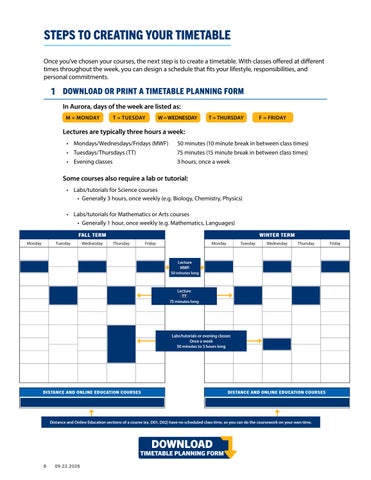
STEPS TO CREATING YOUR TIMETABLE Once you've chosen your courses, the next step is to create a timetable. With classes offered at different times throughout the week, you can design a schedule that fits your lifestyle, responsibilities, and personal commitments.
1 DOWNLOAD OR PRINT A TIMETABLE PLANNING FORM In Aurora, days of the week are listed as: M = MONDAY
T = TUESDAY
W = WEDNESDAY
T = THURSDAY
F = FRIDAY
Lectures are typically three hours a week: • Mondays/Wednesdays/Fridays (MWF)
50 minutes (10 minute break in between class times)
• Tuesdays/Thursdays (TT)
75 minutes (15 minute break in between class times)
• Evening classes
3 hours, once a week
Some courses also require a lab or tutorial: • Labs/tutorials for Science courses • Generally 3 hours, once weekly (e.g. Biology, Chemistry, Physics) • Labs/tutorials for Mathematics or Arts courses • Generally 1 hour, once weekly (e.g. Mathematics, Languages)
TT
DOWNLOAD
TIMETABLE PLANNING FORM 8
09.22.2026
2 IDENTIFY WHEN CLASSES ARE OFFERED Plan your timetable using information found in Aurora, the University of Manitoba’s online registration and student information system.
Watch How to Register Using Aurora
In Aurora, use the Register for Classes function to search for courses. Be sure to read all course details carefully, as they contain important information. Sections • Lecture (A) • Labs/tutorials (B) • Distance and Online Education courses (D) • Lecture sections that include a field trip/field work start with K (ex. K01)
CRN:
• 4- or 5-digit Course Reference Number Days and times the course/lab is offered: • M = Monday • T = Tuesday • W = Wednesday • T = Thursday • F = Friday
Status: • Maximum number of students that can be enrolled in this section
• Number of remaining spots
• Waitlist seats remaining
LINKED = Course must be taken with a lab
9
3 FILL IN YOUR TIMETABLE Build your timetable by adding each course to the Timetable Planning Form. Courses are offered in two formats: • In-Person sections have scheduled meeting times and locations. • Distance and Online Education sections (e.g. D01, D02) have no scheduled lecture times and allow you to complete coursework on your own schedule. • Term tests and final exams are held at set dates and times and are scheduled in the Central Time Zone (CDT/CST).
When building your timetable, prioritize courses in this order: • • • •
10
Courses with the fewest sections, as they offer less flexibility and may fill quickly. Courses that require both a lecture and a lab. Required courses before electives. Spanned courses that run at the same time in both Fall and Winter Terms (e.g. PSYC 1200).
09.22.2026
STEPS TO REGISTERING FOR CLASSES By the time you're ready to register for courses, your timetable should already be planned. If you've not done so, watch Get Ready to Register, Part 2: Registration.
1 DETERMINE YOUR INITIAL REGISTRATION TIME • All students are assigned a specific date and time to begin registering for Fall and Winter Term courses. This is called your Initial Registration Time and it is the earliest opportunity you have to register. Registering at this time gives you the best chance of securing the courses you want. • Check your assigned Initial Registration Time in Aurora on or after June 26. • In Aurora, select Open Registration Dashboard Prepare for Registration • New students: Initial Registration Time are assigned between July 9-15 • Returning students: Initial Registration Times are assigned between July 16–August 4
2 REGISTER FOR CLASSES USING AURORA • Before your initial registration time, view Get Ready to Register. • If a course you want to take is full, you may be able to add yourself to a waitlist. For instructions, please visit the waitlist page. • Make adjustments to your registration before the Course Add and Course Drop Deadlines. • Be sure to plan and register for both Fall and Winter term courses during your initial registration time.
3 CONFIRM YOUR REGISTRATION • Review your registration to make sure it is accurate, and as you intended. • In Aurora, select Open Registration Dashboard View Registration Information
4 CHECK YOUR FEES • Check Aurora for your fee balance by locating the View Account Summary by Term card. • Be sure to review your account summary each time you make changes to your registration.
5 GET YOUR BOOK LIST • A book list for the courses you are registered in will be available through Aurora before your classes begin. • In Aurora, select My Course Materials card.
? NEED ADDITIONAL GUIDANCE? • Attend a Get Ready to Register Session offered by the First Year Centre, or watch a recorded session. • Watch How to Register Using Aurora for step-by-step guidance. • Connect with an Academic Advisor in the First Year Centre if you have questions during the course planning process.
If you receive a registration error, consult Registration Errors for instructions on how to resolve it.
11
WHICH COURSES DO I TAKE IN FIRST YEAR? FACULTIES AND PROGRAMS LIST
Find your target degree program on this index page, which links directly to the appropriate program planning page.
UNDECIDED?
FACULTY OF ARTS
See Tips for Choosing Courses if you are Undecided
Anthropology Art History Asian Studies Canadian Studies Central & East European Studies Classical Studies Criminology Economics Economics and Econometrics Economics and Society Economics-Statistics Economics-Mathematics English Film Studies French German Global Political Economy Greek History Icelandic Indigenous Governance Indigenous Studies Italian Studies Labour Studies Latin Latin American Studies Linguistics Mathematics Medieval and Early Modern Studies Philosophy Political Science Psychology Religion and Culture Russian Sociology Spanish Theatre Ukrainian Ukrainian Canadian Heritage Studies Women’s and Gender Studies
FACULTY OF AGRICULTURAL AND FOOD SCIENCES Agribusiness Agronomy Agriculture
Human Nutritional Sciences
Animal Systems Plant Biotechnology
Agroecology Food Science
Pre-Veterinary Medicine
FACULTY OF ARCHITECTURE Environmental Design
SCHOOL OF ART Art History Fine Arts (Studio) Fine Arts, Diploma (Studio)
ASPER SCHOOL OF BUSINESS Accounting
Human Resource Management /Industrial Relations
Actuarial Mathematics
Indigenous Business Studies
Business Analytics Entrepreneurship/ Innovation
Marketing Strategy and Global Management Supply Chain Management and Logistics
Finance Generalist
FACULTY OF EDUCATION Early, Middle, and Senior Years (After 1st degree)
PRICE FACULTY OF ENGINEERING Biosystems Engineering Civil Engineering Computer Engineering Electrical Engineering Mechanical Engineering
12
09.22.2026
CLAYTON H. RIDDELL FACULTY OF ENVIRONMENT, EARTH, AND RESOURCES
DESAUTELS FACULTY OF MUSIC
Environmental Science
Environmental Geoscience
Jazz Studies
Environmental Studies
Geology
Music
Geography
Geophysics
Earth Sciences
Physical Geography
RADY FACULTY OF HEALTH SCIENCES Interdisciplinary Health Health Sciences Health Studies School of Dental Hygiene Dental Hygiene Dr. Gerald Niznick College of Dentistry Dentistry (After 69 credit hours or 1st degree) Max Rady College of Medicine Medicine (After 1st degree) College of Nursing Midwifery Nursing College of Pharmacy Pharmacy (After 48 credit hours or 1st degree) College of Rehabilitation Sciences Occupational Therapy (After 1st degree) Physical Therapy (After 1st degree) Respiratory Therapy Open to Canadian citizens and Permanent Residents only
FACULTY OF KINESIOLOGY AND RECREATION MANAGEMENT Athletic Therapy Physical Education
FACULTY OF SCIENCE Actuarial Mathematics Applied Mathematics Astronomy & Astrophysics Biochemistry Biological Sciences Chemistry Chemistry–Physics Computer Science Computer Science–Mathematics Computer Science–Physics and Astronomy Computer Science–Statistics Data Science General Science Genetics Mathematics Mathematics–Economics Mathematics–Physics and Astronomy Medical & Biological Physics Microbiology Physics Physics & Astronomy Psychology Statistics Statistics–Actuarial Mathematics Statistics–Economics Statistics–Mathematics
Kinesiology Recreation Management & Community Development
FACULTY OF SOCIAL WORK Social Work
FACULTY OF LAW Law (After 60 credit hours or 1st degree)
You can click on any program in the chart e.g. Nursing to view the required courses. 13
UNDECIDED? NOT SURE WHICH DEGREE IS RIGHT FOR YOU? DON’T WANT TO RUSH INTO CHOOSING A DEGREE? THAT’S OKAY! Your first year at the University of Manitoba is a great opportunity to explore different courses, discover your interests, and learn about possible career paths. By the time you register for your second year, you'll likely have a clearer sense of the degree you want to pursue and can begin selecting courses that align with that program's requirements.
What courses should I take in my first year? • If you haven’t chosen a degree yet, you won’t have a specific course list to follow when registering for your first year. Instead, you can use the Recommended Introductory Courses List to explore a wide range of courses and register in those that interest you. • You can also view the Faculties and Programs List to see all undergraduate degree programs offered at the University of Manitoba.
What is the Recommended Introductory Courses List? • The Recommended Introductory Courses List includes courses that new students are eligible to take in their first year. Some subjects may feel familiar from high school, while others may be entirely new. • Courses on this list are grouped by the faculty that offers them, making it easier to explore academic areas across the university.
How do I use the Recommended Introductory Courses List to pick courses? • Browse the Recommended Introductory Courses List, including subjects you may not recognize. Click on a course code (for example, BIOL 1020) to review important details such as the course description, prerequisites, and any registration restrictions. • Make a list of courses that interest you and note the faculty offering each one. Be sure to include the course codes - you’ll need them when registering. • When it’s time to register, choose your courses from the list you've created.
What's next for me? • As you explore courses, start researching degrees that include the courses you find most interesting and learn about the careers connected to those degree programs. • If you notice that many of your preferred courses come from a particular faculty, visit the Faculties and Programs List to review degree options available. Each program page provides detailed information about program requirements, opportunities such as co-op or experiential learning, and potential career outcomes.
Things to consider when using your first year to explore • Taking time to explore courses, degrees, and careers can help you feel confident and informed about your academic direction. However, some programs have specific timelines, GPA requirements, or prerequisite courses, which may affect when you're eligible to apply. • Be sure to set aside some time during your first year to research degree options and career pathways. Exploring courses is an important first step - but it's only one part of making an informed decision about your academic future.
14
09.22.2026
HIGH SCHOOL PREREQUISITES FOR UNIVERSITY-LEVEL COURSES Some 40S courses may be needed as prerequisites, depending on the courses you choose. In the Recommended Introductory Courses List, click the course code (e.g. BIOL 1020)to view specific prerequisite requirements. If you're missing a high school prerequisite or didn't achieve the minimum grade needed, you can upgrade your high school course.
? NEED MORE INFORMATION? CAREER SERVICES
CAREER COMPASS
UM ACHIEVE
ACADEMIC CALENDAR
DOWNLOAD
IMPORTANT DATES
COURSE PLANNING FORM
15
FACULTY OF AGRICULTURAL AND FOOD SCIENCES AGRIBUSINESS, B.Sc. FIRST YEAR COURSES ABIZ 1000 Introduction to Agribusiness Management AGRI 1600 Introduction to Agrifood Systems BIOL 1000 Foundations of Life (3) or BIOL 1020 Biology 1: Principles and Themes (3 + lab) BIOL 1010 Biological Diversity and Interaction (3) or BIOL 1030 Biology 2: Biological Diversity, Function and Interactions (3 + lab)
CREDIT HOURS 3 3 + lab 6
ECON 1010 Introduction to Microeconomic Principles
3
ECON 1020 Introduction to Macroeconomic Principles
3
HNSC 1200 Food: Facts and Fallacies or HNSC 1210 Nutrition for Health and Changing Lifestyles
3
MATH 1300 (M) Vector Geometry and Linear Algebra or MATH 1210 (M) Techniques of Classical and Linear Algebra
3 + lab
MATH 1524 (M) Mathematics for Management and Social Sciences or MATH 1500 (M) Introduction to Calculus or MATH 1510 (M) Applied Calculus 1
3 + lab
Elective (see Tips for Choosing Courses)
3
Total Credit Hours
30
! MINIMUM ADMISSION REQUIREMENTS
All courses listed in the chart are required for the degree program, but aren't required for admission. Admission to the Agribusiness program requires any 24 graded credit hours of university-level coursework. Minimum admission requirements are outlined in the Faculty of Agricultural and Food Sciences 2027-2028 Advanced Entry admission requirements.
TIPS FOR CHOOSING COURSES • AGRI 1600, ECON 1010, MATH 1300 (M), and MATH 1524 (M) (or approved substitutes listed in the chart) are prerequisites for required second-year courses. It's recommended to complete these courses in your first year, prior to admission. • BIOL 1020 and BIOL 1030 are recommended for students who are undecided about which Agriculture degree to pursue or who plan to take advanced Plant Science (PLNT) courses as electives. • The Written (W) course isn't required for admission. The W requirement is fulfilled by AGRI 2030 (W) in Year 2 of the program. • The Mathematics (M) course isn't required for admission. The M requirement is fulfilled by a MATH course listed in the first-year chart. • Choose one elective from the Recommended Introductory Courses List. • Advanced Placement (AP) or International Baccalaureate (IB) credit may be used, where applicable, to reduce your first-year course load and to meet prerequisites for 2000-level courses. • Contact an Academic Advisor in the First Year Centre to confirm whether Summer Term courses can be used to meet admission requirements for your target degree program.
16
09.22.2026
HIGH SCHOOL PREREQUISITES FOR UNIVERSITY-LEVEL COURSES Minimum 60% required in: • Math 40S (Pre-Calculus) Minimum 50% required in: • Biology 40S and one of Chemistry 40S or Physics 40S - if taking BIOL 1020 If you're missing a high school prerequisite or didn't achieve a sufficient grade for prerequisite purposes, you have the option to upgrade your high school course.
HOW TO APPLY Please refer to the Admissions page to: • Review the 2027-2028 Advanced Entry admission requirements, which outline detailed application information, deadlines, and minimum requirements to apply to this program. • Submit and complete payment for your admission application. Admission requirements are subject to change. Review the Advanced Entry admission requirements for your target degree program regularly to ensure you have the most up-to-date information.
MINIMUM TIME TO GRADUATION • 4 years (120 credit hours). Participating in the Co-op program provides valuable, paid work experience and may extend your program by one term or up to one year.
? NEED MORE INFORMATION? PROGRAM OVERVIEW
CAREER COMPASS
ACADEMIC CALENDAR
UM ACHIEVE
DOWNLOAD
FACULTY WEBSITE
IMPORTANT DATES
COURSE PLANNING FORM
17
FACULTY OF AGRICULTURAL AND FOOD SCIENCES AGRICULTURE, B.Sc. AGRONOMY, ANIMAL SYSTEMS, OR PLANT BIOTECHNOLOGY FIRST YEAR COURSES
CREDIT HOURS
ABIZ 1000 Introduction to Agribusiness Management
3
AGRI 1600 Introduction to Agrifood Systems
3 + lab
BIOL 1020 Biology 1: Principles and Themes
3 + lab
BIOL 1030 Biology 2: Biological Diversity, Function and Interactions
3 + lab
CHEM 1100 Introductory Chemistry 1: Atomic and Molecular Structure and Energetics
3
CHEM 1110 Introductory Chemistry 2: Interaction, Reactivity, and Chemical Properties or CHEM 1130 Introduction to Organic Chemistry
3
ECON 1010 Introduction to Microeconomic Principles
3
HNSC 1200 Food: Facts and Fallacies or HNSC 1210 Nutrition for Health and Changing Lifestyles
3
Choose one of the following: MATH 1210 (M) Techniques of Classical and Linear Algebra MATH 1300 (M) Vector Geometry and Linear Algebra MATH 1500 (M) Introduction to Calculus MATH 1510 (M) Applied Calculus 1 MATH 1524 (M) Mathematics for Management and Social Sciences
3 + lab
Elective (see Tips for Choosing Courses)
3
Total Credit Hours
30
! MINIMUM ADMISSION REQUIREMENTS
All courses listed in the chart are required in the degree program, but aren't required for admission. Admission to Agriculture programs requires any 24 graded credit hours of university-level coursework. Minimum requirements are outlined in the Faculty of Agricultural and Food Sciences 2027-2028 Advanced Entry admission requirements.
TIPS FOR CHOOSING COURSES • AGRI 1600, BIOL 1020, BIOL 1030, CHEM 1100, CHEM 1110 (or CHEM 1130), and ECON 1010 are prerequisites for required second-year courses, depending on the major selected. It's recommended to complete these courses in your first year, prior to admission. • A Written (W) course isn't required for admission. The W requirement is fulfilled in Year 2 by AGRI 2030 (W). • A Mathematics (M) course is not required for admission. The M requirement is fulfilled by a MATH course in the chart. • Choose an elective from the Recommended Introductory Courses List. • Advanced Placement (AP) or International Baccalaureate (IB) credit may be used, where applicable, to reduce your first-year course load and to meet prerequisites for 2000-level courses. • Contact an Academic Advisor in the First Year Centre to confirm whether Summer Term courses can be used to meet admission requirements for your target degree program.
18
09.22.2026
HIGH SCHOOL PREREQUISITES FOR UNIVERSITY-LEVEL COURSES Minimum 50% required in: • Biology 40S • Chemistry 40S Minimum 60% required in: • Math 40S (Pre-Calculus) or 70% in Math 40S (Applied) If you're missing a high school prerequisite or didn't achieve a sufficient grade for prerequisite purposes, you have the option to upgrade your high school course.
HOW TO APPLY Please refer to the Admissions page to: • Review the 2027-2028 Advanced Entry admission requirements, which outline detailed application information, deadlines, and minimum requirements to apply to this program. • Submit and pay for your application for admission. Admission requirements are subject to change. Review the Advanced Entry admission requirements for your target degree program regularly to ensure you have the most up-to-date information.
MINIMUM TIME TO GRADUATION • 4 years (120 credit hours). Participating in the Co-op program provides valuable, paid work experience and may extend your program by one term or up to one year.
? NEED MORE INFORMATION? PROGRAM OVERVIEW
CAREER COMPASS
ACADEMIC CALENDAR
UM ACHIEVE
DOWNLOAD
FACULTY WEBSITE
IMPORTANT DATES
COURSE PLANNING FORM
19
FACULTY OF AGRICULTURAL AND FOOD SCIENCES AGROECOLOGY, B.Sc. FIRST YEAR COURSES ABIZ 1000 Introduction to Agribusiness Management
CREDIT HOURS 3
AGRI 1600 Introduction to Agrifood Systems
3 + lab
BIOL 1020 Biology 1: Principles and Themes
3 + lab
BIOL 1030 Biology 2: Biological Diversity, Function and Interactions
3 + lab
CHEM 1100 Introductory Chemistry 1: Atomic and Molecular Structure and Energetics
3
CHEM 1110 Introductory Chemistry 2: Interaction, Reactivity, and Chemical Properties or CHEM 1130 Introduction to Organic Chemistry
3
ECON 1010 Introduction to Microeconomic Principles
3
HNSC 1200 Food: Facts and Fallacies or HNSC 1210 Nutrition for Health and Changing Lifestyles Electives (see Tips for Choosing Courses)
6
Total Credit Hours
30
3
! MINIMUM ADMISSION REQUIREMENTS
All courses listed in the chart are required in the degree program, but aren't required for admission. Admission to the Agroecology program requires any 24 graded credit hours of university-level coursework. Minimum requirements are outlined in the Faculty of Agricultural and Food Sciences 2027-2028 Advanced Entry admission requirements.
TIPS FOR CHOOSING COURSES • AGRI 1600, BIOL 1020, BIOL 1030, and ECON 1010 are prerequisites for required second-year courses in the program. These courses, along with CHEM 1100 and CHEM 1110 (or CHEM 1130), are recommended to be completed in first year, prior to admission. • The Written (W) course is not required for admission. The W requirement is fulfilled in Year 2 by AGRI 2030 (W). • The Mathematics (M) course is not required for admission. The M requirement is fulfilled by AGRI 2400 (M) in year 2 of the program. • Choose electives from the Recommended Introductory Courses List. • Advanced Placement (AP) or International Baccalaureate (IB) credit may be used, where applicable, to reduce the first-year course load and to meet prerequisites for 2000-level courses. • Contact an Academic Advisor in the First Year Centre to confirm whether Summer Term courses can be used to meet admission requirements for your target degree program.
20
09.22.2026
HIGH SCHOOL PREREQUISITES FOR UNIVERSITY-LEVEL COURSES Minimum 50% required in: • Biology 40S • Chemistry 40S • Math 40S (Pre-Calculus or Applied) If you're missing a high school prerequisite or didn't achieve a sufficient grade for prerequisite purposes, you have the option to upgrade your high school course.
HOW TO APPLY Please refer to the Admissions page to: • Review the 2027-2028 Advanced Entry admission requirements, which outline detailed application information, deadlines, and minimum requirements to apply to this program. • Submit and pay for your application for admission. Admission requirements are subject to change. Review the Advanced Entry admission requirements for your target degree program regularly to ensure you have the most up-to-date information.
MINIMUM TIME TO GRADUATION • 4 years (120 credit hours). Participating in the Co-op program provides valuable, paid work experience and may extend your program by one term or up to one year.
? NEED MORE INFORMATION? PROGRAM OVERVIEW
CAREER COMPASS
ACADEMIC CALENDAR
UM ACHIEVE
DOWNLOAD
FACULTY WEBSITE
IMPORTANT DATES
COURSE PLANNING FORM
21
FACULTY OF AGRICULTURAL AND FOOD SCIENCES FOOD SCIENCE, B.Sc. Options in Science and Business are available.
FIRST YEAR COURSES
CREDIT HOURS
AGRI 1600 Introduction to Agrifood Systems
3 + lab
BIOL 1020 Biology 1: Principles and Themes
3 + lab
BIOL 1030 Biology 2: Biological Diversity, Function and Interactions
3 + lab
CHEM 1100 Introductory Chemistry 1: Atomic and Molecular Structure and Energetics
3
CHEM 1110 Introductory Chemistry 2: Interaction, Reactivity, and Chemical Properties or CHEM 1130 Introduction to Organic Chemistry
3
ECON 1010 Introduction to Microeconomic Principles
3
HNSC 1200 Food: Facts and Fallacies HNSC 1210 Nutrition for Health and Changing Lifestyles
3 3
MATH 1300 (M) Vector Geometry and Linear Algebra or MATH 1210 (M) Techniques of Classical and Linear Algebra
3 + lab
MATH 1500 (M) Introduction to Calculus or MATH 1510 (M) Applied Calculus 1 or MATH 1524 (M) Mathematics for Management and Social Sciences
3 + lab
Total Credit Hours
30
! MINIMUM ADMISSION REQUIREMENTS
All courses listed in the chart are required in the degree program, but aren't required for admission. Admission to the Food Science program requires any 24 graded credit hours of university-level coursework. Minimum requirements are outlined in the Faculty of Agricultural and Food Sciences 2027-2028 Advanced Entry admission requirements.
TIPS FOR CHOOSING COURSES • BIOL 1020, BIOL 1030, CHEM 1100, and CHEM 1110 (or CHEM 1130) are prerequisites for required second-year courses in the program. It's recommended to complete these in first year, prior to admission. • One of AGRI 1600, HNSC 1200, or HNSC 1210 is a prerequisite for AGRI 2400 (M) in the second year. It's recommended to complete one of these in first year, prior to admission. • A Written (W) course is not required for admission. The W requirement is fulfilled in Year 2 by AGRI 2030 (W). • A Mathematics (M) course is not required for admission. The M requirement is fulfilled by a MATH course in the chart. • Advanced Placement (AP) or International Baccalaureate (IB) credit may be used, where applicable, to reduce the first-year course load and to meet prerequisites for 2000-level courses. • Contact an Academic Advisor in the First Year Centre to confirm whether Summer Term courses can be used to meet admission requirements for your target degree program.
22
09.22.2026
HIGH SCHOOL PREREQUISITES FOR UNIVERSITY-LEVEL COURSES Minimum 50% required in: • Biology 40S • Chemistry 40S Minimum 60% required in: • Math 40S (Pre-Calculus) If you're missing a high school prerequisite or didn't achieve a sufficient grade for prerequisite purposes, you have the option to upgrade your high school course.
HOW TO APPLY Please refer to the Admissions page to: • Review the 2027-2028 Advanced Entry admission requirements, which outline detailed application information, deadlines, and minimum requirements to apply to this program. • Submit and pay for your application for admission. Admission requirements are subject to change. Review the Advanced Entry admission requirements for your target degree program regularly to ensure you have the most up-to-date information.
MINIMUM TIME TO GRADUATION • 4 years (120 credit hours). Participating in the Co-op program provides valuable, paid work experience and may extend your program by one term or up to one year.
? NEED MORE INFORMATION? PROGRAM OVERVIEW
CAREER COMPASS
ACADEMIC CALENDAR
UM ACHIEVE
DOWNLOAD
FACULTY WEBSITE
IMPORTANT DATES
COURSE PLANNING FORM
23
FACULTY OF AGRICULTURAL AND FOOD SCIENCES HUMAN NUTRITIONAL SCIENCES, B.Sc. FIRST YEAR COURSES
CREDIT HOURS
HNSC 1200 Food: Facts and Fallacies
3
HNSC 1210 Nutrition for Health and Changing Lifestyles
3
AGRI 1600 Introduction to Agrifood Systems
3 + lab
BIOL 1410 Anatomy of the Human Body
3 + lab
BIOL 1412 Physiology of the Human Body
3 + lab
CHEM 1100 Introductory Chemistry 1: Atomic and Molecular Structure and Energetics
3
CHEM 1110 Introductory Chemistry 2: Interaction, Reactivity, and Chemical Properties or CHEM 1130 Introduction to Organic Chemistry
3
PSYC 1200 Introduction to Psychology or SOC 1000 Introduction to Sociology
6-3
Elective(s) (see Tips for Choosing Courses)
3-6
Total Credit Hours
30
! MINIMUM ADMISSION REQUIREMENTS
All courses listed in the chart are required in the degree program, but aren't required for admission. Admission to the Human Nutritional Sciences program requires any 24 graded credit hours of university-level coursework. Minimum requirements are outlined in the Faculty of Agricultural and Food Sciences 2027-2028 Advanced Entry admission requirements.
TIPS FOR CHOOSING COURSES • HNSC 1200, HNSC 1210, CHEM 1100 and CHEM 1110 (or CHEM 1130), 6 credit hours of BIOL, and PSYC 1200 or SOC 1000 are prerequisites for required second-year courses in the program. It's recommended to complete these in first year, prior to admission. • If you take PSYC 1200, you'll have space for 3 credit hours of electives. If you take SOC 1000, you'll have space for 6 credit hours of electives. • BIOL 1020 and BIOL 1030 (minimum grade of C) may be used instead of BIOL 1410. In this case, BIOL 1412 will be taken in Year 2. • A Written (W) course is not required for admission. The W requirement is fulfilled in Year 2 by HNSC 2000 (W). • The Mathematics (M) course is not required for admission. The M requirement is fulfilled in Year 2 by AGRI 2400 (M). • Choose elective(s) from the Recommended Introductory Courses List. • Advanced Placement (AP) or International Baccalaureate (IB) credit may be used, where applicable, to reduce the first-year course load and to meet prerequisites for 2000-level courses. • Contact an Academic Advisor in the First Year Centre to confirm whether Summer Term courses can be used to meet admission requirements for your target degree program.
24
09.22.2026
HIGH SCHOOL PREREQUISITES FOR UNIVERSITY-LEVEL COURSES Minimum 50% required in: • Chemistry 40S • Math 40S (Pre-Calculus or Applied) • Biology 40S if taking BIOL 1020 If you're missing a high school prerequisite or didn't achieve a sufficient grade for prerequisite purposes, you have the option to upgrade your high school course.
HOW TO APPLY Please refer to the Admissions page to: • Review the 2027-2028 Advanced Entry admission requirements, which outline detailed application information, deadlines, and minimum requirements to apply to this program. • Submit and pay for your application for admission. Admission requirements are subject to change. Review the Advanced Entry admission requirements for your target degree program regularly to ensure you have the most up-to-date information.
MINIMUM TIME TO GRADUATION • 4 years (120 credit hours). Participating in the Co-op program provides valuable, paid work experience and may extend your program by one term or up to one year.
? NEED MORE INFORMATION? PROGRAM OVERVIEW
CAREER COMPASS
ACADEMIC CALENDAR
DIETITIAN PATHWAY
COURSE PLANNING FORM
DOWNLOAD
UM ACHIEVE
FACULTY WEBSITE
IMPORTANT DATES
25
FACULTY OF AGRICULTURAL AND FOOD SCIENCES PREPARATION FOR VETERINARY MEDICINE
RECOMMENDED PROGRESSION FOR THE PRE-VETERINARY PATHWAY YEAR 1
CREDIT HOURS
BIOL 1020 Biology 1: Principles and Themes
3 + lab
BIOL 1030 Biology 2: Biological Diversity, Function and Interactions
3 + lab
CHEM 1100 Introductory Chemistry 1: Atomic and Molecular Structure and Energetics
3
CHEM 1120 Introduction to Chemistry Techniques CHEM 1130 Introduction to Organic Chemistry
3 3
PHYS 1020 (M) General Physics 1
3 + lab
INDG 1220 Indigenous Peoples in Canada, Part 1 (3) or INDG 1240 Indigenous Peoples in Canada, Part 2 (3) or INDG 1200 Indigenous Peoples in Canada (6)
3-6
Electives (see Tips for Choosing Courses)
9-12
Total Credit Hours
33
YEAR 2 AGRI 2030 (W) Technical Communications (3) or ENGL 1340 (W) Introduction to Literary Analysis (3) or ENGL 1400 (W) Thematic Approaches to the Study of Literature (3) or AGRI 2400 (M) Experimental Methods in Agricultural and Food Sciences
CREDIT HOURS 3 3 + lab
CHEM 1110 Introductory Chemistry 2: Interaction, Reactivity, and Chemical Properties
3
CHEM 2730 / MBIO 2730 Elements of Biochemistry 1
3
MBIO 1010 Microbiology 1 PLNT 2520 Genetics or BIOL 2500 Genetics 1
3 + lab 3 + lab
Electives (see Tips for Choosing Courses)
12
Total Credit Hours
30
! MINIMUM ADMISSION REQUIREMENTS
Admission to the Western College of Veterinary Medicine (WCVM) requires at least 60 credit hours of university-level study, including specific courses listed in the chart. • CHEM 1120 isn't included in the 60 credit hours required for admission. UM applicants will apply to WCVM with at least 63 credit hours, including CHEM 1120. • All applicants must complete at least two full years of university courses. The definition of a "full year" for this purpose is 24 credit hours in each of two Regular Sessions (i.e. September-April). • CHEM 1120 won't count as part of the 24 credit hours for a full year of university courses. If a student wishes to take CHEM 1120 during a Regular Session, they must take 27 credit hours total during a Regular Session to meet the requirement of a full year of university courses. • WCVM strongly recommends that applicants complete 30 credit hours per year to ensure their preparedness and future success.
26
09.22.2026
TIPS FOR CHOOSING COURSES • BIOL 1020, BIOL 1030, CHEM 1100, and CHEM 1130 are prerequisites for required Year 2 courses. It's recommended that these courses be completed in the first year. • AGRI 1600, HNSC 1200, or HNSC 1210 is a prerequisite for AGRI 2400 (M) in the second year. It's recommended that one of these courses be completed in the first year, as part of your electives. • In lieu of AGRI 2400 (M), you can take STAT 1000 (M) to meet the Statistics requirement for admission to the Western College of Veterinary Medicine (WCVM). However, AGRI 2400 (M) is required for all degree programs in the Faculty of Agricultural and Food Sciences. • AGRI 2030 (W) meets the 3-credit hour English requirement. In lieu of AGRI 2030 (W), you may take ENGL 1340 (W) or ENGL 1400 (W) to meet the W requirement for admission to the WCVM. However, AGRI 2030 (W) is required for all degree programs in the Faculty of Agriculture and Food Sciences. • Choose electives from the Recommended Introductory Courses List. • If you're not admitted to Veterinary Medicine after completing 63 credit hours, you may choose to complete an Animal Systems degree. To pursue the Pre-Veterinary pathway in parallel with an Animal Systems degree, it's recommended that you select the following electives: • ABIZ 1000 • AGRI 1600 • ECON 1010 • ANSC 2500 • ANSC 2510 • ANSC 2520 • HNSC 1200 or HNSC 1210 • MATH 1300 (M) or MATH 1210 (M) or MATH 1500 (M) or MATH 1510 (M) or MATH 1524 (M)
• To complete all courses listed in the charts within your first two years of university study, you must either take courses during the Summer Term between your first and second year or take 33 credit hours during the Regular Session in Year 2. Consider taking CHEM 1120 during the Summer Term, as this course doesn't count toward the requirement of 24 credit hours in a Regular Session (September-April).
HIGH SCHOOL PREREQUISITES FOR UNIVERSITY-LEVEL COURSES Minimum 50% required in: • Biology 40S • Chemistry 40S • Physics 40S (for PHYS 1020) Minimum 60% required in: • Math 40S (Pre-Calculus) or 70% in Math 40S (Applied) If you're missing a high school prerequisite or didn't achieve a sufficient grade for prerequisite purposes, you have the option to upgrade your high school course.
HOW TO APPLY • For full admission details, see the WCVM Admissions page. • All applicants must complete the English Casper® test (online, open-response situational judgment test).
MINIMUM TIME TO GRADUATION • 6 years: 2 years minimum (63 credit hours) of study at the University of Manitoba, plus 4 years at the Western College of Veterinary Medicine.
? NEED MORE INFORMATION? PROGRAM OVERVIEW
PROGRESSION PLAN
FACULTY WEBSITE
IMPORTANT DATES
DOWNLOAD
COURSE PLANNING FORM
27
FACULTY OF ARCHITECTURE ENVIRONMENTAL DESIGN, B.Env.D. FIRST YEAR COURSES
CREDIT HOURS
EVDS 1600 Introduction to Environmental Design
3
EVDS 1602 Visual Literacy EVDS 1660 History of Culture, Ideas and Environment 1 EVDS 1670 History of Culture, Ideas and Environment 2 EVDS 1680 Environmental Technology Written (W) course (see Tips for Choosing Courses) Mathematics (M) course (see Tips for Choosing Courses) Electives (see Tips for Choosing Courses)
3 3 3 3 3 3 9
Total Credit Hours
30
! MINIMUM ADMISSION REQUIREMENTS
Admission to Environmental Design requires 30 graded credit hours of university-level coursework, which must include: • EVDS 1600 • EVDS 1602 • EVDS 1680
• Written (W) course • Mathematics (M) course • Open electives
All courses must be at the 1000-level or higher. Minimum requirements are outlined in the Faculty of Architecture 2027-2028 Advanced Entry admission requirements. It's strongly recommended to complete EVDS 1660 and EVDS 1670 in your first year, prior to admission, as part of your open electives. These courses are required components of the degree program and serve as prerequisites for 2000-level courses.
TIPS FOR CHOOSING COURSES • Choose electives from the Recommended Introductory Courses List, including a Written (W) course and a Mathematics (M) course. All selected courses must be at the 1000-level or higher. • Advanced Placement (AP) or International Baccalaureate (IB) credit may be used, where applicable, to reduce the first-year course load and to meet prerequisites for 2000-level courses. • Contact an Academic Advisor in the First Year Centre to confirm whether Summer Term courses can be used to meet admission requirements for your target degree program.
28
09.22.2026
HIGH SCHOOL PREREQUISITES FOR UNIVERSITY-LEVEL COURSES • A specific Math 40S course may be required, depending on the Mathematics (M) course you choose.
HOW TO APPLY Please refer to the Admissions page to: • Review the 2027-2028 Advanced Entry admission requirements, which outline detailed application information, deadlines, and minimum requirements to apply to this program. • Submit and pay for your application for admission. Admission requirements are subject to change. Review the Advanced Entry admission requirements for your target degree program regularly to ensure you have the most up-to-date information.
MINIMUM TIME TO GRADUATION • 4 years (129 credit hours).
? NEED MORE INFORMATION? PROGRAM OVERVIEW
CAREER COMPASS
ACADEMIC CALENDAR
UM ACHIEVE
DOWNLOAD
FACULTY WEBSITE
IMPORTANT DATES
COURSE PLANNING FORM
29
SCHOOL OF ART FINE ARTS, B.F.A. (STUDIO) Honours and General degrees are available.
FIRST YEAR COURSES
CREDIT HOURS
STDO 1210 Drawing: Studio 1
3
STDO 1240 Figure Study 1
3
STDO 1250 Drawing: Studio 2
3
STDO 1410 Visual Language
3
STDO 1470 Materials Studio
3
STDO 1480 Digital Essentials
3
STDO 1510 Art Now
3
FAAH 1030 Introduction to Art 1A or EVDS 1660 History of Culture, Ideas and Environment 1
3 + lab*
FAAH 1040 Introduction to Art 2A or EVDS 1670 History of Culture, Ideas and Environment 2
3 + lab*
Written (W) course (see Tips for Choosing Courses)
3
Mathematics (M) course (see Tips for Choosing Courses)
3
*FAAH 1030 and FAAH 1040 have a mandatory lab component, EVDS 1660 and EVDS 1670 do not have a lab.
! MINIMUM ADMISSION REQUIREMENTS
All courses listed in the chart are required in the degree program, but may not be required for admission. Admission to a Studio degree program requires 24 graded credit hours of university-level coursework and a portfolio submission. No specific courses are required. Minimum requirements are outlined in the School of Art 2027-2028 Advanced Entry admission requirements.
TIPS FOR CHOOSING COURSES • Students are encouraged to register for all listed STDO and FAAH courses. This ensures completion of necessary prerequisites for Year 2 Studio and Art History courses if admitted to the Fine Arts Studio Program. • To fulfill the Mathematics (M) course requirement, consider enrolling in FA 1020 (M) / MATH 1020 (M) Mathematics in Art. • The Written (W) course requirement may be fulfilled by FAAH 2930 (W) Writing About Art, which is recommended for Year 2. • Students admitted through the School of Art Direct Entry pathway should also register in FA 1990 in their first year. • Advanced Placement (AP) or International Baccalaureate (IB) credit may be used, where applicable, to reduce the first-year course load and to meet prerequisites for 2000-level courses. • Contact an Academic Advisor in the First Year Centre to confirm whether Summer Term courses can be used to meet admission requirements for your target degree program.
30
09.22.2026
HIGH SCHOOL PREREQUISITES FOR UNIVERSITY-LEVEL COURSES Recommended: • Art 40S
HOW TO APPLY Please refer to the Admissions page to: • Review the 2027-2028 Advanced Entry admission requirements, which outline detailed application information, deadlines, and minimum requirements to apply to this program. • Submit and pay for your application for admission. Admission requirements are subject to change. Review the Advanced Entry admission requirements for your target degree program regularly to ensure you have the most up-to-date information.
MINIMUM TIME TO GRADUATION • General: 3 years (93 credit hours). • Honours: 4 years (123 credit hours).
? NEED MORE INFORMATION? PROGRAM OVERVIEW
ACADEMIC CALENDAR
UM ACHIEVE
FACULTY WEBSITE
DOWNLOAD
IMPORTANT DATES
COURSE PLANNING FORM
31
SCHOOL OF ART FINE ARTS, DIPLOMA (STUDIO) FIRST YEAR COURSES
CREDIT HOURS
STDO 1210 Drawing: Studio 1
3
STDO 1240 Figure Study 1
3
STDO 1250 Drawing: Studio 2
3
STDO 1410 Visual Language
3
STDO 1470 Materials Studio
3
STDO 1480 Digital Essentials
3
STDO 1510 Art Now
3
FAAH 1030 Introduction to Art 1A
3 + lab
Total Credit Hours
24
! MINIMUM ADMISSION REQUIREMENTS
All courses listed in the chart are required in the diploma program, but may not be required for admission. Admission to the Diploma in Art requires a portfolio submission. No specific courses are required. Minimum requirements are outlined in the School of Art 2027-2028 Advanced Entry admission requirements.
TIPS FOR CHOOSING COURSES • Consider registering for all STDO and FAAH courses listed. This will ensure that you have the necessary prerequisites for Year 2 Studio and Art History courses required for the Diploma in Art. • School of Art Direct Entry students should also register in FA 1990 in their first year. • Advanced Placement (AP) or International Baccalaureate (IB) credit may be used, where applicable, to reduce the first-year course load and to meet prerequisites for 2000-level courses.
32
09.22.2026
HIGH SCHOOL PREREQUISITES FOR UNIVERSITY-LEVEL COURSES Recommended: • Art 40S
HOW TO APPLY Please refer to the Admissions page to: • Review the 2027-2028 Advanced Entry admission requirements, which outline detailed application information, deadlines, and minimum requirements to apply to this program. • Submit and pay for your application for admission. Admission requirements are subject to change. Review the Advanced Entry admission requirements for your target degree program regularly to ensure you have the most up-to-date information.
MINIMUM TIME TO GRADUATION • Diploma in Art: 2 years (48 credit hours) in the School of Art.
? NEED MORE INFORMATION? PROGRAM OVERVIEW
ACADEMIC CALENDAR
UM ACHIEVE
FACULTY WEBSITE
DOWNLOAD
IMPORTANT DATES
COURSE PLANNING FORM
33
SCHOOL OF ART ART HISTORY, B.F.A. Honours and General degrees are available.
FIRST YEAR COURSES
CREDIT HOURS
FAAH 1030 Introduction to Art 1A EVDS 1660 History of Culture, Ideas and Environment 1
3 + lab*
FAAH 1040 Introduction to Art 2A EVDS 1670 History of Culture, Ideas and Environment 2
3 + lab*
Choose 6 credit hours from the 'Approved List of Non-School of Art Electives' on the next page
6
ENGL 1200 (W) Representative Literary Works (6) or ENGL 1400 (W) Thematic Approaches to the Study of Literature (3)
3-6
Mathematics (M) course (see Tips for Choosing Courses)
3
Social Sciences or Science electives (see Tips for Choosing Courses)
6
Electives (see Tips for Choosing Courses)
3-6
*FAAH 1030 and FAAH 1040 have a mandatory lab component, EVDS 1660 and EVDS 1670 do not have a lab.
! MINIMUM ADMISSION REQUIREMENTS
All courses listed in the chart are required in the degree program, but may not be required for admission. Admission to Art History (School of Art) requires 24 graded credit hours of university-level coursework, which must include 12 credit hours of the courses listed in the chart. Minimum requirements are outlined in the School of Art 2027-2028 Advanced Entry admission requirements.
TIPS FOR CHOOSING COURSES • To fulfill the Mathematics (M) course requirement, consider enrolling in FA 1020 (M) / MATH 1020 (M) Mathematics in Art. The M requirement isn't required for admission to the program. • The following course subjects may be used to fulfill Social Sciences or Science electives. Choose specific courses from these subjects using the Recommended Introductory Courses List.
APPROVED LIST OF SOCIAL SCIENCES AND SCIENCE SUBJECTS Faculty of Arts • Anthropology (ANTH) • Labour Studies (LABR) • Psychology (PSYC) • Economics (ECON) • Linguistics (LING) • Sociology (SOC) • Global Political Economy (GPE) • Political Science (POLS) • Women's and Gender Studies (WOMN)
Faculty of Agricultural and Food Sciences • Agriculture (AGRI) • Plant Science (PLNT) • Entomology (ENTM) • Soil Science (SOIL) Clayton H. Riddell Faculty of Environment, Earth, and Resources • Environment (ENVR)
• Geography (GEOG)
Faculty of Science • Any course offered by the Faculty of Science
34
09.22.2026
• Geological Sciences (GEOL)
TIPS FOR CHOOSING COURSES CONTINUED • Academic electives may be fulfilled by any course outside of the School of Art. Choose from the Recommended Introductory Courses List. • Advanced Placement (AP) or International Baccalaureate (IB) credit may be used, where applicable, to reduce the first-year course load and to meet prerequisites for 2000-level courses. • Contact an Academic Advisor in the First Year Centre to confirm whether Summer Term courses can be used to meet admission requirements for your target degree program.
APPROVED LIST OF NON-SCHOOL OF ART ELECTIVES • • • • • •
ASIA 1420 (W) • ASIA 1430 (W) • CDN 1000 • CATH 1190 • CLAS 1270 • CLAS 1280 •
FILM 1290 • FILM 1310 • GRMN 2120 (W) • GRMN 2130 (W) • HIST 1200 (W) • HIST 1350 (W) •
HIST 1360 (W) HIST 1370 (W) HIST 1380 (W) HIST 1440 (W) HIST 2390 (W) HIST 2420 (W)
MUSC 1930 INDG 1200 INDG 1220 INDG 1240 PHIL 1200 PHIL 1290
• • • • • •
• • • • •
RLGN 1322 (W) RLGN 1324 (W) RUSN 2290 (W) UKRN 2780 (W) WOMN 1500 (W)
HIGH SCHOOL PREREQUISITES FOR UNIVERSITY-LEVEL COURSES Recommended: • Art 40S
HOW TO APPLY Please refer to the Admissions page to: • Review the 2027-2028 Advanced Entry admission requirements, which outline detailed application information, deadlines, and minimum requirements to apply to this program. • Submit and pay for your application for admission. Admission requirements are subject to change. Review the Advanced Entry admission requirements for your target degree program regularly to ensure you have the most up-to-date information.
MINIMUM TIME TO GRADUATION • General: 3 years (90 credit hours). • Honours: 4 years (120 credit hours).
? NEED MORE INFORMATION? PROGRAM OVERVIEW
ACADEMIC CALENDAR
UM ACHIEVE
FACULTY WEBSITE
DOWNLOAD
IMPORTANT DATES
COURSE PLANNING FORM
35
FACULTY OF ARTS
DEGREES OFFERED IN THE FACULTY OF ARTS B.A. GENERAL – (90 CREDIT HOURS) A three-year degree that provides a general education in the Humanities and Social Sciences, with a concentration in at least two subject areas (a Major and Minor, or a Double Major with no Minor). Choose the B.A. General if you need a degree to meet employment requirements, or if you plan to enter a program that requires a three-year degree (e.g. Education, Occupational Therapy, or Medicine).
B.A. ADVANCED – (120 CREDIT HOURS) A four-year degree offering a more in-depth education in the Humanities and Social Sciences, with a concentration in at least two subject areas (a Major and Minor, or a Double Major with no Minor). Choose the B.A. Advanced if you want greater specialization in your field of study, or if you plan to enter a program that requires a four-year undergraduate degree.
B.A. HONOURS – (120 CREDIT HOURS) A four-year degree that provides an intensive and rigourous examination of a single subject area. This program requires more courses in the Honours discipline and allows for deeper academic focus. A Minor is optional, and Double Honours programs are available in some areas. Choose the B.A. Honours if you plan to pursue graduate studies.
CO-OPERATIVE EDUCATION (CO-OP) Arts students majoring in these programs can participate in Co-op: Anthropology, Central and East European Studies, Economics, German and Slavic Studies, History, Labour Studies, Linguistics, Philosophy, Political Science, or Psychology. Students alternate academic terms with paid, full-time employment, gaining valuable professional experience that complements classroom learning. For more information, consult the Faculty of Arts Co-operative Education Program page.
MAJOR AND MINOR Your Major is your primary area of study, forming the core of your degree coursework. In contrast, your Minor is a secondary field consisting of 18 credit hours. It may be unrelated to your Major (e.g. a Psychology major with a Biology minor).
TRAVEL STUDY AND EXCHANGE PROGRAMS The Faculty of Arts values international experience and offers university credit for approved studyabroad programs, including: exchange programs, travel study courses, and field study courses. Students may study, travel, and even work abroad in over 18 countries, gaining hands-on global experience.
36
09.22.2026
ARTS DEGREES AND PROGRAMS SINGLE DOUBLE DOUBLE CO-OP MINOR GENERAL ADVANCED ADVANCED HONOURS HONOURS MAJOR MAJOR MAJOR Anthropology Art History
Alternatively offered through the School of Art
Asian Studies Canadian Studies Catholic Studies Central & East European Studies Classical Studies Criminology Economics Economics and Econometrics Stream
✔ ✔ ✔ ✔ ✔ ✔ ✔ ✔
✔ ✔ ✔ ✔ ✔ ✔ ✔ ✔
✔
✔ ✔ ✔ ✔ ✔ ✔ ✔ ✔ ✔ ✔ ✔ ✔ ✔ ✔ ✔ ✔
✔ ✔ ✔ ✔ ✔ ✔ ✔ ✔
✔ ✔ ✔ ✔ ✔ ✔ ✔ ✔ ✔ ✔
Economics and Society Stream Economics – Mathematics
✔ ✔
✔
✔ ✔
✔ ✔
Alternatively offered through the Faculty of Science
Economics – Statistics
Alternatively offered through the Faculty of Science
English Film Studies French German Global Political Economy Greek History Icelandic Indigenous Studies Indigenous Governance Indigenous Languages Italian Studies Italian Judaic Studies Labour Studies Latin Latin American Studies Linguistics Management Mathematics
Alternatively offered through the Faculty of Science
Medieval and Early Modern Studies Philosophy Polish Political Science Psychology
Alternatively offered through the Faculty of Science
Religion and Culture Russian Sociology Spanish Theatre Ukrainian Canadian Heritage Studies Ukrainian Women’s and Gender Studies
✔ ✔ ✔ ✔ ✔ ✔ ✔ ✔ ✔ ✔ ✔ ✔ ✔
✔ ✔ ✔
✔ ✔ ✔
✔ ✔ ✔ ✔ ✔ ✔ ✔ ✔ ✔ ✔ ✔ ✔ ✔
✔ ✔ ✔ ✔ ✔ ✔ ✔ ✔ ✔ ✔ ✔
✔ ✔ ✔ ✔ ✔ ✔
✔
✔
✔
✔ ✔
✔ ✔ ✔ ✔ ✔ ✔ ✔ ✔ ✔ ✔ ✔
✔
✔
✔ ✔ ✔ ✔
✔ ✔ ✔
✔ ✔ ✔
✔ ✔
✔
✔ ✔
✔
✔
✔
✔
✔ ✔ ✔ ✔ ✔
✔ ✔ ✔ ✔ ✔
✔ ✔ ✔ ✔ ✔ ✔
✔
✔
✔ ✔ ✔
Click on any subject in the chart e.g. Spanish to view its Introductory Course Requirements. 37
FACULTY OF ARTS BACHELOR OF ARTS Review the Arts Degrees and Programs Chart to see available majors and minors.
FIRST YEAR COURSES
CREDIT HOURS
Choose from Introductory Course Requirements: Introductory Course(s) for Major (see the Faculty of Arts Introductory Course Requirements section starting on page 40)
3-6
Introductory Course(s) for Minor (see the Faculty of Arts Introductory Course Requirements section starting on page 40)
3-6
Choose from Recommended Introductory Courses List: (see Tips for Choosing Courses) 18 credit hours of electives or Choose additional courses that will help you fill Arts degree requirements: 6 credit hours of Social Sciences SS and 6 credit hours of Humanities H including: 3 credit hours of a Written (W) course and 3 credit hours of Indigenous Content Requirement ICR
18-24
6 credit hours of Science including: 3 credit hours of a Mathematics (M) course* (see Tips for Choosing Courses) Total Credit Hours
30
! MINIMUM ADMISSION REQUIREMENTS
Admission to the Faculty of Arts requires the completion of 24 credit hours of coursework. To declare a major within the Faculty of Arts, complete 24 credit hours, including the Introductory Course Requirements for your chosen major.
TIPS FOR CHOOSING COURSES • Select introductory major and minor courses from the Faculty of Arts Introductory Course Requirements section (starting on page 40). All recognized minors in other faculties and schools are acceptable for credit in the Faculty of Arts. See the appropriate faculty or school sections of the Academic Calendar for details. • Choose elective courses from the Recommended Introductory Courses List. • Choose 6 credit hours from the Science Requirements for Arts chart, or any Faculty of Science course from the Recommended Introductory Courses List. If you don't have a strong background in science, consider taking a Science interest course (identified by SCI from the Recommended Introductory Courses List. • Psychology major: PSYC 2260 (M) fulfills the Math requirement. Your Science courses don't need to include an (M) course. • Criminology or Sociology major: SOC 2294 (M) fulfills the Math requirement. Your Science courses don't need to include an (M) course. • Subject field requirement (15 credit hours): Throughout your Arts degree, complete at least one 3-credit hour course from five different Arts subject areas. • Major and minor introductory courses fulfill the first two subject areas. • Choose the remaining three subjects from the Faculty of Arts section of the Recommended Introductory Courses List. • MATH and FAAH courses fulfill Arts subject areas. • Arts students may complete minors offered by other Faculties or Schools (e.g. Psychology major & Biology minor). • Advanced Placement (AP) or International Baccalaureate (IB) credit may be used, where applicable, to reduce the first year course load and to meet prerequisites for 2000-level courses. 38
09.22.2026
SCIENCE REQUIREMENT FOR ARTS Faculty of Science
See Recommended Introductory Courses List for specific courses.
• • • •
Astronomy (ASTR) Biological Sciences (BIOL) Chemistry (CHEM) Computer Science (COMP)
• • • •
Mathematics (MATH) Microbiology (MBIO) Physics (PHYS) Statistics (STAT)
Faculty of Agricultural and Food Sciences • Agriculture - AGRI 1600 • Plant Science - PLNT 1000 • Entomology - ENTM 1000 School of Art • Fine Art, General - FA 1020 (M) Clayton H. Riddell Faculty of Environment, Earth, and Resources • Environment - ENVR 1000, ENVR 2000 • Geography - GEOG 1290 • Geological Sciences - GEOL 1340, GEOL 1400, GEOL 1410, GEOL 1420
Price Faculty of Engineering • Engineering - ENG 1440, ENG 1450, ENG 1460
HIGH SCHOOL PREREQUISITES FOR UNIVERSITY-LEVEL COURSES Introductory university-level courses in Astronomy, Biology, Chemistry, Computer Science, Mathematics, Microbiology, Physics, and Statistics generally require Grade 12 (40S-level) high school prerequisites. Click the relevant course code e.g. BIOL 1020 to view its specific prerequisite information.
HOW TO APPLY • Students moving from University 1 to the Faculty of Arts may transit using the Aurora dashboard. U1 students must complete a minimum of 24 credit hours to be eligible to transit. • Transit to the Faculty of Arts is available in June. • After a transit to Arts, students may declare a major by using the Declarations menu in Aurora, or by submitting a declaration form to the Faculty of Arts. • Students from faculties/schools other than U1 should follow the undergraduate admission requirements to apply to this program.
MINIMUM TIME TO GRADUATION • B.A. General Major: 3 years (90 credit hours). • B.A. Advanced Major: 4 years (120 credit hours). • B.A. Honours: 4 years (120 credit hours). • Participation in a Co-op program offers valuable fieldwork experience that may extend the length of study by up to one year.
? NEED MORE INFORMATION? PROGRAM OVERVIEW
CAREER COMPASS
ACADEMIC CALENDAR
UM ACHIEVE
DOWNLOAD
FACULTY WEBSITE
IMPORTANT DATES
COURSE PLANNING FORM
39
FACULTY OF ARTS
INTRODUCTORY COURSE REQUIREMENTS AVAILABLE DEGREE OPTIONS ANTHROPOLOGY FIRST YEAR COURSES
HONS. CREDIT HOURS
ANTH 1210 Ancient Peoples and Places
3
ANTH 1220 Socio-Cultural Anthropology
3
Other courses (see Arts first year courses chart)
24
Total Credit Hours
30
ADV.
GEN.
MINOR
Review these resources to learn more about the Anthropology degree and related careers • Anthropology program page • Career Compass • Academic Calendar
Co-op Education Program available for Anthropology Single Advanced Major and Single Honours.
ART HISTORY FIRST YEAR COURSES
GEN. CREDIT HOURS
FAAH 1030 Introduction to Art 1A
3 + lab
FAAH 1040 Introduction to Art 2A
3 + lab
Other courses (see Arts first year courses chart)
24
Total Credit Hours
30
Review these resources to learn more about the Art History degree and related careers • Art History program page • Academic Calendar • Alternatively offered through the School of Art
ASIAN STUDIES FIRST YEAR COURSES
GEN. CREDIT HOURS
Any combination of 6 credit hours from List A or List B in the Asian Studies section of the Academic Calendar
6
Other courses (see Arts first year courses chart)
24
Total Credit Hours
30
CANADIAN STUDIES FIRST YEAR COURSES 6 credit hours at the 1000- or 2000-level from the list of approved courses in the Canadian Studies section of the Academic Calendar
6
Other courses (see Arts first year courses chart)
24
Total Credit Hours
30
• Career Compass • Academic Calendar GEN.
40
09.22.2026
MINOR
Review these resources to learn more about the Canadian Studies degree and related careers • Canadian Studies program page • Career Compass • Academic Calendar
Click on a course code e.g. CLAS 1270 to view essential information such as course description, prerequisites, and registration restrictions.
MINOR
Review these resources to learn more about the Asian Studies degree and related careers • Asian Studies program page
HONS. CREDIT HOURS
MINOR
AVAILABLE DEGREE OPTIONS CATHOLIC STUDIES FIRST YEAR COURSES
MINOR CREDIT HOURS
CATH 1190 (W) Introduction to Catholic Studies
3
3 credit hours (minimum) from the list of approved courses in the Catholic Studies section of the Academic Calendar
3
Other courses (see Arts first year courses chart)
24
Total Credit Hours
30
CENTRAL AND EAST EUROPEAN STUDIES FIRST YEAR COURSES
Review these resources to learn more about the Catholic Studies minor and related careers • Catholic Studies program page • Academic Calendar
HONS. CREDIT HOURS
6 credit hours in a language at the 1000 or 2000-level in Russian (RUSN), German (GRMN), Ukrainian (UKRN), Polish (POL), Hungarian (HUNG) or Yiddish (YDSH)
6
6 credit hours from the list of approved courses in the Central and East European Studies section of the Academic Calendar
6
Other courses (see Arts first year courses chart)
18
Total Credit Hours
30
ADV.
GEN.
MINOR
Review these resources to learn more about the Central and East European Studies degree and related careers • Central and East European Studies program page • Academic Calendar
Co-op Education Program available for Central and East European Studies Single Advanced Major.
CLASSICAL STUDIES FIRST YEAR COURSES CLAS 1270 Introduction to Ancient Greek Culture
ADV. CREDIT HOURS
3
CLAS 1280 Introduction to Ancient Roman Culture
3
Other courses (see Arts first year courses chart)
24
Total Credit Hours
30
CRIMINOLOGY FIRST YEAR COURSES SOC 1000 Introduction to Sociology
3
Other courses (see Arts first year courses chart)
27
Total Credit Hours
30
The Mathematics (M) course requirement is fulfilled by SOC 2294 (M) in Year 2 of the program. Sociology and Criminology can't be used together in a Major/Minor combination. Co-op Education Program available for Criminology Single Honours.
MINOR
Review these resources to learn more about the Classical Studies degree and related careers • Classics program page • Career Compass • Academic Calendar HONS.
CREDIT HOURS
GEN.
GEN.
Review these resources to learn more about the Criminology degree and related careers • Criminology program page • Career Compass • Academic Calendar
41
FACULTY OF ARTS
INTRODUCTORY COURSE REQUIREMENTS AVAILABLE DEGREE OPTIONS ECONOMICS FIRST YEAR COURSES
GEN.
MINOR
CREDIT HOURS
ECON 1010 Introduction to Microeconomic Principles and ECON 1020 Introduction to Macroeconomic Principles, or both ECON 1210 Introduction to Canadian Economic Issues and Policies and ECON 1220 Introduction to Global Environmental Economic Issues and Policies
6
Other courses (see Arts first year courses chart)
24
Total Credit Hours
30
Review these resources to learn more about the Economics degree and related careers • Economics program page • Career Compass • Academic Calendar
The Mathematics (M) course requirement is fulfilled by ECON 2040 (M) in Year 2 of the program.
ECONOMICS - ECONOMICS AND ECONOMETRICS STREAM FIRST YEAR COURSES ECON 1010 Introduction to Microeconomic Principles and ECON 1020 Introduction to Macroeconomic Principles, or both ECON 1210 Introduction to Canadian Economic Issues and Policies and ECON 1220 Introduction to Global Environmental Economic Issues and Policies MATH 1500 (M) Introduction to Calculus or MATH 1524 (M) Mathematics for Management and Social Sciences
HONS.
ADV.
CREDIT HOURS
6
3 + lab
Other courses (see Arts first year courses chart)
21
Total Credit Hours
30
Review these resources to learn more about the Economics degree and related careers • Economics program page • Career Compass • Academic Calendar
Co-op Education Program available for the Economics Single Advanced Major and Single Honours.
ECONOMICS - ECONOMICS AND SOCIETY STREAM FIRST YEAR COURSES ECON 1010 Introduction to Microeconomic Principles and ECON 1020 Introduction to Macroeconomic Principles, or both ECON 1210 Introduction to Canadian Economic Issues and Policies and ECON 1220 Introduction to Global Environmental Economic Issues and Policies Choose one of the following for the Honours program only: MATH 1500 (M) Introduction to Calculus or MATH 1524 (M) Mathematics for Management and Social Sciences
HONS. CREDIT HOURS
6
3 + lab
Other courses (see Arts first year courses chart)
24
Total Credit Hours
30
Review these resources to learn more about the Economics degree and related careers • Economics program page • Career Compass • Academic Calendar
The Mathematics (M) course requirement is fulfilled by ECON 2040 (M) in Year 2 of the program. Co-op Education Program available for the Economics Single Advanced Major and Single Honours.
42
09.22.2026
ADV.
AVAILABLE DEGREE OPTIONS ECONOMICS-MATHEMATICS OR ECONOMICS-STATISTICS FIRST YEAR COURSES ECON 1010 Introduction to Microeconomic Principles and ECON 1020 Introduction to Macroeconomic Principles, or both ECON 1210 Introduction to Canadian Economic Issues and Policies and ECON 1220 Introduction to Global Environmental Economic Issues and Policies
HONS. CREDIT HOURS
6
COMP 1010 Introductory Computer Science 1
3 + lab
MATH 1220 (M) Linear Algebra 1
3 + lab
MATH 1230 (M) Differential Calculus
3 + lab
MATH 1232 (M) Integral Calculus
3 + lab
MATH 1240 (M) Elementary Discrete Mathematics
3 + lab
STAT 1150 (M) Introduction to Statistics and Computing
3 + lab
6 credit hours of electives, including a Written (W) course
6
Total Credit Hours
30
ENGLISH FIRST YEAR COURSES
Review these resources to learn more about the EconomicsMathematics degree and related careers • Economics program page • Academic Calendar • Alternatively offered through the Faculty of Science Review these resources to learn more about the EconomicsStatistics degree and related careers • Economics program page • Academic Calendar • Alternatively offered through the Faculty of Science HONS.
CREDIT HOURS
ENGL 1200 (W) Representative Literary Works (6), or both ENGL 1340 (W) Introduction to Literary Analysis (3) and ENGL 1400 (W) Thematic Approaches to the Study of Literature (3)
6
Other courses (see Arts first year courses chart)
24
Total Credit Hours
30
ADV.
GEN.
MINOR
Review these resources to learn more about the English degree and related careers • English program page • Career Compass • Academic Calendar
Co-op Education Program available for the English Single Advanced Major and Single Honours.
FILM STUDIES
ADV.
FIRST YEAR COURSES
CREDIT HOURS
FILM 1290 Art of Film 1
3
FILM 1310 Film History
3
Other courses (see Arts first year courses chart)
24
Total Credit Hours
30
GEN.
MINOR
Review these resources to learn more about the Film Studies degree and related careers • Film Studies program page • Career Compass • Academic Calendar
Co-op Education Program available for the Film Studies Single Advanced Major and Single Honours.
Click on a course code e.g. FILM 1290 to view essential information such as course description, prerequisites, and registration restrictions.
43
FACULTY OF ARTS
INTRODUCTORY COURSE REQUIREMENTS AVAILABLE DEGREE OPTIONS FRENCH FIRST YEAR COURSES FREN 1192 Français pour bilingues et francophones 1 and FREN 1194 Français pour bilingues et francophones 1, or both FREN 1202 Intermediate French 1 and FREN 1204 Intermediate French 2
HONS. CREDIT HOURS
6
Other courses (see Arts first year courses chart)
24
Total Credit Hours
30
GERMAN FIRST YEAR COURSES GRMN 1122 Introductory German 1 (3 + lab) and GRMN 1124 Introductory German 2 (3 + lab), or both GRMN 2102 Intermediate German 1 (3) and GRMN 2104 Intermediate German 2 (3)
6
Other courses (see Arts first year courses chart)
24
Total Credit Hours
30
GEN.
MINOR
Review these resources to learn more about the French degree and related careers • French program page • Career Compass • Academic Calendar
HONS. CREDIT HOURS
ADV.
ADV.
GEN.
MINOR
Review these resources to learn more about the German degree and related careers • German program page • Career Compass • Academic Calendar
Co-op Education Program available for the German Single Advanced Major and Single Honours.
GLOBAL POLITICAL ECONOMY FIRST YEAR COURSES
GEN. CREDIT HOURS
ECON 1010 Introduction to Microeconomic Principles and ECON 1020 Introduction to Macroeconomic Principles, or both ECON 1210 Introduction to Canadian Economic Issues and Policies and ECON 1220 Introduction to Global Environmental Economic Issues and Policies
6
Choose 6 credit hours from the following: HIST 1370 (W) An Introduction to Modern World History: 1500 – 1800 HIST 1380 (W) An Introduction to Modern World History: 1800 – Present HIST 2730 (W) Modern World History, 1914-1945: The 30 Years' Crisis HIST 2732 (W) Modern World History, 1945-1992: The Age of Three Worlds HIST 2734 (W) Modern World History, 1914-Present: New World Order?
6
GPE 1700 / GEOG 1700 Social Justice in the 21st Century: Global Political Economy and Environment Change
Review these resources to learn more about the Global Political Economy degree and related careers • Global Political Economy program page • Career Compass • Academic Calendar
3
Other courses (see Arts first year courses chart)
15
Total Credit Hours
30
Additional suggested electives are listed in the 2026-2027 Global Political Economy section of the Academic Calendar. The Mathematics (M) course requirement is fulfilled by SOC 2294 (M) or STAT 1000 (M) in Year 2 of the program.
44
09.22.2026
AVAILABLE DEGREE OPTIONS GLOBAL POLITICAL ECONOMY FIRST YEAR COURSES
HONS. CREDIT HOURS
ECON 1010 Introduction to Microeconomic Principles and ECON 1020 Introduction to Macroeconomic Principles, or both ECON 1210 Introduction to Canadian Economic Issues and Policies and ECON 1220 Introduction to Global Environmental Economic Issues and Policies
6
Choose 6 credit hours from the following: HIST 1370 (W) An Introduction to Modern World History: 1500 – 1800 HIST 1380 (W) An Introduction to Modern World History: 1800 – Present HIST 2730 (W) Modern World History, 1914-1945: The 30 Years' Crisis HIST 2732 (W) Modern World History, 1945-1992: The Age of Three Worlds HIST 2734 (W) Modern World History, 1914-Present: New World Order?
6
GPE 1700 / GEOG 1700 Social Justice in the 21st Century: Global Political Economy and Environment Change
POLS 2602 Introduction to Comparative Politics Other courses (see Arts first year courses chart) Total Credit Hours
ADV.
Review these resources to learn more about the Global Political Economy degree and related careers • Global Political Economy program page • Career Compass • Academic Calendar
3 3 12 30
Additional suggested electives are listed in the Global Political Economy section of the Academic Calendar. The Mathematics (M) course requirement is fulfilled by SOC 2294 (M) or STAT 1000 (M) in Year 2 of the program.
GREEK
ADV.
FIRST YEAR COURSES
CREDIT HOURS
GRK 1010 Introduction to the Reading of Ancient Greek 1
3
GRK 1020 Introduction to the Reading of Ancient Greek 2
3
Other courses (see Arts first year courses chart)
24
Total Credit Hours
30
HISTORY FIRST YEAR COURSES
Review these resources to learn more about the Greek degree and related careers • Greek program page • Academic Calendar
HONS. CREDIT HOURS
6 credit hours of 1000 or 2000-level History (HIST), or 3 credit hours at the 1000-level and 3 credit hours at the 2000-level.
6
Other courses (see Arts first year courses chart)
24
Total Credit Hours
30
MINOR
ADV.
GEN.
MINOR
Review these resources to learn more about the History degree and related careers • History program page • Career Compass • Academic Calendar
Co-op Education Program available for the History Single Advanced Major and Single Honours.
Click on a course code e.g. FREN 1192 to view essential information such as course description, prerequisites, and registration restrictions.
45
FACULTY OF ARTS
INTRODUCTORY COURSE REQUIREMENTS AVAILABLE DEGREE OPTIONS ICELANDIC FIRST YEAR COURSES ICEL 1202 Introductory Icelandic 1 (3 + lab) and ICEL 1204 Introductory Icelandic 2 (3 + lab), or both ICEL 2202 Intermediate Icelandic 1 (3) and ICEL 2204 Intermediate Icelandic 2 (3)
HONS.
GEN.
CREDIT HOURS
6
Other courses (see Arts first year courses chart)
24
Total Credit Hours
30
Review these resources to learn more about the Icelandic degree and related careers • Icelandic program page • Academic Calendar
Students with superior language ability won't be required to complete ICEL 1202 + ICEL 1204 upon successful completion of a written test administered by the department.
ICELANDIC FIRST YEAR COURSES
MINOR CREDIT HOURS
ICEL 1202 Introductory Icelandic 1 (3 + lab) and ICEL 1204 Introductory Icelandic 2 (3 + lab), or both ICEL 1400 Introduction to Contemporary Culture in Iceland (3) and ICEL 1410 Introduction to Culture in Medieval Iceland (3)
6
Other courses (see Arts first year courses chart)
24
Total Credit Hours
30
Review these resources to learn more about the Icelandic minor and related careers • Icelandic program page • Academic Calendar
Students with superior language ability won't be required to complete ICEL 1202 + ICEL 1204 upon successful completion of a written test administered by the department.
INDIGENOUS STUDIES FIRST YEAR COURSES
ADV. CREDIT HOURS
INDG 1200 Indigenous Peoples in Canada (6), or both INDG 1220 Indigenous Peoples in Canada, Part 1 (3) and INDG 1240 Indigenous Peoples in Canada, Part 2 (3)
6
Other courses (see Arts first year courses chart)
24
Total Credit Hours
30
GEN.
Review these resources to learn more about the Indigenous Studies degree and related careers • Indigenous Studies program page • Career Compass • Academic Calendar
There are three options available for the General Major depending on your area of interest.
Click on a course code e.g. INDG 1220 to view essential information such as its course description, prerequisites, and registration restrictions.
46
09.22.2026
MINOR
AVAILABLE DEGREE OPTIONS INDIGENOUS GOVERNANCE FIRST YEAR COURSES
ADV. CREDIT HOURS
INDG 1200 Indigenous Peoples in Canada (6), or both INDG 1220 Indigenous Peoples in Canada, Part 1 (3) and INDG 1240 Indigenous Peoples in Canada, Part 2 (3)
6
Consider taking the following courses in your first year, as they will be required for degree completion: ACC 1100 Introductory Financial Accounting (3 + lab) ECON 1010 Introduction to Microeconomic Principles (3) or ECON 1210 Introduction to Canadian Economic Issues and Policies (3) or ECON 1220 Introduction to Global Environmental Economic Issues and Policies (3) GMGT 2060 Management and Organizational Theory (3) HRIR 2440 Human Resource Management (3) MKT 2210 Fundamentals of Marketing (3) STAT 1000 (M) Basic Statistical Analysis 1 (3 + lab)
18
Other courses (see Arts first year courses chart)
6
Total Credit Hours
30
INDIGENOUS LANGUAGES FIRST YEAR COURSES
Review these resources to learn more about the Indigenous Governance degree and related careers • Indigenous Governance program page • Academic Calendar For additional information on this program contact the Department of Indigenous Studies. The Indigenous Governance stream has a required Management minor.
MINOR CREDIT HOURS
Introductory Cree:
INDG 1250 Introductory Cree 1 (3 + lab) or INDG 1252 Introductory Cree 1 - Pass/Fail Option (3 + lab) and INDG 1260 Introductory Cree 2 (3 + lab) or INDG 1262 Introductory Cree 2 - Pass/Fail Option (3 + lab)
Intermediate Cree:
INDG 2252 Intermediate Cree 1 (3 + lab) or INDG 2262 Intermediate Cree 1 - Pass/Fail Option (3 + lab) and INDG 2254 Intermediate Cree 2 (3 + lab) or INDG 2264 Intermediate Cree 2 - Pass/Fail Option (3 + lab)
Introductory Anishinaabemowin (Ojibwe):
INDG 1270 Introductory Anishinaabemowin (Ojibwe) 1 (3) or INDG 1272 Introductory Anishinaabemowin (Ojibwe) - Pass/Fail Option (3) and INDG 1280 Introductory Anishinaabemowin (Ojibwe) 2 (3) or INDG 1282 Introductory Anishinaabemowin (Ojibwe) - Pass/Fail Option (3)
6
Review these resources to learn more about the Indigenous Languages minor and related careers • Indigenous Languages program page • Academic Calendar
Intermediate Anishinaabemowin (Ojibwe):
INDG 2272 Intermediate Anishinaabemowin (Ojibwe) 1 (3) or INDG 2282 Intermediate Anishinaabemowin (Ojibwe) - Pass/Fail Option (3) and INDG 2274 Intermediate Anishinaabemowin (Ojibwe) 2 (3) or INDG 2284 Intermediate Anishinaabemowin (Ojibwe) - Pass/Fail (3) Other courses (see Arts first year courses chart)
24
Total Credit Hours
30 47
FACULTY OF ARTS
INTRODUCTORY COURSE REQUIREMENTS AVAILABLE DEGREE OPTIONS ITALIAN AND ITALIAN STUDIES
ADV.
FIRST YEAR COURSES
CREDIT HOURS
ITLN 1082 Introductory Italian 1
3 + lab
ITLN 1084 Introductory Italian 2
3 + lab
Other courses (see Arts first year courses chart)
24
Total Credit Hours
30
GEN.
Review these resources to learn more about the Italian Studies degree and related careers • Italian program page • Career Compass • Academic Calendar
JUDAIC STUDIES FIRST YEAR COURSES 6 credit hours from Judaic Studies courses (Arabic ARA; Hebrew HEB; Judaic Civilization JUD; Yiddish YDSH) or courses from List A in the Judaic Studies section of the Academic Calendar.
MINOR CREDIT HOURS
6
Other courses (see Arts first year courses chart)
24
Total Credit Hours
30
LABOUR STUDIES FIRST YEAR COURSES LABR 1260 (W) Working for a Living
MINOR
Review these resources to learn more about the Judaic Studies minor and related careers • Judaic Studies program page • Academic Calendar
ADV. CREDIT HOURS
3
LABR 1290 (W) Labour Unions and Workers' Rights in Canada
3
Other courses (see Arts first year courses chart)
24
Total Credit Hours
30
GEN.
MINOR
Review these resources to learn more about the Labour Studies degree and related careers • Labour Studies program page • Career Compass • Academic Calendar
Co-op Education Program available for the Labour Studies Single Advanced Major.
LATIN
ADV.
FIRST YEAR COURSES
CREDIT HOURS
LATN 1080 Introduction to the Reading of Latin 1
3
LATN 1090 Introduction to the Reading of Latin 2
3
Other courses (see Arts first year courses chart)
24
Total Credit Hours
30
LATIN AMERICAN STUDIES FIRST YEAR COURSES 6 credit hours from the list of approved courses in the Latin American Studies section of the Academic Calendar
CREDIT HOURS
6
Other courses (see Arts first year courses chart)
24 30
09.22.2026
Review these resources to learn more about the Latin degree and related careers • Latin program page • Academic Calendar
MINOR
Total Credit Hours 48
MINOR
Review these resources to learn more about the Latin American Studies minor and related careers Î Latin American Studies program page Î Academic Calendar
AVAILABLE DEGREE OPTIONS LINGUISTICS FIRST YEAR COURSES
HONS. CREDIT HOURS
LING 1000 Introduction to Linguistics: Foundations of Language
3
LING 1010 Introduction to Linguistics: Language in Context
3
Other courses (see Arts first year courses chart)
24
Total Credit Hours
30
ADV.
GEN.
MINOR
Review these resources to learn more about the Linguistics degree and related careers • Linguistics program page • Career Compass • Academic Calendar
Co-op Education Program available for the Linguistics Single Advanced Major and Single Honours.
MANAGEMENT FIRST YEAR COURSES
MINOR CREDIT HOURS
6 credit hours offered by the Asper School of Business. The following courses are recommended: GMGT 1010 (W) Business and Society GMGT 2060 Management and Organizational Theory GMGT 2070 Introduction to Organizational Behaviour ENTR 2010 Managing the Smaller Business ENTR 2020 Starting a New Business MKT 2210 Fundamentals of Marketing
6
Other courses (see Arts first year courses chart)
24
Total Credit Hours
30
Review these resources to learn more about the Management minor and related careers • Management program page • Academic Calendar
Admission to the minor requires a minimum grade of C in the first 6 credit hours of Business courses. During Initial Registration, a limited number of seats in Business courses are reserved for non-Asper students; additional seats may become available once these reserves are released. Details regarding these allocations and release dates are provided in the Class Schedule in Aurora.
MATHEMATICS
ADV.
FIRST YEAR COURSES
CREDIT HOURS
MATH 1220 (M) Linear Algebra 1 or MATH 1300 (M) Vector Geometry and Linear Algebra or MATH 1210 (M) Techniques of Classical and Linear Algebra
3 + lab
MATH 1230 (M) Differential Calculus or MATH 1500 (M) Introduction to Calculus or MATH 1510 (M) Applied Calculus 1
3 + lab
MATH 1232 (M) Integral Calculus or MATH 1700 (M) Calculus 2 or MATH 1710 (M) Applied Calculus 2
3 + lab
MATH 1240 (M) Elementary Discrete Mathematics
3 + lab
Other courses (see Arts first year courses chart)
18
Total Credit Hours
30
GEN.
Review these resources to learn more about the Mathematics degree and related careers • Mathematics program page • Career Compass • Academic Calendar • Alternatively offered through the Faculty of Science
Click on a course code e.g. LING 1000 to view essential information such as course description, prerequisites, and registration restrictions.
49
FACULTY OF ARTS
INTRODUCTORY COURSE REQUIREMENTS AVAILABLE DEGREE OPTIONS MEDIEVAL AND EARLY MODERN STUDIES FIRST YEAR COURSES
ADV. CREDIT HOURS
HIST 2390 (W) Early Modern Europe 1450-1789 or HIST 2420 (W) The Medieval World
6
6 credit hours from Greek (GRK) or Latin (LATN) courses
6
Other courses (see Arts first year courses chart)
18
Total Credit Hours
30
GEN.
Review these resources to learn more about the Medieval and Early Modern Studies degree and related careers • Medieval and Early Modern Studies program page • Academic Calendar
MEDIEVAL AND EARLY MODERN STUDIES FIRST YEAR COURSES
MINOR CREDIT HOURS
HIST 2390 (W) Early Modern Europe 1450-1789 or HIST 2420 (W) The Medieval World
6
Other courses (see Arts first year courses chart)
24
Total Credit Hours
30
PHILOSOPHY FIRST YEAR COURSES
Review these resources to learn more about the Medieval and Early Modern Studies minor and related careers • Medieval and Early Modern Studies program page • Academic Calendar HONS.
ADV.
GEN.
MINOR
CREDIT HOURS
PHIL 1200 Introduction to Philosophy or Choose 6 credit hours from: PHIL 1290 Critical Thinking PHIL 1300 (M) Introduction to Logic PHIL 1420 Philosophy as a Way of Life
6
Other courses (see Arts first year courses chart)
24
Total Credit Hours
30
Review these resources to learn more about the Philosophy degree and related careers • Philosophy program page • Career Compass • Academic Calendar
Co-op Education Program available for Philosophy Single Advanced Major and Single Honours.
POLISH FIRST YEAR COURSES 6 credit hours of Polish (POL) courses
MINOR CREDIT HOURS
6
Other courses (see Arts first year courses chart)
24
Total Credit Hours
30
Review these resources to learn more about the Polish minor and related careers • Polish program page • Academic Calendar
Click on a course code e.g. PHIL 1290 to view essential information such as course description, prerequisites, and registration restrictions.
50
09.22.2026
AVAILABLE DEGREE OPTIONS POLITICAL SCIENCE FIRST YEAR COURSES
HONS. CREDIT HOURS
6 credit hours of Political Science (POLS) courses
6
Other courses (see Arts first year courses chart)
24
Total Credit Hours
30
ADV.
GEN.
MINOR
Review these resources to learn more about the Political Science degree and related careers • Political Science program page • Career Compass • Academic Calendar
Co-op Education Program available for Political Science Single Advanced Major and Single Honours.
PSYCHOLOGY FIRST YEAR COURSES
HONS.
6
Other courses (see Arts first year courses chart)
24
Total Credit Hours
30
The Mathematics (M) course requirement is met by PSYC 2260 (M) in Year 2 of the program. Entry to Honours program is in Year 3, after completing PSYC 2260 (M) with min. grade of B, in addition to other Honours admission requirements. Co-op Education Program available for Psychology Single Advanced Major. If you're interested in Psychology and want to know what degree may be right for you, contact the Psychology Undergraduate Advisor at psychugadvisor@umanitoba.ca.
RELIGION AND CULTURE
MINOR
Review these resources to learn more about the Psychology degree and related careers • Psychology program page • Career Compass • Academic Calendar • Alternatively offered through the Faculty of Science
HONS. CREDIT HOURS
6 credit hours of Religion and Culture (RLGN) courses
6
Other courses (see Arts first year courses chart)
24
Total Credit Hours
30
Co-op Education Program available for Religion Single Advanced Major and Single Honours.
RUSSIAN FIRST YEAR COURSES
GEN.
CREDIT HOURS
PSYC 1200 Introduction to Psychology
FIRST YEAR COURSES
ADV.
ADV.
GEN.
MINOR
Review these resources to learn more about the Religion degree and related careers • Religion and Culture program page • Career Compass • Academic Calendar
GEN. CREDIT HOURS
6 credit hours from: RUSN 1302 Introductory Russian 1 (3 + lab) and RUSN 1304 Introductory Russian 2 (3 + lab), or both RUSN 2812 Intermediate Russian 1 (3) and RUSN 2814 Intermediate Russian 2 (3)
6
Other courses (see Arts first year courses chart)
24
Total Credit Hours
30
Review these resources to learn more about the Russian degree and related careers • Russian program page • Career Compass • Academic Calendar
51
FACULTY OF ARTS
INTRODUCTORY COURSE REQUIREMENTS AVAILABLE DEGREE OPTIONS RUSSIAN FIRST YEAR COURSES
MINOR CREDIT HOURS
6 credit hours of Russian (RUSN) courses
6
Other courses (see Arts first year courses chart)
24
Total Credit Hours
30
SOCIOLOGY FIRST YEAR COURSES
Review these resources to learn more about the Russian minor and related careers • Russian program page • Career Compass • Academic Calendar HONS.
CREDIT HOURS
SOC 1000 Introduction to Sociology
3
Other courses (see Arts first year courses chart)
27
Total Credit Hours
30
The Mathematics (M) course requirement is fulfilled by SOC 2294 (M) in Year 2 of the program. Sociology and Criminology may not be used together in a Major/Minor combination.
ADV.
GEN.
MINOR
Review these resources to learn more about the Sociology degree and related careers • Sociology program page • Career Compass • Academic Calendar
Co-op Education Program available for the Sociology Advanced Major and Single Honours.
SPANISH FIRST YEAR COURSES
ADV.
6
Or Option 3: SPAN 1280 Spanish for Native Speakers (3) and 3 credit hours from Spanish courses numbered at the 2000-level Other courses (see Arts first year courses chart)
24
Total Credit Hours
30
THEATRE FIRST YEAR COURSES
Review these resources to learn more about the Spanish degree and related careers • Spanish program page • Career Compass • Academic Calendar
GEN. CREDIT HOURS
THTR 1220 Introduction to Theatre
6
Other courses (see Arts first year courses chart)
24
Total Credit Hours
30
09.22.2026
MINOR
Review these resources to learn more about the Theatre degree and related careers • Theatre program page • Career Compass • Academic Calendar
All recognized minors in other faculties and schools are acceptable for credit in the Faculty of Arts. See the appropriate faculty or school sections of the Academic Calendar for details. 52
MINOR
CREDIT HOURS
Option 1: SPAN 1182 Introductory Spanish 1 (3 + lab) and SPAN 1184 Introductory Spanish 2 (3 + lab) Or Option 2: SPAN 1184 Introductory Spanish 2 (3 + lab) and SPAN 1262 Intermediate Spanish Grammar 2 (3 + lab)
GEN.
AVAILABLE DEGREE OPTIONS THEATRE FIRST YEAR COURSES
ADV. CREDIT HOURS
THTR 1220 Introduction to Theatre
6
ENGL 1200 (W) Representative Literary Works (6) or both ENGL 1340 (W) Introduction to Literary Analysis (3) and ENGL 1400 (W) Thematic Approaches to the Study of Literature (3)
6
Other courses (see Arts first year courses chart)
18
Total Credit Hours
30
Review these resources to learn more about the Theatre degree and related careers • Theatre program page • Career Compass • Academic Calendar
Co-op Education Program available for the Theatre Single Advanced Major.
UKRAINIAN FIRST YEAR COURSES
GEN. CREDIT HOURS
6 credit hours from: UKRN 1312 Introductory Ukrainian 1 (3 + lab) and UKRN 1314 Introductory Ukrainian 2 (3 + lab), or both UKRN 2722 Intermediate Ukrainian 1 (3) and UKRN 2724 Intermediate Ukrainian 2 (3)
6
Other courses (see Arts first year courses chart)
24
Total Credit Hours
30
Review these resources to learn more about the Ukrainian degree and related careers • Ukrainian program page • Career Compass • Academic Calendar
UKRAINIAN FIRST YEAR COURSES
MINOR CREDIT HOURS
6 credit hours of Ukrainian (UKRN) courses
6
Other courses (see Arts first year courses chart)
24
Total Credit Hours
30
Review these resources to learn more about the Ukrainian minor and related careers • Ukrainian program page • Career Compass • Academic Calendar
UKRAINIAN CANADIAN HERITAGE STUDIES FIRST YEAR COURSES
ADV. CREDIT HOURS
6 credit hours from List A found in the Ukrainian Canadian Heritage Studies section of the Academic Calendar
6
Other courses (see Arts first year courses chart)
24
Total Credit Hours
30
WOMEN’S AND GENDER STUDIES FIRST YEAR COURSES WOMN 1500 (W) Introduction to Women’s and Gender Studies in the Humanities or WOMN 1600 (W) Introduction to Women’s and Gender Studies in the Social Sciences
3
Other courses (see Arts first year courses chart)
27
Total Credit Hours
30
MINOR
Review these resources to learn more about the Ukrainian Canadian Heritage Studies and related careers • Ukrainian Canadian Heritage Studies program page • Academic Calendar HONS.
CREDIT HOURS
GEN.
ADV.
GEN.
MINOR
Review these resources to learn more about the Women's and Gender Studies degree and related careers • Women's and Gender Studies program page • Career Compass • Academic Calendar 53
ASPER SCHOOL OF BUSINESS BACHELOR OF COMMERCE (HONOURS) FIRST YEAR COURSES
CREDIT HOURS
ECON 1010 Introduction to Microeconomic Principles
3
ECON 1020 Introduction to Macroeconomic Principles
3
MATH 1524 (M) Mathematics for Management and Social Sciences (see Tips for Choosing Courses) STAT 1000 (M) Basic Statistical Analysis 1 or STAT 1150 (M) Introduction to Statistics and Computing Written (W) course (excluding ARTS 1110 (W), GMGT 1010 (W), and GMGT 2010 (W)) GMGT 1010 (W) Business and Society
3 + lab 3 + lab 3 3
Non-Business electives (see Tips for Choosing Courses)
6
Total Credit Hours
24
! MINIMUM ADMISSION REQUIREMENTS
Admission to the Asper School of Business under Track 1 requires 24 graded credit hours of university-level coursework listed in the chart above. Admission to the Asper School of Business under Track 2 requires 24 graded credit hours of university-level coursework. • Track 2 is intended for students missing one or more of the courses listed in the chart above, but have completed a minimum of 24 graded credit hours of university-level coursework. • Admission under Track 2 is limited and more competitive than admission under Track 1. Minimum requirements are outlined in the Asper School of Business 2027-2028 Advanced Entry admission requirements.
TIPS FOR CHOOSING COURSES • MATH 1524 (M) is the preferred MATH course for Asper students; if MATH 1524 (M) is not chosen, students must present: • MATH 1230 (M), or MATH 1500 (M), or MATH 1510 (M), and one of • MATH 1300 (M), or MATH 1210 (M), or MATH 1220 (M) • Choose your Written (W) course from the Recommended Introductory Courses List. • In the Asper School of Business, a Non-Business elective is any course at the 1000-level or higher, taught in a faculty other than Asper. Choose your Non-Business elective(s) from the Recommended Introductory Courses List. • Students taking a full course load (30 credit hours) should also take the following 6 credit hours of core courses: • GMGT 2070 Introduction to Organizational Behaviour (3) • MKT 2210 Fundamentals of Marketing (3) • Students interested in Actuarial Mathematics should take MATH 1700 (M) as a Non-Business elective. • Students interested in Finance should take STAT 1150 (M) in their first year. • Students interested in Indigenous Business Studies should take INDG 1220 and/or INDG 1240 as Non-Business elective(s). • Advanced Placement (AP) or International Baccalaureate (IB) credit may be used, where applicable, to reduce the first year course load and to meet prerequisites for 2000-level courses. • Contact an Academic Advisor in the First Year Centre to confirm whether Summer Term courses can be used to meet admission requirements for your target degree program. 54
09.22.2026
HIGH SCHOOL PREREQUISITES FOR UNIVERSITY-LEVEL COURSES Minimum 60% required in: • Math 40S (Pre-Calculus) If you're missing a high school prerequisite or didn't achieve a sufficient grade for prerequisite purposes, you have the option to upgrade your high school course.
HOW TO APPLY Please refer to the Admissions page to: • Review the 2027-2028 Advanced Entry admission requirements, which outline detailed application information, deadlines, and minimum requirements to apply to this program. • Submit and pay for your application for admission. Admission requirements are subject to change. Review the Advanced Entry admission requirements for your target degree program regularly to ensure you have the most up-to-date information.
MINIMUM TIME TO GRADUATION • 4 years (120 credit hours), Co-op offers valuable work experience and may extend your studies by an additional term(s).
? NEED MORE INFORMATION? PROGRAM OVERVIEW
AVAILABLE MAJORS
ACADEMIC CALENDAR
UM ACHIEVE
DOWNLOAD
FACULTY WEBSITE
IMPORTANT DATES
COURSE PLANNING FORM
55
FACULTY OF EDUCATION BACHELOR OF EDUCATION, B.Ed. (AFTER DEGREE) TIPS FOR CHOOSING COURSES • Students must complete an undergraduate degree, including stream-specific requirements (if applicable), before applying to the Faculty of Education. Browse the Faculties and Programs List to see undergraduate degrees available at UM. • Use the steps below to plan your course selection based on your intended degree, teaching stream, teachable subjects, and any specializations you may wish to pursue.
Step 1: Decide which grade levels you want to teach Choose your teaching stream based on the age group you're most interested in: • Early Years: Kindergarten to Grade 4 | Middle Years: Grades 5 to 8 | Senior Years: Grades 9 to 12 • Your choice will influence your teachable subjects and course selection.
Step 2: Choose your teachable subject(s) Early or Middle Years don't require specific subjects, but you can add an optional specialization (18 credit hours). For Senior Years you need two teachable subjects: • First teachable subject: 24 credit hours (or 30 credit hours for specializations) • Second teachable subject: 15 credit hours (or 18 credit hours for specializations)
Step 3: Consider a specialization (optional) You can focus on an optional specialization in one of the following areas: • Art | Human Ecology (Home Economics) | Music Education | Physical Education • Each specialization requires specific coursework (18–30 credit hours). Check the Planning Chart for more details.
Step 4: Choose courses for your first year To be eligible to apply to the B.Ed. Program, complete a first degree with at least 90 credit hours. When choosing first year courses: • Follow the requirements of your intended first degree. • Choose courses that match your teachable subject(s) or specializations (if applicable), reflect your interests and academic strengths, and help you meet B.Ed. admission requirements. • Consider taking EDUA 1790 / EDUB 1790: Introduction to Education. • Choose courses from the Recommended Introductory Courses List to help you get started.
EARLY AND MIDDLE YEARS PLANNING CHART There are no required courses for Early and Middle Years, but you can choose an optional specialization. If you select a specialization and your first degree isn’t in that area, you’ll need 18 credit hours of specific coursework, as outlined below.
EARLY AND MIDDLE YEARS SPECIALIZATIONS (OPTIONAL)
18 CREDIT HOURS
✔ ✔
Art (Middle Years Only) An Art specialization requires 18 credit hours of studio (STDO) courses.
Human Ecology (Home Economics) (Middle Years Only) A Human Ecology specialization requires courses from any combination of the following areas: foods and nutrition (HNSC) and family studies (FMLY). For more information, contact bachelor.education@umanitoba.ca. Music Education For Music Education specialization course requirements, refer to Appendix 4: Music Education Specialization.
✔ ✔
Physical Education For Physical Education specialization course requirements, refer to Appendix 5: Physical Education Specialization.
? NEED MORE INFORMATION? PROGRAM OVERVIEW 56
09.22.2026
FACULTY WEBSITE
IMPORTANT DATES
DOWNLOAD
COURSE PLANNING FORM
SENIOR YEARS PLANNING CHART Senior Years requires a first and second teachable subject.
SENIOR YEARS TEACHABLE SUBJECT
First Teachable Subject 24 CREDIT HOURS
Second Teachable Subject 15 CREDIT HOURS
Art
See specializations below
See specializations below
See specializations below
See specializations below
Biology Chemistry Computer Science Drama/Theatre English (Language Arts) French General Science* Geography History Human Ecology (Home Economics) Indigenous Studies* Math
*
(Except specializations)
✔ ✔ ✔ ✔ ✔ ✔ ✔ ✔ ✔ ✔ ✔
(Except specializations)
✔ ✔ ✔ ✔ ✔ ✔ ✔ ✔ ✔ ✔ ✔
Music Education See specializations below If you're not pursuing a Bachelor of Music (Music Education), refer to Senior Years specializations below.
See specializations below
Physical Education See specializations below If you're not pursuing a Bachelor of Physical Education, refer to Senior Years Specializations below.
See specializations below
Physics Second Language (other than French or English) *
✔ ✔
Review additional requirements for teachable major/minor in the 2027-2028 admission requirements.
✔ ✔
In the Senior Years stream, you can choose a specialization (listed below) as one or both of your teachable subjects. First Teachable Subject Second Teachable Subject SENIOR YEARS SPECIALIZATIONS 30 CREDIT HOURS 18 CREDIT HOURS
✔
✔
✔
✔
✔ ✔
✔ ✔
Art An Art specialization requires 18 credit hours of studio (STDO) courses for a first teachable subject or 12 credit hours of studio (STDO) courses for a second teachable subject. Human Ecology (Home Economics) A Human Ecology specialization requires courses from any combination of the following areas: Foods and Nutrition (HNSC) and Family Studies (FMLY). For more information, contact bachelor.education@umanitoba.ca. Music Education For Music Education specialization course requirements, refer to Appendix 4: Music Education Specialization.
Physical Education For Physical Education specialization course requirements, refer to Appendix 5: Physical Education Specialization.
HOW TO APPLY Please refer to the Admissions page to: • Review the 2027-2028 Advanced Entry admission requirements, which outline detailed application information, deadlines, and minimum requirements to apply to this program. • Submit and pay for your application for admission. Admission requirements are subject to change. Review the Advanced Entry admission requirements for your target degree program regularly to ensure you have the most up-to-date information.
MINIMUM TIME TO GRADUATION • 5 years - Completion of a first degree (minimum 90 credit hours) plus 2 years (60 credit hours) in Education. 57
PRICE FACULTY OF ENGINEERING ENGINEERING, B.Sc. Biosystems, Civil, Computer, Electrical, and Mechanical Engineering departments are available.
PRELIMINARY YEAR COURSES
CREDIT HOURS
ENG 1430 Design in Engineering
3 + lab
ENG 1440 Introduction to Statics
3 + lab
ENG 1450 Introduction to Electrical and Computer Engineering
3 + lab
ENG 1460 Introduction to Thermal Sciences
3 + lab
CHEM 1100 Introductory Chemistry 1: Atomic and Molecular Structure and Energetics
3
COMP 1012 Computer Programming for Scientists and Engineers
3 + lab
MATH 1210 (M) Techniques of Classical and Linear Algebra
3 + lab
MATH 1510 (M) Applied Calculus 1 or MATH 1500 (M) Introduction to Calculus or MATH 1230 (M) Differential Calculus
3 + lab
MATH 1710 (M) Applied Calculus 2 or MATH 1700 (M) Calculus 2 or MATH 1232 (M) Integral Calculus
3 + lab
PHYS 1050 Physics 1: Mechanics
3 + lab
PHIL 1290 Critical Thinking or Complementary Studies elective (see Tips for Choosing Courses) Price Faculty of Engineering Written (W) course (see Tips for Choosing Courses) CHEM 1122 Introduction to Chemistry Techniques for Engineering 1 (see Tips for Choosing Courses)
3-0 3-6 1.5
! MINIMUM ADMISSION REQUIREMENTS
All courses listed in the chart are required in the degree program, though not all are required for admission.
Admission to Engineering departments requires a minimum of 8 three-credit hour university-level courses (24 graded credit hours) selected from the Preliminary Year Courses chart. All courses must be at the 1000-level or higher.
Minimum requirements are outlined in the Price Faculty of Engineering's 2027-2028 Admission to a Degree Program.
TIPS FOR CHOOSING COURSES • Students are strongly encouraged to complete MATH 1510 (M) and MATH 1710 (M). Approved alternatives are MATH 1500 (M) or MATH 1230 (M) in place of MATH 1510 (M), and MATH 1700 (M) or MATH 1232 (M) in place of MATH 1710 (M). • PHIL 1290 is the recommended Complementary Studies elective. Students can instead choose any 1000-level or higher course from the Faculty of Arts or Asper School of Business, excluding ARTS 1110 (W). See the Recommended Introductory Courses List for many suitable course options. • The Written (W) requirement must be met using a course from the Price Faculty of Engineering Written (W) Course list. A 6-credit hour W course from the list satisfies both the W requirement, and the 3-credit hour Complementary Studies elective requirement. • Registration in CHEM 1122 is restricted to Engineering students only. Students who have completed CHEM 1120 prior to admission to Engineering will receive credit for CHEM 1122 and CHEM 1126 once admitted to an Engineering program. • For additional guidance, students interested in Engineering or who are currently enrolled in the program should contact an Engineering Advisor at eng.info@umanitoba.ca. 58
09.22.2026
TIPS FOR CHOOSING COURSES CONTINUED • Advanced Placement (AP) or International Baccalaureate (IB) credit can be applied toward equivalent Preliminary year requirements. • Contact an Academic Advisor in the First Year Centre to confirm whether Summer Term courses can be used to meet admission requirements for your target degree program.
HIGH SCHOOL PREREQUISITES FOR UNIVERSITY-LEVEL COURSES Minimum 60% required in: • Chemistry 40S • Math 40S (Pre-Calculus) • Physics 40S If you're missing a high school prerequisite or didn't achieve a sufficient grade for prerequisite purposes, you have the option to upgrade your high school course.
HOW TO APPLY Please refer to the Admissions page to: • Review the 2027-2028 Advanced Entry admission requirements, which outline detailed application information, deadlines, and minimum requirements to apply to this program. • Submit and pay for your application for admission. Admission requirements are subject to change. Review the Advanced Entry admission requirements for your target degree program regularly to ensure you have the most up-to-date information.
MINIMUM TIME TO GRADUATION • 4 years (153.5-167 credit hours), Co-op and minors may extend your studies by an additional term(s).
? NEED MORE INFORMATION? PROGRAM OVERVIEW
CAREER COMPASS
ACADEMIC CALENDAR
PROGRAMS OFFERED
ENGINEERING WRITTEN (W) LIST
UM ACHIEVE
PRELIMINARY YEAR
FACULTY WEBSITE
DOWNLOAD
IMPORTANT DATES
COURSE PLANNING FORM
59
CLAYTON H. RIDDELL FACULTY OF ENVIRONMENT, EARTH, AND RESOURCES ENVIRONMENTAL SCIENCE, B.Env.Sc. This program is accredited by the National Standard of Environmental Programs in Canada by ECO Canada. Honours, Major, and General degrees are available. CREDIT HOURS
FIRST YEAR COURSES ENVR 1000 Environmental Science 1: Concepts
3
ENVR 2000 Environmental Science 2: Issues
3
BIOL 1020 Biology 1: Principles and Themes
3 + lab
BIOL 1030 Biology 2: Biological Diversity, Function and Interactions
3 + lab
CHEM 1100 Introductory Chemistry 1: Atomic and Molecular Structure and Energetics
3
CHEM 1110 Introductory Chemistry 2: Interaction, Reactivity, and Chemical Properties
3
CHEM 1120 Introduction to Chemistry Techniques
3
ECON 1010 Introduction to Microeconomic Principles
3
MATH 1500 (M) Introduction to Calculus or MATH 1510 (M) Applied Calculus 1 or MATH 1230 (M) Differential Calculus
3 + lab
STAT 1000 (M) Basic Statistical Analysis 1 (see Tips for Choosing Courses) or STAT 1150 (M) Introduction to Statistics and Computing (see Tips for Choosing Courses)
3 + lab
Total Credit Hours
30
! MINIMUM ADMISSION REQUIREMENTS
All courses listed in the chart are required in the degree program, but may not be required for admission. Admission to Environmental Science requires 24 graded credit hours of coursework, including at least 12 credit hours in the following courses: • ENVR 1000 • BIOL 1030 • MATH 1500 (M) or • STAT 1000 (M) or • • ENVR 2000 • CHEM 1100 MATH 1510 (M) STAT 1150 (M) • BIOL 1020 • CHEM 1110 • STAT 2000 (M) or • STAT 2150 (M)
GEOL 1340 or • GEOG 1290 PHYS 1020 (M) or PHYS 1050
PHYS 1030 (M) or PHYS 1070 or MATH 1300 (M) or MATH 1700 (M)
Minimum requirements are outlined in the Clayton H. Riddell Faculty of Environment, Earth, and Resources 20272028 Advanced Entry admission requirements.
TIPS FOR CHOOSING COURSES • ENVR 1000, ENVR 2000, BIOL 1020, BIOL 1030, and ECON 1010 are prerequisites for upper-level courses in the program. It is recommended to complete these in first year, prior to admission. • The Written (W) course is not required for admission. The W requirement is fulfilled by ENVR 2810 (W) in Year 2 of the program. • The Mathematics (M) course is not required for admission. The M requirement is fulfilled by MATH 1500 (M) (or substitutes listed in the chart). • If you plan to take STAT 2000 (M) in the future, take STAT 1000 (M) as the prerequisite. If you plan to take STAT 2150 (M) in the future, take STAT 1150 (M) as the prerequisite.
60
09.22.2026
TIPS FOR CHOOSING COURSES CONTINUED • Students interested in Environmental Science are encouraged to meet with an Academic Advisor in the Clayton H. Riddell Faculty of Environment, Earth, and Resources early in their first year. • Advanced Placement (AP) or International Baccalaureate (IB) credit may be used, where applicable, to reduce the first-year course load and to meet prerequisites for 2000-level courses. • Contact an Academic Advisor in the First Year Centre to confirm whether Summer Term courses can be used to meet admission requirements for your target degree program.
HIGH SCHOOL PREREQUISITES FOR UNIVERSITY-LEVEL COURSES Minimum 50% required in: • Biology 40S • Chemistry 40S • Physics 40S Minimum 60% required in • Math 40S (Pre-Calculus) If you're missing a high school prerequisite or didn't achieve a sufficient grade for prerequisite purposes, you have the option to upgrade your high school course.
HOW TO APPLY Please refer to the Admissions page to: • Review the 2027-2028 Advanced Entry admission requirements, which outline detailed application information, deadlines, and minimum requirements to apply to this program. • Submit and pay for your application for admission. Admission requirements are subject to change. Review the Advanced Entry admission requirements for your target degree program regularly to ensure you have the most up-to-date information.
MINIMUM TIME TO GRADUATION • Honours/Major: 4 years (120 credit hours), Co-op may extend your studies by an additional term(s). • General: 3 years (90 credit hours).
? NEED MORE INFORMATION? PROGRAM OVERVIEW
AVAILABLE FOCUS AREAS
CAREER COMPASS
ACADEMIC CALENDAR
DOWNLOAD
FACULTY WEBSITE
IMPORTANT DATES
COURSE PLANNING FORM
61
CLAYTON H. RIDDELL FACULTY OF ENVIRONMENT, EARTH, AND RESOURCES ENVIRONMENTAL STUDIES, B.Env.St. Honours, Major, and General degrees are available.
FIRST YEAR COURSES
CREDIT HOURS
ENVR 1000 Environmental Science 1: Concepts
3
ENVR 2000 Environmental Science 2: Issues
3
BIOL 1010 Biological Diversity and Interaction (3), or both BIOL 1020 Biology 1: Principles and Themes (3 + lab) and BIOL 1030 Biology 2: Biological Diversity, Function and Interaction (3 + lab) (see Tips for Choosing Courses)
3-6
ECON 1010 Introduction to Microeconomic Principles
3
GEOG 1280 Introduction to Human Geography
3
GEOG 1290 Introduction to Physical Geography
3
Choose one of the following: INDG 1220 Indigenous Peoples in Canada, Part 1 INDG 1240 Indigenous Peoples in Canada, Part 2 INDG 2020 (W) / HIST 2020 (W) The Métis in Canada INDG 2080 Inuit Society and Culture (see Tips for Choosing Courses)
3
STAT 1000 (M) Basic Statistical Analysis 1
3 + lab
Elective(s) (see Tips for Choosing Courses)
6-3
Total Credit Hours
30
! MINIMUM ADMISSION REQUIREMENTS
All courses listed in the chart are required in the degree program, but may not be required for admission. Admission to Environmental Studies requires 24 graded credit hours of coursework, including at least 12 credit hours in the following courses: • ENVR 1000 • BIOL 1010 or BIOL 1030 • GEOG 1290 • INDG 1220, INDG 1240, INDG 2020 (W) / HIST 2020 (W), or INDG 2080 • ENVR 2000 • GEOG 1280 • STAT 1000 (M) Minimum requirements are outlined in the Clayton H. Riddell Faculty of Environment, Earth, and Resources 20272028 Advanced Entry admission requirements.
TIPS FOR CHOOSING COURSES • ENVR 1000, ENVR 2000, BIOL 1010 (or BIOL 1020 and BIOL 1030), and ECON 1010 are prerequisites for required second-year courses in the program. It is recommended to complete these in first year, prior to admission. • Completing BIOL 1020 and BIOL 1030 is recommended for students interested in Conservation and Biodiversity, Natural Resource Management, Toxicology, Water Resources, and Wildlife Management focus areas. • EVDS 1680 is the recommended elective for students interested in Sustainable Building focus area. • The Written (W) course isn't required for admission. • The Mathematics (M) course isn't required for admission. The M requirement is fulfilled by STAT 1000 (M). • Choose electives from the Recommended Introductory Courses List. • If you're considering taking INDG 2080, note that prerequisites for this course are INDG 1200, INDG 1220 and INDG 1240, or written consent of the Indigenous Studies Department Head.
62
09.22.2026
TIPS FOR CHOOSING COURSES CONTINUED • Students interested in Environmental Studies are encouraged to meet with an Academic Advisor in the Clayton H. Riddell Faculty of Environment, Earth, and Resources early in their first year. • Advanced Placement (AP) or International Baccalaureate (IB) credit may be used, where applicable, to reduce the first-year course load and to meet prerequisites for 2000-level courses. • Contact an Academic Advisor in the First Year Centre to confirm whether Summer Term courses can be used to meet admission requirements for your target degree program.
HIGH SCHOOL PREREQUISITES FOR UNIVERSITY-LEVEL COURSES Minimum 50% required in: • Math 40S • Biology 40S – if taking BIOL 1020 • Chemistry 40S or Physics 40S – if taking BIOL 1020 If you're missing a high school prerequisite or didn't achieve a sufficient grade for prerequisite purposes, you have the option to upgrade your high school course.
HOW TO APPLY Please refer to the Admissions page to: • Review the 2027-2028 Advanced Entry admission requirements, which outline detailed application information, deadlines, and minimum requirements to apply to this program. • Submit and pay for your application for admission. Admission requirements are subject to change. Review the Advanced Entry admission requirements for your target degree program regularly to ensure you have the most up-to-date information.
MINIMUM TIME TO GRADUATION • Honours/Major: 4 years (120 credit hours), Co-op offers valuable fieldwork experience and may extend your studies by an additional term(s). • General: 3 years (90 credit hours).
? NEED MORE INFORMATION? PROGRAM OVERVIEW
AVAILABLE FOCUS AREAS
CAREER COMPASS
ACADEMIC CALENDAR
DOWNLOAD
FACULTY WEBSITE
IMPORTANT DATES
COURSE PLANNING FORM
63
CLAYTON H. RIDDELL FACULTY OF ENVIRONMENT, EARTH, AND RESOURCES GEOGRAPHY, B.A. Honours, Advanced, and General degrees are available. CREDIT HOURS
FIRST YEAR COURSES Choose 6 credit hours from the following: GEOG 1280 Introduction to Human Geography GEOG 1290 Introduction to Physical Geography GEOG 1700 / GPE 1700 Social Justice in the 21st Century: Global Political Economy and Environmental Change
6
Course(s) in 2nd subject field
6
Course(s) in 3rd subject field
6
Course(s) in 4th subject field
6
Course(s) in 5th subject field or Electives (see Tips for Choosing Courses)
6
Total Credit Hours
30
From the courses selected above, have you fulfilled: • 6 credit hours of Humanities courses (see Tips for Choosing Courses) • 6 credit hours of Science courses (see Science Courses for B.A. Geography chart) • Written (W) course (see Tips for Choosing Courses) • Mathematics (M) course (see Tips for Choosing Courses)
! MINIMUM ADMISSION REQUIREMENTS
All courses listed in the chart are required in the degree program, but may not be required for admission. Admission to Geography requires 24 graded credit hours of coursework, including at least 6 credit hours in the following courses: • GEOG 1280 • GEOG 1290 • GEOG 1700 / GPE 1700 Minimum requirements are outlined in the Clayton H. Riddell Faculty of Environment, Earth, and Resources 20272028 Advanced Entry admission requirements.
SCIENCE COURSES FOR B.A. GEOGRAPHY Clayton H. Riddell Faculty of Environment, Earth, and Resources • Environment - ENVR 1000, ENVR 2000 • Geography - GEOG 1290 • Geological Sciences - GEOL 1340, GEOL 1400, GEOL 1410, GEOL 1420 Faculty of Science
See the Recommended Introductory Courses List for specific courses.
• • • •
Astronomy (ASTR) Biological Sciences (BIOL) Chemistry (CHEM) Computer Science (COMP)
• • • •
Mathematics (MATH) Microbiology (MBIO) Physics (PHYS) Statistics (STAT)
Faculty of Agricultural and Food Sciences • Agriculture - AGRI 1600 • Plant Science - PLNT 1000 • Entomology - ENTM 1000 Some additional upper-level courses in ENTM, PLNT, and SOIL may also be used. 64
09.22.2026
TIPS FOR CHOOSING COURSES • It's recommended to start working on the subject field, elective, Humanities, and Science course requirements in your first year. • A subject field is comprised of six credit hours in one subject, and may be completed by two 3-credit hour courses in a subject (e.g. ENVR 1000 (3) and ENVR 2000 (3)) or by one 6-credit hour course in a subject (e.g. INDG 1200 (6)). • Choose courses to fulfill the subject field, elective, and Humanities course requirements from the Recommended Introductory Courses List. Humanities courses are marked with H . • Choose courses to fulfill the Science course requirement from the Science Courses for B.A. Geography chart. • A minor is a requirement for the Advanced and General Major degrees. See the Academic Calendar for information on accepted minors. Consider choosing courses that will work toward your intended minor. • The Written (W) course isn't required for admission. Students will have the option to fulfill the W requirement using ENVR 2810 (W), once admitted to the program. • The Mathematics (M) course isn't required for admission. • Students interested in Geography are encouraged to meet with an Academic Advisor in the Clayton H. Riddell Faculty of Environment, Earth, and Resources early on in their first year. • Advanced Placement (AP) or International Baccalaureate (IB) credit may be used, where applicable, to reduce the first year course load and to meet prerequisites for 2000-level courses. • Contact an Academic Advisor in the First Year Centre to confirm whether Summer Term courses can be used to meet admission requirements for your target degree program.
HIGH SCHOOL PREREQUISITES FOR UNIVERSITY-LEVEL COURSES Minimum 50% required in: • Math 40S • Additional 40S courses may be required, depending on the Science courses you choose. If you're missing a high school prerequisite or didn't achieve a sufficient grade for prerequisite purposes, you have the option to upgrade your high school course.
HOW TO APPLY Please refer to the Admissions page to: • Review the 2027-2028 Advanced Entry admission requirements, which outline detailed application information, deadlines, and minimum requirements to apply to this program. • Submit and pay for your application for admission. Admission requirements are subject to change. Review the Advanced Entry admission requirements for your target degree program regularly to ensure you have the most up-to-date information
MINIMUM TIME TO GRADUATION • Honours/Advanced: 4 years (120 credit hours). • General: 3 years (90 credit hours).
? NEED MORE INFORMATION? PROGRAM OVERVIEW
CAREER COMPASS
ACADEMIC CALENDAR
UM ACHIEVE
DOWNLOAD
FACULTY WEBSITE
IMPORTANT DATES
COURSE PLANNING FORM
65
CLAYTON H. RIDDELL FACULTY OF ENVIRONMENT, EARTH, AND RESOURCES EARTH SCIENCES, B.Sc. GENERAL General degree is available. Major or Honours are available in Geology, Geophysics, and Environmental Geoscience.
FIRST YEAR COURSES
CREDIT HOURS
GEOL 1340 The Dynamic Earth
3 + lab
GEOL 1400 Time-Trekker’s Travelog: Our Evolving Earth or GEOL 1410 Natural Disasters and Global Change or GEOL 1420 Exploring the Planets
3
Introductory course(s) in intended Minor (see Tips for Choosing Courses)
6
Electives (see Tips for Choosing Courses)
18
Total Credit Hours
30
From the courses selected above, have you fulfilled: • 6 credit hours of Faculty of Arts course(s) (see Tips for Choosing Courses) • Written (W) course (see Tips for Choosing Courses) • Mathematics (M) course (see Tips for Choosing Courses)
! MINIMUM ADMISSION REQUIREMENTS
All courses listed in the chart are required in the degree program, but may not be required for admission. Admission to Earth Sciences (General) requires 24 graded credit hours of coursework, including GEOL 1340. Minimum requirements outlined in the Clayton H. Riddell Faculty of Environment, Earth, and Resources 20272028 Advanced Entry admission requirements.
TIPS FOR CHOOSING COURSES • It's recommended to take GEOL 1400, but the listed substitutions are permitted. • Consider choosing courses in your first year that will meet your required minor. See the Academic Calendar for information on accepted minors. • It's recommended to complete the 6 credit hours of Faculty of Arts course(s) requirement in the first year. • Choose Faculty of Arts courses, electives, and courses for your minor from the Recommended Introductory Courses List. • The Written (W) course isn't required for admission. • The Mathematics (M) course isn't required for admission. • Students interested in Earth Sciences (General) are encouraged to meet with an Academic Advisor in the Clayton H. Riddell Faculty of Environment, Earth, and Resources early on in the first year. • Advanced Placement (AP) or International Baccalaureate (IB) credit may be used, where applicable, to reduce the first year course load and to meet prerequisites for 2000-level courses. • Contact an Academic Advisor in the First Year Centre to confirm whether Summer Term courses can be used to meet admission requirements for your target degree program.
66
09.22.2026
HIGH SCHOOL PREREQUISITES FOR UNIVERSITY-LEVEL COURSES For Year 2 courses, minimum 50% required in: • Chemistry 40S • Math 40S • Physics 40S If you're missing a high school prerequisite or didn't achieve a sufficient grade for prerequisite purposes, you have the option to upgrade your high school course.
HOW TO APPLY Please refer to the Admissions page to: • Review the 2027-2028 Advanced Entry admission requirements, which outline detailed application information, deadlines, and minimum requirements to apply to this program. • Submit and pay for your application for admission. Admission requirements are subject to change. Review the Advanced Entry admission requirements for your target degree program regularly to ensure you have the most up-to-date information.
MINIMUM TIME TO GRADUATION • 3 years (90 credit hours).
? NEED MORE INFORMATION? PROGRAM OVERVIEW
CAREER COMPASS
ACADEMIC CALENDAR
UM ACHIEVE
DOWNLOAD
FACULTY WEBSITE
IMPORTANT DATES
COURSE PLANNING FORM
67
CLAYTON H. RIDDELL FACULTY OF ENVIRONMENT, EARTH, AND RESOURCES ENVIRONMENTAL GEOSCIENCE, B.Sc. Honours and Major degrees are available.
FIRST YEAR COURSES
CREDIT HOURS
GEOL 1340 The Dynamic Earth
3 + lab
GEOL 1400 Time-Trekker’s Travelog: Our Evolving Earth
3
ENVR 1000 Environmental Science 1: Concepts
3
CHEM 1100 Introductory Chemistry 1: Atomic and Molecular Structure and Energetics
3
CHEM 1120 Introduction to Chemistry Techniques MATH 1500 (M) Introduction to Calculus or MATH 1510 (M) Applied Calculus 1 or MATH 1230 (M) Differential Calculus PHYS 1020 (M) General Physics 1 or PHYS 1050 Physics 1: Mechanics STAT 1000 (M) Basic Statistical Analysis 1 (see Tips for Choosing Courses) or STAT 1150 (M) Introduction to Statistics and Computing (see Tips for Choosing Courses)
3 3 + lab 3 + lab 3 + lab
Faculty of Arts course(s) (see Tips for Choosing Courses)
6
Total Credit Hours
30
! MINIMUM ADMISSION REQUIREMENTS
All courses listed in the chart are required in the degree program, but may not be required for admission. Admission to Environmental Geoscience requires 24 graded credit hours of coursework, including GEOL 1340. Minimum requirements are outlined in the Clayton H. Riddell Faculty of Environment, Earth, and Resources 20272028 Advanced Entry admission requirements.
TIPS FOR CHOOSING COURSES • CHEM 1100, CHEM 1120, PHYS 1020 (M), and MATH 1500 (M) (or substitutes listed in the chart) are prerequisites for upper-level courses in the program. It's recommended to complete these in first year, prior to admission. • The Written (W) course isn't required for admission. The W requirement is fulfilled by GEOL 3130 (W) in Year 3 of the program. • The Mathematics (M) course isn't required for admission. The M requirement is fulfilled by MATH 1500 (M) (or substitutes listed in the chart). • Choose your Faculty of Arts course from the Recommended Introductory Courses List. • Students interested in Environmental Geoscience are encouraged to meet with an Academic Advisor in the Clayton H. Riddell Faculty of Environment, Earth, and Resources early to learn about minimum grades and GPA requirements. • Advanced Placement (AP) or International Baccalaureate (IB) credit may be used, where applicable, to reduce the first year course load and to meet prerequisites for 2000-level courses. • Contact an Academic Advisor in the First Year Centre to confirm whether Summer Term courses can be used to meet admission requirements for your target degree program.
68
09.22.2026
HIGH SCHOOL PREREQUISITES FOR UNIVERSITY-LEVEL COURSES Minimum 50% required in: • Chemistry 40S • Physics 40S Minimum 60% required in: • Math 40S (Pre-Calculus) If you're missing a high school prerequisite or didn't achieve a sufficient grade for prerequisite purposes, you have the option to upgrade your high school course.
HOW TO APPLY Please refer to the Admissions page to: • Review the 2027-2028 Advanced Entry admission requirements, which outline detailed application information, deadlines, and minimum requirements to apply to this program. • Submit and pay for your application for admission to the Earth Sciences (General) program, and consult with an Academic Advisor in the faculty to enter the Environmental Geoscience (Major or Honours) program. • For complete admission details and deadlines, consult with an Academic Advisor in the faculty. Admission requirements are subject to change. Review the Advanced Entry admission requirements for your target degree program regularly to ensure you have the most up-to-date information.
MINIMUM TIME TO GRADUATION • Honours/Major: 4 years (120 credit hours).
? NEED MORE INFORMATION? PROGRAM OVERVIEW
CAREER COMPASS
ACADEMIC CALENDAR
UM ACHIEVE
DOWNLOAD
FACULTY WEBSITE
IMPORTANT DATES
COURSE PLANNING FORM
69
CLAYTON H. RIDDELL FACULTY OF ENVIRONMENT, EARTH, AND RESOURCES GEOLOGY, B.Sc. Honours and Major degrees are available.
FIRST YEAR COURSES
CREDIT HOURS
GEOL 1340 The Dynamic Earth
3 + lab
GEOL 1400 Time-Trekker’s Travelog: Our Evolving Earth
3
CHEM 1100 Introductory Chemistry 1: Atomic and Molecular Structure and Energetics
3
CHEM 1120 Introduction to Chemistry Techniques MATH 1500 (M) Introduction to Calculus or MATH 1510 (M) Applied Calculus 1 or MATH 1230 (M) Differential Calculus
3
PHYS 1020 (M) General Physics 1 or PHYS 1050 Physics 1: Mechanics
3 + lab 3 + lab
Faculty of Arts course(s) (see Tips for Choosing Courses)
6
Electives (see Tips for Choosing Courses)
6
Total Credit Hours
30
! MINIMUM ADMISSION REQUIREMENTS
All courses listed in the chart are required in the degree program, but may not be required for admission Admission to Geology requires 24 graded credit hours of coursework, including GEOL 1340. Minimum requirements are outlined in the Clayton H. Riddell Faculty of Environment, Earth, and Resources 20272028 Advanced Entry admission requirements.
TIPS FOR CHOOSING COURSES • CHEM 1100, CHEM 1120, PHYS 1020 (M), and MATH 1500 (M) (or substitutes listed in the chart) are prerequisites for upper-level courses in the program. It's recommended to complete these in the first year, prior admission. • The Written (W) course isn't required for admission. The W requirement is fulfilled by GEOL 3130 (W) in Year 3 of the program. • The Mathematics (M) course isn't required for admission. The M requirement is fulfilled by MATH 1500 (M) (or substitutes listed in the chart). • Choose Faculty of Arts courses and electives from the Recommended Introductory Courses List. • Students interested in Geology are encouraged to meet with an Academic Advisor in the Clayton H. Riddell Faculty of Environment, Earth, and Resources early to learn about minimum grades and GPA requirements. • Advanced Placement (AP) or International Baccalaureate (IB) credit may be used, where applicable, to reduce the first-year course load and to meet prerequisites for 2000-level courses. • Contact an Academic Advisor in the First Year Centre to confirm whether Summer Term courses can be used to meet admission requirements for your target degree program.
70
09.22.2026
HIGH SCHOOL PREREQUISITES FOR UNIVERSITY-LEVEL COURSES Minimum 50% required in: • Chemistry 40S • Physics 40S Minimum 60% required in: • Math 40S (Pre-Calculus) If you're missing a high school prerequisite or didn't achieve a sufficient grade for prerequisite purposes, you have the option to upgrade your high school course.
HOW TO APPLY Please refer to the Admissions page to: • Review the 2027-2028 Advanced Entry admission requirements, which outline detailed application information, deadlines, and minimum requirements to apply to this program. • Submit and pay for your application for admission to the Earth Sciences (General) program, and consult with an Academic Advisor in the faculty to enter the Geology (Major or Honours) program. • For complete admission details and deadlines, consult with an Academic Advisor in the faculty. Admission requirements are subject to change. Review the Advanced Entry admission requirements for your target degree program regularly to ensure you have the most up-to-date information.
MINIMUM TIME TO GRADUATION • Honours/Major: 4 years (120 credit hours).
? NEED MORE INFORMATION? PROGRAM OVERVIEW
CAREER COMPASS
ACADEMIC CALENDAR
UM ACHIEVE
DOWNLOAD
FACULTY WEBSITE
IMPORTANT DATES
COURSE PLANNING FORM
71
CLAYTON H. RIDDELL FACULTY OF ENVIRONMENT, EARTH, AND RESOURCES GEOPHYSICS, B.Sc. Honours and Major degrees are available.
FIRST YEAR COURSES
CREDIT HOURS
GEOL 1340 The Dynamic Earth
3 + lab
GEOL 1400 Time-Trekker’s Travelog: Our Evolving Earth or GEOL 1410 Natural Disasters and Global Change or GEOL 1420 Exploring the Planets
3
CHEM 1100 Introductory Chemistry 1: Atomic and Molecular Structure and Energetics
3
CHEM 1120 Introduction to Chemistry Techniques
3
MATH 1210 (M) Techniques of Classical and Linear Algebra or MATH 1300 (M) Vector Geometry and Linear Algebra
3 + lab
MATH 1510 (M) Applied Calculus 1 or MATH 1500 (M) Introduction to Calculus or MATH 1230 (M) Differential Calculus
3 + lab
MATH 1710 (M) Applied Calculus 2 or MATH 1700 (M) Calculus 2
3 + lab
PHYS 1050 Physics 1: Mechanics or PHYS 1020 (M) General Physics 1
3 + lab
PHYS 1070 Physics 1: Waves and Modern Physics or PHYS 1030 (M) General Physics 2
3 + lab
Faculty of Arts course (see Tips for Choosing Courses)
3
Total Credit Hours
30
! MINIMUM ADMISSION REQUIREMENTS
All courses listed in the chart are required in the degree program, but may not be required for admission. Admission to Geophysics requires 24 graded credit hours of coursework, including GEOL 1340. Minimum requirements are outlined in the Clayton H. Riddell Faculty of Environment, Earth, and Resources 20272028 Advanced Entry admission requirements.
TIPS FOR CHOOSING COURSES • GEOL 1400 is recommended, but the listed substitutions are permitted. • PHYS 1050, PHYS 1070, MATH 1510 (M) and MATH 1710 (M) (or substitutes listed in the chart) are prerequisites for upper-level courses in the program. It's recommended to complete these in the first year, prior to admission. • The Written (W) course isn't required for admissions. The W requirement is fulfilled by GEOL 3130 (W) in Year 3 of the program. • The Mathematics (M) course isn't required for admission. The M requirement is fulfilled by MATH courses in the chart. • Choose your Faculty of Arts course from the Recommended Introductory Courses List. • Students interested in Geophysics are encouraged to meet with an Academic Advisor in the Clayton H. Riddell Faculty of Environment, Earth, and Resources early to learn about minimum grades and GPA requirements.
72
09.22.2026
TIPS FOR CHOOSING COURSES CONTINUED • Advanced Placement (AP) or International Baccalaureate (IB) credit may be used, where applicable, to reduce the first year course load and to meet prerequisites for 2000-level courses. • Contact an Academic Advisor in the First Year Centre to confirm whether Summer Term courses can be used to meet admission requirements for your target degree program.
HIGH SCHOOL PREREQUISITES FOR UNIVERSITY-LEVEL COURSES Minimum 50% required in: • Chemistry 40S • Physics 40S Minimum 60% required in: • Math 40S (Pre-Calculus) If you're missing a high school prerequisite or didn't achieve a sufficient grade for prerequisite purposes, you have the option to upgrade your high school course.
HOW TO APPLY Please refer to the Admissions page to: • Review the 2027-2028 Advanced Entry admission requirements, which outline detailed application information, deadlines, and minimum requirements to apply to this program. • Submit and pay for your application for admission to the Earth Sciences (General) program, and consult with an Academic Advisor in the faculty to enter the Geophysics (Major or Honours) program. • For complete admission details and deadlines, consult with an Academic Advisor in the faculty. Admission requirements are subject to change. Review the Advanced Entry admission requirements for your target degree program regularly to ensure you have the most up-to-date information.
MINIMUM TIME TO GRADUATION • Honours/Major: 4 years (120 credit hours).
? NEED MORE INFORMATION? PROGRAM OVERVIEW
CAREER COMPASS
ACADEMIC CALENDAR
UM ACHIEVE
DOWNLOAD
FACULTY WEBSITE
IMPORTANT DATES
COURSE PLANNING FORM
73
CLAYTON H. RIDDELL FACULTY OF ENVIRONMENT, EARTH, AND RESOURCES PHYSICAL GEOGRAPHY, B.Sc. Physical Geography offers streams in Atmosphere & Hydrological Science, Geomatics, and General Physical Geography. Honours and Major degrees are available.
FIRST YEAR COURSES
CREDIT HOURS
GEOG 1290 Introduction to Physical Geography
3
MATH 1500 (M) Introduction to Calculus or MATH 1510 (M) Applied Calculus 1 or MATH 1230 (M) Differential Calculus
3 + lab
PHYS 1020 (M) General Physics 1 or PHYS 1050 Physics 1: Mechanics
3 + lab
12 credit hours from the following: GEOL 1340 The Dynamic Earth MATH 1300 (M) Vector Geometry and Linear Algebra PHYS 1030 (M) General Physics 2 or PHYS 1070 Physics 2: Waves and Modern Physics BIOL 1020 Biology 1: Principles and Themes BIOL 1030 Biology 2: Biological Diversity, Function and Interaction or both BIOL 1000 Foundations of Life (3) and BIOL 1010 Biological Diversity and Interactions (3) CHEM 1100 Introductory Chemistry 1: Atomic and Molecular Structure and Energetics CHEM 1110 Introductory Chemistry 2: Interaction, Reactivity, and Chemical Properties CHEM 1120 Introduction to Chemistry Techniques COMP 1012 Computer Programming for Scientists and Engineers MATH 1700 (M) Calculus 2 or MATH 1710 (M) Applied Calculus 2 or MATH 1232 (M) Integral Calculus STAT 1000 (M) Basic Statistical Analysis 1 or STAT 1150 (M) Introduction to Statistics and Computing STAT 2000 (M) Basic Statistical Analysis 2
12 + lab
Faculty of Arts course(s) (see Tips for Choosing Courses)
6
Elective (see Tips for Choosing Courses)
3
Total Credit Hours
30
! MINIMUM ADMISSION REQUIREMENTS
All courses listed in the chart are required in the degree program, but may not be required for admission. Admission to Physical Geography requires 24 graded credit hours of coursework, including GEOG 1290 and at least 6 credit hours in the following courses: • GEOL 1340 • MATH 1500 (M) or MATH 1510 (M) or MATH 1230 (M) • PHYS 1030 (M) or PHYS 1070 • MATH 1300 (M) • PHYS 1020 (M) or PHYS 1050 Minimum requirements are outlined in the Clayton H. Riddell Faculty of Environment, Earth, and Resources 20272028 Advanced Entry admission requirements.
74
09.22.2026
TIPS FOR CHOOSING COURSES • MATH 1500 (M) and PHYS 1020 (M) (or substitutes listed in the chart) are prerequisites for required secondyear courses in the program. It's recommended to complete these in the first year, prior to admission. • The Written (W) course isn't required for admission. The W requirement is fulfilled by ENVR 2810 (W) once admitted to the program. • The Mathematics (M) course isn't required for admission. The M requirement is fulfilled by MATH 1500 (M) (or substitutes listed in the chart). • Choose Faculty of Arts courses and the elective from the Recommended Introductory Courses List. When choosing the elective, consider taking additional courses from the First Year Courses chart. • Students interested in Physical Geography are encouraged to meet with an Academic Advisor in the Clayton H. Riddell Faculty of Environment, Earth, and Resources early on in the first year. • Advanced Placement (AP) or International Baccalaureate (IB) credit may be used, where applicable, to reduce the first year course load and to meet prerequisites for 2000-level courses. • Contact an Academic Advisor in the First Year Centre to confirm whether Summer Term courses can be used to meet admission requirements for your target degree program.
HIGH SCHOOL PREREQUISITES FOR UNIVERSITY-LEVEL COURSES Minimum 50% required in: • Physics 40S • Biology 40S – if taking BIOL 1020 • Chemistry 40S – if taking CHEM 1100 Minimum 60% required in: • Math 40S (Pre-Calculus) If you're missing a high school prerequisite or didn't achieve a sufficient grade for prerequisite purposes, you have the option to upgrade your high school course.
HOW TO APPLY Please refer to the Admissions page to: • Review the 2027-2028 Advanced Entry admission requirements, which outline detailed application information, deadlines, and minimum requirements to apply to this program. • Submit and pay your application for admission. Admission requirements are subject to change. Review the Advanced Entry admission requirements for your target degree program regularly to ensure you have the most up-to-date information.
MINIMUM TIME TO GRADUATION • Honours/Major: 4 years (120 credit hours), Co-op may extend your studies by an additional term(s).
? NEED MORE INFORMATION? PROGRAM OVERVIEW
PROGRAM STREAMS
CAREER COMPASS
ACADEMIC CALENDAR
DOWNLOAD
FACULTY WEBSITE
IMPORTANT DATES
COURSE PLANNING FORM
75
RADY FACULTY OF HEALTH SCIENCES HEALTH SCIENCES, B.H.Sc. FIRST YEAR COURSES
CREDIT HOURS
BIOL 1410 Anatomy of the Human Body
3 + lab
CHEM 1100 Introductory Chemistry 1: Atomic and Molecular Structure and Energetics
3
CHEM 1110 Introductory Chemistry 2: Interaction, Reactivity, and Chemical Properties
3
CHEM 1120 Introduction to Chemistry Techniques
3
HEAL 1500 Foundations of Human Biology 1
3
HEAL 1502 Foundations of Human Biology 2
3
INDG 1220 Indigenous Peoples in Canada, Part 1 or INDG 1240 Indigenous Peoples in Canada, Part 2
3
PSYC 1200 Introduction to Psychology (6) or SOC 1000 Introduction to Sociology (3)
3-6
STAT 1000 (M) Basic Statistical Analysis 1
3 + lab
Elective (If taking SOC 1000, see Tips for Choosing Courses)
0-3
Total Credit Hours
30
! MINIMUM ADMISSION REQUIREMENTS
All courses listed in the chart are required in the degree program, but aren't required for admission. Admission to Health Sciences requires 24 graded credit hours of university-level coursework, including: • 6 credit hours from the Faculty of Arts • 6 credit hours from the Faculty of Science Minimum requirements are outlined in the Interdisciplinary Health Program 2027-2028 Advanced Entry admission requirements.
TIPS FOR CHOOSING COURSES • HEAL 1500, HEAL 1502, CHEM 1100, CHEM 1110, CHEM 1120, PSYC 1200 or SOC 1000, and STAT 1000 (M) are prerequisites for required second-year courses in the program. It's recommended to complete these in your first year, prior to admission. • For your 6 credit hours of Faculty of Arts courses, consider taking INDG 1220 or INDG 1240, PSYC 1200 (or SOC 1000), as they're degree requirements. See the Faculty of Arts section of the Recommended Introductory Courses List for additional courses. • For your 6 credit hours of Faculty of Science courses, consider taking BIOL 1410, CHEM 1100, CHEM 1110, CHEM 1120, or STAT 1000, as they're all degree requirements. See the Faculty of Science section of the Recommended Introductory Courses List for additional courses. • The Written (W) course isn't required for admission. The W requirement must be fulfilled within your first 60 credit hours. • The Mathematics (M) course isn't required for admission. The M requirement is fulfilled by STAT 1000 (M). • Choose an elective from the Recommended Introductory Courses List. • Students interested in learning more about Health Sciences are encouraged to connect with an Academic Advisor in the Interdisciplinary Health Program: IHP.Advisors@umanitoba.ca.
76
09.22.2026
TIPS FOR CHOOSING COURSES CONTINUED • Advanced Placement (AP) or International Baccalaureate (IB) credit may be used, where applicable, to reduce the first year course load and to meet prerequisites for 2000-level courses. • Contact an Academic Advisor in the First Year Centre to confirm whether Summer Term courses can be used to meet admission requirements for your target degree program.
HIGH SCHOOL PREREQUISITES FOR UNIVERSITY-LEVEL COURSES Minimum 50% required in: • Biology 40S • Chemistry 40S • Math 40S (Pre-calculus or Applied) If you're missing a high school prerequisite or didn't achieve a sufficient grade for prerequisite purposes, you have the option to upgrade your high school course.
HOW TO APPLY Please refer to the Admissions page to: • Review the 2027-2028 Advanced Entry admission requirements, which outline detailed application information, deadlines, and minimum requirements to apply to this program. • Submit and pay for your application for admission. Admission requirements are subject to change. Review the Advanced Entry admission requirements for your target degree program regularly to ensure you have the most up-to-date information.
MINIMUM TIME TO GRADUATION • 4 years (120 credit hours).
? NEED MORE INFORMATION? PROGRAM OVERVIEW
CAREER COMPASS
ACADEMIC CALENDAR
UM ACHIEVE
DOWNLOAD
FACULTY WEBSITE
IMPORTANT DATES
COURSE PLANNING FORM
77
RADY FACULTY OF HEALTH SCIENCES HEALTH STUDIES, B.H.St. Students will choose a concentration in one of three areas: Health Policy, Planning and Evaluation, or Health Promotion and Education, or Family Health.
FIRST YEAR COURSES
CREDIT HOURS
ANTH 1210 Ancient Peoples and Places or ANTH 1220 Socio-Cultural Anthropology
3
FMLY 1012 Introduction to Social Development HEAL 1500 Foundations of Human Biology 1 HEAL 1502 Foundations of Human Biology 2
3 3 3
PSYC 1200 Introduction to Psychology
6
SOC 1000 Introduction to Sociology
3
STAT 1000 (M) Basic Statistical Analysis 1
3 + lab
Concentration Elective from the approved list (see Tips for Choosing Courses)
3
Elective (see Tips for Choosing Courses)
3
Total Credit Hours
30
! MINIMUM ADMISSION REQUIREMENTS
All courses listed in the chart are required in the degree program, but aren't required for admission. Admission to Health Studies requires any 24 graded credit hours of university-level coursework. Minimum requirements are outlined in the Interdisciplinary Health Program 2027-2028 Advanced Entry admission requirements.
TIPS FOR CHOOSING COURSES • HEAL 1500 and HEAL 1502 are required as part of the degree program, either before or after admission. • It's recommended to complete PSYC 1200, SOC 1000, and STAT 1000 (M) in your first year, prior to admission. • Choose your concentration elective from the B.H.St. Concentration Electives list. • Choose your elective from the Recommended Introductory Courses List. • The Written (W) course isn't required for admission. The W requirement must be completed within the first 60 credit hours. • The Mathematics (M) course isn't required for admission. The M requirement is fulfilled by STAT 1000 (M). • Students interested in learning more about Health Studies are encouraged to connect with an Academic Advisor in the Interdisciplinary Health Program: IHP.Advisors@umanitoba.ca. • Advanced Placement (AP) or International Baccalaureate (IB) credit may be used, where applicable, to reduce the first year course load and to meet prerequisites for 2000-level courses. • Contact an Academic Advisor in the First Year Centre to confirm whether Summer Term courses can be used to meet admission requirements for your target degree program.
78
09.22.2026
HIGH SCHOOL PREREQUISITES FOR UNIVERSITY-LEVEL COURSES Minimum 50% required in: • Biology 40S or Chemistry 40S • Math 40S (Pre-Calculus or Applied recommended) • Additional 40S courses may be required, depending on the concentration and program electives you choose. If you're missing a high school prerequisite or didn't achieve a sufficient grade for prerequisite purposes, you have the option to upgrade your high school course.
HOW TO APPLY Please refer to the Admissions page to: • Review the 2027-2028 Advanced Entry admission requirements, which outline detailed application information, deadlines, and minimum requirements to apply to this program. • Submit and pay for your application for admission. Admission requirements are subject to change. Review the Advanced Entry admission requirements for your target degree program regularly to ensure you have the most up-to-date information.
MINIMUM TIME TO GRADUATION • 4 years (120 credit hours).
? NEED MORE INFORMATION? PROGRAM OVERVIEW
CAREER COMPASS
CONCENTRATIONS
ACADEMIC CALENDAR
DOWNLOAD
UM ACHIEVE
FACULTY WEBSITE
IMPORTANT DATES
COURSE PLANNING FORM
79
RADY FACULTY OF HEALTH SCIENCES DR. GERALD NIZNICK COLLEGE OF DENTISTRY SCHOOL OF DENTAL HYGIENE DENTAL HYGIENE, DIPLOMA REQUIRED COURSES
CREDIT HOURS
BIOL 1410 Anatomy of the Human Body
3 + lab
BIOL 1412 Physiology of the Human Body
3 + lab
CHEM 1100 Introductory Chemistry 1: Atomic and Molecular Structure and Energetics
3
CHEM 1110 Introductory Chemistry 2: Interaction, Reactivity, and Chemical Properties
3
CHEM 1120 Introduction to Chemistry Techniques
3
ENGL course at the 1000-level or higher (see Tips for Choosing Courses)
3
PSYC 1200 Introduction to Psychology
6
STAT 1000 (M) Basic Statistical Analysis 1
3 + lab
Elective (see Tips for Choosing Courses)
3
Total Credit Hours
30
! MINIMUM ADMISSION REQUIREMENTS
Admission to Dental Hygiene requires all 30 graded credit hours of university-level coursework listed in the Required Courses chart. All courses must be at the 1000-level or higher. Minimum requirements are outlined in the School of Dental Hygiene 2027-2028 Advanced Entry admission requirements. • Open to Canadian citizens and Permanent Residents only.
TIPS FOR CHOOSING COURSES • Consider taking SOC 1000 or HEAL 1600 as the 3-credit hour elective. • Choose your elective and your ENGL course from the Recommended Introductory Courses List. Your elective and ENGL course must be at the 1000-level or higher. • Minimum grades in required courses are outlined in the Academic Calendar. • Advanced Placement (AP) or International Baccalaureate (IB) credit may be used, where applicable, to reduce the first year course load and to meet prerequisites for 2000-level courses. • Contact an Academic Advisor in the First Year Centre to confirm whether Summer Term courses can be used to complete admission requirements for your target degree program.
80
09.22.2026
HIGH SCHOOL PREREQUISITES FOR UNIVERSITY-LEVEL COURSES Minimum 50% required in: • Chemistry 40S • Math 40S (Pre-Calculus or Applied) Minimum 50% recommended in: • Biology 40S If you're missing a high school prerequisite or didn't achieve a sufficient grade for prerequisite purposes, you have the option to upgrade your high school course.
HOW TO APPLY Please refer to the Admissions page to: • Review the 2027-2028 Advanced Entry admission requirements, which outline detailed application information, deadlines, and minimum requirements to apply to this program. • Submit and pay for your application for admission. Admission requirements are subject to change. Review the Advanced Entry admission requirements for your target degree program regularly to ensure you have the most up-to-date information.
MINIMUM TIME TO GRADUATION • 3 years (101 credit hours).
? NEED MORE INFORMATION? PROGRAM OVERVIEW
ACADEMIC CALENDAR
UM ACHIEVE
FACULTY WEBSITE
DOWNLOAD
IMPORTANT DATES
COURSE PLANNING FORM
81
RADY FACULTY OF HEALTH SCIENCES
DR. GERALD NIZNICK COLLEGE OF DENTISTRY DENTAL MEDICINE, D.M.D. YEAR 1
CREDIT HOURS
BIOL 1020 Biology 1: Principles and Themes
3 + lab
BIOL 1030 Biology 2: Biological Diversity, Function and Interactions
3 + lab
CHEM 1100 Introductory Chemistry 1: Atomic and Molecular Structure and Energetics
3
CHEM 1110 Introductory Chemistry 2: Interaction, Reactivity, and Chemical Properties
3
CHEM 1120 Introduction to Chemistry Techniques
3
PHYS 1020 (M) General Physics 1 or PHYS 1050 Physics 1: Mechanics
3 + lab
PHYS 1030 (M) General Physics 2 or PHYS 1070 Physics 2: Waves and Modern Physics
3 + lab
Choose 6 credit hours from the following: ENGL 1200 (W) Representative Literary Works (6) ENGL 1340 (W) Introduction to Literary Analysis (3) ENGL 1400 (W) Thematic Approaches to the Study of Literature (3) ENGL 0930 (W) English Composition (3) ENGL 0940 (W) Writing About Literature (3)
6
Humanities or Social Sciences electives (see Tips for Choosing Courses)
6
YEAR 2
CREDIT HOURS
CHEM 2100 Organic Chemistry 1: Foundations of Organic Chemistry
3
CHEM 2110 Organic Chemistry 2: Foundations of Organic Synthesis
3
CHEM 2122 Experimental Organic Chemistry
3
CHEM 2700 / MBIO 2700 Biochemistry 1: Biomolecules and an Introduction to Metabolic Energy
3
CHEM 2710 / MBIO 2710 Biochemistry 2: Catabolism, Synthesis, and Information Pathways
3
CHEM 2720 Principles and Practices of the Modern Biochemistry Laboratory
3
Electives (see Tips for Choosing Courses)
18
! MINIMUM ADMISSION REQUIREMENTS
Admission to Dentistry requires the graded credit hours of university-level coursework listed in the charts above, and at least 2 regular sessions (i.e. September - April) with at least 24 new graded credit hours of university-level coursework. Repeated courses, transfer credit, and AP/IB credit don't count toward the 24 new graded credit hours. Minimum requirements are outlined in the Rady Faculty of Health Sciences Dr. Gerald Niznick College of Dentistry 2027-2028 Advanced Entry Admission requirements. • Open to Canadian citizens and Permanent Residents only.
82
09.22.2026
TIPS FOR CHOOSING COURSES • BIOL 1020, BIOL 1030, CHEM 1100, CHEM 1110 and CHEM 1120 are prerequisites for required second-year courses and should be completed in the first year. • If choosing PHYS 1050: MATH 1500 (M) (or MATH 1510, MATH 1524, MATH 1230) is a co-requisite. If choosing PHYS 1070: MATH 1700 (M) (or MATH 1710, MATH 1232) is a co-requisite. MATH 1500 (M) and MATH 1700 (M) (or substitutions listed) will meet electives. • Consider taking HEAL 1600 Health and Health Professions as an elective. • Choose electives and Humanities or Social Sciences from the Recommended Introductory Courses List. Humanities courses are marked with H , and Social Sciences courses are marked with SS . • The following courses can be taken in either Year 1 or Year 2: • 6 credit hours of ENGL courses from the approved list • Humanities and Social Sciences electives • Electives • If you plan to complete all courses in the chart in your first two years of university studies, you must take courses during the Summer Term between your first and second year. • Students can use Advanced Placement (AP) or International Baccalaureate (IB) credit for required courses. However, they must still complete at least two regular sessions (September - April) with 24 new graded credit hours of university-level coursework in each regular session. AP/IB credit won't fulfill these 24 new graded credit hours.
HIGH SCHOOL PREREQUISITES FOR UNIVERSITY-LEVEL COURSES Minimum 50% required in: • Biology 40S • Chemistry 40S • Math 40S (Pre-Calculus) or 70% in Math 40S (Applied) • Physics 40S If you're missing a high school prerequisite or didn't achieve a sufficient grade for prerequisite purposes, you have the option to upgrade your high school course.
HOW TO APPLY Please refer to the Admissions page to: • Review the 2027-2028 Advanced Entry admission requirements, which outline detailed application information, deadlines, and minimum requirements to apply to this program. • Submit and pay for your application for admission. Admission requirements are subject to change. Review the Advanced Entry admission requirements for your target degree program regularly to ensure you have the most up-to-date information. • All applicants must complete the Canadian English Dental Aptitude Test (DAT).
MINIMUM TIME TO GRADUATION • 6 years - 2 years of university study (all prerequisites as listed in the charts), plus 4 years in Dentistry.
? NEED MORE INFORMATION? PROGRAM OVERVIEW
ACADEMIC CALENDAR
UM ACHIEVE
FACULTY WEBSITE
DOWNLOAD
IMPORTANT DATES
COURSE PLANNING FORM
83
RADY FACULTY OF HEALTH SCIENCES MAX RADY COLLEGE OF MEDICINE DOCTOR OF MEDICINE (M.D.) A Doctor of Medicine (M.D.) at the University of Manitoba is an after-degree program. Students must complete an undergraduate degree before applying to the Max Rady College of Medicine. Browse the Faculties and Programs List to see undergraduate degrees available at UM.
! MINIMUM ADMISSION REQUIREMENTS
Admission to Medicine requires an undergraduate degree including a 3-credit hour course that fulfills the Indigenous Content Requirement (see Tips for Choosing Courses).
Minimum requirements are outlined in the Max Rady College of Medicine 2027-2028 Advanced Entry admission requirements. • Open to Canadian citizens and Permanent Residents only.
TIPS FOR CHOOSING COURSES • The Association of American Medical Colleges (AAMC) recommends that students consider taking courses in the following disciplines: biology, chemistry, organic chemistry, physics, psychology, sociology, biochemistry, microbiology, and research methods. Refer to the Association of American Medical Colleges (AAMC) website for complete details on preparation and writing the MCAT exam. • Plan to write the MCAT at the end of Year 2 and/or prior to the beginning of Year 3 studies. Refer to Section 3: Application Process & Deadlines in the Max Rady College of Medicine applicant admission requirements. • Courses that fulfill the Indigenous Content Requirement are marked with ICR in the Recommended Introductory Courses List. A current list of approved courses can also be found in Appendix 1: Approved Indigenous Course List.
84
09.22.2026
HIGH SCHOOL PREREQUISITES FOR UNIVERSITY-LEVEL COURSES Minimum grades in specific 40S courses may be required, depending on which courses you choose in your first degree.
HOW TO APPLY Please refer to the Admissions page to: • Review the 2027-2028 Advanced Entry admission requirements, which outline detailed application information, deadlines, and minimum requirements to apply to this program. • Submit and pay for your application for admission. Admission requirements are subject to change. Review the Advanced Entry admission requirements for your target degree program regularly to ensure you have the most up-to-date information. • View previous admission statistics online • All applicants must complete the Medical College Admission Test (MCAT) and the English Casper® test (online, open-response situational judgment test).
MINIMUM TIME TO GRADUATION • 7-8 years — Completion of a first degree (minimum 90 credit hours), plus 4 years in Medicine. • M.D. graduates then complete 3 – 5 years of residency training, which is the final stage of medical education.
? NEED MORE INFORMATION? PROGRAM OVERVIEW
ACADEMIC CALENDAR
FACULTY WEBSITE
IMPORTANT DATES
DOWNLOAD
COURSE PLANNING FORM
85
RADY FACULTY OF HEALTH SCIENCES COLLEGE OF NURSING MIDWIFERY, B.MID. FIRST YEAR COURSES
CREDIT HOURS
BIOL 1410 Anatomy of the Human Body
3 + lab
BIOL 1412 Physiology of the Human Body or both BIOL 2410 Human Physiology 1 and BIOL 2420 Human Physiology 2
3 + lab*
MBIO 1220 Essentials of Microbiology or MBIO 3010 Mechanisms of Microbial Disease
3
STAT 1000 (M) Basic Statistical Analysis or STAT 1150 (M) Introduction to Statistics and Computing
3 + lab
Faculty of Science elective (see Tips for Choosing Courses)
3
INDG 1200 Indigenous Peoples in Canada (6), or both INDG 1220 Indigenous Peoples in Canada, Part 1 (3) and INDG 1240 Indigenous Peoples in Canada, Part 2 (3)
6
Humanities or Social Sciences Written (W) elective (see Tips for Choosing Courses)
3
Total Credit Hours
24
*BIOL 2410 and BIOL 2420 have no lab requirement, BIOL 1412 does have a required lab.
! MINIMUM ADMISSION REQUIREMENTS
Admission to Midwifery requires all 24 graded credit hours of university-level coursework listed in the First Year Courses chart. All courses must be at the 1000-level or higher. Admission Minimum requirements are outlined in the College of Nursing Bachelor of Midwifery 2027-2028 Advanced Entry admission requirements. • Open to Canadian citizens and Permanent Residents only.
TIPS FOR CHOOSING COURSES • Choose your Science elective from the Faculty of Science section of the Recommended Introductory Courses List. If you don't have a strong background in Science or you aren't interested in taking upper-level Science courses, consider taking a Science Interest Course, marked with SCI . • Make sure that your Humanities H or Social Sciences SS elective is marked with a (W) in the Recommended Introductory Courses List, to ensure that it fulfills the Written (W) course requirement. Consider taking WOMN 1500 (W) or WOMN 1600 (W) to fulfill your W requirement, or choose from the Recommended Introductory Courses List. • Note: While ARTS 1110 (W) fulfills the Written (W) course requirement, it doesn't meet a Humanities or Social Science elective. • Once admitted to Midwifery, students attend courses three (3) terms per year (Fall, Winter, and Summer). This program is offered as full-time study only. • Advanced Placement (AP) or International Baccalaureate (IB) credit may be used, where applicable, to reduce the first-year course load and meet prerequisites for 2000-level courses. • Contact an Academic Advisor in the First Year Centre to confirm whether Summer Term courses can be used to meet admission requirements for your target degree program.
86
09.22.2026
HIGH SCHOOL PREREQUISITES FOR UNIVERSITY-LEVEL COURSES Minimum 50% required in: • Math 40S (Applied or Pre-Calculus) Minimum 50% recommended in: • Biology 40S • Additional 40S courses may be required, depending on the Faculty of Science elective you choose. If you're missing a high school prerequisite or didn't achieve a sufficient grade for prerequisite purposes, you have the option to upgrade your high school course.
HOW TO APPLY Please refer to the Admissions page to: • Review the 2027-2028 Advanced Entry admission requirements, which outline detailed application information, deadlines, and minimum requirements to apply to this program. • Submit and pay for your application for admission. Admission requirements are subject to change. Review the Advanced Entry admission requirements for your target degree program regularly to ensure you have the most up-to-date information. • All applicants must complete the English Casper® test (online, open-response situational judgment test).
MINIMUM TIME TO GRADUATION • 4 Years (125 credit hours).
? NEED MORE INFORMATION? PROGRAM OVERVIEW
ACADEMIC CALENDAR
UM ACHIEVE
FACULTY WEBSITE
DOWNLOAD
IMPORTANT DATES
COURSE PLANNING FORM
87
RADY FACULTY OF HEALTH SCIENCES COLLEGE OF NURSING NURSING, B.N. FIRST YEAR COURSES
CREDIT HOURS
BIOL 1410 Anatomy of the Human Body
3 + lab
BIOL 1412 Physiology of the Human Body
3 + lab
MBIO 1220 Essentials of Microbiology
3
Faculty of Science electives, including a Mathematics (M) course (see Tips for Choosing Courses)
9
Humanities or Social Sciences electives, including a Written (W) course (See Tips for Choosing Courses)
12
Total Credit Hours
30
! MINIMUM ADMISSION REQUIREMENTS
Admission to Nursing requires all 30 graded credit hours of university-level coursework listed in the First Year Courses chart. All courses must be at the 1000-level or higher. Minimum requirements are outlined in the College of Nursing Bachelor of Nursing 2027-2028 Advanced Entry admission requirements.
TIPS FOR CHOOSING COURSES • Choose Science electives from the Faculty of Science section of the Recommended Introductory Courses List. If you don't have a strong background in Science or you aren't interested in taking upper-level Science courses, consider taking a Science Interest Course, marked with SCI . • Make sure that at least one of your Faculty of Science courses is marked with an (M), an indication that it fulfills the Mathematics (M) course requirement. • Choose Humanities H or Social Sciences SS electives from the Recommended Introductory Courses List. Humanities courses are marked with H , and Social Sciences courses are marked with SS . • Make sure that at least one of your Humanities or Social Sciences electives is marked with a (W), an indication that it fulfills the Written (W) course requirement. • Humanities or Social Sciences electives, including the Written (W) course, must be taken at the 1000-level or higher. Consider taking PHIL 1290 to fulfill a Humanities elective, or choose from the Recommended Introductory Courses List. • Note: While ARTS 1110 (W) fulfills the Written (W) course requirement, it doesn't fulfill a Humanities or Social Science elective. • Once admitted to Nursing, students attend courses three (3) terms per year (Fall, Winter, and Summer), in an accelerated degree program. • Advanced Placement (AP) or International Baccalaureate (IB) credit may be used, where applicable, to reduce the first year course load and to meet prerequisites for 2000-level courses. • Contact an Academic Advisor in the First Year Centre to confirm whether Summer Term courses can be used to meet admission requirements for your target degree program.
88
09.22.2026
HIGH SCHOOL PREREQUISITES FOR UNIVERSITY-LEVEL COURSES Minimum 50% recommended in: • Biology 40S • Math 40S • Additional 40S courses may be required, depending on the Faculty of Science electives you choose. If you're missing a high school prerequisite or didn't achieve a sufficient grade for prerequisite purposes, you have the option to upgrade your high school course.
HOW TO APPLY Please refer to the Admissions page to: • Review the 2027-2028 Advanced Entry admission requirements, which outline detailed application information, deadlines, and minimum requirements to apply to this program. • Submit and pay for your application for admission. Admission requirements are subject to change. Review the Advanced Entry admission requirements for your target degree program regularly to ensure you have the most up-to-date information.
MINIMUM TIME TO GRADUATION • 3.5 Years (127 credit hours).
? NEED MORE INFORMATION? PROGRAM OVERVIEW
ACADEMIC CALENDAR
UM ACHIEVE
FACULTY WEBSITE
DOWNLOAD
IMPORTANT DATES
COURSE PLANNING FORM
89
RADY FACULTY OF HEALTH SCIENCES COLLEGE OF PHARMACY PHARMACY, Pharm.D. YEAR 1
CREDIT HOURS
BIOL 1020 Biology 1: Principles and Themes
3 + lab
BIOL 1030 Biology 2: Biological Diversity, Function and Interactions
3 + lab
CHEM 1100 Introductory Chemistry 1: Atomic and Molecular Structure and Energetics
3
CHEM 1110 Introductory Chemistry 2: Interaction, Reactivity, and Chemical Properties
3
CHEM 1120 Introduction to Chemistry Techniques
3
MATH 1500 (M) Introduction to Calculus or MATH 1230 (M) Differential Calculus
3 + lab
STAT 1000 (M) Basic Statistical Analysis 1 or STAT 1150 (M) Introduction to Statistics and Computing
3 + lab
Humanities or Social Sciences Written (W) elective (see Tips for Choosing Courses)
3
Total Credit Hours
24
YEAR 2
CREDIT HOURS
MBIO 1010 Microbiology 1
3 + lab
BIOL 2410 Human Physiology 1
3
BIOL 2420 Human Physiology 2
3
CHEM 2100 Organic Chemistry 1: Foundations of Organic Chemistry
3
CHEM 2700 / MBIO 2700 Biochemistry 1: Biomolecules and an Introduction to Metabolic Energy
3
Humanities or Social Sciences electives (see Tips for Choosing Courses)
9
Total Credit Hours
24
! MINIMUM ADMISSION REQUIREMENTS
Admission to Pharmacy requires all 48 graded credit hours of university-level coursework listed in the charts. Students must complete at least one regular session (i.e. September - April) with at least 24 new graded credit hours of university-level coursework. Repeated courses, transfer credit, and AP/IB credit don't count toward the 24 new graded credit hours. Applicants must have 48 graded credit hours completed at the 1000-level or higher. Minimum requirements are outlined in the College of Pharmacy 2027-2028 Advanced Entry admission requirements. • Open to Canadian citizens and Permanent Residents only.
90
09.22.2026
TIPS FOR CHOOSING COURSES • BIOL 1020, BIOL 1030, CHEM 1100, CHEM 1110 and CHEM 1120 are prerequisites for required second-year courses and should be completed in the first year. • Choose Humanities or Social Sciences electives from the Recommended Introductory Courses List. Humanities courses are marked with H , and Social Sciences courses are marked with SS . • Make sure that at least one of your Humanities or Social Sciences electives is marked with a (W), an indication that it fulfills the Written (W) course requirement. • Humanities and Social Sciences electives, including the Written (W) course, must be at the 1000-level or higher. • The following courses can be taken in either Year 1 or Year 2: • MATH 1500 (M) (or substitute listed) • STAT 1000 (M) (or substitute listed) • Humanities and Social Sciences electives, including the Written (W) course • Students can use Advanced Placement (AP) or International Baccalaureate (IB) credit for required courses. However, students must still complete at least one regular session (September - April) with 24 new graded credit hours of university-level coursework. AP/IB credit won't fulfill these 24 new graded credit hours.
HIGH SCHOOL PREREQUISITES FOR UNIVERSITY-LEVEL COURSES Minimum 50% required in: • Biology 40S • Chemistry 40S Minimum 60% required in: • Math 40S (Pre-calculus) If you're missing a high school prerequisite or didn't achieve a sufficient grade for prerequisite purposes, you have the option to upgrade your high school course.
HOW TO APPLY Please refer to the Admissions page to: • Review the 2027-2028 Advanced Entry admission requirements, which outline detailed application information, deadlines, and minimum requirements to apply to this program. • Submit and pay for your application for admission. Admission requirements are subject to change. Review the Advanced Entry admission requirements for your target degree program regularly to ensure you have the most up-to-date information. • All applicants must complete the Casper® test (online, open-response situational judgment test).
MINIMUM TIME TO GRADUATION • 6 years — 2 years of university study (48 credit hours), plus 4 years in Pharmacy.
? NEED MORE INFORMATION? PROGRAM OVERVIEW
ACADEMIC CALENDAR
UM ACHIEVE
FACULTY WEBSITE
DOWNLOAD
IMPORTANT DATES
COURSE PLANNING FORM
91
RADY FACULTY OF HEALTH SCIENCES
COLLEGE OF REHABILITATION SCIENCES RESPIRATORY THERAPY, B.R.T. FIRST YEAR COURSES
CREDIT HOURS
BIOL 1020 Biology 1: Principles and Themes (3 + lab) and BIOL 1030 Biology 2: Biological Diversity, Function and Interaction (3 + lab), or both BIOL 1000 Foundations of Life (3) and BIOL 1010 Biological Diversity and Interactions (3)
6 + lab
STAT 1000 (M) Basic Statistical Analysis 1 or STAT 1150 (M) Introduction to Statistics and Computing
3 + lab
Humanities or Social Sciences electives (See Tips for Choosing Courses) Electives, including a Written (W) course (see Tips for Choosing Courses)
6 9
Total Credit Hours
24
! MINIMUM ADMISSION REQUIREMENTS
Admission to Respiratory Therapy requires all 24 graded credit hours of university-level coursework listed in the First Year Courses chart. Students apply to Respiratory Therapy under Category 1 if they: • Have completed at least one regular session (e.g. September - April) with at least 24 graded credit hours of university-level coursework • Minimum requirements for Category 1 are outlined in the College of Rehabilitation Sciences: Respiratory Therapy 2027-2028 Advanced Entry admission requirements. Students apply to Respiratory Therapy under Category 2 if they: • Have completed less than 24 graded credit hours of university-level coursework in a regular session (e.g. September - April), but still have at least 24 graded credit hours of university-level coursework overall • Minimum requirements for Category 2 are outlined in the College of Rehabilitation Sciences: Respiratory Therapy 2027-2028 Advanced Entry admission requirements. Category 1 applicants are given priority admission over Category 2 applicants. • Open to Canadian citizens and Permanent Residents only.
TIPS FOR CHOOSING COURSES • Choose electives, including the Written (W) course, and Humanities or Social Sciences from the Recommended Introductory Courses List. Humanities courses are marked with H , and Social Sciences courses are marked with SS . • Consider taking HEAL 1600 as an elective. • Advanced Placement (AP) or International Baccalaureate (IB) credit can be used to fulfill core course requirements, but won't contribute to the 24 credit hour course load requirement for Category 1 admission. • Contact an Academic Advisor in the First Year Centre to confirm whether Summer Term courses can be used to meet admission requirements for your target degree program.
92
09.22.2026
HIGH SCHOOL PREREQUISITES FOR UNIVERSITY-LEVEL COURSES Minimum 50% required in: • Biology 40S if taking BIOL 1020 • Chemistry 40S or Physics 40S if taking BIOL 1020 • Math 40S (Pre-Calculus or Applied recommended) Recommended: • Chemistry 40S • English 40S • Physics 30S and/or 40S If you're missing a high school prerequisite or didn't achieve a sufficient grade for prerequisite purposes, you have the option to upgrade your high school course.
HOW TO APPLY Please refer to the Admissions page to: • Review the 2027-2028 Advanced Entry admission requirements, which outline detailed application information, deadlines, and minimum requirements to apply to this program. • Submit and pay for your application for admission. Admission requirements are subject to change. Review the Advanced Entry admission requirements for your target degree program regularly to ensure you have the most up-to-date information.
MINIMUM TIME TO GRADUATION • 4 years (136 credit hours)
? NEED MORE INFORMATION? PROGRAM OVERVIEW
ACADEMIC CALENDAR
UM ACHIEVE
FACULTY WEBSITE
DOWNLOAD
IMPORTANT DATES
COURSE PLANNING FORM
93
RADY FACULTY OF HEALTH SCIENCES
COLLEGE OF REHABILITATION SCIENCES OCCUPATIONAL THERAPY, M.O.T. The Master of Occupational Therapy at the University of Manitoba is a graduate program. Students must first complete an undergraduate degree, including specific courses in the chart below, prior to applying to the College of Rehabilitation Sciences. Browse the Faculties and Programs List for undergraduate degrees available at UM.
COURSES REQUIRED IN FIRST DEGREE
CREDIT HOURS
BIOL 1410 Anatomy of the Human Body
3 + lab
BIOL 1412 Physiology of the Human Body
3 + lab
Minimum 3 credit hours of Psychology (PSYC) at the 1000-level or higher
3
Indigenous Content Course requirement - choose one of the following: INDG 1200 Indigenous Peoples in Canada (6) INDG 1220 Indigenous Peoples in Canada, Part 1 (3) INDG 1240 Indigenous Peoples in Canada, Part 2 (3) INDG 2012 (W) / HIST 2010 (W) Indigenous History in Canada (6) INDG 2020 (W) / HIST 2020 (W) The Métis in Canada (3) INDG 2080 Inuit Society and Culture (3)
3-6
! MINIMUM ADMISSION REQUIREMENTS
Students must first complete an undergraduate degree, including the required courses listed in this chart, prior to admission to Occupational Therapy. Minimum requirements are outlined in the Master of Occupational Therapy 2027-2028 admission requirements. When choosing courses for the first year, also reference the requirements of your intended first degree, as outlined in this guide.
TIPS FOR CHOOSING COURSES • Other courses may be considered to meet the course requirements listed in the chart. Refer to the 20272028 Occupational Therapy admission requirements for the most up-to-date information. • BIOL 1410, BIOL 1412 are recommended courses to take in the first year, as this offers the best opportunity to secure space in introductory-level courses. Plan to take PSYC 1200 in the first or second year, as it is the prerequisite for PSYC 2290 and PSYC 3070, which are recommended. • Consider taking HEAL 1600 as an elective in your first degree.
94
09.22.2026
HIGH SCHOOL PREREQUISITES FOR UNIVERSITY-LEVEL COURSES Recommended: • Math 40S • Biology 40S • Physics 30S and/or 40S
HOW TO APPLY Please refer to the Admissions page to: • Review the 2027-2028 Advanced Entry admission requirements, which outline detailed application information, deadlines, and minimum requirements to apply to this program. • Submit and pay for your application for admission. Admission requirements are subject to change. Review the Advanced Entry admission requirements for your target degree program regularly to ensure you have the most up-to-date information. • All applicants must complete the English Casper® test (online, open-response situational judgment test).
MINIMUM TIME TO GRADUATION • 5 years – completion of first degree (minimum 90 credit hours) plus 2 years in Occupational Therapy.
? NEED MORE INFORMATION? PROGRAM OVERVIEW
ACADEMIC CALENDAR
FACULTY WEBSITE
IMPORTANT DATES
DOWNLOAD
COURSE PLANNING FORM
95
RADY FACULTY OF HEALTH SCIENCES
COLLEGE OF REHABILITATION SCIENCES PHYSICAL THERAPY, M.P.T. The Master of Physical Therapy at the University of Manitoba is a graduate program. Students must first complete an undergraduate degree, including specific courses in the chart below, prior to applying to the College of Rehabilitation Sciences. Browse the Faculties and Programs List for undergraduate degrees available at UM.
COURSES REQUIRED IN FIRST DEGREE
CREDIT HOURS
BIOL 1410 Anatomy of the Human Body
3 + lab
BIOL 1412 Physiology of the Human Body
3 + lab
STAT 1000 (M) Basic Statistical Analysis 1 or PSYC 2250 Introduction to Psychological Research
3 + lab
Minimum 3 credit hours of Indigenous Studies (INDG) Choose one of the following: INDG 1200 Indigenous Peoples in Canada (6) INDG 1220 Indigenous Peoples in Canada, Part 1 (3) INDG 1240 Indigenous Peoples in Canada, Part 2 (3) HIST 2010 (W) Indigenous History in Canada (6) INDG 2020 (W) / HIST 2020 (W) The Métis in Canada (3) INDG 2080 Inuit Society and Culture (3) Minimum 3 credit hours of Psychology (PSYC) at the 1000-level or higher Minimum 3 credit hours of English Literature (ENGL)
3
3 3
! MINIMUM ADMISSION REQUIREMENTS
Students must complete an undergraduate degree, including the required courses listed in this chart, prior to admission to Physical Therapy. Minimum requirements are outlined in the Master of Physical Therapy 2027-2028 admission requirements. When choosing courses for first year, also reference the requirements of your intended first degree, as outlined in this guide.
TIPS FOR CHOOSING COURSES • Other courses may be considered to fulfill the course requirements listed in the chart. Refer to the Physical Therapy admission requirements for the most up-to-date information. If you feel that your courses may be suitable substitutions, contact the Physical Therapy Chair of Admissions. • Statistical analysis and research courses from departments other than Statistics may be considered on an individual basis instead of STAT 1000 (M). • Choose the Indigenous Studies (INDG), Psychology (PSYC) and English Literature (ENGL) courses from the Recommended Introductory Courses List. These courses must be completed at the 1000-level or higher. • Consider taking HEAL 1600 as an elective in your first degree.
96
09.22.2026
HIGH SCHOOL PREREQUISITES FOR UNIVERSITY-LEVEL COURSES Minimum 50% required in: • Math 40S (Pre-Calculus or Applied recommended) Recommended: • Biology 40S • Chemistry 40S • English 40S • Physics 30S and/or 40S If you're missing a high school prerequisite or didn't achieve a sufficient grade for prerequisite purposes, you have the option to upgrade your high school course.
HOW TO APPLY Please refer to the Admissions page to: • Review the 2027-2028 Advanced Entry admission requirements, which outline detailed application information, deadlines, and minimum requirements to apply to this program. • Submit and pay for your application for admission. Admission requirements are subject to change. Review the Advanced Entry admission requirements for your target degree program regularly to ensure you have the most up-to-date information. • All applicants must complete the English Casper® test (online, open-response situational judgment test).
MINIMUM TIME TO GRADUATION • 5 years – completion of first degree (minimum 90 credit hours) plus 2 years in Physical Therapy.
? NEED MORE INFORMATION? PROGRAM OVERVIEW
ACADEMIC CALENDAR
FACULTY WEBSITE
IMPORTANT DATES
DOWNLOAD
COURSE PLANNING FORM
97
FACULTY OF KINESIOLOGY AND RECREATION MANAGEMENT KINESIOLOGY, B.KIN. FIRST YEAR COURSES
CREDIT HOURS
KPER 1200 Physical Activity, Health and Wellness
3
KPER 1500 Foundations of Physical Education and Kinesiology
3
BIOL 1410 Anatomy of the Human Body
3 + lab
BIOL 1412 Physiology of the Human Body
3 + lab
PSYC 1200 Introduction to Psychology
6
STAT 1000 (M) Basic Statistical Analysis 1 or STAT 1150 (M) Introduction to Statistics and Computing
3 + lab
Science electives from list (see next page)
6 + lab
Elective (see Tips for Choosing Courses)
3
Total Credit Hours
30
! MINIMUM ADMISSION REQUIREMENTS
All courses listed in the chart are required in the degree program, but may not be required for admission. Admission to Kinesiology requires 24 credit hours of university-level coursework, including: • BIOL 1410 • BIOL 1412 • KPER 1500 Minimum requirements are outlined in the Faculty of Kinesiology and Recreation Management 2027-2028 Advanced Entry admission requirements.
TIPS FOR CHOOSING COURSES • KPER 1200 and STAT 1000 (M) are strongly recommended to be taken in your first year, prior to admission, as they are prerequisites for second year courses. • Choose 6 credit hours from the Science electives chart on page 99. Note that all listed courses include a lab. It's recommended to complete 6 credit hours of these courses in your first year to build a solid foundation for upper-year lab work. • The Written (W) course isn't required for admission. The W requirement is fulfilled by KPER 2120 (W) in Year 2 of the program. • The Mathematics (M) course isn't required for admission. The M requirement is fulfilled by STAT 1000 (M). • Choose your elective from the Recommended Introductory Courses List. • Advanced Placement (AP) or International Baccalaureate (IB) credit may be used, where applicable, to reduce the first-year course load and meet prerequisites for 2000-level courses. • Contact an Academic Advisor in the First Year Centre to confirm whether Summer Term courses can be used to meet admission requirements for your target degree program.
98
09.22.2026
FACULTY OF KINESIOLOGY LIST OF SCIENCE ELECTIVES Choose 6 credit hours from the following courses: • ASTR 1810 • BIOL 1020 • BIOL 1030
• CHEM 1120 • COMP 1010 • COMP 1020
• • • •
MATH 1240 (M) MATH 1300 (M) (or equivalent) MATH 1500 (M) (or equivalent) MATH 1700 (M) (or equivalent)
• • • •
MBIO 1010 PHYS 1020 (M) (or equivalent) PHYS 1030 (M) (or equivalent) STAT 2000 (M) (or equivalent)
HIGH SCHOOL PREREQUISITES FOR UNIVERSITY-LEVEL COURSES Minimum 50% required in: • Math 40S • Additional 40S courses may be required, depending on the Science electives you choose. Recommended: • Biology 40S If you're missing a high school prerequisite or didn't achieve a sufficient grade for prerequisite purposes, you have the option to upgrade your high school course.
HOW TO APPLY Please refer to the Admissions page to: • Review the 2027-2028 Advanced Entry admission requirements, which outline detailed application information, deadlines, and minimum requirements to apply to this program. • Submit and pay for your application for admission. Admission requirements are subject to change. Review the Advanced Entry admission requirements for your target degree program regularly to ensure you have the most up-to-date information.
MINIMUM TIME TO GRADUATION • 4 years (120 credit hours).
? NEED MORE INFORMATION? PROGRAM OVERVIEW
CAREER COMPASS
ACADEMIC CALENDAR
UM ACHIEVE
DOWNLOAD
FACULTY WEBSITE
IMPORTANT DATES
COURSE PLANNING FORM
99
FACULTY OF KINESIOLOGY AND RECREATION MANAGEMENT ATHLETIC THERAPY, B.KIN. FIRST YEAR COURSES
CREDIT HOURS
KPER 1200 Physical Activity, Health and Wellness
3
KPER 1500 Foundations of Physical Education and Kinesiology
3
BIOL 1410 Anatomy of the Human Body
3 + lab
BIOL 1412 Physiology of the Human Body
3 + lab
HNSC 1210 Nutrition for Health and Changing Lifestyles
3
PSYC 1200 Introduction to Psychology
6
STAT 1000 (M) Basic Statistical Analysis 1 or STAT 1150 (M) Introduction to Statistics and Computing
3 + lab
Science electives from list (see next page)
6 + lab
Total Credit Hours
30
! MINIMUM ADMISSION REQUIREMENTS
All courses listed in the chart are required in the degree program, but may not be required for admission. Admission to Athletic Therapy requires 24 credit hours of university-level coursework, including: • BIOL 1410 • BIOL 1412 • KPER 1500 Minimum requirements are outlined in the Faculty of Kinesiology and Recreation Management 2027-2028 Advanced Entry admission requirements.
TIPS FOR CHOOSING COURSES • KPER 1200 and STAT 1000 (M) are strongly recommended to take in the first year, prior to program admission, as they are prerequisites for second-year courses. • Choose 6 credit hours from the Science electives chart on page 101. Note that all listed courses include a lab. It's recommended to complete 6 credit hours of these courses in the first year to build a strong foundation for upper-year lab work. • The Written (W) course isn't required for admission. The W requirement is fulfilled by KPER 2120 (W) in Year 2 of the program. • The Mathematics (M) course isn't required for admission. The M requirement is fulfilled by STAT 1000 (M). • Advanced Placement (AP) or International Baccalaureate (IB) credit may be used, where applicable, to reduce the first year course load and meet prerequisites for 2000-level courses. • Contact an Academic Advisor in the First Year Centre to confirm whether Summer Term courses can be used to meet admission requirements for your target degree program.
100 09.22.2026
FACULTY OF KINESIOLOGY LIST OF SCIENCE ELECTIVES Choose 6 credit hours from the following courses: • ASTR 1810 • BIOL 1020 • BIOL 1030
• CHEM 1120 • COMP 1010 • COMP 1020
MATH 1240 (M) MATH 1300 (M) (or equivalent) MATH 1500 (M) (or equivalent) MATH 1700 (M) (or equivalent)
• • • •
• • • •
MBIO 1010 PHYS 1020 (M) (or equivalent) PHYS 1030 (M) (or equivalent) STAT 2000 (M) (or equivalent)
HIGH SCHOOL PREREQUISITES FOR UNIVERSITY-LEVEL COURSES Minimum 50% required in: • Math 40S • Additional 40S courses may be required, depending on the Science electives you choose. Recommended: • Biology 40S If you're missing a high school prerequisite or didn't achieve a sufficient grade for prerequisite purposes, you have the option to upgrade your high school course.
HOW TO APPLY Please refer to the Admissions page to: • Review the 2027-2028 Advanced Entry admission requirements, which outline detailed application information, deadlines, and minimum requirements to apply to this program. • Submit and pay for your application for admission. Admission requirements are subject to change. Review the Advanced Entry admission requirements for your target degree program regularly to ensure you have the most up-to-date information.
MINIMUM TIME TO GRADUATION • 4 years (120 credit hours).
? NEED MORE INFORMATION? PROGRAM OVERVIEW
CAREER COMPASS
ACADEMIC CALENDAR
UM ACHIEVE
DOWNLOAD
FACULTY WEBSITE
IMPORTANT DATES
COURSE PLANNING FORM
101
FACULTY OF KINESIOLOGY AND RECREATION MANAGEMENT PHYSICAL EDUCATION, B.P.E. FIRST YEAR COURSES
CREDIT HOURS
KPER 1200 Physical Activity, Health and Wellness
3
KPER 1500 Foundations of Physical Education and Kinesiology
3
BIOL 1410 Anatomy of the Human Body
3 + lab
BIOL 1412 Physiology of the Human Body
3 + lab
ENGL 1200 (W) Representative Literary Works
6
Mathematics (M) course from the Mathematics or Statistics departments
3
Electives/Second Teachable Subject (see Tips for Choosing Courses)
9
Total Credit Hours
30
! MINIMUM ADMISSION REQUIREMENTS
All courses listed in the chart are required in the degree program, but may not be required for admission. Admission to Physical Education requires 24 credit hours of university-level courses, including: • BIOL 1410 • BIOL 1412 • KPER 1500 Minimum requirements are outlined in the Faculty of Kinesiology and Recreation Management 2027-2028 Advanced Entry admission requirements.
TIPS FOR CHOOSING COURSES • KPER 1200 is strongly recommended to take in the first year, prior to program admission, as it's a prerequisite for second-year courses. • B.P.E. students planning to enter the Faculty of Education should choose courses toward their second teachable subject when choosing elective courses. Refer to the Education pages of this guide for more information on teachable subject areas. • B.P.E. students who don't plan to enter the Faculty of Education can choose electives from the Recommended Introductory Courses List. • The Written (W) course isn't required for admission. The W requirement is fulfilled by ENGL 1200 (W). • ENGL 1340 (W) and ENGL 1400 (W) can be taken instead of ENGL 1200 (W). • The Mathematics (M) course isn't required for admission. The M requirement must be fulfilled by a course from the Mathematics or Statistics department. • Advanced Placement (AP) or International Baccalaureate (IB) credit may be used, where applicable, to reduce the first year course load and meet prerequisites for 2000-level courses. • Contact an Academic Advisor in the First Year Centre to confirm whether Summer Term courses can be used to meet admission requirements for your target degree program.
102 09.22.2026
HIGH SCHOOL PREREQUISITES FOR UNIVERSITY-LEVEL COURSES Recommended: • Biology 40S • Math 40S • Additional 40S courses may be required, depending on the teachable minor or subject you choose. See the Education page for more information. If you're missing a high school prerequisite or didn't achieve a sufficient grade for prerequisite purposes, you have the option to upgrade your high school course.
HOW TO APPLY Please refer to the Admissions page to: • Review the 2027-2028 Advanced Entry admission requirements, which outline detailed application information, deadlines, and minimum requirements to apply to this program. • Submit and pay for your application for admission. Admission requirements are subject to change. Review the Advanced Entry admission requirements for your target degree program regularly to ensure you have the most up-to-date information.
MINIMUM TIME TO GRADUATION • 3 years (102 credit hours). B.Ed. - an additional 2 years (60 credit hours) in Education.
? NEED MORE INFORMATION? PROGRAM OVERVIEW
CAREER COMPASS
ACADEMIC CALENDAR
UM ACHIEVE
DOWNLOAD
FACULTY WEBSITE
IMPORTANT DATES
COURSE PLANNING FORM
103
FACULTY OF KINESIOLOGY AND RECREATION MANAGEMENT RECREATION MANAGEMENT AND COMMUNITY DEVELOPMENT, B.R.M.C.D. FIRST YEAR COURSES
CREDIT HOURS
KPER 1200 Physical Activity, Health and Wellness
3
KPER 1400 Concepts of Recreation and Leisure
3
PSYC 1200 Introduction to Psychology
6
SOC 1000 Introduction to Sociology
3
STAT 1000 (M) Basic Statistical Analysis 1 or STAT 1150 (M) Introduction to Statistics and Computing
3 + lab
Electives (see Tips for Choosing Courses)
12
Total Credit Hours
30
! MINIMUM ADMISSION REQUIREMENTS
All courses listed in the chart are required in the degree program, but aren't required for admission. Admission to Recreation Management and Community Development requires any 24 credit hours of universitylevel coursework. Minimum requirements are outlined in the Faculty of Kinesiology and Recreation Management 2027-2028 Advanced Entry admission requirements.
TIPS FOR CHOOSING COURSES • KPER 1200, KPER 1400, and STAT 1000 (M) are recommended to be taken in your first year, prior to admission, as they fulfill prerequisites for second-year courses in the program. • Consider taking REC 2100 in the first or second year as the faculty elective requirement. • The Written (W) course isn't required for admission. The W requirement is fulfilled by KPER 2120 (W) in Year 2 of the program. • The Mathematics (M) course isn't required for admission. The M requirement is fulfilled by STAT 1000 (M). • Choose electives from the Recommended Introductory Courses List. • Advanced Placement (AP) or International Baccalaureate (IB) credit may be used, where applicable, to reduce the first-year course load and meet prerequisites for 2000-level courses. • Contact an Academic Advisor in the First Year Centre to confirm whether Summer Term courses can be used to meet admission requirements for your target degree program.
104 09.22.2026
HIGH SCHOOL PREREQUISITES FOR UNIVERSITY-LEVEL COURSES Minimum 50% required in: • Math 40S If you're missing a high school prerequisite or didn't achieve a sufficient grade for prerequisite purposes, you have the option to upgrade your high school course.
HOW TO APPLY Please refer to the Admissions page to: • Review the 2027-2028 Advanced Entry admission requirements, which outline detailed application information, deadlines, and minimum requirements to apply to this program. • Submit and pay for your application for admission. Admission requirements are subject to change. Review the Advanced Entry admission requirements for your target degree program regularly to ensure you have the most up-to-date information.
MINIMUM TIME TO GRADUATION • 4 years (120 credit hours).
? NEED MORE INFORMATION? PROGRAM OVERVIEW
CAREER COMPASS
ACADEMIC CALENDAR
UM ACHIEVE
DOWNLOAD
FACULTY WEBSITE
IMPORTANT DATES
COURSE PLANNING FORM
105
FACULTY OF LAW JURIS DOCTOR, J.D. Students must complete at least 60 credit hours prior to applying to the Faculty of Law, but many students choose to first complete an undergraduate degree. Browse the Faculties and Programs List for undergraduate degrees available at UM.
YEAR 1 (30 CREDIT HOURS)
CREDIT HOURS
Courses of interest and/or those that meet degree requirements in another faculty
30
Total Credit Hours
30
YEAR 2 (30 CREDIT HOURS)
CREDIT HOURS
Courses of interest and/or those that meet degree requirements in another faculty
30
Total Credit Hours
30
! MINIMUM ADMISSION REQUIREMENTS
There are no prerequisites or preferred courses for admission to Law. Any 60 graded credit hours of universitylevel coursework will be considered for admission. Choose courses in which you have personal interest to increase your chances of earning high grades, as admission to Law is competitive. You can choose your courses from the Recommended Introductory Courses List. Minimum requirements are outlined in the Faculty of Law 2027-2028 Advanced Entry admission requirements.
TIPS FOR CHOOSING COURSES • When choosing first-year courses, consider the faculty or program you may want to enter in Year 2. Many students opt to complete a degree prior to admission to law school, so it's a good idea to consider the degree requirements of your second year faculty when choosing courses. • The Law School Admission Test (LSAT) doesn't assume any specialized knowledge, but is designed to measure your ability to read, understand, and reason. Choose courses that further the development of these skills. • You're strongly recommended to register in courses with a writing component. This helps you develop writing and research skills at the post-secondary level. • Contact an Academic Advisor in the First Year Centre to confirm whether Summer Term courses can be used to meet admission requirements for your target degree program.
106 09.22.2026
HIGH SCHOOL PREREQUISITES FOR UNIVERSITY-LEVEL COURSES • None
HOW TO APPLY Refer to the Admissions page to: • Review the 2027-2028 Advanced Entry admission requirements, which outline detailed application information, deadlines, and minimum requirements to apply to this program. • Submit and pay for your application for admission. Admission requirements are subject to change. Review the Advanced Entry admission requirements for your target degree program regularly to ensure you have the most up-to-date information. • View previous admission statistics online.
MINIMUM TIME TO GRADUATION • 5 years - 2 years of University study (60 credit hours), plus 3 years in Law.
? NEED MORE INFORMATION? PROGRAM OVERVIEW
ACADEMIC CALENDAR
UM ACHIEVE
FACULTY WEBSITE
DOWNLOAD
IMPORTANT DATES
COURSE PLANNING FORM
107
DESAUTELS FACULTY OF MUSIC MUSIC, B.Mus. General, Composition, History, Music Education, and Performance programs are available.
MUSIC, B.Jazz, Jazz Studies PREPARATORY WORK FOR A MUSIC DEGREE • Students must audition for acceptance into the Desautels Faculty of Music. While most students are admitted directly from high school, all applicants should prepare for the audition by taking private lessons on their instrument/voice and by continuing to study music rudiments (either MUSC 1930 or private study). • As part of the audition process, students will write a music theory diagnostic. See the Desautels Faculty of Music 2027-2028 Advanced Entry admission requirements for more information regarding these requirements. • The Desautels Faculty of Music Prep Studies program offers private instruction on a variety of instruments and group theory classes. • Minimum requirements are outlined in the Desautels Faculty of Music 2027-2028 Advanced Entry admission requirements.
TIPS FOR CHOOSING COURSES • MUSC 1006, MUSC 1010, MUSC 1020, MUSC 1030, MUSC 1040, MUSC 1110, MUSC 1120, and MUSC 1930 are Recommended Introductory Courses. • Note that MUSC 1010 can't be used to fulfill the B.Mus. and B.Jazz degree requirements. • MUSC 1930: Rudiments of Music fulfills the Theory entrance diagnostic requirement for admission to MUSC 1010. • The Written (W) course isn't required for admission. • The Mathematics (M) course isn't required for admission. Consider taking MUSC 3230 (M): Acoustics of Music to fulfill the M requirement. Consult an academic advisor in the Faculty of Music if you plan to take this course in the first year. • Up to 24 credit hours of non-music elective courses can be taken in the B. Mus., B. Jazz degree programs, including the Written (W) course and Mathematics (M) course. Choose electives from the Recommended Introductory Courses List. • Ensembles are open to students in faculties outside of Music, and auditions are held annually at the end of August. Visit the Ensemble Audition information page in July for details. • If you're interested in Desautels Faculty of Music courses or programs, contact the Faculty of Music Advisor at dfom.advising@umanitoba.ca.
108 09.22.2026
HIGH SCHOOL PREREQUISITES FOR UNIVERSITY-LEVEL COURSES Recommended: • Music 40S • Private lessons in your instrument • Formal instruction in music theory
HOW TO APPLY Please refer to the Admissions page to: • Review the 2027-2028 Advanced Entry admission requirements, which outline detailed application information, deadlines, and minimum requirements to apply to this program. • Submit and pay for your application for admission. Admission requirements are subject to change. Review the Advanced Entry admission requirements for your target degree program regularly to ensure you have the most up-to-date information.
MINIMUM TIME TO GRADUATION • B.Mus.: 5 years from University 1, or 4 years if Direct Entry from high school (122-126 credit hours). • B.Jazz: 5 years from University 1, or 4 years if Direct Entry from high school (126 credit hours). • B.Mus (Music Education): 5 years from University 1, or 4 years if Direct Entry from high school (129-133 credit hours).
? NEED MORE INFORMATION? PROGRAM OVERVIEW
ACADEMIC CALENDAR
UM ACHIEVE
FACULTY WEBSITE
DOWNLOAD
IMPORTANT DATES
COURSE PLANNING FORM
109
FACULTY OF SCIENCE
DEGREES OFFERED BY THE FACULTY OF SCIENCE B.Sc. GENERAL – (90 CREDIT HOURS) A three-year degree providing broad training in a number of diverse Science disciplines. Choose the B.Sc. General if you: • Are seeking general education in natural and/or mathematical sciences • Plan to enter a program that requires a first degree (e.g. Education, Occupational Therapy, or Medicine)
B.Sc. MAJOR – (120 CREDIT HOURS) A four-year degree focused on deeper study within a primary science discipline, best suited for students preparing for a career in that discipline. Major programs aren't intended for students who wish to pursue graduate studies (ex. Master’s or PhD). However, if a student completes a Major program and wishes to pursue graduate studies, they can usually do so without difficulty.
B.Sc. HONOURS – (120 CREDIT HOURS) A four-year degree providing an intensive and rigorous examination of a single science subject. This program requires full-time study and has higher grade requirements compared to General and Major programs. Honours programs are best suited for students planning to pursue graduate studies (e.g.. Master’s or PhD). Students who are interested in pursuing an Honours program should connect with advisors in the Faculty of Science.
CO-OPERATIVE EDUCATION (CO-OP) A form of experiential learning that integrates academic, classroom-based learning, with relevant, paid work experience. Most Honours and Major programs in the Faculty of Science have Co-op options. Review the Science Coop Program page for more information.
MINOR (18 CREDIT HOURS) The Major is the primary area of study, forming the core of your degree coursework. In contrast, the Minor is a secondary field consisting of 18 credit hours. It may be unrelated to the Major (e.g. Biology major Philosophy minor). Students in the General program don't have the option of declaring a minor. Students in Honours and Major programs have the option of declaring a minor.
PREPARING FOR A HEALTH-RELATED PROFESSION IN THE FACULTY OF SCIENCE Science degrees provide strong preparation for health-related and professional programs by developing foundational scientific knowledge and analytical skills. Taking introductory courses in Biological Sciences, Chemistry, Microbiology, Physics, Statistics, and Mathematics can often lead to Life Sciences degree programs, and meet admission prerequisites for many professional health-related programs. Many professional health-related programs also require entrance exams (e.g. standardized tests) and interviews. If you plan to apply to programs at the University of Manitoba, review their program pages in the First Year Planning Guide for further details: • Dentistry • Medicine
• Pharmacy • Physical Therapy • Occupational Therapy • Respiratory Therapy
• Nursing
If you plan to apply to a program outside of the University of Manitoba, consult with that institution’s website and admissions information, as requirements vary from school to school. Common external programs include the Western College of Veterinary Medicine (University of Saskatchewan) and the School of Optometry & Vision Science (University of Waterloo).
110 09.22.2026
SCIENCE DEGREES AND PROGRAMS MINOR
MAJOR
ACTUARIAL MATHEMATICS
Alternatively offered through the Asper School of Business
✔
✔ ✔ ✔ ✔ ✔
✔
✔
BIOCHEMISTRY BIOLOGICAL SCIENCES
✔
Ecology and Evolutionary Biology Molecular, Cellular, and Systems Biology
CHEMISTRY Chemistry – Physics Joint Program
COMPUTER SCIENCE Computer Science – Mathematics Joint Program Computer Science – Physics and Astronomy Joint Program Computer Science – Statistics Joint Program
DATA SCIENCE GENETICS MATHEMATICS
Alternatively offered through the Faculty of Arts
✔
Applied Mathematics
✔ ✔ ✔ ✔
Mathematics – Physics and Astronomy Joint Program Mathematics – Economics Joint Program Alternatively offered through the Faculty of Arts
MICROBIOLOGY PHYSICS AND ASTRONOMY
✔ ✔
✔ ✔
✔ ✔
✔ ✔
Astronomy and Astrophysics option Physics option Medical and Biological Physics option
PSYCHOLOGY
Alternatively offered through the Faculty of Arts
STATISTICS Statistics – Actuarial Mathematics Joint Program Statistics – Mathematics Joint Program Statistics – Economics Joint Program
Alternatively offered through the Faculty of Arts
HONOURS
✔ ✔ ✔ ✔ ✔ ✔ ✔ ✔ ✔ ✔ ✔ ✔ ✔ ✔ ✔ ✔ ✔ ✔ ✔ ✔ ✔ ✔ ✔ ✔ ✔
CO-OP
✔ ✔ ✔ ✔ ✔ ✔ ✔ ✔ ✔ ✔ ✔ ✔ ✔ ✔ ✔ ✔ ✔ ✔ ✔ ✔ ✔ ✔
GENERAL SCIENCE
Click on any subject in the chart e.g. Genetics to view its Introductory Course Requirements. 111
FACULTY OF SCIENCE COMPUTER SCIENCE
COMPUTER SCIENCE, B.C.Sc./B.Sc. Honours and Four Year Major degrees are available.
FIRST YEAR COURSES
CREDIT HOURS
COMP 1010 Introductory Computer Science 1 or COMP 1012 Computer Programming for Scientists and Engineers
3 + lab
COMP 1020 Introductory Computer Science 2
3 + lab
MATH 1240 (M) Elementary Discrete Mathematics
3 + lab
MATH 1300 (M) Vector Geometry and Linear Algebra or MATH 1220 (M) Linear Algebra 1 or MATH 1210 (M) Techniques of Classical and Linear Algebra
3 + lab
MATH 1500 (M) Introduction to Calculus or MATH 1230 (M) Differential Calculus or MATH 1510 (M) Applied Calculus 1
3 + lab
MATH 1700 (M) Calculus 2 or MATH 1232 (M) Integral Calculus or MATH 1710 (M) Applied Calculus 2
3 + lab
STAT 1150 (M) Introduction to Statistics and Computing
3 + lab
Faculty of Arts course(s), including a Written (W) course (see Tips for Choosing Courses)
6
Elective (see Tips for Choosing Courses)
3
Total Credit Hours
30
! MINIMUM FACULTY ADMISSION REQUIREMENTS
To be eligible for admission to the Faculty of Science, students must complete a minimum of 24 credit hours of coursework, including: • 6 credit hours of 1000-level or higher courses offered by the Faculty of Science, with a minimum grade of C in each, and • One 3-credit hour course that fulfills UM's Mathematics (M) requirement
PROGRAM DECLARATION To declare the Computer Science Honours or Major program, students must first complete at least 24 credit hours of coursework that meet the minimum faculty admission requirements, including: • COMP 1020 • MATH 1300 (M) • MATH 1700 (M) • MATH 1240 (M) • MATH 1500 (M) • or substitutes listed in the chart Minimum GPA and grades in required courses are outlined in the 2026-2027 Academic Calendar Computer Science Honours and Four Year Major Degree Requirements.
112 09.22.2026
TIPS FOR CHOOSING COURSES • If you don't have any previous programming experience and/or you didn't take Computer Science 40S in high school, you're strongly encouraged to take the elective COMP 1000 before COMP 1010 (or COMP 1012). • COMP 1000, COMP 1500 or COMP 1600 is recommended as an elective in your first year. If you choose to take COMP 1000 or COMP 1500 as an elective, it must be taken before declaring your major. • Include a Written (W) course as part of the Faculty of Arts course(s) or as part of your electives; choose from the Recommended Introductory Courses List. • Advanced Placement (AP) or International Baccalaureate (IB) credit may be used, where applicable, to reduce the first year course load and to meet prerequisites for 2000-level courses.
HIGH SCHOOL PREREQUISITES FOR UNIVERSITY-LEVEL COURSES Minimum 70% required in: • Math 40S (Pre-Calculus) If you're missing a high school prerequisite or didn't achieve a sufficient grade for prerequisite purposes, you have the option to upgrade your high school course.
HOW TO APPLY • U1 students may be eligible to transit to the Faculty of Science on the Aurora dashboard if they complete the minimum faculty admission requirements. • Transit is open once per year, in June. • After you transit to Science, you can use the Declarations menu in Aurora to declare your major. To declare an Honours program, you must consult with a Science Advisor. • Students from faculties/schools other than U1 should follow the undergraduate admission requirements to apply to this program.
MINIMUM TIME TO GRADUATION • 4 years (120 credit hours), Co-op offers valuable work experience and may extend your studies by an additional year.
? NEED MORE INFORMATION? PROGRAM OVERVIEW
CAREER COMPASS
ACADEMIC CALENDAR
UM ACHIEVE
DOWNLOAD
FACULTY WEBSITE
IMPORTANT DATES
COURSE PLANNING FORM
113
FACULTY OF SCIENCE COMPUTER SCIENCE
COMPUTER SCIENCE–MATHEMATICS JOINT, B.Sc. HONOURS FIRST YEAR COURSES
CREDIT HOURS
COMP 1010 Introductory Computer Science 1 or COMP 1012 Computer Programming for Scientists and Engineers
3 + lab
COMP 1020 Introductory Computer Science 2
3 + lab
MATH 1220 (M) Linear Algebra 1 or MATH 1300 (M) Vector Geometry and Linear Algebra or MATH 1210 (M) Techniques of Classical and Linear Algebra
3 + lab
MATH 1230 (M) Differential Calculus or MATH 1500 (M) Introduction to Calculus or MATH 1510 (M) Applied Calculus 1
3 + lab
MATH 1232 (M) Integral Calculus or MATH 1700 (M) Calculus 2 or MATH 1710 (M) Applied Calculus 2
3 + lab
MATH 1240 (M) Elementary Discrete Mathematics
3 + lab
STAT 1150 (M) Introduction to Statistics and Computing
3 + lab
Faculty of Arts course(s), including a Written (W) course (see Tips for Choosing Courses)
6
Elective (see Tips for Choosing Courses)
3
Total Credit Hours
30
! MINIMUM FACULTY ADMISSION REQUIREMENTS
To be eligible for admission to the Faculty of Science, students must complete a minimum of 24 credit hours of coursework, including: • 6 credit hours of 1000-level or higher courses offered by the Faculty of Science, with a minimum grade of C in each, and • One 3-credit hour course that fulfills UM's Mathematics (M) requirement
PROGRAM DECLARATION To declare the Computer Science-Mathematics Joint Honours program, students must first complete at least 24 credit hours of coursework that meet the minimum faculty admission requirements above, including COMP 1020 and MATH 1232 (M) (or substitutes listed in the chart). Minimum GPA and grades in required courses are outlined in the 2026-2027 Academic Calendar Computer Science–Mathematics Joint Honours Degree Requirements.
114 09.22.2026
TIPS FOR CHOOSING COURSES • Students are strongly advised to take MATH 1220 (M), MATH 1230 (M), and MATH 1232 (M). The listed substitutions are allowed, but higher grades are required. • If you don't have previous programming experience and/or you didn't take Computer Science 40S in high school, you're strongly encouraged to take the elective COMP 1000 before COMP 1010 (or COMP 1012). • STAT 2150 is recommended as an elective in your first year, but not required. • Include a Written (W) course as part of the Faculty of Arts course(s) or as part of your electives; choose from the Recommended Introductory Courses List. • Advanced Placement (AP) or International Baccalaureate (IB) credit may be used, where applicable, to reduce the first year course load and to meet prerequisites for 2000-level courses.
HIGH SCHOOL PREREQUISITES FOR UNIVERSITY-LEVEL COURSES Minimum 70% required in: • Math 40S (Pre-Calculus) If you're missing a high school prerequisite or didn't achieve a sufficient grade for prerequisite purposes, you have the option to upgrade your high school course.
HOW TO APPLY • U1 students may be eligible to transit to the Faculty of Science on the Aurora dashboard if they complete the minimum faculty admission requirements. • Transit is open once per year, in June. • After you transit to Science, you can use the Declarations menu in Aurora to declare your major. To declare an Honours program, you must consult with a Science Advisor. • Students from faculties/schools other than U1 should follow the undergraduate admission requirements to apply to this program.
MINIMUM TIME TO GRADUATION • 4 years (120 credit hours), Co-op offers valuable work experience and may extend your studies by an additional year.
? NEED MORE INFORMATION? PROGRAM OVERVIEW
CAREER COMPASS
ACADEMIC CALENDAR
UM ACHIEVE
DOWNLOAD
FACULTY WEBSITE
IMPORTANT DATES
COURSE PLANNING FORM
115
FACULTY OF SCIENCE COMPUTER SCIENCE
COMPUTER SCIENCE–PHYSICS AND ASTRONOMY JOINT, B.Sc. HONOURS FIRST YEAR COURSES
CREDIT HOURS
COMP 1010 Introductory Computer Science 1 or COMP 1012 Computer Programming for Scientists and Engineers
3 + lab
COMP 1020 Introductory Computer Science 2
3 + lab
PHYS 1050 Physics 1: Mechanics or PHYS 1020 (M) General Physics 1
3 + lab
PHYS 1070 Physics 2: Waves and Modern Physics or PHYS 1030 (M) General Physics 2
3 + lab
MATH 1300 (M) Vector Geometry and Linear Algebra or MATH 1220 (M) Linear Algebra 1
3 + lab
MATH 1500 (M) Introduction to Calculus or MATH 1230 (M) Differential Calculus or MATH 1510 (M) Applied Calculus 1
3 + lab
MATH 1700 (M) Calculus 2 or MATH 1232 (M) Integral Calculus or MATH 1710 (M) Applied Calculus 2
3 + lab
Faculty of Arts course(s), including a Written (W) course (see Tips for Choosing Courses)
6
Elective (see Tips for Choosing Courses)
3
Total Credit Hours
30
! MINIMUM FACULTY ADMISSION REQUIREMENTS
To be eligible for admission to the Faculty of Science, students must complete a minimum of 24 credit hours of coursework, including: • 6 credit hours of 1000-level or higher courses offered by the Faculty of Science, with a minimum grade of C in each, and • One 3-credit hour course that fulfills UM's Mathematics (M) requirement
PROGRAM DECLARATION To declare the Computer Science-Physics and Astronomy Joint Honours program, students must first complete 24 credit hours that meet the minimum faculty admission requirements above, including: • COMP 1020 • MATH 1300 (M) • or substitutes listed in the chart • PHYS 1070 • MATH 1700 (M) Minimum GPA and grades in required courses are outlined in the 2026-2027 Academic Calendar Computer Science–Physics and Astronomy Joint Honours Degree Requirements.
116 09.22.2026
TIPS FOR CHOOSING COURSES • If you don't have any previous programming experience and/or you didn't take Computer Science 40S in high school, you're strongly encouraged to take the elective COMP 1000 before COMP 1010 (or COMP 1012). • COMP 1000, COMP 1500 or COMP 1600 is recommended as an elective in your first year. If you choose to take COMP 1000 or COMP 1500 as an elective, it must be taken before declaring your major. • PHYS 1020 (M) and PHYS 1030 (M) may be used as a substitute for PHYS 1050 and PHYS 1070, but higher grades are required. • Include a Written (W) course as part of the Faculty of Arts course(s) or as part of your electives; choose from the Recommended Introductory Courses List. • Advanced Placement (AP) or International Baccalaureate (IB) credit may be used to reduce the first year course load and to meet prerequisites for 2000-level courses, where applicable.
HIGH SCHOOL PREREQUISITES FOR UNIVERSITY-LEVEL COURSES Minimum 60% required in: • Math 40S (Pre-Calculus) • Physics 40S If you're missing a high school prerequisite or didn't achieve a sufficient grade for prerequisite purposes, you have the option to upgrade your high school course.
HOW TO APPLY • U1 students may be eligible to transit to the Faculty of Science on the Aurora dashboard if they complete the minimum faculty admission requirements. • Transit is open once per year, in June. • After you transit to Science, you can use the Declarations menu in Aurora to declare your major. To declare an Honours program, you must consult with a Science Advisor. • Students from faculties/schools other than U1 should follow the undergraduate admission requirements to apply to this program.
MINIMUM TIME TO GRADUATION • 4 years (120 credit hours), Co-op offers valuable work experience and may extend your studies by an additional year.
? NEED MORE INFORMATION? PROGRAM OVERVIEW
CAREER COMPASS
ACADEMIC CALENDAR
UM ACHIEVE
DOWNLOAD
FACULTY WEBSITE
IMPORTANT DATES
COURSE PLANNING FORM
117
FACULTY OF SCIENCE COMPUTER SCIENCE
COMPUTER SCIENCE–STATISTICS JOINT, B.Sc. HONOURS FIRST YEAR COURSES
CREDIT HOURS
COMP 1010 Introductory Computer Science 1 or COMP 1012 Computer Programming for Scientists and Engineers
3 + lab
COMP 1020 Introductory Computer Science 2
3 + lab
STAT 1150 (M) Introduction to Statistics and Computing
3 + lab
STAT 2150 (M) Statistics and Computing
3 + lab
MATH 1220 (M) Linear Algebra 1 or MATH 1300 (M) Vector Geometry and Linear Algebra or MATH 1210 (M) Techniques of Classical and Linear Algebra
3 + lab
MATH 1230 (M) Differential Calculus or MATH 1500 (M) Introduction to Calculus or MATH 1510 (M) Applied Calculus 1
3 + lab
MATH 1232 (M) Integral Calculus or MATH 1700 (M) Calculus 2 or MATH 1710 (M) Applied Calculus 2
3 + lab
MATH 1240 (M) Elementary Discrete Mathematics
3 + lab
Faculty of Arts course(s), including a Written (W) course (see Tips for Choosing Courses)
6
Total Credit Hours
30
! MINIMUM FACULTY ADMISSION REQUIREMENTS
To be eligible for admission to the Faculty of Science, students must complete a minimum of 24 credit hours of coursework, including: • 6 credit hours of 1000-level or higher courses offered by the Faculty of Science, with a minimum grade of C in each, and • One 3-credit hour course that fulfills UM's Mathematics (M) requirement
PROGRAM DECLARATION To declare the Computer Science-Statistics Joint Honours program, students must first complete 24 credit hours that meet the minimum faculty admission requirements above, including COMP 1020 and STAT 2150 (M). Minimum GPA and grades in required courses are outlined in the 2026-2027 Academic Calendar Computer Science–Statistics Joint Honours Degree Requirements.
118 09.22.2026
TIPS FOR CHOOSING COURSES • Students are strongly advised to take MATH 1220 (M), MATH 1230 (M), and MATH 1232 (M). The listed substitutions are allowed, but higher grades are required. • If you don't have any previous programming experience and/or you didn't take Computer Science 40S in high school, you're strongly encouraged to take the elective COMP 1000 before COMP 1010 (or COMP 1012). • Include a Written (W) course as part of the Faculty of Arts course(s); choose from the Recommended Introductory Courses List. • Advanced Placement (AP) or International Baccalaureate (IB) credit may be used, where applicable, to reduce the first year course load and meet prerequisites for 2000-level courses.
HIGH SCHOOL PREREQUISITES FOR UNIVERSITY-LEVEL COURSES Minimum 70% required in: • Math 40S (Pre-Calculus) If you're missing a high school prerequisite or didn't achieve a sufficient grade for prerequisite purposes, you have the option to upgrade your high school course.
HOW TO APPLY • U1 students may be eligible to transit to the Faculty of Science on the Aurora dashboard if they complete the minimum faculty admission requirements. • Transit is open once per year, in June. • After you transit to Science, you can use the Declarations menu in Aurora to declare your major. To declare an Honours program, you must consult with a Science Advisor. • Students from faculties/schools other than U1 should follow the undergraduate admission requirements to apply to this program.
MINIMUM TIME TO GRADUATION • 4 years (120 credit hours), Co-op offers valuable work experience and may extend your studies by an additional year.
? NEED MORE INFORMATION? PROGRAM OVERVIEW
CAREER COMPASS
ACADEMIC CALENDAR
UM ACHIEVE
DOWNLOAD
FACULTY WEBSITE
IMPORTANT DATES
COURSE PLANNING FORM
119
FACULTY OF SCIENCE DATA SCIENCE
DATA SCIENCE, B.Sc. MAJOR FIRST YEAR COURSES
CREDIT HOURS
COMP 1012 Computer Programming for Scientists and Engineers or COMP 1010 Introductory Computer Science 1
3 + lab
COMP 1020 Introductory Computer Science 2
3 + lab
MATH 1220 (M) Linear Algebra 1 or MATH 1300 (M) Vector Geometry and Linear Algebra or MATH 1210 (M) Techniques of Classical and Linear Algebra
3 + lab
MATH 1230 (M) Differential Calculus or MATH 1500 (M) Introduction to Calculus or MATH 1510 (M) Applied Calculus 1
3 + lab
MATH 1232 (M) Integral Calculus or MATH 1700 (M) Calculus 2 or MATH 1710 (M) Applied Calculus 2
3 + lab
MATH 1240 (M) Elementary Discrete Mathematics STAT 1150 (M) Introduction to Statistics and Computing
3 + lab 3 + lab
Faculty of Arts course(s), including a Written (W) course (see Tips for Choosing Courses)
6
Elective (see Tips for Choosing Courses)
3
Total Credit Hours
30
! MINIMUM FACULTY ADMISSION REQUIREMENTS
To be eligible for admission to the Faculty of Science, students must complete a minimum of 24 credit hours of coursework, including: • 6 credit hours of 1000-level or higher courses offered by the Faculty of Science, with a minimum grade of C in each, and • One 3-credit hour course that fulfills UM's Mathematics (M) requirement
PROGRAM DECLARATION To declare Data Science Major program, students must first complete 24 credit hours that meet the minimum faculty admission requirements above, including: • COMP 1020 • MATH 1232 (M) (or substitutes listed in chart) • STAT 1150 (M) Minimum GPA and grades in required courses are outlined in the 2026-2027 Academic Calendar Data Science Degree Requirements.
120 09.22.2026
TIPS FOR CHOOSING COURSES • If you don't have any previous programming experience and/or you didn't take Computer Science 40S in high school, you're strongly encouraged to take the elective COMP 1000 before COMP 1012 (or COMP 1010). • Students are strongly advised to take MATH 1220 (M), MATH 1230 (M), and MATH 1232 (M). The listed substitutions are allowed, but higher grades are required. • Include a Written (W) course as part of the Faculty of Arts course(s) or as part of your electives; choose from the Recommended Introductory Courses List. • Advanced Placement (AP) or International Baccalaureate (IB) credit may be used, where applicable, to reduce the first year course load and to meet prerequisites for 2000-level courses.
HIGH SCHOOL PREREQUISITES FOR UNIVERSITY-LEVEL COURSES Minimum 70% required in: • Math 40S (Pre-Calculus) If you're missing a high school prerequisite or didn't achieve a sufficient grade for prerequisite purposes, you have the option to upgrade your high school course.
HOW TO APPLY • U1 students may be eligible to transit to the Faculty of Science on the Aurora dashboard if they complete the minimum faculty admission requirements. • Transit is open once per year, in June. • After you transit to Science, you can use the Declarations menu in Aurora to declare your major. To declare an Honours program, you must consult with a Science Advisor. • Students from faculties/schools other than U1 should follow the undergraduate admission requirements to apply to this program.
MINIMUM TIME TO GRADUATION • 4 years (120 credit hours), Co-op offers valuable work experience and may extend your studies by an additional year.
? NEED MORE INFORMATION? PROGRAM OVERVIEW
ACADEMIC CALENDAR
UM ACHIEVE
FACULTY WEBSITE
DOWNLOAD
IMPORTANT DATES
COURSE PLANNING FORM
121
FACULTY OF SCIENCE LIFE SCIENCES
BIOCHEMISTRY, B.Sc. Honours and Four Year Major degrees are available.
FIRST YEAR COURSES
CREDIT HOURS
BIOL 1020 Biology 1: Principles and Themes
3 + lab
BIOL 1030 Biology 2: Biological Diversity, Function and Interactions
3 + lab
CHEM 1100 Introductory Chemistry 1: Atomic and Molecular Structure and Energetics
3
CHEM 1110 Introductory Chemistry 2: Interaction, Reactivity, and Chemical Properties
3
CHEM 1120 Introduction to Chemistry Techniques
3
MATH 1500 (M) Introduction to Calculus or MATH 1230 (M) Differential Calculus or MATH 1510 (M) Applied Calculus 1 or MATH 1524 (M) Mathematics for Management and Social Sciences
3 + lab
STAT 1150 (M) Introduction to Statistics and Computing or STAT 1000 (M) Basic Statistical Analysis 1
3 + lab
PHYS 1050 Physics 1: Mechanics or PHYS 1020 (M) General Physics 1
3 + lab
Faculty of Arts course(s), including a Written (W) course (see Tips for Choosing Courses)
6
Total Credit Hours
30
! MINIMUM FACULTY ADMISSION REQUIREMENTS
To be eligible for admission to the Faculty of Science, students must complete a minimum of 24 credit hours of coursework, including: • 6 credit hours of 1000-level or higher courses offered by the Faculty of Science, with a minimum grade of C in each, and • One 3-credit hour course that fulfills UM's Mathematics (M) requirement
PROGRAM DECLARATION To declare the Biochemistry Joint Honours or Major program, students must first complete 24 credit hours that meet the minimum faculty admission requirements above, including: • BIOL 1020 • CHEM 1110 • CHEM 1120 Minimum GPA and grades in required courses are outlined in the 2026-2027 Academic Calendar Biochemistry Joint Honours and Four Year Major Degree Requirements.
122 09.22.2026
TIPS FOR CHOOSING COURSES • Include a Written (W) course as part of the Faculty of Arts course(s); choose from the Recommended Introductory Courses List. • Advanced Placement (AP) or International Baccalaureate (IB) credit may be used, where applicable, to reduce the first-year course load and meet prerequisites for 2000-level courses.
HIGH SCHOOL PREREQUISITES FOR UNIVERSITY-LEVEL COURSES Minimum 50% required in: • Biology 40S • Chemistry 40S • Physics 40S - if taking PHYS 1020 (M) Minimum 60% required in: • Math 40S (Pre-Calculus) • Physics 40S - if taking PHYS 1050 If you're missing a high school prerequisite or didn't achieve a sufficient grade for prerequisite purposes, you have the option to upgrade your high school course.
HOW TO APPLY • U1 students may be eligible to transit to the Faculty of Science on the Aurora dashboard if they complete the minimum faculty admission requirements. • Transit is open once per year, in June. • After you transit to Science, you can use the Declarations menu in Aurora to declare your major. To declare an Honours program, you must consult with a Science Advisor. • Students from faculties/schools other than U1 should follow the undergraduate admission requirements to apply to this program.
MINIMUM TIME TO GRADUATION • 4 years (120 credit hours), Co-op offers valuable work experience and may extend your studies by an additional year.
? NEED MORE INFORMATION? PROGRAM OVERVIEW
CAREER COMPASS
ACADEMIC CALENDAR
UM ACHIEVE
DOWNLOAD
FACULTY WEBSITE
IMPORTANT DATES
COURSE PLANNING FORM
123
FACULTY OF SCIENCE LIFE SCIENCES
BIOLOGICAL SCIENCES, B.Sc. Honours and Four Year Major degrees are available.
FIRST YEAR COURSES
CREDIT HOURS
BIOL 1020 Biology 1: Principles and Themes
3 + lab
BIOL 1030 Biology 2: Biological Diversity, Function and Interactions
3 + lab
CHEM 1100 Introductory Chemistry 1: Atomic and Molecular Structure and Energetics
3
CHEM 1120 Introduction to Chemistry Techniques
3
STAT 1150 (M) Introduction to Statistics and Computing or STAT 1000 (M) Basic Statistical Analysis 1
3 + lab
Choose two of the following: MATH 1240 (M) Elementary Discrete Mathematics MATH 1300 (M) Vector Geometry and Linear Algebra or MATH 1210 (M) Techniques of Classical and Linear Algebra or MATH 1220 (M) Linear Algebra 1 MATH 1500 (M) Introduction to Calculus or MATH 1230 (M) Differential Calculus or MATH 1510 (M) Applied Calculus 1 or MATH 1524 (M) Mathematics for Management and Social Sciences MATH 1700 (M) Calculus 2 or MATH 1232 (M) Integral Calculus or MATH 1710 (M) Applied Calculus 2 PHYS 1020 (M) General Physics 1 or PHYS 1050 Physics 1: Mechanics
6 + lab
Faculty of Arts course(s), including a Written (W) course (see Tips for Choosing Courses)
6
Elective (see Tips for Choosing Courses)
3
Total Credit Hours
30
! MINIMUM FACULTY ADMISSION REQUIREMENTS
To be eligible for admission to the Faculty of Science, students must complete a minimum of 24 credit hours of coursework, including: • 6 credit hours of 1000-level or higher courses offered by the Faculty of Science, with a minimum grade of C in each, and • One 3-credit hour course that fulfills UM's Mathematics (M) requirement
PROGRAM DECLARATION To declare the Biological Sciences Honours or Major program, students must first complete 24 credit hours that meet the minimum faculty admission requirements above, including BIOL 1030. Minimum GPA and grades in required courses are outlined in the 2026-2027 Academic Calendar Biological Sciences Honours and Four Year Major Degree Requirements.
124 09.22.2026
TIPS FOR CHOOSING COURSES • Students interested in focusing on a particular biology discipline can opt to declare a concentration in either Ecology and Evolutionary Biology or Molecular, Cellular, and Systems Biology. • Students interested in the Molecular, Cellular and Systems concentration should consider taking CHEM 1110 in their first year, as it's a prerequisite for second-year courses in the program. • STAT 1150 (M) is strongly recommended over STAT 1000 (M). • Include a Written (W) course as part of the Faculty of Arts course(s) or an elective; choose this course from the Recommended Introductory Courses List. • Advanced Placement (AP) or International Baccalaureate (IB) credit may be used, where applicable, to reduce the first-year course load and meet prerequisites for 2000-level courses.
HIGH SCHOOL PREREQUISITES FOR UNIVERSITY-LEVEL COURSES Minimum 50% required in: • Biology 40S • Chemistry 40S • Physics 40S - if taking PHYS 1020 (M) Minimum 60% required in: • Math 40S (Pre-Calculus) or 70% in Math 40S (Applied) • Physics 40S - if taking PHYS 1050 Students who don't have Pre-Calculus Math 40S (60%) can alternatively use both Applied Math 40S (70%) and Physics 40S. Some courses have higher grade prerequisites. Select the course code e.g. MATH 1220 to read the course description that lists its specific prerequisites. If you're missing a high school prerequisite or didn't achieve a sufficient grade for prerequisite purposes, you have the option to upgrade your high school course.
HOW TO APPLY • U1 students may be eligible to transit to the Faculty of Science on the Aurora dashboard if they complete the minimum faculty admission requirements. • Students from faculties/schools other than U1 should follow the 2027-2028 advanced entry admission requirements to apply to this program. • Transit is open once per year, in June. • After you transit to Science, you can use the Declarations menu in Aurora to declare your major. To declare an Honours program, you must consult with a Science Advisor.
MINIMUM TIME TO GRADUATION • 4 years (120 credit hours), Co-op offers valuable work experience and may extend your studies by an additional year.
? NEED MORE INFORMATION? PROGRAM OVERVIEW
CAREER COMPASS
ACADEMIC CALENDAR
UM ACHIEVE
DOWNLOAD
FACULTY WEBSITE
IMPORTANT DATES
COURSE PLANNING FORM
125
FACULTY OF SCIENCE LIFE SCIENCES GENETICS, B.Sc. Honours and Four Year Major degrees are available.
FIRST YEAR COURSES
CREDIT HOURS
BIOL 1020 Biology 1: Principles and Themes
3 + lab
BIOL 1030 Biology 2: Biological Diversity, Function and Interactions
3 + lab
CHEM 1100 Introductory Chemistry 1: Atomic and Molecular Structure and Energetics
3
CHEM 1110 Introductory Chemistry 2: Interaction, Reactivity, and Chemical Properties
3
CHEM 1120 Introduction to Chemistry Techniques
3
MATH 1500 (M) Introduction to Calculus or MATH 1230 (M) Differential Calculus or MATH 1510 (M) Applied Calculus 1 or MATH 1524 (M) Mathematics for Management and Social Sciences
3 + lab
STAT 1150 (M) Introduction to Statistics and Computing or STAT 1000 (M) Basic Statistical Analysis 1
3 + lab
Choose one of the following: MATH 1210 (M) Techniques of Classical and Linear Algebra MATH 1220 (M) Linear Algebra 1 MATH 1232 (M) Integral Calculus MATH 1240 (M) Elementary Discrete Mathematics MATH 1300 (M) Vector Geometry and Linear Algebra MATH 1700 (M) Calculus 2 MATH 1710 (M) Applied Calculus 2
3 + lab
Faculty of Arts course(s), including a Written (W) course (see Tips for Choosing Courses)
3
Elective (see Tips for Choosing Courses)
3
Total Credit Hours
30
! MINIMUM FACULTY ADMISSION REQUIREMENTS
To be eligible for admission to the Faculty of Science, students must complete a minimum of 24 credit hours of coursework, including: • 6 credit hours of 1000-level or higher courses offered by the Faculty of Science, with a minimum grade of C in each, and • One 3-credit hour course that fulfills UM's Mathematics (M) requirement
PROGRAM DECLARATION To declare the Genetics Honours or Major program, students must first complete 24 credit hours that meet the minimum faculty admission requirements above, specifically including BIOL 1030 and CHEM 1110. Minimum GPA and grades in required courses are outlined in the 2026-2027 Academic Calendar Genetics Honours and Four Year Major Degree Requirements.
126 09.22.2026
TIPS FOR CHOOSING COURSES • STAT 1150 (M) is strongly recommended over STAT 1000 (M). • Include a Written (W) course as part of the Faculty of Arts course(s) or as part of your electives; choose from the Recommended Introductory Courses List. • Advanced Placement (AP) or International Baccalaureate (IB) credit may be used, where applicable, to reduce the first year course load and to meet prerequisites for 2000-level courses.
HIGH SCHOOL PREREQUISITES FOR UNIVERSITY-LEVEL COURSES Minimum 50% required in: • Biology 40S • Chemistry 40S Minimum 60% required in: • Math 40S (Pre-Calculus) Some courses have higher grade prerequisites. Select the course code e.g. MATH 1220 to read the course description which lists the specific prerequisites. If you're missing a high school prerequisite or didn't achieve a sufficient grade for prerequisite purposes, you have the option to upgrade your high school course.
HOW TO APPLY • U1 students may be eligible to transit to the Faculty of Science on the Aurora dashboard if they complete the minimum faculty admission requirements. • Transit is open once per year, in June. • After you transit to Science, you can use the Declarations menu in Aurora to declare your major. To declare an Honours program, you must consult with a Science Advisor. • Students from faculties/schools other than U1 should follow the undergraduate admission requirements to apply to this program.
MINIMUM TIME TO GRADUATION • 4 years (120 credit hours), Co-op may offers valuable work experience and may extend your studies by an additional year.
? NEED MORE INFORMATION? PROGRAM OVERVIEW
CAREER COMPASS
ACADEMIC CALENDAR
UM ACHIEVE
DOWNLOAD
FACULTY WEBSITE
IMPORTANT DATES
COURSE PLANNING FORM
127
FACULTY OF SCIENCE LIFE SCIENCES
MICROBIOLOGY, B.Sc. Honours and Four Year Major degrees are available.
FIRST YEAR COURSES
CREDIT HOURS
BIOL 1020 Biology 1: Principles and Themes
3 + lab
BIOL 1030 Biology 2: Biological Diversity, Function and Interactions
3 + lab
MBIO 1010 Microbiology 1
3 + lab
CHEM 1100 Introductory Chemistry 1: Atomic and Molecular Structure and Energetics
3
CHEM 1110 Introductory Chemistry 2: Interaction, Reactivity, and Chemical Properties
3
CHEM 1120 Introduction to Chemistry Techniques
3
STAT 1150 (M) Introduction to Statistics and Computing or STAT 1000 (M) Basic Statistical Analysis 1
3 + lab
Choose one of the following: MATH 1210 (M) Techniques of Classical and Linear Algebra MATH 1220 (M) Linear Algebra 1 MATH 1230 (M) Differential Calculus MATH 1240 (M) Elementary Discrete Mathematics MATH 1300 (M) Vector Geometry and Linear Algebra MATH 1500 (M) Introduction to Calculus MATH 1510 (M) Applied Calculus 1 MATH 1524 (M) Mathematics for Management and Social Sciences PHYS 1020 (M) General Physics 1 PHYS 1050 Physics 1: Mechanics
3 + lab
Faculty of Arts course(s), including a Written (W) course (see Tips for Choosing Courses)
6
Total Credit Hours
30
! MINIMUM FACULTY ADMISSION REQUIREMENTS
To be eligible for admission to the Faculty of Science, students must complete a minimum of 24 credit hours of coursework, including: • 6 credit hours of 1000-level or higher courses offered by the Faculty of Science, with a minimum grade of C in each, and • One 3-credit hour course that fulfills UM's Mathematics (M) requirement
PROGRAM DECLARATION To declare the Microbiology Honours or Major program, students must first complete a minimum of 24 credit hours that meet the minimum faculty admission requirements, specifically including MBIO 1010 and CHEM 1110. Minimum GPA and grades in required courses are outlined in the 2026-2027 Academic Calendar Microbiology Honours and Four Year Major Degree Requirements.
128 09.22.2026
TIPS FOR CHOOSING COURSES • STAT 1150 (M) is strongly recommended over STAT 1000 (M). • Include a Written (W) course as part of the Faculty of Arts course(s) or as part of your electives; choose from the Recommended Introductory Courses List. • Advanced Placement (AP) or International Baccalaureate (IB) credit may be used, where applicable, to reduce the first year course load and to meet prerequisites for 2000-level courses.
HIGH SCHOOL PREREQUISITES FOR UNIVERSITY-LEVEL COURSES Minimum 50% required in: • Biology 40S • Chemistry 40S • Physics 40S - if taking PHYS 1020 (M) Minimum 60% required in: • Math 40S (Pre-Calculus) or 70% in Math 40S (Applied) • Physics 40S - if taking PHYS 1050 Some courses have higher grade prerequisites. Select the course code e.g. MATH 1220 to read the course description that lists its specific prerequisites. If you're missing a high school prerequisite or didn't achieve a sufficient grade for prerequisite purposes, you have the option to upgrade your high school course.
HOW TO APPLY • U1 students may be eligible to transit to the Faculty of Science on the Aurora dashboard if they complete the minimum faculty admission requirements. • Transit is open once per year, in June. • After you transit to Science, you can use the Declarations menu in Aurora to declare your major. To declare an Honours program, you must consult with a Science Advisor. • Students from faculties/schools other than U1 should follow the undergraduate admission requirements to apply to this program.
MINIMUM TIME TO GRADUATION • 4 years (120 credit hours), Co-op offers valuable work experience and may extend your studies by an additional year.
? NEED MORE INFORMATION? PROGRAM OVERVIEW
CAREER COMPASS
ACADEMIC CALENDAR
UM ACHIEVE
DOWNLOAD
FACULTY WEBSITE
IMPORTANT DATES
COURSE PLANNING FORM
129
FACULTY OF SCIENCE
MATHEMATICAL SCIENCES ACTUARIAL MATHEMATICS, B.Sc. HONOURS FIRST YEAR COURSES
CREDIT HOURS
ECON 1010 Introduction to Microeconomic Principles
3
ECON 1020 Introduction to Macroeconomic Principles
3
MATH 1220 (M) Linear Algebra 1 or MATH 1300 (M) Vector Geometry and Linear Algebra
3 + lab
MATH 1230 (M) Differential Calculus or MATH 1500 (M) Introduction to Calculus or MATH 1510 (M) Applied Calculus 1
3 + lab
MATH 1232 (M) Integral Calculus or MATH 1700 (M) Calculus 2 or MATH 1710 (M) Applied Calculus 2
3 + lab
MATH 1240 (M) Elementary Discrete Mathematics
3 + lab
STAT 1150 (M) Introduction to Statistics and Computing
3 + lab
STAT 2150 (M) Statistics and Computing
3 + lab
Electives (see Tips for Choosing Courses)
6
Total Credit Hours
30
! MINIMUM FACULTY ADMISSION REQUIREMENTS
To be eligible for admission to the Faculty of Science, students must complete a minimum of 24 credit hours of coursework, including: • 6 credit hours of 1000-level or higher courses offered by the Faculty of Science, with a minimum grade of C in each, and • One 3-credit hour course that fulfills UM's Mathematics (M) requirement
PROGRAM DECLARATION To declare the Actuarial Mathematics Honours degree program, students must first complete 24 credit hours of coursework that meet the minimum faculty admission requirements above, with a strong recommendation to fulfill these by taking the courses as listed in the chart. See Tips for Choosing Courses for detailed recommendations. Minimum GPA and grades in required courses are outlined in the 2026-2027 Academic Calendar Actuarial Mathematics Honours Degree Requirements.
130 09.22.2026
TIPS FOR CHOOSING COURSES • Students are strongly advised to take MATH 1220 (M), MATH 1230 (M), and MATH 1232 (M). The listed substitutions are allowed, but higher grades are required. • Choose electives from the Recommended Introductory Courses List. • The Written (W) course requirement is fulfilled by GMGT 2010 (W) in Year 2 of the program. • Advanced Placement (AP) or International Baccalaureate (IB) credit may be used, where applicable, to reduce the first-year course load and to meet prerequisites for 2000-level courses.
HIGH SCHOOL PREREQUISITES FOR UNIVERSITY-LEVEL COURSES Minimum 70% required in: • Math 40S (Pre-Calculus) If you're missing a high school prerequisite or didn't achieve a sufficient grade for prerequisite purposes, you have the option to upgrade your high school course.
HOW TO APPLY • U1 students may be eligible to transit to the Faculty of Science on the Aurora dashboard if they complete the minimum faculty admission requirements. • Transit is open once per year, in June. • After you transit to Science, you can use the Declarations menu in Aurora to declare your major. To declare an Honours program, you must consult with a Science Advisor. • Students from faculties/schools other than U1 should follow the undergraduate admission requirements to apply to this program
MINIMUM TIME TO GRADUATION • 4 years (120 credit hours).
? NEED MORE INFORMATION? PROGRAM OVERVIEW
CAREER COMPASS
ACADEMIC CALENDAR
UM ACHIEVE
DOWNLOAD
FACULTY WEBSITE
IMPORTANT DATES
COURSE PLANNING FORM
131
FACULTY OF SCIENCE
MATHEMATICAL SCIENCES APPLIED MATHEMATICS, B.Sc. MAJOR Applied Mathematics has options in Computer Science, Economics, or Statistics.
FIRST YEAR COURSES
CREDIT HOURS
MATH 1220 (M) Linear Algebra 1 or MATH 1300 (M) Vector Geometry and Linear Algebra or MATH 1210 (M) Techniques of Classical and Linear Algebra
3 + lab
MATH 1230 (M) Differential Calculus or MATH 1500 (M) Introduction to Calculus or MATH 1510 (M) Applied Calculus 1
3 + lab
MATH 1232 (M) Integral Calculus or MATH 1700 (M) Calculus 2 or MATH 1710 (M) Applied Calculus 2
3 + lab
MATH 1240 (M) Elementary Discrete Mathematics 6 credit hours from one of the options, below: Computer Science Option COMP 1010 Introductory Computer Science 1 (3 + lab) or COMP 1012 Computer Programming for Scientists and Engineers (3 + lab) COMP 1020 Introductory Computer Science 2 (3 + lab) Economics Option ECON 1010 Introduction to Microeconomic Principles (3) and ECON 1020 Introduction to Macroeconomic Principles (3), or both ECON 1210 Introduction to Canadian Economic Issues and Policies (3) and ECON 1220 Introduction to Global Environmental Economic Issues and Policies (3) Statistics Option STAT 1150 (M) Introduction to Statistics and Computing (3 + lab) and STAT 2150 (M) Statistics and Computing (3 + lab)
3 + lab
6
Electives - If 6 credit hours are chosen from the Computer Science or Statistics Option, then 6 credit hours of electives must be from the Faculty of Arts, including a Written (W) course. (See Tips for Choosing Courses)
12
Total Credit Hours
30
! MINIMUM FACULTY ADMISSION REQUIREMENTS
To be eligible for admission to the Faculty of Science, students must complete a minimum of 24 credit hours of coursework, including: • 6 credit hours of 1000-level or higher courses offered by the Faculty of Science, with a minimum grade of C in each, and • One 3-credit hour course that fulfills UM's Mathematics (M) requirement
132 09.22.2026
PROGRAM DECLARATION To declare the Applied Mathematics Major program, students must first complete a minimum of 24 credit hours of coursework that meet the minimum faculty admission requirements, including MATH 1232 (M) (or substitutes listed in the chart). Minimum GPA and grades in required courses are outlined in the following 2027-2028 Academic Calendar Applied Mathematics Degree Requirements: • Computer Science Option • Economics Option • Statistics Option
TIPS FOR CHOOSING COURSES • Students are strongly advised to take MATH 1220 (M), MATH 1230 (M), and MATH 1232 (M). The listed substitutions are allowed, but have higher grade requirements. • Choose 6 credit hours from the Computer Science, Economics, or Statistics option to help you decide the best option for your degree overall. • Include a Written (W) course as part of your electives; choose from the Recommended Introductory Courses List. • Include 6 credit hours from the Faculty of Arts if pursuing the Computer Science or Statistics option. • Advanced Placement (AP) or International Baccalaureate (IB) credit may be used, where applicable, to reduce the first-year course load and to meet prerequisites for 2000-level courses.
HIGH SCHOOL PREREQUISITES FOR UNIVERSITY-LEVEL COURSES Minimum 70% required in: • Math 40S (Pre-Calculus) If you're missing a high school prerequisite or didn't achieve a sufficient grade for prerequisite purposes, you have the option to upgrade your high school course.
HOW TO APPLY • U1 students may be eligible to transit to the Faculty of Science on the Aurora dashboard if they complete the minimum faculty admission requirements. • Transit is open once per year, in June. • After you transit to Science, you can use the Declarations menu in Aurora to declare your major. To declare an Honours program, you must consult with a Science Advisor. • Students from faculties/schools other than U1 should follow the undergraduate admission requirements to apply to this program.
MINIMUM TIME TO GRADUATION • 4 years (120 credit hours), Co-op offers valuable work experience and may extend your studies by an additional year.
? NEED MORE INFORMATION? PROGRAM OVERVIEW
CAREER COMPASS
ACADEMIC CALENDAR
UM ACHIEVE
DOWNLOAD
FACULTY WEBSITE
IMPORTANT DATES
COURSE PLANNING FORM
133
FACULTY OF SCIENCE
MATHEMATICAL SCIENCES MATHEMATICS, B.Sc. Honours and Four Year Major degrees are available.
FIRST YEAR COURSES
CREDIT HOURS
MATH 1220 (M) Linear Algebra 1 or MATH 1300 (M) Vector Geometry and Linear Algebra or MATH 1210 (M) Techniques of Classical and Linear Algebra
3 + lab
MATH 1230 (M) Differential Calculus or MATH 1500 (M) Introduction to Calculus or MATH 1510 (M) Applied Calculus 1
3 + lab
MATH 1232 (M) Integral Calculus or MATH 1700 (M) Calculus 2 or MATH 1710 (M) Applied Calculus 2
3 + lab
MATH 1240 (M) Elementary Discrete Mathematics
3 + lab
COMP 1010 Introductory Computer Science 1 or COMP 1012 Computer Programming for Scientists and Engineers
3 + lab
STAT 1150 (M) Introduction to Statistics and Computing
3 + lab
Faculty of Arts course(s), including a Written (W) course (see Tips for Choosing Courses)
6
Electives (see Tips for Choosing Courses)
6
Total Credit Hours
30
! MINIMUM FACULTY ADMISSION REQUIREMENTS
To be eligible for admission to the Faculty of Science, students must complete a minimum of 24 credit hours of coursework, including: • 6 credit hours of 1000-level or higher courses offered by the Faculty of Science, with a minimum grade of C in each, and • One 3-credit hour course that fulfills UM's Mathematics (M) requirement
PROGRAM DECLARATION To declare the Statistics-Mathematics program, students must first complete 24 credit hours of coursework that meet the minimum faculty admission requirements above, including MATH 1232 (M) (or substitutes listed in the chart). Minimum GPA and grades in required courses are outlined in the 2026-2027 Academic Calendar Mathematics Honours and Four Year Major Degree Requirements.
134 09.22.2026
TIPS FOR CHOOSING COURSES • Students are strongly advised to take MATH 1220 (M), MATH 1230 (M), and MATH 1232 (M). The listed substitutions are allowed, but higher grades are required. • Include a Written (W) course as part of the Faculty of Arts course(s) or as part of your electives; choose from the Recommended Introductory Courses List. • Advanced Placement (AP) or International Baccalaureate (IB) credit may be used, where applicable, to reduce the first year course load and to meet prerequisites for 2000-level courses.
HIGH SCHOOL PREREQUISITES FOR UNIVERSITY-LEVEL COURSES Minimum 70% required in: • Math 40S (Pre-Calculus) If you're missing a high school prerequisite or didn't achieve a sufficient grade for prerequisite purposes, you have the option to upgrade your high school course.
HOW TO APPLY • U1 students may be eligible to transit to the Faculty of Science on the Aurora dashboard if they complete the minimum faculty admission requirements. • Transit is open once per year, in June. • After you transit to Science, you can use the Declarations menu in Aurora to declare your major. To declare an Honours program, you must consult with a Science Advisor. • Students from faculties/schools other than U1 should follow the undergraduate admission requirements to apply to this program.
MINIMUM TIME TO GRADUATION • 4 years (120 credit hours), Co-op offers valuable work experience and may extend your studies by an additional year.
? NEED MORE INFORMATION? PROGRAM OVERVIEW
CAREER COMPASS
ACADEMIC CALENDAR
UM ACHIEVE
DOWNLOAD
FACULTY WEBSITE
IMPORTANT DATES
COURSE PLANNING FORM
135
FACULTY OF SCIENCE
MATHEMATICAL SCIENCES MATHEMATICS–ECONOMICS JOINT, B.Sc. HONOURS FIRST YEAR COURSES
CREDIT HOURS
MATH 1220 (M) Linear Algebra 1 or MATH 1300 (M) Vector Geometry and Linear Algebra or MATH 1210 (M) Techniques of Classical and Linear Algebra
3 + lab
MATH 1230 (M) Differential Calculus or MATH 1500 (M) Introduction to Calculus or MATH 1510 (M) Applied Calculus 1
3 + lab
MATH 1232 (M) Integral Calculus or MATH 1700 (M) Calculus 2 or MATH 1710 (M) Applied Calculus 2
3 + lab
MATH 1240 (M) Elementary Discrete Mathematics
3 + lab
ECON 1010 Introduction to Microeconomic Principles and ECON 1020 Introduction to Macroeconomic Principles, or both ECON 1210 Canadian Economic Issues and Policies and ECON 1220 Global Environmental Economic Issues and Policies
6
COMP 1010 Introductory Computer Science 1 or COMP 1012 Computer Programming for Scientists and Engineers
3 + lab
STAT 1150 (M) Introduction to Statistics and Computing
3 + lab
Electives, including a Written (W) course (see Tips for Choosing Courses)
6
Total Credit Hours
30
! MINIMUM FACULTY ADMISSION REQUIREMENTS
To be eligible for admission to the Faculty of Science, students must complete a minimum of 24 credit hours of coursework, including: • 6 credit hours of 1000-level or higher courses offered by the Faculty of Science, with a minimum grade of C in each, and • One 3-credit hour course that fulfills UM's Mathematics (M) requirement
PROGRAM DECLARATION To declare the Statistics-Mathematics program, students must first complete 24 credit hours of coursework that meet the minimum faculty admission requirements above, including: • ECON 1010 • ECON 1020
• MATH 1232 (M) • or substitutes listed in the chart
Minimum GPA and grades in required courses are outlined in the 2026-2027 Academic Calendar Mathematics– Economics Joint Honours Degree Requirements.
136 09.22.2026
TIPS FOR CHOOSING COURSES • Students are strongly advised to take MATH 1220 (M), MATH 1230 (M), and MATH 1232 (M). The listed substitutions are allowed, but higher grades are required. • Include a Written (W) course as part of your electives; choose from the Recommended Introductory Courses List. • Advanced Placement (AP) or International Baccalaureate (IB) credit may be used, where applicable, to reduce the first year course load and meet prerequisites for 2000-level courses.
HIGH SCHOOL PREREQUISITES FOR UNIVERSITY-LEVEL COURSES Minimum 70% required in: • Math 40S (Pre-Calculus) If you're missing a high school prerequisite or didn't achieve a sufficient grade for prerequisite purposes, you have the option to upgrade your high school course.
HOW TO APPLY • U1 students may be eligible to transit to the Faculty of Science on the Aurora dashboard if they complete the minimum faculty admission requirements. • Transit is open once per year, in June. • After you transit to Science, you can use the Declarations menu in Aurora to declare your major. To declare an Honours program, you must consult with a Science Advisor. • Students from faculties/schools other than U1 should follow the undergraduate admission requirements to apply to this program.
MINIMUM TIME TO GRADUATION • 4 years (120 credit hours).
? NEED MORE INFORMATION? PROGRAM OVERVIEW
CAREER COMPASS
ACADEMIC CALENDAR
UM ACHIEVE
DOWNLOAD
FACULTY WEBSITE
IMPORTANT DATES
COURSE PLANNING FORM
137
FACULTY OF SCIENCE
MATHEMATICAL SCIENCES STATISTICS, B.Sc. Honours and Four Year Major degrees are available.
FIRST YEAR COURSES
CREDIT HOURS
STAT 1150 (M) Introduction to Statistics and Computing
3 + lab
STAT 2150 (M) Statistics and Computing
3 + lab
COMP 1010 Introductory Computer Science 1 or COMP 1012 Computer Programming for Scientists and Engineers
3 + lab
COMP 1020 Introductory Computer Science 2 MATH 1220 (M) Linear Algebra 1 or MATH 1300 (M) Vector Geometry and Linear Algebra
3 + lab 3 + lab
MATH 1230 (M) Differential Calculus or MATH 1500 (M) Introduction to Calculus or MATH 1510 (M) Applied Calculus 1
3 + lab
MATH 1232 (M) Integral Calculus or MATH 1700 (M) Calculus 2 or MATH 1710 (M) Applied Calculus 2
3 + lab
MATH 1240 (M) Elementary Discrete Mathematics
3 + lab
Faculty of Arts course(s), including a Written (W) course (see Tips for Choosing Courses)
6
Total Credit Hours
30
! MINIMUM FACULTY ADMISSION REQUIREMENTS
To be eligible for admission to the Faculty of Science, students must complete a minimum of 24 credit hours of coursework, including: • 6 credit hours of 1000-level or higher courses offered by the Faculty of Science, with a minimum grade of C in each, and • One 3-credit hour course that fulfills UM's Mathematics (M) requirement
PROGRAM DECLARATION To declare the Statistics-Mathematics program, students must first complete 24 credit hours of coursework that meet the minimum faculty admission requirements above, including STAT 2150 (M). Minimum GPA and grades in required courses are outlined in the 2026-2027 Academic Calendar Statistics Honours and Four Year Major Degree Requirements.
138 09.22.2026
TIPS FOR CHOOSING COURSES • If you don't have previous programming experience and/or you didn't take Computer Science 40S in high school, you're strongly encouraged to take the elective COMP 1000 before COMP 1010 (or COMP 1012). • Students are strongly advised to take MATH 1220 (M), MATH 1230 (M), and MATH 1232 (M). The listed substitutions are allowed, but higher grades are required. • Include a Written (W) course as part of the Faculty of Arts course(s) or as part of your electives; choose from the Recommended Introductory Courses List. • Advanced Placement (AP) or International Baccalaureate (IB) credit may be used, where applicable, to reduce the first-year course load and meet prerequisites for 2000-level courses.
HIGH SCHOOL PREREQUISITES FOR UNIVERSITY-LEVEL COURSES Minimum 70% required in: • Math 40S (Pre-Calculus) If you're missing a high school prerequisite or didn't achieve a sufficient grade for prerequisite purposes, you have the option to upgrade your high school course.
HOW TO APPLY • U1 students may be eligible to transit to the Faculty of Science on the Aurora dashboard if they complete the minimum faculty admission requirements. • Transit is open once per year, in June. • After you transit to Science, you can use the Declarations menu in Aurora to declare your major. To declare an Honours program, you must consult with a Science Advisor. • Students from faculties/schools other than U1 should follow the undergraduate admission requirements to apply to this program.
MINIMUM TIME TO GRADUATION • 4 years (120 credit hours), Co-op offers valuable work experience and may extend your studies by an additional year.
? NEED MORE INFORMATION? PROGRAM OVERVIEW
CAREER COMPASS
ACADEMIC CALENDAR
UM ACHIEVE
DOWNLOAD
FACULTY WEBSITE
IMPORTANT DATES
COURSE PLANNING FORM
139
FACULTY OF SCIENCE
MATHEMATICAL SCIENCES STATISTICS–ACTUARIAL MATHEMATICS JOINT, B.Sc. HONOURS FIRST YEAR COURSES
CREDIT HOURS
STAT 1150 (M) Introduction to Statistics and Computing
3 + lab
STAT 2150 (M) Statistics and Computing
3 + lab
ECON 1010 Introduction to Microeconomic Principles
3
ECON 1020 Introduction to Macroeconomic Principles
3
MATH 1220 (M) Linear Algebra 1 or MATH 1300 (M) Vector Geometry and Linear Algebra
3 + lab
MATH 1230 (M) Differential Calculus or MATH 1500 (M) Introduction to Calculus or MATH 1510 (M) Applied Calculus 1
3 + lab
MATH 1232 (M) Integral Calculus or MATH 1700 (M) Calculus 2 or MATH 1710 (M) Applied Calculus 2
3 + lab
MATH 1240 (M) Elementary Discrete Mathematics
3 + lab
Electives, including a Written (W) course (see Tips for Choosing Courses)
6
Total Credit Hours
30
! MINIMUM FACULTY ADMISSION REQUIREMENTS
To be eligible for admission to the Faculty of Science, students must complete a minimum of 24 credit hours of coursework, including: • 6 credit hours of 1000-level or higher courses offered by the Faculty of Science, with a minimum grade of C in each, and • One 3-credit hour course that fulfills UM's Mathematics (M) requirement
PROGRAM DECLARATION To declare the Statistics-Mathematics program, students must first complete 24 credit hours of coursework that meet the minimum faculty admission requirements above, including STAT 2150 (M). Minimum GPA and grades in required courses are outlined in the 2026-2027 Academic Calendar Statistics– Actuarial Mathematics Joint Honours Degree Requirements.
140 09.22.2026
TIPS FOR CHOOSING COURSES • Students are strongly advised to take MATH 1220 (M), MATH 1230 (M), and MATH 1232 (M). The listed substitutions are allowed, but higher grades are required. • Choose electives, including a Written (W) course, from the Recommended Introductory Courses List. • Advanced Placement (AP) or International Baccalaureate (IB) credit may be used, where applicable, to reduce the first-year course load and meet prerequisites for 2000-level courses.
HIGH SCHOOL PREREQUISITES FOR UNIVERSITY-LEVEL COURSES Minimum 70% required in: • Math 40S (Pre-Calculus) If you're missing a high school prerequisite or didn't achieve a sufficient grade for prerequisite purposes, you have the option to upgrade your high school course.
HOW TO APPLY • U1 students may be eligible to transit to the Faculty of Science on the Aurora dashboard if they complete the minimum faculty admission requirements. • Transit is open once per year, in June. • After you transit to Science, you can use the Declarations menu in Aurora to declare your major. To declare an Honours program, you must consult with a Science Advisor. • Students from faculties/schools other than U1 should follow the undergraduate admission requirements to apply to this program.
MINIMUM TIME TO GRADUATION • 4 years (120 credit hours).
? NEED MORE INFORMATION? PROGRAM OVERVIEW
CAREER COMPASS
ACADEMIC CALENDAR
UM ACHIEVE
DOWNLOAD
FACULTY WEBSITE
IMPORTANT DATES
COURSE PLANNING FORM
141
FACULTY OF SCIENCE
MATHEMATICAL SCIENCES STATISTICS–ECONOMICS JOINT, B.Sc. HONOURS FIRST YEAR COURSES
CREDIT HOURS
STAT 1150 (M) Introduction to Statistics and Computing
3 + lab
ECON 1010 Introduction to Microeconomic Principles and ECON 1020 Introduction to Macroeconomic Principles, or both ECON 1210 Canadian Economic Issues and Policies and ECON 1220 Global Environmental Economic Issues and Policies
6
COMP 1010 Introductory Computer Science 1 or COMP 1012 Computer Programming for Scientists and Engineers
3 + lab
MATH 1220 (M) Linear Algebra 1 or MATH 1300 (M) Vector Geometry and Linear Algebra
3 + lab
MATH 1230 (M) Differential Calculus or MATH 1500 (M) Introduction to Calculus
3 + lab
MATH 1232 (M) Integral Calculus or MATH 1700 (M) Calculus 2
3 + lab
MATH 1240 (M) Elementary Discrete Mathematics
3 + lab
Electives, including a Written (W) course (see Tips for Choosing Courses)
6
Total Credit Hours
30
! MINIMUM FACULTY ADMISSION REQUIREMENTS
To be eligible for admission to the Faculty of Science, students must complete a minimum of 24 credit hours of coursework, including: • 6 credit hours of 1000-level or higher courses offered by the Faculty of Science, with a minimum grade of C in each, and • One 3-credit hour course that fulfills UM's Mathematics (M) requirement
PROGRAM DECLARATION To declare the Statistics-Mathematics program, students must first complete 24 credit hours of coursework that meet the minimum faculty admission requirements above, including: • ECON 1010 • STAT 2150 (M • ECON 1020 • or substitutes listed in the chart Minimum GPA and grades in required courses are outlined in the 2026-2027 Academic Calendar Statistics– Economics Joint Honours Degree Requirements.
142 09.22.2026
TIPS FOR CHOOSING COURSES • Students typically take STAT 2150 (M) in Year 2, and enter the Joint Honours program in Year 3. If you'd like to enter the Joint Honours program in Year 2, consider taking STAT 2150 (M) in your first year. • If you don't have previous programming experience and/or you didn't take Computer Science 40S in high school, you're strongly encouraged to take the elective COMP 1000 before COMP 1010 (or COMP 1012). • Students are strongly advised to take MATH 1220 (M), MATH 1230 (M), and MATH 1232 (M). The listed substitutions are allowed, but higher grades are required. • Include a Written (W) course as part of your electives; choose from the Recommended Introductory Courses List. • Advanced Placement (AP) or International Baccalaureate (IB) credit may be used, where applicable, to reduce the first-year course load and meet prerequisites for 2000-level courses.
HIGH SCHOOL PREREQUISITES FOR UNIVERSITY-LEVEL COURSES Minimum 70% required in: • Math 40S (Pre-Calculus) If you're missing a high school prerequisite or didn't achieve a sufficient grade for prerequisite purposes, you have the option to upgrade your high school course.
HOW TO APPLY • U1 students may be eligible to transit to the Faculty of Science on the Aurora dashboard if they complete the minimum faculty admission requirements. • Transit is open once per year, in June. • After you transit to Science, you can use the Declarations menu in Aurora to declare your major. To declare an Honours program, you must consult with a Science Advisor. • Students from faculties/schools other than U1 should follow the undergraduate admission requirements to apply to this program.
MINIMUM TIME TO GRADUATION • 4 years (120 credit hours).
? NEED MORE INFORMATION? PROGRAM OVERVIEW
CAREER COMPASS
ACADEMIC CALENDAR
UM ACHIEVE
DOWNLOAD
FACULTY WEBSITE
IMPORTANT DATES
COURSE PLANNING FORM
143
FACULTY OF SCIENCE
MATHEMATICAL SCIENCES STATISTICS–MATHEMATICS JOINT, B.Sc. HONOURS FIRST YEAR COURSES
CREDIT HOURS
STAT 1150 (M) Introduction to Statistics and Computing
3 + lab
STAT 2150 (M) Statistics and Computing
3 + lab
MATH 1220 (M) Linear Algebra 1 or MATH 1300 (M) Vector Geometry and Linear Algebra or MATH 1210 (M) Techniques of Classical and Linear Algebra
3 + lab
MATH 1230 (M) Differential Calculus or MATH 1500 (M) Introduction to Calculus or MATH 1510 (M) Applied Calculus 1
3 + lab
MATH 1232 (M) Integral Calculus or MATH 1700 (M) Calculus 2 or MATH 1710 (M) Applied Calculus 2
3 + lab
MATH 1240 (M) Elementary Discrete Mathematics
3 + lab
COMP 1010 Introductory Computer Science 1 or COMP 1012 Computer Programming for Scientists and Engineers
3 + lab
Faculty of Arts course(s), including a Written (W) course (see Tips for Choosing Courses)
6
Elective (see Tips for Choosing Courses)
3
Total Credit Hours
30
! MINIMUM FACULTY ADMISSION REQUIREMENTS
To be eligible for admission to the Faculty of Science, students must complete a minimum of 24 credit hours of coursework, including: • 6 credit hours of 1000-level or higher courses offered by the Faculty of Science, with a minimum grade of C in each, and • One 3-credit hour course that fulfills UM's Mathematics (M) requirement
PROGRAM DECLARATION To declare the Statistics-Mathematics program, students must first complete 24 credit hours of coursework that meet the minimum faculty admission requirements above, including: • MATH 1232 (M) • STAT 2150 (M) • or substitutes listed in the chart Minimum GPA and grades in required courses are outlined in the 2026-2027 Academic Calendar StatisticsMathematics Joint Honours Degree Requirements.
144 09.22.2026
TIPS FOR CHOOSING COURSES • Students are strongly advised to take MATH 1220 (M), MATH 1230 (M), and MATH 1232 (M). The listed substitutions are allowed, but higher grades are required. • If you don't have previous programming experience and/or you didn't take Computer Science 40S in high school, you're strongly encouraged to take the elective COMP 1000 before COMP 1010 (or COMP 1012). • Include a Written (W) course as part of the Faculty of Arts course(s) or as part of your electives; choose from the Recommended Introductory Courses List. • Advanced Placement (AP) or International Baccalaureate (IB) credit may be used, where applicable, to reduce the first-year course load and meet prerequisites for 2000-level courses.
HIGH SCHOOL PREREQUISITES FOR UNIVERSITY-LEVEL COURSES Minimum 70% required in: • Math 40S (Pre-Calculus) If you're missing a high school prerequisite or didn't achieve a sufficient grade for prerequisite purposes, you have the option to upgrade your high school course.
HOW TO APPLY • U1 students may be eligible to transit to the Faculty of Science on the Aurora dashboard if they complete the minimum faculty admission requirements. • Transit is open once per year, in June. • After you transit to Science, you can use the Declarations menu in Aurora to declare your major. To declare an Honours program, you must consult with a Science Advisor. • Students from faculties/schools other than U1 should follow the undergraduate admission requirements to apply to this program.
MINIMUM TIME TO GRADUATION • 4 years (120 credit hours).
? NEED MORE INFORMATION? PROGRAM OVERVIEW
CAREER COMPASS
ACADEMIC CALENDAR
UM ACHIEVE
DOWNLOAD
FACULTY WEBSITE
IMPORTANT DATES
COURSE PLANNING FORM
145
FACULTY OF SCIENCE PHYSICAL SCIENCES CHEMISTRY, B.Sc. Honours and Four Year Major degrees are available.
FIRST YEAR COURSES
CREDIT HOURS
CHEM 1100 Introductory Chemistry 1: Atomic and Molecular Structure and Energetics
3
CHEM 1110 Introductory Chemistry 2: Interaction, Reactivity, and Chemical Properties
3
CHEM 1120 Introduction to Chemistry Techniques
3
MATH 1500 (M) Introduction to Calculus or MATH 1230 (M) Differential Calculus or MATH 1510 (M) Applied Calculus 1 or MATH 1524 (M) Mathematics for Management and Social Sciences
3 + lab
MATH 1700 (M) Calculus 2 or MATH 1232 (M) Integral Calculus or MATH 1710 (M) Applied Calculus 2
3 + lab
PHYS 1020 (M) General Physics 1 or PHYS 1050 Physics 1: Mechanics
3 + lab
PHYS 1030 (M) General Physics 2 or PHYS 1070 Physics 2: Waves and Modern Physics
3 + lab
Faculty of Arts course(s), including a Written (W) course (see Tips for Choosing Courses)
6
Electives (see Tips for Choosing Courses)
3
Total Credit Hours
30
! MINIMUM FACULTY ADMISSION REQUIREMENTS
To be eligible for admission to the Faculty of Science, students must complete a minimum of 24 credit hours of coursework, including: • 6 credit hours of 1000-level or higher courses offered by the Faculty of Science, with a minimum grade of C in each, and • One 3-credit hour course that fulfills UM's Mathematics (M) requirement
PROGRAM DECLARATION To declare the Chemistry Honours or Major program, students must first complete at least 24 credit hours of coursework that meet the minimum faculty admission requirements above, including CHEM 1110. Minimum GPA and grades in required courses are outlined in the 2026-2027 Academic Calendar Chemistry Honours and Four Year Major Degree Requirements.
146 09.22.2026
TIPS FOR CHOOSING COURSES • Include a Written (W) course as part of the Faculty of Arts course(s) or as an elective; choose from the Recommended Introductory Courses List. • Advanced Placement (AP) or International Baccalaureate (IB) credit may be used, where applicable, to reduce the first-year course load and meet prerequisites for 2000-level courses.
HIGH SCHOOL PREREQUISITES FOR UNIVERSITY-LEVEL COURSES Minimum 50% required in: • Chemistry 40S Minimum 60% required in: • Math 40S (Pre-Calculus) • Physics 40S If you're missing a high school prerequisite or didn't achieve a sufficient grade for prerequisite purposes, you have the option to upgrade your high school course.
HOW TO APPLY • U1 students may be eligible to transit to the Faculty of Science on the Aurora dashboard if they complete the minimum faculty admission requirements. • Transit to the Faculty of Science is open once per year, in June. • After you transit to Science, use the Declarations menu in Aurora to declare your major. To declare an Honours program, you must meet with a Science Advisor. • Students from faculties/schools other than U1 should follow the undergraduate admission requirements to apply to this program.
MINIMUM TIME TO GRADUATION • 4 years (120 credit hours), Co-op offers valuable work experience and may extend your studies by an additional year.
? NEED MORE INFORMATION? PROGRAM OVERVIEW
CAREER COMPASS
ACADEMIC CALENDAR
UM ACHIEVE
DOWNLOAD
FACULTY WEBSITE
IMPORTANT DATES
COURSE PLANNING FORM
147
FACULTY OF SCIENCE PHYSICAL SCIENCES
ASTRONOMY AND ASTROPHYSICS, B.Sc. HONOURS FIRST YEAR COURSES
CREDIT HOURS
PHYS 1050 Physics 1: Mechanics or PHYS 1020 (M) General Physics 1
3 + lab
PHYS 1070 Physics 2: Waves and Modern Physics or PHYS 1030 (M) General Physics 2
3 + lab
MATH 1300 (M) Vector Geometry and Linear Algebra or MATH 1220 (M) Linear Algebra 1 or MATH 1210 (M) Techniques of Classical and Linear Algebra
3 + lab
MATH 1500 (M) Introduction to Calculus or MATH 1230 (M) Differential Calculus or MATH 1510 (M) Applied Calculus 1 or MATH 1524 (M) Mathematics for Management and Social Sciences
3 + lab
MATH 1700 (M) Calculus 2 or MATH 1232 (M) Integral Calculus or MATH 1710 (M) Applied Calculus 2
3 + lab
COMP 1012 Computer Programming for Scientists and Engineers or COMP 1010 Introductory Computer Science 1 ASTR 1810 Introduction to Astronomy: The Magnificent Universe
3 + lab 3 + lab
Faculty of Arts course(s), including a Written (W) course (see Tips for Choosing Courses)
6
Elective (see Tips for Choosing Courses)
3
Total Credit Hours
30
! MINIMUM FACULTY ADMISSION REQUIREMENTS
To be eligible for admission to the Faculty of Science, students must complete a minimum of 24 credit hours of coursework, including: • 6 credit hours of 1000-level or higher courses offered by the Faculty of Science, with a minimum grade of C in each, and • One 3-credit hour course that fulfills UM's Mathematics (M) requirement
PROGRAM DECLARATION To declare the Astronomy and Astrophysics Honours program, students must first complete at least 24 credit hours of coursework that meet the minimum faculty admission requirements above, including PHYS 1070 (or substitute listed in the chart). Minimum GPA and grades in required courses are outlined in the 2026-2027 Academic Calendar Astronomy and Astrophysics Degree Requirements.
148 09.22.2026
TIPS FOR CHOOSING COURSES • Students are strongly advised to take PHYS 1050 and PHYS 1070. The listed substitutions are allowed, but higher grades are required. • If you don't have previous programming experience and/or you didn't take Computer Science 40S in high school, you're strongly encouraged to take the elective COMP 1000 before COMP 1012 (or COMP 1010). • ASTR 1830 is recommended as an elective in the first year. • Include a Written (W) course as part of the Faculty of Arts course(s) or as an elective; choose from the Recommended Introductory Courses List. • Advanced Placement (AP) or International Baccalaureate (IB) credit may be used, where applicable, to reduce the first-year course load and meet prerequisites for 2000-level courses.
HIGH SCHOOL PREREQUISITES FOR UNIVERSITY-LEVEL COURSES Minimum 50% required in: • Physics 40S - if taking PHYS 1020 (M) Minimum 60% required in: • Math 40S (Pre-Calculus) • Physics 40S - if taking PHYS 1050 If you're missing a high school prerequisite or didn't achieve a sufficient grade for prerequisite purposes, you have the option to upgrade your high school course.
HOW TO APPLY • U1 students may be eligible to transit to the Faculty of Science on the Aurora dashboard if they complete the minimum faculty admission requirements. • Transit to the Faculty of Science is open once per year, in June. • After you transit to Science, use the Declarations menu in Aurora to declare your major. To declare an Honours program, you must meet with a Science Advisor. • Students from faculties/schools other than U1 should follow the undergraduate admission requirements to apply to this program.
MINIMUM TIME TO GRADUATION • 4 years (120 credit hours), Co-op offers valuable work experience that may extend your studies by an additional year.
? NEED MORE INFORMATION? PROGRAM OVERVIEW
CAREER COMPASS
ACADEMIC CALENDAR
UM ACHIEVE
DOWNLOAD
FACULTY WEBSITE
IMPORTANT DATES
COURSE PLANNING FORM
149
FACULTY OF SCIENCE PHYSICAL SCIENCES
MEDICAL AND BIOLOGICAL PHYSICS, B.Sc. HONOURS FIRST YEAR COURSES
CREDIT HOURS
PHYS 1050 Physics 1: Mechanics or PHYS 1020 (M) General Physics 1
3 + lab
PHYS 1070 Physics 2: Waves and Modern Physics or PHYS 1030 (M) General Physics 2
3 + lab
BIOL 1020 Biology 1: Principles and Themes
3 + lab
BIOL 1030 Biology 2: Biological Diversity, Function and Interactions
3 + lab
MATH 1300 (M) Vector Geometry and Linear Algebra or MATH 1220 (M) Linear Algebra 1 or MATH 1210 (M) Techniques of Classical and Linear Algebra
3 + lab
MATH 1500 (M) Introduction to Calculus or MATH 1230 (M) Differential Calculus or MATH 1510 (M) Applied Calculus 1 or MATH 1524 (M) Mathematics for Management and Social Sciences
3 + lab
MATH 1700 (M) Calculus 2 or MATH 1232 (M) Integral Calculus or MATH 1710 (M) Applied Calculus 2
3 + lab
COMP 1012 Computer Programming for Scientists and Engineers or COMP 1010 Introductory Computer Science 1
3 + lab
Faculty of Arts course(s), including a Written (W) course (see Tips for Choosing Courses)
6
Total Credit Hours
30
! MINIMUM FACULTY ADMISSION REQUIREMENTS
To be eligible for admission to the Faculty of Science, students must complete a minimum of 24 credit hours of coursework, including: • 6 credit hours of 1000-level or higher courses offered by the Faculty of Science, with a minimum grade of C in each, and • One 3-credit hour course that fulfills UM's Mathematics (M) requirement
PROGRAM DECLARATION To declare the Medical and Biological Physics Honours program, students must first complete at least 24 credit hours of coursework that meet the minimum faculty admission requirements above, including PHYS 1070 (or substitute listed in the chart). Minimum GPA and grades in required courses are outlined in the 2026-2027 Academic Calendar Medical and Biological Physics Degree Requirements.
150 09.22.2026
TIPS FOR CHOOSING COURSES • Students are strongly advised to take PHYS 1050 and PHYS 1070. The listed substitutions are allowed, but higher grades are required. • If you don't have previous programming experience and/or you didn't take Computer Science 40S in high school, you're strongly encouraged to take the elective COMP 1000 before COMP 1012 (or COMP 1010). • Include a Written (W) course as part of the Faculty of Arts course(s); choose from the Recommended Introductory Courses List. • Advanced Placement (AP) or International Baccalaureate (IB) credit may be used, where applicable, to reduce the first-year course load and meet prerequisites for 2000-level courses.
HIGH SCHOOL PREREQUISITES FOR UNIVERSITY-LEVEL COURSES Minimum 50% required in: • Biology 40S • Chemistry 40S or Physics 40S - if taking PHYS 1020 Minimum 60% required in: • Math 40S (Pre-Calculus) • Physics 40S - if taking PHYS 1050 If you're missing a high school prerequisite or didn't achieve a sufficient grade for prerequisite purposes, you have the option to upgrade your high school course.
HOW TO APPLY • U1 students may be eligible to transit to the Faculty of Science on the Aurora dashboard if they complete the minimum faculty admission requirements. • Transit to the Faculty of Science is open once per year, in June. • After you transit to Science, use the Declarations menu in Aurora to declare your major. To declare an Honours program, you must meet with a Science Advisor. • Students from faculties/schools other than U1 should follow the undergraduate admission requirements to apply to this program.
MINIMUM TIME TO GRADUATION • 4 years (120 credit hours), Co-op offers valuable work experience that may extend your studies by an additional year.
? NEED MORE INFORMATION? PROGRAM OVERVIEW
CAREER COMPASS
ACADEMIC CALENDAR
UM ACHIEVE
DOWNLOAD
FACULTY WEBSITE
IMPORTANT DATES
COURSE PLANNING FORM
151
FACULTY OF SCIENCE PHYSICAL SCIENCES
PHYSICS, B.Sc. HONOURS FIRST YEAR COURSES
CREDIT HOURS
PHYS 1050 Physics 1: Mechanics or PHYS 1020 (M) General Physics 1
3 + lab
PHYS 1070 Physics 2: Waves and Modern Physics or PHYS 1030 (M) General Physics 2
3 + lab
MATH 1300 (M) Vector Geometry and Linear Algebra or MATH 1220 (M) Linear Algebra 1 or MATH 1210 (M) Techniques of Classical and Linear Algebra
3 + lab
MATH 1500 (M) Introduction to Calculus or MATH 1230 (M) Differential Calculus or MATH 1510 (M) Applied Calculus 1 or MATH 1524 (M) Mathematics for Management and Social Sciences
3 + lab
MATH 1700 (M) Calculus 2 or MATH 1232 (M) Integral Calculus or MATH 1710 (M) Applied Calculus 2
3 + lab
COMP 1012 Computer Programming for Scientists and Engineers or COMP 1010 Introductory Computer Science 1
3 + lab
Faculty of Arts course(s), including a Written (W) course (see Tips for Choosing Courses)
6
Electives (see Tips for Choosing Courses)
6
Total Credit Hours
30
! MINIMUM FACULTY ADMISSION REQUIREMENTS
To be eligible for admission to the Faculty of Science, students must complete a minimum of 24 credit hours of coursework, including: • 6 credit hours of 1000-level or higher courses offered by the Faculty of Science, with a minimum grade of C in each, and • One 3-credit hour course that fulfills UM's Mathematics (M) requirement
PROGRAM DECLARATION To declare the Physics Honours program, students must first complete at least 24 credit hours of coursework that meet the minimum faculty admission requirements above, including PHYS 1070 (or substitute listed in the chart). Minimum GPA and grades in required courses are outlined in the 2026-2027 Academic Calendar Physics Degree Requirements.
152 09.22.2026
TIPS FOR CHOOSING COURSES • Students are strongly advised to take PHYS 1050 and PHYS 1070. The listed substitutions are allowed, but higher grades are required. • If you don't have any previous programming experience and/or you didn't take Computer Science 40S in high school, you're strongly encouraged to take the elective COMP 1000 before COMP 1012 (or COMP 1010). • Include a Written (W) course as part of the Faculty of Arts course(s) or as part of your electives; choose from the Recommended Introductory Courses List. • Advanced Placement (AP) or International Baccalaureate (IB) credit may be used, where applicable, to reduce the first-year course load and meet prerequisites for 2000-level courses.
HIGH SCHOOL PREREQUISITES FOR UNIVERSITY-LEVEL COURSES Minimum 50% required in: • Physics 40S - if taking PHYS 1020 (M) Minimum 60% required in: • Math 40S (Pre-Calculus) • Physics 40S - if taking PHYS 1050 If you're missing a high school prerequisite or didn't achieve a sufficient grade for prerequisite purposes, you have the option to upgrade your high school course.
HOW TO APPLY • U1 students may be eligible to transit to the Faculty of Science on the Aurora dashboard if they complete the minimum faculty admission requirements. • Transit to the Faculty of Science is open once per year, in June. • After you transit to Science, use the Declarations menu in Aurora to declare your major. To declare an Honours program, you must meet with a Science Advisor. • Students from faculties/schools other than U1 should follow the undergraduate admission requirements to apply to this program.
MINIMUM TIME TO GRADUATION • 4 years (120 credit hours), Co-op offers valuable work experience that may extend your studies by an additional year.
? NEED MORE INFORMATION? PROGRAM OVERVIEW
CAREER COMPASS
ACADEMIC CALENDAR
UM ACHIEVE
DOWNLOAD
FACULTY WEBSITE
IMPORTANT DATES
COURSE PLANNING FORM
153
FACULTY OF SCIENCE PHYSICAL SCIENCES
PHYSICS AND ASTRONOMY, B.Sc. MAJOR FIRST YEAR COURSES
CREDIT HOURS
PHYS 1050 Physics 1: Mechanics or PHYS 1020 (M) General Physics 1
3 + lab
PHYS 1070 Physics 2: Waves and Modern Physics or PHYS 1030 (M) General Physics 2
3 + lab
MATH 1300 (M) Vector Geometry and Linear Algebra or MATH 1220 (M) Linear Algebra 1 or MATH 1210 (M) Techniques of Classical and Linear Algebra
3 + lab
MATH 1500 (M) Introduction to Calculus or MATH 1230 (M) Differential Calculus or MATH 1510 (M) Applied Calculus 1 or MATH 1524 (M) Mathematics for Management and Social Sciences
3 + lab
MATH 1700 (M) Calculus 2 or MATH 1232 (M) Integral Calculus or MATH 1710 (M) Applied Calculus 2
3 + lab
COMP 1012 Computer Programming for Scientists and Engineers or COMP 1010 Introductory Computer Science 1
3 + lab
Faculty of Arts course(s), including a Written (W) course (see Tips for Choosing Courses)
6
Electives (see Tips for Choosing Courses)
6
Total Credit Hours
30
! MINIMUM FACULTY ADMISSION REQUIREMENTS
To be eligible for admission to the Faculty of Science, students must complete a minimum of 24 credit hours of coursework, including: • 6 credit hours of 1000-level or higher courses offered by the Faculty of Science, with a minimum grade of C in each, and • One 3-credit hour course that fulfills UM's Mathematics (M) requirement
PROGRAM DECLARATION To declare the Physics and Astronomy Major, students must first complete at least 24 credit hours of coursework that meet the minimum faculty admission requirements above, including PHYS 1050 (or substitute listed in the chart). Minimum GPA and grades in required courses are outlined in the 2026-2027 Academic Calendar Physics and Astronomy Four Year Major Degree Requirements.
154 09.22.2026
TIPS FOR CHOOSING COURSES • Students are strongly advised to take PHYS 1050 and PHYS 1070. The listed substitutions are allowed, but higher grades are required. • If you don't have previous programming experience and/or you didn't take Computer Science 40S in high school, you're strongly encouraged to take the elective COMP 1000 before COMP 1012 (or COMP 1010). • Include a Written (W) course as part of the Faculty of Arts course(s) or as part of your electives; choose from the Recommended Introductory Courses List. • Advanced Placement (AP) or International Baccalaureate (IB) credit may be used, where applicable, to reduce the first-year course load and meet prerequisites for 2000-level courses.
HIGH SCHOOL PREREQUISITES FOR UNIVERSITY-LEVEL COURSES Minimum 50% required in: • Physics 40S - if taking PHYS 1020 (M) Minimum 60% required in: • Math 40S (Pre-Calculus) • Physics 40S - if taking PHYS 1050 If you're missing a high school prerequisite or didn't achieve a sufficient grade for prerequisite purposes, you have the option to upgrade your high school course.
HOW TO APPLY • U1 students may be eligible to transit to the Faculty of Science on the Aurora dashboard if they complete the minimum faculty admission requirements. • Transit to the Faculty of Science is open once per year, in June. • After you transit to Science, use the Declarations menu in Aurora to declare your major. To declare an Honours program, you must meet with a Science Advisor. • Students from faculties/schools other than U1 should follow the undergraduate admission requirements to apply to this program.
MINIMUM TIME TO GRADUATION • 4 years (120 credit hours), Co-op offers valuable work experience that may extend your studies by an additional year.
? NEED MORE INFORMATION? PROGRAM OVERVIEW
CAREER COMPASS
ACADEMIC CALENDAR
UM ACHIEVE
DOWNLOAD
FACULTY WEBSITE
IMPORTANT DATES
COURSE PLANNING FORM
155
FACULTY OF SCIENCE PHYSICAL SCIENCES
CHEMISTRY–PHYSICS JOINT, B.Sc. HONOURS CREDIT HOURS
FIRST YEAR COURSES CHEM 1100 Introductory Chemistry 1: Atomic and Molecular Structure and Energetics
3
CHEM 1110 Introductory Chemistry 2: Interaction, Reactivity, and Chemical Properties
3
CHEM 1120 Introduction to Chemistry Techniques
3
PHYS 1050 Physics 1: Mechanics or PHYS 1020 (M) General Physics 1
3 + lab
PHYS 1070 Physics 2: Waves and Modern Physics or PHYS 1030 (M) General Physics 2
3 + lab
MATH 1300 (M) Vector Geometry and Linear Algebra or MATH 1220 (M) Linear Algebra 1
3 + lab
MATH 1500 (M) Introduction to Calculus or MATH 1230 (M) Differential Calculus or MATH 1510 (M) Applied Calculus 1 or MATH 1524 (M) Mathematics for Management and Social Sciences
3 + lab
MATH 1700 (M) Calculus 2 or MATH 1232 (M) Integral Calculus or MATH 1710 (M) Applied Calculus 2
3 + lab
Faculty of Arts course(s), including a Written (W) course (see Tips for Choosing Courses)
6
Total Credit Hours
30
! MINIMUM FACULTY ADMISSION REQUIREMENTS
To be eligible for admission to the Faculty of Science, students must complete a minimum of 24 credit hours of coursework, including: • 6 credit hours of 1000-level or higher courses offered by the Faculty of Science, with a minimum grade of C in each, and • One 3-credit hour course that fulfills UM's Mathematics (M) requirement
PROGRAM DECLARATION To declare the Chemistry-Physics Joint Honours program, students must first complete at least 24 credit hours of coursework that meet the minimum faculty admission requirements above, including the following: • CHEM 1100 • CHEM 1110
• PHYS 1050 • PHYS 1070
• MATH 1500 (M) • MATH 1700 (M)
• or substitutes listed in the chart
Minimum GPA and grades in required courses are outlined in the 2026-2027 Academic Calendar Chemistry– Physics Joint Honours Degree Requirements.
156 09.22.2026
TIPS FOR CHOOSING COURSES • Students are strongly encouraged to take PHYS 1050 and PHYS 1070. The listed substitutions are allowed but higher grades are required. • Include a Written (W) course as part of the Faculty of Arts course(s) or as an elective; choose from the Recommended Introductory Courses List. • Advanced Placement (AP) or International Baccalaureate (IB) credit may be used, where applicable, to reduce the first-year course load and meet prerequisites for 2000-level courses.
HIGH SCHOOL PREREQUISITES FOR UNIVERSITY-LEVEL COURSES Minimum 50% required in: • Chemistry 40S • Physics 40S - if taking PHYS 1020 (M) Minimum 60% required in: • Math 40S (Pre-Calculus) • Physics 40S - if taking PHYS 1050 If you're missing a high school prerequisite or didn't achieve a sufficient grade for prerequisite purposes, you have the option to upgrade your high school course.
HOW TO APPLY • U1 students may be eligible to transit to the Faculty of Science on the Aurora dashboard if they complete the minimum faculty admission requirements. • Transit to the Faculty of Science is open once per year, in June. • After you transit to Science, use the Declarations menu in Aurora to declare your major. To declare an Honours program, you must meet with a Science Advisor. • Students from faculties/schools other than U1 should follow the undergraduate admission requirements to apply to this program.
MINIMUM TIME TO GRADUATION • 4 years (120 credit hours).
? NEED MORE INFORMATION? PROGRAM OVERVIEW
CAREER COMPASS
ACADEMIC CALENDAR
UM ACHIEVE
DOWNLOAD
FACULTY WEBSITE
IMPORTANT DATES
COURSE PLANNING FORM
157
FACULTY OF SCIENCE PHYSICAL SCIENCES
MATHEMATICS–PHYSICS AND ASTRONOMY JOINT, B.Sc. HONOURS FIRST YEAR COURSES
CREDIT HOURS
MATH 1220 (M) Linear Algebra 1 or MATH 1300 (M) Vector Geometry and Linear Algebra or MATH 1210 (M) Techniques of Classical and Linear Algebra
3 + lab
MATH 1230 (M) Differential Calculus or MATH 1500 (M) Introduction to Calculus or MATH 1510 (M) Applied Calculus 1
3 + lab
MATH 1232 (M) Integral Calculus or MATH 1700 (M) Calculus 2 or MATH 1710 (M) Applied Calculus 2
3 + lab
MATH 1240 (M) Elementary Discrete Mathematics
3 + lab
PHYS 1050 Physics 1: Mechanics or PHYS 1020 (M) General Physics 1
3 + lab
PHYS 1070 Physics 2: Waves and Modern Physics or PHYS 1030 (M) General Physics 2
3 + lab
COMP 1012 Computer Programming for Scientists and Engineers
3 + lab
STAT 1150 (M) Introduction to Statistics and Computing
3 + lab
Faculty of Arts course(s), including a Written (W) course (see Tips for Choosing Courses)
6
Total Credit Hours
30
! MINIMUM FACULTY ADMISSION REQUIREMENTS
To be eligible for admission to the Faculty of Science, students must complete a minimum of 24 credit hours of coursework including: • 6 credit hours of 1000-level or higher courses offered by the Faculty of Science, with a minimum grade of C in each, and • One 3-credit hour course that fulfills UM's Mathematics (M) requirement
PROGRAM DECLARATION To declare the Mathematics-Physics and Astronomy Joint Honours program, students must first complete at least 24 credit hours of coursework that meet the minimum faculty admission requirements above, including the following: • MATH 1232 (M) • PHYS 1050
• PHYS 1070 • or substitutes listed in the chart
Minimum GPA and grades in required courses are outlined in the 2026-2027 Academic Calendar Mathematics– Physics and Astronomy Joint Honours Degree Requirements.
158 09.22.2026
TIPS FOR CHOOSING COURSES • Students are strongly advised to take PHYS 1050 and PHYS 1070. The listed substitutions are allowed, but higher grades are required. • Students are strongly encouraged to take MATH 1220 (M), MATH 1230 (M), and MATH 1232 (M). The listed substitutions are allowed, but higher grades are required. • If you don't have previous programming experience and/or you didn't take Computer Science 40S in high school, you're strongly encouraged to take the elective COMP 1000 before COMP 1012. • Include a Written (W) course as part of the Faculty of Arts course(s); choose from the Recommended Introductory Courses List. • Students should complete their W requirement in the first year, as there are no electives in the second year. If the W requirement is not completed in the first year, it must be taken in second year, along with required year two courses. • Advanced Placement (AP) or International Baccalaureate (IB) credit may be used, where applicable, to reduce the first-year course load and meet prerequisites for 2000-level courses.
HIGH SCHOOL PREREQUISITES FOR UNIVERSITY-LEVEL COURSES Minimum 50% required in: • Physics 40S - if taking PHYS 1020 (M) Minimum 60% required in: • Physics 40S - if taking PHYS 1050 Minimum 70% required in: • Math 40S (Pre-Calculus) If you're missing a high school prerequisite or didn't achieve a sufficient grade for prerequisite purposes, you have the option to upgrade your high school course.
HOW TO APPLY • U1 students may be eligible to transit to the Faculty of Science on the Aurora dashboard if they complete the minimum faculty admission requirements. • Transit to the Faculty of Science is open once per year, in June. • After you transit to Science, use the Declarations menu in Aurora to declare your major. To declare an Honours program, you must meet with a Science Advisor. • Students from faculties/schools other than U1 should follow the undergraduate admission requirements to apply to this program.
MINIMUM TIME TO GRADUATION • 4 years (120 credit hours), Co-op offers valuable work experience that may extend your studies by an additional year.
? NEED MORE INFORMATION? PROGRAM OVERVIEW
CAREER COMPASS
ACADEMIC CALENDAR
UM ACHIEVE
DOWNLOAD
COURSE PLANNING FORM
FACULTY WEBSITE
IMPORTANT DATES
159
FACULTY OF SCIENCE PSYCHOLOGY
PSYCHOLOGY, B.Sc. Honours and Four Year Major degrees are available. These programs consist primarily of Psychology courses, complemented by related Science coursework. The Honours and Four Year Major Psychology degrees are also offered through the Faculty of Arts.
FIRST YEAR COURSES
CREDIT HOURS
PSYC 1200 Introduction to Psychology
6
Written (W) course (see Tips for Choosing Courses)
3
6 credit hours of Introductory Faculty of Science courses Choose from the subject areas you plan to pursue beyond your first year Biological Sciences BIOL 1020 and BIOL 1030 Chemistry CHEM 1100 and CHEM 1110 Statistics STAT 1000 (M) and STAT 2000 (M), or STAT 1150 (M) and STAT 2150 (M) Computer Science COMP 1010 or COMP 1012 COMP 1020 Mathematics Choose 2 courses from: MATH 1500 (M) (or MATH 1510 (M), MATH 1524 (M), MATH 1230 (M)) MATH 1700 (M), MATH 1710 (M), or MATH 1232 (M) MATH 1300 (M) or MATH 1220 (M) MATH 1240 (M Microbiology MBIO 1010 and MBIO 2020 Physics PHYS 1020 (M) and PHYS 1030 (M), or PHYS 1050 and PHYS 1070 15 credit hours of Faculty of Science courses (choose from above) or Electives (see Tips for Choosing Courses) Total Credit Hours
6
15 30
! MINIMUM FACULTY ADMISSION REQUIREMENTS
To be eligible for admission to the Faculty of Science, students must complete a minimum of 24 credit hours, including: • 6 credit hours of 1000-level or higher courses offered by the Faculty of Science, with a minimum grade of C in each, and • One 3-credit hour course that fulfills UM's Mathematics (M) requirement
PROGRAM DECLARATION To declare the Psychology Major in the Faculty of Science, students must first complete at least 24 credit hours of coursework that meet the minimum faculty admission requirements above, including PSYC 1200. Minimum GPA and grades in required courses are outlined in the 2026-2027 Academic Calendar Psychology Honours and Four Year Major Degree Requirements. 160 09.22.2026
TIPS FOR CHOOSING COURSES • When choosing introductory Science courses from the list in the chart, consider subject areas you may want to pursue beyond your first year. • If you plan to take upper-level Chemistry courses later in your degree, take CHEM 1120 in addition to CHEM 1100 and CHEM 1110. • For your 15 credit hours of Faculty of Science courses or electives, you are strongly encouraged to select courses from the chart. This ensures that you meet the prerequisites for upper-level Science courses later in your degree program. • Alternatively, choose your 15 credit hours of Faculty of Science courses or electives from the Recommended Introductory Courses List. • If you want to include Computer Science in your Introductory Science courses and don't have prior programming experience, it's strongly recommended to complete COMP 1000 before COMP 1010 (or COMP 1012). • Choose your Written (W) course from the Recommended Introductory Courses List. • If you're interested in Psychology and want guidance on which degree may be right for you, contact the Psychology Undergraduate Advisor at psychugadvisor@umanitoba.ca. • Advanced Placement (AP) or International Baccalaureate (IB) credit may be used, where applicable, to reduce your first-year course load and meet prerequisites for 2000-level courses.
HIGH SCHOOL PREREQUISITES FOR UNIVERSITY-LEVEL COURSES Introductory science courses in Biology, Chemistry, Computer Science, Mathematics, and Statistics have 40S level prerequisites. Click the course code for a specific course e.g. BIOL 1020 to view its prerequisites. If you're missing a high school prerequisite or didn't achieve a sufficient grade for prerequisite purposes, you have the option to upgrade your high school course.
HOW TO APPLY • U1 students may be eligible to transit to the Faculty of Science on the Aurora dashboard if they complete the minimum faculty admission requirements. • Transit to the Faculty of Science is open once per year, in June. • After you transit to Science, use the Declarations menu in Aurora to declare your major. To declare an Honours program, you must meet with a Science Advisor. • Students from faculties/schools other than U1 should follow the undergraduate admission requirements to apply to this program.
MINIMUM TIME TO GRADUATION • 4 years (120 credit hours), Co-op offers valuable work experience and may extend your studies by an additional year. Co-op is only available for the Major, not the Honours program.
? NEED MORE INFORMATION? PROGRAM OVERVIEW
CAREER COMPASS
ACADEMIC CALENDAR
UM ACHIEVE
DOWNLOAD
FACULTY WEBSITE
IMPORTANT DATES
COURSE PLANNING FORM
161
FACULTY OF SCIENCE GENERAL
GENERAL B.Sc. The B.Sc. General provides students with diversified training in Science.
FIRST YEAR COURSES
CREDIT HOURS
Choose 9 credit hours from Computer Science, Mathematics, or Statistics COMP 1010 Introductory Computer Science 1 (3 + lab) or COMP 1012 Computer Programming for Scientists and Engineers (3 + lab) COMP 1020 Introductory Computer Science 2 (3 + lab) MATH 1220 (M) Linear Algebra 1 (3 + lab) or MATH 1300 (M) Vector Geometry and Linear Algebra (3 + lab) or MATH 1210 (M) Techniques of Classical and Linear Algebra (3 + lab) MATH 1230 (M) Differential Calculus (3 + lab) or MATH 1500 (M) Introduction to Calculus (3 + lab) or MATH 1524 (M) Mathematics for Management and Social Sciences (3 + lab) MATH 1232 (M) Integral Calculus (3 + lab) or MATH 1700 (M) Calculus 2 (3 + lab) (or equivalent) MATH 1240 (M) Elementary Discrete Mathematics (3 + lab)
9
STAT 1000 (M) Basic Statistical Analysis (3 + lab) or STAT 1150 (M) Introduction to Statistics and Computing (3 + lab) STAT 2000 (M) Basic Statistical Analysis 2 (3 + lab) or STAT 2150 (M) Statistics and Computing (3 + lab)
Choose 6 credit hours from Astronomy, Chemistry, or Physics ASTR 1810 Introduction to Astronomy: The Magnificent Universe (3 + lab) ASTR 1830 Life in the Universe (3) CHEM 1100 Introductory Chemistry 1: Atomic and Molecular Structure and Energetics (3) CHEM 1110 Introductory Chemistry 2: Interaction, Reactivity, and Chemical Properties (3) CHEM 1120 Introduction to Chemistry Techniques (3)
6
PHYS 1020 (M) General Physics 1 (3 + lab) or PHYS 1050 Physics 1: Mechanics (3 + lab) PHYS 1030 (M) General Physics 2 (3 + lab) or PHYS 1070 Physics 2: Waves and Modern Physics (3 + lab)
Choose 6 credit hours from Biology or Microbiology BIOL 1020 Biology 1: Principles and Themes (3 + lab) BIOL 1030 Biology 2: Biological Diversity, Function and Interaction (3 + lab) BIOL 1410 Anatomy of the Human Body (3 + lab) BIOL 1412 Physiology of the Human Body (3 + lab)
6
MBIO 1010 Microbiology 1 (3 + lab) MBIO 1220 Essentials of Microbiology (3) Faculty of Arts course(s), including a Written (W) course (see Tips for Choosing Courses)
6
Elective (see Tips for Choosing Courses)
3 30
Total Credit Hours
162 09.22.2026
TIPS FOR CHOOSING COURSES • Deciding between a 3-year General Science Degree and a 4-year degree (Honours or Major)? Consult the program planning page for the specific 4-year degree for more course planning information. • When choosing first-year Science courses, consider upper-level Science subjects you want to focus on later in your degree. Biology
If you plan to take upper-level Biology courses, take BIOL 1020 and BIOL 1030. Note: BIOL 1410 and BIOL 1412 aren't prerequisites for most upper-level Biology courses - they're intended for students targeting health-related programs.
Chemistry
If you plan to take upper-level Chemistry courses, take CHEM 1100, CHEM 1110, and CHEM 1120.
Mathematics
If you plan to take upper-level Math courses, take MATH 1220 (M), MATH 1230 (M), MATH 1232 (M), and MATH 1240 (M) (or substitutes listed).
If you plan to take upper-level Microbiology courses, take BIOL 1020, BIOL 1030, MBIO 1010, Microbiology CHEM 1100, CHEM 1110, and CHEM 1120. Note: MBIO 1220 is intended for students targeting Nursing, and isn't a prerequisite for upper-level MBIO courses. Statistics
If you plan to take upper-level Statistics courses, take STAT 1150 (M), STAT 2150 (M), MATH 1230 (M), and MATH 1232 (M) (or substitutes listed).
• If you plan to take Computer Science as Introductory Science courses, and don't have previous programming experience, it's a good idea to take COMP 1000 before COMP 1010 (or COMP 1012). • Choose your Faculty of Arts courses and elective from the Recommended Introductory Courses List. Make sure at least one of these courses is a Written (W) course. • Advanced Placement (AP) or International Baccalaureate (IB) credit may be used, where applicable, to reduce the first-year course load and meet prerequisites for 2000-level courses.
HIGH SCHOOL PREREQUISITES FOR UNIVERSITY-LEVEL COURSES Minimum 50% required in: • Math 40S (Pre-Calculus) or 70% in Math 40S (Applied) • Chemistry 40S or Physics 40S Intro science courses in Astronomy, Biology, Chemistry, Computer Science, Mathematics, Microbiology, Physics, and Statistics have 40S-level prerequisites. Click the course code e.g. BIOL 1020 to view its prerequisites. If you're missing a high school prerequisite or didn't achieve a sufficient grade for prerequisite purposes, you have the option to upgrade your high school course.
HOW TO APPLY • U1 students may be eligible to transit to the Faculty of Science on the Aurora dashboard if they complete the minimum faculty admission requirements. • Transit to the Faculty of Science is open once per year, in June. • After you transit to Science, use the Declarations menu in Aurora to declare your major. To declare an Honours program, you must meet with a Science Advisor. • Students from faculties/schools other than U1 should follow the undergraduate admission requirements to apply to this program.
MINIMUM TIME TO GRADUATION • 3 years (90 credit hours) • B.Sc. General Degree students can participate in the General Science Internship Program, which provides valuable experience and may extend your studies.
? NEED MORE INFORMATION? PROGRAM OVERVIEW
CAREER COMPASS
ACADEMIC CALENDAR
UM ACHIEVE
DOWNLOAD
COURSE PLANNING FORM
FACULTY WEBSITE
IMPORTANT DATES
163
FACULTY OF SOCIAL WORK SOCIAL WORK, B.S.W. FIRST YEAR COURSES
CREDIT HOURS
6 credit hours of Indigenous Studies (INDG) at the 1000-level or higher
6
3 credit hours of Women’s and Gender Studies (WOMN) at the 1000-level or higher
3
Choose 12 credit hours from the following: (see Tips for Choosing Courses) Humanities Social Sciences Family Social Sciences
12
Non-Social Work electives (see Tips for Choosing Courses)
9
Total Credit Hours
30
! MINIMUM ADMISSION REQUIREMENTS
Admission to Social Work requires 30 graded credit hours of university-level coursework listed in the First Year Courses chart. All courses must be at the 1000-level or higher. Minimum requirements are outlined in the Faculty of Social Work 2027-2028 Advanced Entry admission requirements.
TIPS FOR CHOOSING COURSES • To find approved course options for the 6 credit hours of Indigenous Studies (INDG), see the Faculty of Arts section of the Recommended Introductory Courses List. • Choose your Humanities or Social Sciences courses from the Faculty of Arts section in the Recommended Introductory Courses List. Humanities courses are marked with H , and Social Sciences courses are marked with SS . • Choose your Family Social Sciences (FMLY) courses from the Rady Faculty of Health Sciences section in the Recommended Introductory Courses List. • Courses in Psychology (PSYC), Sociology (SOC), and Family Social Sciences (FMLY) are strongly recommended. • A non-Social Work elective is any course offered outside of the Faculty of Social Work. Choose these electives from the Recommended Introductory Courses List. • The Written (W) course isn't required for admission. • The Mathematics (M) course isn't required for admission. • Choose courses that support your learning and foundational knowledge in social work. Selecting courses from the Recommended Introductory Courses List can help you to succeed academically. • Advanced Placement (AP) or International Baccalaureate (IB) credits may be used to meet prerequisites for some 2000-level courses. However, application to the Faculty of Social Work requires the completion of at least 30 credit hours at the university-level, not including AP/IB credits. Eligible AP/IB credits are reviewed and applied after admission to the B.S.W. Program. • Contact an Academic Advisor in the First Year Centre for help with course planning, registering for upperlevel courses, or to confirm whether you can use Summer Term courses to meet admission requirements.
164 09.22.2026
HIGH SCHOOL PREREQUISITES FOR UNIVERSITY-LEVEL COURSES • None
HOW TO APPLY Please refer to the Admissions page to: • Review the 2027-2028 Advanced Entry admission requirements, which provide detailed information about application procedures, deadlines, and the minimum requirements applicants must meet to be considered for this program. • Submit and pay for your application for admission by the required deadline. Admission requirements are subject to change. Review the Advanced Entry admission requirements for your target degree program regularly to ensure you have the most up-to-date information.
MINIMUM TIME TO GRADUATION • 4 years (123 credit hours).
? NEED MORE INFORMATION? PROGRAM OVERVIEW
ACADEMIC CALENDAR
UM ACHIEVE
FACULTY WEBSITE
DOWNLOAD
IMPORTANT DATES
COURSE PLANNING FORM
165
RECOMMENDED INTRODUCTORY COURSES The Recommended Introductory Courses List includes courses open to first-year students. Click on a course number to view its description and access additional information. Courses that fulfill specific degree requirements or are offered in specialized formats are identified using the icons listed below:
(W) Written course—identifies courses that meet the University of Manitoba’s W requirement, meaning they include significant written English content.
(M) Mathematics course—identifies courses that meet the University of Manitoba’s M requirement, meaning they include significant mathematics content.
H
Humanities — identifies courses that are classified as humanities subjects, which generally
ICR
Indigenous Content Requirement— identifies courses that meet the Indigenous Content
SS
Social Sciences— identifies courses that are classified as social science subjects, which
focus on the study of human culture. Requirement in the Faculty of Arts.
generally focus on the study of society, social relationships, and behaviour.
Science Interest Course — identifies courses that are a good option for students without SCI a strong science background. While these courses are not intended to lead to advanced-level study, they may fulfill the science requirement of a degree program.
QUICK LINKS TO COURSES BY FACULTY FACULTY OF AGRICULTURAL AND FOOD SCIENCES FACULTY OF ARCHITECTURE SCHOOL OF ART ASPER SCHOOL OF BUSINESS FACULTY OF ARTS FACULTY OF EDUCATION PRICE FACULTY OF ENGINEERING CLAYTON H. RIDDELL FACULTY OF ENVIRONMENT, EARTH, AND RESOURCES RADY FACULTY OF HEALTH SCIENCES FACULTY OF KINESIOLOGY AND RECREATION MANAGEMENT DESAUTELS FACULTY OF MUSIC FACULTY OF SCIENCE FACULTY OF SOCIAL WORK
166 09.22.2026
FACULTY OF AGRICULTURAL AND FOOD SCIENCES
CREDIT HOURS
AGRIBUSINESS ABIZ 1000
Introduction to Agribusiness Management
3
ABIZ 1010
Economics of World Food Issues and Policies
3
AGRICULTURE AGRI 1600
Introduction to Agrifood Systems
3 + lab
ENTOMOLOGY ENTM 1000
World of Bugs
3
Food Safety Today and Tomorrow
3
FOOD SCIENCE FOOD 1000
HUMAN NUTRITIONAL SCIENCES HNSC 1200
Food: Facts and Fallacies
3
HNSC 1210
Nutrition for Health and Changing Lifestyles
3
Urban Agriculture
3
PLANT SCIENCE PLNT 1000
FACULTY OF ARCHITECTURE ENVIRONMENTAL DESIGN EVDS 1600
Introduction to Environmental Design
3
EVDS 1602
Visual Literacy
3
EVDS 1660
History of Culture, Ideas and Environment 1 Can't be held with FAAH 1030.
3
History of Culture, Ideas and Environment 2 EVDS 1670
Prerequisite: EVDS 1660 (C). Can't be held with FAAH 1040.
3
If you're interested in taking a specific course, click on its course code e.g. ABIZ 1000 to view essential information such as its course description, prerequisites, and restrictions.
167
RECOMMENDED INTRODUCTORY COURSES CREDIT HOURS
SCHOOL OF ART FINE ART, GENERAL FA 1212
The Art of Graphic Narrative
3
Mathematics in Art SCI FA 1020 (M)
Also offered as MATH 1020 (M). A good course to choose if you don't have a strong background in math and you need a Mathematics (M) course.
3
FINE ART, ART HISTORY FAAH 1030 FAAH 1040
Introduction to Art 1A Can't be held with EVDS 1660.
Introduction to Art 2A Can't be held with EVDS 1670.
3 + lab 3 + lab
FINE ART, STUDIO STDO 1210
Drawing: Studio 1
3
STDO 1240
Figure Study 1
3
STDO 1250 STDO 1410 STDO 1470 STDO 1510
Drawing: Studio 2 Prerequisite: STDO 1210 (C).
Visual Language Materials Studio Prerequisite: STDO 1410 (C).
Art Now
3 3 3 3
ASPER SCHOOL OF BUSINESS GENERAL MANAGEMENT GMGT 1010 (W) GMGT 2060 GMGT 2070
Business and Society Management and Organizational Theory Prerequisite: GMGT 1010 (D).
Introduction to Organizational Behaviour
3 3 3
ENTREPRENEURSHIP / SMALL BUSINESS ENTR 2020
168 09.22.2026
Starting a New Business
3
ASPER SCHOOL OF BUSINESS (CONTINUED) FINANCE FIN 1010
Introduction to Personal Finance
3
Fundamentals of Marketing
3
MARKETING MKT 2210
FACULTY OF ARTS
CREDIT HOURS
ANTHROPOLOGY SS ANTH 1210
Ancient Peoples and Places
3
SS ANTH 1220
Socio-Cultural Anthropology
3
ARABIC H
ARA 2000
Intermediate Arabic Prerequisite: ARA 1000 (C) or instructor's written consent
6
ARTS INTERDISCIPLINARY ARTS 1110 (W) SS ARTS 1160
Introduction to University
3
Leadership: An Interdisciplinary Approach
3
ASIAN STUDIES H
ASIA 1420 (W)
H
ASIA 1750
H
ASIA 1760
Asian Civilizations to 1500 Also offered as HIST 1420 (W).
Introduction to Korean Students educated in Korean during elementary or secondary schooling are generally not eligible to enroll.
Introduction to Chinese (Mandarin) Students educated in Chinese languages are generally not eligible to enroll.
3 6 + lab 6 + lab
Introduction to Japanese H
ASIA 1770
H
ASIA 2750
Intended for students with no prior knowledge of Japanese. Students with prior study of the language must complete a placement test or consult the Program Director or designate.
Intermediate Korean Prerequisite: ASIA 1750 (C) or instructor's written consent.
6 + lab
6 + lab
169
RECOMMENDED INTRODUCTORY COURSES FACULTY OF ARTS (CONTINUED)
CREDIT HOURS
ASIAN STUDIES (CONTINUED) H
ASIA 2760
H
ASIA 2770
Intermediate Chinese (Mandarin) Prerequisite: ASIA 1760 (C) or instructor's written consent.
Intermediate Japanese Prerequisite: ASIA 1770 (C) or instructor's written consent.
6 + lab 6 + lab
CANADIAN STUDIES H
CDN 1000
Introduction to Canada
3
Introduction to Catholic Studies
3
CATHOLIC STUDIES H
CATH 1190 (W)
CLASSICAL STUDIES H
CLAS 1270
Introduction to Ancient Greek Culture
3
H
CLAS 1280
Introduction to Ancient Roman Culture
3
H
CLAS 1520
Greek and Roman Mythology
3
SS ECON 1010
Introduction to Microeconomic Principles
3
SS ECON 1020
Introduction to Macroeconomic Principles
3
SS ECON 1210
Introduction to Canadian Economic Issues and Policies
3
SS ECON 1220
Introduction to Global Environmental Economic Issues and Policies
3
ENGL 0930 (W)
English Composition
3
H
ENGL 1200 (W)
Representative Literary Works
6
H
ENGL 1340 (W)
Introduction to Literary Analysis
3
H
ENGL 1400 (W)
Thematic Approaches to the Study of Literature
3
ECONOMICS
ENGLISH
170 09.22.2026
FACULTY OF ARTS (CONTINUED)
CREDIT HOURS
FILM STUDIES H
FILM 1290
H
FILM 1310
The Art of the Film 1 Film History Prerequisite: FILM 1290 (C) or instructor's written consent.
3 3
FRENCH H
Introductory French 1
FREN 1152
Intended for students with no prior knowledge of French or who have studied French up to and including Grade 11 or its equivalent.
H
FREN 1154
Intended for students with limited prior knowledge of French or who have studied French up to and including Grade 11 or its equivalent, or who have successfully completed Introductory French 1.
H
FREN 1192
H
FREN 1194
H
FREN 1202
H
FREN 1204
H
FREN 1252
Prerequisite: Senior 4 French or FREN 1154 (B) or department head's written consent.
3
H
FSIE 2100
Exploration of Contemporary French and Francophone Cultures
3
3 + lab
Introductory French 2
Français pour bilingues et francophones 1 Prerequisite: Senior 4 French or department head's written consent.
Français pour bilingues et francophones 2 Prerequisite: FREN 1192 (C) or department head's written consent.
Intermediate French 1 Prerequisite: FREN 1154 (C) or Senior 4 French.
Intermediate French 2 Prerequisite: FREN 1202 (C) or department head's written consent.
Français Oral 1
3 + lab
3 3 3 3
GERMAN Introductory German 1 H
GRMN 1122
Intended for students with limited or no prior knowledge of German. Students
H
GRMN 1124
Intended for students with some basic knowledge of German. Prerequisite: GRMN 1122 (C) or department head's written consent.
H
GRMN 2102
with Grade 12 German or its equivalent may not normally take this course for credit.
Introductory German 2
Intermediate German 1 Prerequisite: German 40S or GRMN 1124 (C) or department head's written consent.
3 + lab
3 + lab 3
If you're interested in taking a specific course, click on its course code e.g. ECON 1010 to view essential information such as its course description, prerequisites, and restrictions.
171
RECOMMENDED INTRODUCTORY COURSES FACULTY OF ARTS (CONTINUED)
CREDIT HOURS
GERMAN (CONTINUED) H
GRMN 2104
H
GRMN 2130 (W)
Intermediate German 2 Prerequisite: GRMN 2102 (C) or department head's written consent.
Introduction to German Culture from the Beginnings to 1918 (C)
3 3
GLOBAL POLITICAL ECONOMY SS GPE 1700
Social Justice in the 21st Century: Global Political Economy and Environmental Change
3
Introduction to the Reading of Ancient Greek 1
3
GREEK H
GRK 1010
H
GRK 1020
Introduction to the Reading of Ancient Greek 2 Prerequisite: GRK 1010 (C).
3
HISTORY H
HIST 1200 (W)
An Introduction to the History of Western Civilization
6
H
HIST 1350 (W)
An Introduction to the History of Western Civilization to 1500
3
H
HIST 1360 (W)
An Introduction to the History of Western Civilization from 1500
3
H
HIST 1370 (W)
An Introduction to Modern World History: 1500-1800
3
H
HIST 1380 (W)
An Introduction to Modern World History: 1800-Present
3
H
HIST 1390 (W)
History of Colonial Canada: 1500-1885
3
H
HIST 1400 (W)
History of Canadian Nation since 1867
3
H
HIST 1420 (W)
Asian Civilizations to 1500
3
H HIST 2010 (W) ICR
Indigenous History in Canada
6
H HIST 2020 (W) ICR
The Métis in Canada (C)
6
H
HIST 2140 (W)
Colonial Latin America (A)
3
H
HIST 2180 (W)
The History of Catholicism to 1540 (G)
3
H
HIST 2200 (W)
172 09.22.2026
Labour History: Canada and Beyond (C) Also offered as LABR 2200
3
FACULTY OF ARTS (CONTINUED)
CREDIT HOURS
HISTORY (CONTINUED) H
HIST 2286 (W)
Modern Canada
3
H
HIST 2350 (W)
Europe 1789-1870
3
H
HIST 2360 (W)
Europe 1870 to the Present
3
H
HIST 2400 (W)
History of Human Rights and Social Justice in the Modern World
3
H
HIST 2420 (W)
The Medieval World
6
H
HIST 2540 (W)
History of the Islamic World (R)
3
H
HIST 2600 (W)
Introduction to Ukraine
3
H
HIST 2610 (W)
Making of Modern Ukraine
3
H
HIST 2670 (W)
History of Capitalism
3
H
HIST 2680 (W)
A History of Socialism from the French Revolution to the Present
3
H
HIST 2730 (W)
Modern World History, 1914-1945: The 30 Years' Crisis
3
H
HIST 2732 (W)
Modern World History, 1945-1992: The Age of Three Worlds
3
H
HIST 2734 (W)
Modern World History, 1980-Present: New World Order? (M)
3
H
HIST 2750 (W)
History of the United States from 1607 to 1877 (A)
3
H
HIST 2760 (W)
History of the United States from 1877 (A)
3
H
HIST 2990 (W)
The History of Catholicism since 1540 (G)
3
HUNGARIAN H
HUNG 1000
H
HUNG 1002
Introduction to Hungarian 1 Introduction to Hungarian 2 Prerequisite: HUNG 1000 (C) or department head's written consent.
3 + lab 3 + lab
ICELANDIC H
ICEL 1202
H
ICEL 1204
Introductory Icelandic 1 Introductory Icelandic 2
Prerequisite: ICEL 1202 (C) or department head's written consent.
3 + lab 3 + lab
If you're interested in taking a specific course, click on its course code e.g. GRK 1010 to view essential information such as its course description, prerequisites, and restrictions.
173
RECOMMENDED INTRODUCTORY COURSES FACULTY OF ARTS (CONTINUED)
CREDIT HOURS
ICELANDIC (CONTINUED) H
ICEL 2450
Viking Legends in World Literature
3
H
ICEL 2470
The Viking Age
3
INDIGENOUS STUDIES H INDG 1200 ICR
Indigenous Peoples in Canada
6
H INDG 1220 ICR
Indigenous Peoples in Canada, Part 1
3
H INDG 1240 ICR
Indigenous Peoples in Canada, Part 2
3
H INDG 2020 (W) ICR
The Métis in Canada
3
INDIGENOUS LANGUAGES Introductory Cree 1
H
INDG 1250
H
INDG 1252
H
INDG 1260
H
INDG 1262
H
INDG 1270
Practical course intended for students who aren't fluent in Anishinaabe (Ojibwe).
H
INDG 1272
Practical course intended for students who aren't fluent in Anishinaabemowin (Ojibwe).
H
INDG 1280
H
INDG 1282
174 09.22.2026
Practical course intended for students who aren't fluent in Cree.
Introductory Cree 1 - Pass/Fail Option Practical course intended for students who aren't fluent in Cree.
Introductory Cree 2 Prerequisite: INDG 1250 (C).
Introductory Cree 2 - Pass/Fail Option Practical course intended for students who aren't fluent in Cree.
Introductory Anishinaabemowin (Ojibway) 1
Introductory Anishinaabemowin (Ojibwe) 1 - Pass/Fail Option
Introductory Anishinaabemowin (Ojibway) 2 Prerequisite: INDG 1270 (C).
Introductory Anishinaabemowin (Ojibwe) 2 - Pass/Fail Option Practical course intended for students who aren't fluent in Anishinaabemowin (Ojibwe).
3 + lab 3 + lab 3 + lab 3 + lab 3
3 + lab 3 3 + lab
FACULTY OF ARTS (CONTINUED)
CREDIT HOURS
ITALIAN Introductory Italian 1
H
ITLN 1082
An introduction to the Italian language for students with little or no knowledge of Italian.
H
ITLN 1084
An introduction to the Italian language for students with basic previous knowledge of Italian. Prerequisite: ITLN 1082 (C).
Introductory Italian 2
3 + lab
3 + lab
LABOUR STUDIES SS LABR 1260 (W)
Working for a Living
3
SS LABR 1290 (W)
Labour Unions and Workers' Rights in Canada
3
SS LABR 2200 (W)
Labour History: Canada and Beyond (C)
3
Introduction to the Reading of Latin 1
3
LATIN H
LATN 1080
H
LATN 1090
Introduction to the Reading of Latin 2 Prerequisite: LATN 1080 (C).
3
LINGUISTICS SS LING 1000
Introduction to Linguistics: Foundations of Language
3
SS LING 1010
Introduction to Linguistics: Language in Context
3
PHILOSOPHY H
PHIL 1200
Introduction to Philosophy
6
H
PHIL 1290
Critical Thinking
3
H
PHIL 1300 (M)
Introduction to Logic
3
H
PHIL 1420
Philosophy as a Way of Life
3
H
PHIL 1520
Goodness, Beauty, and Justice
3
H
PHIL 1540
Philosophical History of Ideas
3
If you're interested in taking a specific course, click on its course code e.g. PHIL 1290 to view essential information such as its course description, prerequisites, and restrictions.
175
RECOMMENDED INTRODUCTORY COURSES FACULTY OF ARTS (CONTINUED)
CREDIT HOURS
POLISH H
POL 1892
H
POL 1894
H
POL 2892
Introductory Polish 1 Intended for students with little or no previous knowledge of Polish.
Introductory Polish 2 Prerequisite: POL 1892 (C) or department head's written consent.
Intermediate Polish 1 Prerequisite: POL 1894 (C) or department head's written consent.
3 + lab 3 + lab 3
POLITICAL SCIENCE SS POLS 1502 (W)
Introduction to Political Science
3 + lab
PSYCHOLOGY SS PSYC 1200
Introduction to Psychology
6
RELIGION AND CULTURE H
RLGN 1322
Introduction to Eastern Religions
3
H
RLGN 1324
Introduction to Western Religions
3
H
RLGN 1420
Ethics in World Religions
3
H
RLGN 1424
Religion and Sexuality
3
H
RLGN 1430
Food: Religious Concepts and Practices
3
H
RLGN 1440 (W)
Evil in World Religions
3
H
RLGN 1450
Religion and the Media
3
RUSSIAN H
RUSN 1302
H
RUSN 1304
H
RUSN 2812
176 09.22.2026
Introductory Russian 1 Not open to native speakers and students with high school Russian 41G credit.
Introductory Russian 2 Prerequisite: RUSN 1302 (C) or department head's written consent.
Intermediate Russian 1 Prerequisite: One of RUSN 1304, Russian 41G or department head's written consent.
3 + lab 3 + lab 3
FACULTY OF ARTS (CONTINUED)
CREDIT HOURS
SOCIOLOGY & CRIMINOLOGY SS SOC 1000
Introduction to Sociology
3
SPANISH Introductory Spanish 1 H
SPAN 1182
Not open to students who have taken Senior 4 Spanish, students with native or near-native proficiency. Students with proficiency levels beyond this course will be directed to a higher-level course.
3 + lab
Introductory Spanish 2 H
SPAN 1184
H
SPAN 1262
H
SPAN 1272
H
SPAN 1280
Prerequisite: SPAN 1182 (C) or department head's written permission. Not open to students who have taken Senior 4 Spanish, students with native or near-native proficiency. Students with proficiency levels beyond this course will be directed to a higher-level course.
Intermediate Spanish Grammar and Conversation 1 Prerequisite: SPAN 1182 (C) and SPAN 1184 (C) or department head's written consent.
Intermediate Spanish Grammar and Conversation 2 Prerequisite: SPAN 1262 (C) or instructor/department head's written consent
Spanish for Native Speakers Prerequisite: Department head's written consent.
3 + lab
3 + lab 3 + lab 3
THEATRE H
THTR 1220
Introduction to Theatre
6
UKRAINIAN Introductory Ukrainian 1
H
UKRN 1312
H
UKRN 1314
H
UKRN 2722
H
UKRN 2770 (W) Ukrainian Culture until 1900
3
H
UKRN 2780 (W) Ukrainian Culture until 1900 to the Present
3
Not open to native speakers and students with Ukrainian 40S credit.
Introductory Ukrainian 2 Prerequisite: UKRN 1312 (C) or department head's written consent.
Intermediate Ukrainian 1 Prerequisite: Ukrainian 40S or UKRN 1314 (C) or department head's written consent.
3 + lab 3 + lab 3
If you're interested in taking a specific course, click on its course code e.g. UKRN 1312 to view essential information such as its course description, prerequisites, and restrictions.
177
RECOMMENDED INTRODUCTORY COURSES FACULTY OF ARTS (CONTINUED)
CREDIT HOURS
WOMEN’S AND GENDER STUDIES H
WOMN 1500 (W) Introduction to Women’s and Gender Studies in the Humanities
3
SS WOMN 1600 (W) Introduction to Women’s and Gender Studies in the Social Sciences
3
SS WOMN 2560 (W) Women, Science and Technology
3
H
3
WOMN 2600
Sex, Gender, Space and Place
FACULTY OF EDUCATION EDUCATION EDUA 1790
Introduction to Education: What does it mean to Teach?
3
EDUB 1790
Introduction to Education: What does it mean to Teach?
3
PRICE FACULTY OF ENGINEERING ENGINEERING Design in Engineering ENG 1430
Prerequisites: • Minimum 60% in Pre-Calculus Mathematics 40S or MATH 1018 (M) (C) or MSKL 0100 (C) • Minimum 60% in Physics 40S or PHYS 1018 (C) or PSKL 0100 (P) • Minimum 60% in Chemistry 40S or CHEM 1018 (C)
3 + lab
Introduction to Statics ENG 1440
Prerequisites: • Minimum 60% in Pre-Calculus Mathematics 40S or MATH 1018 (M) (C) or MSKL 0100 (C) • Minimum 60% in Physics 40S or PHYS 1018 (C) or PSKL 0100 (P) • Minimum 60% in Chemistry 40S or CHEM 1018 (C)
3 + lab
Introduction to Electrical and Computer Engineering ENG 1450
Prerequisites: • Minimum 60% in Pre-Calculus Mathematics 40S or MATH 1018 (M) (C) or MSKL 0100 (C)
3 + lab
• Minimum 60% in Physics 40S or PHYS 1018 (C) or PSKL 0100 (P) • Minimum 60% in Chemistry 40S or CHEM 1018 (C)
Introduction to Thermal Sciences ENG 1460
178 09.22.2026
Prerequisites: • Minimum 60% in Pre-Calculus Mathematics 40S or MATH 1018 (M) (C) or MSKL 0100 (C) • Minimum 60% in Physics 40S or PHYS 1018 (C) or PSKL 0100 (P) • Minimum 60% in Chemistry 40S or CHEM 1018 (C)
3 + lab
CLAYTON H. RIDDELL FACULTY OF ENVIRONMENT, EARTH, AND RESOURCES
CREDIT HOURS
ENVIRONMENT, EARTH, AND RESOURCES (GENERAL FACULTY) EER 1000
Earth: A User’s Guide
3
ENVIRONMENTAL SCIENCE ENVR 1000 ENVR 2000
Environmental Science 1: Concepts Can't be held with BIOL 1340.
Environmental Science 2: Issues Prerequisite: ENVR 1000 (C) or BIOL 1340 (C).
3 3
GEOGRAPHY GEOG 1280
Introduction to Human Geography
3
GEOG 1290
Introduction to Physical Geography
3
GEOG 1700
Social Justice in the 21st Century: Global Political Economy and Environmental Change
3
GEOLOGICAL SCIENCE GEOL 1340
The Dynamic Earth
GEOL 1400
Time-Trekker’s Travelog: Our Evolving Earth
3
GEOL 1410
Natural Disasters and Global Change
3
GEOL 1420
Exploring the Planets
3
3 + lab
RADY FACULTY OF HEALTH SCIENCES MAX RADY COLLEGE OF MEDICINE FAMILY SOCIAL SCIENCES FMLY 1000
Families in Contemporary Canadian Society
3
FMLY 1010
Human Development in the Family
3
FMLY 1012
Introduction to Social Development
3
FMLY 1420
Family Management Principles
3
Health and Health Professions
3
HEALTH STUDIES HEAL 1600
If you're interested in taking a specific course, click on its course code e.g. ENVR 1000 to view essential information such as its course description, prerequisites, and restrictions.
179
RECOMMENDED INTRODUCTORY COURSES FACULTY OF KINESIOLOGY AND RECREATION MANAGEMENT
CREDIT HOURS
KINESIOLOGY, PHYSICAL EDUCATION, AND RECREATION KPER 1200
Physical Activity, Health and Wellness
3
KPER 1400
Concepts of Recreation and Leisure
3
KPER 1500
Foundations of Physical Education and Kinesiology
3
REC 2100
Introduction to Leisure Travel
3
DESAUTELS FACULTY OF MUSIC MUSIC MUSC 1010
Music Matters: Excursions in Western Musical Culture
3
MUSC 1020
Introduction to Popular Music
3
MUSC 1030
History of Musical Theatre
3
MUSC 1040
Discovering Jazz
3
MUSC 1110 MUSC 1120 MUSC 1930
Music Theory 1 Prerequisite: MUSC 1930 (C).
Music Theory 2 Prerequisite: MUSC 1110 (C).
Rudiments of Music
3 3 3
FACULTY OF SCIENCE ASTRONOMY Introduction to Astronomy: The Magnificent Universe
ASTR 1810
Prerequisites: • Minimum of 50% in Physics 40S or PHYS 1018 (C) • Minimum of 70% in Pre-calculus Mathematics 40S or Applied Mathematics 40S
3 + lab
It's strongly recommended that students have achieved a minimum 70% average across Physics 40S and Pre-calculus Mathematics 40S.
SCI ASTR 1830
Life in the Universe
If you're interested in taking a specific course, click on its course code e.g. KPER 1200 to view essential information such as its course description, prerequisites, and restrictions.
180 09.22.2026
3
FACULTY OF SCIENCE (CONTINUED) BIOLOGICAL SCIENCES Biology: Foundations of Life SCI BIOL 1000
Prerequisite: Minimum 50% in any 40S Mathematics course or MATH 1018 (M) (C) or MSKL 0100 (C).
3
BIOL 1000 (C) can be used as prerequisite for BIOL 1020. However, students who take BIOL 1020 after taking BIOL 1000 will lose credit for BIOL 1000.
Biology: Biological Diversity and Interaction SCI BIOL 1010
Prerequisite: Minimum 50% in any 40S Mathematics course or MATH 1018 (M) (C) or MSKL 0100 (C). Students who take BIOL 1030 after BIOL 1010 will lose credit for BIOL 1010.
3
Biology 1: Principles and Themes
BIOL 1020
Prerequisites: • Minimum 50% in Biology 40S • Minimum 50% in any 40S Mathematics course or MATH 1018 (M) (C) or MSKL 0100 (C) 3 + lab • Minimum 50% in Chemistry 40S or CHEM 1018 (C) or 50% in Physics 40S or PHYS 1018 (C) or PSKL 0100 (P) BIOL 1000 (C) can be used as prerequisite for BIOL 1020. However, students who take BIOL 1020 after completing BIOL 1000 will lose credit for BIOL 1000.
Biology 2: Biological Diversity, Function and Interactions BIOL 1030
Prerequisite: BIOL 1020 (C).
3 + lab
Students who take BIOL 1030 after BIOL 1010 will lose credit for BIOL 1010.
BIOL 1410 BIOL 1412
Anatomy of the Human Body Physiology of the Human Body Prerequisite: BIOL 1410 (C) or BIOL 1030 (C).
3 + lab 3 + lab
CHEMISTRY CHEM 1018
Chemistry - The Central Science Intended for students who don't have Chemistry 40S credit and plan to pursue further coursework in Chemistry.
3
Introductory Chemistry 1: Atomic and Molecular Structure and Energetics CHEM 1100
CHEM 1110
Prerequisites: • Minimum 50% in Chemistry 40S or CHEM 1018 (C) • Minimum 50% in Pre-Calculus Mathematics 40S or MATH 1018 (M) (C) or 50% in Applied Mathematics or MSKL 0100 (C)
Introductory Chemistry 2: Interaction, Reactivity, and Chemical Properties
3
3
Prerequisite: CHEM 1100 (C).
181
RECOMMENDED INTRODUCTORY COURSES FACULTY OF SCIENCE (CONTINUED) CHEMISTRY (CONTINUED) Introduction to Chemistry Techniques
CHEM 1120
CHEM 1130
Prerequisites: • Minimum 70% in Chemistry 40S or CHEM 1018 (C) and one of: • 70% in Pre-Calculus Mathematics 40S or 70% in Applied Mathematics 40S or MATH 1018 (M) (C) or MSKL 0100 (B) Or • CHEM 1100 (C)
Introduction to Organic Chemistry
Prerequisite: CHEM 1100 (C).
3
3
COMPUTER SCIENCE Introductory Programming: Think Like a Computer
SCI COMP 1000
Prerequisite: Minimum 50% in any 40S Mathematics course or MATH 1018 (M) (C) or MSKL 0100 (C).
COMP 1010
Prerequisite: Minimum 50% in any 40S Mathematics course or MATH 1018 (M) (C) or MSKL 0100 (D). Can't be held for credit with COMP 1012.
3 + lab
Introductory Computer Science 1 3 + lab
Computer Programming for Scientists and Engineers COMP 1012
COMP 1020 SCI COMP 1600
Prerequisite: Minimum 50% in any 40S Mathematics course or MATH 1018 (M) (C) or MSKL 0100 (C). Co-requisite: MATH 1230 (M) or MATH 1500 (M) (or equivalent). Can't be held for credit with COMP 1010.
Introductory Computer Science 2 Prerequisite: COMP 1010 (C) or COMP 1012 (C) or minimum 75% in Computer Science 40S and 50% in any 40S Mathematics course.
Navigating Your Digital World
3 + lab
3 + lab 3
MATHEMATICS SCI MATH 1010 (M)
MATH 1018 (M)
Applied Finite Mathematics A good course to choose if you don't have a strong background in math and you need a Mathematics (M) course.
Pre-Calculus in Practice Intended for students who don't have Pre-Calculus Mathematics 40S credit (minimum 60%) and plan to pursue further coursework in Mathematics.
3 + lab
3 + lab
Mathematics in Art SCI MATH 1020 (M)
182 09.22.2026
Also offered as FA 1020 (M). A good course to choose if you don't have a strong background in math and you need a Mathematics (M) course.
3
FACULTY OF SCIENCE (CONTINUED) MATHEMATICS (CONTINUED) MATH 1080 (M)
Fundamentals of Mathematical Reasoning Prerequisite: Minimum 50% in Pre-Calculus Mathematics 40S or 65% in Applied Mathematics 40S or MATH 1018 (M) (C+) or MSKL 0100 (C).
3 + lab
Techniques of Classical and Linear Algebra
MATH 1210 (M)
Prerequisite: Minimum 60% in Pre-calculus Mathematics 40S or MATH 1018 (M) 3 + lab (C+) or MSKL 0100 (C).
MATH 1220 (M)
Prerequisite: Minimum 70% in Pre-calculus Mathematics 40S or MATH 1018 (M) (B) or MSKL 0100 (B).
MATH 1230 (M) MATH 1232 (M)
Linear Algebra 1
Differential Calculus Prerequisite: Minimum 70% in Pre-calculus Mathematics 40S or MATH 1018 (M) (B) or MSKL 0100 (B).
Integral Calculus Prerequisite: MATH 1230 (M) (C) or MATH 1500 (M) (B).
3 + lab
3 + lab 3 + lab
Elementary Discrete Mathematics
MATH 1240 (M)
Prerequisite: Minimum 60% in Pre-calculus Mathematics 40S or MATH 1018 (M) 3 + lab (B) or MSKL 0100 (C).
MATH 1300 (M)
Prerequisite: Minimum 60% in Pre-calculus Mathematics 40S or 70% in Applied Mathematics 40S or MATH 1018 (M) (C+) or MSKL 0100 (C).
MATH 1500 (M)
Vector Geometry and Linear Algebra
3 + lab
Introduction to Calculus
Prerequisite: Minimum 60% in Pre-calculus Mathematics 40S or MATH 1018 (M) 3 + lab (C+) or MSKL 0100 (C).
Applied Calculus 1 MATH 1510 (M)
Prerequisites: • Minimum 60% in Pre-Calculus Mathematics 40S or MATH 1018 (M) (C+) or MSKL 0100 (C)
3 + lab
• Minimum 50% in Physics 40S or PHYS 1018 (C) or PSKL 0100 (P)
MATH 1524 (M) MATH 1700 (M)
Mathematics for Management and Social Sciences
Prerequisite: Minimum 60% in Pre-calculus Mathematics 40S or MATH 1018 (M) 3 + lab (C+) or MSKL 0100 (C).
Calculus 2 Prerequisite: MATH 1500 (M) (C) or equivalent.
3 + lab
Applied Calculus 2 MATH 1710 (M)
Prerequisite: MATH 1510 (M) (C) or equivalent. Prerequisite or co-requisite requirement: PHYS 1050 (C).
3 + lab
183
RECOMMENDED INTRODUCTORY COURSES FACULTY OF SCIENCE (CONTINUED) MICROBIOLOGY MBIO 1010 MBIO 1220
Microbiology 1 Prerequisites: BIOL 1020 (C) and CHEM 1100 (C).
Essentials of Microbiology
3 + lab 3
PHYSICS The Mechanics of Nature PHYS 1018
Intended for students who don't have Physics 40S credit and plan to continue their studies in Physics. Prerequisite or co-requisite: Minimum 50% in Pre-Calculus Mathematics 40S or 50% in Applied Mathematics or MATH 1018 (M) (C) or MSKL 0100 (C).
3
General Physics 1
PHYS 1020 (M)
Prerequisites: • Minimum 50% in Physics 40S or PHYS 1018 (C) or PSKL 0100 (P) • Minimum 50% in Pre-Calculus Mathematics 40S or 70% in Applied Mathematics 40S or MATH 1018 (M) (C) or MSKL 0100 (C)
3 + lab
Minimum average of 70% in Physics 40S and Pre-calculus Mathematics 40S is strongly recommended.
PHYS 1030 (M)
General Physics 2 Prerequisite: PHYS 1020 (M) (C) or PHYS 1050 (C).
3 + lab
Physics 1: Mechanics PHYS 1050
Prerequisite: Minimum 60% in Physics 40S or PHYS 1018 (C) or PSKL 0100 (P). Prerequisite or co-requisite: MATH 1500 (M) (C) or equivalent.
3 + lab
Physics 2: Waves and Modern Physics PHYS 1070
Prerequisites: • PHYS 1050 (C) or PHYS 1020 (M) (B)
3 + lab
• MATH 1500 (M) (C) or equivalent Prerequisite or co-requisite: MATH 1700 (M) (C) or equivalent.
STATISTICS STAT 1000 (M)
STAT 1150 (M) STAT 2000 (M)
184 09.22.2026
Basic Statistical Analysis 1 Prerequisite: Minimum 50% in any 40S Mathematics course or MATH 1018 (M) (C) or MSKL 0100 (C).
Introduction to Statistics and Computing Prerequisite: Minimum 70% in Pre-calculus Mathematics 40S or MATH 1018 (M) (B) or MSKL 0100 (B).
Basic Statistical Analysis 2 Prerequisite: STAT 1000 (M) (C).
3 + lab
3 + lab 3 + lab
FACULTY OF SCIENCE (CONTINUED) STATISTICS Statistics and Computing STAT 2150 (M)
Prerequisites: • STAT 1150 (M) (C) or STAT 2000 (M) (B)
3 + lab
• MATH 1500 (M) (C) or equivalent
FACULTY OF SOCIAL WORK SOCIAL WORK SWRK 1200
Introduction to Canadian Social Welfare
3
SWRK 1220
Social Justice, Diversity and Human Rights
3
SWRK 1230
Community Health and Well-Being: Imagination for Social Work Practice
3
SWRK 1240
Social Work and Professional Identity
3
SWRK 2030
Communication and Relational Skills in Social Work
3
If you're interested in taking a specific course, click on the course code (e.g. MBIO 1010) to view essential information such as its course description, prerequisites, and restrictions.
185
This page is intentionally left blank.
186 09.22.2026
UM COURSE OPTIONS FOR UPGRADING If you're missing a high school prerequisite or didn't achieve the required grade for prerequisite purposes, you can upgrade your high school courses at the University of Manitoba. Upgrading courses can be taken concurrently with (at the same time as) your other university courses, providing the courses you're upgrading aren't required as their prerequisites. Some upgrading courses aren't eligible for university credit and won't count toward your overall course load. Remember this when considering minimum course load requirements for program admission, financial aid (e.g. student loans, bursaries, scholarships), study permits, and other related requirements.
BIOLOGY 40S Biology: Foundations of Life • Prerequisite: Minimum 50% in any 40S Mathematics course or MATH 1018 (M) (C) or MSKL 0100 (C).
BIOL 1000
• Counts as university credit. BIOL 1000 (C) can be used as prerequisite for BIOL 1020. However, if a student takes BIOL 1020 after taking BIOL 1000, they will lose credit for BIOL 1000. • Register using Aurora.
CHEMISTRY 40S CHEM 1018
Chemistry - The Central Science • Register using Aurora.
MATH 40S Mathematical Skills MSKL 0100
• Doesn't count as university credit. However, it can be used as a prerequisite for university-level courses that require any Mathematics 40S course. • Register through Extended Education.
MATH 1018 (M)
Pre-Calculus in Practice • Register using Aurora.
PHYSICS 40S The Mechanics of Nature PHYS 1018
• Prerequisite or co-requisite: Minimum 50% in Pre-Calculus Mathematics 40S or 50% in Applied Mathematics or MATH 1018 (M) (C) or MSKL 0100 (C). • Register using Aurora.
EXTERNAL UPGRADING OPTIONS You can also upgrade high school courses outside of the University of Manitoba through an Adult Education Centre. Typically, externally completed upgrading courses don't carry university credit and don't contribute to your overall course load.
187
IMPORTANT DATES INITIAL REGISTRATION PERIOD June 26, 2026
Confirm your Initial Registration Time in Aurora
July 9-15, 2026
Initial Registration Times begin for new students. Returning students are assigned a registration time between July 16-August 4. Registration changes are permitted until Course Add and Course Drop deadlines for each term.
FALL TERM 2026 September 8, 2026
Welcome Day (Fall Term Orientation)
September 9, 2026
First day of classes • Attend first classes to receive important course and syllabus information
September 22, 2026
Course Drop Date • Last day to DROP Fall Term and Fall/Winter spanned courses without being assessed a Voluntary Withdrawal (VW) • Last day for tuition fee refund for dropped Fall Term courses • Last day for tuition fee refund for dropped Fall/Winter spanned courses
September 23, 2026
Course Add Date • Last day to ADD Fall Term and Fall/Winter spanned courses
October 7, 2026
Fall Term fees due by 4:30 pm (CST/CDT)
November 9-13, 2026
Fall Term Break
November 24, 2026
Voluntary Withdrawal (VW) Deadline • Last day to Voluntarily Withdraw (VW) from Fall Term courses • Fall Term courses cannot be dropped after this date
TBA
Registration for Winter/Summer spanned courses opens in Aurora
December 11, 2026
Last day of classes for Fall Term
December 12-23, 2026
Fall Term examinations and tests
December 24, 2026January 4, 2027
University closed for Winter holidays
188 09.22.2026
WINTER TERM 2027 January 5, 2027
University reopens
January 6, 2027
Welcome Day (Winter Term Orientation)
January 7, 2027
First day of classes • Attend first classes to receive important course and syllabus information
January 20, 2027
Voluntary Withdrawal (VW) Deadline for Fall/Winter Spanned • Last day to Voluntarily Withdraw (VW) from Fall/Winter spanned courses with a refund for Winter Term fees • Spanned Fall/Winter courses cannot be dropped after this date
January 20, 2027
Course Drop Date • Last day to DROP Winter Term and Winter/Summer spanned courses without being assessed a Voluntary Withdrawal (VW) • Last day for tuition fee refund for dropped Winter Term courses • Last day for tuition fee refund for dropped Winter/Summer spanned courses
January 21, 2027
Course Add Date • Last day to ADD Winter Term courses and Winter/Summer spanned courses
February 3, 2027
Winter Term fees due by 4:30 pm (CST/CDT)
February 15-19, 2027
Winter Term Break
March 22, 2027
Voluntary Withdrawal (VW) Deadline • Last day to Voluntarily Withdraw (VW) from Winter Term courses • Winter Term courses cannot be dropped after this date
April 12, 2027
Last day of classes for Winter Term
April 13-25, 2027
Winter Term examinations and tests
May 13, 2027
Voluntary Withdrawal (VW) Deadline for Winter/Summer Spanned • Voluntary Withdrawal (VW) Deadline for Winter/Summer spanned courses with a refund for the Summer Term fees • Spanned Winter/Summer courses cannot be dropped after this date
IMPORTANT DATES AND DEADLINES View the Important Dates and Deadlines from the Registrar's Office for a complete list of academic dates.
189
CONTACT US FIRST YEAR CENTRE 1-204-474-6209 umfirstyearcentre Monday-Friday, 8:30 am to 4:30 pm (CST/CDT) 205 Tier Building